instrument panel CHEVROLET TRAX 2018 Owner's Guide
[x] Cancel search | Manufacturer: CHEVROLET, Model Year: 2018, Model line: TRAX, Model: CHEVROLET TRAX 2018Pages: 366, PDF Size: 5.44 MB
Page 142 of 366
Chevrolet TRAX Owner Manual (GMNA-Localizing-U.S./Canada/Mexico-
11354406) - 2018 - crc - 10/12/17
Lighting 141
Turn and Lane-Change
Signals
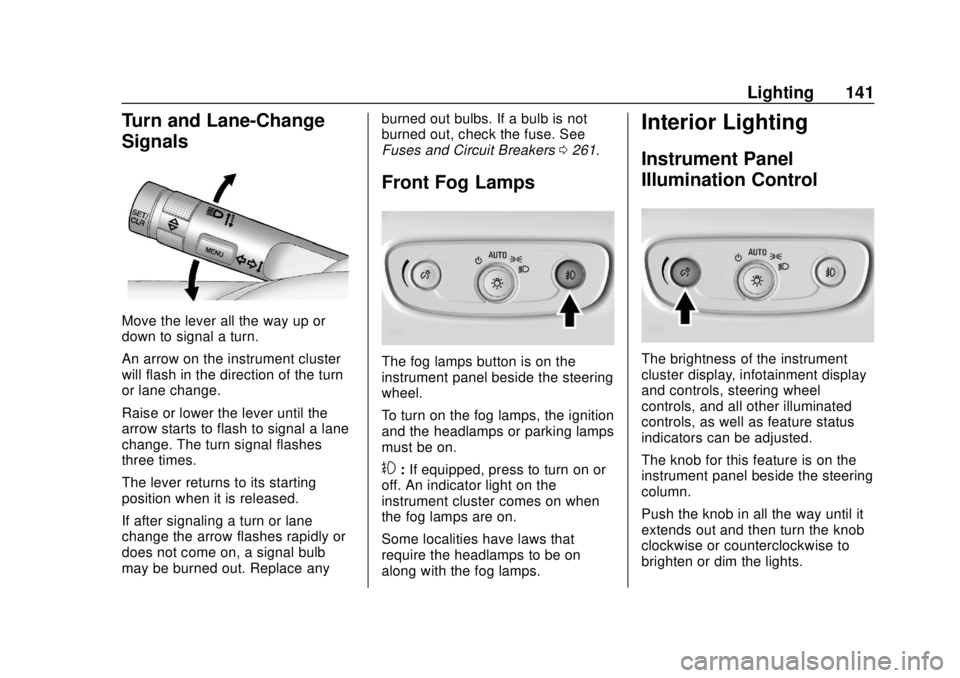
Move the lever all the way up or
down to signal a turn.
An arrow on the instrument cluster
will flash in the direction of the turn
or lane change.
Raise or lower the lever until the
arrow starts to flash to signal a lane
change. The turn signal flashes
three times.
The lever returns to its starting
position when it is released.
If after signaling a turn or lane
change the arrow flashes rapidly or
does not come on, a signal bulb
may be burned out. Replace anyburned out bulbs. If a bulb is not
burned out, check the fuse. See
Fuses and Circuit Breakers
0261.
Front Fog Lamps
The fog lamps button is on the
instrument panel beside the steering
wheel.
To turn on the fog lamps, the ignition
and the headlamps or parking lamps
must be on.
#:If equipped, press to turn on or
off. An indicator light on the
instrument cluster comes on when
the fog lamps are on.
Some localities have laws that
require the headlamps to be on
along with the fog lamps.
Interior Lighting
Instrument Panel
Illumination Control
The brightness of the instrument
cluster display, infotainment display
and controls, steering wheel
controls, and all other illuminated
controls, as well as feature status
indicators can be adjusted.
The knob for this feature is on the
instrument panel beside the steering
column.
Push the knob in all the way until it
extends out and then turn the knob
clockwise or counterclockwise to
brighten or dim the lights.
Page 173 of 366
Chevrolet TRAX Owner Manual (GMNA-Localizing-U.S./Canada/Mexico-
11354406) - 2018 - crc - 10/12/17
172 Climate Controls
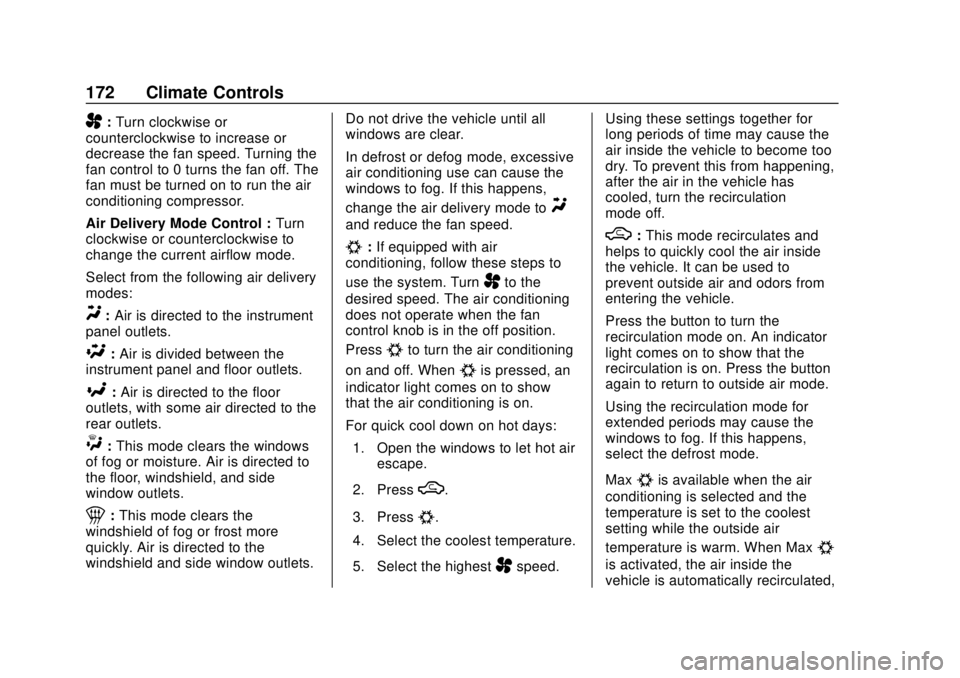
A:Turn clockwise or
counterclockwise to increase or
decrease the fan speed. Turning the
fan control to 0 turns the fan off. The
fan must be turned on to run the air
conditioning compressor.
Air Delivery Mode Control : Turn
clockwise or counterclockwise to
change the current airflow mode.
Select from the following air delivery
modes:
Y: Air is directed to the instrument
panel outlets.
\: Air is divided between the
instrument panel and floor outlets.
[: Air is directed to the floor
outlets, with some air directed to the
rear outlets.
W: This mode clears the windows
of fog or moisture. Air is directed to
the floor, windshield, and side
window outlets.
1: This mode clears the
windshield of fog or frost more
quickly. Air is directed to the
windshield and side window outlets. Do not drive the vehicle until all
windows are clear.
In defrost or defog mode, excessive
air conditioning use can cause the
windows to fog. If this happens,
change the air delivery mode to
Y
and reduce the fan speed.
#:
If equipped with air
conditioning, follow these steps to
use the system. Turn
Ato the
desired speed. The air conditioning
does not operate when the fan
control knob is in the off position.
Press
#to turn the air conditioning
on and off. When
#is pressed, an
indicator light comes on to show
that the air conditioning is on.
For quick cool down on hot days:
1. Open the windows to let hot air escape.
2. Press
M.
3. Press
#.
4. Select the coolest temperature.
5. Select the highest
Aspeed. Using these settings together for
long periods of time may cause the
air inside the vehicle to become too
dry. To prevent this from happening,
after the air in the vehicle has
cooled, turn the recirculation
mode off.
M:
This mode recirculates and
helps to quickly cool the air inside
the vehicle. It can be used to
prevent outside air and odors from
entering the vehicle.
Press the button to turn the
recirculation mode on. An indicator
light comes on to show that the
recirculation is on. Press the button
again to return to outside air mode.
Using the recirculation mode for
extended periods may cause the
windows to fog. If this happens,
select the defrost mode.
Max
#is available when the air
conditioning is selected and the
temperature is set to the coolest
setting while the outside air
temperature is warm. When Max
#
is activated, the air inside the
vehicle is automatically recirculated,
Page 174 of 366
Chevrolet TRAX Owner Manual (GMNA-Localizing-U.S./Canada/Mexico-
11354406) - 2018 - crc - 10/12/17
Climate Controls 173
which helps to quickly cool the
vehicle. The recirculation indicator
will not be lit.
To allow outside air to enter in these
conditions, press the recirculation
button twice. The recirculation
indicator will not be lit.
MorL:If equipped, press to heat
the driver or passenger seat. See
Heated Front Seats 060.
Rear Window and Outside
Mirror Defogger
1:Press to turn the rear window
and outside mirror defogger on or
off. An indicator light comes on to
show that the feature is on.
The rear window defogger turns off
after about 10 minutes. It can also
be turned off by pressing
1again
or by turning the ignition off or to
ACC/ACCESSORY. If turned on
again it runs for about five minutes
before turning off. If equipped with heated outside
mirrors, they turn on with the rear
window defogger and help to clear
fog or frost from the surface of the
mirror. See
Heated Mirrors 049.
Caution
Using a razor blade or sharp
object on the inside rear window
can damage the antenna or
defogger. Repairs would not be
covered by the vehicle warranty.
Do not stick anything to the rear
window.
Air Vents
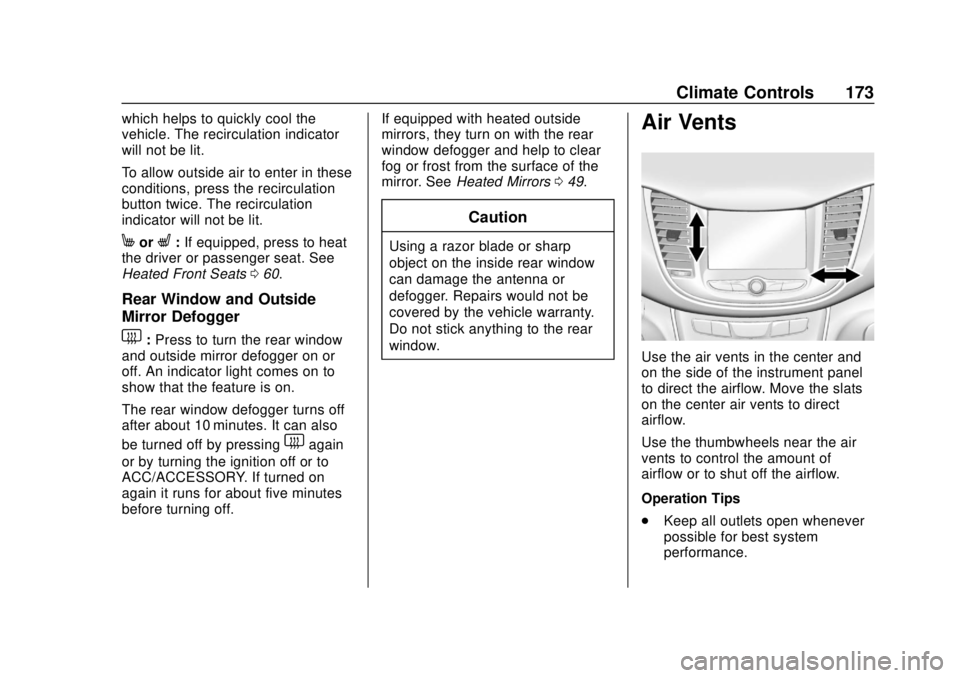
Use the air vents in the center and
on the side of the instrument panel
to direct the airflow. Move the slats
on the center air vents to direct
airflow.
Use the thumbwheels near the air
vents to control the amount of
airflow or to shut off the airflow.
Operation Tips
.
Keep all outlets open whenever
possible for best system
performance.
Page 184 of 366
Chevrolet TRAX Owner Manual (GMNA-Localizing-U.S./Canada/Mexico-
11354406) - 2018 - crc - 10/12/17
Driving and Operating 183
Winter Driving
Driving on Snow or Ice
Snow or ice between the tires and
the road creates less traction or
grip, so drive carefully. Wet ice can
occur at about 0 °C (32 °F) when
freezing rain begins to fall. Avoid
driving on wet ice or in freezing rain
until roads can be treated.
For Slippery Road Driving:
.Accelerate gently. Accelerating
too quickly causes the wheels to
spin and makes the surface
under the tires slick.
. Turn on Traction Control. See
Traction Control/Electronic
Stability Control 0208.
. The Antilock Brake System
(ABS) improves vehicle stability
during hard stops, but the
brakes should be applied sooner
than when on dry pavement.
See Antilock Brake System
(ABS) 0206. .
Allow greater following distance
and watch for slippery spots. Icy
patches can occur on otherwise
clear roads in shaded areas.
The surface of a curve or an
overpass can remain icy when
the surrounding roads are clear.
Avoid sudden steering
maneuvers and braking while
on ice.
. Turn off cruise control.
Blizzard Conditions
Stop the vehicle in a safe place and
signal for help. Stay with the vehicle
unless there is help nearby.
If possible, use Roadside
Assistance. See Roadside
Assistance Program 0331. To get
help and keep everyone in the
vehicle safe:
. Turn on the hazard warning
flashers.
. Tie a red cloth to an outside
mirror.
{Warning
Snow can trap engine exhaust
under the vehicle. This may
cause exhaust gases to get
inside. Engine exhaust contains
carbon monoxide (CO), which
cannot be seen or smelled. It can
cause unconsciousness and even
death.
If the vehicle is stuck in snow:
. Clear snow from the base of
the vehicle, especially any
blocking the exhaust pipe.
. Open a window about 5 cm
(2 in) on the vehicle side
that is away from the wind,
to bring in fresh air.
. Fully open the air outlets on
or under the instrument
panel.
. Adjust the climate control
system to circulate the air
inside the vehicle and set
(Continued)
Page 227 of 366
Chevrolet TRAX Owner Manual (GMNA-Localizing-U.S./Canada/Mexico-
11354406) - 2018 - crc - 10/12/17
226 Vehicle Care
Vehicle Care
General Information
General Information . . . . . . . . . . 227
California Proposition65 Warning . . . . . . . . . . . . . . . . . 227
California Perchlorate Materials Requirements . . . . . 228
Accessories and Modifications . . . . . . . . . . . . . . . . 228
Vehicle Checks
Doing Your OwnService Work . . . . . . . . . . . . . . . 228
Hood . . . . . . . . . . . . . . . . . . . . . . . . . 229
Engine Compartment Overview . . . . . . . . . . . . . . . . . . . . 231
Engine Oil . . . . . . . . . . . . . . . . . . . . 234
Engine Oil Life System . . . . . . . 236
Automatic Transmission Fluid . . . . . . . . . . . . . . . . . . . . . . . . 238
Manual Transmission Fluid . . . 238
Hydraulic Clutch . . . . . . . . . . . . . . 238
Engine Air Cleaner/Filter . . . . . . 238
Cooling System . . . . . . . . . . . . . . 240
Engine Overheating . . . . . . . . . . 244
Power Steering Fluid (1.4L L4 Engine) . . . . . . . . . . . . . . . . . . . . . 245 Power Steering Fluid (1.8L L4
Engine) . . . . . . . . . . . . . . . . . . . . . 245
Washer Fluid . . . . . . . . . . . . . . . . . 246
Brakes . . . . . . . . . . . . . . . . . . . . . . . 247
Brake Fluid . . . . . . . . . . . . . . . . . . . 247
Battery - North America . . . . . . 249
All-Wheel Drive . . . . . . . . . . . . . . . 249
Starter Switch Check . . . . . . . . . 250
Automatic Transmission Shift Lock Control Function
Check . . . . . . . . . . . . . . . . . . . . . . . 250
Ignition Transmission Lock Check . . . . . . . . . . . . . . . . . . . . . . . 250
Park Brake and P (Park) Mechanism Check . . . . . . . . . . 251
Wiper Blade Replacement . . . . 251
Windshield Replacement . . . . . 252
Gas Strut(s) . . . . . . . . . . . . . . . . . . 253
Headlamp Aiming
Headlamp Aiming . . . . . . . . . . . . 254
Bulb Replacement
Bulb Replacement . . . . . . . . . . . . 254
Halogen Bulbs . . . . . . . . . . . . . . . . 254
LED Lighting . . . . . . . . . . . . . . . . . 254
Headlamps, Front Turn Signal and Parking Lamps . . . . . . . . . 255
Taillamps, Turn Signal,
Sidemarker, Stoplamps, and
Back-Up Lamps . . . . . . . . . . . . . 257 License Plate Lamp . . . . . . . . . . 260
Electrical System
Electrical System Overload . . . 260
Fuses and Circuit Breakers . . . 261
Engine Compartment Fuse
Block . . . . . . . . . . . . . . . . . . . . . . . . 261
Instrument Panel Fuse Block . . . . . . . . . . . . . . . . . . . . . . . . 265
Rear Compartment Fuse Block . . . . . . . . . . . . . . . . . . . . . . . . 267
Wheels and Tires
Tires . . . . . . . . . . . . . . . . . . . . . . . . . . 268
All-Season Tires . . . . . . . . . . . . . . 269
Winter Tires . . . . . . . . . . . . . . . . . . 269
Tire Sidewall Labeling . . . . . . . . 270
Tire Designations . . . . . . . . . . . . . 272
Tire Terminology andDefinitions . . . . . . . . . . . . . . . . . . 272
Tire Pressure . . . . . . . . . . . . . . . . . 275
Tire Pressure Monitor System . . . . . . . . . . . . . . . . . . . . . . 276
Tire Pressure Monitor Operation . . . . . . . . . . . . . . . . . . . 277
Tire Inspection . . . . . . . . . . . . . . . . 280
Tire Rotation . . . . . . . . . . . . . . . . . 281
When It Is Time for New Tires . . . . . . . . . . . . . . . . . . . . . . . . 282
Buying New Tires . . . . . . . . . . . . . 282
Page 230 of 366
Chevrolet TRAX Owner Manual (GMNA-Localizing-U.S./Canada/Mexico-
11354406) - 2018 - crc - 10/12/17
Vehicle Care 229
Keep a record with all parts receipts
and list the mileage and the date of
any service work performed. See
Maintenance Records0323.
Caution
Even small amounts of
contamination can cause damage
to vehicle systems. Do not allow
contaminants to contact the fluids,
reservoir caps, or dipsticks.
Hood
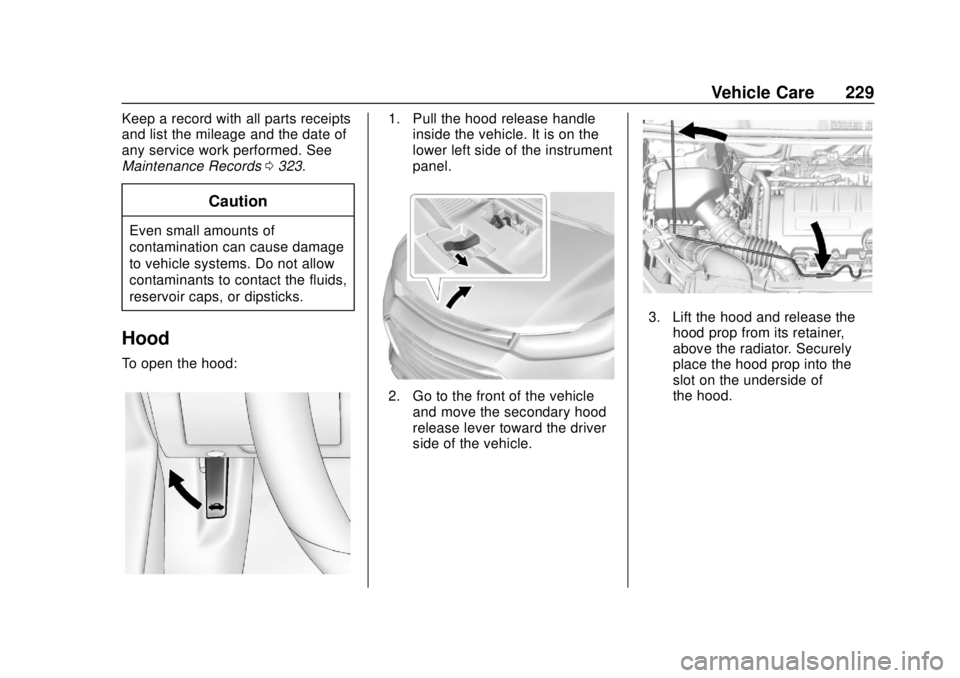
To open the hood:
1. Pull the hood release handle
inside the vehicle. It is on the
lower left side of the instrument
panel.
2. Go to the front of the vehicle
and move the secondary hood
release lever toward the driver
side of the vehicle.
3. Lift the hood and release thehood prop from its retainer,
above the radiator. Securely
place the hood prop into the
slot on the underside of
the hood.
Page 266 of 366
Chevrolet TRAX Owner Manual (GMNA-Localizing-U.S./Canada/Mexico-
11354406) - 2018 - crc - 10/12/17
Vehicle Care 265
Instrument Panel Fuse
Block
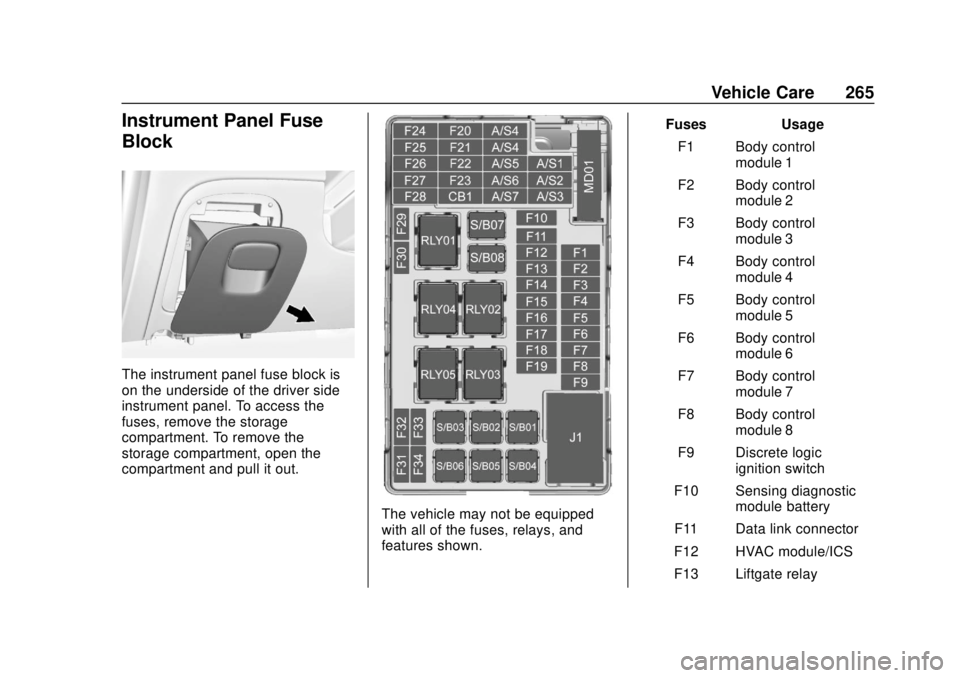
The instrument panel fuse block is
on the underside of the driver side
instrument panel. To access the
fuses, remove the storage
compartment. To remove the
storage compartment, open the
compartment and pull it out.
The vehicle may not be equipped
with all of the fuses, relays, and
features shown.Fuses Usage
F1 Body control module 1
F2 Body control module 2
F3 Body control module 3
F4 Body control module 4
F5 Body control module 5
F6 Body control module 6
F7 Body control module 7
F8 Body control module 8
F9 Discrete logic ignition switch
F10 Sensing diagnostic module battery
F11 Data link connector
F12 HVAC module/ICS
F13 Liftgate relay
Page 308 of 366
Chevrolet TRAX Owner Manual (GMNA-Localizing-U.S./Canada/Mexico-
11354406) - 2018 - crc - 10/12/17
Vehicle Care 307
2. Remove excess moisture bygently wringing until water does
not drip from the cleaning cloth.
3. Start on the outside edge of the soil and gently rub toward the
center. Fold the cleaning cloth
to a clean area frequently to
prevent forcing the soil in to the
fabric.
4. Continue gently rubbing the soiled area until there is no
longer any color transfer from
the soil to the cleaning cloth.
5. If the soil is not completely removed, use a mild soap
solution followed only by plain
water.
If the soil is not completely
removed, it may be necessary to
use a commercial upholstery
cleaner or spot lifter. Test a small
hidden area for colorfastness before
using a commercial upholstery
cleaner or spot lifter. If ring
formation occurs, clean the entire
fabric or carpet.
After cleaning, use a paper towel to
blot excess moisture.Cleaning High Gloss Surfaces
and Vehicle Information and
Radio Displays
Use a microfiber cloth on high gloss
surfaces or vehicle displays. First,
use a soft bristle brush to remove
dirt that can scratch the surface.
Then gently clean by rubbing with a
microfiber cloth. Never use window
cleaners or solvents. Periodically
hand wash the microfiber cloth
separately, using mild soap. Do not
use bleach or fabric softener. Rinse
thoroughly and air dry before
next use.
Caution
Do not attach a device with a
suction cup to the display. This
may cause damage and would
not be covered by the vehicle
warranty.
Instrument Panel, Leather,
Vinyl, Other Plastic Surfaces,
Low Gloss Paint Surfaces, and
Natural Open Pore Wood
Surfaces
Use a soft microfiber cloth
dampened with water to remove
dust and loose dirt. For a more
thorough cleaning, use a soft
microfiber cloth dampened with a
mild soap solution.
Caution
Soaking or saturating leather,
especially perforated leather, as
well as other interior surfaces,
may cause permanent damage.
Wipe excess moisture from these
surfaces after cleaning and allow
them to dry naturally. Never use
heat, steam, or spot removers. Do
not use cleaners that contain
silicone or wax-based products.
Cleaners containing these
solvents can permanently change (Continued)
Page 309 of 366
Chevrolet TRAX Owner Manual (GMNA-Localizing-U.S./Canada/Mexico-
11354406) - 2018 - crc - 10/12/17
308 Vehicle Care
Caution (Continued)
the appearance and feel of
leather or soft trim, and are not
recommended.
Do not use cleaners that increase
gloss, especially on the instrument
panel. Reflected glare can decrease
visibility through the windshield
under certain conditions.
Caution
Use of air fresheners may cause
permanent damage to plastics
and painted surfaces. If an air
freshener comes in contact with
any plastic or painted surface in
the vehicle, blot immediately and
clean with a soft cloth dampened
with a mild soap solution.
Damage caused by air fresheners
would not be covered by the
vehicle warranty.
Cargo Cover and
Convenience Net
If equipped, wash with warm water
and mild detergent. Do not use
chlorine bleach. Rinse with cold
water, and then dry completely.
Care of Seat Belts
Keep belts clean and dry.
{Warning
Do not bleach or dye seat belt
webbing. It may severely weaken
the webbing. In a crash, they
might not be able to provide
adequate protection. Clean and
rinse seat belt webbing only with
mild soap and lukewarm water.
Allow the webbing to dry.
Floor Mats
{Warning
If a floor mat is the wrong size or
is not properly installed, it can
interfere with the pedals.
Interference with the pedals can
cause unintended acceleration
and/or increased stopping
distance which can cause a crash
and injury. Make sure the floor
mat does not interfere with the
pedals.
Use the following guidelines for
proper floor mat usage.
. The original equipment floor
mats were designed for your
vehicle. If the floor mats need
replacing, it is recommended
that GM certified floor mats be
purchased. Non-GM floor mats
may not fit properly and may
interfere with the accelerator or
brake pedal. Always check that
the floor mats do not interfere
with the pedals.
Page 325 of 366

Chevrolet TRAX Owner Manual (GMNA-Localizing-U.S./Canada/Mexico-
11354406) - 2018 - crc - 10/12/17
324 Technical Data
Technical Data
Vehicle Identification
Vehicle IdentificationNumber (VIN) . . . . . . . . . . . . . . . 324
Service Parts Identification Label . . . . . . . . . . . . . . . . . . . . . . . . 324
Vehicle Data
Capacities andSpecifications . . . . . . . . . . . . . . . 325
Engine Drive Belt Routing . . . . 326
Vehicle Identification
Vehicle Identification
Number (VIN)
This legal identifier is in the front
corner of the instrument panel, on
the driver side of the vehicle. It can
be seen through the windshield from
outside. The Vehicle Identification
Number (VIN) also appears on the
Vehicle Certification and Service
Parts labels and certificates of title
and registration.
Engine Identification
The eighth character in the VIN is
the engine code. This code
identifies the vehicle's engine,
specifications, and replacement parts. See
“Engine Specifications”
under Capacities and Specifications
0 325 for the vehicle's engine code.
Service Parts
Identification Label
There may be a label on the inside
the rear compartment area, that
contains the following information:
.
Vehicle Identification
Number (VIN).
. Model designation.
. Paint information.
. Production options and special
equipment.
If there is no label, there is a
barcode on the certification label on
the center (B) pillar to scan for this
same information.