crash CHEVROLET TRAX 2018 Owner's Manual
[x] Cancel search | Manufacturer: CHEVROLET, Model Year: 2018, Model line: TRAX, Model: CHEVROLET TRAX 2018Pages: 366, PDF Size: 5.44 MB
Page 20 of 366
Chevrolet TRAX Owner Manual (GMNA-Localizing-U.S./Canada/Mexico-
11354406) - 2018 - crc - 10/12/17
In Brief 19
Vehicle Features
Infotainment System
Read the following pages to
become familiar with the features.
{Warning
Taking your eyes off the road for
too long or too often while using
any infotainment feature can
cause a crash. You or others
could be injured or killed. Do not
give extended attention to
infotainment tasks while driving.
Limit your glances at the vehicle
displays and focus your attention
on driving. Use voice commands
whenever possible.
The infotainment system has built-in
features intended to help avoid
distraction by disabling some
functions when driving. These
functions may gray out when they
are unavailable. Many infotainment features are also available through
the instrument cluster and steering
wheel controls.
Before driving:
.
Become familiar with the
operation, center stack controls,
and infotainment display
controls.
. Set up the audio by presetting
favorite stations, setting the
tone, and adjusting the
speakers.
. Set up phone numbers in
advance so they can be called
easily by pressing a single
button or by using a single voice
command if equipped with
Bluetooth phone capability.
See Defensive Driving 0178.
To play the infotainment system with
the ignition off, see Retained
Accessory Power (RAP) 0195.
Radio(s)
O
:Press to turn the system on.
Press and hold to turn the system
off. Turn to increase or decrease the
volume.
g: Press and release to go to the
previous station, channel, or track.
Press and hold to fast seek the
previous strongest station.
d: Press and release to go to the
next station, channel, or track.
Press and hold to fast seek the next
strongest station.
Source : Touch to choose between
available sources.
Menu : Touch to choose between
available menus.
SorT: Touch to view saved
favorite stations or channels.
See Overview 0146.
Satellite Radio
If equipped, a SiriusXM satellite
radio tuner and a valid SiriusXM
satellite radio subscription can
receive SiriusXM programming.
Page 23 of 366
Chevrolet TRAX Owner Manual (GMNA-Localizing-U.S./Canada/Mexico-
11354406) - 2018 - crc - 10/12/17
22 In Brief
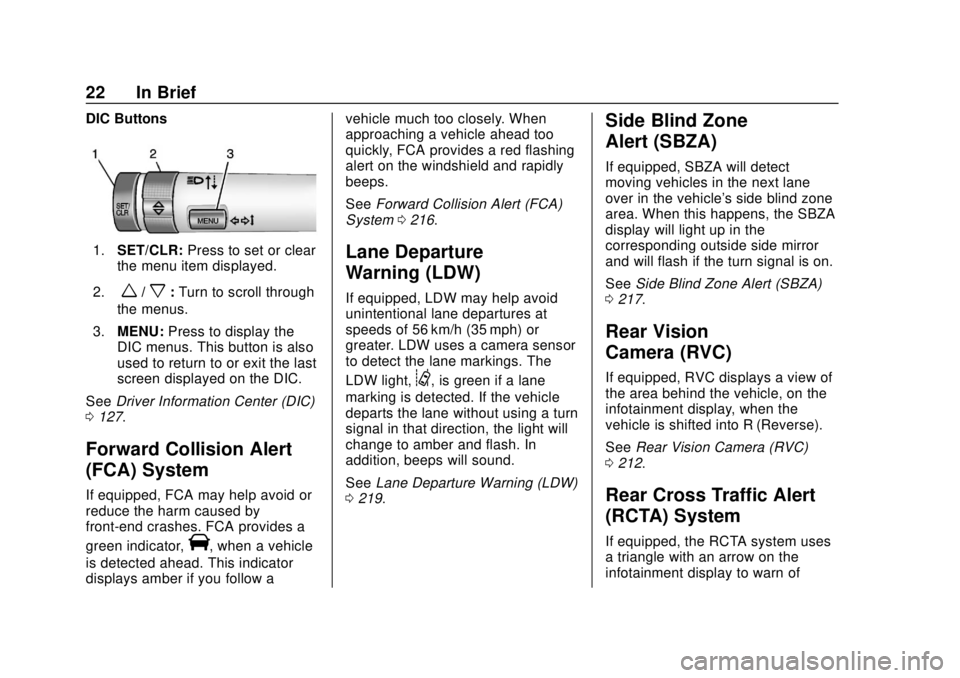
DIC Buttons
1.SET/CLR: Press to set or clear
the menu item displayed.
2.
w/x: Turn to scroll through
the menus.
3. MENU: Press to display the
DIC menus. This button is also
used to return to or exit the last
screen displayed on the DIC.
See Driver Information Center (DIC)
0 127.
Forward Collision Alert
(FCA) System
If equipped, FCA may help avoid or
reduce the harm caused by
front-end crashes. FCA provides a
green indicator,
V, when a vehicle
is detected ahead. This indicator
displays amber if you follow a vehicle much too closely. When
approaching a vehicle ahead too
quickly, FCA provides a red flashing
alert on the windshield and rapidly
beeps.
See
Forward Collision Alert (FCA)
System 0216.
Lane Departure
Warning (LDW)
If equipped, LDW may help avoid
unintentional lane departures at
speeds of 56 km/h (35 mph) or
greater. LDW uses a camera sensor
to detect the lane markings. The
LDW light,
@, is green if a lane
marking is detected. If the vehicle
departs the lane without using a turn
signal in that direction, the light will
change to amber and flash. In
addition, beeps will sound.
See Lane Departure Warning (LDW)
0 219.
Side Blind Zone
Alert (SBZA)
If equipped, SBZA will detect
moving vehicles in the next lane
over in the vehicle's side blind zone
area. When this happens, the SBZA
display will light up in the
corresponding outside side mirror
and will flash if the turn signal is on.
See Side Blind Zone Alert (SBZA)
0 217.
Rear Vision
Camera (RVC)
If equipped, RVC displays a view of
the area behind the vehicle, on the
infotainment display, when the
vehicle is shifted into R (Reverse).
See Rear Vision Camera (RVC)
0 212.
Rear Cross Traffic Alert
(RCTA) System
If equipped, the RCTA system uses
a triangle with an arrow on the
infotainment display to warn of
Page 42 of 366
Chevrolet TRAX Owner Manual (GMNA-Localizing-U.S./Canada/Mexico-
11354406) - 2018 - crc - 10/12/17
Keys, Doors, and Windows 41
.The malfunction indicator lamp
is on.
. The engine coolant temperature
is too high.
. The oil pressure is low.
. Two remote vehicle starts, or a
single remote start with an
extension, have already
been used.
. The vehicle is not in P (Park).
Door Locks
{Warning
Unlocked doors can be
dangerous.
. Passengers, especially
children, can easily open
the doors and fall out of a
moving vehicle. The doors
can be unlocked and
opened while the vehicle is
moving. The chance of
being thrown out of the
vehicle in a crash is
(Continued)
Warning (Continued)
increased if the doors are
not locked. So, all
passengers should wear
seat belts properly and the
doors should be locked
whenever the vehicle is
driven.
. Young children who get into
unlocked vehicles may be
unable to get out. A child
can be overcome by
extreme heat and can suffer
permanent injuries or even
death from heat stroke.
Always lock the vehicle
whenever leaving it.
. Outsiders can easily enter
through an unlocked door
when you slow down or stop
the vehicle. Locking the
doors can help prevent this
from happening. To lock or unlock the doors from the
outside:
.
PressKorQon the Remote
Keyless Entry (RKE) transmitter.
See Remote Keyless Entry
(RKE) System Operation (Key
Access) 031 orRemote Keyless
Entry (RKE) System Operation
(Keyless Access) 034.
. Use the key in the driver door.
See Power Door Locks 042.
To lock or unlock the doors from the
inside:
. Press
KorQon the power door
lock switch.
. Pulling an interior door handle
will unlock the door. Pulling the
door handle again unlatches it.
Keyless Access
The RKE transmitter must be within
1 m (3 ft) of the liftgate or door being
opened.
Page 56 of 366
Chevrolet TRAX Owner Manual (GMNA-Localizing-U.S./Canada/Mexico-
11354406) - 2018 - crc - 10/12/17
Seats and Restraints 55
Seats and
Restraints
Head Restraints
Head Restraints . . . . . . . . . . . . . . . 56
Front Seats
Seat Adjustment . . . . . . . . . . . . . . . 57
Power Seat Adjustment . . . . . . . . 58
Lumbar Adjustment . . . . . . . . . . . . 58
Reclining Seatbacks . . . . . . . . . . . 59
Front Seat Armrest . . . . . . . . . . . . 60
Heated Front Seats . . . . . . . . . . . . 60
Folding Seatback . . . . . . . . . . . . . . 61
Rear Seats
Rear Seats . . . . . . . . . . . . . . . . . . . . 62
Rear Seat Armrest . . . . . . . . . . . . . 65
Seat Belts
Seat Belts . . . . . . . . . . . . . . . . . . . . . 65
How to Wear Seat BeltsProperly . . . . . . . . . . . . . . . . . . . . . . 66
Lap-Shoulder Belt . . . . . . . . . . . . . 67
Seat Belt Use During Pregnancy . . . . . . . . . . . . . . . . . . . . 70
Seat Belt Extender . . . . . . . . . . . . . 70
Safety System Check . . . . . . . . . . 71
Seat Belt Care . . . . . . . . . . . . . . . . . 71 Replacing Seat Belt System
Parts after a Crash . . . . . . . . . . . 71
Airbag System
Airbag System . . . . . . . . . . . . . . . . . 72
Where Are the Airbags? . . . . . . . 74
When Should an AirbagInflate? . . . . . . . . . . . . . . . . . . . . . . . 75
What Makes an Airbag Inflate? . . . . . . . . . . . . . . . . . . . . . . . 76
How Does an Airbag Restrain? . . . . . . . . . . . . . . . . . . . . . 76
What Will You See after an Airbag Inflates? . . . . . . . . . . . . . . 77
Passenger Sensing System . . . 78
Servicing the Airbag-Equipped Vehicle . . . . . . . . . . . . . . . . . . . . . . . 82
Adding Equipment to the Airbag-Equipped Vehicle . . . . . 82
Airbag System Check . . . . . . . . . . 83
Replacing Airbag System Parts after a Crash . . . . . . . . . . . . . . . . . 83
Child Restraints
Older Children . . . . . . . . . . . . . . . . . 84
Infants and Young Children . . . . 85
Child Restraint Systems . . . . . . . 88
Where to Put the Restraint . . . . . 89
Lower Anchors and Tethers forChildren (LATCH System) . . . . 90 Replacing LATCH System Parts
After a Crash . . . . . . . . . . . . . . . . . 97
Securing Child Restraints (With the Seat Belt in the
Rear Seat) . . . . . . . . . . . . . . . . . . . 98
Securing Child Restraints (With the Seat Belt in the
Front Seat) . . . . . . . . . . . . . . . . . . 100
Page 57 of 366
Chevrolet TRAX Owner Manual (GMNA-Localizing-U.S./Canada/Mexico-
11354406) - 2018 - crc - 10/12/17
56 Seats and Restraints
Head Restraints
{Warning
With head restraints that are not
installed and adjusted properly,
there is a greater chance that
occupants will suffer a neck/
spinal injury in a crash. Do not
drive until the head restraints for
all occupants are installed and
adjusted properly.
Front Seats
The front seats have adjustable
head restraints in the outboard
seating positions.
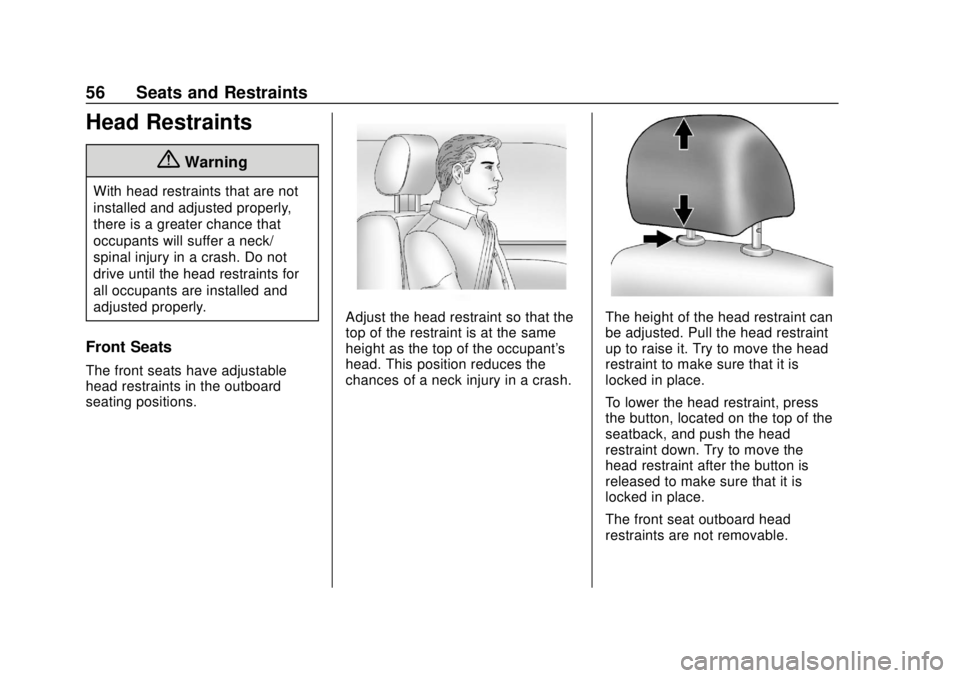
Adjust the head restraint so that the
top of the restraint is at the same
height as the top of the occupant's
head. This position reduces the
chances of a neck injury in a crash.The height of the head restraint can
be adjusted. Pull the head restraint
up to raise it. Try to move the head
restraint to make sure that it is
locked in place.
To lower the head restraint, press
the button, located on the top of the
seatback, and push the head
restraint down. Try to move the
head restraint after the button is
released to make sure that it is
locked in place.
The front seat outboard head
restraints are not removable.
Page 60 of 366
Chevrolet TRAX Owner Manual (GMNA-Localizing-U.S./Canada/Mexico-
11354406) - 2018 - crc - 10/12/17
Seats and Restraints 59
Reclining Seatbacks
{Warning
If either seatback is not locked, it
could move forward in a sudden
stop or crash. That could cause
injury to the person sitting there.
Always push and pull on the
seatbacks to be sure they are
locked.
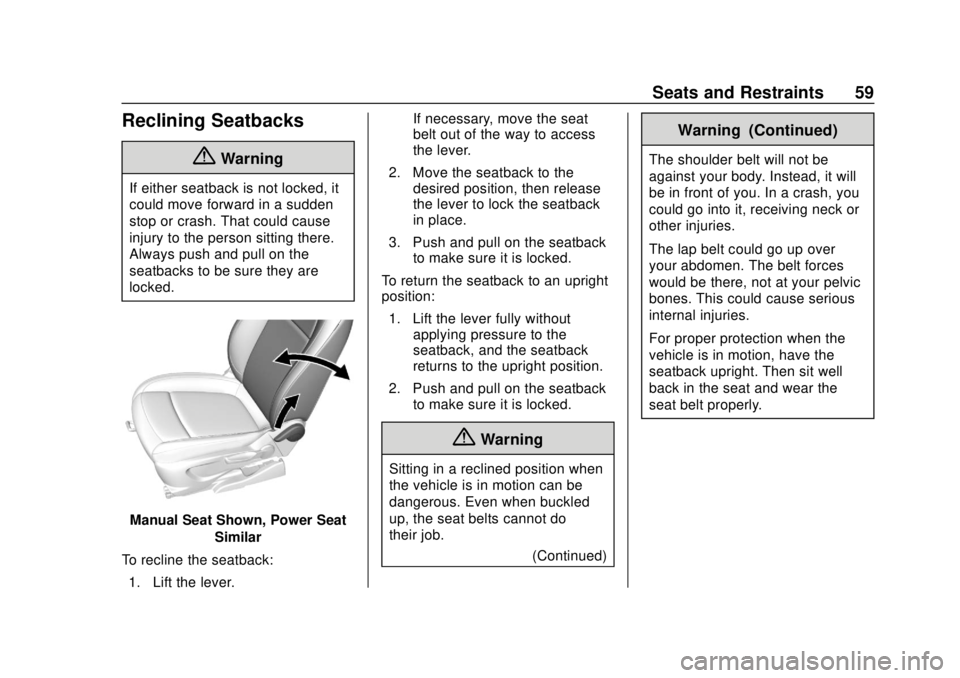
Manual Seat Shown, Power SeatSimilar
To recline the seatback: 1. Lift the lever. If necessary, move the seat
belt out of the way to access
the lever.
2. Move the seatback to the desired position, then release
the lever to lock the seatback
in place.
3. Push and pull on the seatback to make sure it is locked.
To return the seatback to an upright
position: 1. Lift the lever fully without applying pressure to the
seatback, and the seatback
returns to the upright position.
2. Push and pull on the seatback to make sure it is locked.
{Warning
Sitting in a reclined position when
the vehicle is in motion can be
dangerous. Even when buckled
up, the seat belts cannot do
their job.
(Continued)
Warning (Continued)
The shoulder belt will not be
against your body. Instead, it will
be in front of you. In a crash, you
could go into it, receiving neck or
other injuries.
The lap belt could go up over
your abdomen. The belt forces
would be there, not at your pelvic
bones. This could cause serious
internal injuries.
For proper protection when the
vehicle is in motion, have the
seatback upright. Then sit well
back in the seat and wear the
seat belt properly.
Page 62 of 366
Chevrolet TRAX Owner Manual (GMNA-Localizing-U.S./Canada/Mexico-
11354406) - 2018 - crc - 10/12/17
Seats and Restraints 61
when the ignition is turned on. Press
the control to use the heated seats
after the vehicle is started.
The heated seat indicator lights do
not turn on during a remote start.
The temperature performance of an
unoccupied seat may be reduced.
This is normal.
The heated seats will not turn on
during a remote start unless the
heated seat feature is enabled in
the vehicle personalization menu.
SeeRemote Vehicle Start 039 and
Vehicle Personalization 0134.
Folding Seatback
The front passenger seatback may
fold flat.
{Warning
If you fold the seatback forward to
carry longer objects, such as skis,
be sure any such cargo is not
near an airbag. In a crash, an
inflating airbag might force that
(Continued)
Warning (Continued)
object toward a person. This
could cause severe injury or even
death. Secure objects away from
the area in which an airbag would
inflate. For more information, see
Where Are the Airbags? 074 and
Vehicle Load Limits 0184.
{Warning
Things you put on this seatback
can strike and injure people in a
sudden stop or turn, or in a crash.
Remove or secure all items
before driving.
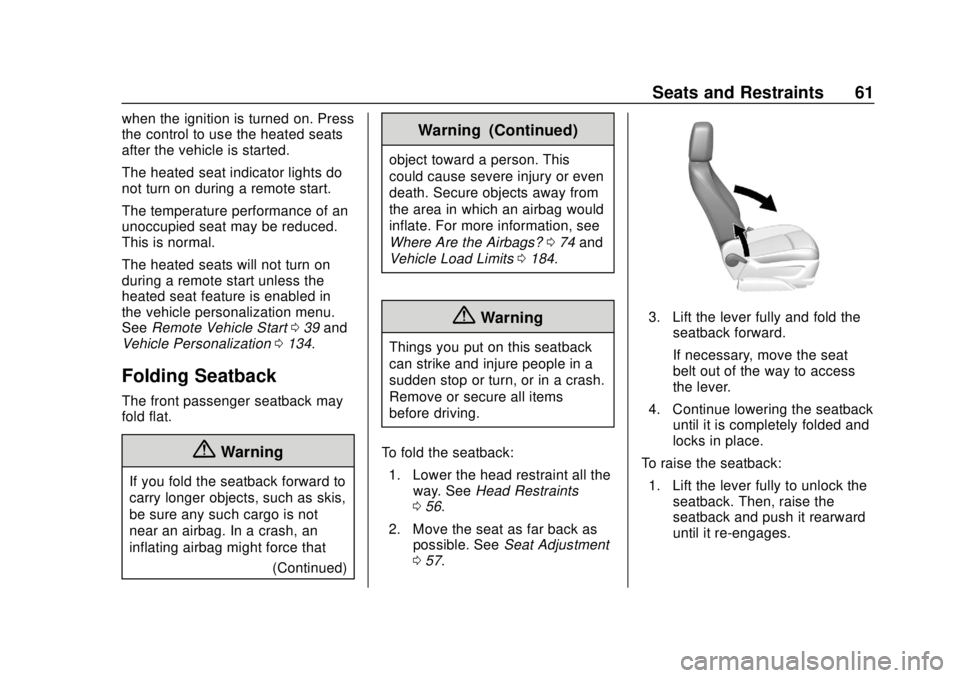
To fold the seatback: 1. Lower the head restraint all the way. See Head Restraints
0 56.
2. Move the seat as far back as possible. See Seat Adjustment
0 57.
3. Lift the lever fully and fold the
seatback forward.
If necessary, move the seat
belt out of the way to access
the lever.
4. Continue lowering the seatback until it is completely folded and
locks in place.
To raise the seatback: 1. Lift the lever fully to unlock the seatback. Then, raise the
seatback and push it rearward
until it re-engages.
Page 63 of 366
Chevrolet TRAX Owner Manual (GMNA-Localizing-U.S./Canada/Mexico-
11354406) - 2018 - crc - 10/12/17
62 Seats and Restraints
2. Push and pull on the seatbackto make sure it is locked in
place.
{Warning
If either seatback is not locked, it
could move forward in a sudden
stop or crash. That could cause
injury to the person sitting there.
Always push and pull on the
seatbacks to be sure they are
locked.
Rear Seats
Folding the Seatback
Either side of the seatback can be
folded down for more cargo space.
Fold a seatback only when the
vehicle is not moving.
Caution
Folding a rear seat with the seat
belts still fastened may cause
damage to the seat or the seat
belts. Always unbuckle the seat
belts and return them to their
normal stowed position before
folding a rear seat.
Caution
Folding the rear seatback prior to
tilting the seat cushion forward
may damage the rear seat.
Always tilt the rear seat cushion
forward before folding the
seatback. To fold a seatback down:
1. Make sure the floor area in front of the rear seats is clear.
2. Fully lower the head restraint. See Head Restraints 056.
3. Slide the front seats forward and place the front seatbacks
in the upright position.
See Seat Adjustment 057 and
Reclining Seatbacks 059.
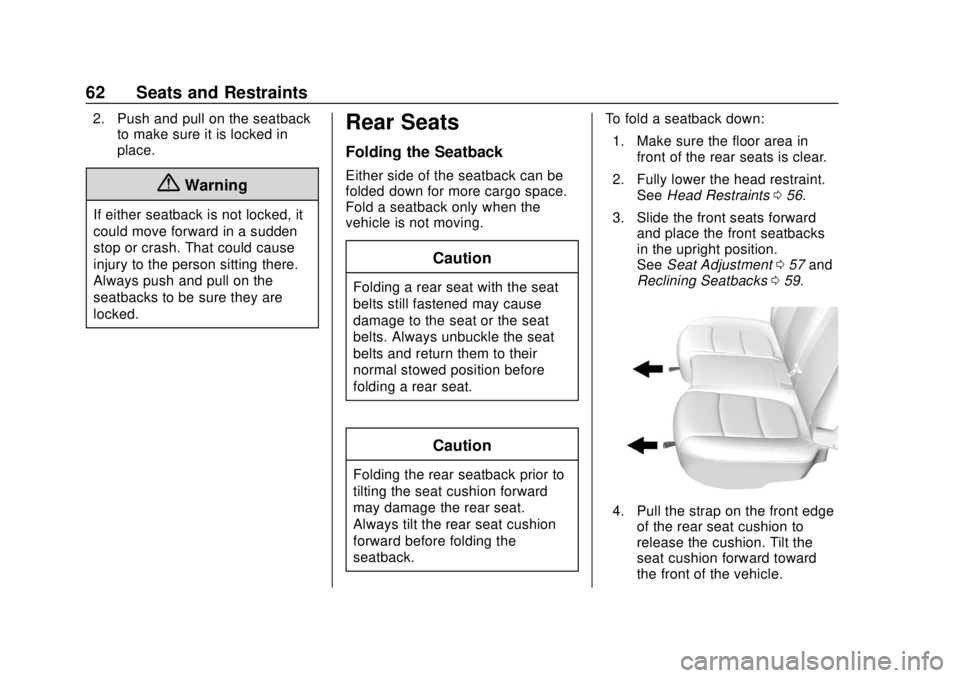
4. Pull the strap on the front edge
of the rear seat cushion to
release the cushion. Tilt the
seat cushion forward toward
the front of the vehicle.
Page 65 of 366
Chevrolet TRAX Owner Manual (GMNA-Localizing-U.S./Canada/Mexico-
11354406) - 2018 - crc - 10/12/17
64 Seats and Restraints
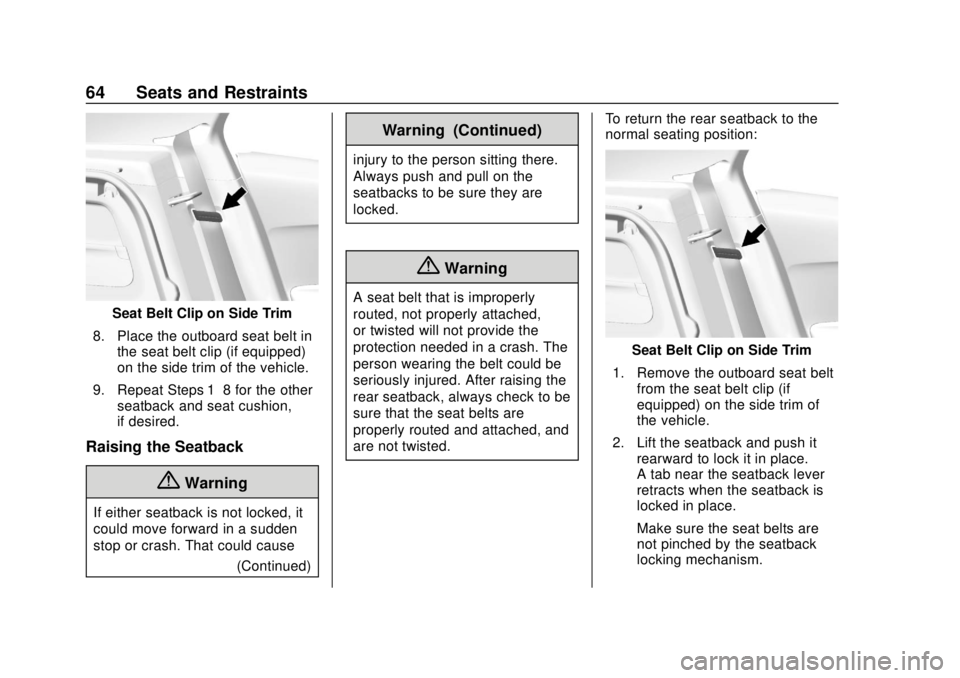
Seat Belt Clip on Side Trim
8. Place the outboard seat belt in the seat belt clip (if equipped)
on the side trim of the vehicle.
9. Repeat Steps 1–8 for the other seatback and seat cushion,
if desired.
Raising the Seatback
{Warning
If either seatback is not locked, it
could move forward in a sudden
stop or crash. That could cause
(Continued)
Warning (Continued)
injury to the person sitting there.
Always push and pull on the
seatbacks to be sure they are
locked.
{Warning
A seat belt that is improperly
routed, not properly attached,
or twisted will not provide the
protection needed in a crash. The
person wearing the belt could be
seriously injured. After raising the
rear seatback, always check to be
sure that the seat belts are
properly routed and attached, and
are not twisted. To return the rear seatback to the
normal seating position:
Seat Belt Clip on Side Trim
1. Remove the outboard seat belt from the seat belt clip (if
equipped) on the side trim of
the vehicle.
2. Lift the seatback and push it rearward to lock it in place.
A tab near the seatback lever
retracts when the seatback is
locked in place.
Make sure the seat belts are
not pinched by the seatback
locking mechanism.
Page 66 of 366
Chevrolet TRAX Owner Manual (GMNA-Localizing-U.S./Canada/Mexico-
11354406) - 2018 - crc - 10/12/17
Seats and Restraints 65
The center rear seat belt may
lock when you raise the
seatback. If this happens, let
the belt go back all the way
and start again. If the seat belt
is still locked, try again after
pulling the seat cushion out.
3. Push and pull the top of the seatback to be sure it is locked
into position.
4. Return the seat cushion to its original position and push
down on the front part of the
seat cushion until it latches.
Make sure the seat belts and
seat belt buckles are not
trapped under the seat cushion
and are properly positioned
for use.
5. Repeat Steps 1–4 for the other seatback and seat cushion,
if necessary.
If additional cargo space is not
needed, the seatbacks should be
kept in the upright, locked position.Rear Seat Armrest
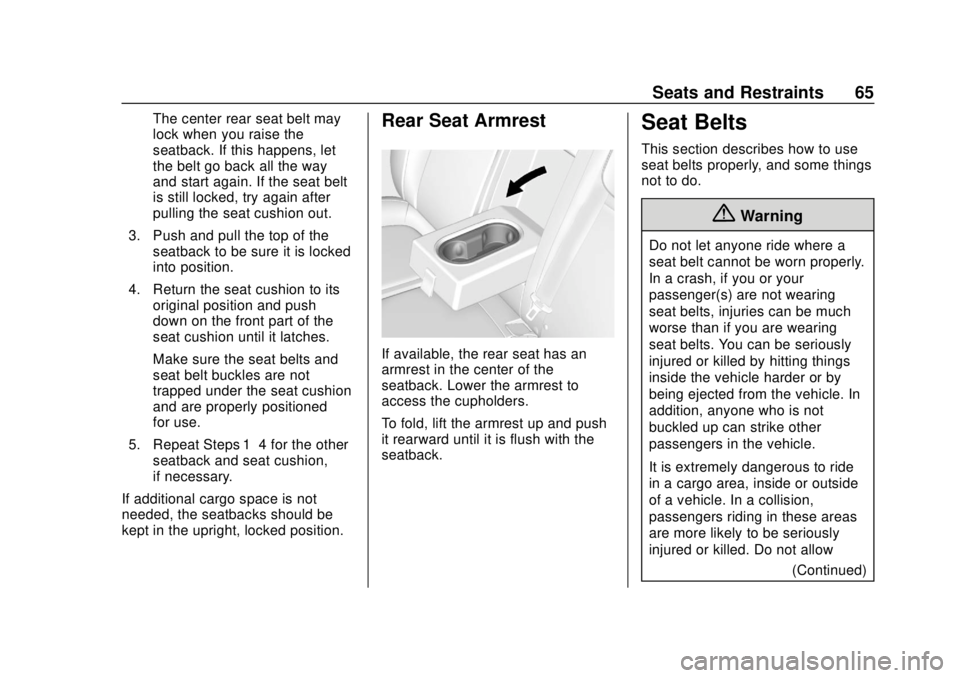
If available, the rear seat has an
armrest in the center of the
seatback. Lower the armrest to
access the cupholders.
To fold, lift the armrest up and push
it rearward until it is flush with the
seatback.
Seat Belts
This section describes how to use
seat belts properly, and some things
not to do.
{Warning
Do not let anyone ride where a
seat belt cannot be worn properly.
In a crash, if you or your
passenger(s) are not wearing
seat belts, injuries can be much
worse than if you are wearing
seat belts. You can be seriously
injured or killed by hitting things
inside the vehicle harder or by
being ejected from the vehicle. In
addition, anyone who is not
buckled up can strike other
passengers in the vehicle.
It is extremely dangerous to ride
in a cargo area, inside or outside
of a vehicle. In a collision,
passengers riding in these areas
are more likely to be seriously
injured or killed. Do not allow (Continued)