jack CHEVROLET TRAX 2020 Owners Manual
[x] Cancel search | Manufacturer: CHEVROLET, Model Year: 2020, Model line: TRAX, Model: CHEVROLET TRAX 2020Pages: 355, PDF Size: 5.75 MB
Page 130 of 355
Chevrolet TRAX Owner Manual (GMNA-Localizing-U.S./Canada/Mexico-
13556235) - 2020 - CRC - 9/19/19
Infotainment System 129
Infotainment
System
Introduction
Introduction . . . . . . . . . . . . . . . . . . . 129
Overview . . . . . . . . . . . . . . . . . . . . . 130
Using the System . . . . . . . . . . . . 132
Radio
AM-FM Radio . . . . . . . . . . . . . . . . 134
Satellite Radio . . . . . . . . . . . . . . . . 136
Radio Reception . . . . . . . . . . . . . . 136
Multi-Band Antenna . . . . . . . . . . 136
Audio Players
Avoiding Untrusted MediaDevices . . . . . . . . . . . . . . . . . . . . . 137
USB Port . . . . . . . . . . . . . . . . . . . . . 137
Auxiliary Jack . . . . . . . . . . . . . . . . 140
Bluetooth Audio . . . . . . . . . . . . . . 140
OnStar System
OnStar System . . . . . . . . . . . . . . . 141
Phone
Bluetooth (Overview) . . . . . . . . . 143
Bluetooth (Pairing and Using the Phone) . . . . . . . . . . . . . . . . . . 144 Apple CarPlay and
Android Auto . . . . . . . . . . . . . . . . 148
Settings
Settings . . . . . . . . . . . . . . . . . . . . . . 149
Trademarks and License
Agreements
Trademarks and LicenseAgreements . . . . . . . . . . . . . . . . . 153
Introduction
Read the following pages to
become familiar with the features.
{Warning
Taking your eyes off the road for
too long or too often while using
any infotainment feature can
cause a crash. You or others
could be injured or killed. Do not
give extended attention to
infotainment tasks while driving.
Limit your glances at the vehicle
displays and focus your attention
on driving. Use voice commands
whenever possible.
The infotainment system has built-in
features intended to help avoid
distraction by disabling some
functions when driving. These
functions may gray out when they
are unavailable. Many infotainment
features are also available through
the instrument cluster and steering
wheel controls.
Page 141 of 355
Chevrolet TRAX Owner Manual (GMNA-Localizing-U.S./Canada/Mexico-
13556235) - 2020 - CRC - 9/19/19
140 Infotainment System
Select from one of the following
Browse options to save a favorite:
Playlists :Touch
Hnext to any
playlist to store the playlist as a
favorite. Touch a screen icon in the
favorite area to recall a favorite
playlist. The first song in the playlist
begins to play.
Artists : Touch
Hnext to any artist
to store the artist as a favorite.
Touch a screen icon in the favorite
area to recall a favorite artist. The
first song in the artist list begins
to play.
Songs : Touch
Hnext to any song
to store the song as a favorite.
Touch a screen icon in the favorite
area to recall a favorite song.
Albums : Touch
Hnext to any
album to store the album as a
favorite. Touch a screen icon in the
favorite area to recall a favorite
album. The first song in the album
list begins to play.
Genres : Touch
Hnext to any
genre to store the genre as a
favorite. Touch a screen icon in the favorite area to recall a favorite
genre. The first song of the genre
begins to play.
Audiobooks :
Touch
Hnext to any
audiobook to store the audiobook as
a favorite. Touch a screen icon in
the favorite area to recall a favorite
audiobook. The first chapter in the
audiobook begins to play.
Media Playback and Mute
USB playback will be paused if the
system is muted. If the steering
wheel mute control is pressed
again, playback will resume.
If the source is changed while in
mute, playback resumes and audio
will unmute.
Auxiliary Jack
This vehicle has an auxiliary input
jack in the center stack. Possible
auxiliary audio sources include:
. Laptop computer
. Audio music player This jack is not an audio output. Do
not plug headphones into the
auxiliary input jack. Set up an
auxiliary device while the vehicle is
parked.
Connect a 3.5 mm (1/8 in) cable
from the auxiliary device to the
auxiliary input jack. When a device
is connected, the system can play
audio from the device over the
vehicle speakers.
If an auxiliary device has already
been connected, but a different
source is currently active, touch
More and select AUX to make the
source active.
Shuffle and Browse are not
available in the AUX source menu.
Bluetooth Audio
Music may be played from a paired
Bluetooth device. See
“Pairing”
under Bluetooth (Overview) 0143 or
Bluetooth (Pairing and Using the
Phone) 0144.
Volume and song selection may be
controlled by using the infotainment
controls or the phone/device.
Page 203 of 355
Chevrolet TRAX Owner Manual (GMNA-Localizing-U.S./Canada/Mexico-
13556235) - 2020 - CRC - 9/19/19
202 Driving and Operating
speeds less than 8 km/h (5 mph),
and the sensors on the rear bumper
detect objects up to 1.5 m (5 ft)
behind the vehicle, and at least
30 cm (12 in) off the ground. The
distance objects can be detected
may be less during warmer or humid
weather.
{Warning
The Park Assist system does not
detect children, pedestrians,
bicyclists, animals, or objects
below the bumper or that are too
close or too far from the vehicle.
It is not available at speeds
greater than 8 km/h (5 mph). To
prevent injury, death, or vehicle
damage, even with Park Assist,
always check the area around the
vehicle and check all mirrors
before backing.
How the System Works
RPA comes on automatically when
the shift lever is moved into
R (Reverse).An obstacle is indicated by audible
beeps. The interval between the
beeps becomes shorter as the
vehicle gets closer to the obstacle.
When the distance is less than
30 cm (12 in) the beeping is a
continuous tone for five seconds.
Turning the System On and Off
The RPA system can be turned on
and off using the infotainment
system controls. See
Vehicle
Personalization 0118.
When the System Does Not
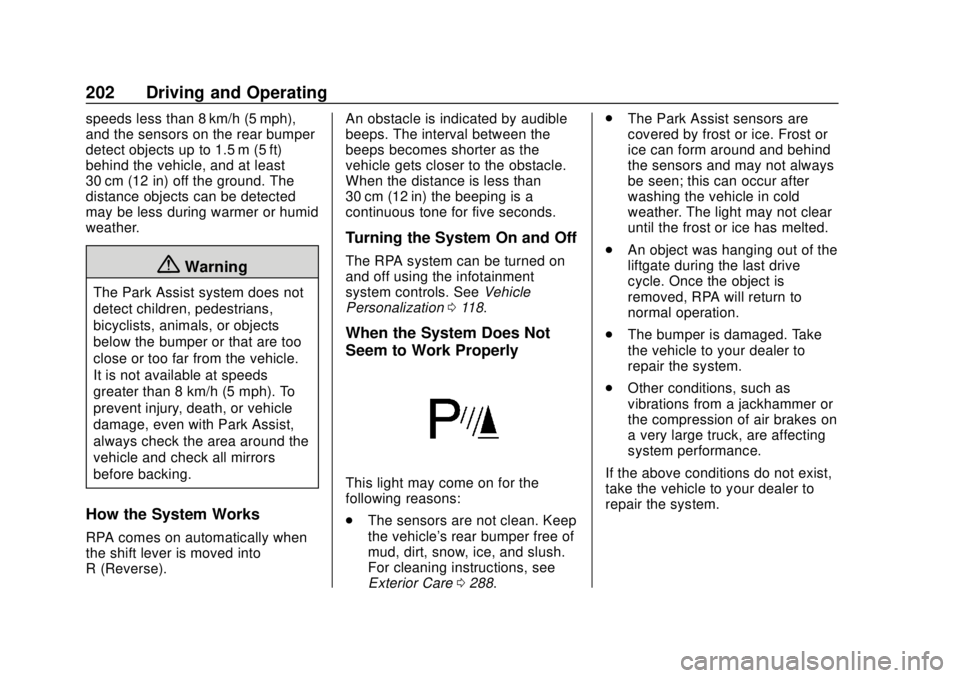
Seem to Work Properly
This light may come on for the
following reasons:
.
The sensors are not clean. Keep
the vehicle's rear bumper free of
mud, dirt, snow, ice, and slush.
For cleaning instructions, see
Exterior Care 0288. .
The Park Assist sensors are
covered by frost or ice. Frost or
ice can form around and behind
the sensors and may not always
be seen; this can occur after
washing the vehicle in cold
weather. The light may not clear
until the frost or ice has melted.
. An object was hanging out of the
liftgate during the last drive
cycle. Once the object is
removed, RPA will return to
normal operation.
. The bumper is damaged. Take
the vehicle to your dealer to
repair the system.
. Other conditions, such as
vibrations from a jackhammer or
the compression of air brakes on
a very large truck, are affecting
system performance.
If the above conditions do not exist,
take the vehicle to your dealer to
repair the system.
Page 276 of 355
Chevrolet TRAX Owner Manual (GMNA-Localizing-U.S./Canada/Mexico-
13556235) - 2020 - CRC - 9/19/19
Vehicle Care 275
{Warning
Driving on a flat tire will cause
permanent damage to the tire.
Re-inflating a tire after it has been
driven on while severely
underinflated or flat may cause a
blowout and a serious crash.
Never attempt to re-inflate a tire
that has been driven on while
severely underinflated or flat.
Have your dealer or an authorized
tire service center repair or
replace the flat tire as soon as
possible.
{Warning
Lifting a vehicle and getting under
it to do maintenance or repairs is
dangerous without the
appropriate safety equipment and
training. If a jack is provided with
the vehicle, it is designed only for
changing a flat tire. If it is used for(Continued)
Warning (Continued)
anything else, you or others could
be badly injured or killed if the
vehicle slips off the jack. If a jack
is provided with the vehicle, only
use it for changing a flat tire.
If a tire goes flat, avoid further tire
and wheel damage by driving slowly
to a level place, well off the road,
if possible. Turn on the hazard
warning flashers. See Hazard
Warning Flashers 0124.
{Warning
Changing a tire can be
dangerous. The vehicle can slip
off the jack and roll over or fall
causing injury or death. Find a
level place to change the tire. To
help prevent the vehicle from
moving:
1. Set the parking brake firmly. (Continued)
Warning (Continued)
2. Put an automatictransmission in P (Park) or a
manual transmission in
1 (First) or R (Reverse).
3. Turn off the engine and do not restart while the vehicle
is raised.
4. Do not allow passengers to remain in the vehicle.
5. Place wheel blocks, if equipped, on both sides of
the tire at the opposite
corner of the tire being
changed.
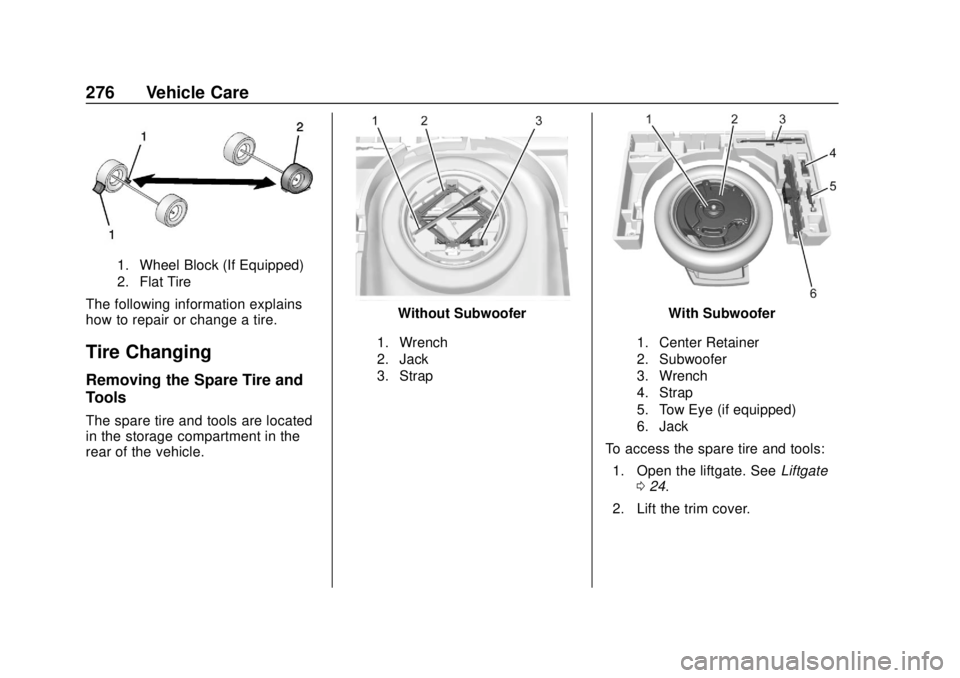
When the vehicle has a flat tire (2),
use the following example as a
guide to assist in the placement of
the wheel blocks (1), if equipped.
Page 277 of 355
Chevrolet TRAX Owner Manual (GMNA-Localizing-U.S./Canada/Mexico-
13556235) - 2020 - CRC - 9/19/19
276 Vehicle Care
1. Wheel Block (If Equipped)
2. Flat Tire
The following information explains
how to repair or change a tire.
Tire Changing
Removing the Spare Tire and
Tools
The spare tire and tools are located
in the storage compartment in the
rear of the vehicle.
Without Subwoofer
1. Wrench
2. Jack
3. Strap
With Subwoofer
1. Center Retainer
2. Subwoofer
3. Wrench
4. Strap
5. Tow Eye (if equipped)
6. Jack
To access the spare tire and tools:1. Open the liftgate. See Liftgate
0 24.
2. Lift the trim cover.
Page 278 of 355
Chevrolet TRAX Owner Manual (GMNA-Localizing-U.S./Canada/Mexico-
13556235) - 2020 - CRC - 9/19/19
Vehicle Care 277
3. If the vehicle has a subwooferassembly on top of the spare
tire, remove it by turning the
center retainer
counterclockwise.
4. If the vehicle does not have a subwoofer, turn the retainer
counterclockwise to remove the
spare tire.
5. Remove the spare tire, jack, and tools and place them near
the tire being changed.
Removing the Flat Tire and
Installing the Spare Tire
1. Do a safety check beforeproceeding. See If a Tire Goes
Flat 0274.
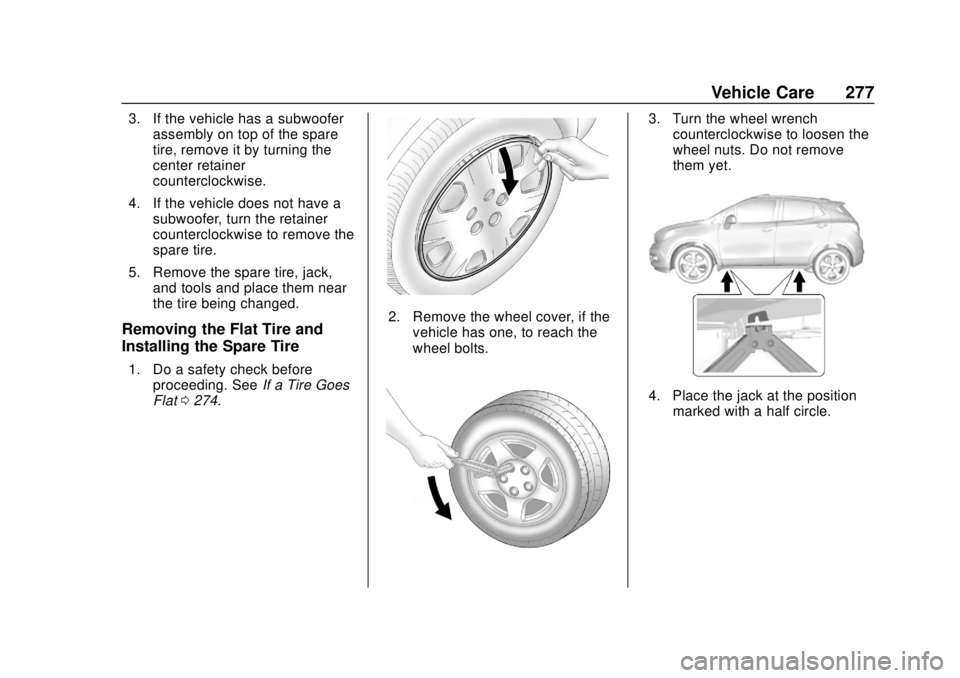
2. Remove the wheel cover, if the
vehicle has one, to reach the
wheel bolts.
3. Turn the wheel wrenchcounterclockwise to loosen the
wheel nuts. Do not remove
them yet.
4. Place the jack at the positionmarked with a half circle.
Page 279 of 355
Chevrolet TRAX Owner Manual (GMNA-Localizing-U.S./Canada/Mexico-
13556235) - 2020 - CRC - 9/19/19
278 Vehicle Care
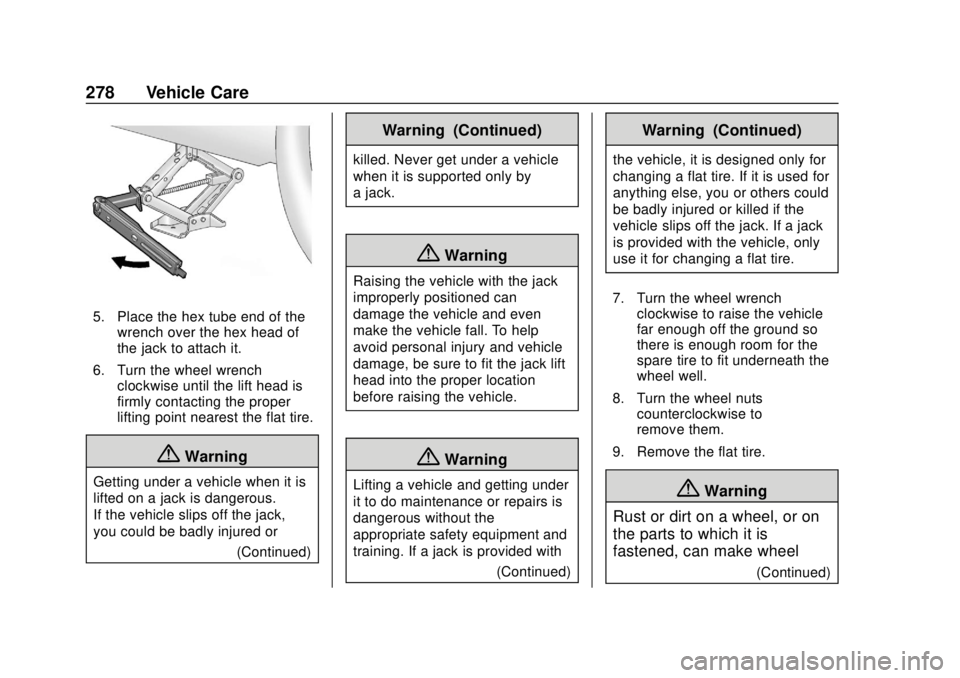
5. Place the hex tube end of thewrench over the hex head of
the jack to attach it.
6. Turn the wheel wrench clockwise until the lift head is
firmly contacting the proper
lifting point nearest the flat tire.
{Warning
Getting under a vehicle when it is
lifted on a jack is dangerous.
If the vehicle slips off the jack,
you could be badly injured or
(Continued)
Warning (Continued)
killed. Never get under a vehicle
when it is supported only by
a jack.
{Warning
Raising the vehicle with the jack
improperly positioned can
damage the vehicle and even
make the vehicle fall. To help
avoid personal injury and vehicle
damage, be sure to fit the jack lift
head into the proper location
before raising the vehicle.
{Warning
Lifting a vehicle and getting under
it to do maintenance or repairs is
dangerous without the
appropriate safety equipment and
training. If a jack is provided with(Continued)
Warning (Continued)
the vehicle, it is designed only for
changing a flat tire. If it is used for
anything else, you or others could
be badly injured or killed if the
vehicle slips off the jack. If a jack
is provided with the vehicle, only
use it for changing a flat tire.
7. Turn the wheel wrench clockwise to raise the vehicle
far enough off the ground so
there is enough room for the
spare tire to fit underneath the
wheel well.
8. Turn the wheel nuts counterclockwise to
remove them.
9. Remove the flat tire.
{Warning
Rust or dirt on a wheel, or on
the parts to which it is
fastened, can make wheel
(Continued)
Page 280 of 355
Chevrolet TRAX Owner Manual (GMNA-Localizing-U.S./Canada/Mexico-
13556235) - 2020 - CRC - 9/19/19
Vehicle Care 279
Warning (Continued)
nuts become loose after time.
The wheel could come off and
cause a crash. When
changing a wheel, remove any
rust or dirt from places where
the wheel attaches to the
vehicle. In an emergency, a
cloth or a paper towel can be
used; however, use a scraper
or wire brush later to remove
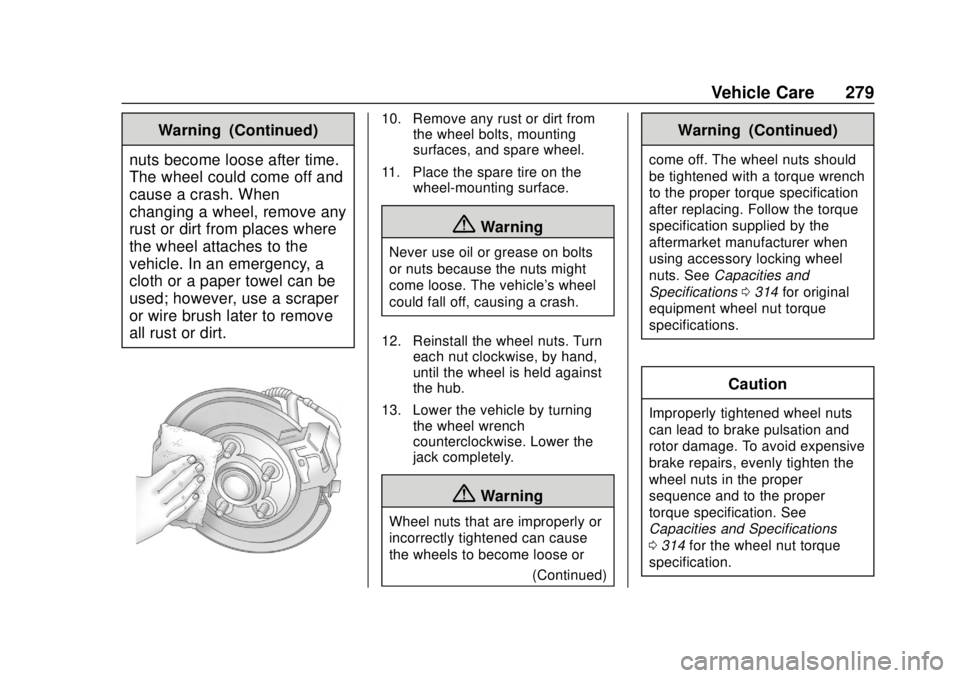
all rust or dirt.10. Remove any rust or dirt from the wheel bolts, mounting
surfaces, and spare wheel.
11. Place the spare tire on the wheel-mounting surface.
{Warning
Never use oil or grease on bolts
or nuts because the nuts might
come loose. The vehicle's wheel
could fall off, causing a crash.
12. Reinstall the wheel nuts. Turn each nut clockwise, by hand,
until the wheel is held against
the hub.
13. Lower the vehicle by turning the wheel wrench
counterclockwise. Lower the
jack completely.
{Warning
Wheel nuts that are improperly or
incorrectly tightened can cause
the wheels to become loose or
(Continued)
Warning (Continued)
come off. The wheel nuts should
be tightened with a torque wrench
to the proper torque specification
after replacing. Follow the torque
specification supplied by the
aftermarket manufacturer when
using accessory locking wheel
nuts. SeeCapacities and
Specifications 0314 for original
equipment wheel nut torque
specifications.
Caution
Improperly tightened wheel nuts
can lead to brake pulsation and
rotor damage. To avoid expensive
brake repairs, evenly tighten the
wheel nuts in the proper
sequence and to the proper
torque specification. See
Capacities and Specifications
0 314 for the wheel nut torque
specification.
Page 281 of 355
Chevrolet TRAX Owner Manual (GMNA-Localizing-U.S./Canada/Mexico-
13556235) - 2020 - CRC - 9/19/19
280 Vehicle Care
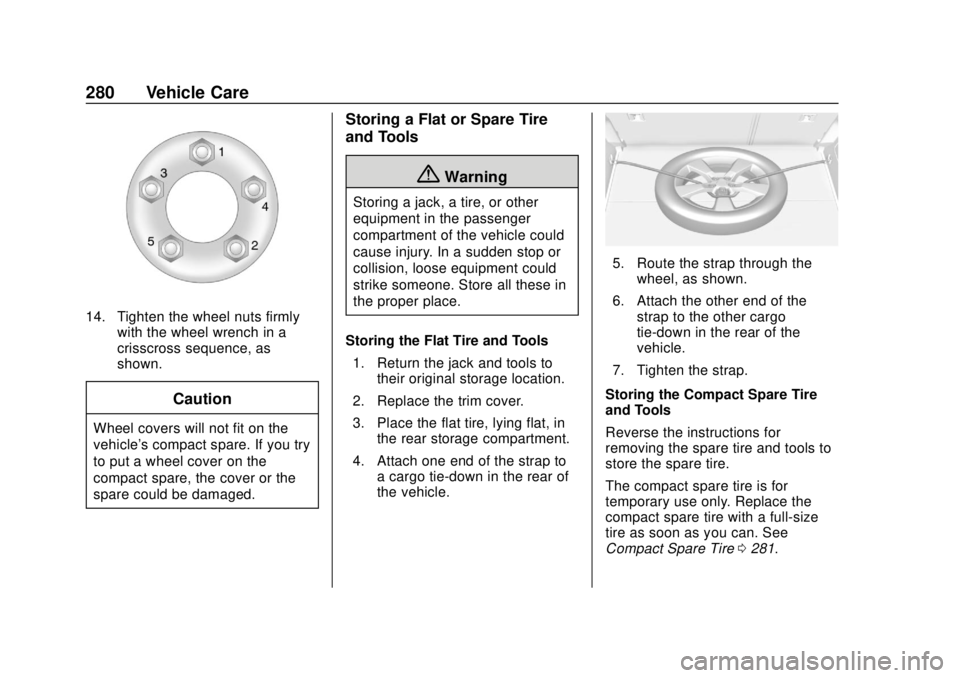
14. Tighten the wheel nuts firmlywith the wheel wrench in a
crisscross sequence, as
shown.
Caution
Wheel covers will not fit on the
vehicle's compact spare. If you try
to put a wheel cover on the
compact spare, the cover or the
spare could be damaged.
Storing a Flat or Spare Tire
and Tools
{Warning
Storing a jack, a tire, or other
equipment in the passenger
compartment of the vehicle could
cause injury. In a sudden stop or
collision, loose equipment could
strike someone. Store all these in
the proper place.
Storing the Flat Tire and Tools 1. Return the jack and tools to their original storage location.
2. Replace the trim cover.
3. Place the flat tire, lying flat, in the rear storage compartment.
4. Attach one end of the strap to a cargo tie-down in the rear of
the vehicle.
5. Route the strap through thewheel, as shown.
6. Attach the other end of the strap to the other cargo
tie-down in the rear of the
vehicle.
7. Tighten the strap.
Storing the Compact Spare Tire
and Tools
Reverse the instructions for
removing the spare tire and tools to
store the spare tire.
The compact spare tire is for
temporary use only. Replace the
compact spare tire with a full-size
tire as soon as you can. See
Compact Spare Tire 0281.
Page 344 of 355

Chevrolet TRAX Owner Manual (GMNA-Localizing-U.S./Canada/Mexico-
13556235) - 2020 - CRC - 9/19/19
Index 343
Apple CarPlay andAndroid Auto . . . . . . . . . . . . . . . . . . 148
Armrest Front Seat . . . . . . . . . . . . . . . . . . . . . . 40
Rear Seat . . . . . . . . . . . . . . . . . . . . . . 46
Assistance Program, Roadside . . . . . . . . . . . . . . . . . . . . . . 321
Audio Bluetooth . . . . . . . . . . . . . . . . . . . . . 140
Automatic Door Locks . . . . . . . . . . . . . . . . . . . . . 23
Headlamp System . . . . . . . . . . . . 124
Transmission . . . . . . . . . . . . . . . . . 186
Transmission Fluid . . . . . . . . . . . 224
Automatic Transmission Manual Mode . . . . . . . . . . . . . . . . . 188
Shift Lock Control Function
Check . . . . . . . . . . . . . . . . . . . . . . . 237
Auxiliary Jack . . . . . . . . . . . . . . . . . . . 140
Avoiding Untrusted Media Devices . . . . . . . . . . . . . . . . . . . . . . . 137
B
Battery
Exterior Lighting BatterySaver . . . . . . . . . . . . . . . . . . . . . . . 128
Load Management . . . . . . . . . . . . 127 Battery (cont'd)
Power Protection . . . . . . . . . . . . . 128
Battery - North America . . . . 236, 282
Blade Replacement, Wiper . . . . . 238
Bluetooth Overview . . . . . . . . . . . . . . . . 143, 144
Bluetooth Audio . . . . . . . . . . . . . . . . 140
Brake
System Warning Light . . . . . . . . 105
Brakes . . . . . . . . . . . . . . . . . . . . . . . . . . 234 Antilock . . . . . . . . . . . . . . . . . . . . . . . 192
Assist . . . . . . . . . . . . . . . . . . . . . . . . . 193
Fluid . . . . . . . . . . . . . . . . . . . . . . . . . . 234
Parking . . . . . . . . . . . . . . . . . . . . . . . 192
Braking . . . . . . . . . . . . . . . . . . . . . . . . . 163
Break-In, New Vehicle . . . . . . . . . . 173
Bulb Replacement Halogen Bulbs . . . . . . . . . . . . . . . . 241
Headlamp Aiming . . . . . . . . . . . . . 241
Headlamps . . . . . . . . . . . . . . . . . . . 241
Headlamps, Front TurnSignal, and Parking
Lamps . . . . . . . . . . . . . . . . . . . . . . 242
License Plate Lamps . . . . . . . . . 247
Taillamps, Turn Signal, Sidemarker, Stoplamps,
and Backup Lamps . . . . . . . . . . 245
Buying New Tires . . . . . . . . . . . . . . . 270
C
Calibration . . . . . . . . . . . . . . . . . . . . . . . 95
California Perchlorate MaterialsRequirements . . . . . . . . . . . . . . . 215
California Proposition
65 Warning . . . . . . . . . .214, 236, 282, Back Cover
Camera
Rear Vision (RVC) . . . . . . . . . . . . 199
Canadian Vehicle Owners . . . . . . . . 2
Capacities and Specifications . . . . . . . . . . . . . . . . . 314
Carbon Monoxide Engine Exhaust . . . . . . . . . . . . . . . 185
Liftgate . . . . . . . . . . . . . . . . . . . . . . . . . 24
Winter Driving . . . . . . . . . . . . . . . . 168
Cargo
Cover . . . . . . . . . . . . . . . . . . . . . . . . . . . 88
Management System . . . . . . . . . . . 88
Caution, Danger, and Warning . . . . 3
Chains, Tire . . . . . . . . . . . . . . . . . . . . 274
Charging System Light . . . . . . . . . 102