reset CHEVROLET TRAX 2020 Owners Manual
[x] Cancel search | Manufacturer: CHEVROLET, Model Year: 2020, Model line: TRAX, Model: CHEVROLET TRAX 2020Pages: 355, PDF Size: 5.75 MB
Page 23 of 355
Chevrolet TRAX Owner Manual (GMNA-Localizing-U.S./Canada/Mexico-
13556235) - 2020 - CRC - 9/19/19
22 Keys, Doors, and Windows
Warning (Continued)
permanent injuries or even
death from heat stroke.
Always lock the vehicle
whenever leaving it.
. Outsiders can easily enter
through an unlocked door
when you slow down or stop
the vehicle. Locking the
doors can help prevent this
from happening.
To lock or unlock the doors from the
outside:
. Press
KorQon the Remote
Keyless Entry (RKE) transmitter.
See Remote Keyless Entry
(RKE) System Operation
(Keyless Access) 010 or
Remote Keyless Entry (RKE)
System Operation (Key Access)
0 17.
. Use the key in the driver door.
To lock or unlock the doors from the
inside: .
Press
KorQon the power door
lock switch.
. Pulling an interior door handle
will unlock the door. Pulling the
door handle again unlatches it.
Keyless Access
The RKE transmitter must be within
1 m (3 ft) of the liftgate or door being
opened.
Press the button on the door handle
to open. See “Keyless Access
Operation” underRemote Keyless
Entry (RKE) System Operation
(Keyless Access) 010 or
Remote Keyless Entry (RKE)
System Operation (Key Access)
0 17.
Free-Turning Locks
The door key lock cylinder turns
freely when either the wrong key is
used, or the correct key is not fully
inserted. The free-turning door lock
feature prevents the lock from being
forced open. To reset the lock, turn
it to the vertical position with the
correct key fully inserted. Remove
the key and insert it again. If this does not reset the lock, turn the key
halfway around in the cylinder and
repeat the reset procedure.
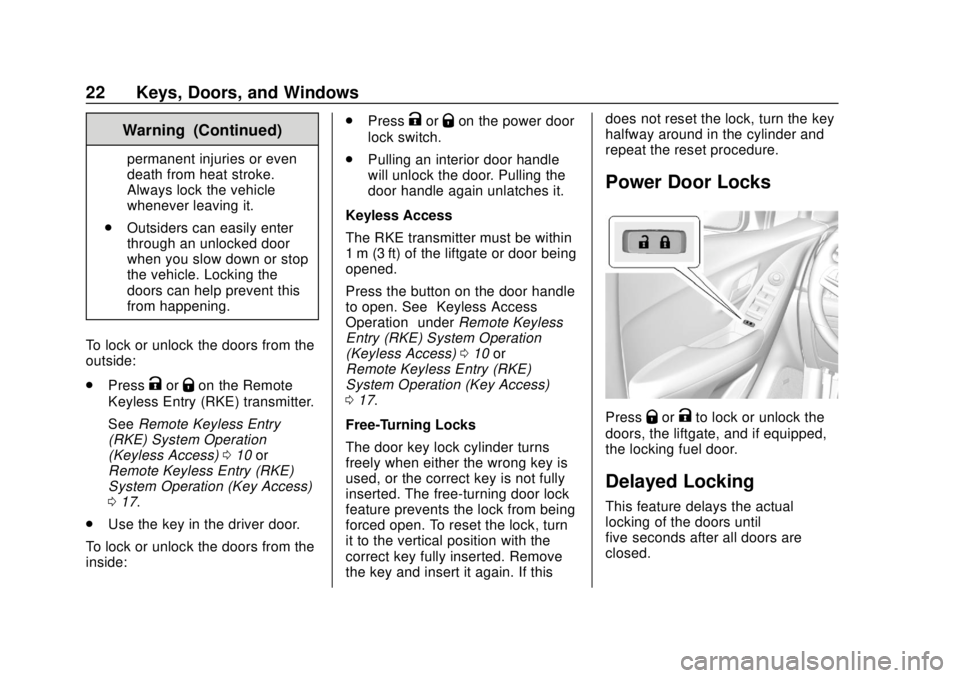
Power Door Locks
PressQorKto lock or unlock the
doors, the liftgate, and if equipped,
the locking fuel door.
Delayed Locking
This feature delays the actual
locking of the doors until
five seconds after all doors are
closed.
Page 24 of 355
Chevrolet TRAX Owner Manual (GMNA-Localizing-U.S./Canada/Mexico-
13556235) - 2020 - CRC - 9/19/19
Keys, Doors, and Windows 23
Delayed locking can only be turned
on when the Open Door Anti
Lockout feature has been turned off.
When
Qis pressed on the power
door lock switch with the door open,
a chime will sound three times
indicating that delayed locking is
active.
The doors will then lock
automatically five seconds after all
doors are closed. If a door is
reopened before five seconds have
elapsed, the five-second timer will
reset once all the doors are closed
again.
Press
Qon the door lock switch
again, or press
Qon the RKE
transmitter, to override this feature
and lock the doors immediately.
Delayed locking can be
programmed through the Driver
Information Center (DIC). See
Vehicle Personalization 0118.
Automatic Door Locks
When the doors are closed, the
ignition is on, and the shift lever is
moved out of P (Park) for automatic
transmissions, or when vehicle
speed becomes faster than 13 km/h
(8 mph) for manual transmissions,
the doors will lock.
If a vehicle door is unlocked, and
then opened and closed, the doors
will lock either when your foot is
removed from the brake or the
vehicle speed becomes faster than
13 km/h (8 mph).
To unlock the doors:
.
Press
Kon the power door lock
switch.
. Shift the transmission into
P (Park) for an automatic
transmission.
. Remove the key from the
ignition for a manual
transmission.
Automatic door locking cannot be
disabled. Automatic door unlocking
can be programmed. See Vehicle
Personalization 0118.
Lockout Protection
Key Access : When locking is
requested with the driver door open
and the key in the ignition, all the
doors will lock and then the driver
door will unlock.
This can be manually overridden by
pressing and holding
Qon the
power door lock switch.
Keyless Access : When locking is
requested with the driver door open
and the vehicle is on or in ACC/
ACCESSORY, all the doors will lock
and then the driver door will unlock.
If the vehicle is off and locking is
requested while a door is open,
when all doors are closed the
vehicle will check for RKE
transmitters inside. If an RKE
transmitter is detected and the
number of RKE transmitters inside
has not reduced, the driver door will
unlock and the horn will sound three
times.
This can be manually overridden by
pressing and holding
Qon the
power door lock switch.
Page 28 of 355
Chevrolet TRAX Owner Manual (GMNA-Localizing-U.S./Canada/Mexico-
13556235) - 2020 - CRC - 9/19/19
Keys, Doors, and Windows 27
Avoid setting off the alarm by
accident by locking the vehicle after
all occupants have left the vehicle
and all doors are closed.
To avoid setting off the alarm by
accident:
.Lock the vehicle after all
occupants have exited.
. Always unlock the vehicle with
the RKE transmitter.
Unlocking the driver door with the
key will not disarm the system or
turn off the alarm.
How to Detect a Tamper
Condition
IfKis pressed on the RKE
transmitter and the horn chirps and
the lights flash three times, an alarm
occurred previously while the
system was armed.
Steering Column Lock
If equipped, the steering column
lock is a theft-deterrent device. This
feature locks the steering column
when the vehicle is turned off and the driver door is opened, or when
the driver door is opened and then
the vehicle is turned off. The
steering column unlocks when the
vehicle is turned on.
The Driver Information Center (DIC)
may display one of these
messages:
.
A message to service the
steering column lock indicates
that an issue has been detected
with the column lock feature and
the vehicle should be serviced.
. A message that the steering
column is locked indicates that
the engine is running, but the
steering column is still locked.
It is normal for the column to be
locked during a remote start, but
the column should unlock after
the brake pedal is pressed and
the vehicle is started. No
message will display during a
remote start.
. A message that the steering
wheel must be turned and the
vehicle must be started again
indicates that the column lock
mechanism is bound, the column locking device was unable to
unlock the steering column, and
the vehicle did not start. If this
happens, immediately turn the
steering wheel from side to side
to unbind the column lock. If this
does not unlock the steering
column, turn the vehicle off and
open the driver door to reset the
system. Then turn the vehicle on
and immediately turn the
steering wheel side to side for
about 15 seconds. In some
cases, it may take significant
force to unbind the column.
To keep the steering column from
binding, straighten the front wheels
before turning off the vehicle.
Immobilizer
See Radio Frequency Statement
0 327.
Immobilizer Operation
(Keyless Access)
This vehicle has a passive
theft-deterrent system.
Page 96 of 355

Chevrolet TRAX Owner Manual (GMNA-Localizing-U.S./Canada/Mexico-
13556235) - 2020 - CRC - 9/19/19
Instruments and Controls 95
Compass
The vehicle may have a compass
display in the Driver Information
Center (DIC).
Setting the Compass Zone
Under certain circumstances, such
as during a long trip or moving to a
new area, the compass zone will
need to be reset. If the compass is
not set to the correct zone, it may
give false readings. The compass
zone should be set to the area in
which the vehicle is currently
traveling.
Use the DIC buttons to set the
compass zone:1. While the vehicle is in P (Park), press the MENU button to
display the DIC menu.
2. Press and hold SET/CLR while the Set Area display is active.
3. Find the vehicle's currentlocation and zone number on
the map. Zones 1 through 15
are available.
4. Use
w xto change to the
correct zone number.
5. Press SET/CLR to confirm the setting.
The compass system is designed to
operate for a certain number of
miles or degrees of turn before
needing a signal from the GPS
satellites. When the compass
display shows CAL, drive the
vehicle for a short distance in an
open area where it can receive a GPS signal. The compass system
will automatically determine when a
GPS signal is restored and provide
a heading again.
Clock
The clock can be set using the
infotainment system. See "System“
under
Settings 0149.
Power Outlets
Power Outlet 110/120 Volt
Alternating Current
If equipped, this power outlet is on
the rear of the center console. It can
be used to plug in electrical
equipment that uses a maximum
limit of 150 watts.
Page 97 of 355

Chevrolet TRAX Owner Manual (GMNA-Localizing-U.S./Canada/Mexico-
13556235) - 2020 - CRC - 9/19/19
96 Instruments and Controls
An indicator light on the outlet turns
on to show it is in use. The light
comes on when the ignition is on
and equipment requiring less than
150 watts is plugged into the outlet,
and no system fault is detected.
The indicator light does not come on
when the ignition is off or if the
equipment is not fully seated into
the outlet.
If equipment is connected using
more than 150 watts or a system
fault is detected, a protection circuit
shuts off the power supply and the
indicator light turns off. To reset the
circuit, unplug the item and plug it
back in or turn the RetainedAccessory Power (RAP) off and
then back on. See
Retained
Accessory Power (RAP) 0181. The
power restarts when equipment
using 150 watts or less is plugged
into the outlet and a system fault is
not detected.
The power outlet is not designed for
and may not work properly, if the
following are plugged in:
. Equipment with high initial peak
wattage such as:
compressor-driven refrigerators
and electric power tools
. Other equipment requiring an
extremely stable power supply
such as:
microcomputer-controlled
electric blankets, touch sensor
lamps, etc
. Medical equipment
Warning Lights,
Gauges, and
Indicators
Warning lights and gauges can
signal that something is wrong
before it becomes serious enough
to cause an expensive repair or
replacement. Paying attention to the
warning lights and gauges could
prevent injury.
Some warning lights come on briefly
when the engine is started to
indicate they are working. When
one of the warning lights comes on
and stays on while driving, or when
one of the gauges shows there may
be a problem, check the section that
explains what to do. Waiting to do
repairs can be costly and even
dangerous.
Page 100 of 355

Chevrolet TRAX Owner Manual (GMNA-Localizing-U.S./Canada/Mexico-
13556235) - 2020 - CRC - 9/19/19
Instruments and Controls 99
Speedometer
The speedometer shows the
vehicle's speed in either kilometers
per hour (km/h) or miles per
hour (mph).
Odometer
The odometer shows how far the
vehicle has been driven, in either
kilometers or miles.
Trip Odometer
The trip odometer shows how far
the vehicle has been driven since
the trip odometer was last reset.
The trip odometer is accessed and
reset through the Driver Information
Center (DIC). SeeDriver
Information Center (DIC) 0111.
Tachometer
The tachometer displays the engine
speed in revolutions per
minute (rpm).
Caution
If the engine is operated with the
rpm’s in the warning area at the
high end of the tachometer, the
vehicle could be damaged, and
the damage would not be covered
by the vehicle warranty. Do not
operate the engine with the rpm’s
in the warning area.
Fuel Gauge
English Shown, Metric Similar
When the ignition is on, the fuel
gauge shows how much fuel is left
in the fuel tank. When the indicator
nears empty, a message in the
Driver Information Center (DIC)
displays. The vehicle still has a little
fuel left, but the vehicle should be
fueled soon. An arrow on the fuel
gauge indicates the side of the
vehicle the fuel door is on.
Here are four things that some
owners ask about. These are
normal and do not indicate a
problem with the fuel gauge:
Page 106 of 355

Chevrolet TRAX Owner Manual (GMNA-Localizing-U.S./Canada/Mexico-
13556235) - 2020 - CRC - 9/19/19
Instruments and Controls 105
This symbol is shown when you
need to see the owner’s manual for
additional instructions or
information.
Brake System Warning
Light
MetricEnglish
This light should come on briefly
when the vehicle is turned on. If it
does not come on then, have it fixed
so it will be ready to warn you if
there is a problem.
When the vehicle is on, the brake
system warning light also comes on
when the parking brake is set. The
light stays on if the parking brake
does not fully release. If it stays on
after the parking brake is fully
released, there is a brake problem.
Have the brake system inspected
right away. If the light comes on while driving,
pull off the road and stop carefully.
The brake pedal might be harder to
push, or the brake pedal may go
closer to the floor. It could take
longer to stop. If the light is still on,
have the vehicle towed for service.
See
Towing the Vehicle 0285.
{Warning
The brake system might not be
working properly if the brake
system warning light is on.
Driving with the brake system
warning light on can lead to a
crash. If the light is still on after
the vehicle has been pulled off
the road and carefully stopped,
have the vehicle towed for
service.
Antilock Brake System
(ABS) Warning Light
This light comes on briefly when the
engine is started.
If it does not, have the vehicle
serviced by your dealer. If the
system is working normally, the
indicator light then goes off.
If the ABS light stays on, turn the
ignition off. If the light comes on
while driving, stop as soon as it is
safely possible and turn the ignition
off. Then start the engine again to
reset the system. If the ABS light
stays on, or comes on again while
driving, the vehicle needs service.
If the regular brake system warning
light is not on, the vehicle still has
brakes, but not antilock brakes.
If the regular brake system warning
light is also on, the vehicle does not
Page 112 of 355
Chevrolet TRAX Owner Manual (GMNA-Localizing-U.S./Canada/Mexico-
13556235) - 2020 - CRC - 9/19/19
Instruments and Controls 111
Lamps On Reminder
This light comes on when the
exterior lamps are in use, except
when only the Daytime Running
Lamps (DRL) are active. See
Exterior Lamp Controls0122.
Cruise Control Light
For vehicles with cruise control, the
cruise control light is white when the
cruise control is on and ready, and
turns green when the cruise control
is set and active. The light turns off when the cruise
control is turned off. See
Cruise
Control 0196.
Door Ajar Light
This light comes on when a door is
open or not securely latched. Before
driving, check that all doors are
properly closed.
Information Displays
Driver Information
Center (DIC)
The DIC displays information about
the vehicle. It also displays warning
messages if a system problem is
detected. All messages appear in
the DIC display in the instrument
cluster.
DIC Operation and Displays
On some models, the trip odometer
reset stem is used to operate the
DIC. On other models, the controls
for the DIC are on the turn signal
lever.
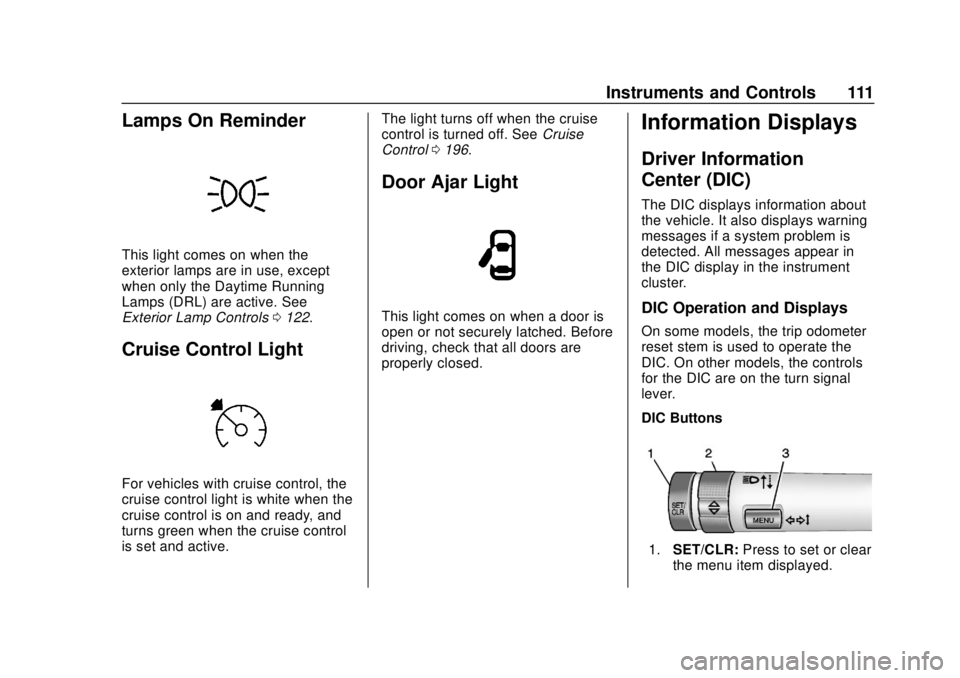
DIC Buttons
1. SET/CLR: Press to set or clear
the menu item displayed.
Page 113 of 355
Chevrolet TRAX Owner Manual (GMNA-Localizing-U.S./Canada/Mexico-
13556235) - 2020 - CRC - 9/19/19
112 Instruments and Controls
2.w/x:Turn the band to scroll
through the menus.
3. MENU: Press to display the
Trip/Fuel menu and the Vehicle
Information menu. This button
is also used to return to or exit
the last screen displayed on
the DIC.
Vehicle Information Menu
Items (Base Level DIC)
Press MENU to view the DIC menu.
Some items display in the upper
display area, some in the lower
display area, and others use both
the upper and lower display areas.
Use
w/xto scroll through the
menu items. Not all items are
available on every vehicle. The
following is a list of possible menu
items:
. Remaining Oil Life
. Units
. Tire Learn Remaining Oil Life
This menu is not available while the
vehicle is moving. This display
shows an estimate of the oil's
remaining useful life. If 99
:% is
displayed, that means 99% of the
current oil life remains.
When the remaining oil life is low,
the
:% CHANGE message will
appear on the display. The oil
should changed as soon as
possible. See Engine Oil0221. In
addition to the engine oil life system
monitoring the oil life, additional
maintenance is recommended. See
Maintenance Schedule 0300.
Remember, the Oil Life display must
be reset after each oil change. It will
not reset itself. Also, be careful not
to reset the Oil Life display
accidentally at any time other than
when the oil has just been changed.
It cannot be reset accurately until
the next oil change. To reset the
engine oil life system, press SET/
CLR while the Oil Life display is
active. See Engine Oil Life System
0 223. Units
This menu is not available while the
vehicle is moving. Press SET/CLR
while the unit display is active and
move
w/xto change units when
UNIT SET is displayed. Press SET/
CLR to confirm the setting. Select 1,
2, or 3 for the unit display. 1 is
metric units, 2 is Imperial units, and
3 is US units. This will change the
displays on the cluster and DIC to
the type of measurements selected.
Tire Learn
This display allows for matching of
the TPMS sensors. The display will
show a vehicle with the approximate
pressures of all four tires. Tire
pressure is displayed in either
kilopascal (kPa) or pounds per
square inch (psi). See Tire Pressure
Monitor System 0263 and
Tire Pressure Monitor Operation
0 264.
Page 114 of 355
Chevrolet TRAX Owner Manual (GMNA-Localizing-U.S./Canada/Mexico-
13556235) - 2020 - CRC - 9/19/19
Instruments and Controls 113
Trip/Fuel Menu Items (Base
Level DIC)
Press MENU until the Trip/Fuel
menu is displayed. Use
w/xto
scroll through the menu items. On
some models, use the trip odometer
reset stem to scroll through the
menu. Not all items are available on
every vehicle. The following is a list
of possible menu items:
. Trip Odometer
. Fuel Range
. Average Vehicle Speed
. Instantaneous Fuel Economy
. Average Fuel Economy
. Timer
Trip Odometer
This display shows the current
distance traveled, in either
kilometers (km) or miles (mi), since
the last reset for the trip odometer.
The trip odometer can be reset to
zero by pressing SET/CLR or
pressing and holding the trip
odometer reset stem while the trip
odometer display is showing. Fuel Range
This display shows the approximate
distance the vehicle can be driven
without refueling. The fuel range
estimate is based on an average of
the vehicle's fuel economy over
recent driving history and the
amount of fuel remaining in the fuel
tank. Fuel range cannot be reset.
Average Vehicle Speed
This display shows the average
speed of the vehicle in kilometers
per hour (km/h) or miles per
hour (mph). This average is
calculated based on the various
vehicle speeds recorded since the
last reset of this value. The average
speed can be reset by pressing
SET/CLR or pressing and holding
the trip odometer reset stem while
the Average Vehicle Speed display
is showing.
Instantaneous Fuel Economy
The instantaneous fuel economy
display shows the current fuel
economy in liters per 100 kilometers
(L/100 km) or miles per
gallon (mpg). This number reflectsonly the approximate fuel economy
that the vehicle has right now and
changes frequently as driving
conditions change. This display
cannot be reset.
Average Fuel Economy
This display shows the approximate
average liters per 100 kilometers (L/
100 km) or miles per gallon (mpg).
This number is calculated based on
the number of L/100 km (mpg)
recorded since the last time this
menu item was reset. This number
reflects only the approximate
average fuel economy that the
vehicle has right now, and will
change as driving conditions
change. The fuel economy can be
reset by pressing SET/CLR or
pressing and holding the trip
odometer reset stem while the
Average Fuel Economy display is
showing.
Timer
Available on some vehicles, this
display can be used as a timer. To
start the timer, press SET/CLR while
Timer is displayed. The display will