steering CHEVROLET TRAX 2021 User Guide
[x] Cancel search | Manufacturer: CHEVROLET, Model Year: 2021, Model line: TRAX, Model: CHEVROLET TRAX 2021Pages: 280, PDF Size: 8.76 MB
Page 77 of 280
Chevrolet TRAX Owner Manual (GMNA-Localizing-U.S./Canada-14609828) -
2021 - CRC - 8/21/20
76 Instruments and Controls
Instruments and Controls
Controls
Steering Wheel Adjustment . . . . . . . . . . . . 76
Steering Wheel Controls . . . . . . . . . . . . . . . . 77
Horn . . . . . . . . . . . . . . . . . . . . . . . . . . . . . . . . . . . . 77
Windshield Wiper/Washer . . . . . . . . . . . . . . 77
Rear Window Wiper/Washer . . . . . . . . . . . 78
Compass . . . . . . . . . . . . . . . . . . . . . . . . . . . . . . . . 78
Clock . . . . . . . . . . . . . . . . . . . . . . . . . . . . . . . . . . . 79
Power Outlets . . . . . . . . . . . . . . . . . . . . . . . . . . 79
Warning Lights, Gauges, and Indicators
Warning Lights, Gauges, andIndicators . . . . . . . . . . . . . . . . . . . . . . . . . . . . 80
Instrument Cluster . . . . . . . . . . . . . . . . . . . . . 80
Speedometer . . . . . . . . . . . . . . . . . . . . . . . . . . . 81
Odometer . . . . . . . . . . . . . . . . . . . . . . . . . . . . . . 81
Trip Odometer . . . . . . . . . . . . . . . . . . . . . . . . . . 81
Tachometer . . . . . . . . . . . . . . . . . . . . . . . . . . . . . 81
Fuel Gauge . . . . . . . . . . . . . . . . . . . . . . . . . . . . . 81
Seat Belt Reminders . . . . . . . . . . . . . . . . . . . . 81
Airbag Readiness Light . . . . . . . . . . . . . . . . . 82
Passenger Airbag Status Indicator . . . . . . 83
Charging System Light . . . . . . . . . . . . . . . . . 83
Malfunction Indicator Lamp (Check Engine Light) . . . . . . . . . . . . . . . . . . . . . . . . . 84
Service Vehicle Soon Light . . . . . . . . . . . . . . 85
Owner Manual Indicator . . . . . . . . . . . . . . . . 85
Brake System Warning Light . . . . . . . . . . . 86 Antilock Brake System (ABS) Warning
Light . . . . . . . . . . . . . . . . . . . . . . . . . . . . . . . . . 86
Power Steering Warning Light . . . . . . . . . . 86
Ultrasonic Parking Sensor Light . . . . . . . . . 87
Traction Off Light . . . . . . . . . . . . . . . . . . . . . . . 87
StabiliTrak OFF Light . . . . . . . . . . . . . . . . . . . . 87
Traction Control System (TCS)/StabiliTrak Light . . . . . . . . . . . . . . . . . . . . . . . . . . . . . . . . . . 87
Engine Coolant Temperature Warning Light . . . . . . . . . . . . . . . . . . . . . . . . . . . . . . . . . 88
Tire Pressure Light . . . . . . . . . . . . . . . . . . . . . 88
Engine Oil Pressure Light . . . . . . . . . . . . . . . 88
Low Fuel Warning Light . . . . . . . . . . . . . . . . 89
Immobilizer Light . . . . . . . . . . . . . . . . . . . . . . 89
Reduced Engine Power Light . . . . . . . . . . . 89
High-Beam On Light . . . . . . . . . . . . . . . . . . . . 90
Lamps On Reminder . . . . . . . . . . . . . . . . . . . . 90
Cruise Control Light . . . . . . . . . . . . . . . . . . . . 90
Door Ajar Light . . . . . . . . . . . . . . . . . . . . . . . . . 90
Information Displays
Driver Information Center (DIC) . . . . . . . . 90
Vehicle Messages
Vehicle Messages . . . . . . . . . . . . . . . . . . . . . . . 92
Engine Power Messages . . . . . . . . . . . . . . . . 93
Vehicle Speed Messages . . . . . . . . . . . . . . . . 93
Vehicle Personalization
Vehicle Personalization . . . . . . . . . . . . . . . . . 93
Controls
Steering Wheel Adjustment
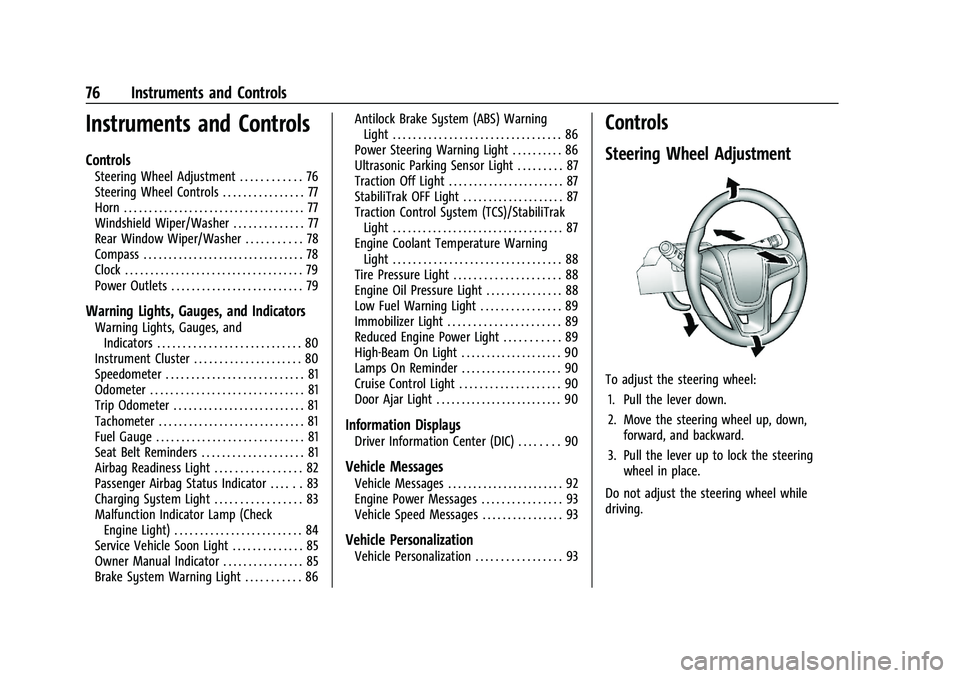
To adjust the steering wheel:
1. Pull the lever down.
2. Move the steering wheel up, down, forward, and backward.
3. Pull the lever up to lock the steering wheel in place.
Do not adjust the steering wheel while
driving.
Page 78 of 280
Chevrolet TRAX Owner Manual (GMNA-Localizing-U.S./Canada-14609828) -
2021 - CRC - 8/21/20
Instruments and Controls 77
Steering Wheel Controls
The infotainment system can be operated
by using the steering wheel controls. See
Steering Wheel Controls0105.
Horn
Pressaon the steering wheel pad to
sound the horn.
Windshield Wiper/Washer
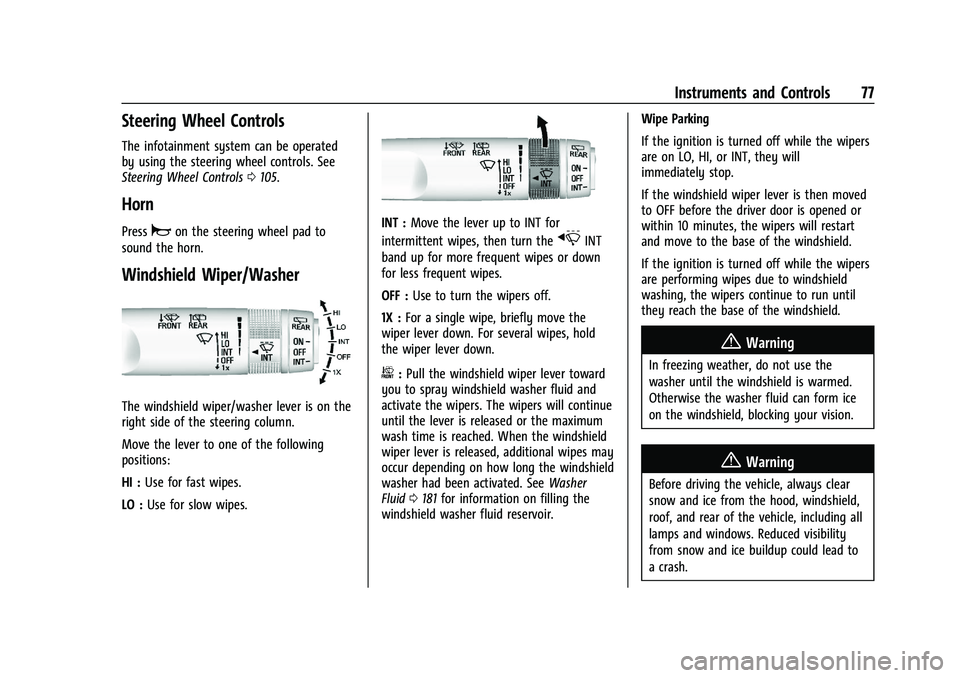
The windshield wiper/washer lever is on the
right side of the steering column.
Move the lever to one of the following
positions:
HI : Use for fast wipes.
LO : Use for slow wipes.
INT : Move the lever up to INT for
intermittent wipes, then turn the
xINT
band up for more frequent wipes or down
for less frequent wipes.
OFF : Use to turn the wipers off.
1X : For a single wipe, briefly move the
wiper lever down. For several wipes, hold
the wiper lever down.
b: Pull the windshield wiper lever toward
you to spray windshield washer fluid and
activate the wipers. The wipers will continue
until the lever is released or the maximum
wash time is reached. When the windshield
wiper lever is released, additional wipes may
occur depending on how long the windshield
washer had been activated. See Washer
Fluid 0181 for information on filling the
windshield washer fluid reservoir. Wipe Parking
If the ignition is turned off while the wipers
are on LO, HI, or INT, they will
immediately stop.
If the windshield wiper lever is then moved
to OFF before the driver door is opened or
within 10 minutes, the wipers will restart
and move to the base of the windshield.
If the ignition is turned off while the wipers
are performing wipes due to windshield
washing, the wipers continue to run until
they reach the base of the windshield.
{Warning
In freezing weather, do not use the
washer until the windshield is warmed.
Otherwise the washer fluid can form ice
on the windshield, blocking your vision.
{Warning
Before driving the vehicle, always clear
snow and ice from the hood, windshield,
roof, and rear of the vehicle, including all
lamps and windows. Reduced visibility
from snow and ice buildup could lead to
a crash.
Page 86 of 280

Chevrolet TRAX Owner Manual (GMNA-Localizing-U.S./Canada-14609828) -
2021 - CRC - 8/21/20
Instruments and Controls 85
.If equipped with capped fuel fill: A loose
or missing fuel cap may cause the light
to come on. SeeFilling the Tank (Capless
Fuel Fill) 0161 or
Filling the Tank (Capped Fuel Fill) 0163.
A few driving trips with the cap properly
installed may turn the light off.
.Poor fuel quality can cause inefficient
engine operation and poor drivability,
which may go away once the engine is
warmed up. If this occurs, change the fuel
brand. It may require at least one full
tank of the proper fuel to turn the light
off. See Recommended Fuel 0160.
If the light remains on, see your dealer.
Emissions Inspection and Maintenance
Programs
If the vehicle requires an Emissions
Inspection/Maintenance test, the test
equipment will likely connect to the
vehicle's Data Link Connector (DLC).
The DLC is under the instrument panel to
the left of the steering wheel. Connecting
devices that are not used to perform an
Emissions Inspection/Maintenance test or to
service the vehicle may affect vehicle
operation. See Add-On Electrical Equipment
0 164. See your dealer if assistance is
needed.
The vehicle may not pass inspection if:
.The light is on when the engine is
running.
.The light does not come on when the
ignition is on with the engine not running
for Key Access or in Service Mode for
Keyless Access.
.Critical emission control systems have not
been completely diagnosed. If this
happens, the vehicle would not be ready
for inspection and might require
several days of routine driving before the
system is ready for inspection. This can
happen if the 12-volt battery has recently
been replaced or run down, or if the
vehicle has been recently serviced.
See your dealer if the vehicle will not pass
or cannot be made ready for the test.
Service Vehicle Soon Light
For vehicles with this light, it comes on if a
condition exists that may require the vehicle
to be taken in for service.
If the light comes on, take the vehicle to
your dealer for service as soon as possible.
Owner Manual Indicator
This symbol is shown when you need to see
the owner’s manual for additional
instructions or information.
Page 87 of 280
Chevrolet TRAX Owner Manual (GMNA-Localizing-U.S./Canada-14609828) -
2021 - CRC - 8/21/20
86 Instruments and Controls
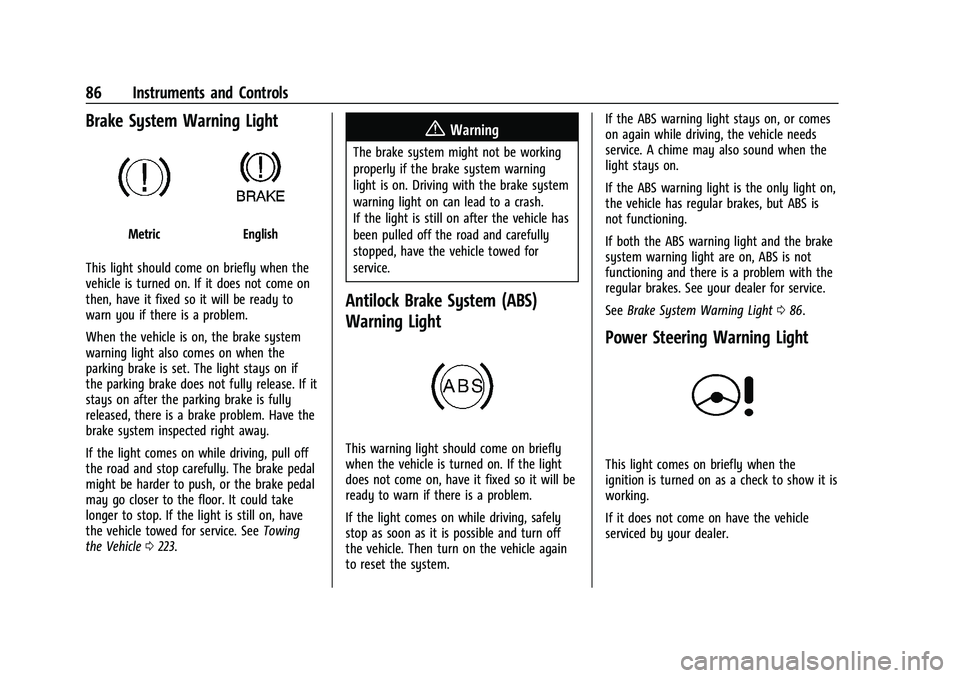
Brake System Warning Light
MetricEnglish
This light should come on briefly when the
vehicle is turned on. If it does not come on
then, have it fixed so it will be ready to
warn you if there is a problem.
When the vehicle is on, the brake system
warning light also comes on when the
parking brake is set. The light stays on if
the parking brake does not fully release. If it
stays on after the parking brake is fully
released, there is a brake problem. Have the
brake system inspected right away.
If the light comes on while driving, pull off
the road and stop carefully. The brake pedal
might be harder to push, or the brake pedal
may go closer to the floor. It could take
longer to stop. If the light is still on, have
the vehicle towed for service. See Towing
the Vehicle 0223.
{Warning
The brake system might not be working
properly if the brake system warning
light is on. Driving with the brake system
warning light on can lead to a crash.
If the light is still on after the vehicle has
been pulled off the road and carefully
stopped, have the vehicle towed for
service.
Antilock Brake System (ABS)
Warning Light
This warning light should come on briefly
when the vehicle is turned on. If the light
does not come on, have it fixed so it will be
ready to warn if there is a problem.
If the light comes on while driving, safely
stop as soon as it is possible and turn off
the vehicle. Then turn on the vehicle again
to reset the system. If the ABS warning light stays on, or comes
on again while driving, the vehicle needs
service. A chime may also sound when the
light stays on.
If the ABS warning light is the only light on,
the vehicle has regular brakes, but ABS is
not functioning.
If both the ABS warning light and the brake
system warning light are on, ABS is not
functioning and there is a problem with the
regular brakes. See your dealer for service.
See
Brake System Warning Light 086.
Power Steering Warning Light
This light comes on briefly when the
ignition is turned on as a check to show it is
working.
If it does not come on have the vehicle
serviced by your dealer.
Page 96 of 280
Chevrolet TRAX Owner Manual (GMNA-Localizing-U.S./Canada-14609828) -
2021 - CRC - 8/21/20
Instruments and Controls 95
.Remote Left in Vehicle Alert
Remote Unlock Light Feedback
This setting flashes the exterior lamps when
you remotely unlock the vehicle.
Touch Off or Flash Lights.
Remote Lock Feedback
This setting specifies how the vehicle
responds when you remotely lock the
vehicle.
Touch Off, Lights and Horn, Lights Only,
or Horn Only.
Remote Door Unlock
This setting specifies whether all doors,
or just the driver door, unlock when pressing
Kon the RKE transmitter.
Touch All Doors or Driver Door.
Remote Start Auto Heat Seats
This setting automatically turns on the
heated seats when using the remote start
function on cold days. See Heated Front
Seats 033 and
Remote Vehicle Start 017.
Touch Off or On. Passive Door Unlock
This setting specifies which doors unlock
when using the button on the driver door
handle to unlock the vehicle.
Touch All Doors or Driver Door Only.
Passive Door Lock
This setting specifies whether the vehicle
will automatically lock, or lock and alert you
after all the doors are closed, and you walk
away from the vehicle with the RKE
transmitter. See
Remote Keyless Entry (RKE)
System Operation (Key Access) 09or
Remote Keyless Entry (RKE) System
Operation (Keyless Access) 012.
Touch Off, On with Horn Chirp, or On.
Remote Left in Vehicle Alert
This feature sounds an alert when the RKE
transmitter is left in the vehicle. This menu
also enables Remote No Longer in Vehicle
Alert.
Touch Off or On.
Valet Mode
This will lock the infotainment system and
steering wheel controls. It may also limit
access to vehicle storage locations,
if equipped. To enable valet mode:
1. Enter a four-digit code on the keypad.
2. Touch Enter to go to the confirmation screen.
3. Re-enter the four-digit code.
Touch Lock or Unlock to lock or unlock the
system. Touch Back to go back to the
previous menu.
Page 97 of 280
Chevrolet TRAX Owner Manual (GMNA-Localizing-U.S./Canada-14609828) -
2021 - CRC - 8/21/20
96 Lighting
Lighting
Exterior Lighting
Exterior Lamp Controls . . . . . . . . . . . . . . . . . 96
Headlamp High/Low-Beam Changer . . . . 96
Flash-to-Pass . . . . . . . . . . . . . . . . . . . . . . . . . . . . 97
Daytime Running Lamps (DRL) . . . . . . . . . . 97
Automatic Headlamp System . . . . . . . . . . . 97
Hazard Warning Flashers . . . . . . . . . . . . . . . 98
Turn and Lane-Change Signals . . . . . . . . . . 98
Interior Lighting
Instrument Panel IlluminationControl . . . . . . . . . . . . . . . . . . . . . . . . . . . . . . . 98
Courtesy Lamps . . . . . . . . . . . . . . . . . . . . . . . . 99
Dome Lamps . . . . . . . . . . . . . . . . . . . . . . . . . . . 99
Reading Lamps . . . . . . . . . . . . . . . . . . . . . . . . . 99
Lighting Features
Entry Lighting . . . . . . . . . . . . . . . . . . . . . . . . . . 99
Exit Lighting . . . . . . . . . . . . . . . . . . . . . . . . . . . 100
Battery Load Management . . . . . . . . . . . . 100
Battery Power Protection . . . . . . . . . . . . . . 100
Exterior Lighting Battery Saver . . . . . . . . 101
Exterior Lighting
Exterior Lamp Controls
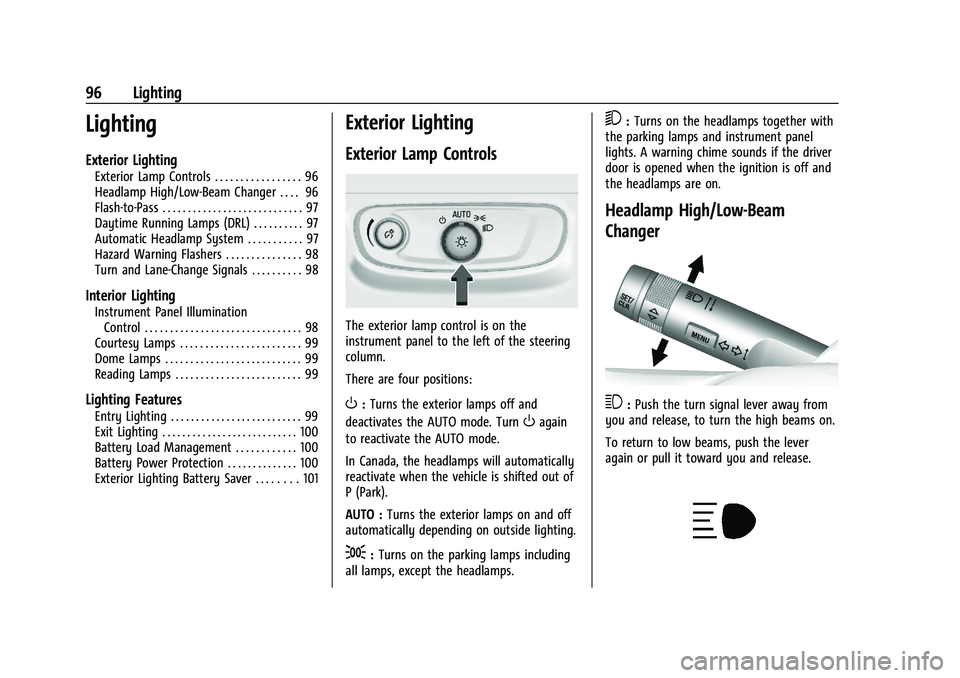
The exterior lamp control is on the
instrument panel to the left of the steering
column.
There are four positions:
O: Turns the exterior lamps off and
deactivates the AUTO mode. Turn
Oagain
to reactivate the AUTO mode.
In Canada, the headlamps will automatically
reactivate when the vehicle is shifted out of
P (Park).
AUTO : Turns the exterior lamps on and off
automatically depending on outside lighting.
;: Turns on the parking lamps including
all lamps, except the headlamps.
5: Turns on the headlamps together with
the parking lamps and instrument panel
lights. A warning chime sounds if the driver
door is opened when the ignition is off and
the headlamps are on.
Headlamp High/Low-Beam
Changer
3: Push the turn signal lever away from
you and release, to turn the high beams on.
To return to low beams, push the lever
again or pull it toward you and release.
Page 99 of 280
Chevrolet TRAX Owner Manual (GMNA-Localizing-U.S./Canada-14609828) -
2021 - CRC - 8/21/20
98 Lighting
operating, these lamps turn off. Move the
exterior lamp control to
Por;to
disable this feature.
Hazard Warning Flashers
|: Press to make the front and rear turn
signal lamps flash on and off. This warns
others that you are having trouble. Press
again to turn the flashers off.
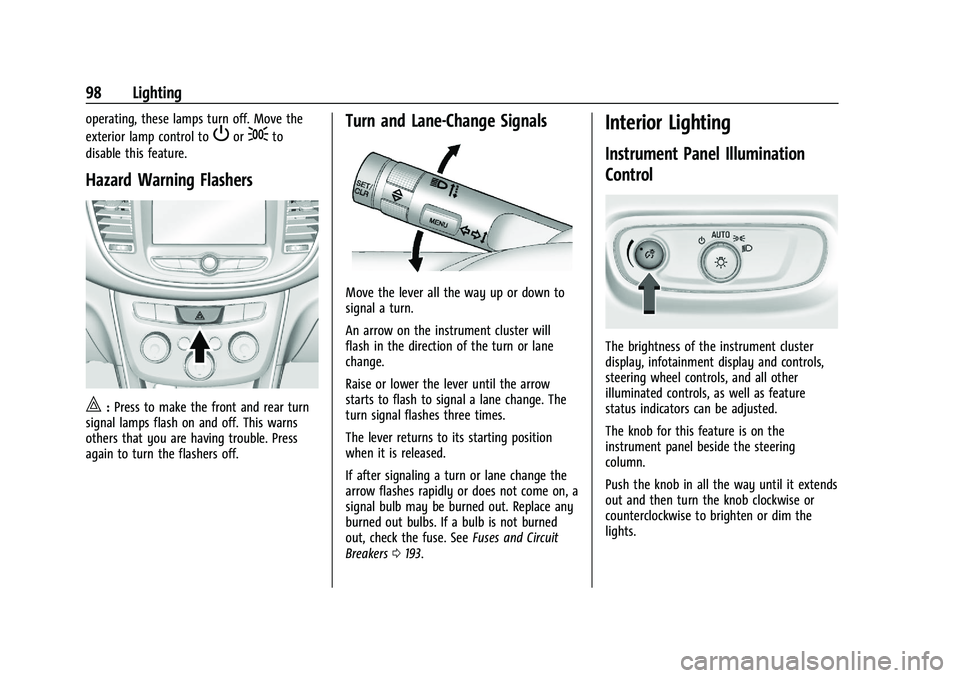
Turn and Lane-Change Signals
Move the lever all the way up or down to
signal a turn.
An arrow on the instrument cluster will
flash in the direction of the turn or lane
change.
Raise or lower the lever until the arrow
starts to flash to signal a lane change. The
turn signal flashes three times.
The lever returns to its starting position
when it is released.
If after signaling a turn or lane change the
arrow flashes rapidly or does not come on, a
signal bulb may be burned out. Replace any
burned out bulbs. If a bulb is not burned
out, check the fuse. See Fuses and Circuit
Breakers 0193.
Interior Lighting
Instrument Panel Illumination
Control
The brightness of the instrument cluster
display, infotainment display and controls,
steering wheel controls, and all other
illuminated controls, as well as feature
status indicators can be adjusted.
The knob for this feature is on the
instrument panel beside the steering
column.
Push the knob in all the way until it extends
out and then turn the knob clockwise or
counterclockwise to brighten or dim the
lights.
Page 103 of 280
Chevrolet TRAX Owner Manual (GMNA-Localizing-U.S./Canada-14609828) -
2021 - CRC - 8/21/20
102 Infotainment System
Infotainment System
Introduction
Introduction . . . . . . . . . . . . . . . . . . . . . . . . . . . 102
Overview . . . . . . . . . . . . . . . . . . . . . . . . . . . . . . 103
Steering Wheel Controls . . . . . . . . . . . . . . . 105
Using the System . . . . . . . . . . . . . . . . . . . . . 105
Radio
AM-FM Radio . . . . . . . . . . . . . . . . . . . . . . . . . . 107
Satellite Radio . . . . . . . . . . . . . . . . . . . . . . . . . 109
Radio Reception . . . . . . . . . . . . . . . . . . . . . . . 109
Multi-Band Antenna . . . . . . . . . . . . . . . . . . . 109
Audio Players
Avoiding Untrusted Media Devices . . . . 109
USB Port . . . . . . . . . . . . . . . . . . . . . . . . . . . . . . . 110
Auxiliary Jack . . . . . . . . . . . . . . . . . . . . . . . . . . 112
Bluetooth Audio . . . . . . . . . . . . . . . . . . . . . . . 112
OnStar System
OnStar System . . . . . . . . . . . . . . . . . . . . . . . . . 113
Phone
Bluetooth (Overview) . . . . . . . . . . . . . . . . . . 114
Bluetooth (Pairing and Using thePhone) . . . . . . . . . . . . . . . . . . . . . . . . . . . . . . . 115
Apple CarPlay and Android Auto . . . . . . . 118
Settings
Settings . . . . . . . . . . . . . . . . . . . . . . . . . . . . . . . . 119
Trademarks and License Agreements
Trademarks and License Agreements . . . 121
Introduction
Read the following pages to become familiar
with the features.
{Warning
Taking your eyes off the road for too
long or too often while using any
infotainment feature can cause a crash.
You or others could be injured or killed.
Do not give extended attention to
infotainment tasks while driving. Limit
your glances at the vehicle displays and
focus your attention on driving. Use voice
commands whenever possible.
The infotainment system has built-in
features intended to help avoid distraction
by disabling some features when driving.
These features may gray out when they are
unavailable. Many infotainment features are
also available through the instrument cluster
and steering wheel controls.
Before driving:
.Become familiar with the operation,
center stack controls, steering wheel
controls, and infotainment display.
Page 105 of 280

Chevrolet TRAX Owner Manual (GMNA-Localizing-U.S./Canada-14609828) -
2021 - CRC - 8/21/20
104 Infotainment System
Infotainment System
The infotainment system is controlled by using the infotainment display, the controls on the
center stack, and the steering wheel controls.
1.{
.Press to go to the Home Page. See
“Home Page”following.
2.
g
.Radio: Press and release to go to the
previous station or channel. Press and
hold to fast seek the previous
strongest station.
.USB/Music: Press to go to the
previous content. Press and hold to
fast rewind.
3.
O
.When off, pressOto turn the
system on. Press and hold to turn off.
.When on, pressOto mute the
system and display a status pane.
Press
Oagain to unmute the system.
.Turn to decrease or increase the
volume.
4.
d
.Radio: Press and release to go to the
next strongest station or channel.
Press and hold to fast seek the next
strongest station.
Page 106 of 280
Chevrolet TRAX Owner Manual (GMNA-Localizing-U.S./Canada-14609828) -
2021 - CRC - 8/21/20
Infotainment System 105
.USB/Music: Press to go to the next
content. Press and hold to fast
forward.
5.
5
.Press and release to access the phone
screen, answer an incoming call,
or access the device home screen.
Home Page
The Home Page is where application icons
are accessed. Some features are disabled
when the vehicle is moving.
Slide a finger left/right across the screen to
access the pages of icons.
Managing Home Page Icons 1. Touch and hold any of the Home Page icons to edit that icon.
2. Drag the icon to a new location on the Home Page.
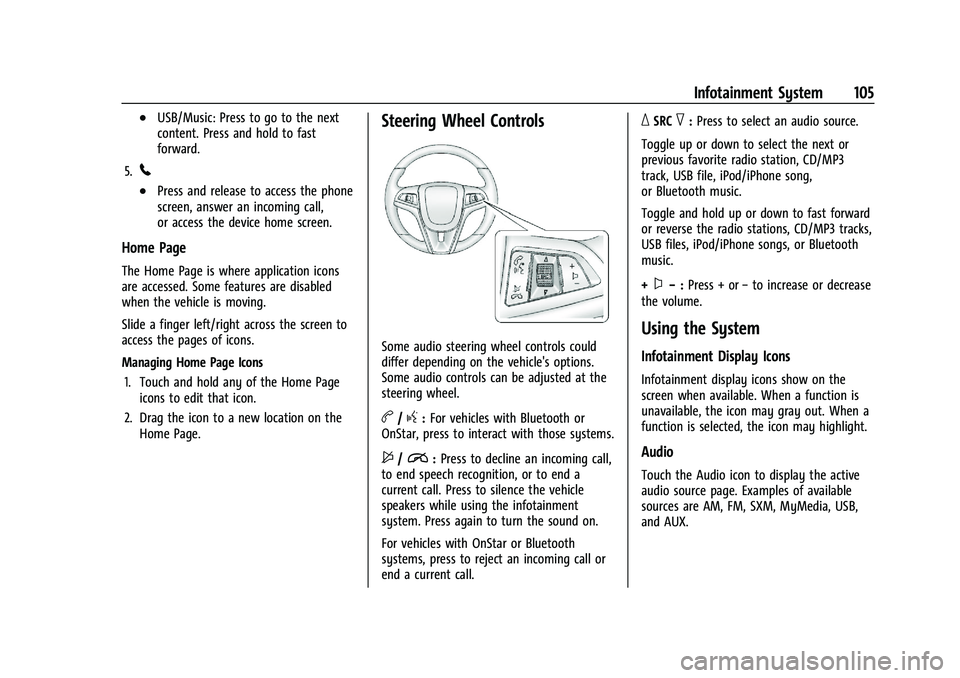
Steering Wheel Controls
Some audio steering wheel controls could
differ depending on the vehicle's options.
Some audio controls can be adjusted at the
steering wheel.
b/g:For vehicles with Bluetooth or
OnStar, press to interact with those systems.
$/i: Press to decline an incoming call,
to end speech recognition, or to end a
current call. Press to silence the vehicle
speakers while using the infotainment
system. Press again to turn the sound on.
For vehicles with OnStar or Bluetooth
systems, press to reject an incoming call or
end a current call.
_SRC^: Press to select an audio source.
Toggle up or down to select the next or
previous favorite radio station, CD/MP3
track, USB file, iPod/iPhone song,
or Bluetooth music.
Toggle and hold up or down to fast forward
or reverse the radio stations, CD/MP3 tracks,
USB files, iPod/iPhone songs, or Bluetooth
music.
+
x− :Press + or −to increase or decrease
the volume.
Using the System
Infotainment Display Icons
Infotainment display icons show on the
screen when available. When a function is
unavailable, the icon may gray out. When a
function is selected, the icon may highlight.
Audio
Touch the Audio icon to display the active
audio source page. Examples of available
sources are AM, FM, SXM, MyMedia, USB,
and AUX.