seats CHEVROLET TRAX 2021 Service Manual
[x] Cancel search | Manufacturer: CHEVROLET, Model Year: 2021, Model line: TRAX, Model: CHEVROLET TRAX 2021Pages: 280, PDF Size: 8.76 MB
Page 68 of 280
Chevrolet TRAX Owner Manual (GMNA-Localizing-U.S./Canada-14609828) -
2021 - CRC - 8/21/20
Seats and Restraints 67
Head Restraint Removal and
Reinstallation
The rear outboard head restraints can be
removed if they interfere with the proper
installation of the child restraint.
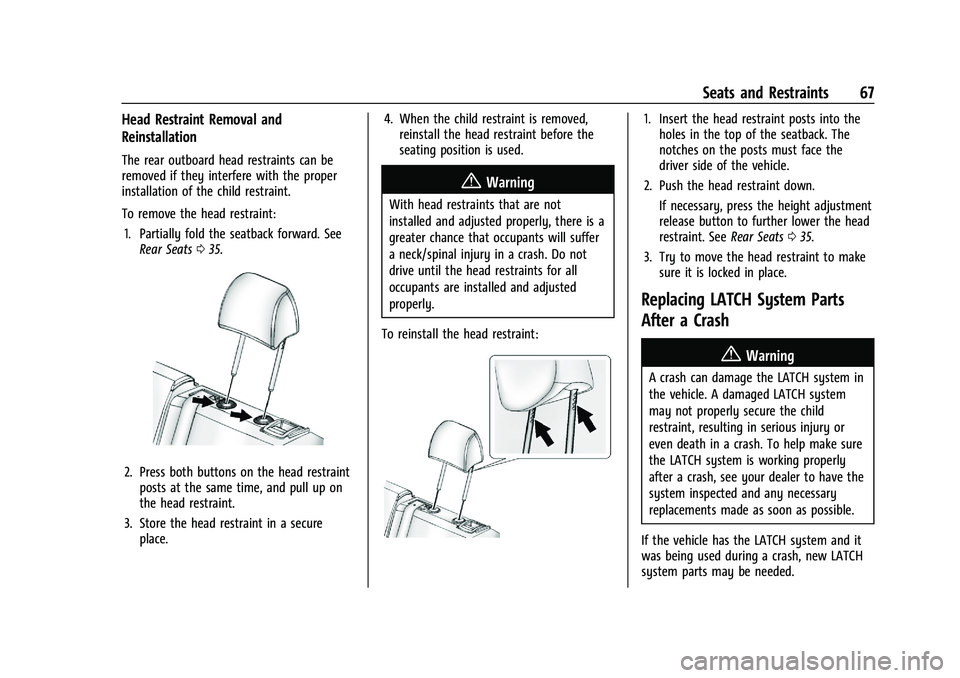
To remove the head restraint:1. Partially fold the seatback forward. See Rear Seats 035.
2. Press both buttons on the head restraint
posts at the same time, and pull up on
the head restraint.
3. Store the head restraint in a secure place. 4. When the child restraint is removed,
reinstall the head restraint before the
seating position is used.
{Warning
With head restraints that are not
installed and adjusted properly, there is a
greater chance that occupants will suffer
a neck/spinal injury in a crash. Do not
drive until the head restraints for all
occupants are installed and adjusted
properly.
To reinstall the head restraint:
1. Insert the head restraint posts into the holes in the top of the seatback. The
notches on the posts must face the
driver side of the vehicle.
2. Push the head restraint down.
If necessary, press the height adjustment
release button to further lower the head
restraint. See Rear Seats035.
3. Try to move the head restraint to make sure it is locked in place.
Replacing LATCH System Parts
After a Crash
{Warning
A crash can damage the LATCH system in
the vehicle. A damaged LATCH system
may not properly secure the child
restraint, resulting in serious injury or
even death in a crash. To help make sure
the LATCH system is working properly
after a crash, see your dealer to have the
system inspected and any necessary
replacements made as soon as possible.
If the vehicle has the LATCH system and it
was being used during a crash, new LATCH
system parts may be needed.
Page 69 of 280
Chevrolet TRAX Owner Manual (GMNA-Localizing-U.S./Canada-14609828) -
2021 - CRC - 8/21/20
68 Seats and Restraints
New parts and repairs may be necessary
even if the LATCH system was not being
used at the time of the crash.
Securing Child Restraints (With
the Seat Belt in the Rear Seat)
When securing a child restraint with the
seat belts in a rear seat position, study the
instructions that came with the child
restraint to make sure it is compatible with
this vehicle.
If the child restraint has the LATCH system,
seeLower Anchors and Tethers for Children
(LATCH System) 061 for how and where to
install the child restraint using LATCH. If a
child restraint is secured in the vehicle using
a seat belt and it uses a top tether, see
Lower Anchors and Tethers for Children
(LATCH System) 061 for top tether anchor
locations.
Do not secure a child seat in a position
without a top tether anchor if a national or
local law requires that the top tether be
anchored, or if the instructions that come
with the child restraint say that the top
tether must be anchored. In Canada, the law requires that
forward-facing child restraints have a top
tether and that the tether be attached.
If the child restraint or vehicle seat position
does not have the LATCH system, you will
be using the seat belt to secure the child
restraint. Be sure to follow the instructions
that came with the child restraint.
If more than one child restraint needs to be
installed in the rear seat, be sure to read
Where to Put the Restraint
060.
1. Put the child restraint on the seat. For outboard second row seating
positions, remove the seat belt from the
guide. Do not secure the child restraint
with the seat belt routed through the
guide.
When installing a rear-facing child
restraint, it may be necessary to move
the front seat forward to properly install
the child restraint per the child restraint
manufacturer instructions.
If the head restraint interferes with the
proper installation of the child restraint,
the head restraint may be removed. See
"Head Restraint Removal and
Reinstallation" under Lower Anchors and
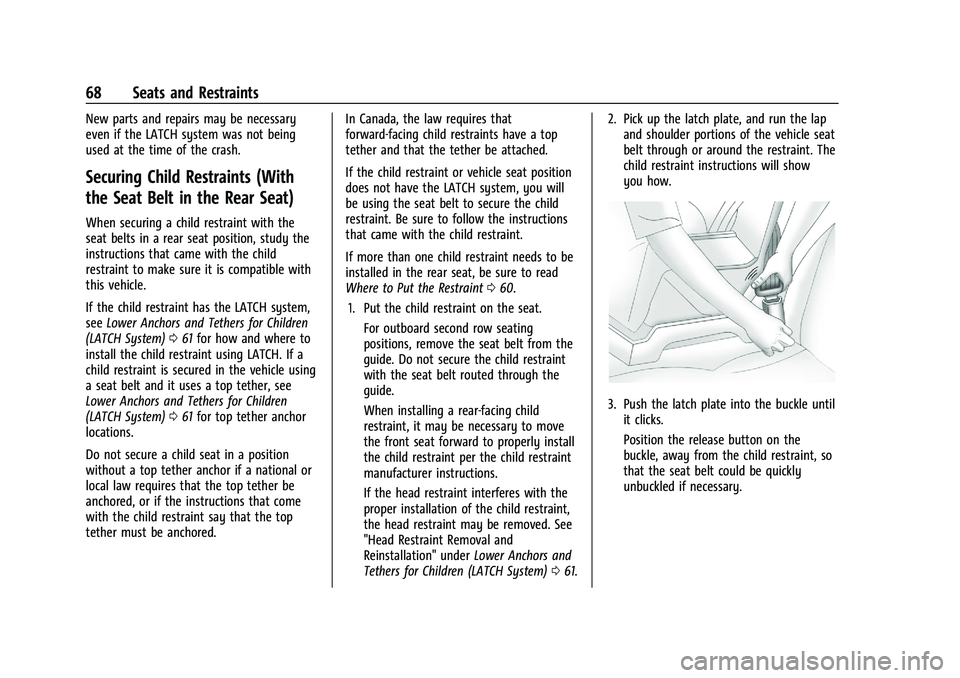
Tethers for Children (LATCH System) 061. 2. Pick up the latch plate, and run the lap
and shoulder portions of the vehicle seat
belt through or around the restraint. The
child restraint instructions will show
you how.
3. Push the latch plate into the buckle untilit clicks.
Position the release button on the
buckle, away from the child restraint, so
that the seat belt could be quickly
unbuckled if necessary.
Page 70 of 280
Chevrolet TRAX Owner Manual (GMNA-Localizing-U.S./Canada-14609828) -
2021 - CRC - 8/21/20
Seats and Restraints 69
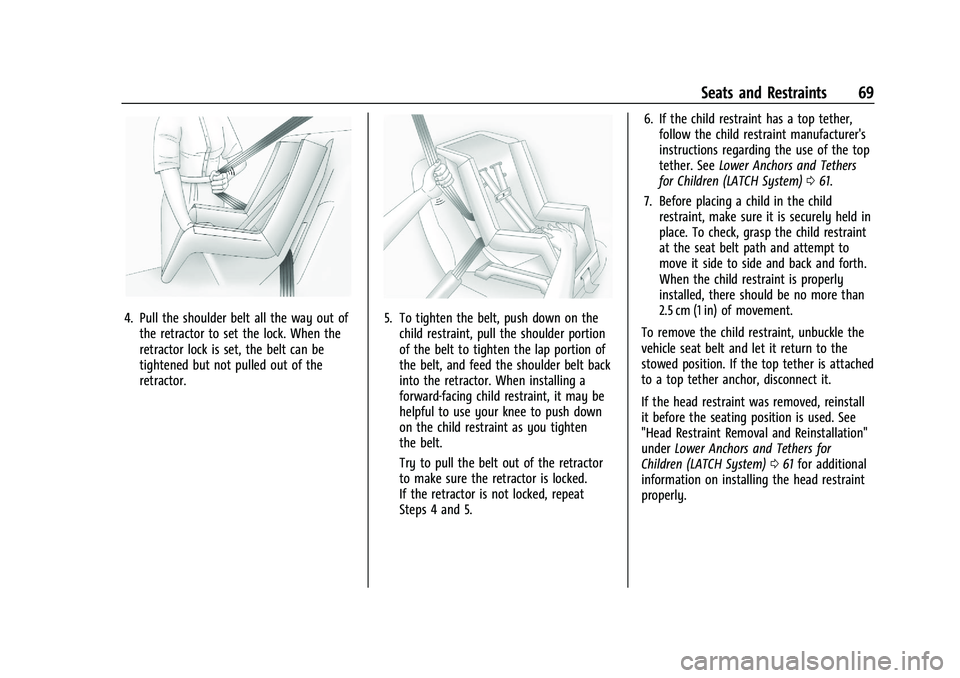
4. Pull the shoulder belt all the way out ofthe retractor to set the lock. When the
retractor lock is set, the belt can be
tightened but not pulled out of the
retractor.5. To tighten the belt, push down on thechild restraint, pull the shoulder portion
of the belt to tighten the lap portion of
the belt, and feed the shoulder belt back
into the retractor. When installing a
forward-facing child restraint, it may be
helpful to use your knee to push down
on the child restraint as you tighten
the belt.
Try to pull the belt out of the retractor
to make sure the retractor is locked.
If the retractor is not locked, repeat
Steps 4 and 5. 6. If the child restraint has a top tether,
follow the child restraint manufacturer's
instructions regarding the use of the top
tether. See Lower Anchors and Tethers
for Children (LATCH System) 061.
7. Before placing a child in the child restraint, make sure it is securely held in
place. To check, grasp the child restraint
at the seat belt path and attempt to
move it side to side and back and forth.
When the child restraint is properly
installed, there should be no more than
2.5 cm (1 in) of movement.
To remove the child restraint, unbuckle the
vehicle seat belt and let it return to the
stowed position. If the top tether is attached
to a top tether anchor, disconnect it.
If the head restraint was removed, reinstall
it before the seating position is used. See
"Head Restraint Removal and Reinstallation"
under Lower Anchors and Tethers for
Children (LATCH System) 061 for additional
information on installing the head restraint
properly.
Page 71 of 280
Chevrolet TRAX Owner Manual (GMNA-Localizing-U.S./Canada-14609828) -
2021 - CRC - 8/21/20
70 Seats and Restraints
Securing Child Restraints (With
the Seat Belt in the Front Seat)
This vehicle has airbags. A rear seat is a
safer place to secure a forward-facing child
restraint. SeeWhere to Put the Restraint
0 60.
In addition, the vehicle has a passenger
sensing system which is designed to turn off
the front outboard passenger frontal airbag
and knee airbag under certain conditions.
See Passenger Sensing System 050 and
Passenger Airbag Status Indicator 083 for
more information, including important
safety information.
Never put a rear-facing child seat in the
front. This is because the risk to the
rear-facing child is so great if the airbag
deploys.
{Warning
A child in a rear-facing child restraint can
be seriously injured or killed if the front
outboard passenger frontal airbag
inflates. This is because the back of the
rear-facing child restraint would be very
close to the inflating airbag. A child in a
(Continued)
Warning (Continued)
forward-facing child restraint can be
seriously injured or killed if the front
outboard passenger frontal airbag inflates
and the passenger seat is in a forward
position.
Even if the passenger sensing system has
turned off the front outboard passenger
airbag(s), no system is fail-safe. No one
can guarantee that an airbag will not
deploy under some unusual circumstance,
even though the airbag(s) are off.
Secure rear-facing child restraints in a
rear seat, even if the airbag(s) are off.
If you secure a forward-facing child
restraint in the front outboard passenger
seat, always move the seat as far back as
it will go. It is better to secure the child
restraint in a rear seat.
SeePassenger Sensing System 050 for
additional information.
If the child restraint uses a top tether, see
Lower Anchors and Tethers for Children
(LATCH System) 061 for top tether anchor
locations. Do not secure a child seat in a position
without a top tether anchor if a national or
local law requires that the top tether be
anchored, or if the instructions that come
with the child restraint say that the top
tether must be anchored.
In Canada, the law requires that
forward-facing child restraints have a top
tether, and that the tether be attached.
When using the lap-shoulder belt to secure
the child restraint in this position, follow the
instructions that came with the child
restraint and the following instructions:
1. Move the seat as far back as it will go before securing the forward-facing child
restraint. Move the seat upward or the
seatback to an upright position,
if needed, to get a tight installation of
the child restraint.
When the passenger sensing system has
turned off the front outboard passenger
frontal airbag and knee airbag, the OFF
indicator on the passenger airbag status
indicator should light and stay lit when
the vehicle is started. See Passenger
Airbag Status Indicator 083.
2. Put the child restraint on the seat.
Page 72 of 280
Chevrolet TRAX Owner Manual (GMNA-Localizing-U.S./Canada-14609828) -
2021 - CRC - 8/21/20
Seats and Restraints 71
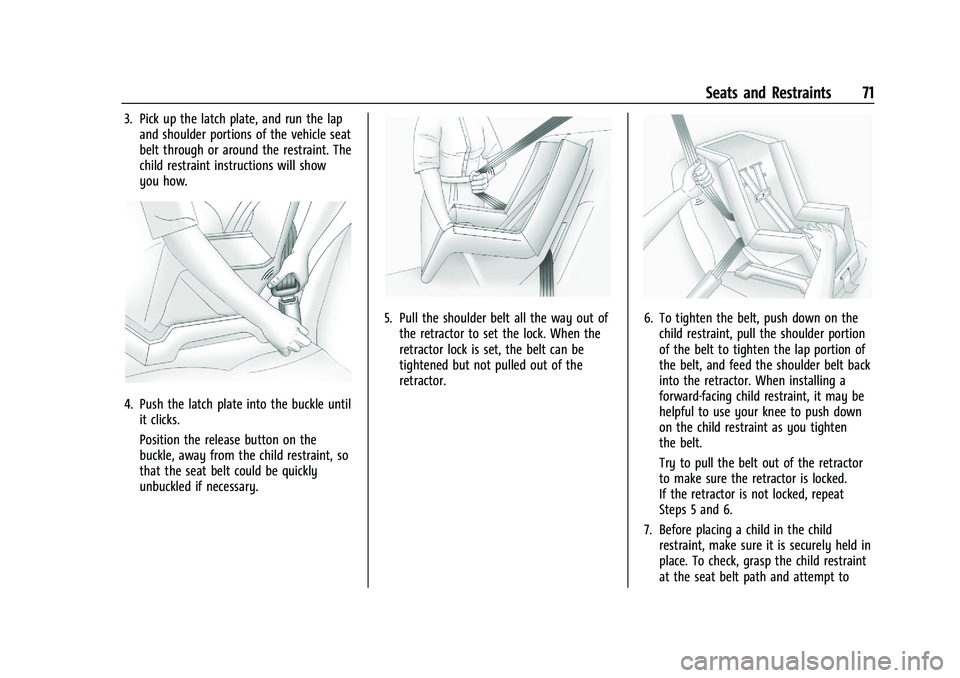
3. Pick up the latch plate, and run the lapand shoulder portions of the vehicle seat
belt through or around the restraint. The
child restraint instructions will show
you how.
4. Push the latch plate into the buckle untilit clicks.
Position the release button on the
buckle, away from the child restraint, so
that the seat belt could be quickly
unbuckled if necessary.
5. Pull the shoulder belt all the way out ofthe retractor to set the lock. When the
retractor lock is set, the belt can be
tightened but not pulled out of the
retractor.6. To tighten the belt, push down on thechild restraint, pull the shoulder portion
of the belt to tighten the lap portion of
the belt, and feed the shoulder belt back
into the retractor. When installing a
forward-facing child restraint, it may be
helpful to use your knee to push down
on the child restraint as you tighten
the belt.
Try to pull the belt out of the retractor
to make sure the retractor is locked.
If the retractor is not locked, repeat
Steps 5 and 6.
7. Before placing a child in the child restraint, make sure it is securely held in
place. To check, grasp the child restraint
at the seat belt path and attempt to
Page 73 of 280
Chevrolet TRAX Owner Manual (GMNA-Localizing-U.S./Canada-14609828) -
2021 - CRC - 8/21/20
72 Seats and Restraints
move it side to side and back and forth.
When the child restraint is properly
installed, there should be no more than
2.5 cm (1 in) of movement.
If the airbags are off, the OFF indicator in
the passenger airbag status indicator will
come on and stay on when the vehicle is
started. If a child restraint has been installed
and the ON indicator is lit, see “If the On
Indicator Is Lit for a Child Restraint” under
Passenger Sensing System 050.
To remove the child restraint, unbuckle the
vehicle seat belt and let it return to the
stowed position.
Page 95 of 280

Chevrolet TRAX Owner Manual (GMNA-Localizing-U.S./Canada-14609828) -
2021 - CRC - 8/21/20
94 Instruments and Controls
Rear Camera Park Assist Symbols
This setting enables the Rear Camera Park
Assist Symbols. SeePark Assist0158.
Touch Off or On.
Rear Cross Traffic Alert
This allows the feature to be turned on or
off. See Rear Vision Camera (RVC) 0157.
Touch Off or On.
Side Blind Zone Alert
This allows the feature to be turned on or
off. See Side Blind Zone Alert (SBZA) 0159.
Touch Off or On.
Comfort and Convenience
Touch and the following may display:
.Chime Volume
.Auto Wipe in Reverse Gear
Chime Volume
This setting determines the chime volume
level.
Touch the controls to adjust the volume. Auto Wipe in Reverse Gear
This setting automatically turns on the rear
window wiper when the vehicle is in
R (Reverse) and the front wipers are on.
Touch Off or On.
Lighting
Touch and the following may display:
.Vehicle Locator Lights
.Exit Lighting
Vehicle Locator Lights
This setting flashes the headlamps when
you press
Kon the Remote Keyless Entry
(RKE) transmitter.
Touch Off or On.
Exit Lighting
This setting specifies how long the
headlamps stay on after you have turned
off and exited your vehicle.
Touch Off, 30 Seconds, 60 Seconds,
or 120 Seconds.
Power Door Locks
Touch and the following may display:
.Open Door Anti Lock Out
.Auto Door Unlock
.Delayed Door Lock
Open Door Anti Lock Out
This setting prevents the driver door from
locking when the door is open. If this
setting is on, the Delayed Door Lock menu
will not be available.
Touch Off or On.
Auto Door Unlock
This setting allows you to select which
doors will automatically unlock when the
vehicle is shifted into P (Park).
Touch Off, All Doors, or Driver Door.
Delayed Door Lock
This setting delays the locking of the
vehicle’s doors.
Touch Off or On.
Remote Lock, Unlock, and Start
Touch and the following may display:
.Remote Unlock Light Feedback
.Remote Lock Feedback
.Remote Door Unlock
.Remote Start Auto Heat Seats
.Passive Door Unlock
.Passive Door Lock
Page 96 of 280
Chevrolet TRAX Owner Manual (GMNA-Localizing-U.S./Canada-14609828) -
2021 - CRC - 8/21/20
Instruments and Controls 95
.Remote Left in Vehicle Alert
Remote Unlock Light Feedback
This setting flashes the exterior lamps when
you remotely unlock the vehicle.
Touch Off or Flash Lights.
Remote Lock Feedback
This setting specifies how the vehicle
responds when you remotely lock the
vehicle.
Touch Off, Lights and Horn, Lights Only,
or Horn Only.
Remote Door Unlock
This setting specifies whether all doors,
or just the driver door, unlock when pressing
Kon the RKE transmitter.
Touch All Doors or Driver Door.
Remote Start Auto Heat Seats
This setting automatically turns on the
heated seats when using the remote start
function on cold days. See Heated Front
Seats 033 and
Remote Vehicle Start 017.
Touch Off or On. Passive Door Unlock
This setting specifies which doors unlock
when using the button on the driver door
handle to unlock the vehicle.
Touch All Doors or Driver Door Only.
Passive Door Lock
This setting specifies whether the vehicle
will automatically lock, or lock and alert you
after all the doors are closed, and you walk
away from the vehicle with the RKE
transmitter. See
Remote Keyless Entry (RKE)
System Operation (Key Access) 09or
Remote Keyless Entry (RKE) System
Operation (Keyless Access) 012.
Touch Off, On with Horn Chirp, or On.
Remote Left in Vehicle Alert
This feature sounds an alert when the RKE
transmitter is left in the vehicle. This menu
also enables Remote No Longer in Vehicle
Alert.
Touch Off or On.
Valet Mode
This will lock the infotainment system and
steering wheel controls. It may also limit
access to vehicle storage locations,
if equipped. To enable valet mode:
1. Enter a four-digit code on the keypad.
2. Touch Enter to go to the confirmation screen.
3. Re-enter the four-digit code.
Touch Lock or Unlock to lock or unlock the
system. Touch Back to go back to the
previous menu.
Page 100 of 280

Chevrolet TRAX Owner Manual (GMNA-Localizing-U.S./Canada-14609828) -
2021 - CRC - 8/21/20
Lighting 99
Courtesy Lamps
The courtesy lamps come on automatically
when any door is opened and the dome
lamp is in the door position.
Dome Lamps
Front and Rear Dome Lamps
The front dome lamp controls are in the
overhead console.
(:Press to turn the lamps off, even when
a door is open.
H: When the button is returned to the
middle position, the lamps turn on
automatically when a door is opened.
': Press to turn on the dome lamps.
The rear dome lamp controls are in the
headliner above the rear seats.
9:Press to turn the lamps off, even when
a door is open.
H: When the button is returned to the
middle position, the lamps turn on
automatically when a door is opened.
R: Press to turn on the dome lamps.
Reading Lamps
The front reading lamps are in the overhead
console.
#or$: Press to turn each lamp on
or off.
Lighting Features
Entry Lighting
Some exterior lamps and interior lamps turn
on briefly at night, or in areas with limited
lighting, when
Kis pressed on the Remote
Keyless Entry (RKE) transmitter. When a
door is opened, the interior lamps come on.
They stay on for about 20 seconds. When all
Page 101 of 280
Chevrolet TRAX Owner Manual (GMNA-Localizing-U.S./Canada-14609828) -
2021 - CRC - 8/21/20
100 Lighting
of the doors have been closed or the
ignition is turned on, they gradually
fade out.
This feature can be changed. See“Vehicle
Locator Lights” underVehicle Personalization
0 93.
Exit Lighting
Some exterior lamps and interior lamps
come on when the key is removed from the
ignition. The exterior and interior lamps
remain on for a set amount of time, then
automatically turn off.
If equipped with Keyless Access, the exterior
lamps automatically turn on when the driver
door is opened after the ignition is turned
off. The interior lights turn on when the
ignition is turned off.
The exterior lamps turn off immediately by
turning the exterior lamp control off.
This feature can be changed. See Vehicle
Personalization 093.
Battery Load Management
The vehicle has Electric Power Management
(EPM) that estimates the battery's
temperature and state of charge. It then
adjusts the voltage for best performance
and extended life of the battery.
When the battery's state of charge is low,
the voltage is raised slightly to quickly bring
the charge back up. When the state of
charge is high, the voltage is lowered
slightly to prevent overcharging. If the
vehicle has a voltmeter gauge or a voltage
display on the Driver Information Center
(DIC), you may see the voltage move up or
down. This is normal. If there is a problem,
an alert will be displayed.
The battery can be discharged at idle if the
electrical loads are very high. This is true for
all vehicles. This is because the generator
(alternator) may not be spinning fast
enough at idle to produce all the power
needed for very high electrical loads.
A high electrical load occurs when several of
the following are on, such as: headlamps,
high beams, fog lamps, rear window
defogger, climate control fan at high speed, heated seats, engine cooling fans, trailer
loads, and loads plugged into accessory
power outlets.
EPM works to prevent excessive discharge of
the battery. It does this by balancing the
generator's output and the vehicle's
electrical needs. It can increase engine idle
speed to generate more power, whenever
needed. It can temporarily reduce the power
demands of some accessories.
Normally, these actions occur in steps or
levels, without being noticeable. In rare
cases at the highest levels of corrective
action, this action may be noticeable to the
driver.
Battery Power Protection
The battery saver feature protects against
draining the vehicle's battery.
If some interior lamps or the manual
parking lamps or headlamps are left on and
the ignition is turned off, the battery
rundown protection system automatically
turns the lamp off after some time.
To restart the 10-minute timer, turn the
exterior lamp control to the
Oposition and
then back to the
;or5position. To