seats CHEVROLET TRAX 2024 Workshop Manual
[x] Cancel search | Manufacturer: CHEVROLET, Model Year: 2024, Model line: TRAX, Model: CHEVROLET TRAX 2024Pages: 328, PDF Size: 7.3 MB
Page 114 of 328

Chevrolet TRAX Owner Manual (GMNA-Localizing-U.S./Canada/Mexico-
17041293) - 2024 - CRC - 12/2/22
Lighting 113
Lighting Features
Entry Lighting
The interior lamps turn on when pressingK
on the remote key or opening any doors,
and the dome lamp control is in the door
position.
Some exterior lamps also turn on when
pressing
Kon the remote key or opening
any doors. Low-Beam lamps will only turn
on briefly at night, or in areas with limited
lighting.
All lamps will gradually fade out after about
30 seconds.
Entry lighting can be disabled manually by
closing all doors, pressing
Qon the remote
key, or starting the vehicle.
This feature can be changed. On the
infotainment home page, select Settings
T
VehicleTVehicle Locator Lights.
Exit Lighting
Some exterior lamps and interior lamps turn
on when the driver door is opened after the
vehicle is turned off. The exterior and interior lamps remain on
for a set amount of time, then automatically
turn off.
The interior lights turn on when the vehicle
is turned off.
The exterior lamps turn off immediately by
turning the exterior lamp control off.
This feature can be changed. On the
infotainment home screen, select Settings
T
VehicleTExit Lighting.
Battery Load Management
The vehicle has Electric Power Management
(EPM) that estimates the battery's
temperature and state of charge. It then
adjusts the voltage for best performance
and extended life of the battery.
When the battery's state of charge is low,
the voltage is raised slightly to quickly bring
the charge back up. When the state of
charge is high, the voltage is lowered
slightly to prevent overcharging. If the
vehicle has a voltmeter gauge or a voltage
display on the Driver Information Center
(DIC), you may see the voltage move up or
down. This is normal. If there is a problem,
an alert will be displayed.The battery can be discharged at idle if the
electrical loads are very high. This is true for
all vehicles. This is because the generator
(alternator) may not be spinning fast
enough at idle to produce all the power
needed for very high electrical loads.
A high electrical load occurs when several of
the following are on, such as: headlamps,
high beams, fog lamps, rear window
defogger, climate control fan at high speed,
heated seats, engine cooling fans, trailer
loads, and loads plugged into accessory
power outlets.
EPM works to prevent excessive discharge of
the battery. It does this by balancing the
generator's output and the vehicle's
electrical needs. It can increase engine idle
speed to generate more power, whenever
needed. It can temporarily reduce the power
demands of some accessories.
Normally, these actions occur in steps or
levels, without being noticeable. In rare
cases at the highest levels of corrective
action, this action may be noticeable to the
driver.
Page 142 of 328
Chevrolet TRAX Owner Manual (GMNA-Localizing-U.S./Canada/Mexico-
17041293) - 2024 - CRC - 12/2/22
Infotainment System 141
FM
FM signals only reach about 16 to 65 km
(10 to 40 mi). Although the radio has a
built-in electronic circuit that automatically
works to reduce interference, some static
can occur, especially around tall buildings or
hills, causing the sound to fade in and out.
AM
The range for most AM stations is greater
than for FM, especially at night. The longer
range can cause station frequencies to
interfere with each other. Static can also
occur when things like storms and power
lines interfere with radio reception. When
this happens, try reducing the treble on the
radio.
SiriusXM Satellite Radio Service
If equipped, SiriusXM Satellite Radio Service
provides digital radio reception. Tall
buildings or hills can interfere with satellite
radio signals, causing the sound to fade in
and out. In addition, traveling or standing
under heavy foliage, bridges, garages,
or tunnels may cause loss of the SiriusXM
signal for a period of time. Some cellular
services may interfere with SXM reception
causing loss of signal.
Mobile Device Usage
Mobile device usage, such as making or
receiving calls, charging, or just having the
mobile device on may cause static
interference in the radio. Unplug the mobile
device or turn it off if this happens.
Multi-Band Antenna (8 inch
screen radio)
The multi-band roof antenna may be used
for radio, navigation, and other
communication systems, depending on the
equipped options. To ensure clear reception,
keep the antenna clear of obstructions, such
as snow and ice. If the vehicle has a
sunroof, and it is open, or a roof loaded
with cargo, reception may be affected.
Audio Players
Avoiding Untrusted Media Devices
(8 inch screen radio)
When using media devices such as USB and
mobile devices, consider the source.
Untrusted media devices could contain files
that affect system operation or performance
and should be avoided.
USB Port (8 inch screen radio)
Audio stored on a USB device may be
listened to.
Depending on your vehicle, it may be
equipped with two USB ports in the center
console under the armrest and another two
on the center stack. These ports are for data
and charging. There may also be two USB
ports at the rear of the center console and a
USB port on each side of the third row seats
for charging only.
Caution
To avoid vehicle damage, unplug all
accessories and disconnect all accessory
cables from the vehicle when not in use.
Accessory cables left plugged into the
vehicle, unconnected to a device, could be
damaged or cause an electrical short if
the unconnected end comes in contact
with liquids or another power source such
as the accessory power outlet.
Playing from a USB
A USB mass storage device can be connected
to the USB port.
Page 161 of 328
Chevrolet TRAX Owner Manual (GMNA-Localizing-U.S./Canada/Mexico-
17041293) - 2024 - CRC - 12/2/22
160 Climate Controls
Automatic Climate Control System
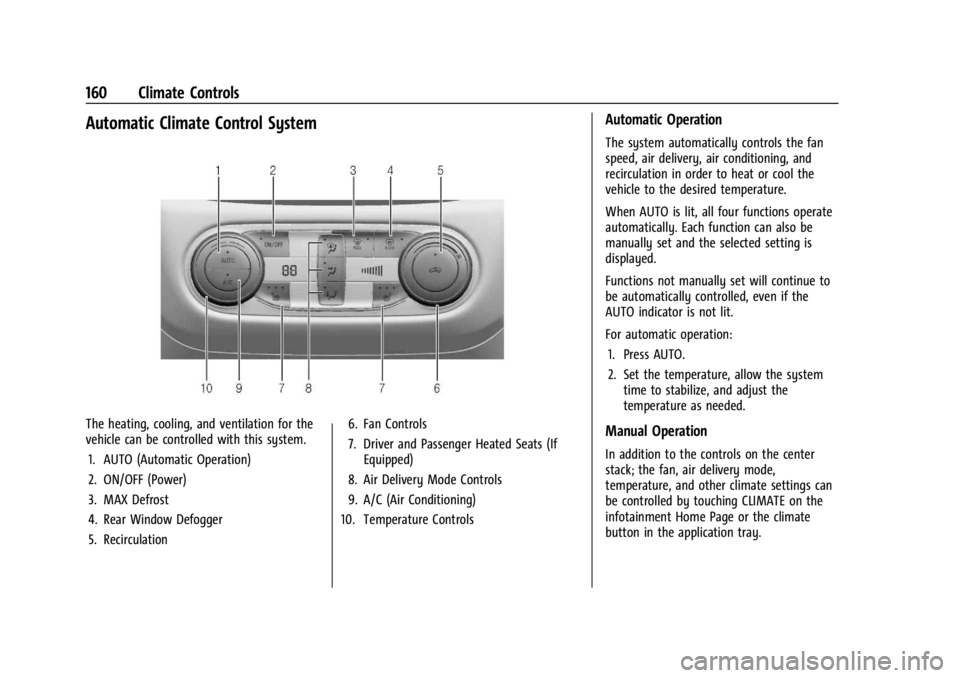
The heating, cooling, and ventilation for the
vehicle can be controlled with this system.1. AUTO (Automatic Operation)
2. ON/OFF (Power)
3. MAX Defrost
4. Rear Window Defogger
5. Recirculation 6. Fan Controls
7. Driver and Passenger Heated Seats (If
Equipped)
8. Air Delivery Mode Controls
9. A/C (Air Conditioning)
10. Temperature Controls
Automatic Operation
The system automatically controls the fan
speed, air delivery, air conditioning, and
recirculation in order to heat or cool the
vehicle to the desired temperature.
When AUTO is lit, all four functions operate
automatically. Each function can also be
manually set and the selected setting is
displayed.
Functions not manually set will continue to
be automatically controlled, even if the
AUTO indicator is not lit.
For automatic operation:
1. Press AUTO.
2. Set the temperature, allow the system time to stabilize, and adjust the
temperature as needed.
Manual Operation
In addition to the controls on the center
stack; the fan, air delivery mode,
temperature, and other climate settings can
be controlled by touching CLIMATE on the
infotainment Home Page or the climate
button in the application tray.
Page 163 of 328

Chevrolet TRAX Owner Manual (GMNA-Localizing-U.S./Canada/Mexico-
17041293) - 2024 - CRC - 12/2/22
162 Climate Controls
To turn Auto Rear Defog off or on, select
Settings > Climate and Air Quality > Auto
Rear Defog > Select ON or OFF.
When auto rear defog is selected, the rear
window defogger turns on automatically
when the interior temperature is cold and
the outside temperature is about 5 °C (41 °F)
and below. The Auto Rear Defogger turns off
automatically.
If the vehicle is equipped with heated
outside mirrors, they turn on when the rear
window defogger button is on and help to
clear fog or frost from the surface of the
mirror. SeeHeated Mirrors 026
Caution
Do not try to clear frost or other material
from the inside of the front windshield
and rear window with a razor blade or
anything else that is sharp. This may
damage the rear window defogger grid
and affect the radio's ability to pick up
stations clearly. The repairs would not be
covered by the vehicle warranty.
MorL:If equipped, pressMorLto
heat the driver or passenger seat. See
Heated Front Seats 034. Remote Start Climate Control Operation
(If Equipped) :
If the vehicle is equipped
with the remote start feature, the climate
control system may run when the vehicle is
started remotely. The system uses the
driver’s previous settings to heat or cool the
inside of the vehicle. The rear defog may
come on during remote start based on cold
ambient conditions. If the vehicle has heated
seats, they may come on during a remote
start. See Remote Vehicle Start 018 and
Heated Front Seats 034.
Sensors
The solar sensor on top of the instrument
panel near the windshield monitors the solar
heat. The climate control system uses the
sensor information to adjust the
temperature, fan speed, recirculation, and air
delivery mode for best comfort.
Do not cover the sensor; otherwise the
automatic climate control system may not
work properly.
Afterblow Feature
If equipped, under certain conditions, the
fan may stay on or may turn on and off
several times after you turn off and lock the
vehicle. This is normal.
Air Vents
Use the louvers located on the air vents to
change the direction of the airflow.
To open or close off the airflow:
.Move slider knobs away from the
occupant for shut off closing.
Operation Tips
.Clear away any ice, snow, or leaves from
air inlets at the base of the windshield
that could block the flow of air into the
vehicle.
.Clear snow off the hood to improve
visibility and help decrease moisture
drawn into the vehicle, which may
improve long term system performance.
.Keep the path under the front seats clear
of objects to help circulate the air inside
of the vehicle more effectively.
.Use of non-GM approved hood deflectors
can adversely affect the performance of
the system. Check with your dealer
before adding equipment to the outside
of the vehicle.
.Do not attach any devices to the air vent
slats. This restricts airflow and may cause
damage to the air vents.
Page 175 of 328
Chevrolet TRAX Owner Manual (GMNA-Localizing-U.S./Canada/Mexico-
17041293) - 2024 - CRC - 12/6/22
174 Driving and Operating
Refer to your vehicle's Tire and Loading
Information label for specific
information about your vehicle's
capacity weight and seating positions.
The combined weight of the driver,
passengers, and cargo should never
exceed your vehicle's capacity weight.
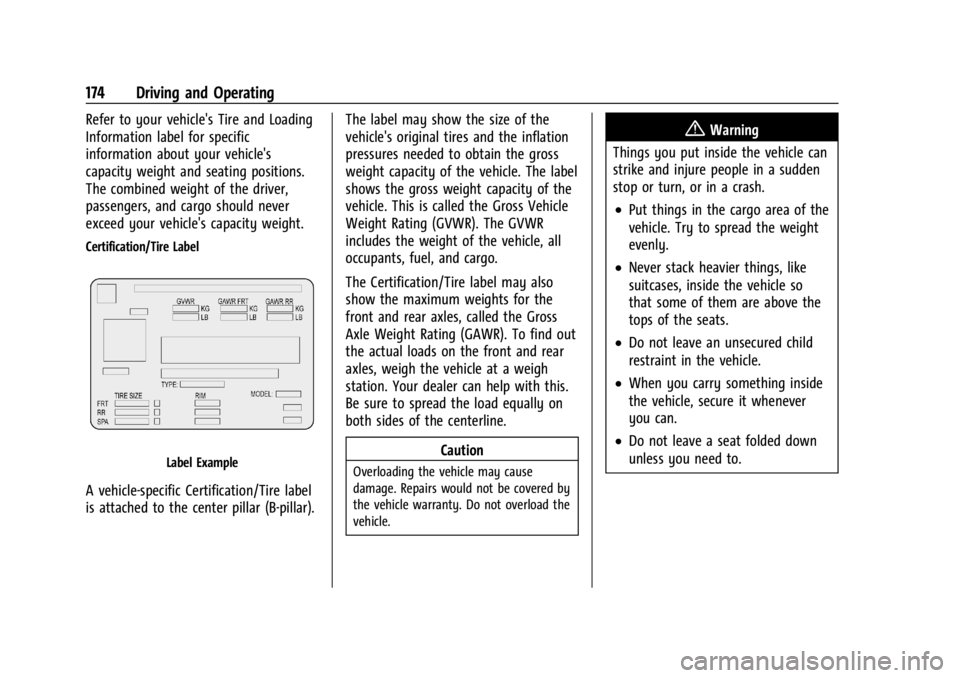
Certification/Tire Label
Label Example
A vehicle-specific Certification/Tire label
is attached to the center pillar (B-pillar).The label may show the size of the
vehicle's original tires and the inflation
pressures needed to obtain the gross
weight capacity of the vehicle. The label
shows the gross weight capacity of the
vehicle. This is called the Gross Vehicle
Weight Rating (GVWR). The GVWR
includes the weight of the vehicle, all
occupants, fuel, and cargo.
The Certification/Tire label may also
show the maximum weights for the
front and rear axles, called the Gross
Axle Weight Rating (GAWR). To find out
the actual loads on the front and rear
axles, weigh the vehicle at a weigh
station. Your dealer can help with this.
Be sure to spread the load equally on
both sides of the centerline.
Caution
Overloading the vehicle may cause
damage. Repairs would not be covered by
the vehicle warranty. Do not overload the
vehicle.
{Warning
Things you put inside the vehicle can
strike and injure people in a sudden
stop or turn, or in a crash.
.Put things in the cargo area of the
vehicle. Try to spread the weight
evenly.
.Never stack heavier things, like
suitcases, inside the vehicle so
that some of them are above the
tops of the seats.
.Do not leave an unsecured child
restraint in the vehicle.
.When you carry something inside
the vehicle, secure it whenever
you can.
.Do not leave a seat folded down
unless you need to.
Page 256 of 328
Chevrolet TRAX Owner Manual (GMNA-Localizing-U.S./Canada/Mexico-
17041293) - 2024 - CRC - 12/6/22
Vehicle Care 255
Warning (Continued)
places where the wheel attaches to
the vehicle. In an emergency, a cloth
or paper towel can be used; however,
use a scraper or wire brush later to
remove all rust or dirt.
Lightly coat the inner diameter of the
wheel hub opening with wheel bearing
grease after a wheel change or tire
rotation to prevent corrosion or rust
buildup.
{Warning
Do not apply grease to the wheel
mounting surface, wheel conical
seats, or the wheel nuts or bolts.
Grease applied to these areas could
cause a wheel to become loose or
come off, resulting in a crash.
When It Is Time for New Tires
Factors, such as maintenance, temperatures,
driving speeds, vehicle loading, and road
conditions affect the wear rate of the tires.
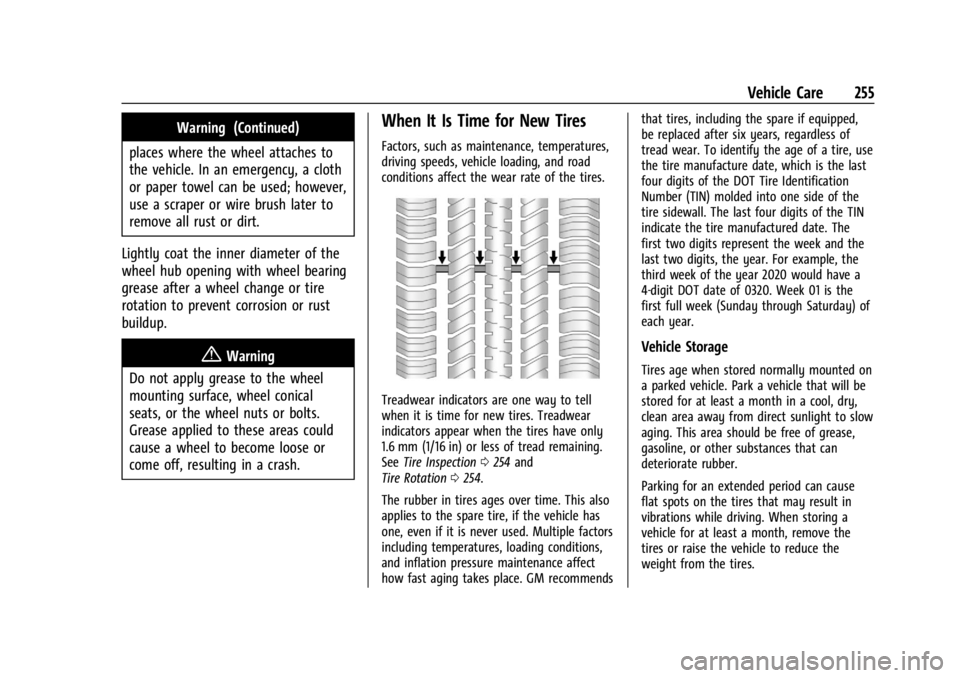
Treadwear indicators are one way to tell
when it is time for new tires. Treadwear
indicators appear when the tires have only
1.6 mm (1/16 in) or less of tread remaining.
See Tire Inspection 0254 and
Tire Rotation 0254.
The rubber in tires ages over time. This also
applies to the spare tire, if the vehicle has
one, even if it is never used. Multiple factors
including temperatures, loading conditions,
and inflation pressure maintenance affect
how fast aging takes place. GM recommends that tires, including the spare if equipped,
be replaced after six years, regardless of
tread wear. To identify the age of a tire, use
the tire manufacture date, which is the last
four digits of the DOT Tire Identification
Number (TIN) molded into one side of the
tire sidewall. The last four digits of the TIN
indicate the tire manufactured date. The
first two digits represent the week and the
last two digits, the year. For example, the
third week of the year 2020 would have a
4-digit DOT date of 0320. Week 01 is the
first full week (Sunday through Saturday) of
each year.
Vehicle Storage
Tires age when stored normally mounted on
a parked vehicle. Park a vehicle that will be
stored for at least a month in a cool, dry,
clean area away from direct sunlight to slow
aging. This area should be free of grease,
gasoline, or other substances that can
deteriorate rubber.
Parking for an extended period can cause
flat spots on the tires that may result in
vibrations while driving. When storing a
vehicle for at least a month, remove the
tires or raise the vehicle to reduce the
weight from the tires.
Page 285 of 328
Chevrolet TRAX Owner Manual (GMNA-Localizing-U.S./Canada/Mexico-
17041293) - 2024 - CRC - 12/6/22
284 Vehicle Care
Caution (Continued)
these surfaces after cleaning and allow
them to dry naturally. Never use heat,
steam, or spot removers. Do not use
liquids that contain alcohol or solvents on
leather seats. Do not use cleaners that
contain silicone or wax-based products.
Cleaners containing these solvents can
permanently change the appearance and
feel of leather or soft trim, and are not
recommended.
Do not use cleaners that increase gloss,
especially on the instrument panel. Reflected
glare can decrease visibility through the
windshield under certain conditions.
Caution
Use of air fresheners may cause
permanent damage to plastics and
painted surfaces. If an air freshener
comes in contact with any plastic or
painted surface in the vehicle, blot
immediately and clean with a soft cloth
dampened with a mild soap solution.
Damage caused by air fresheners would
not be covered by the vehicle warranty.
Cargo Cover and Convenience Net
If equipped, wash with warm water and
mild detergent. Do not use chlorine bleach.
Rinse with cold water, and then dry
completely.
Care of Seat Belts
Keep belts clean and dry.
{Warning
Do not bleach or dye seat belt webbing.
It may severely weaken the webbing. In
a crash, they might not be able to
provide adequate protection. Clean and
rinse seat belt webbing only with mild
soap and lukewarm water. Allow the
webbing to dry.
Floor Mats
{Warning
If a floor mat is the wrong size or is not
properly installed, it can interfere with
the pedals. Interference with the pedals
can cause unintended acceleration and/or
increased stopping distance which can (Continued)
Warning (Continued)
cause a crash and injury. Make sure the
floor mat does not interfere with the
pedals.
Use the following guidelines for proper floor
mat use.
.The original equipment floor mats are
designed for your vehicle. If the floor
mats need to be replaced, it is
recommended that GM-certified floor
mats are purchased. Non-GM floor mats
may not fit properly and may interfere
with the pedals. Always check that the
floor mats do not interfere with the
pedals.
.Do not use a floor mat if the vehicle is
not equipped with a floor mat retainer on
the driver side floor.
.Use the floor mat with the correct side
up. Do not turn it over.
.Do not place anything on top of the
driver side floor mat.
.Use only a single floor mat on the
driver side.
.Do not place one floor mat on top of
another.
Page 317 of 328

Chevrolet TRAX Owner Manual (GMNA-Localizing-U.S./Canada/Mexico-
17041293) - 2024 - CRC - 12/2/22
316 Index
IndexA
About Driving the Vehicle . . . . . . . . . . . . . . . . . .2
Accessories and Modifications . . . . . . . . . . . 216
Accessory Power . . . . . . . . . . . . . . . . . . . . . . . . . . 181
AdaptiveCruise Control . . . . . . . . . . . . . . . . . . . . 100, 192
Add-On Electrical Equipment . . . . . . . . . . . . . .214
Additional OnStar Information . . . . . . . . . . . . . . . . . . . . 310
Adjustments
Lumbar, Front Seats . . . . . . . . . . . . . . . . . . . . 34
Advanced Driver Assistance Systems . . . . . . . . . . . . . 200
Agreements
Trademarks and License . . . . . . . . . . . 133, 155
Air Cleaner/Filter, Engine . . . . . . . . . . . . . . . . . . 223
Conditioning . . . . . . . . . . . . . . . . . . . . . . . . . . . 160
Filter Life System . . . . . . . . . . . . . . . . . . . . . . 223
Filter, Passenger Compartment . . . . . . . . 163
Vents . . . . . . . . . . . . . . . . . . . . . . . . . . . . . . . . . . 162
Air Conditioning . . . . . . . . . . . . . . . . . . . . . . . . . .158
Airbag System . . . . . . . . . . . . . . . . . . . . . . . . . . . . 45 Check . . . . . . . . . . . . . . . . . . . . . . . . . . . . . . . . . . . 54
How Does an Airbag Restrain? . . . . . . . . . . 48
Passenger Sensing System . . . . . . . . . . . . . . 49
What Makes an Airbag Inflate? . . . . . . . . . 48 Airbag System (cont'd)
What Will You See after an Airbag
Inflates? . . . . . . . . . . . . . . . . . . . . . . . . . . . . . . 48
When Should an Airbag Inflate? . . . . . . . . 47
Where Are the Airbags? . . . . . . . . . . . . . . . . 46
Airbags Adding Equipment to the Vehicle . . . . . . . 53
Passenger Status Indicator . . . . . . . . . . . . . . 92
Readiness Light . . . . . . . . . . . . . . . . . . . . . . . . . 91
Replacing System Parts after a
Crash . . . . . . . . . . . . . . . . . . . . . . . . . . . . . . . . . 54
Servicing Airbag-Equipped Vehicles . . . . . . 53
Alarm Vehicle Security . . . . . . . . . . . . . . . . . . . . . . . . 24
Alert Lane Change (LCA) . . . . . . . . . . . . . . . . . . . . . 208
Rear Cross Traffic . . . . . . . . . . . . . . . . . . . . . . 202
Side Blind Zone (SBZA) . . . . . . . . . . . . . . . . . 208
All-Season Tires . . . . . . . . . . . . . . . . . . . . . . . . . . 243
AM-FM Radio . . . . . . . . . . . . . . . . . . . . . . . . 119, 138
Antenna Multi-band . . . . . . . . . . . . . . . . . . . . . . . . . 121, 141
Antilock Brake System (ABS) . . . . . . . . . . . . . 186 Warning Light . . . . . . . . . . . . . . . . . . . . . . . . . . 95
Appearance Care Exterior . . . . . . . . . . . . . . . . . . . . . . . . . . . . . . . . 277
Interior . . . . . . . . . . . . . . . . . . . . . . . . . . . . . . . . 281
Apple CarPlay and Android Auto . . . . . 127, 149
Page 321 of 328

Chevrolet TRAX Owner Manual (GMNA-Localizing-U.S./Canada/Mexico-
17041293) - 2024 - CRC - 12/2/22
320 Index
FluidAutomatic Transmission . . . . . . . . . . . . . . . 223
Brakes . . . . . . . . . . . . . . . . . . . . . . . . . . . . . . . . . 230
Washer . . . . . . . . . . . . . . . . . . . . . . . . . . . . . . . . 228
Folding Mirrors . . . . . . . . . . . . . . . . . . . . . . . . . . . 26
Folding Seatback . . . . . . . . . . . . . . . . . . . . . . . . . . .35
Frequency Statement Radio . . . . . . . . . . . . . . . . . . . . . . . . . . . . . . . . . . 305
Front Heated Seats . . . . . . . . . . . . . . . . . . . . . . . . . . . 34
Front Seats
Adjustment . . . . . . . . . . . . . . . . . . . . . . . . . . . . . 32
Fuel Additives . . . . . . . . . . . . . . . . . . . . . . . . . . . . . . 212
Economy, Driving for Better . . . . . . . . . . . 165
Filling a Portable Fuel Container . . . . . . . 213
Filling the Tank . . . . . . . . . . . . . . . . . . . . . . . . 212
Foreign Countries . . . . . . . . . . . . . . . . . . . . . . 212
Gauge . . . . . . . . . . . . . . . . . . . . . . . . . . . . . . . . . . 89
Low Fuel Warning Light . . . . . . . . . . . . . . . . 99
Prohibited Fuels . . . . . . . . . . . . . . . . . . . . . . . . 211
Recommended . . . . . . . . . . . . . . . . . . . . . . . . . . 211
Top Tier . . . . . . . . . . . . . . . . . . . . . . . . . . . . . . . . 211
Fuses Engine Compartment Fuse Block . . . . . . . 239
Fuses and Circuit Breakers . . . . . . . . . . . . . 238
Instrument Panel Fuse Block . . . . . . . . . . . 241G
Gas Strut(s) . . . . . . . . . . . . . . . . . . . . . . . . . . . . . . 233
Gauges
Engine Coolant Temperature . . . . . . . . . . . . 90
Fuel . . . . . . . . . . . . . . . . . . . . . . . . . . . . . . . . . . . . . 89
Odometer . . . . . . . . . . . . . . . . . . . . . . . . . . . . . . 88
Speedometer . . . . . . . . . . . . . . . . . . . . . . . . . . . 88
Tachometer . . . . . . . . . . . . . . . . . . . . . . . . . . . . . 88
Trip Odometer . . . . . . . . . . . . . . . . . . . . . . . . . . 88
Warning Lights and Indicators . . . . . . . . . . 85
General Information Service and Maintenance . . . . . . . . . . . . . . 286
Towing . . . . . . . . . . . . . . . . . . . . . . . . . . . . . . . . 214
Vehicle Care . . . . . . . . . . . . . . . . . . . . . . . . . . . 216
Glove Box . . . . . . . . . . . . . . . . . . . . . . . . . . . . . . . . 74
GM Mobility Reimbursement Program . . . . . . . . . . . . . . . . . . . . . . . . . . . . . . . 299
H
Halogen Bulbs . . . . . . . . . . . . . . . . . . . . . . . . . . . 235
Hazard Warning Flashers . . . . . . . . . . . . . . . . . 111
Head Restraints . . . . . . . . . . . . . . . . . . . . . . . . . . . 30
HeadlampsAiming . . . . . . . . . . . . . . . . . . . . . . . . . . . . . . . . 234
Automatic . . . . . . . . . . . . . . . . . . . . . . . . . . . . . 110
Bulb Replacement . . . . . . . . . . . . . . . . . . . . . . 234
Daytime Running Lamps (DRL) . . . . . . . . . 110
Flash-to-Pass . . . . . . . . . . . . . . . . . . . . . . . . . . . 110 Headlamps (cont'd)
Headlamps, Front Turn Signal,
Sidemarker, and Parking Lamps . . . . . . 235
High-Beam On Light . . . . . . . . . . . . . . . . . . . . 99
High/Low Beam Changer . . . . . . . . . . . . . . 110
Lamps On Reminder . . . . . . . . . . . . . . . . . . . 100
Heated
Front Seats . . . . . . . . . . . . . . . . . . . . . . . . . . . . . 34
Mirrors . . . . . . . . . . . . . . . . . . . . . . . . . . . . . . . . . 26
Steering Wheel . . . . . . . . . . . . . . . . . . . . . . . . . 80
Heater Engine . . . . . . . . . . . . . . . . . . . . . . . . . . . . . . . . . 180
Heating . . . . . . . . . . . . . . . . . . . . . . . . . . . . . .158, 160
High-Beam On Light . . . . . . . . . . . . . . . . . . . . . . 99
High-Speed Operation . . . . . . . . . . . . . . . . . . . 249
Hill and Mountain Roads . . . . . . . . . . . . . . . . 169
Hill Start Assist (HSA) . . . . . . . . . . . . . . . . . . . . 188
Hood . . . . . . . . . . . . . . . . . . . . . . . . . . . . . . . . . . . . . 217
Horn . . . . . . . . . . . . . . . . . . . . . . . . . . . . . . . . . . . . . . 80
How to Wear Seat Belts Properly . . . . . . . . . 39
HVAC . . . . . . . . . . . . . . . . . . . . . . . . . . . . . . . .158, 160
I
Ignition Positions . . . . . . . . . . . . . . . . . . . . 175, 177
Immobilizer . . . . . . . . . . . . . . . . . . . . . . . . . . . . . . . .25
Indicator Auto Stop . . . . . . . . . . . . . . . . . . . . . . . . . . . . . . 99
Pedestrian Ahead . . . . . . . . . . . . . . . . . . . . . . . 96
Page 323 of 328

Chevrolet TRAX Owner Manual (GMNA-Localizing-U.S./Canada/Mexico-
17041293) - 2024 - CRC - 12/2/22
322 Index
Lights (cont'd)Traction Control System
(TCS)/Electronic Stability Control
Light . . . . . . . . . . . . . . . . . . . . . . . . . . . . . . . . . . 97
Traction Off . . . . . . . . . . . . . . . . . . . . . . . . . . . . . 97
Locks Automatic Door . . . . . . . . . . . . . . . . . . . . . . . . . . 21
Delayed Locking . . . . . . . . . . . . . . . . . . . . . . . . . 21
Door . . . . . . . . . . . . . . . . . . . . . . . . . . . . . . . . . . . . 19
Lockout Protection . . . . . . . . . . . . . . . . . . . . . . 22
Power Door . . . . . . . . . . . . . . . . . . . . . . . . . . . . . . 21
Safety . . . . . . . . . . . . . . . . . . . . . . . . . . . . . . . . . . 22
Loss of Control . . . . . . . . . . . . . . . . . . . . . . . . . . 168
Low Fuel Warning Light . . . . . . . . . . . . . . . . . . 99
Lower Anchors and Tethers for Children (LATCH System) . . . . . . . . . . . . . . . . 60
Lumbar Adjustment . . . . . . . . . . . . . . . . . . . . . . . 34 Front Seats . . . . . . . . . . . . . . . . . . . . . . . . . . . . . 34
M
MaintenanceRecords . . . . . . . . . . . . . . . . . . . . . . . . . . . . . . . . 293
Maintenance Schedule . . . . . . . . . . . . . . . . . . . 287 Recommended Fluids andLubricants . . . . . . . . . . . . . . . . . . . . . . . . . . . . 291
Malfunction Indicator Lamp . . . . . . . . . . . . . . . 93
Manual
Mode . . . . . . . . . . . . . . . . . . . . . . . . . . . . . . . . . . 185 Media
Avoiding Untrusted Devices . . . . . . . . 122, 141
Messages Engine Power . . . . . . . . . . . . . . . . . . . . . . . . . . 107
Vehicle . . . . . . . . . . . . . . . . . . . . . . . . . . . . . . . . 106
Vehicle Speed . . . . . . . . . . . . . . . . . . . . . . . . . . 107
Mirrors
Automatic Dimming Rearview . . . . . . . . . . 27
Convex . . . . . . . . . . . . . . . . . . . . . . . . . . . . . . . . . 26
Folding . . . . . . . . . . . . . . . . . . . . . . . . . . . . . . . . . 26
Heated . . . . . . . . . . . . . . . . . . . . . . . . . . . . . . . . . 26
Interior Rearview . . . . . . . . . . . . . . . . . . . . . . . 27
Manual Rearview . . . . . . . . . . . . . . . . . . . . . . . 27
Power . . . . . . . . . . . . . . . . . . . . . . . . . . . . . . . . . . 26
Monitor System, Tire Pressure . . . . . . . . . . . 249
Multi-band Antenna . . . . . . . . . . . . . . . . . .121, 141
Multi-Point Vehicle Inspection (MPVI) . . . . 289
N
Navigation Connected Services . . . . . . . . . . . . . . . . . . . . 313
New Vehicle Break-In . . . . . . . . . . . . . . . . . . . . . 175
O
Odometer . . . . . . . . . . . . . . . . . . . . . . . . . . . . . . . . 88 Trip . . . . . . . . . . . . . . . . . . . . . . . . . . . . . . . . . . . . . 88
Off-Road
Recovery . . . . . . . . . . . . . . . . . . . . . . . . . . . . . . . 168 Oil
Engine . . . . . . . . . . . . . . . . . . . . . . . . . . . . . . . . . 220
Engine Oil Life System . . . . . . . . . . . . . . . . . 222
Pressure Light . . . . . . . . . . . . . . . . . . . . . . . . . . 98
Older Children, Restraints . . . . . . . . . . . . . . . . . 54
Online Account . . . . . . . . . . . . . . . . . . . . . . . . . . 299
OnStar . . . . . . . . . . . . . . . . . . . . . . . . . . . . . . . . . . . 307 Additional Information . . . . . . . . . . . . . . . . . 310
Overview . . . . . . . . . . . . . . . . . . . . . . . . . . . . . . 308
OnStar Emergency . . . . . . . . . . . . . . . . . . . . . . . 309
OnStar Security . . . . . . . . . . . . . . . . . . . . . . . . . . 309
Outlets Power . . . . . . . . . . . . . . . . . . . . . . . . . . . . . . . . . . 82
Overheating, Engine . . . . . . . . . . . . . . . . . . . . . 227
Overview . . . . . . . . . . . . . . . . . . . . . . . . . . . . 116, 135 Instrument Panel . . . . . . . . . . . . . . . . . . . . . . . . 5
P
Park
Assist . . . . . . . . . . . . . . . . . . . . . . . . . . . . . 201, 202
Shifting Into . . . . . . . . . . . . . . . . . . . . . . . . . . . . 181
Shifting Out of . . . . . . . . . . . . . . . . . . . . . . . . 182
Parking Brake and P (Park) MechanismCheck . . . . . . . . . . . . . . . . . . . . . . . . . . . . . . . . 232
Extended . . . . . . . . . . . . . . . . . . . . . . . . . . . . . . 183
Over Things That Burn . . . . . . . . . . . . . . . . . 183