Auto stop CHEVROLET TRAX 2024 Owners Manual
[x] Cancel search | Manufacturer: CHEVROLET, Model Year: 2024, Model line: TRAX, Model: CHEVROLET TRAX 2024Pages: 328, PDF Size: 7.3 MB
Page 7 of 328

Chevrolet TRAX Owner Manual (GMNA-Localizing-U.S./Canada/Mexico-
17041293) - 2024 - CRC - 12/2/22
6 Introduction
1.Air Vents 0162.
2. Turn Signal Lever. See Turn and
Lane-Change Signals 0111.
IntelliBeam System Button (If Equipped).
See Exterior Lamp Controls 0108.
3. Instrument Cluster (Uplevel) 087 or
Instrument Cluster (Base Level) 086.
Driver Information Center (DIC) Display.
See Driver Information Center (DIC) (Base
Level) 0101 or
Driver Information Center (DIC) (Uplevel)
0 103.
4. Windshield Wiper/Washer 080.
Rear Window Wiper/Washer 081.
5. Infotainment System. See Overview
(11 inch screen radio) 0116.
6. Light Sensor. See Automatic Headlamp
System 0110.
Vehicle Alarm System 024.
7. Hazard Warning Flashers 0111.
8. Climate Control Systems 0158.
Automatic Climate Control System 0160.
Heated Front Seats 034. (If Equipped).
9. USB Port (11 inch screen radio) 0122.
10. Wireless Charging 083 (If Equipped). 11. Auto Stop Disable. See
Stop/Start System
0 179.
Lane Keep Assist (LKA) 0209.
12. Power Outlets 082.
13. Electric Parking Brake 0187.
14. Shift Lever. See Automatic Transmission
0 184.
15. ENGINE START/STOP Button (Out of View) (If Equipped). See Ignition Positions
(Key Access) 0175 or
Ignition Positions (Keyless Access) 0177.
16. Steering Wheel Controls (11 inch screen
radio) 0117.
17. Column Ignition Switch (Out of View) (If Equipped). See Ignition Positions (Key
Access) 0175 or
Ignition Positions (Keyless Access) 0177.
18. Horn 080.
19. Steering Wheel Adjustment 080 (Out
of View).
20. Cruise Control 0190.
Adaptive Cruise Control 0192 (If
Equipped).
Forward Collision Alert (FCA) System
0 203 (If Equipped).
21. Hood Release. See Hood0217. 22. Data Link Connector (DLC) (Out of View).
SeeMalfunction Indicator Lamp (Check
Engine Light) 093.
23. Instrument Panel Storage 074.
Instrument Panel Fuse Block 0241.
24. Instrument Panel Illumination Control
0112.
Exterior Lamp Controls 0108.
Page 19 of 328

Chevrolet TRAX Owner Manual (GMNA-Localizing-U.S./Canada/Mexico-
17041293) - 2024 - CRC - 12/6/22
18 Keys, Doors, and Windows
2. Remove the battery with a small tool bypushing it toward the top of the
transmitter.
3. Insert a new battery, positive side up, pushing it down until it is held in place.
Use a CR 2032 or equivalent battery.
4. Snap the battery cover back on to the transmitter.
Remote Vehicle Start
The vehicle has a remote starting feature
that starts the engine from outside of the
vehicle.
/:This button is on the RKE transmitter. Laws in some communities may restrict the
use of remote starters. For example, some
laws may require a person using the remote
start to have the vehicle in view when doing
so. Check local regulations for any
requirements on remote starting of vehicles.
Do not use the remote start feature if the
vehicle is low on fuel. The vehicle could run
out of fuel.
The RKE transmitter range may be less while
the vehicle is running.
Other conditions can affect the performance
of the transmitter. See
Remote Key
Operation (Keyless Access) 010 or
Remote Key Operation (Key Access) 015.
Starting the Engine Using Remote Start
To start the vehicle:
1. Press and release
Qon the RKE
transmitter.
2. Immediately after completing Step 1, press and hold
/until the lamps flash.
If the vehicle's lights cannot be seen,
press and hold
/for at least
four seconds. When the vehicle starts, the park lamps will
turn on and remain on as long as the
engine is running. The doors will be locked
and the climate control system will operate
automatically if the vehicle has the
automatic system, or at the same setting as
when the vehicle was last turned off.
With an automatic climate control system
and if equipped with heated seats, the
heated seats turn on during colder outside
temperatures and shut off when the ignition
is turned on.
The rear window defogger and heated
mirrors, if equipped, turn on during colder
outside temperatures and turn off when the
ignition is turned on.
After entering the vehicle during a remote
start, press the brake and ENGINE START/
STOP with the transmitter in the vehicle to
drive the vehicle.
If the vehicle is left running, it automatically
shuts off after 15 minutes unless a time
extension has been done.Extending Engine Run Time
To extend the engine run time by
15 minutes, repeat Steps 1 and 2 while the
engine is still running. An extension can be
Page 30 of 328

Chevrolet TRAX Owner Manual (GMNA-Localizing-U.S./Canada/Mexico-
17041293) - 2024 - CRC - 12/6/22
Keys, Doors, and Windows 29
Sunroof Switch Express-Open/
Express-Close :To express-open the sunroof,
fully press and release
i(1). Press the
switch again to stop it. To express-close the
sunroof, fully press and release
g(1).
Press the switch again to stop it.
Sunroof Open/Close (Manual Mode) : To
open the sunroof, press and hold
i(1)
at the first switch position until the sunroof
opens the desired amount. Press and hold
g(1) at the first switch position to close
it the desired amount.
Sunroof Vent/Close : From the closed
position, press
f(2) to vent the sunroof.
Press
g(2) to close it.
When the sunroof is opened, an air deflector
will automatically raise.
Sunshade
The sunshade is manually operated.
Physically slide it open or closed as desired.
Automatic Reversal System
The sunroof has an automatic reversal
system that is only active when the sunroof
is operated in express-close mode.
If an object is in the path while express
closing, the reversal system will detect an
object, stop, and open the sunroof again.
If frost or other conditions prevent closing,
override the feature by closing the sunroof
in manual mode. To stop movement, release
the switch.
In the event of closing difficulties like frost
or other conditions, it is possible to override
the reversal system. To override the reversal
system, close in manual mode. To stop the
movement, release the switch.
Dirt and debris may collect on the sunroof
seal or in the track. This could cause an
issue with sunroof operation or noise.
It could also plug the water drainage
system. Periodically open the sunroof and
remove any obstacles or loose debris. Wipe
the sunroof seal and roof sealing area using
a clean cloth, mild soap, and water. Do not
remove grease from the sunroof.
Page 36 of 328

Chevrolet TRAX Owner Manual (GMNA-Localizing-U.S./Canada/Mexico-
17041293) - 2024 - CRC - 12/7/22
Seats and Restraints 35
Warning (Continued)
cause the seat heater to overheat. An
overheated seat heater may cause a burn
or may damage the seat.
If equipped, the controls are on the climate
control panel. The engine must be running
to operate the heated seats.
Press
MorLto heat the driver or
passenger seat cushion and seatback.
Press the control once for the highest
setting. With each press of the control, the
heated seat will change to the next lower setting, and then the off setting. Three
lights indicate the highest setting and one
light the lowest.
The passenger seat may take longer to
heat up.
Remote Start Heated Seats
During a remote start, the heated seats,
if equipped, can be turned on automatically.
When it is cold outside, the heated seats
will turn on. The heated seats are canceled
when the vehicle is turned on.
Press the heated seat button to use the
heated seats after the vehicle is started. The
heated seat indicator lights do not turn on
during a remote start.
The temperature performance of an
unoccupied seat may be reduced. This is
normal.
To enable or disable remote start heated
seats, select Settings > Vehicle > Remote
Lock, Unlock, and Start > Remote Start Auto
Heat Seats > ON or OFF.
Folding Seatback
The front passenger seatback may fold flat.
{Warning
If you fold the seatback forward to carry
longer objects, such as skis, be sure any
such cargo is not near an airbag. In a
crash, an inflating airbag might force that
object toward a person. This could cause
severe injury or even death. Secure
objects away from the area in which an
airbag would inflate.
Where Are the
Airbags? 046. Vehicle Load Limits 0171.
{Warning
Things you put on this seatback can
strike and injure people in a sudden stop
or turn, or in a crash. Remove or secure
all items before driving.
To fold the seatback: 1. Lower the head restraint all the way. See Head Restraints 030.
2. Move the seat as far back as possible. See Seat Adjustment 032 or
Power Seat Adjustment 032.
Page 80 of 328
Chevrolet TRAX Owner Manual (GMNA-Localizing-U.S./Canada/Mexico-
17041293) - 2024 - CRC - 12/2/22
Instruments and Controls 79
Instruments and Controls
Controls
Steering Wheel Adjustment . . . . . . . . . . . . 80
Heated Steering Wheel . . . . . . . . . . . . . . . . . 80
Horn . . . . . . . . . . . . . . . . . . . . . . . . . . . . . . . . . . . 80
Windshield Wiper/Washer . . . . . . . . . . . . . 80
Rear Window Wiper/Washer . . . . . . . . . . . 81
Compass . . . . . . . . . . . . . . . . . . . . . . . . . . . . . . . . 82
Clock . . . . . . . . . . . . . . . . . . . . . . . . . . . . . . . . . . . 82
Power Outlets . . . . . . . . . . . . . . . . . . . . . . . . . . 82
Wireless Charging . . . . . . . . . . . . . . . . . . . . . . 83
Warning Lights, Gauges, and Indicators
Warning Lights, Gauges, andIndicators . . . . . . . . . . . . . . . . . . . . . . . . . . . . . 85
Instrument Cluster (Base Level) . . . . . . . . 86
Instrument Cluster (Uplevel) . . . . . . . . . . . . 87
Speedometer . . . . . . . . . . . . . . . . . . . . . . . . . . . 88
Odometer . . . . . . . . . . . . . . . . . . . . . . . . . . . . . . 88
Trip Odometer . . . . . . . . . . . . . . . . . . . . . . . . . 88
Tachometer . . . . . . . . . . . . . . . . . . . . . . . . . . . . 88
Fuel Gauge . . . . . . . . . . . . . . . . . . . . . . . . . . . . . 89
Engine Coolant Temperature Gauge . . . . 90
Seat Belt Reminders . . . . . . . . . . . . . . . . . . . . 91
Airbag Readiness Light . . . . . . . . . . . . . . . . . . 91
Passenger Airbag Status Indicator . . . . . . 92
Charging System Light . . . . . . . . . . . . . . . . . 92
Malfunction Indicator Lamp (Check Engine Light) . . . . . . . . . . . . . . . . . . . . . . . . . 93 Brake System Warning Light . . . . . . . . . . . 94
Electric Parking Brake Light . . . . . . . . . . . . . 95
Service Electric Parking Brake Light . . . . . 95
Antilock Brake System (ABS) Warning
Light . . . . . . . . . . . . . . . . . . . . . . . . . . . . . . . . . . 95
Lane Keep Assist (LKA) Light . . . . . . . . . . . 96
Automatic Emergency Braking (AEB) Disabled Light . . . . . . . . . . . . . . . . . . . . . . . . 96
Vehicle Ahead Indicator . . . . . . . . . . . . . . . . 96
Pedestrian Ahead Indicator . . . . . . . . . . . . . 96
Traction Off Light . . . . . . . . . . . . . . . . . . . . . . 97
Traction Control System (TCS)/Electronic Stability Control Light . . . . . . . . . . . . . . . . 97
Electronic Stability Control (ESC) Off Light . . . . . . . . . . . . . . . . . . . . . . . . . . . . . . . . . . 97
Engine Coolant Temperature Warning Light (Uplevel only) . . . . . . . . . . . . . . . . . . 98
Tire Pressure Light . . . . . . . . . . . . . . . . . . . . . 98
Engine Oil Pressure Light . . . . . . . . . . . . . . . 98
Low Fuel Warning Light . . . . . . . . . . . . . . . . 99
Auto Stop Indicator (Uplevel only) . . . . . 99
Security Light . . . . . . . . . . . . . . . . . . . . . . . . . . 99
High-Beam On Light . . . . . . . . . . . . . . . . . . . . 99
Lamps On Reminder . . . . . . . . . . . . . . . . . . . 100
Cruise Control Light . . . . . . . . . . . . . . . . . . . 100
Adaptive Cruise Control Light (Uplevel only) . . . . . . . . . . . . . . . . . . . . . . . 100
Door Ajar Light . . . . . . . . . . . . . . . . . . . . . . . . 100
Information Displays
Driver Information Center (DIC) (Base Level) . . . . . . . . . . . . . . . . . . . . . . . . . . . . . . . . 101
Driver Information Center (DIC) (Uplevel) . . . . . . . . . . . . . . . . . . . . . . . . . . . . . 103
Vehicle Status (Uplevel only) . . . . . . . . . . 104
Vehicle Messages
Vehicle Messages . . . . . . . . . . . . . . . . . . . . . 106
Engine Power Messages . . . . . . . . . . . . . . . 107
Vehicle Speed Messages . . . . . . . . . . . . . . . 107
Page 82 of 328
Chevrolet TRAX Owner Manual (GMNA-Localizing-U.S./Canada/Mexico-
17041293) - 2024 - CRC - 12/2/22
Instruments and Controls 81
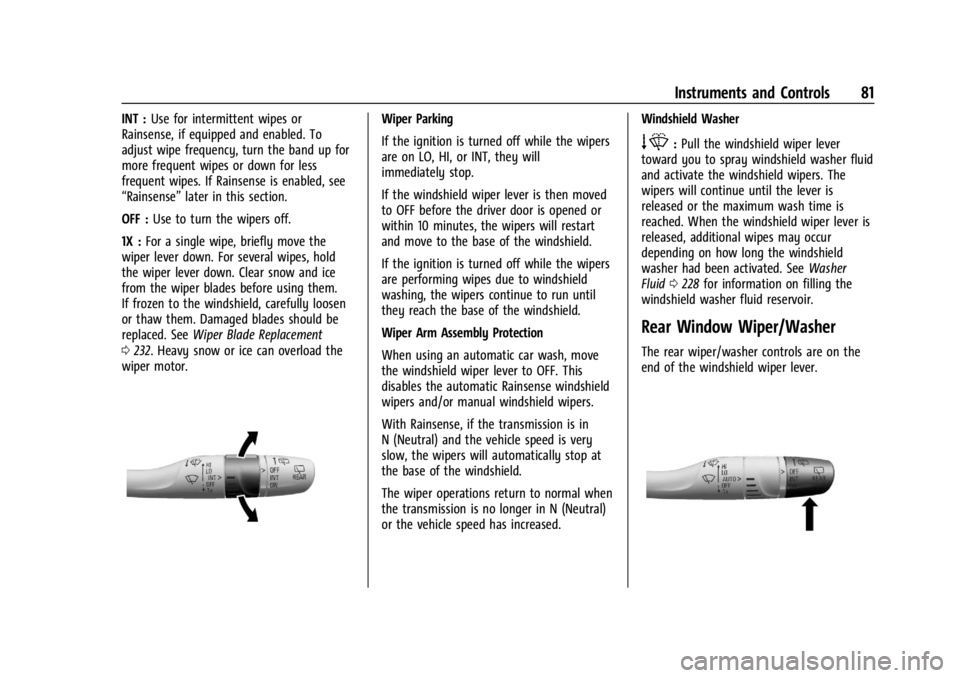
INT :Use for intermittent wipes or
Rainsense, if equipped and enabled. To
adjust wipe frequency, turn the band up for
more frequent wipes or down for less
frequent wipes. If Rainsense is enabled, see
“Rainsense” later in this section.
OFF : Use to turn the wipers off.
1X : For a single wipe, briefly move the
wiper lever down. For several wipes, hold
the wiper lever down. Clear snow and ice
from the wiper blades before using them.
If frozen to the windshield, carefully loosen
or thaw them. Damaged blades should be
replaced. See Wiper Blade Replacement
0 232. Heavy snow or ice can overload the
wiper motor.Wiper Parking
If the ignition is turned off while the wipers
are on LO, HI, or INT, they will
immediately stop.
If the windshield wiper lever is then moved
to OFF before the driver door is opened or
within 10 minutes, the wipers will restart
and move to the base of the windshield.
If the ignition is turned off while the wipers
are performing wipes due to windshield
washing, the wipers continue to run until
they reach the base of the windshield.
Wiper Arm Assembly Protection
When using an automatic car wash, move
the windshield wiper lever to OFF. This
disables the automatic Rainsense windshield
wipers and/or manual windshield wipers.
With Rainsense, if the transmission is in
N (Neutral) and the vehicle speed is very
slow, the wipers will automatically stop at
the base of the windshield.
The wiper operations return to normal when
the transmission is no longer in N (Neutral)
or the vehicle speed has increased. Windshield Washer
e:
Pull the windshield wiper lever
toward you to spray windshield washer fluid
and activate the windshield wipers. The
wipers will continue until the lever is
released or the maximum wash time is
reached. When the windshield wiper lever is
released, additional wipes may occur
depending on how long the windshield
washer had been activated. See Washer
Fluid 0228 for information on filling the
windshield washer fluid reservoir.
Rear Window Wiper/Washer
The rear wiper/washer controls are on the
end of the windshield wiper lever.
Page 84 of 328
Chevrolet TRAX Owner Manual (GMNA-Localizing-U.S./Canada/Mexico-
17041293) - 2024 - CRC - 12/2/22
Instruments and Controls 83
{Warning
Power is always supplied to the power
outlet. Do not leave electrical equipment
plugged in when the vehicle is not in use
because the vehicle could catch fire and
cause injury or death.
Caution
Leaving electrical equipment plugged in
for an extended period of time while the
ignition is off will drain the battery.
Always unplug electrical equipment when
not in use and do not plug in equipment
that exceeds the maximum 15 amp
rating.
Certain accessory plugs may not be
compatible with the accessory power outlet
and could overload vehicle and adapter
fuses. If a problem is experienced, see your
dealer.
When adding electrical equipment, be sure
to follow the proper installation instructions
included with the equipment. See Add-On
Electrical Equipment 0214.
Caution
Hanging heavy equipment from the
power outlet can cause damage not
covered by the vehicle warranty. The
power outlets are designed for accessory
power plugs only, such as cell phone
charge cords.
Wireless Charging
If equipped and enabled, the vehicle has
wireless charging in the storage bin at the
front of the floor console . The system
operates at 145 kHz and wirelessly charges
one Qi compatible smartphone. The power
output of the system is capable of charging
at a rate up to 3 amp (15 W), as requested
by the compatible smartphone. See Radio
Frequency Statement 0305.
{Warning
Wireless charging may affect the
operation of an implanted pacemaker or
other medical devices. If you have one, it
is recommended to consult with your
doctor before using the wireless charging
system. The vehicle must be on, in ACC/ACCESSORY,
or Retained Accessory Power (RAP) must be
active. The wireless charging feature may
not correctly indicate charging when the
vehicle is in RAP, during a Bluetooth phone
call, or when phone projection (e.g. Apple
CarPlay / Android Auto) is active. See
Retained Accessory Power (RAP)
0181.
The operating temperature is −40 °C (−40 °F)
to 85 °C (185 °F) for the charging system and
0 °C (32 °F) to 35 °C (95 °F) for the phone.
A charging stopped alert may be displayed
on the infotainment screen, if the wireless
charger or smartphone are outside of
normal operating temperature. Charging will
automatically resume when a normal
operating temperature is reached.
{Warning
Remove all objects from the charger
before charging your compatible
smartphone. Objects, such as coins, keys,
rings, paper clips, or cards, between the
smartphone and charger may become
very hot.
(Continued)
Page 85 of 328
Chevrolet TRAX Owner Manual (GMNA-Localizing-U.S./Canada/Mexico-
17041293) - 2024 - CRC - 12/2/22
84 Instruments and Controls
Warning (Continued)
On the rare occasion that the charging
system does not detect an object, and
the object gets wedged between the
smartphone and charger, remove the
smartphone and allow the object to cool
before removing it from the charger, to
prevent burns.
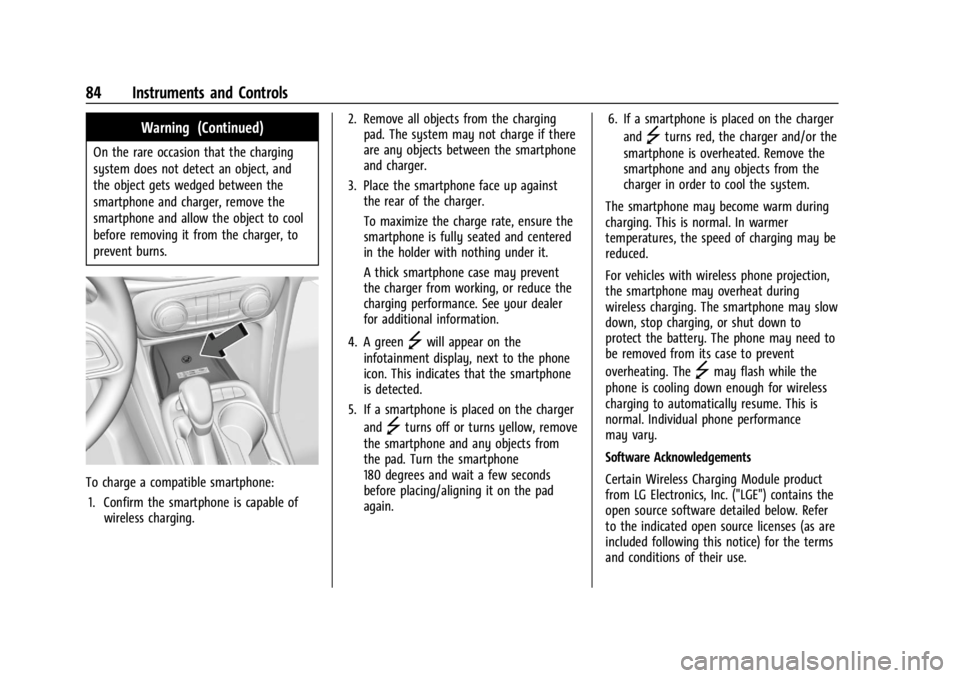
To charge a compatible smartphone:1. Confirm the smartphone is capable of wireless charging. 2. Remove all objects from the charging
pad. The system may not charge if there
are any objects between the smartphone
and charger.
3. Place the smartphone face up against the rear of the charger.
To maximize the charge rate, ensure the
smartphone is fully seated and centered
in the holder with nothing under it.
A thick smartphone case may prevent
the charger from working, or reduce the
charging performance. See your dealer
for additional information.
4. A green
]will appear on the
infotainment display, next to the phone
icon. This indicates that the smartphone
is detected.
5. If a smartphone is placed on the charger and
]turns off or turns yellow, remove
the smartphone and any objects from
the pad. Turn the smartphone
180 degrees and wait a few seconds
before placing/aligning it on the pad
again. 6. If a smartphone is placed on the charger
and
]turns red, the charger and/or the
smartphone is overheated. Remove the
smartphone and any objects from the
charger in order to cool the system.
The smartphone may become warm during
charging. This is normal. In warmer
temperatures, the speed of charging may be
reduced.
For vehicles with wireless phone projection,
the smartphone may overheat during
wireless charging. The smartphone may slow
down, stop charging, or shut down to
protect the battery. The phone may need to
be removed from its case to prevent
overheating. The
]may flash while the
phone is cooling down enough for wireless
charging to automatically resume. This is
normal. Individual phone performance
may vary.
Software Acknowledgements
Certain Wireless Charging Module product
from LG Electronics, Inc. ("LGE") contains the
open source software detailed below. Refer
to the indicated open source licenses (as are
included following this notice) for the terms
and conditions of their use.
Page 90 of 328
Chevrolet TRAX Owner Manual (GMNA-Localizing-U.S./Canada/Mexico-
17041293) - 2024 - CRC - 12/2/22
Instruments and Controls 89
For vehicles with the Stop/Start system,
when the ignition is on, the tachometer
indicates the vehicle status. When pointing
to AUTO STOP, the engine is off but the
vehicle is on and can move. The engine
could auto start at any time. When the
indicator points to OFF, the vehicle is off.
When the engine is on, the tachometer will
indicate the engine’s revolutions per minute
(rpm). The tachometer may vary by several
hundred rpm, during Auto Stop mode, when
the engine is shutting off and restarting.
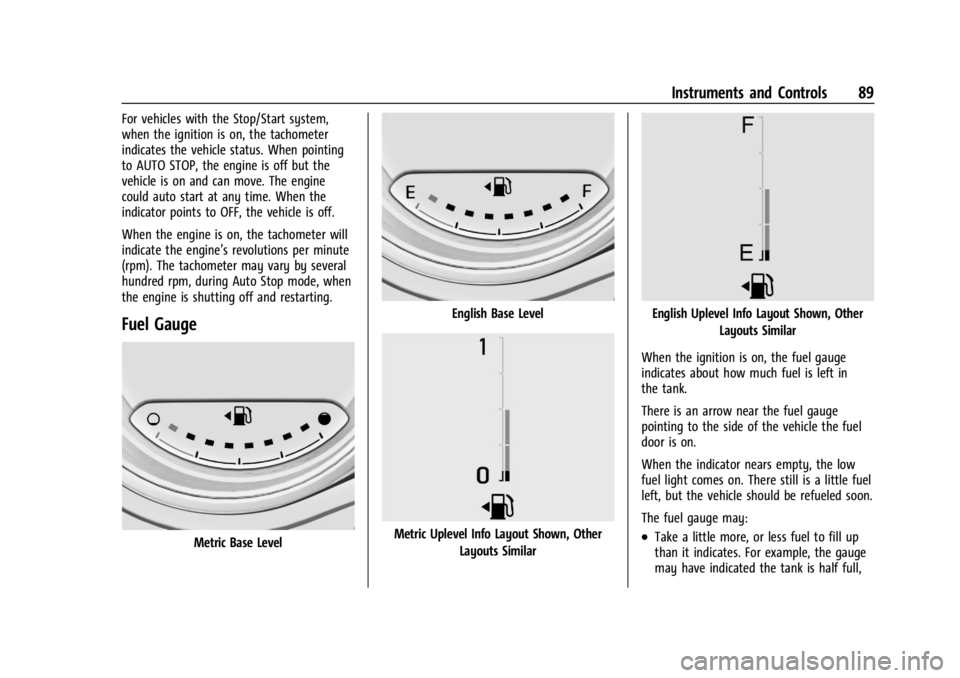
Fuel Gauge
Metric Base Level
English Base Level
Metric Uplevel Info Layout Shown, OtherLayouts Similar
English Uplevel Info Layout Shown, Other Layouts Similar
When the ignition is on, the fuel gauge
indicates about how much fuel is left in
the tank.
There is an arrow near the fuel gauge
pointing to the side of the vehicle the fuel
door is on.
When the indicator nears empty, the low
fuel light comes on. There still is a little fuel
left, but the vehicle should be refueled soon.
The fuel gauge may:
.Take a little more, or less fuel to fill up
than it indicates. For example, the gauge
may have indicated the tank is half full,
Page 100 of 328

Chevrolet TRAX Owner Manual (GMNA-Localizing-U.S./Canada/Mexico-
17041293) - 2024 - CRC - 12/2/22
Instruments and Controls 99
Caution (Continued)
4. Restart the vehicle. If the engine oilpressure light stays on for more
than 10 seconds, turn the vehicle
back off. Do not restart the vehicle.
See your dealer for service.
This light should come on briefly when the
engine starts. When the engine is off and
the vehicle is on, the light should remain
illuminated. If it does not come on under
either condition, contact your dealer.
If the light comes on and stays on when the
engine is running, it may not have adequate
oil pressure. The oil level may be low or
there may be some other oil system
problem. Turn the engine off when it is safe
to do so and contact your dealer.
Low Fuel Warning Light
A Low Fuel Warning Light near the fuel
gauge comes on briefly when the ignition is
turned on as a check to show it is working.
It also comes on when the fuel gauge
indicator nears empty. The light turns off
when fuel is added. If it does not, have the
vehicle serviced.
Auto Stop Indicator (Uplevel only)
This light comes on when the engine is in
an Auto Stop.
See Stop/Start System 0179.
Security Light
The security light should come on briefly as
the engine is started. If it does not come on,
have the vehicle serviced by your dealer.
If the system is working normally, the
indicator light turns off.
If the light stays on and the engine does
not start, there could be a problem with the
theft-deterrent system. See Immobilizer
Operation 025.
High-Beam On Light
This light comes on when the high-beam
headlamps are in use. See Headlamp High/
Low-Beam Changer 0110.