reset CHEVROLET UPLANDER 2005 1.G User Guide
[x] Cancel search | Manufacturer: CHEVROLET, Model Year: 2005, Model line: UPLANDER, Model: CHEVROLET UPLANDER 2005 1.GPages: 460, PDF Size: 2.75 MB
Page 201 of 460
Your vehicle’s charging system regulates voltage based
on the state of the battery. The battery voltage may
uctuate when viewing this information on the DIC. This
is normal.
Oil Life
Press the information button until OIL LIFE displays.
This mode shows an estimate of the oil’s remaining
useful life. If you see OIL LIFE 99% on the display, that
means 99% of the current oil life remains. The engine
oil life system will alert you to change your oil on a
schedule consistent with your driving conditions.
When the remaining oil life is low, the LOW OIL
PRESSURE message will appear on the display. You
should change your oil as soon as possible. SeeEngine
Oil on page 5-13. In addition to the engine oil life
system monitoring the oil life, additional maintenance is
recommended in the Maintenance Schedule in this
manual. SeeScheduled Maintenance on page 6-4for
more information.
Remember, you must reset the OIL LIFE yourself after
each oil change. It will not reset itself. Also, be
careful not to reset the OIL LIFE accidentally at any
time other than when the oil has just been changed. It
cannot be reset accurately until the next oil change.
To reset the engine oil life system, seeEngine Oil Life
System on page 5-16. The display will show 100%
when the system is reset.
Menu Button Items
q
(Menu):Press this button to scroll through the
following items:
Units
Press the menu button until UNITS displays. This mode
allows you to select between English or Metric units
of measurement. Once in this mode, press the set/reset
button to select between ENGLISH or METRIC.
Language
Press the menu button until the language screen
displays. This mode allows you to select the language
in which the DIC messages will appear. Once in
this mode, press the set/reset button to select among
the following choices:
English
Francais (French)
Espanol (Spanish)
3-49
Page 202 of 460
Personalization (Uplevel Only)
Press the menu button until PERSONAL PROGRAM
displays. Your vehicle may have personalization
capabilities that allow you to program certain features to
a preferred setting for up to two drivers.
Your vehicle may also have customization capabilities
that allow you to program certain features to one
preferred setting. Customization features can only be
programmed to one setting on the vehicle and cannot be
programmed to a preferred setting for up to two
drivers. SeeDIC Vehicle Personalization (Uplevel Only)
on page 3-68for additional information on personal
programming.
Compass Zone (Uplevel Only)
Press the menu button until COMPASS ZONE displays.
Press the set/reset button to change the compass
zone. Zones 1 through 15 are available. The direction
the vehicle is moving will be displayed in the top
right corner of the DIC display.
Compass Calibration (Uplevel Only)
Under certain circumstances, such as during a long
distance cross-country trip, it will be necessary to
compensate for compass variance and reset the zone
through the DIC.
Compass variance is the difference between the earth’s
magnetic north and true geographic north. If not
adjusted to account for compass variance, the compass
in the vehicle could give false readings.
In order to do this, the compass must be set or
calibrated to the variance zone in which the vehicle is
travelling.
To adjust for compass variance, use the following
procedure:
1. Press the menu button until COMPASS ZONE
displays.
3-50
Page 203 of 460
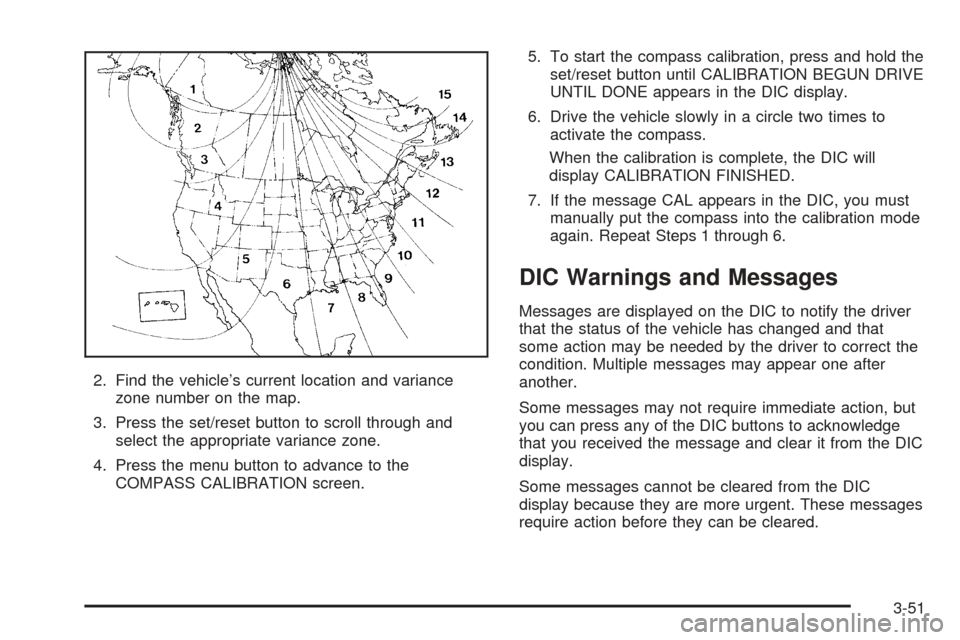
2. Find the vehicle’s current location and variance
zone number on the map.
3. Press the set/reset button to scroll through and
select the appropriate variance zone.
4. Press the menu button to advance to the
COMPASS CALIBRATION screen.5. To start the compass calibration, press and hold the
set/reset button until CALIBRATION BEGUN DRIVE
UNTIL DONE appears in the DIC display.
6. Drive the vehicle slowly in a circle two times to
activate the compass.
When the calibration is complete, the DIC will
display CALIBRATION FINISHED.
7. If the message CAL appears in the DIC, you must
manually put the compass into the calibration mode
again. Repeat Steps 1 through 6.
DIC Warnings and Messages
Messages are displayed on the DIC to notify the driver
that the status of the vehicle has changed and that
some action may be needed by the driver to correct the
condition. Multiple messages may appear one after
another.
Some messages may not require immediate action, but
you can press any of the DIC buttons to acknowledge
that you received the message and clear it from the DIC
display.
Some messages cannot be cleared from the DIC
display because they are more urgent. These messages
require action before they can be cleared.
3-51
Page 204 of 460
If there are any active warning messages when the
vehicle is turned off, two chimes will sound and the DIC
will go into a reminder mode. The reminder mode
displays any active message. If there are multiple
messages, the DIC will display each message for
ve seconds. After each active message is displayed
once, the reminder mode will turn off.
You should take any messages that appear on the
display seriously and remember that clearing the
messages will only make the messages disappear, not
correct the problem.
The following are the possible messages that can be
displayed and some information about them.
A/C OFF FOR ENGINE PROTECTION
This message will display when the engine coolant
becomes hotter than the normal operating temperature.
SeeEngine Coolant Temperature Gage on page 3-39.
To avoid added strain on a hot engine, the air
conditioning compressor is automatically turned off.
When the coolant temperature returns to normal, the air
conditioning compressor will turn back on. You can
continue to drive your vehicle.
This message will come on while the ignition is in RUN.
Press any of the DIC buttons to acknowledge this
warning message and to clear it from the screen.This message will continue to display for two seconds if
it has not been acknowledged when the engine is
turned off. It will also re-display for two seconds if the
message has been acknowledged, but the condition still
exists when the engine is turned off.
If the condition still exists, the message will re-appear
when the engine is turned on. If this message continues
to appear, have the system repaired by your GM dealer
as soon as possible to avoid damage to your engine.
ALL WHEEL DRIVE DISABLED
If your vehicle has the all-wheel drive system, this
message will display when there is a spare tire on the
vehicle, or when the anti-lock brake system warning light
comes on, or when the rear differential uid is
overheating. This message will turn off when the
differential uid cools.
The all-wheel drive system will be disabled until the
compact spare tire is replaced by a full-size tire. If the
warning message is still on after putting on the full-size
tire, you need to reset the warning message. To
reset the warning message, turn the ignition off and
then back on again. If the message stays on, see your
GM dealer right away. SeeAll-Wheel Drive (AWD)
System on page 4-12for more information.
3-52
Page 205 of 460
BATTERY SAVER ACTIVE
This message will display when the system detects that
the battery voltage is dropping beyond a reasonable
level. The battery saver system will start reducing certain
features of the vehicle that you may be able to notice.
At the point that the features are disabled, this message
is displayed. It means that the vehicle is trying to
save the charge in the battery.
Turn off all unnecessary accessories to allow the battery
to recharge.
The normal battery voltage range is 11.5 to 15.5 volts.
You can monitor the battery voltage by pressing the
information button until BATTERY displays.
CHANGE OIL SOON
This message will display when service is required for
the vehicle. See your GM dealer. SeeEngine Oil
on page 5-13andScheduled Maintenance on page 6-4
for more information.
The CHANGE OIL SOON message is reset by
acknowledging the message. The OIL LIFE screen
under the gages menu on the DIC must also be reset.
See “Oil Life” underDIC Operation and Displays on
page 3-45andEngine Oil Life System on page 5-16.
This message will display while the ignition is in
RUN. Press any of the DIC buttons to acknowledge this
message and to clear it from the screen.This message will continue to display for two seconds if
it has not been acknowledged when the engine is
turned off. It will also re-display for two seconds if the
message has been acknowledged, but the condition still
exists when the engine is turned off.
If the condition still exists, the message will re-appear
when the engine is turned on.
CHARGING SYSTEM FAILURE
This message will display when there is a problem with
the generator and battery charging systems. Driving
with this problem could drain your battery. Turn off all
unnecessary accessories. Stop and turn off the
vehicle as soon as it is safe to do so. Have the electrical
system checked by your GM dealer immediately.
This message will display and a chime will sound while
the ignition is in RUN. Press any of the DIC buttons
to acknowledge this message and to clear it from
the screen.
This message will continue to display for two seconds if
it has not been acknowledged when the engine is
turned off. It will also re-display for two seconds if the
message has been acknowledged, but the condition still
exists when the engine is turned off.
If the condition still exists, the message will re-appear
when the engine is turned on.
3-53
Page 216 of 460
SERVICE PARK LAMPS
This message will display when there is a problem with
the park lamps. Check to see if the park lamp fuse
is blown and replace the fuse if necessary. SeeFuses
and Circuit Breakers on page 5-96andInstrument
Panel Fuse Block on page 5-96for more information. If
changing the fuse does not correct the problem, see
your GM dealer.
This message will only display while the ignition is in
RUN. Press any of the DIC buttons to acknowledge this
message and to clear it from the screen.
This message will continue to display for two seconds if
it has not been acknowledged when the engine is
turned off. It will also re-display for two seconds if the
message has been acknowledged, but the condition still
exists when the engine is turned off.
If the condition still exists, the message will re-appear
when the engine is turned on.
SERVICE STABILITY SYSTEM
If your vehicle has StabiliTrak®, this message will
display if there has been a problem detected with
StabiliTrak
®. SeeStabiliTrak®System on page 4-10.
If this message turns on while you are driving, pull off
the road as soon as possible and stop carefully.
Try resetting the system by turning the ignition off and
then back on. If this message still stays on or turns back
on again while you are driving, your vehicle needs
service. Have the StabiliTrak
®System inspected by your
GM dealer as soon as possible.
This message will display only while the ignition is in
RUN. Press any of the DIC buttons to acknowledge this
message and to clear it from the screen.
This message will continue to display for two seconds if
it has not been acknowledged when the engine is
turned off. It will also re-display for two seconds if the
message has been acknowledged, but the condition still
exists when the engine is turned off.
If the condition still exists, the message will re-appear
when the engine is turned on.
3-64
Page 220 of 460
DIC Vehicle Personalization
(Uplevel Only)
Your vehicle may have customization capabilities that
allow you to program certain features to one preferred
setting. Customization features can only be programmed
to one setting on the vehicle and cannot be programmed
to a preferred setting for two different drivers. The
customization features include the following:
Exterior lighting delay
Interior lighting delay
Delayed locking
Content theft
Remote keyless entry feedback
Remote start
Rear park chime
Your vehicle may also have personalization capabilities
that allow you to program certain features to a
preferred setting for up to two drivers. The rst
personalized key corresponds to driver 1 and the second
personalized key corresponds to driver 2. The
personalization features include the following:
Radio station presets
Auto door unlock preferences
Remote keyless entry unlock preferencesAll of the customization and personalization options may
not be available on your vehicle. Only the options
available will be displayed on your DIC.
The default settings for the customization and
personalization features were set when your vehicle left
the factory, but may have been changed from their
default setting since then.
The customization preferences are automatically
recalled.
The driver’s personalization preferences are recalled by
using the key programmed for driver 1 or 2.
To change customization and personalization
preferences, use the following procedure.
Entering the Personal Program Menu
1. Turn the ignition on and place the vehicle in
PARK (P).
2. Press the menu button until PERSONAL
PROGRAM displays.
If the vehicle is not in PARK (P), PERSONAL
PROGRAM ONLY IN PARK will display.
If the vehicle is not able to enter the personal
program menu, PERSONAL PROGRAM NOT
AVAILABLE will display.
3-68
Page 221 of 460
3. Press the set/reset button to begin.
4. The DIC will then display an instruction screen.
Press the menu button to display the modes that
are available to program.
Press the set/reset button to change the setting of
each mode.
Customization Menu Items
The following are customization features that allow you
to program settings to the vehicle:
FACTORY DEFAULTS
This feature allows you to set all of the customization
and personalization features back to their factory default
settings.
Press the menu button until FACTORY DEFAULTS
appears on the DIC display. Press the set/reset button
to scroll through the following choices:
NO (default):The customization and personalization
features will not be set to their factory default settings.YES:The customization and personalization features
will be set to their factory default settings.
If YES is selected, the keys will need to be personalized
again to be recognized as key 1 or 2. See
“PERSONALIZE KEY” later in this section for more
information.
Choose one of the available settings and press the
menu button while it is displayed on the DIC to select it
and move on to the next feature.
ALL KEYS RESET
This screen will only display if YES was selected on the
FACTORY DEFAULTS screen.
Press the set/reset button to scroll through the following
choices:
CANCEL (default):The features will not be set to their
factory default settings and the DIC will return to the
FACTORY DEFAULTS screen.
OK:The features will be set to their factory default
settings, the DIC will exit the personal program menu,
and PERSONAL OPTIONS SAVED will display.
3-69
Page 222 of 460
EXT (Exterior) LIGHT DELAY
This feature allows you to set the amount of time the
exterior lamps remain on after the key is removed from
the ignition or the vehicle is unlocked using the
remote keyless entry transmitter.
Press the menu button until EXT LIGHT DELAY
appears on the DIC display. Press the set/reset button
to scroll through the following choices:
OFF:The exterior lamps will not turn on.
15 seconds:The exterior lamps will stay on for
15 seconds.
30 seconds (default):The exterior lamps will stay on
for 30 seconds.
60 seconds:The exterior lamps will stay on for
60 seconds.
90 seconds:The exterior lamps will stay on for
90 seconds.
Choose one of the available settings and press the
menu button while it is displayed on the DIC to select it
and move on to the next feature.
INT (Interior) LIGHTS KEYS REMOVED
This feature enables the interior lamps in the vehicle to
turn on for about 25 seconds after the key is removed
from the ignition.
Press the menu button until INT LIGHTS KEYS
REMOVED appears on the DIC display. Press the
set/reset button to scroll through the following choices:
OFF:Removing the key from the ignition will not
cause the interior lamps to turn on.
ON (default):Removing the key from the ignition will
cause the interior lamps to be turned on for about
25 seconds.
Choose one of the available settings and press the
menu button while it is displayed on the DIC to select it
and move on to the next feature.
DELAYED LOCKING
This feature allows the locking of the vehicle to be
delayed until all of the doors have been closed
for approximately ve seconds.
3-70
Page 223 of 460
When the delayed locking feature is enabled, it may be
activated when the key is out of the ignition by doing
one of the following:
Pressing the driver’s door power lock switch one
time while the driver’s door is open.
Pressing the passenger’s door power lock switch
one time while the passenger’s door is open.
Pressing the lock button on the remote keyless
entry transmitter one time while any door is open.
Two chimes will sound to signal that delayed locking is
active.
The doors may be locked immediately by repeating one
of the above actions more than one time.
If a door remains open, without any other door being
opened or closed, the vehicle will lock after
approximately 45 seconds.
If a key is in the ignition, this feature will not lock the
doors. SeeDelayed Locking on page 2-13for more
information.Press the menu button until DELAYED LOCKING
appears on the DIC display. Press the set/reset button
to scroll through the following choices:
OFF:There will be no delayed locking of the
vehicle’s doors.
ON (default):The locking of the vehicle’s doors will be
delayed by ve seconds while a door is open after a
power door lock switch is pressed, or the lock button on
the remote keyless entry transmitter is pressed while
a door is open.
Choose one of the available settings and press the
menu button while it is displayed on the DIC to select it
and move on to the next feature.
CONTENT THEFT
If your vehicle has the content theft-deterrent system,
once this feature is turned on, the system will activate if
someone tries to enter the vehicle without using the
remote keyless entry transmitter or the correct key. It will
also activate when an incorrect key is used in the
ignition.
3-71