key CHEVROLET UPLANDER 2005 1.G Workshop Manual
[x] Cancel search | Manufacturer: CHEVROLET, Model Year: 2005, Model line: UPLANDER, Model: CHEVROLET UPLANDER 2005 1.GPages: 460, PDF Size: 2.75 MB
Page 222 of 460
EXT (Exterior) LIGHT DELAY
This feature allows you to set the amount of time the
exterior lamps remain on after the key is removed from
the ignition or the vehicle is unlocked using the
remote keyless entry transmitter.
Press the menu button until EXT LIGHT DELAY
appears on the DIC display. Press the set/reset button
to scroll through the following choices:
OFF:The exterior lamps will not turn on.
15 seconds:The exterior lamps will stay on for
15 seconds.
30 seconds (default):The exterior lamps will stay on
for 30 seconds.
60 seconds:The exterior lamps will stay on for
60 seconds.
90 seconds:The exterior lamps will stay on for
90 seconds.
Choose one of the available settings and press the
menu button while it is displayed on the DIC to select it
and move on to the next feature.
INT (Interior) LIGHTS KEYS REMOVED
This feature enables the interior lamps in the vehicle to
turn on for about 25 seconds after the key is removed
from the ignition.
Press the menu button until INT LIGHTS KEYS
REMOVED appears on the DIC display. Press the
set/reset button to scroll through the following choices:
OFF:Removing the key from the ignition will not
cause the interior lamps to turn on.
ON (default):Removing the key from the ignition will
cause the interior lamps to be turned on for about
25 seconds.
Choose one of the available settings and press the
menu button while it is displayed on the DIC to select it
and move on to the next feature.
DELAYED LOCKING
This feature allows the locking of the vehicle to be
delayed until all of the doors have been closed
for approximately ve seconds.
3-70
Page 223 of 460
When the delayed locking feature is enabled, it may be
activated when the key is out of the ignition by doing
one of the following:
Pressing the driver’s door power lock switch one
time while the driver’s door is open.
Pressing the passenger’s door power lock switch
one time while the passenger’s door is open.
Pressing the lock button on the remote keyless
entry transmitter one time while any door is open.
Two chimes will sound to signal that delayed locking is
active.
The doors may be locked immediately by repeating one
of the above actions more than one time.
If a door remains open, without any other door being
opened or closed, the vehicle will lock after
approximately 45 seconds.
If a key is in the ignition, this feature will not lock the
doors. SeeDelayed Locking on page 2-13for more
information.Press the menu button until DELAYED LOCKING
appears on the DIC display. Press the set/reset button
to scroll through the following choices:
OFF:There will be no delayed locking of the
vehicle’s doors.
ON (default):The locking of the vehicle’s doors will be
delayed by ve seconds while a door is open after a
power door lock switch is pressed, or the lock button on
the remote keyless entry transmitter is pressed while
a door is open.
Choose one of the available settings and press the
menu button while it is displayed on the DIC to select it
and move on to the next feature.
CONTENT THEFT
If your vehicle has the content theft-deterrent system,
once this feature is turned on, the system will activate if
someone tries to enter the vehicle without using the
remote keyless entry transmitter or the correct key. It will
also activate when an incorrect key is used in the
ignition.
3-71
Page 224 of 460
Press the menu button until CONTENT THEFT appears
on the DIC display. Press the set/reset button to
scroll through the following choices:
OFF:The content theft-deterrent system will be
turned off.
ON (default):The content theft-deterrent system will be
turned on.
When ON is selected, the content theft-deterrent system
will be armed when the vehicle is locked by pressing
the lock button on the remote keyless entry transmitter
or by pressing the power door lock switch. See
Content Theft-Deterrent on page 2-27andPower Door
Locks on page 2-12for more information.
Choose one of the available settings and press the
menu button while it is displayed on the DIC to select it
and move on to the next feature.
FOB LOCK FEEDBACK
This feature allows you to select the type of feedback
you will receive when locking the vehicle with the remote
keyless entry transmitter.Press the menu button until FOB LOCK FEEDBACK
appears on the DIC display. Press the set/reset button to
scroll through the following choices:
OFF:There will be no feedback when locking the
vehicle.
LIGHTS:The exterior lamps will ash when you press
the lock button on the remote keyless entry transmitter.
LIGHTS and HORN (default):The exterior lamps
will ash when you press the lock button on the remote
keyless entry transmitter, and the horn will sound
when the lock button is pressed again within
ve seconds of the previous command.
Choose one of the available settings and press the
menu button while it is displayed on the DIC to select it
and move on to the next feature.
REMOTE START
If your vehicle has remote start, this feature allows the
remote start to be turned OFF or ON. The remote
start feature allows you to start the engine from outside
of the vehicle using the remote keyless entry
transmitter. See “Remote Vehicle Start” underRemote
Keyless Entry System Operation on page 2-5for
more information.
3-72
Page 225 of 460
Press the menu button until REMOTE START appears
on the DIC display. Press the set/reset button to
scroll through the following choices:
OFF:The remote start feature will be disabled.
ON (default):The remote start feature will be enabled.
Choose one of the available settings and press the
menu button while it is displayed on the DIC to select it
and move on to the next feature.
REAR PARK CHIME
If your vehicle has the Ultrasonic Rear Parking Assist
(URPA) system, this feature allows the URPA system’s
chime to be turned OFF or ON. SeeUltrasonic Rear
Parking Assist (URPA) on page 3-21for more
information.
Press the option button until REAR PARK CHIME
appears on the DIC display. Press the set/reset button
to scroll through the following choices:
OFF:The URPA system’s chime will be disabled.
ON (default):The URPA system’s chime will be
enabled.
Choose one of the available settings and press the
menu button while it is displayed on the DIC to select it
and move on to the next feature.
Personalization Menu Items
The following are personalization features that allow you
to program setting for up to two drivers:
PERSONALIZE KEY
If you are using a key that has already been
personalized to be recognized as key 1 or 2, this screen
will not display. This feature allows you to personalize
a key to be recognized as key 1 or 2. A personalized key
allows you to program personalization features to a
preferred setting to correspond to key 1 or 2.
Press the menu button until PERSONALIZE KEY
appears on the DIC display. Press the set/reset button
to scroll through the following choices:
NO (default):The key will not be personalized.
YES:The key will be personalized.
Choose one of the available settings and press the
menu button while it is displayed on the DIC to select it
and move on to the next feature.
3-73
Page 226 of 460
REPLACE KEY
This screen displays only if YES was selected for the
PERSONALIZE KEY feature, keys 1 and 2 have already
been personalized, and the current key being used is
not key 1 or 2. This feature allows you to program a key
to be recognized as key 1 or 2 in the event that the
previously programmed key needs to be replaced.
1:The key will be programmed to be recognized
as key 1.
2:The key will be programmed to be recognized
as key 2.
CANCEL (default):The key will not be programmed.
RADIO STATIONS PERSONALIZED
This screen displays only if YES was selected for the
PERSONALIZE KEY feature. This feature allows you to
set the radio station presets to be recognized for the
key, 1 or 2, that is being used. Once this message
displays, set the radio station presets. If the presets are
not set at this time, the presets will not be recognized
for key 1 or 2, however, the vehicle radio station presets
will be maintained.
AUTO DOOR UNLOCK
This feature allows automatic door unlocking to be
turned off, used for the driver’s door only, or for all of
the doors.
Press the menu button until AUTO DOOR UNLOCK
appears on the DIC display. Press the set/reset button
to scroll through the following choices:
OFF:None of the doors will unlock when the vehicle is
shifted into PARK (P) or the key is taken out of the
ignition.
DRIVER:Only the driver’s door will unlock when the
vehicle is shifted into PARK (P) or the key is taken out of
the ignition.
ALL (default):All of the doors will unlock when the
vehicle is shifted into PARK (P) or the key is taken out
of the ignition.
Choose one of the available settings and press the
menu button while it is displayed on the DIC to select it
and move on to the next feature.
3-74
Page 227 of 460
AUTO UNLOCK ON
This feature displays only if DRIVER or ALL was
selected for the AUTO DOOR UNLOCK feature. This
feature allows the selection of when the vehicle’s doors
will unlock.
Press the menu button until AUTO UNLOCK ON
appears on the DIC display. Press the set/reset button
to scroll through the following choices:
KEY-OUT:The door(s) will unlock when the key is
taken out of the ignition.
PARK (default):The door(s) will unlock when the
vehicle is shifted into PARK (P).
Choose one of the available settings and press the
menu button while it is displayed on the DIC to select it
and move on to the next feature.
FOB UNLOCK ON 1ST PRESS
This feature allows the selection of which doors will
unlock on the rst press of the unlock button on
the remote keyless entry transmitter. SeeRemote
Keyless Entry System Operation on page 2-5for more
information.Press the menu button until FOB UNLOCK ON 1ST
PRESS appears on the DIC display. Press the set/reset
button to scroll through the following choices:
DRIVER (default):The driver’s door will unlock on the
rst press of the unlock button on the remote keyless
entry transmitter.
ALL:All of the doors will unlock on the rst press of
the unlock button on the remote keyless entry
transmitter.
Choose one of the available settings and press the
menu button while it is displayed on the DIC to select it.
The DIC will then display PRESS UNLOCK SWITCH
ON KEY FOB. Press the unlock button on the remote
keyless entry transmitter and your setting will be
saved for that remote keyless entry transmitter.
After programming the last option, the message KEY
FOB NOW PERSONALIZED will appear on the
DIC display for a few seconds if you personalized the
key. Next, the message PERSONAL OPTIONS SAVED
will appear briey on the DIC display, then the display
will return to the PERSONAL PROGRAM main screen.
3-75
Page 256 of 460
s(Play/Pause):Press this button to start play of a
disc. Press this button while a disc is playing to
pause it. Press it again to continue playing the disc.
t(Prior Chapter/Track):Press this button to go to
the beginning of the current chapter or track. Press
this button again to return to the previous chapter
or track. This button may not work when the DVD is
playing the copyright information or previews.
u(Next Chapter/Track):Press this button to go to
the beginning of the next chapter or track. This
button may not work when the DVD is playing the
copyright information or the previews.
r(Fast Reverse):Press this button to fast reverse
the DVD and CD. To stop reversing, press the play
or stop button. This button may not work when the DVD
is playing the copyright information or the previews.
[(Fast Forward):Press this button to fast forward
the DVD and CD. To stop fast forwarding, press the play
or stop button. This button may not work when the
DVD is playing the copyright information or the previews.
e(Sound):Press this button to display the current
audio track. Each press will move the DVD to the next
language or commentary. The format and content of
this function will vary for each disc.
{(Subtitles):Press this button to display the current
subtitles. Each press of this button will move the
DVD to the next available subtitle option (English,
Spanish, French, etc., if available). The format
and content of this function will vary for each disc.
AUX (Auxiliary):Press this button to switch the system
between the DVD player and an auxiliary source.
d(Camera):Press this button to display the current
camera angle on DVDs that have this feature. Each
press will move the DVD to the next available camera
angle. The format and content of this function will
vary for each disc.
0 through 9 (Numeric Keypad):The numeric keypad
provides the capability of direct chapter or track
number selection.
\(Clear):Press this button within two seconds after
inputting a numeric selection, to clear all numeric
inputs.
}10 (Multiple Digit Entries):Press this button to
select chapter or track numbers greater than 9. Press
this button before inputting the number.
3-104
Page 270 of 460
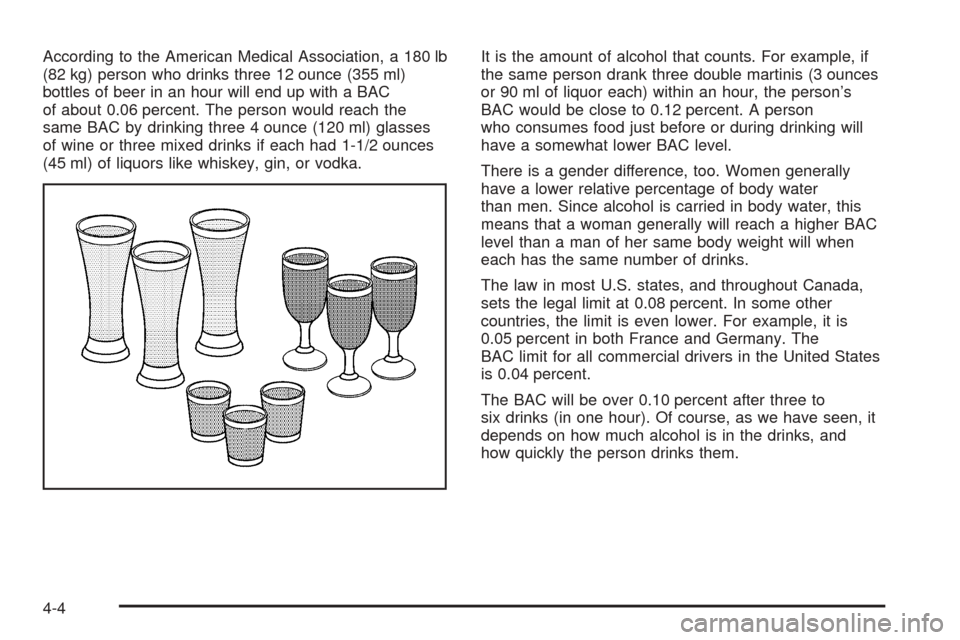
According to the American Medical Association, a 180 lb
(82 kg) person who drinks three 12 ounce (355 ml)
bottles of beer in an hour will end up with a BAC
of about 0.06 percent. The person would reach the
same BAC by drinking three 4 ounce (120 ml) glasses
of wine or three mixed drinks if each had 1-1/2 ounces
(45 ml) of liquors like whiskey, gin, or vodka.It is the amount of alcohol that counts. For example, if
the same person drank three double martinis (3 ounces
or 90 ml of liquor each) within an hour, the person’s
BAC would be close to 0.12 percent. A person
who consumes food just before or during drinking will
have a somewhat lower BAC level.
There is a gender difference, too. Women generally
have a lower relative percentage of body water
than men. Since alcohol is carried in body water, this
means that a woman generally will reach a higher BAC
level than a man of her same body weight will when
each has the same number of drinks.
The law in most U.S. states, and throughout Canada,
sets the legal limit at 0.08 percent. In some other
countries, the limit is even lower. For example, it is
0.05 percent in both France and Germany. The
BAC limit for all commercial drivers in the United States
is 0.04 percent.
The BAC will be over 0.10 percent after three to
six drinks (in one hour). Of course, as we have seen, it
depends on how much alcohol is in the drinks, and
how quickly the person drinks them.
4-4
Page 306 of 460
Dinghy Towing
Your vehicle was not designed to be towed with all of its
wheels on the ground. If you have a two-wheel-drive
vehicle, it can be towed with the two rear wheels on the
ground. See “Dolly Towing” following. If you have an
all-wheel-drive vehicle, it cannot be towed with any of its
wheels on the ground. It can be towed with car carrier
equipment.
Notice:Towing an all-wheel-drive vehicle with all
four wheels on the ground, or even with only two of
its wheels on the ground, will damage drivetrain
components. Do not tow an all-wheel-drive vehicle if
any of its wheels will be on the ground.
Dolly Towing
If you have a two-wheel-drive vehicle, it can be towed
with its two rear wheels on the ground. To dolly tow your
vehicle, do the following:
1. Put the front wheels on a dolly.
2. Put the vehicle in PARK (P).
3. Set the parking brake and then remove the key.
4. Clamp the steering wheel in a straight-ahead
position with a clamping device designed for towing.
5. Release the parking brake.If you have an all-wheel-drive vehicle, it cannot be
towed with any of its wheels on the ground. It can be
towed with car carrier equipment.
Notice:Towing an all-wheel-drive vehicle with all
four wheels on the ground, or even with only two of
its wheels on the ground, will damage drivetrain
components. Do not tow an all-wheel-drive vehicle if
any of its wheels will be on the ground.
Level Control
On vehicles equipped with automatic level control, the
rear of the vehicle is automatically kept level as you load
or unload your vehicle. However, you should still not
exceed the GVWR or the GAWR. SeeLoading
Your Vehicle on page 4-33.
You may hear the compressor operating when you load
or unload your vehicle, and periodically as the system
self-adjusts. This is normal. The compressor should
operate for brief periods of time. If the sound continues
for an extended period of time, your vehicle needs
service.
Using heavier suspension components to get added
durability might not change your weight ratings. Ask your
dealer to help you load your vehicle the right way.
4-40
Page 333 of 460
How to Reset the Engine Oil Life
System
The Engine Oil Life System calculates when to change
your engine oil and lter based on vehicle use.
Anytime your oil is changed, reset the system so it can
calculate when the next oil change is required. If a
situation occurs where you change your oil prior to a
CHANGE OIL SOON message being turned on,
reset the system.
1. With the ignition key in RUN but the engine off,
repeatedly push the set/reset button until OIL is
displayed on the Driver Information Center (DIC).
2. Once OIL is displayed, push and hold the set/reset
button for ve seconds. The number will disappear
and be replaced by 100 (indicating 100% oil life
remaining).
3. Turn the key to LOCK.
If the CHANGE OIL SOON message comes back on
when you start your vehicle, the engine oil life system
has not reset. Repeat the procedure.
What to Do with Used Oil
Used engine oil contains certain elements that may be
unhealthy for your skin and could even cause cancer.
Do not let used oil stay on your skin for very long. Clean
your skin and nails with soap and water, or a good
hand cleaner. Wash or properly dispose of clothing or
rags containing used engine oil. See the manufacturer’s
warnings about the use and disposal of oil products.
Used oil can be a threat to the environment. If you
change your own oil, be sure to drain all the oil from the
lter before disposal. Never dispose of oil by putting it
in the trash, pouring it on the ground, into sewers, or into
streams or bodies of water. Instead, recycle it by
taking it to a place that collects used oil. If you have a
problem properly disposing of your used oil, ask
your dealer, a service station, or a local recycling center
for help.
5-17