ABS CHEVROLET UPLANDER 2006 Owners Manual
[x] Cancel search | Manufacturer: CHEVROLET, Model Year: 2006, Model line: UPLANDER, Model: CHEVROLET UPLANDER 2006Pages: 458, PDF Size: 3.19 MB
Page 148 of 458
Luggage Carrier
{CAUTION:
If you try to carry something on top of your
vehicle that is longer or wider than the luggage
carrier — like paneling, plywood, a mattress and
so forth — the wind can catch it as you drive
along. This can cause you to lose control. What
you are carrying could be violently torn off, and
this could cause you or other drivers to have a
collision, and of course damage your vehicle.
You may be able to carry something like this
inside. But, never carry something longer or
wider than the luggage carrier on top of
your vehicle.
If you have the luggage carrier, you can load things on
top of your vehicle. Crossrails are not standard on
this vehicle and must be purchased at your dealer.
Notice:Loading cargo on the luggage carrier that
weighs more than 150 lbs (68 kg) or hangs over
the rear or sides of the vehicle may damage your
vehicle. Load cargo so that it rests on the slats
as far forward as possible and against the side rails,
making sure to fasten it securely.Do not exceed the maximum vehicle capacity when
loading your vehicle. For more information on vehicle
capacity and loading, seeLoading Your Vehicle on
page 4-30.
To prevent damage or loss of cargo as you are driving,
check now and then to make sure the cargo is still
securely fastened.
Convenience Net (With Rear
Convenience Center)
Your vehicle may have a convenience net. The
convenience net is designed to help keep small loads,
from falling out of the vehicle when the liftgate is
opened. Install the convenience net at the rear of your
vehicle, inside the liftgate.
To use the convenience net, do the following:
1. Attach the upper loops to the posts on both sides of
the liftgate opening. The label on the net should be
in the upper left corner.
2. Attach the lower loops to the tabs at the rear edge
of the rear convenience center.
When not in use, it is recommended that you take down
the convenience net to extend the life of the net and
to help retain its elasticity, and to keep the rear
exit clear.
2-52
ProCarManuals.com
Page 172 of 458
If an object is detected at a REVERSE (R) speed of
less than 3 mph (5 km/h), one of the following will occur:
Description English Metric
amber light 5 ft 1.5 m
amber/amber lights 40 in 1.0 m
amber/amber/red lights &
continuous chime20 in 0.5 m
amber/amber/red lights
ashing & continuous
chime1 ft 0.3 m
A chime will sound the rst time an object is detected
between 20 inches (0.5 m) and 5 feet (1.5 m) away.
URPA cannot detect objects that are above liftgate level.
In order for the rear sensors to recognize an object, it
must be within detection range behind the vehicle.
When the System Does Not Seem to Work
Properly
The light may ash red when the vehicle is in
REVERSE (R) if the ultrasonic sensors are not kept
clean. So be sure to keep your rear bumper free of mud,
dirt, snow, ice and slush. Other conditions that may affect
system performance include things like the vibrations
from a jackhammer or the compression of air brakes on a
very large truck. If after cleaning the rear bumper and
then driving forward at least 15 mph (25 km/h), the
display continues to ash red, see your dealer.If a trailer was attached to your vehicle, or a bicycle or
an object was on the back of, or hanging out of your
liftgate during your last drive cycle, the light may
also ash red. The light will continue to ash whenever
in REVERSE (R) until your vehicle is driven forward
at least 15 mph (25 km/h) without any obstructions
behind the vehicle.
Accessory Power Outlet(s)
Your vehicle may be equipped with a front accessory
power outlet located below the climate controls on
the instrument panel. It can be used to plug in electrical
equipment such as a cellular telephone or CB radio.
Pull the cover down to use the accessory power outlet.
When not in use, keep the cover on.
The rear accessory power outlet is located on the rear
compartment on the driver’s side.
To remove the cover, pull the tab on the cover and pull
it off. To put the cover back on, line up the tabs at
the back of the cover and put the cover in place. Push
down the tab to secure the cover. When not in use,
always cover the rear accessory power outlet with the
protective cap.
3-22
ProCarManuals.com
Page 214 of 458
RIGHT REAR TURN LAMP OUT
This message will display when the right rear turn signal
bulb needs to be replaced. SeeTaillamps, Turn
Signal, Stoplamps and Back-up Lamps on page 5-47.
This message will display while the ignition is in
RUN. Press any of the DIC buttons to acknowledge this
message and to clear it from the screen.
This message will continue to display for two seconds if
it has not been acknowledged when the engine is
turned off. It will also re-display for two seconds if the
message has been acknowledged, but the condition still
exists when the engine is turned off.
If the condition still exists, the message will re-appear
when the engine is turned on.
SERVICE ABS SYSTEM
This message will display when the vehicle’s brakes are
not functioning properly. Have the brake system
serviced by your GM dealer as soon as possible.
The anti-lock brake system warning light will also appear
on the instrument panel cluster when this message
appears on the DIC. SeeAnti-Lock Brake System
Warning Light on page 3-39.
This message will only display while the ignition is in
RUN. Press any of the DIC buttons to acknowledge this
message and to clear it from the screen.This message will continue to display for two seconds if
it has not been acknowledged when the engine is
turned off. It will also re-display for two seconds if the
message has been acknowledged, but the condition still
exists when the engine is turned off.
If the condition still exists, the message will re-appear
when the engine is turned on.
SERVICE AIR BAG
This message will display along with the airbag
readiness light if there is a problem with the airbag
system. Have your GM dealer inspect the system for
problems. SeeAirbag Readiness Light on page 3-34and
Airbag System on page 1-74for more information.
This message will only display while the ignition is in
RUN. Press any of the DIC buttons to acknowledge this
message and to clear it from the screen.
This message will continue to display for two seconds if
it has not been acknowledged when the engine is
turned off. It will also re-display for two seconds if the
message has been acknowledged, but the condition still
exists when the engine is turned off.
If the condition still exists, the message will re-appear
when the engine is turned on.
3-64
ProCarManuals.com
Page 267 of 458
Your Driving, the Road, and Your Vehicle..........4-2
Defensive Driving...........................................4-2
Drunken Driving.............................................4-3
Control of a Vehicle........................................4-5
Braking.........................................................4-5
Anti-Lock Brake System (ABS).........................4-6
Braking in Emergencies...................................4-8
Traction Control System (TCS).........................4-8
StabiliTrak
®System........................................4-9
All-Wheel Drive (AWD) System.......................4-11
Steering......................................................4-11
Off-Road Recovery.......................................4-14
Passing.......................................................4-14
Loss of Control.............................................4-15
Driving at Night............................................4-17
Driving in Rain and on Wet Roads..................4-18City Driving..................................................4-20
Freeway Driving...........................................4-21
Before Leaving on a Long Trip.......................4-22
Highway Hypnosis........................................4-23
Hill and Mountain Roads................................4-24
Winter Driving..............................................4-25
If Your Vehicle is Stuck in Sand, Mud,
Ice or Snow..............................................4-29
Rocking Your Vehicle to Get It Out.................4-30
Loading Your Vehicle....................................4-30
Towing..........................................................4-35
Towing Your Vehicle.....................................4-35
Recreational Vehicle Towing...........................4-35
Level Control...............................................4-37
Towing a Trailer...........................................4-37
Section 4 Driving Your Vehicle
4-1
ProCarManuals.com
Page 272 of 458
coordination, and eyesight all play a part. So do alcohol,
drugs, and frustration. But even in three-fourths of a
second, a vehicle moving at 60 mph (100 km/h) travels
66 feet (20 m). That could be a lot of distance in an
emergency, so keeping enough space between
your vehicle and others is important.
And, of course, actual stopping distances vary greatly
with the surface of the road, whether it is pavement
or gravel; the condition of the road, whether it is
wet, dry, or icy; tire tread; the condition of your brakes;
the weight of the vehicle; and the amount of brake
force applied.
Avoid needless heavy braking. Some people drive
in spurts — heavy acceleration followed by heavy
braking — rather than keeping pace with traffic. This is
a mistake. Your brakes may not have time to cool
between hard stops. Your brakes will wear out much
faster if you do a lot of heavy braking. If you keep pace
with the traffic and allow realistic following distances,
you will eliminate a lot of unnecessary braking.
That means better braking and longer brake life.
If your engine ever stops while you are driving, brake
normally but do not pump your brakes. If you do,
the pedal may get harder to push down. If your engine
stops, you will still have some power brake assist.
But you will use it when you brake. Once the power
assist is used up, it may take longer to stop and
the brake pedal will be harder to push.Adding non-GM accessories can affect your vehicle’s
performance. SeeAccessories and Modications
on page 5-3.
Anti-Lock Brake System (ABS)
Your vehicle has anti-lock brakes. ABS is an advanced
electronic braking system that will help prevent a
braking skid.
When you start your engine and begin to drive away,
your anti-lock brake system will check itself. You
may hear a momentary motor or clicking noise while
this test is going on, and you may even notice that your
brake pedal moves or pulses a little. This is normal.
If there is a problem with
the anti-lock brake system,
this warning light will
stay on. SeeAnti-Lock
Brake System Warning
Light on page 3-39.
4-6
ProCarManuals.com
Page 273 of 458
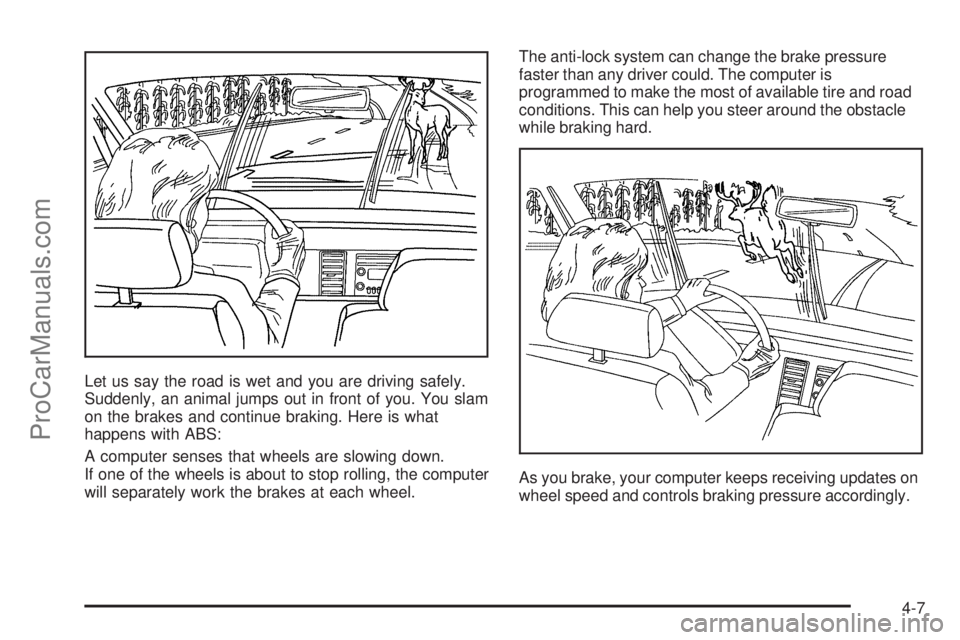
Let us say the road is wet and you are driving safely.
Suddenly, an animal jumps out in front of you. You slam
on the brakes and continue braking. Here is what
happens with ABS:
A computer senses that wheels are slowing down.
If one of the wheels is about to stop rolling, the computer
will separately work the brakes at each wheel.The anti-lock system can change the brake pressure
faster than any driver could. The computer is
programmed to make the most of available tire and road
conditions. This can help you steer around the obstacle
while braking hard.
As you brake, your computer keeps receiving updates on
wheel speed and controls braking pressure accordingly.
4-7
ProCarManuals.com
Page 282 of 458
Skidding
In a skid, a driver can lose control of the vehicle.
Defensive drivers avoid most skids by taking reasonable
care suited to existing conditions, and by not overdriving
those conditions. But skids are always possible.
The three types of skids correspond to your vehicle’s
three control systems. In the braking skid, your wheels
are not rolling. In the steering or cornering skid, too much
speed or steering in a curve causes tires to slip and lose
cornering force. And in the acceleration skid, too much
throttle causes the driving wheels to spin.
A cornering skid is best handled by easing your foot off
the accelerator pedal.
Remember: Any traction control system helps avoid only
the acceleration skid. If your traction control system is
off, then an acceleration skid is also best handled
by easing your foot off the accelerator pedal.
If your vehicle starts to slide, ease your foot off the
accelerator pedal and quickly steer the way you want
the vehicle to go. If you start steering quickly enough,
your vehicle may straighten out. Always be ready
for a second skid if it occurs.Of course, traction is reduced when water, snow, ice,
gravel, or other material is on the road. For safety, you
will want to slow down and adjust your driving to
these conditions. It is important to slow down on slippery
surfaces because stopping distance will be longer and
vehicle control more limited.
While driving on a surface with reduced traction, try
your best to avoid sudden steering, acceleration,
or braking, including engine braking by shifting to a
lower gear. Any sudden changes could cause the tires
to slide. You may not realize the surface is slippery
until your vehicle is skidding. Learn to recognize warning
clues — such as enough water, ice, or packed snow
on the road to make a mirrored surface — and
slow down when you have any doubt.
Remember: Any Anti-Lock Brake System (ABS) helps
avoid only the braking skid.
4-16
ProCarManuals.com
Page 293 of 458
If you have a traction system, it will improve your ability
to accelerate when driving on a slippery road. But
you can turn the traction system off if you ever need to.
You should turn the traction system off if your vehicle
ever gets stuck in sand, mud, ice, or snow. SeeIf Your
Vehicle is Stuck in Sand, Mud, Ice or Snow on
page 4-29. Even if your vehicle has a traction system,
you will want to slow down and adjust your driving to the
road conditions. Under certain conditions, you may
want to turn the traction system off, such as when
driving through deep snow and loose gravel, to help
maintain vehicle motion at lower speeds. SeeTraction
Control System (TCS) on page 4-8andStabiliTrak
®
System on page 4-9.
If you do not have a traction system, accelerate gently.
Try not to break the fragile traction. If you accelerate
too fast, the drive wheels will spin and polish the surface
under the tires even more.
Your Anti-Lock Brake System (ABS) improves
your vehicle’s stability when you make a hard stop
on a slippery road. Even though you have ABS,
you will want to begin stopping sooner than you
would on dry pavement.SeeAnti-Lock Brake System (ABS) on page 4-6.
Allow greater following distance on any slippery road.
Watch for slippery spots. The road might be ne until
you hit a spot that is covered with ice. On an
otherwise clear road, ice patches may appear in
shaded areas where the sun cannot reach, such as
around clumps of trees, behind buildings, or under
bridges. Sometimes the surface of a curve or an
overpass may remain icy when the surrounding
roads are clear. If you see a patch of ice ahead of
you, brake before you are on it. Try not to brake while
you are actually on the ice, and avoid sudden
steering maneuvers.
If You Are Caught in a Blizzard
If you are stopped by heavy snow, you could be in a
serious situation. You should probably stay with
your vehicle unless you know for sure that you are near
help and you can hike through the snow. Here are
some things to do to summon help and keep yourself
and your passengers safe:
Turn on your hazard ashers.
Tie a red cloth to your vehicle to alert police that
you have been stopped by the snow.
4-27
ProCarManuals.com
Page 311 of 458
Driving on Grades
Reduce speed and shift to a lower gear before you start
down a long or steep downgrade. If you do not shift
down, you might have to use your brakes so much that
they would get hot and no longer work well.
If you are towing a trailer that weighs more than
1,000 lbs (450 kg), you may prefer to drive in THIRD (3)
instead of AUTOMATIC OVERDRIVE (D) or, as you
need to, a lower gear. This will minimize heat build-up
and extend the life of your transaxle.
Parking on Hills
{CAUTION:
You really should not park your vehicle, with a
trailer attached, on a hill. If something goes
wrong, your rig could start to move. People
can be injured, and both your vehicle and the
trailer can be damaged.
But if you ever have to park your rig on a hill,
do the following:
1. Apply your regular brakes, but do not shift
into PARK (P).
2. Have someone place chocks under the
trailer wheels.
3. When the wheel chocks are in place, release the
regular brakes until the chocks absorb the load.
4. Reapply the regular brakes. Then apply your
parking brake, and shift into PARK (P).
5. Release the regular brakes.
4-45
ProCarManuals.com
Page 332 of 458
Engine Air Cleaner/Filter
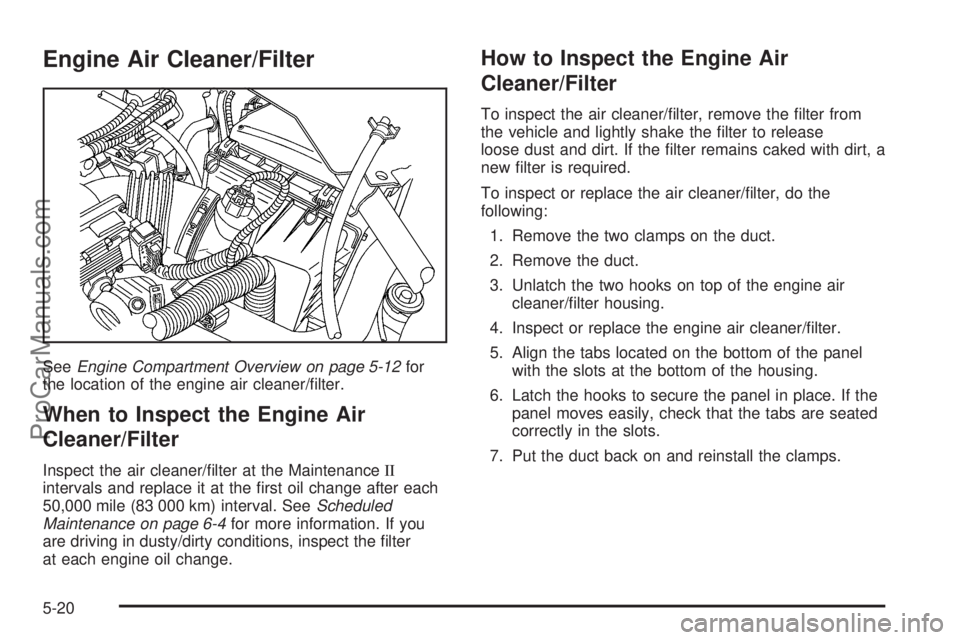
SeeEngine Compartment Overview on page 5-12for
the location of the engine air cleaner/lter.
When to Inspect the Engine Air
Cleaner/Filter
Inspect the air cleaner/lter at the MaintenanceII
intervals and replace it at the rst oil change after each
50,000 mile (83 000 km) interval. SeeScheduled
Maintenance on page 6-4for more information. If you
are driving in dusty/dirty conditions, inspect the lter
at each engine oil change.
How to Inspect the Engine Air
Cleaner/Filter
To inspect the air cleaner/lter, remove the lter from
the vehicle and lightly shake the lter to release
loose dust and dirt. If the lter remains caked with dirt, a
new lter is required.
To inspect or replace the air cleaner/lter, do the
following:
1. Remove the two clamps on the duct.
2. Remove the duct.
3. Unlatch the two hooks on top of the engine air
cleaner/lter housing.
4. Inspect or replace the engine air cleaner/lter.
5. Align the tabs located on the bottom of the panel
with the slots at the bottom of the housing.
6. Latch the hooks to secure the panel in place. If the
panel moves easily, check that the tabs are seated
correctly in the slots.
7. Put the duct back on and reinstall the clamps.
5-20
ProCarManuals.com