CD player CHEVROLET UPLANDER 2007 1.G Owner's Manual
[x] Cancel search | Manufacturer: CHEVROLET, Model Year: 2007, Model line: UPLANDER, Model: CHEVROLET UPLANDER 2007 1.GPages: 592, PDF Size: 3.04 MB
Page 317 of 592
Remote Control
The RSE system will include a remote control
(batteries are included). To use the remote control,
aim it at the transmitter window next to the RSE
faceplate and press the desired button. Direct
sunlight or very bright light may affect the ability of
the transmitter to receive signals from the
remote control. If the remote control does not
seem to be working, the batteries may need to be
replaced. See “Battery Replacement” later in
this section. Objects blocking the line of sight will
affect the function of the remote control.
Notice:Storing the remote control in a hot
area or in direct sunlight may damage it,
and the repairs will not be covered by your
warranty. Keep the remote control stored in a
cool, dry place.
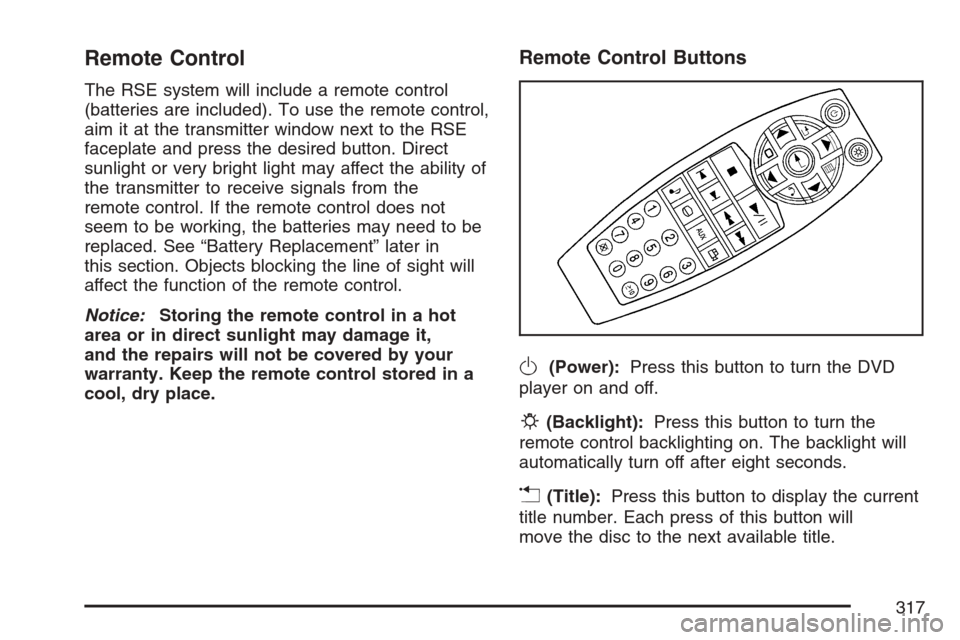
Remote Control Buttons
O(Power):Press this button to turn the DVD
player on and off.
P(Backlight):Press this button to turn the
remote control backlighting on. The backlight will
automatically turn off after eight seconds.
v(Title):Press this button to display the current
title number. Each press of this button will
move the disc to the next available title.
317
Page 319 of 592
e(Sound):Press this button to display the
current audio track. Each press will move the DVD
to the next language or commentary. The format
and content of this function will vary for each disc.
{(Subtitles):Press this button to display the
current subtitles. Each press of this button
will move the DVD to the next available subtitle
option (English, Spanish, French, etc., if available).
The format and content of this function will vary
for each disc.
AUX (Auxiliary):Press this button to switch the
system between the DVD player and an auxiliary
source.
d(Camera):Press this button to display the
current camera angle on DVDs that have
this feature. Each press will move the DVD to the
next available camera angle. The format and
content of this function will vary for each disc.
0 through 9 (Numeric Keypad):The numeric
keypad provides the capability of direct chapter or
track number selection.
\(Clear):Press this button within two seconds
after inputting a numeric selection, to clear all
numeric inputs.
}10 (Multiple Digit Entries):Press this button
to select chapter or track numbers greater
than 9. Press this button before inputting the
number.
RSE On-Screen Display (OSD) Menu
To use the RSE OSD menu when using a DVD or
an auxiliary device, do the following:
To access this menu, press the display button on
the remote control. Once the menu is on the
screen, use the directional arrows and the enter
button to navigate the screen. This menu will
let you select default preferences for video format,
language preference, brightness, color, contrast,
and tint. Not all DVDs support all the feature
defaults in the setup menus. If a feature is not
supported, the defaults will be provided by
the DVD media. To exit this menu, press the
display or the return button on the remote control
or wait for the menu to time out.
The default language selection will apply to all
future DVDs.
319
Page 320 of 592
To use the RSE OSD menu when using a CD or
an MP3, do the following:
Make sure that a CD or an MP3 is loaded in the
RSE system and that the system is not in auxiliary,
then press the display button on the remote control.
Once the menu is on the screen, use the directional
arrows and the enter button to navigate the screen.
This menu will let you select default preferences for
language and playback settings. To exit this menu,
press the display or the return button on the remote
control or wait for the menu to time out.
Battery Replacement
To change the remote control batteries, do the
following:
1. Slide the battery door, located on the back of
the remote control, down.
2. Replace the two AA batteries in the
compartment. Make sure that they are
installed correctly, using the diagram on the
inside of the battery compartment.
3. Close the battery door.
If the remote control is to be stored for a long
period of time, remove the batteries and keep them
in a cool, dry place.
Tips and Troubleshooting Chart
Problem Recommended Action
No power. The ignition may not be
in ACCESSORY, RUN,
or RAP.
Disc will not play. The system might be off.
The parental control
button might have been
pressed. The power
indicator lights will ash.
The system might be in
auxiliary source mode.
Press the AUX button to
switch between the DVD
player and the auxiliary
source. The disc is upside
down or is not compatible.
No sound — Wireless
HeadphonesTurn the headphones on.
Make sure the correct
channel is selected on the
wireless headphones.
Check the batteries. The
volume on the
headphones could be too
low, adjust the volume.
No sound — Wired
HeadphonesMake sure the wired
headphones are plugged
in. Adjust the volume. If
RSA is on, DVD audio will
not be heard.
320
Page 322 of 592
Problem Recommended Action
The auxiliary source is
running but there is no
picture or sound.Press and release the
AUX button on the remote
control or the DVD player
to get to auxiliary input.
Check to make sure that
the auxiliary source is
connected to the inputs
properly.
The audio or video skips
or jumps.The DVD could be dirty or
scratched. Try cleaning
the disc.
The fast forward, fast
reverse, previous, and
next functions do
not work.Some commands that do
one thing for DVDs will
not always work or
perform the same function
for audio, audio discs, or
games. These functions
may also be disabled
when the DVD is playing
the copyright information
or the previews. When
RSA is on, these buttons
control RSA functions.Problem Recommended Action
My disc is stuck in the
player. The eject button
does not work.Press the eject button on
the DVD player. Turn the
ignition off, then on again,
then press the eject
button on the DVD player.
Do not attempt to force or
remove the disc from the
player. If the problem
persists, return to your
GM dealer for further
assistance.
I lost the remote control
and/or the headphones.Contact your GM dealer
for assistance.
Sometimes the wireless
headphone audio cuts out
or buzzes for a moment,
then it comes back.This could be caused by
interference from cell
towers or by using the
cellular telephone or other
radio transmitter devices
in the vehicle.
322
Page 323 of 592
Problem Recommended Action
DVD System inoperable. In severe or extreme
temperatures the DVD
system might not be
operable. Temperatures
below−4°F (−20°C) or
above 140°F (60°C) could
damage the DVD system.
Operate the DVD system
under normal or
comfortable cabin
temperature ranges. See
your GM dealer if the
problem persists.
The wireless headphones
have audio distortion.Verify that the
headphones are facing to
the front of the vehicle,
left and right sides are
indicated on the
headphones to ensure
that the signal is received
properly.
Verify that there is no
obstruction between the
headphone(s) and the
transmitter.
Verify that the batteries
have a full charge.
In auxiliary mode, the
picture moves or scrolls.Check the signal coming
from the auxiliary device
and make sure that the
connection and the signal
is good.DVD Messages
The following errors may be displayed on the
video screen.
Disc Format Error:This message will be
displayed if a disc is inserted upside down, if the
disc is not readable, or if the disc format is
not compatible.
Disc Play Error:This message will be displayed
if the mechanism cannot play the disc. Scratched
or damaged discs will cause this error.
Region Code Error:This message will be
displayed if the region code of the DVD is not
compatible with the region code of the DVD player.
Load/Eject Error:This message will be
displayed if the disc is not properly loaded or
ejected.
No Disc:This message will be displayed when
you try to play or eject a disc that is not in
the player.
X:A white X will be displayed, in the upper left
corner of the video screen, if the operation that has
been selected is not currently available.
323
Page 324 of 592
DVD Distortion
There may be an experience with video distortion
when operating cellular phones, scanners, CB
radios, Global Position Systems (GPS)*, two-way
radios, mobile fax, or walkie talkies.
It may be necessary to turn off the DVD player
when operating one of these devices in or near the
vehicle.
*Excludes the OnStar
®System.
Cleaning the DVD Player
When cleaning the outside DVD faceplate and
buttons, use only a clean cloth dampened
with clean water.
Cleaning the Video Screen
When cleaning the video screen, use only a clean
cloth dampened with clean water. Use care
when directly touching or cleaning the screen, as
damage may result.
Rear Seat Entertainment System
(Option B, Uplevel)
Your vehicle may have this type of DVD Rear
Seat Entertainment (RSE) system. If it has
this feature, it will include a DVD player, a video
display screen, auxiliary inputs, two sets of
wireless headphones, and a remote control.
Parental Control
rj
(Parental Control):This button is located
behind the video screen, next to the auxiliary jacks.
Press this button while using rear seat audio (RSA),
or when a DVD or CD is playing to make the video
screen go blank and to mute the audio. The power
indicator lights on the DVD player will ash. Turning
on the parental control will also disable all other
button operations from the remote control and the
DVD player, except for the eject button. Press this
button again to restore operation of the RSA, DVD
player, and remote control.
This button may also be used to turn the DVD
player power on and to automatically resume play
of a disc that is in the player while the vehicle is on.
If no disc is in the player, the system will power up
and display no display on the LCD screen.
324
Page 328 of 592
To use the auxiliary audio and video inputs,
connect an external auxiliary device such as a
camcorder to the RCA jacks and turn on both the
auxiliary device power and the power on the
front of the RSE player.
If a disc is present when the RSE power is turned
on, the player may automatically begin playing
the disc. Press the AUX button on the remote
control or the DVD AUX button on the DVD player
faceplate to switch the system between the
DVD player and the auxiliary device. See “DVD
Player” and “Remote Control” later in this section
for more information.
Audio Output
Audio from the DVD player or auxiliary devices
can be heard through the following sources:
Vehicle Speakers
Wireless Headphones
Wired Headphones (not included)
Vehicle Speakers
Only one audio source can be heard through the
vehicle’s speakers at a time.
The RSE system or an auxiliary device can be
heard through all of the vehicle’s speakers when
the following occurs:
A DVD or auxiliary device is playing
The front audio system is on and the CD AUX
button is pressed to enable the RSE system
DVD appears on the radio display when the RSE
system is on.
To turn the vehicles speakers on and off, press
the CD AUX button on the radio. The audio
from the RSE system can be heard through the
wireless headphones and the vehicles speakers at
the same time. The volume on the radio may
vary when switching between the radio, CD, DVD,
MP3, or an auxiliary device.
328
Page 329 of 592
Video Screen
The video screen is located in the overhead
console.
To use the video screen, do the following:
1. Push the release button and the screen will
fold down.
2. Adjust its position as desired.
When the video screen is not in use, push it up
into its stowed and latched position.
Notice:Avoid directly touching the video
screen, as damage may occur. See “Cleaning
the Video Screen” later in this section for
more information.
DVD Player
The DVD player is located in the overhead
console.
The DVD player can be controlled by the buttons
on the DVD player and/or by the buttons on
the remote control. See “Remote Control” later in
this section for more information.The RSE system DVD player is only compatible
with DVDs of the appropriate region code for
the country that the vehicle was sold. The DVD
region code is printed on the jacket of most DVDs.
The player is capable of playing the following
media formats: DVD (single and dual player),
DVD+R/RW, DVD-R/RW, DVD-ROM with MP3,
DVD-ROM with WMA, CD-DA, CD-R/RW,
CD-ROM with MP3, CD-ROM with WMA,
Enhanced CD, SACD (CD player only). An error
message may appear on the display if any
other type of media is inserted into the DVD
player.
If an error message appears on the video screen,
see “DVD Messages” later in this section.
329
Page 330 of 592
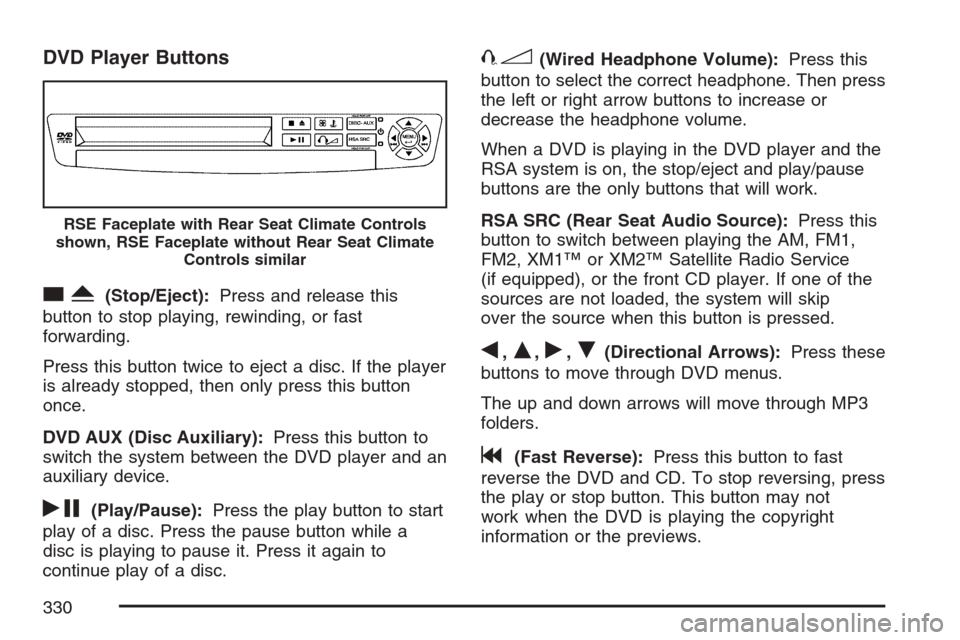
DVD Player Buttons
cY(Stop/Eject):Press and release this
button to stop playing, rewinding, or fast
forwarding.
Press this button twice to eject a disc. If the player
is already stopped, then only press this button
once.
DVD AUX (Disc Auxiliary):Press this button to
switch the system between the DVD player and an
auxiliary device.
rj(Play/Pause):Press the play button to start
play of a disc. Press the pause button while a
disc is playing to pause it. Press it again to
continue play of a disc.
43(Wired Headphone Volume):Press this
button to select the correct headphone. Then press
the left or right arrow buttons to increase or
decrease the headphone volume.
When a DVD is playing in the DVD player and the
RSA system is on, the stop/eject and play/pause
buttons are the only buttons that will work.
RSA SRC (Rear Seat Audio Source):Press this
button to switch between playing the AM, FM1,
FM2, XM1™ or XM2™ Satellite Radio Service
(if equipped), or the front CD player. If one of the
sources are not loaded, the system will skip
over the source when this button is pressed.
q,Q,r,R(Directional Arrows):Press these
buttons to move through DVD menus.
The up and down arrows will move through MP3
folders.
g(Fast Reverse):Press this button to fast
reverse the DVD and CD. To stop reversing, press
the play or stop button. This button may not
work when the DVD is playing the copyright
information or the previews.
RSE Faceplate with Rear Seat Climate Controls
shown, RSE Faceplate without Rear Seat Climate
Controls similar
330
Page 331 of 592
l(Fast Forward):Press this button to fast
forward the DVD and CD. To stop forwarding,
press the play or stop button. This button may not
work when the DVD is playing the copyright
information or the previews.
MENU (Disc):Press this button to view the main
DVD menu. The menu is different on every
disc. Use the up, down, right, and left arrow
buttons to move the cursor around the menu. After
making a selection, press the enter button.
r(Enter/Select):Press this button to select
the choice that is highlighted in any menu.
z(Display Control Button):For vehicles
without rear seat climate control, this button will
take the place of the fan/temp button. For vehicles
with rear seat climate control, this button is also
found on the remote control. Press this button
to open the RSE On-Screen Display (OSD) menus
to adjust the color, tint, brightness, contrast, and
display modes.
Playing a Disc
To play a disc, gently insert the disc, with the label
side up, into the loading slot. The DVD player
will continue loading the disc and the player will
automatically start if the vehicle is in
ACCESSORY, RUN, or RAP.
If a disc is already in the player, make sure that
the DVD player is on, then press the play/pause
button on the player faceplate or on the remote
control. You can also press the DVD AUX button
on the player faceplate, or the CD AUX button
on the radio faceplate until RSE appears on
the display, to start playing a disc.
Some DVDs will not allow fast forwarding or
skipping of the copyright information or previews.
Some DVDs will begin playing after the previews
have nished. If the DVD does not begin playing at
the main title, refer to the on-screen instructions.
331