CD player CHEVROLET UPLANDER 2007 1.G Service Manual
[x] Cancel search | Manufacturer: CHEVROLET, Model Year: 2007, Model line: UPLANDER, Model: CHEVROLET UPLANDER 2007 1.GPages: 592, PDF Size: 3.04 MB
Page 345 of 592
Mobile Digital Media System
Your vehicle may have the GM Mobile Digital
Media system which is made up of a digital media
player, a wireless game controller, the digital
media storage (DMS) cartridge, the USB 2.0 cradle
(docking station), and the PhatNoise™ Media
Manager software.
See the following information to learn more about
the components that make up the complete
Digital Media system.
Digital Media Player
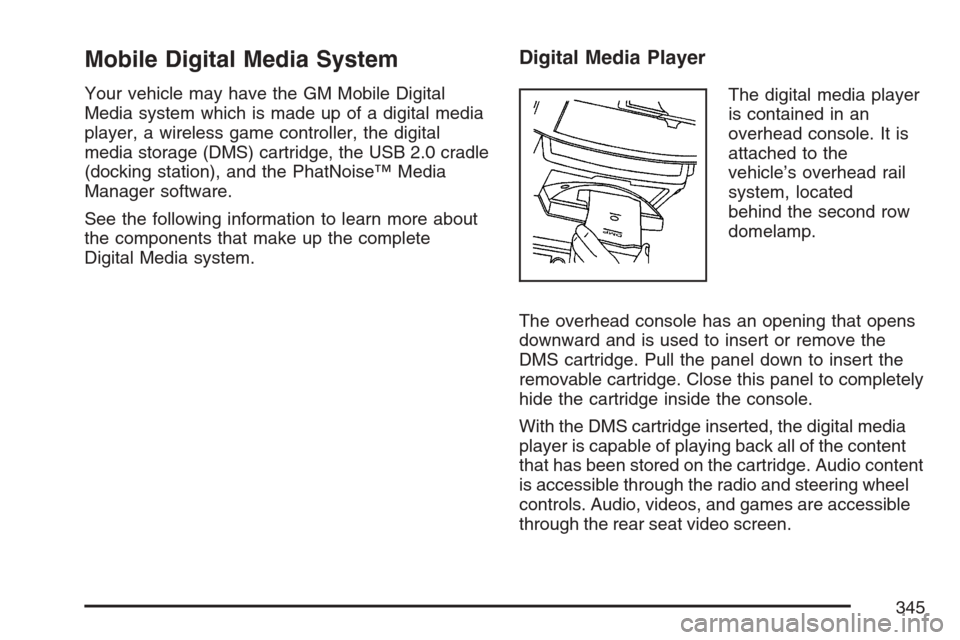
The digital media player
is contained in an
overhead console. It is
attached to the
vehicle’s overhead rail
system, located
behind the second row
domelamp.
The overhead console has an opening that opens
downward and is used to insert or remove the
DMS cartridge. Pull the panel down to insert the
removable cartridge. Close this panel to completely
hide the cartridge inside the console.
With the DMS cartridge inserted, the digital media
player is capable of playing back all of the content
that has been stored on the cartridge. Audio content
is accessible through the radio and steering wheel
controls. Audio, videos, and games are accessible
through the rear seat video screen.
345
Page 350 of 592
The GM Mobile Digital Media is controlled through
the radio and steering wheel controls on your
vehicle’s audio system. This system functions
differently than a typical CD changer. The Digital
Media system allows you to switch between
different playback modes. These modes determine
the next song that will play. Using modes, you
can browse through playlists, artists, albums, and
genres while the system reads Voice Index™
names to you while you drive. By selecting Playlist
Mode, you can access the music collection in
the order placed onto the DMS cartridge, or you
can have the system sort the music by Album,
Artist, or Genre by selecting the corresponding
Modes.
Starting the System for Front Seat
Entertainment
The GM Mobile Digital Media system is available
through the DMS mode of your radio. This
system will power on and off automatically and
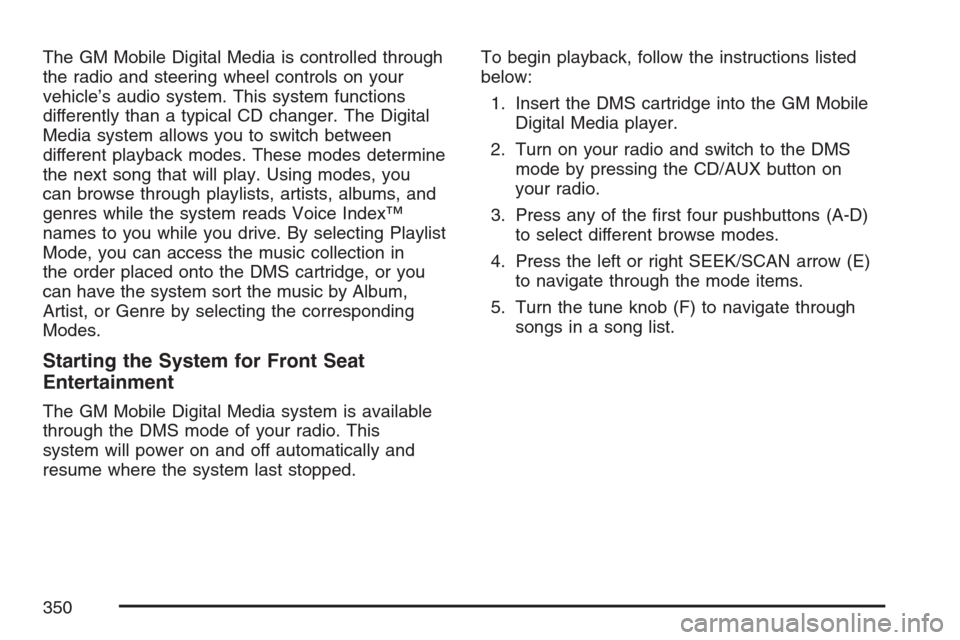
resume where the system last stopped.To begin playback, follow the instructions listed
below:
1. Insert the DMS cartridge into the GM Mobile
Digital Media player.
2. Turn on your radio and switch to the DMS
mode by pressing the CD/AUX button on
your radio.
3. Press any of the rst four pushbuttons (A-D)
to select different browse modes.
4. Press the left or right SEEK/SCAN arrow (E)
to navigate through the mode items.
5. Turn the tune knob (F) to navigate through
songs in a song list.
350
Page 353 of 592
The Digital Media system will announce the
following in each mode:
Mode 1 (Album Mode):Album names are
announced.
Mode 2 (Artist Mode):Artist names are
announced. Press and hold the SEEK/SCAN
button until the system announces the rst letter of
each artist name.
Mode 3 (Genre Mode):The rst letter of Artist
names are announced in alphabetical order. Press
and hold the SEEK/SEEK button until the system
announces the rst letter of each artist name.
Mode 4 (Playlist Mode):Seeking through songs
is not available in Playlist Mode.
Finding Songs in a Song List
After nding a playlist, artist, album, or genre,
navigate through the songs by turning the
tune knob.
Using the Fast Forward and Fast Reverse
Buttons
{|(Fast Forward/Fast Reverse):Press and
hold the fast forward or fast reverse arrow to
fast forward or reverse within the current track.
Using the GM Mobile Digital Media
System for Rear Seat Entertainment
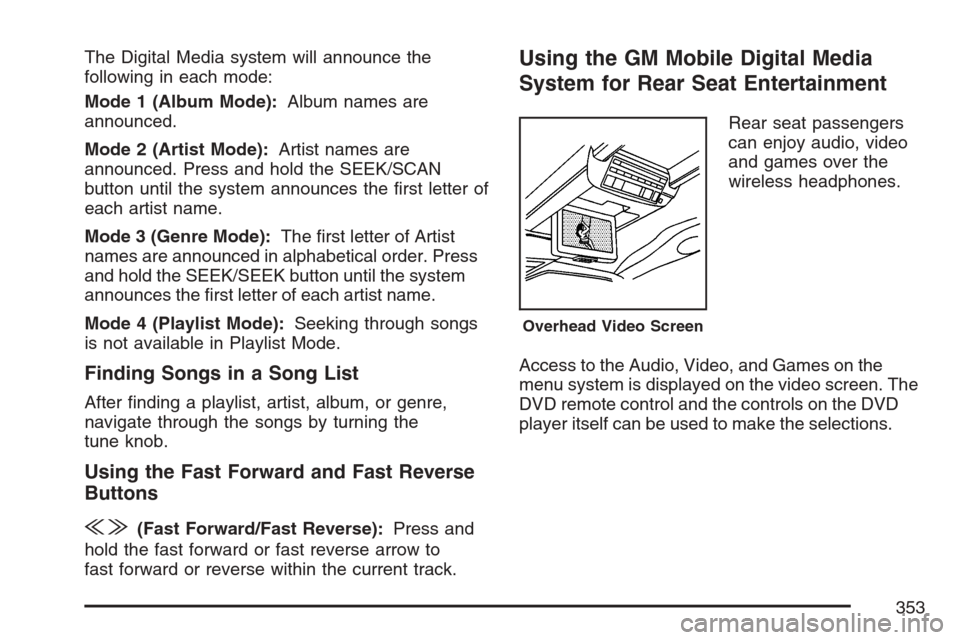
Rear seat passengers
can enjoy audio, video
and games over the
wireless headphones.
Access to the Audio, Video, and Games on the
menu system is displayed on the video screen. The
DVD remote control and the controls on the DVD
player itself can be used to make the selections.
Overhead Video Screen
353
Page 354 of 592
Starting the System for Rear Seat
Entertainment
The GM Mobile Digital Media system is available
through the auxiliary mode of the DVD player.
To begin using the system, follow the instruction
list below:
1. Insert the DMS cartridge into the GM Mobile
Digital Media player.
2. Turn on your video screen by pressing the
power button.
3. Switch to the DMS mode by pressing the AUX
button.
Navigating the On-Screen Menus Using
the DVD Remote Control
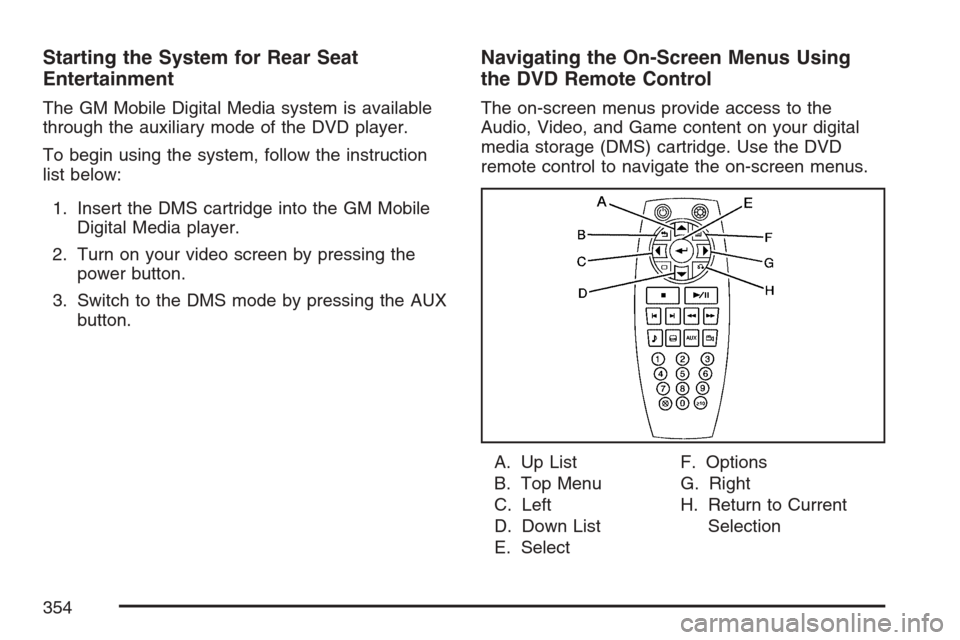
The on-screen menus provide access to the
Audio, Video, and Game content on your digital
media storage (DMS) cartridge. Use the DVD
remote control to navigate the on-screen menus.
A. Up List
B. Top Menu
C. Left
D. Down List
E. SelectF. Options
G. Right
H. Return to Current
Selection
354
Page 361 of 592
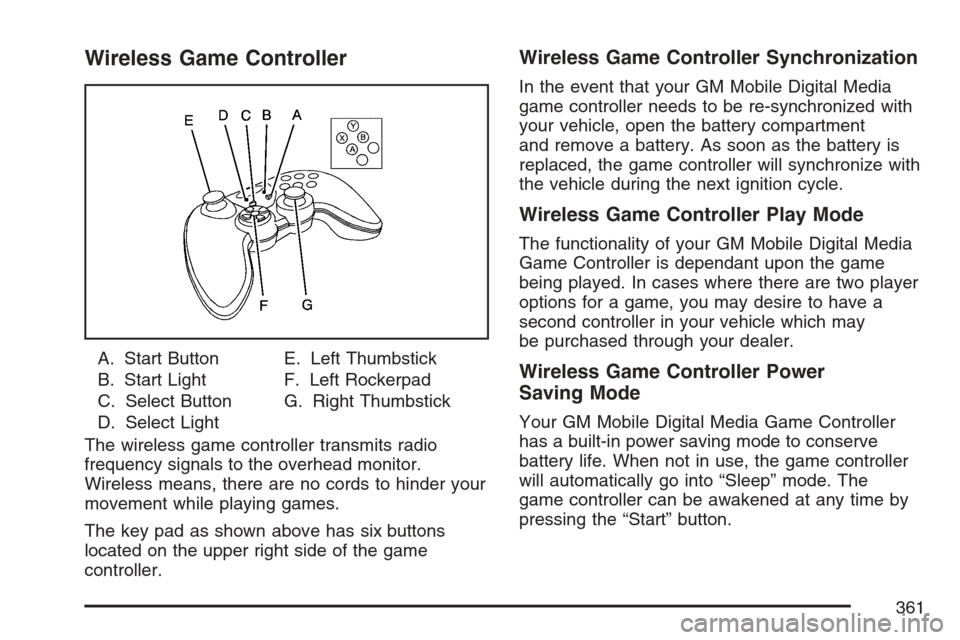
Wireless Game Controller
A. Start Button
B. Start Light
C. Select Button
D. Select LightE. Left Thumbstick
F. Left Rockerpad
G. Right Thumbstick
The wireless game controller transmits radio
frequency signals to the overhead monitor.
Wireless means, there are no cords to hinder your
movement while playing games.
The key pad as shown above has six buttons
located on the upper right side of the game
controller.
Wireless Game Controller Synchronization
In the event that your GM Mobile Digital Media
game controller needs to be re-synchronized with
your vehicle, open the battery compartment
and remove a battery. As soon as the battery is
replaced, the game controller will synchronize with
the vehicle during the next ignition cycle.
Wireless Game Controller Play Mode
The functionality of your GM Mobile Digital Media
Game Controller is dependant upon the game
being played. In cases where there are two player
options for a game, you may desire to have a
second controller in your vehicle which may
be purchased through your dealer.
Wireless Game Controller Power
Saving Mode
Your GM Mobile Digital Media Game Controller
has a built-in power saving mode to conserve
battery life. When not in use, the game controller
will automatically go into “Sleep” mode. The
game controller can be awakened at any time by
pressing the “Start” button.
361
Page 363 of 592
Digital Media Storage (DMS)
Cartridge Care
Do not leave the DMS cartridge in locations
with extremely high temperatures such as
on a car dashboard or in the rear window
where it will be subject to direct sunlight.
Do not drop the DMS cartridge or subject it to
a violent shock.
Do not spill liquid on the DMS cartridge or
submerge the DMS cartridge in liquid. The
only effective protection for data and
other material stored on the DMS cartridge is
the regular backing up of that data by you.
Mobile Digital Media Player Care
Never spray any type of liquid such as a
cleaning agent inside of an open cartridge
panel on the Digital Media player. Doing this
may damage the parts or inside mechanism
needed to help operate the unit.
Do not use any object to probe the opening of
the Mobile Digital Media player and do not put
any body parts or other foreign objects in
the opening of the product.
363
Page 365 of 592
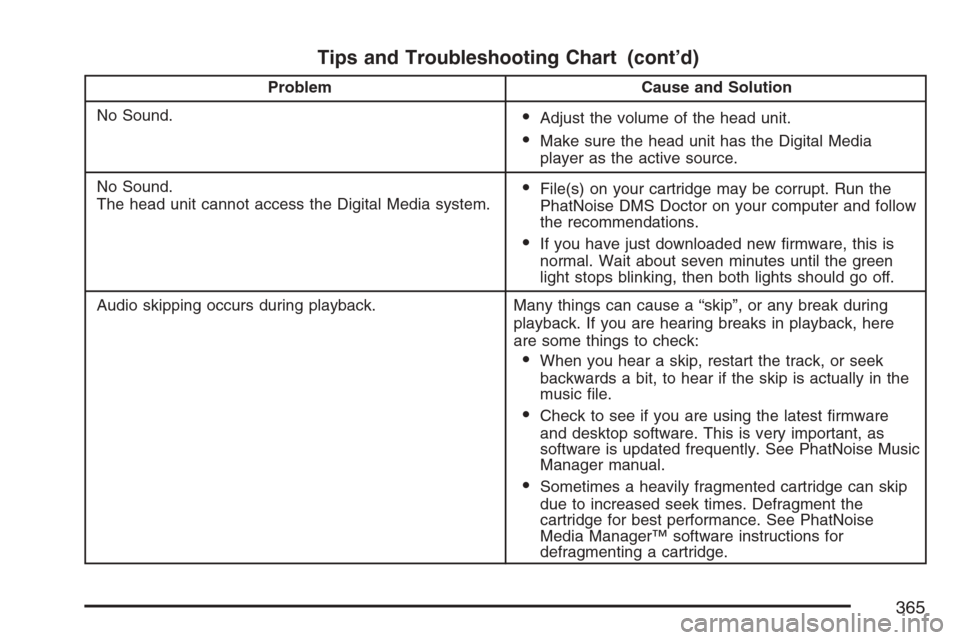
Tips and Troubleshooting Chart (cont’d)
Problem Cause and Solution
No Sound.
Adjust the volume of the head unit.
Make sure the head unit has the Digital Media
player as the active source.
No Sound.
The head unit cannot access the Digital Media system.
File(s) on your cartridge may be corrupt. Run the
PhatNoise DMS Doctor on your computer and follow
the recommendations.
If you have just downloaded new rmware, this is
normal. Wait about seven minutes until the green
light stops blinking, then both lights should go off.
Audio skipping occurs during playback. Many things can cause a “skip”, or any break during
playback. If you are hearing breaks in playback, here
are some things to check:
When you hear a skip, restart the track, or seek
backwards a bit, to hear if the skip is actually in the
music le.
Check to see if you are using the latest rmware
and desktop software. This is very important, as
software is updated frequently. See PhatNoise Music
Manager manual.
Sometimes a heavily fragmented cartridge can skip
due to increased seek times. Defragment the
cartridge for best performance. See PhatNoise
Media Manager™ software instructions for
defragmenting a cartridge.
365
Page 366 of 592
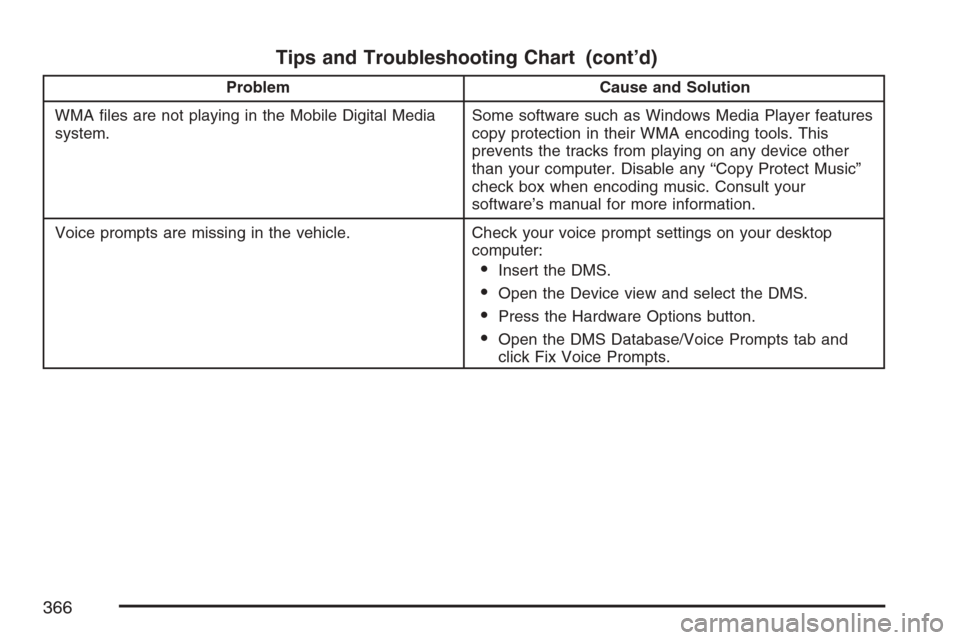
Tips and Troubleshooting Chart (cont’d)
Problem Cause and Solution
WMA les are not playing in the Mobile Digital Media
system.Some software such as Windows Media Player features
copy protection in their WMA encoding tools. This
prevents the tracks from playing on any device other
than your computer. Disable any “Copy Protect Music”
check box when encoding music. Consult your
software’s manual for more information.
Voice prompts are missing in the vehicle. Check your voice prompt settings on your desktop
computer:
Insert the DMS.
Open the Device view and select the DMS.
Press the Hardware Options button.
Open the DMS Database/Voice Prompts tab and
click Fix Voice Prompts.
366
Page 368 of 592
The radio will only seek or scan stations with a
strong signal that are in the selected band.
When a CD is playing, press either arrow to
go to the previous or next track, if more than
eight seconds have played. If either arrow is held or
pressed more than once, the player will continue
moving backward or forward through the CD.
BAND:Press this button to switch between FM1,
FM2, AM, or XM1 or XM2 (if equipped).
1-6:Press this button to scan the stations that
are programmed on the radio preset pushbuttons.
The radio will go to the next preset station
stored on the pushbuttons, play for a few seconds,
then go on to the next preset station. Press this
button again to stop scanning. The radio will
only scan preset stations with a strong signal that
are in the selected band.
$(Mute):Press this button to silence the system.
Press this button again, to turn the sound on.
r(Play):When listening to the radio, press this
button to play a CD.
wux(Volume):Press the up or down arrow
to increase or decrease the volume.
Radio Reception
You may experience frequency interference and
static during normal radio reception if items
such as cellphone chargers, vehicle convenience
accessories, and external electronic devices
are plugged into the accessory power outlet. If
there is interference or static, unplug the item from
the accessory power outlet.
AM
The range for most AM stations is greater than for
FM, especially at night. The longer range can
cause station frequencies to interfere with each
other. For better radio reception, most AM
radio stations will boost the power levels during
the day, and then reduce these levels during
the night. Static can also occur when things like
storms and power lines interfere with radio
reception. When this happens, try reducing the
treble on your radio.
368
Page 369 of 592
FM Stereo
FM stereo will give the best sound, but FM signals
will reach only about 10 to 40 miles (16 to 65 km).
Tall buildings or hills can interfere with FM
signals, causing the sound to fade in and out.
XM™ Satellite Radio Service
XM™ Satellite Radio Service gives digital radio
reception from coast-to-coast in the 48 contiguous
United States, and in Canada. Just as with FM,
tall buildings or hills can interfere with satellite
radio signals, causing the sound to fade in and out.
In addition, traveling or standing under heavy
foliage, bridges, garages, or tunnels may cause
loss of the XM™ signal for a period of time.
The radio may display NO SIGNAL to indicate
interference.
Care of Your CDs and DVDs
Handle CDs carefully. Store them in their original
cases or other protective cases and away from
direct sunlight and dust. The CD player scans the
bottom surface of the disc. If the surface of a
CD is damaged, such as cracked, broken,
or scratched, the CD will not play properly or not
at all. If the surface of a CD is soiled, take a
soft, lint free cloth or dampen a clean, soft cloth in
a mild, neutral detergent solution mixed with
water, and clean it. Make sure the wiping process
starts from the center to the edge.
Do not touch the bottom side of a CD while
handling it; this could damage the surface. Pick up
CDs by grasping the outer edges or the edge of
the hole and the outer edge.
Care of the CD and DVD Player
The use of CD lens cleaners for CDs is not
advised, due to the risk of contaminating the lens
of the CD optics with lubricants internal to the
CD mechanism.
369