buttons CHEVROLET UPLANDER 2007 1.G Owner's Guide
[x] Cancel search | Manufacturer: CHEVROLET, Model Year: 2007, Model line: UPLANDER, Model: CHEVROLET UPLANDER 2007 1.GPages: 592, PDF Size: 3.04 MB
Page 271 of 592
This message only displays while the ignition is in
RUN. Press any of the DIC buttons to acknowledge
this message and to clear it from the screen.
This message continues to display for two seconds
if it has not been acknowledged when the engine is
turned off. It also re-displays for two seconds if the
message has been acknowledged, but the
condition still exists when the engine is turned off.
If the condition still exists, the message re-appears
when the engine is turned on.
SERVICE STABILITY SYSTEM
If your vehicle has StabiliTrak®, this message
displays if there has been a problem detected with
StabiliTrak
®. SeeStabiliTrak®System on
page 381.
If this message turns on while you are driving, pull
off the road as soon as possible and stop
carefully. Try resetting the system by turning the
ignition off and then back on. If this message
still stays on or turns back on again while you are
driving, your vehicle needs service. Have the
StabiliTrak
®System inspected by your dealer as
soon as possible.This message displays only while the ignition is in
RUN. Press any of the DIC buttons to acknowledge
this message and to clear it from the screen.
This message continues to display for two seconds
if it has not been acknowledged when the engine is
turned off. It also re-displays for two seconds if the
message has been acknowledged, but the
condition still exists when the engine is turned off.
If the condition still exists, the message re-appears
when the engine is turned on.
SERVICE TRACTION SYSTEM
If your vehicle has the Traction Control System
(TCS), this message displays when the system is
not functioning properly. A warning light also
appears on the instrument panel cluster. See
Traction Control System (TCS) Warning Light on
page 240. SeeTraction Control System (TCS)
on page 379for more information. Have the TCS
serviced by your dealer as soon as possible.
This message displays only while the ignition is in
RUN. Press any of the DIC buttons to acknowledge
this message and to clear it from the screen.
271
Page 272 of 592
This message continues to display for two seconds
if it has not been acknowledged when the engine is
turned off. It also re-displays for two seconds if the
message has been acknowledged, but the
condition still exists when the engine is turned off.
If the condition still exists, the message re-appears
when the engine is turned on.
SERVICE VEHICLE SOON
This message displays when a non-emissions
related malfunction occurs. Have the vehicle
serviced by your dealer as soon as possible.
This message displays only while the ignition is in
RUN. Press any of the DIC buttons to acknowledge
this message and to clear it from the screen.
This message continues to display for two seconds
if it has not been acknowledged when the engine is
turned off. It also re-displays for two seconds if the
message has been acknowledged, but the
condition still exists when the engine is turned off.
If the condition still exists, the message re-appears
when the engine is turned on.
STABILITY CONTROL ACTIVE
If your vehicle has StabiliTrak®, this message
displays when StabiliTrak®is actively assisting you
with directional control of the vehicle. Slippery
road conditions may exist when this message is
displayed, so adjust your driving accordingly.
SeeStabiliTrak
®System on page 381.
This message displays only while the ignition is in
RUN. This message stays on until road conditions
change and StabiliTrak
®is not active.
This message cannot be acknowledged and
cleared from the screen.
STABILITY CONTROL OFF
If your vehicle has StabiliTrak®, this message
displays any time the system turns off. When this
message has been displayed, StabiliTrak
®is
no longer available to assist you with directional
control of the vehicle. Adjust your driving
accordingly. SeeStabiliTrak
®System on page 381.
272
Page 274 of 592
Any of the following conditions may cause the
TCS to turn off:
The TCS is turned off by pressing the traction
control button located on the center of the
instrument panel. SeeTraction Control System
(TCS) on page 379.
The battery is low.
There is a TCS failure. See your dealer for
service.
TRANSMISSION FLUID HOT
This message displays when the transaxle uid in
your vehicle is too hot. Stop the vehicle and
allow it to idle until it cools down. If the warning
message continues to display, have the vehicle
serviced by your dealer as soon as possible.
This message displays and a chime sounds only
while the ignition is in RUN. Press any of the
DIC buttons to acknowledge this message and to
clear it from the screen.This message continues to display for two seconds
if it has not been acknowledged when the engine is
turned off. It also re-displays for two seconds if the
message has been acknowledged, but the
condition still exists when the engine is turned off.
If the condition still exists, the message re-appears
when the engine is turned on.
TURN SIGNAL ON
This message displays as a reminder to turn off
the turn signal if you drive your vehicle for
more than about 0.75 mile (1.2 km) with a turn
signal on. SeeTurn Signal/Multifunction Lever on
page 195.
This message displays and a chime sounds only
when the ignition is in RUN. This message
clears from the DIC if the turn signal is manually
turned off, a turn is completed, or the message
is acknowledged.
274
Page 288 of 592
AUTOn(Automatic Volume):With automatic
volume, the audio system adjusts automatically
to make up for road and wind noise as you drive,
by increasing the volume as the vehicle speed
increases.
Set the volume at the desired level. Press this
button to select AUTO VOLUME MIN (minimum),
AUTO VOLUME MED (medium), or AUTO
VOLUME MAX (maximum). Each higher setting
provides more volume compensation at faster
vehicle speeds. To turn automatic volume
off, press this button until AUTO VOLUME OFF
appears on the display.
MUTE:Press this button to silence the system.
Press this button again to turn the sound on.
This button is not available on the Radio
with Six-Disc CD.
Finding a Station
BAND:Press this button to switch between FM1,
FM2, AM, or XM1 or XM2 (if equipped). The
display shows the selection.
O/e(Tune):Turn this knob to select radio
stations.
tSEEKu:Press the right or the left arrow to
go to the next or to the previous station and
stay there.
The radio only seeks stations with a strong signal
that are in the selected band.
tSCANu:Press and hold either arrow for
two seconds until FREQUENCY SCAN appears on
the display. The radio goes to a station, plays
for a few seconds, then goes to the next station.
Press either arrow again to stop scanning.
To scan preset stations, press and hold either
arrow for four seconds until PRESET SCAN
appears on the display. The radio goes to the next
preset station, plays for a few seconds, then
goes to the next preset station. Press either scan
arrow again or one of the pushbuttons to stop
scanning presets.
The radio only scans stations with a strong signal
that are in the selected band.
288
Page 289 of 592
Setting Preset Stations
Up to 30 stations (six FM1, six FM2, and six AM,
six XM1 and six XM2 (if equipped)), can be
programmed on the six numbered pushbuttons, by
performing the following steps:
1. Turn the radio on.
2. Press BAND to select FM1, FM2, AM, or XM1
or XM2.
3. Tune in the desired station.
4. Press AUTO EQ to select the equalization.
5. Press and hold one of the six numbered
pushbuttons until you hear a beep.
Whenever that numbered pushbutton is
pressed, the station that was set returns and
the equalization that was selected is stored
for that pushbutton.
6. Repeat the steps for each pushbutton.
Setting the Tone (Bass/Treble)
e
(Bass/Treble/Midrange):Press this knob to
select BASS, MIDRANGE, or TREBLE. Turn
the knob to increase or to decrease. If a station is
weak or has static, decrease the treble.
To adjust the bass, midrange, and treble to the
middle position, press and hold this knob when the
tone control is on the display. The level changes
to the middle position.
To adjust all tone and speaker controls to the
middle position, press and hold this knob when no
tone or speaker control is displayed. AUDIO
SETTINGS CENTERED appears on the display.
AUTO EQ (Automatic Equalization):Press
this button to select customized equalization
settings designed for country/western, jazz, talk,
pop, rock, and classical. Selecting CUSTOM
or changing bass or treble, returns the EQ to the
manual bass and treble settings.
The radio saves separate AUTO EQ settings for
each preset and source.
289
Page 303 of 592
No Folder
When the CD contains only compressed les, the
les will be located under the root folder. The
next and previous folder functions will not function
on a CD that was recorded without folders or
playlists. When displaying the name of the folder
the radio displays ROOT.
When the CD contains only playlists and
compressed audio les, but no folders, all les are
located under the root folder. The folder down and
the folder up buttons search playlists (Px) rst and
then go to the root folder. When the radio displays
the name of the folder the radio displays ROOT.
Order of Play
Tracks are played in the following order:
Play begins from the rst track in the rst
playlist and continues sequentially through
all tracks in each playlist. When the last track
of the last playlist has played, play continues
from the rst track of the rst playlist.
If the CD does not contain any playlists, then
play begins from the rst track under the root
directory. When all tracks from the root
directory have played, play continues from
les according to their numerical listing. After
playing the last track from the last folder,
play begins again at the rst track of the rst
folder or root directory.
When play enters a new folder, the display does
not automatically show the new folder name unless
you have chosen the folder mode as the default
display. See the information button later in
this section for more information. The new track
name appears on the display.
File System and Naming
The song name that displays is the song name
that is contained in the ID3 tag. If the song name
is not present in the ID3 tag, then the radio
displays the le name without the extension
(such as .mp3) as the track name.
Track names longer than 32 characters or four
pages are shortened. Parts of words on the
last page of text and the extension of the lename
will not display.
303
Page 312 of 592
Wired Headphones
There is a right and left wired headphone jack. To
adjust the volume, do the following:
1. Plug the headphone into the corresponding
jack, located behind the video screen, next
to the auxiliary jacks.
2. Press the corresponding headphone button on
the DVD faceplate.
3. Press the right and left arrow buttons, on the
DVD faceplate, to increase or to decrease the
volume.
The wired headphones work as follows:
DVD on / RSA off: The wired headphones will
play RSE audio.
DVD off / RSA on: The wired headphones will
play RSA audio.
DVD on / RSA on: The wired headphones will
play RSA audio.
Stereo RCA Jacks
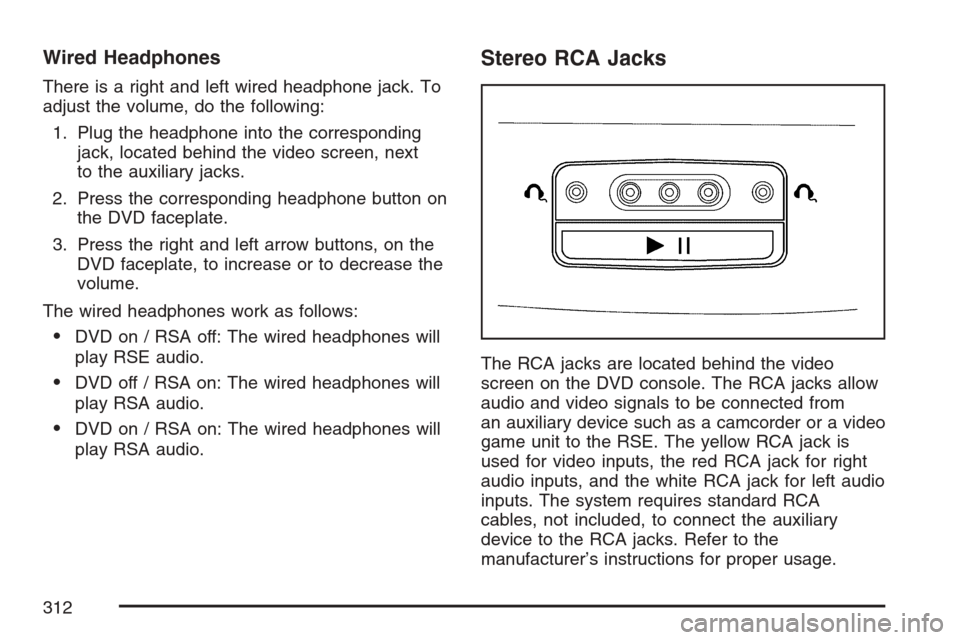
The RCA jacks are located behind the video
screen on the DVD console. The RCA jacks allow
audio and video signals to be connected from
an auxiliary device such as a camcorder or a video
game unit to the RSE. The yellow RCA jack is
used for video inputs, the red RCA jack for right
audio inputs, and the white RCA jack for left audio
inputs. The system requires standard RCA
cables, not included, to connect the auxiliary
device to the RCA jacks. Refer to the
manufacturer’s instructions for proper usage.
312
Page 314 of 592
Video Screen
The video screen is located in the overhead
console.
To use the video screen, do the following:
1. Push forward on the release button and the
screen will fold down.
2. Adjust its position as desired.
When the video screen is not in use, push it up
into its stowed and latched position.
Notice:Avoid directly touching the video
screen, as damage may occur. See “Cleaning
the Video Screen” later in this section for
more information.
DVD Player
The DVD player is located in the overhead
console.
The DVD player can be controlled by the buttons
on the DVD player and/or by the buttons on
the remote control. See “Remote Control” later in
this section for more information.The RSE system DVD player is only compatible
with DVDs of the appropriate region code for
the country that the vehicle was sold. The DVD
region code is printed on the jacket of most DVDs.
Standard audio CDs, CD-R, CD-RW, enhanced
CDs, video CDs, and CD-ROM with MP3
media are supported by this DVD player. DVD+R,
DVD+RW, and copy protected CDs may or
may not be supported by the DVD player. The
DVD player does not support DVD-RAM,
DVD-ROM, DVD-R, DVD-R/W, and DVD audio
media. An error message will appear on the
display if this type of media is inserted into the
DVD player.
If an error message appears on the video screen,
see “DVD Messages” later in this section.
314
Page 315 of 592
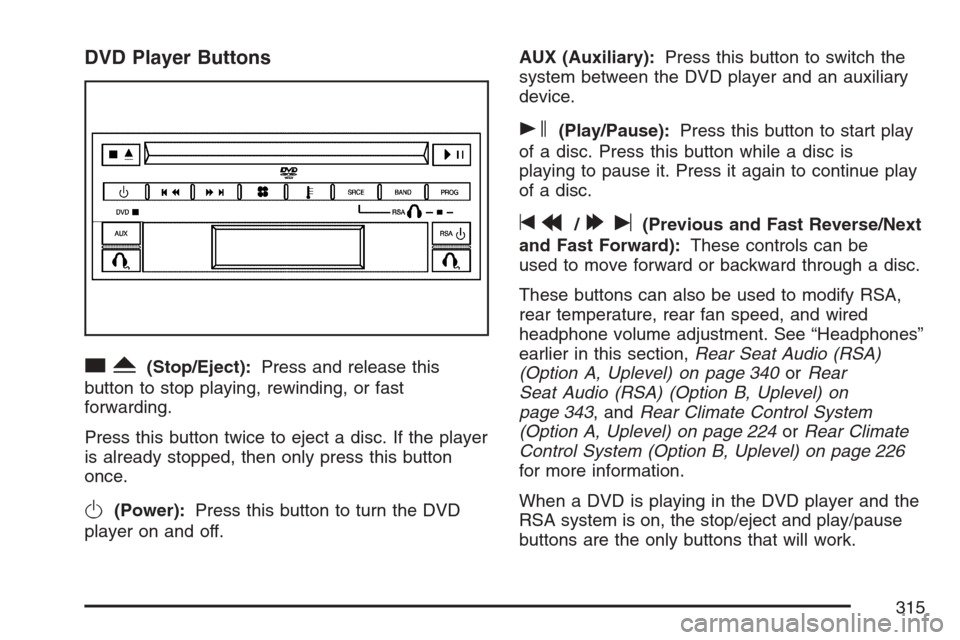
DVD Player Buttons
cY(Stop/Eject):Press and release this
button to stop playing, rewinding, or fast
forwarding.
Press this button twice to eject a disc. If the player
is already stopped, then only press this button
once.
O(Power):Press this button to turn the DVD
player on and off.AUX (Auxiliary):Press this button to switch the
system between the DVD player and an auxiliary
device.
s(Play/Pause):Press this button to start play
of a disc. Press this button while a disc is
playing to pause it. Press it again to continue play
of a disc.
tr/[u(Previous and Fast Reverse/Next
and Fast Forward):These controls can be
used to move forward or backward through a disc.
These buttons can also be used to modify RSA,
rear temperature, rear fan speed, and wired
headphone volume adjustment. See “Headphones”
earlier in this section,Rear Seat Audio (RSA)
(Option A, Uplevel) on page 340orRear
Seat Audio (RSA) (Option B, Uplevel) on
page 343, andRear Climate Control System
(Option A, Uplevel) on page 224orRear Climate
Control System (Option B, Uplevel) on page 226
for more information.
When a DVD is playing in the DVD player and the
RSA system is on, the stop/eject and play/pause
buttons are the only buttons that will work.
315
Page 317 of 592
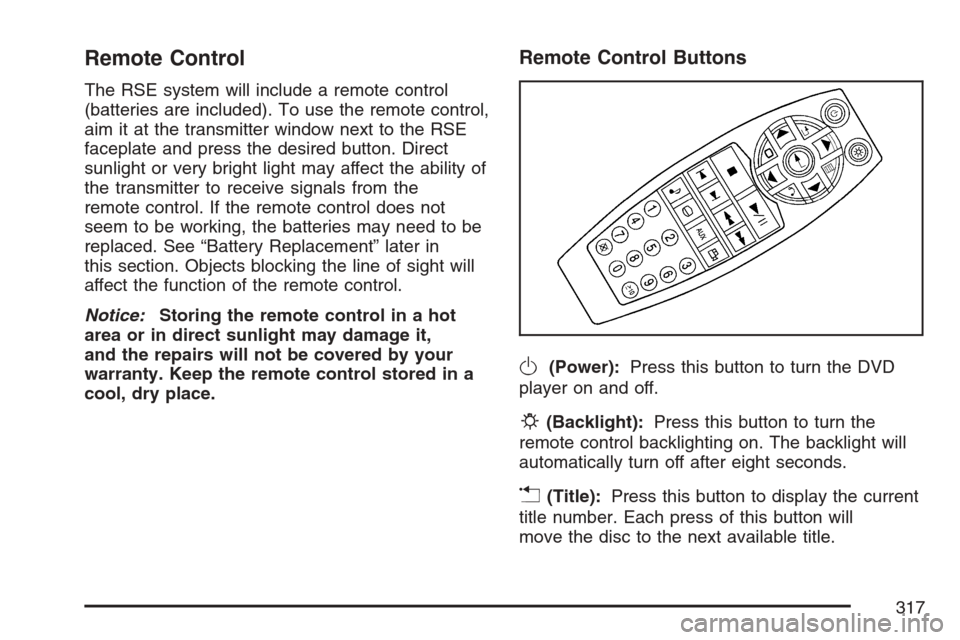
Remote Control
The RSE system will include a remote control
(batteries are included). To use the remote control,
aim it at the transmitter window next to the RSE
faceplate and press the desired button. Direct
sunlight or very bright light may affect the ability of
the transmitter to receive signals from the
remote control. If the remote control does not
seem to be working, the batteries may need to be
replaced. See “Battery Replacement” later in
this section. Objects blocking the line of sight will
affect the function of the remote control.
Notice:Storing the remote control in a hot
area or in direct sunlight may damage it,
and the repairs will not be covered by your
warranty. Keep the remote control stored in a
cool, dry place.
Remote Control Buttons
O(Power):Press this button to turn the DVD
player on and off.
P(Backlight):Press this button to turn the
remote control backlighting on. The backlight will
automatically turn off after eight seconds.
v(Title):Press this button to display the current
title number. Each press of this button will
move the disc to the next available title.
317