tow CHEVROLET UPLANDER 2008 1.G Workshop Manual
[x] Cancel search | Manufacturer: CHEVROLET, Model Year: 2008, Model line: UPLANDER, Model: CHEVROLET UPLANDER 2008 1.GPages: 476, PDF Size: 5.77 MB
Page 363 of 476
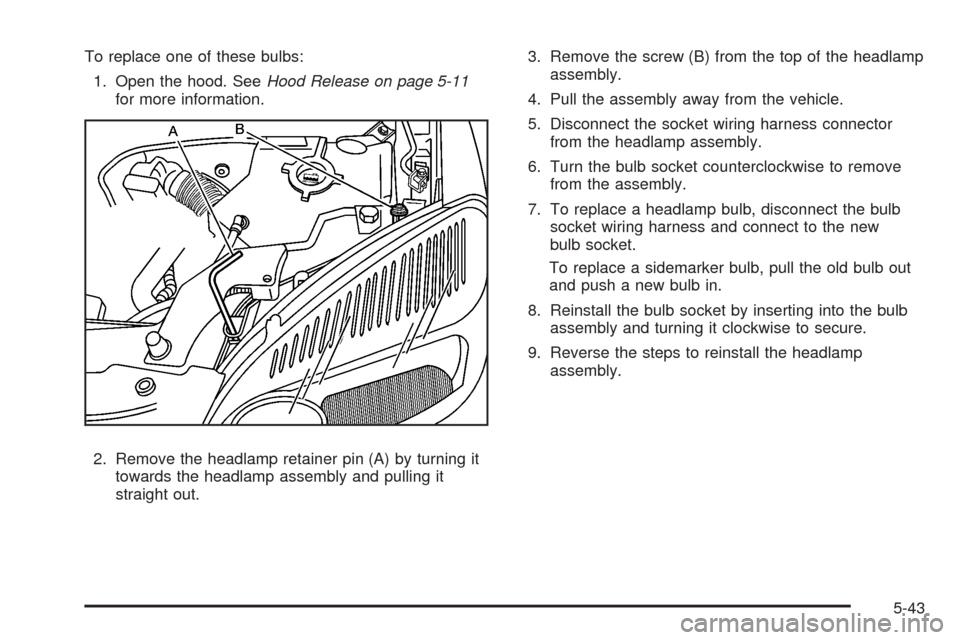
To replace one of these bulbs:
1. Open the hood. SeeHood Release on page 5-11
for more information.
2. Remove the headlamp retainer pin (A) by turning it
towards the headlamp assembly and pulling it
straight out.3. Remove the screw (B) from the top of the headlamp
assembly.
4. Pull the assembly away from the vehicle.
5. Disconnect the socket wiring harness connector
from the headlamp assembly.
6. Turn the bulb socket counterclockwise to remove
from the assembly.
7. To replace a headlamp bulb, disconnect the bulb
socket wiring harness and connect to the new
bulb socket.
To replace a sidemarker bulb, pull the old bulb out
and push a new bulb in.
8. Reinstall the bulb socket by inserting into the bulb
assembly and turning it clockwise to secure.
9. Reverse the steps to reinstall the headlamp
assembly.
5-43
Page 383 of 476
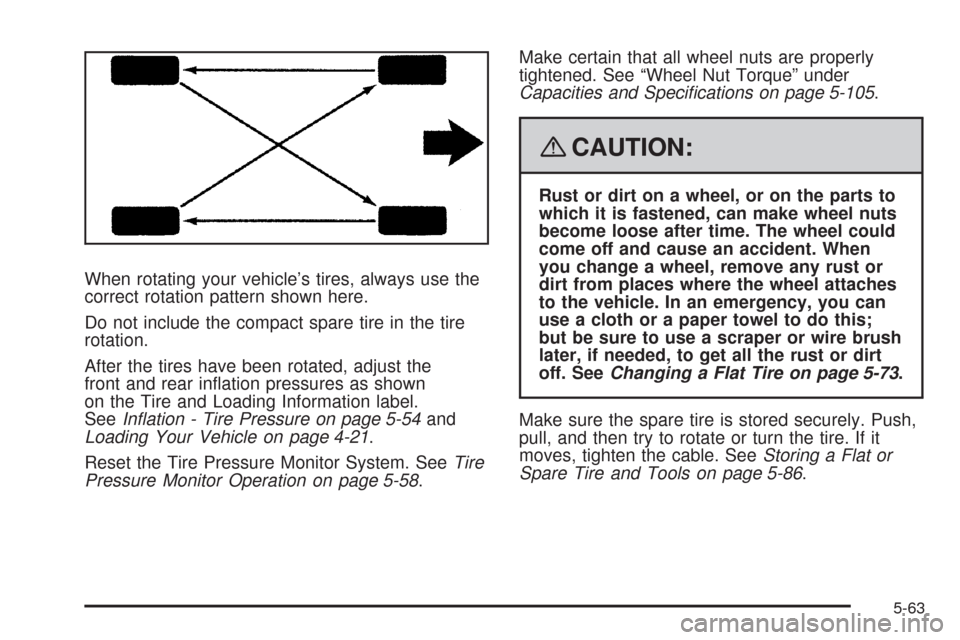
When rotating your vehicle’s tires, always use the
correct rotation pattern shown here.
Do not include the compact spare tire in the tire
rotation.
After the tires have been rotated, adjust the
front and rear ination pressures as shown
on the Tire and Loading Information label.
SeeInflation - Tire Pressure on page 5-54and
Loading Your Vehicle on page 4-21.
Reset the Tire Pressure Monitor System. SeeTire
Pressure Monitor Operation on page 5-58.Make certain that all wheel nuts are properly
tightened. See “Wheel Nut Torque” under
Capacities and Specifications on page 5-105.
{CAUTION:
Rust or dirt on a wheel, or on the parts to
which it is fastened, can make wheel nuts
become loose after time. The wheel could
come off and cause an accident. When
you change a wheel, remove any rust or
dirt from places where the wheel attaches
to the vehicle. In an emergency, you can
use a cloth or a paper towel to do this;
but be sure to use a scraper or wire brush
later, if needed, to get all the rust or dirt
off. SeeChanging a Flat Tire on page 5-73.
Make sure the spare tire is stored securely. Push,
pull, and then try to rotate or turn the tire. If it
moves, tighten the cable. SeeStoring a Flat or
Spare Tire and Tools on page 5-86.
5-63
Page 392 of 476
If a Tire Goes Flat
It is unusual for a tire to blowout while you are driving,
especially if you maintain your vehicle’s tires properly.
If air goes out of a tire, it is much more likely to leak out
slowly. But if you should ever have a blowout, here
are a few tips about what to expect and what to do:
If a front tire fails, the at tire creates a drag that pulls
the vehicle toward that side. Take your foot off the
accelerator pedal and grip the steering wheel rmly.
Steer to maintain lane position, and then gently brake to
a stop well out of the traffic lane.
A rear blowout, particularly on a curve, acts much like a
skid and may require the same correction you would
use in a skid. In any rear blowout remove your foot from
the accelerator pedal. Get the vehicle under control
by steering the way you want the vehicle to go. It may
be very bumpy and noisy, but you can still steer.
Gently brake to a stop, well off the road if possible.{CAUTION:
Lifting a vehicle and getting under it to do
maintenance or repairs is dangerous without
the appropriate safety equipment and training.
The jack provided with your vehicle is
designed only for changing a at tire. If it is
used for anything else, you or others could be
badly injured or killed if the vehicle slips off
the jack. Use the jack provided with your
vehicle only for changing a at tire.
If a tire goes at, the next part shows how to use the
jacking equipment to change a at tire safely.
5-72
Page 400 of 476
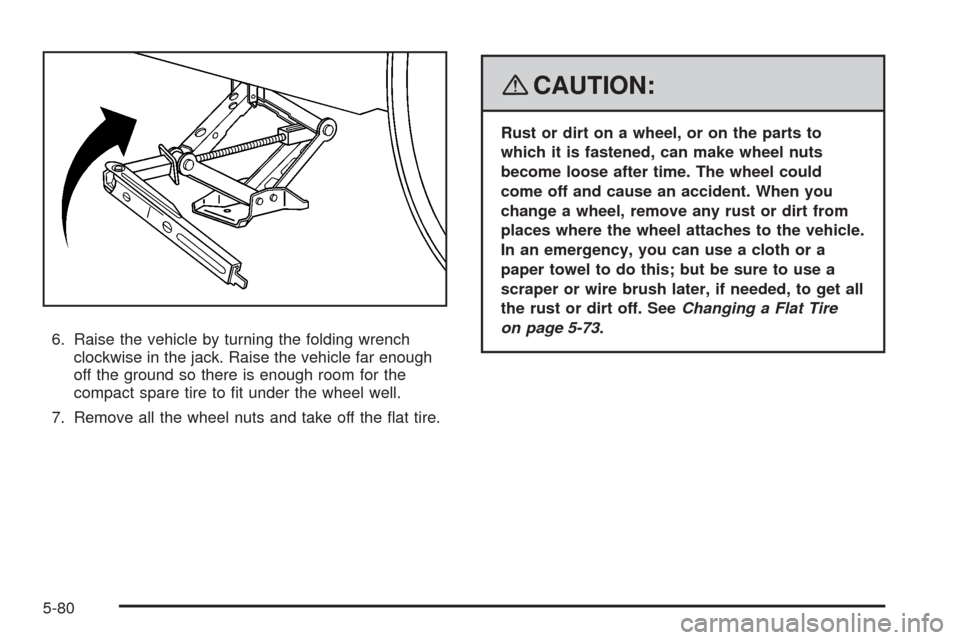
6. Raise the vehicle by turning the folding wrench
clockwise in the jack. Raise the vehicle far enough
off the ground so there is enough room for the
compact spare tire to t under the wheel well.
7. Remove all the wheel nuts and take off the at tire.
{CAUTION:
Rust or dirt on a wheel, or on the parts to
which it is fastened, can make wheel nuts
become loose after time. The wheel could
come off and cause an accident. When you
change a wheel, remove any rust or dirt from
places where the wheel attaches to the vehicle.
In an emergency, you can use a cloth or a
paper towel to do this; but be sure to use a
scraper or wire brush later, if needed, to get all
the rust or dirt off. SeeChanging a Flat Tire
on page 5-73.
5-80
Page 401 of 476
{CAUTION:
Never use oil or grease on studs or nuts.
Because the nuts might come loose. The
vehicle’s wheel could fall off, causing a crash.
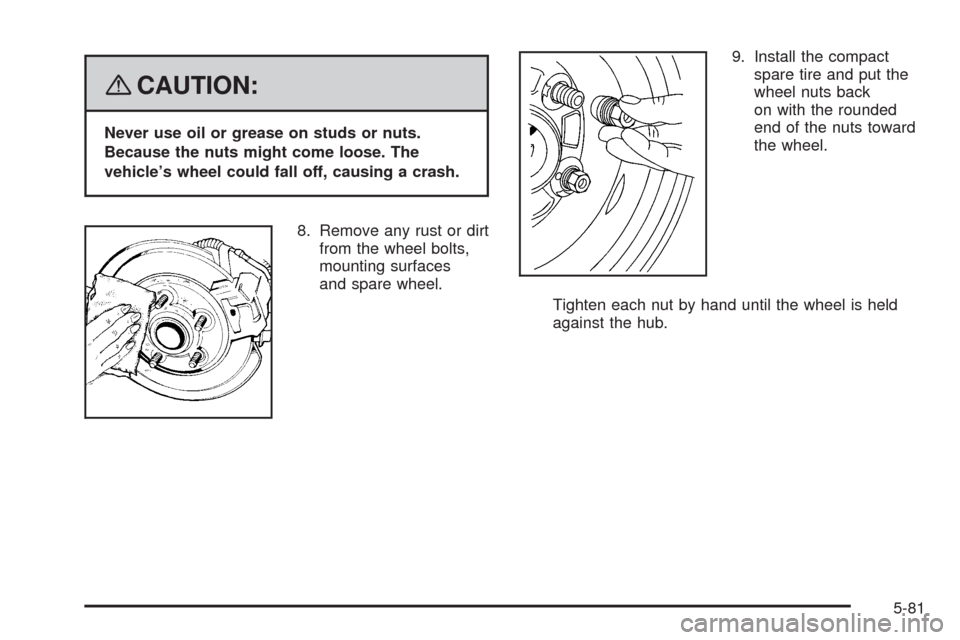
8. Remove any rust or dirt
from the wheel bolts,
mounting surfaces
and spare wheel.9. Install the compact
spare tire and put the
wheel nuts back
on with the rounded
end of the nuts toward
the wheel.
Tighten each nut by hand until the wheel is held
against the hub.
5-81
Page 403 of 476
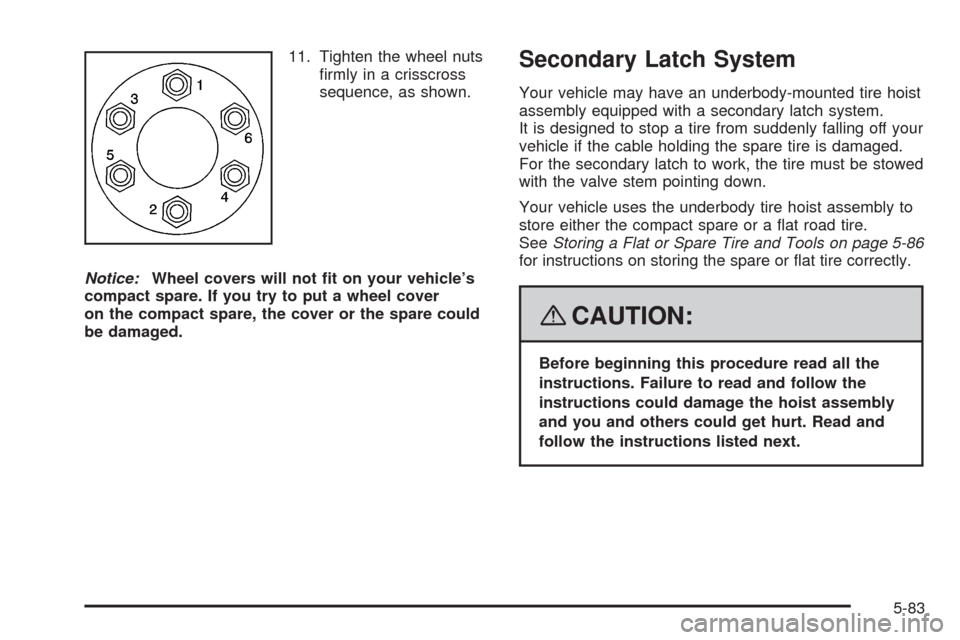
11. Tighten the wheel nuts
rmly in a crisscross
sequence, as shown.
Notice:Wheel covers will not t on your vehicle’s
compact spare. If you try to put a wheel cover
on the compact spare, the cover or the spare could
be damaged.Secondary Latch System
Your vehicle may have an underbody-mounted tire hoist
assembly equipped with a secondary latch system.
It is designed to stop a tire from suddenly falling off your
vehicle if the cable holding the spare tire is damaged.
For the secondary latch to work, the tire must be stowed
with the valve stem pointing down.
Your vehicle uses the underbody tire hoist assembly to
store either the compact spare or a at road tire.
SeeStoring a Flat or Spare Tire and Tools on page 5-86
for instructions on storing the spare or at tire correctly.
{CAUTION:
Before beginning this procedure read all the
instructions. Failure to read and follow the
instructions could damage the hoist assembly
and you and others could get hurt. Read and
follow the instructions listed next.
5-83
Page 407 of 476
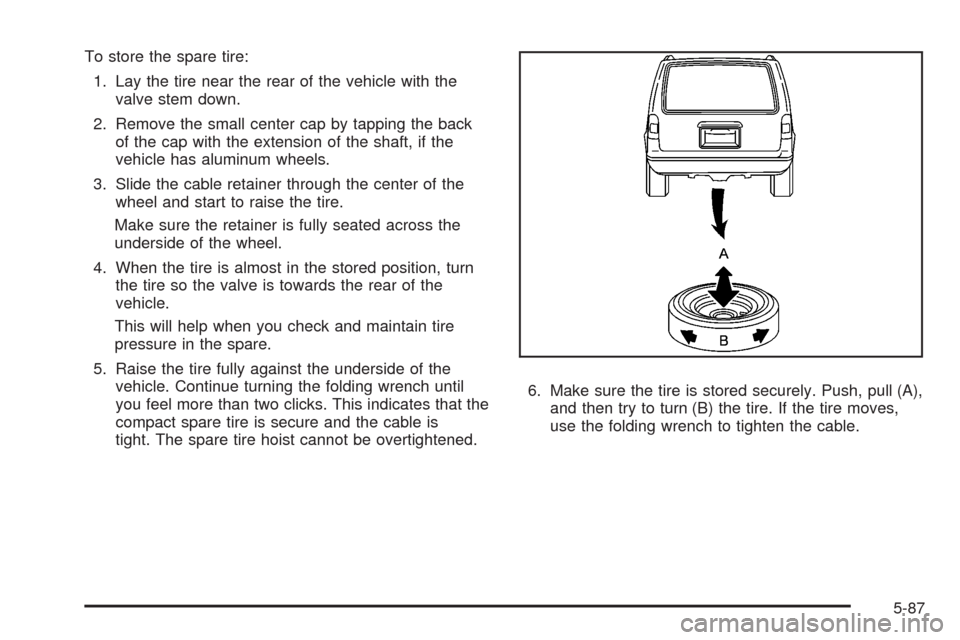
To store the spare tire:
1. Lay the tire near the rear of the vehicle with the
valve stem down.
2. Remove the small center cap by tapping the back
of the cap with the extension of the shaft, if the
vehicle has aluminum wheels.
3. Slide the cable retainer through the center of the
wheel and start to raise the tire.
Make sure the retainer is fully seated across the
underside of the wheel.
4. When the tire is almost in the stored position, turn
the tire so the valve is towards the rear of the
vehicle.
This will help when you check and maintain tire
pressure in the spare.
5. Raise the tire fully against the underside of the
vehicle. Continue turning the folding wrench until
you feel more than two clicks. This indicates that the
compact spare tire is secure and the cable is
tight. The spare tire hoist cannot be overtightened.6. Make sure the tire is stored securely. Push, pull (A),
and then try to turn (B) the tire. If the tire moves,
use the folding wrench to tighten the cable.
5-87
Page 411 of 476
Use only mild, neutral-pH soaps. Avoid laundry
detergents or dishwashing soaps with degreasers.
Using too much soap will leave a residue that
leaves streaks and attracts dirt. For liquid cleaners,
about 20 drops per gallon (3.78 L) of water is a
good guide.
Do not heavily saturate your upholstery while
cleaning.
Damage to your vehicle’s interior may result from
the use of many organic solvents such as naptha,
alcohol, etc.
Fabric/Carpet
Use a vacuum cleaner with a soft brush attachment
frequently to remove dust and loose dirt. A canister
vacuum with a beater bar in the nozzle may only
be used on oor carpet and carpeted oor mats.
For soils, always try to remove them rst with plain
water or club soda. Before cleaning, gently remove as
much of the soil as possible using one of the following
techniques:
For liquids: gently blot the remaining soil with a
paper towel. Allow the soil to absorb into the
paper towel until no more can be removed.
For solid dry soils: remove as much as possible
and then vacuum.To clean, use the following instructions:
1. Saturate a lint-free, clean white cloth with water or
club soda.
2. Wring the cloth to remove excess moisture.
3. Start on the outside edge of the soil and gently rub
toward the center. Continue cleaning, using a clean
area of the cloth each time it becomes soiled.
4. Continue to gently rub the soiled area until the
cleaning cloth remains clean.
5. If the soil is not completely removed, use a mild
soap solution and repeat the cleaning process
that was used with plain water.
If any of the soil remains, a commercial fabric cleaner or
spot lifter may be necessary. When a commercial
upholstery cleaner or spot lifter is to be used, test a
small hidden area for colorfastness rst. If the locally
cleaned area gives any impression that a ring formation
may result, clean the entire surface.
After the cleaning process has been completed, a paper
towel can be used to blot excess moisture from the
fabric or carpet.
5-91
Page 413 of 476
Care of Safety Belts and Built-in
Child Restraint Harness
Keep the safety belts and the built-in child restraint
harness clean and dry.
{CAUTION:
Do not bleach or dye safety belts or the built-in
child restraint harness. If you do, they may be
severely weakened. In a crash, they might not
be able to provide adequate protection. Clean
the safety belts and the child restraint harness
only with mild soap and lukewarm water.
Weatherstrips
Silicone grease on weatherstrips will make them last
longer, seal better, and not stick or squeak. Apply
silicone grease with a clean cloth. During very cold,
damp weather frequent application may be required.
SeeRecommended Fluids and Lubricants on page 6-11.
Washing Your Vehicle
The best way to preserve your vehicle’s nish is to keep
it clean by washing it often.
Notice:Certain cleaners contain chemicals that can
damage the emblems or nameplates on your vehicle.
Check the cleaning product label. If it states that
is should not be used on plastic parts, do not use it
on your vehicle or damage may occur and it
would not be covered by the warranty.
Do not wash the vehicle in direct sunlight. Use a car
washing soap. Do not use cleaning agents that
are petroleum based or that contain acid or abrasives,
as they can damage the paint, metal or plastic on
your vehicle. Approved cleaning products can be
obtained from your dealer/retailer. SeeVehicle
Care/Appearance Materials on page 5-97. Follow all
manufacturers’ directions regarding correct product
usage, necessary safety precautions and appropriate
disposal of any vehicle care product.
Rinse the vehicle well, before washing and after to
remove all cleaning agents completely. If they are
allowed to dry on the surface, they could stain.
Dry the nish with a soft, clean chamois or an all-cotton
towel to avoid surface scratches and water spotting.
5-93
Page 415 of 476
Windshield, Backglass, and
Wiper Blades
Clean the outside of the windshield and backglass with
glass cleaner.
Clean the rubber blades using a lint free cloth or paper
towel soaked with windshield washer uid or a mild
detergent. Wash the windshield thoroughly when you
clean the blades. Bugs, road grime, sap and a buildup of
vehicle wash/wax treatments may cause wiper
streaking. Replace the wiper blades if they are worn or
damaged.
Wipers can be damaged by:
Extreme dusty conditions
Sand and salt
Heat and sun
Snow and ice, without proper removal
Aluminum Wheels
Notice:If you use strong soaps, chemicals,
abrasive polishes, cleaners, brushes, or cleaners
that contain acid on aluminum or chrome-plated
wheels, you could damage the surface of the
wheel(s). The repairs would not be covered by your
warranty. Use only approved cleaners on aluminum
or chrome-plated wheels.Keep the wheels clean using a soft clean cloth with mild
soap and water. Rinse with clean water. After rinsing
thoroughly, dry with a soft clean towel. A wax may then
be applied.
Notice:Using chrome polish on aluminum wheels
could damage the wheels. The repairs would not
be covered by your warranty. Use chrome polish on
chrome wheels only.
The surface of these wheels is similar to the painted
surface of the vehicle. Do not use strong soaps,
chemicals, abrasive polishes, abrasive cleaners,
cleaners with acid, or abrasive cleaning brushes on
them because the surface could be damaged. Do not
use chrome polish on aluminum wheels.
Notice:If you drive your vehicle through an
automatic car wash that has silicone carbide tire
cleaning brushes, you could damage the aluminum
or chrome-plated wheels. The repairs would not
be covered by your warranty. Never drive a vehicle
equipped with aluminum or chrome-plated wheels
through an automatic car wash that uses silicone
carbide tire cleaning brushes.
5-95