climate control CHEVROLET UPLANDER 2009 1.G User Guide
[x] Cancel search | Manufacturer: CHEVROLET, Model Year: 2009, Model line: UPLANDER, Model: CHEVROLET UPLANDER 2009 1.GPages: 464, PDF Size: 2.59 MB
Page 185 of 464
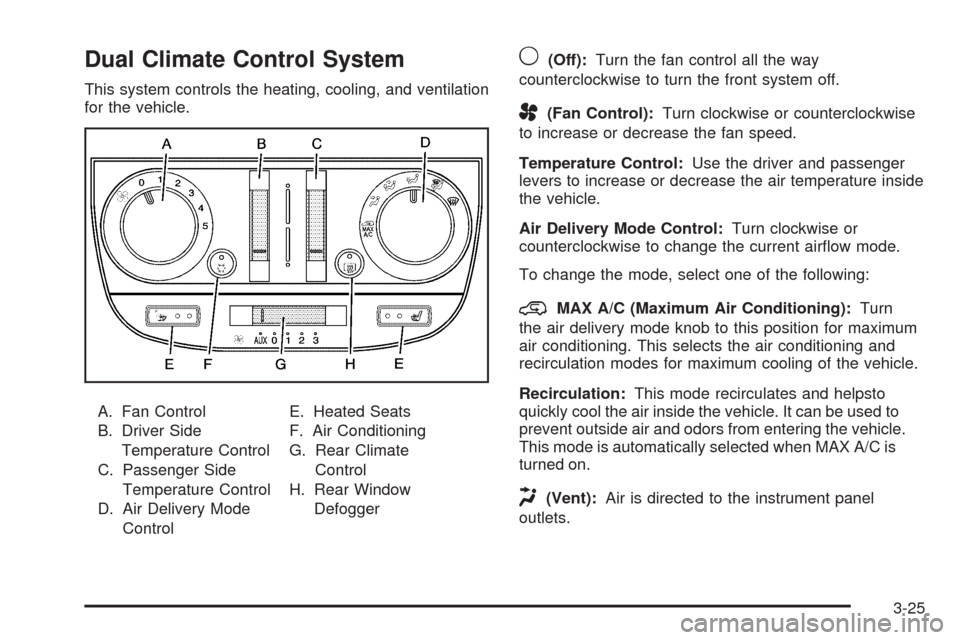
Dual Climate Control System
This system controls the heating, cooling, and ventilation
for the vehicle.
A. Fan Control
B. Driver Side
Temperature Control
C. Passenger Side
Temperature Control
D. Air Delivery Mode
ControlE. Heated Seats
F. Air Conditioning
G. Rear Climate
Control
H. Rear Window
Defogger
9(Off):Turn the fan control all the way
counterclockwise to turn the front system off.
A(Fan Control):Turn clockwise or counterclockwise
to increase or decrease the fan speed.
Temperature Control:Use the driver and passenger
levers to increase or decrease the air temperature inside
the vehicle.
Air Delivery Mode Control:Turn clockwise or
counterclockwise to change the current airow mode.
To change the mode, select one of the following:
@MAX A/C (Maximum Air Conditioning):Turn
the air delivery mode knob to this position for maximum
air conditioning. This selects the air conditioning and
recirculation modes for maximum cooling of the vehicle.
Recirculation:This mode recirculates and helpsto
quickly cool the air inside the vehicle. It can be used to
prevent outside air and odors from entering the vehicle.
This mode is automatically selected when MAX A/C is
turned on.
H(Vent):Air is directed to the instrument panel
outlets.
3-25
Page 188 of 464
Rear Climate Control System
For vehicles with a rear climate control system, the
driver or rear seat passengers may be able to adjust the
fan speed for the rear seating area. This system works
with the main climate control system.
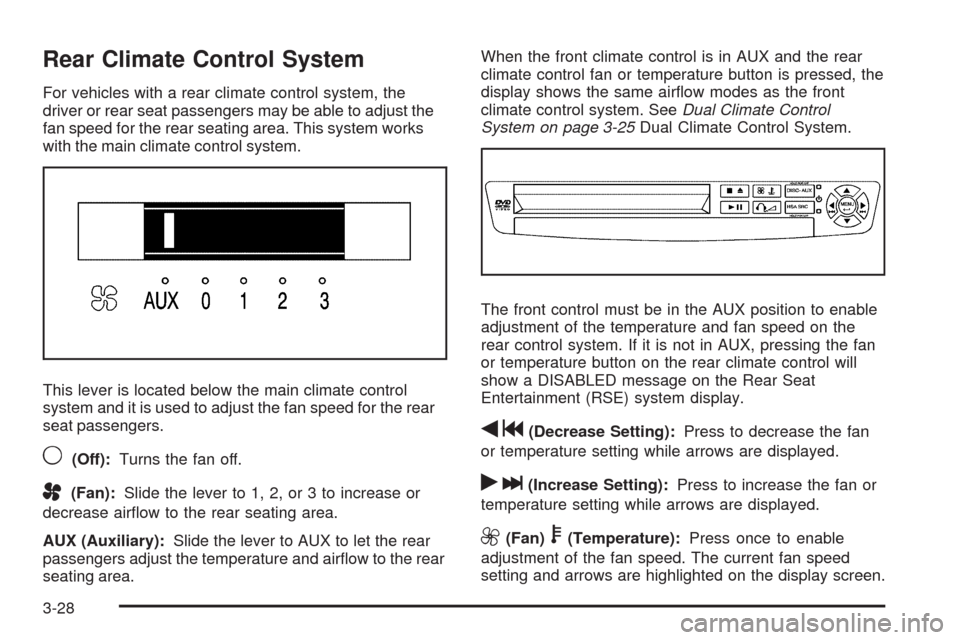
This lever is located below the main climate control
system and it is used to adjust the fan speed for the rear
seat passengers.
9(Off):Turns the fan off.
A(Fan):Slide the lever to 1, 2, or 3 to increase or
decrease airow to the rear seating area.
AUX (Auxiliary):Slide the lever to AUX to let the rear
passengers adjust the temperature and airow to the rear
seating area.When the front climate control is in AUX and the rear
climate control fan or temperature button is pressed, the
display shows the same airow modes as the front
climate control system. SeeDual Climate Control
System on page 3-25Dual Climate Control System.
The front control must be in the AUX position to enable
adjustment of the temperature and fan speed on the
rear control system. If it is not in AUX, pressing the fan
or temperature button on the rear climate control will
show a DISABLED message on the Rear Seat
Entertainment (RSE) system display.
qg(Decrease Setting):Press to decrease the fan
or temperature setting while arrows are displayed.
rl(Increase Setting):Press to increase the fan or
temperature setting while arrows are displayed.
9(Fan)b(Temperature):Press once to enable
adjustment of the fan speed. The current fan speed
setting and arrows are highlighted on the display screen.
3-28
Page 189 of 464
Press eitherqgorrlto increase or decrease
fan speed. The on screen display disappears after
a few seconds.
Press
9btwice to enable temperature adjustment.
After pressing
9b, the current temperature settings
are highlighted and appear in the on screen display. The
arrows indicate that to increase or decrease
temperature, press either the
qgorrlbutton.
The on screen display disappears after a few seconds.
Press
9ba third time to turn off the on screen
display.
QR:Press to toggle between the fan and
temperature settings.
Rear Air Outlets
The outlet behind the driver side rear seat is for the cold
air return. Be sure to keep it free from obstructions.
Also, keep the area around the base of the center
instrument panel console, between and under the front
seats, free of objects that could also obstruct airow
to the rear seating area.
SeeClimate Control System on page 3-22orDual
Climate Control System on page 3-25for more
information on the main climate control system.
SeeOutlet Adjustment on page 3-27for information on
ventilation.
Passenger Compartment Air Filter
Both outside and recirculated air are routed through a
passenger compartment lter. Pollen, dust particles and
other contaminants are removed by the lter. Air
reductions indicate that the lter needs to be replaced.
SeeScheduled Maintenance on page 6-4for
replacement intervals.
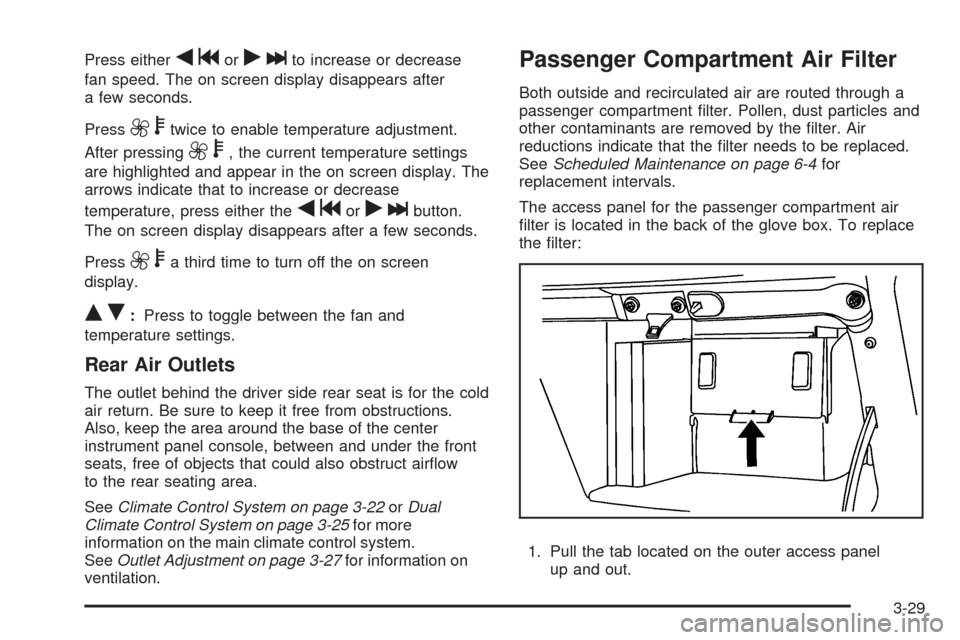
The access panel for the passenger compartment air
lter is located in the back of the glove box. To replace
the lter:
1. Pull the tab located on the outer access panel
up and out.
3-29
Page 210 of 464
Compass Calibration
The compass can be manually calibrated. Only calibrate
the compass in a magnetically clean and safe location,
such as an open parking lot, where driving the vehicle in
circles is not a danger. It is suggested to calibrate away
from tall buildings, utility wires, manhole covers, or other
industrial structures, if possible.
If CAL should ever appear in the DIC display, the
compass should be calibrated.
If the DIC display does not show a heading, for
example, N for North, or the heading does not change
after making turns, there may be a strong magnetic eld
interfering with the compass. Such interference may be
caused by a magnetic CB or cell phone antenna mount, a
magnetic emergency light, magnetic note pad holder, or
any other magnetic item. Turn off the vehicle, move the
magnetic item, then turn on the vehicle and calibrate the
compass.To calibrate the compass, use the following procedure:Compass Calibration Procedure
1. Before calibrating the compass, make sure the
compass zone is set to the variance zone in
which the vehicle is located. See “Compass
Variance (Zone) Procedure” earlier in this section.
Do not operate any switches such as window,
sunroof, climate controls, seats, etc. during
the calibration procedure.
2. Press the menu button until COMPASS
CALIBRATION displays.
3. Press the set/reset button to start the compass
calibration.
4. The DIC will display CALIBRATION BEGUN DRIVE
UNTIL DONE. Drive the vehicle in tight circles at
less than 5 mph (8 km/h) to complete the calibration.
The DIC will display CALIBRATION FINISHED
for a few seconds when the calibration is complete.
3-50
Page 258 of 464
An error message could display if any other type of
media is inserted into the DVD player.
If an error message displays on the video screen, see
“DVD Messages” later in this section.
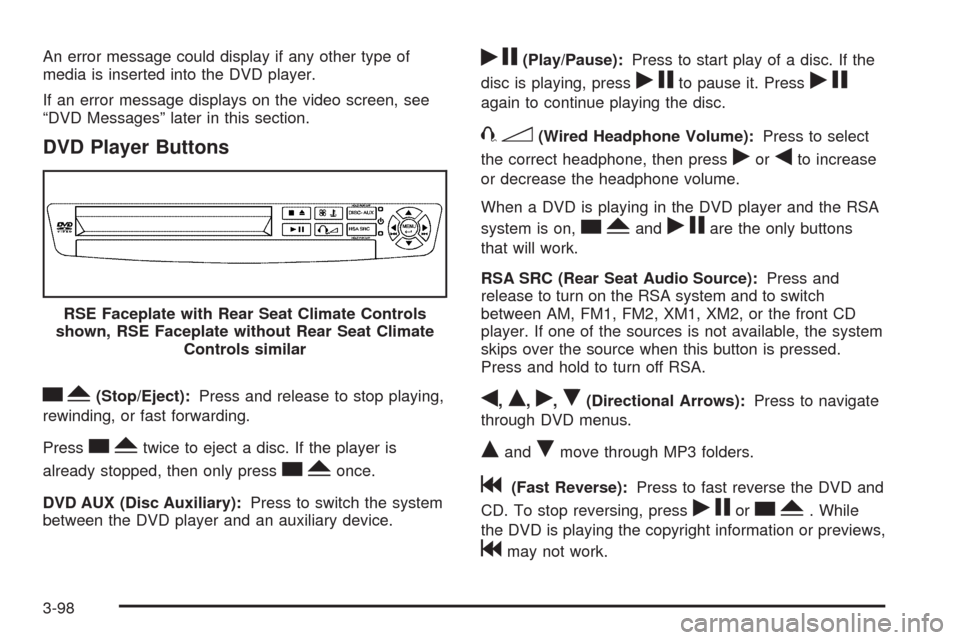
DVD Player Buttons
cY(Stop/Eject):Press and release to stop playing,
rewinding, or fast forwarding.
Press
cYtwice to eject a disc. If the player is
already stopped, then only press
cYonce.
DVD AUX (Disc Auxiliary):Press to switch the system
between the DVD player and an auxiliary device.
rj(Play/Pause):Press to start play of a disc. If the
disc is playing, press
rjto pause it. Pressrj
again to continue playing the disc.
43(Wired Headphone Volume):Press to select
the correct headphone, then press
rorqto increase
or decrease the headphone volume.
When a DVD is playing in the DVD player and the RSA
system is on,
cYandrjare the only buttons
that will work.
RSA SRC (Rear Seat Audio Source):Press and
release to turn on the RSA system and to switch
between AM, FM1, FM2, XM1, XM2, or the front CD
player. If one of the sources is not available, the system
skips over the source when this button is pressed.
Press and hold to turn off RSA.
q,Q,r,R(Directional Arrows):Press to navigate
through DVD menus.
QandRmove through MP3 folders.
g(Fast Reverse):Press to fast reverse the DVD and
CD. To stop reversing, press
rjorcY. While
the DVD is playing the copyright information or previews,
gmay not work. RSE Faceplate with Rear Seat Climate Controls
shown, RSE Faceplate without Rear Seat Climate
Controls similar
3-98
Page 259 of 464
l(Fast Forward):Press to fast forward the DVD and
CD. To stop forwarding, press
rjorcY. While
the DVD is playing the copyright information or previews,
lmay not work.
MENU (Disc):Press to view the main DVD menu. The
menu is different on every disc. Use
q,Q,r,or
Rto move the cursor around the menu. After making a
selection, press
r.
r(Enter/Select):Press to select the choice that is
highlighted in any menu.
z(Display Control Button):Press to open the RSE
On-Screen Display (OSD) menus to adjust the color,
tint, brightness, contrast, and display modes.
For vehicles without rear seat climate control,z
can take the place of9C.
For vehicles with rear seat climate control,zis
also found on the remote control.
Playing a Disc
To play a disc, insert the disc with the label side up into
the loading slot. The DVD player continues loading
the disc and the player automatically starts if the vehicle
is in ACC/ACCESSORY, ON/RUN, or RAP.
If a disc is already in the player make sure that the DVD
player is on, then press
rjon the player faceplate or
on the remote control. Press DVD AUX on the player
faceplate, or CD AUX on the radio faceplate until RSE
displays, to start playing a disc.
Some DVDs do not allow fast forwarding or skipping of
the copyright information or previews. Some DVDs
begins playing after the previews have nished. If the
DVD does not begin playing at the main title, refer to the
on-screen instructions.
To stop playing a disc, press
cYon the DVD player
faceplate or the remote control.
To resume playback, press
rjon the DVD player
faceplate or the remote control. The movie should
resume play from where it was last stopped if the disc
has not been ejected.
If the disc has been ejected, the disc resumes play at
the beginning of the disc.
3-99
Page 263 of 464
RSE On-Screen Display (OSD) Menu
To use the RSE OSD menu when using a DVD or an
auxiliary device:
1. Press
zon the remote control or on the DVD
faceplate, if the vehicle does not have rear seat
climate control.
2. Use
q,Q,r,Randrto navigate the
screen.
This menu lets you select default preferences for video
format, language preference, brightness, color, contrast,
and tint. Not all DVDs support all the feature defaults in
the setup menus. If a feature is not supported, the
defaults are provided by the DVD media. To exit this
menu press
z,orqon the remote control, or
faceplate if there is no rear seat climate control, or wait
for the menu to time out.
The default language selection applies to all
future DVDs.To use the RSE OSD menu when using a CD or
an MP3:
1. Press
zon the remote control or on the DVD
faceplate, if the vehicle does not have rear seat
climate control.
2. Use
q,Q,r,Randrto navigate the
screen.
This menu lets you select default preferences for
language and playback settings. To exit this menu press
z,orqon the remote control, or faceplate if there
is no rear seat climate control, or wait for the menu
to time out.
Battery Replacement
To change the remote control batteries, do the following:
1. Slide the rear cover back on the remote control.
2. Replace the two batteries in the compartment. Make
sure that they are installed correctly using the
diagram on the inside of the battery compartment.
3. Replace the battery cover.
If the remote control is to be stored for a long period of
time, remove the batteries and keep them in a cool,
dry place.
3-103
Page 291 of 464
{CAUTION:
Snow can trap engine exhaust under the vehicle.
This may cause exhaust gases to get inside. Engine
exhaust contains carbon monoxide (CO) which
cannot be seen or smelled. It can cause
unconsciousness and even death.
If the vehicle is stuck in the snow:
Clear away snow from around the base of your
vehicle, especially any that is blocking the
exhaust pipe.
Check again from time to time to be sure snow
does not collect there.
Open a window about two inches on the side of
the vehicle that is away from the wind to bring
in fresh air.
Fully open the air outlets on or under the
instrument panel.
Adjust the Climate Control system to a setting
that circulates the air inside the vehicle and
set the fan speed to the highest setting.
See Climate Control System in the Index.
CAUTION: (Continued)
CAUTION: (Continued)
For more information about carbon monoxide, see
Engine Exhaust on page 2-41.
Snow can trap exhaust gases under your vehicle.
This can cause deadly CO (carbon monoxide) gas
to get inside. CO could overcome you and kill you.
You cannot see it or smell it, so you might not
know it is in your vehicle. Clear away snow from
around the base of your vehicle, especially any
that is blocking the exhaust
Run the engine for short periods only as needed to
keep warm, but be careful.
To save fuel, run the engine for only short periods as
needed to warm the vehicle and then shut the engine off
and close the window most of the way to save heat.
Repeat this until help arrives but only when you feel really
uncomfortable from the cold. Moving about to keep warm
also helps.
If it takes some time for help to arrive, now and then
when you run the engine, push the accelerator pedal
slightly so the engine runs faster than the idle speed.
This keeps the battery charged to restart the vehicle and
to signal for help with the headlamps. Do this as little as
possible to save fuel.
4-17
Page 306 of 464
Safety Chains
You should always attach chains between your vehicle
and your trailer. Cross the safety chains under the tongue
of the trailer to help prevent the tongue from contacting
the road if it becomes separated from the hitch.
Instructions about safety chains may be provided by the
hitch manufacturer or by the trailer manufacturer. Follow
the manufacturer’s recommendation for attaching safety
chains and do not attach them to the bumper. Always
leave just enough slack so you can turn with your rig.
Never allow safety chains to drag on the ground.
Trailer Brakes
If your trailer weighs more than 1,000 lbs (450 kg)
loaded, then it needs its own brakes – and they must be
adequate. Be sure to read and follow the instructions
for the trailer brakes so you will be able to install, adjust,
and maintain them properly.
Because your vehicle may have anti-lock brakes, do not
try to tap into your vehicle’s brake system. If you do,
both brake systems will not work well, or at all.
Driving with a Trailer
{CAUTION:
When towing a trailer, exhaust gases may collect
at the rear of the vehicle and enter if the liftgate,
trunk/hatch, or rear-most window is open.
Engine exhaust contains carbon monoxide (CO)
which cannot be seen or smelled. It can cause
unconsciousness and even death.
To maximize safety when towing a trailer:
Have the exhaust system inspected for leaks
and make necessary repairs before starting
a trip.
Never drive with the liftgate, trunk/hatch, or
rear-most window open.
Fully open the air outlets on or under the
instrument panel.
Adjust the Climate Control system to a setting
that brings in only outside air and set the fan
speed to the highest setting. See Climate
Control System in the Index.
For more information about carbon monoxide, see
Engine Exhaust on page 2-41
4-32
Page 377 of 464
Uniform Tire Quality Grading
Quality grades can be found where applicable
on the tire sidewall between tread shoulder
and maximum section width. For example:
Treadwear 200 Traction AA
Temperature A
The following information relates to the system
developed by the United States National Highway
Traffic Safety Administration (NHTSA), which
grades tires by treadwear, traction, and
temperature performance. This applies only to
vehicles sold in the United States. The grades are
molded on the sidewalls of most passenger car
tires. The Uniform Tire Quality Grading (UTQG)
system does not apply to deep tread, winter-type
snow tires, space-saver, or temporary use spare
tires, tires with nominal rim diameters of
10 to 12 inches (25 to 30 cm), or to some
limited-production tires.While the tires available on General Motors
passenger cars and light trucks may vary with
respect to these grades, they must also conform
to federal safety requirements and additional
General Motors Tire Performance Criteria (TPC)
standards.
Treadwear
The treadwear grade is a comparative rating
based on the wear rate of the tire when tested
under controlled conditions on a specied
government test course. For example, a tire
graded 150 would wear one and a half (1.5) times
as well on the government course as a tire
graded 100. The relative performance of tires
depends upon the actual conditions of their use,
however, and may depart signicantly from the
norm due to variations in driving habits, service
practices, and differences in road characteristics
and climate.
5-67