climate control CHEVROLET UPLANDER 2009 1.G Owners Manual
[x] Cancel search | Manufacturer: CHEVROLET, Model Year: 2009, Model line: UPLANDER, Model: CHEVROLET UPLANDER 2009 1.GPages: 464, PDF Size: 2.59 MB
Page 1 of 464
Seats and Restraint System............................. 1-1
Front Seats
............................................... 1-2
Rear Seats
............................................... 1-6
Safety Belts
.............................................1-23
Child Restraints
.......................................1-43
Airbag System
.........................................1-77
Restraint System Check
............................1-92
Features and Controls..................................... 2-1
Keys
........................................................ 2-3
Doors and Locks
......................................2-10
Windows
.................................................2-24
Theft-Deterrent Systems
............................2-27
Starting and Operating Your Vehicle
...........2-31
Mirrors
....................................................2-43
Object Detection Systems
..........................2-44
OnStar
®System
......................................2-47
Universal Home Remote System
................2-50
Storage Areas
.........................................2-55
Instrument Panel............................................. 3-1
Instrument Panel Overview
.......................... 3-4
Climate Controls
......................................3-22
Warning Lights, Gages, and Indicators
........3-30
Driver Information Center (DIC)
..................3-43
Audio System(s)
.......................................3-76Driving Your Vehicle....................................... 4-1
Your Driving, the Road, and the Vehicle
....... 4-2
Towing
...................................................4-24
Service and Appearance Care.......................... 5-1
Service
..................................................... 5-3
Fuel
......................................................... 5-5
Checking Things Under the Hood
...............5-12
Headlamp Aiming
.....................................5-41
Bulb Replacement
....................................5-41
Windshield Wiper Blade Replacement
.........5-46
Tires
......................................................5-47
Appearance Care
.....................................5-89
Vehicle Identication
.................................5-97
Electrical System
......................................5-97
Capacities and Specications
...................5-104
Maintenance Schedule..................................... 6-1
Maintenance Schedule
................................ 6-2
Customer Assistance Information.................... 7-1
Customer Assistance and Information
........... 7-2
Reporting Safety Defects
...........................7-14
Vehicle Data Recording and Privacy
...........7-16
Index................................................................ 1
2009 Chevrolet Uplander Owner ManualM
Page 7 of 464
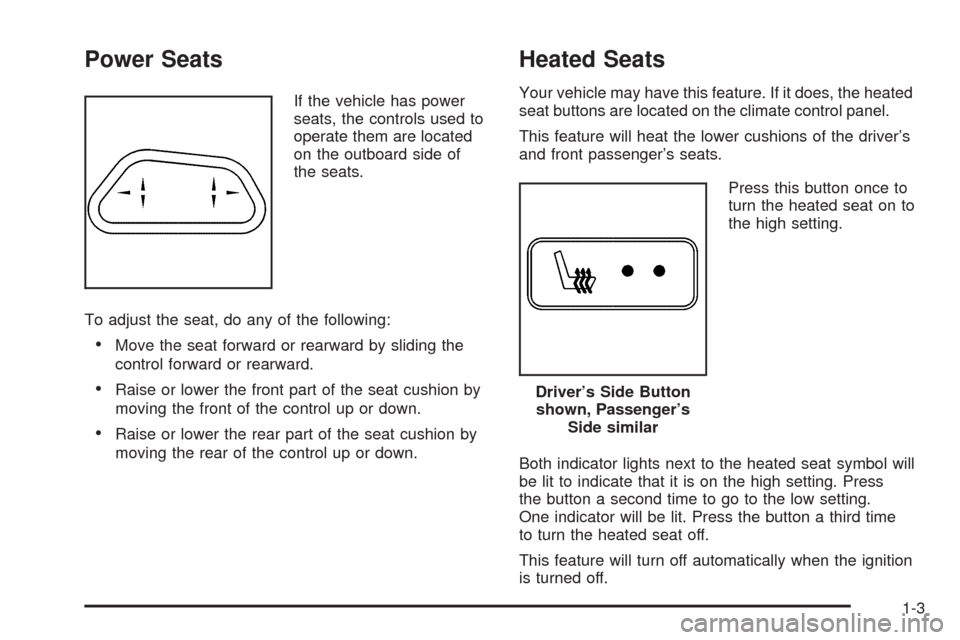
Power Seats
If the vehicle has power
seats, the controls used to
operate them are located
on the outboard side of
the seats.
To adjust the seat, do any of the following:
Move the seat forward or rearward by sliding the
control forward or rearward.
Raise or lower the front part of the seat cushion by
moving the front of the control up or down.
Raise or lower the rear part of the seat cushion by
moving the rear of the control up or down.
Heated Seats
Your vehicle may have this feature. If it does, the heated
seat buttons are located on the climate control panel.
This feature will heat the lower cushions of the driver’s
and front passenger’s seats.
Press this button once to
turn the heated seat on to
the high setting.
Both indicator lights next to the heated seat symbol will
be lit to indicate that it is on the high setting. Press
the button a second time to go to the low setting.
One indicator will be lit. Press the button a third time
to turn the heated seat off.
This feature will turn off automatically when the ignition
is turned off.
Driver’s Side Button
shown, Passenger’s
Side similar
1-3
Page 121 of 464
Notice:If you open the liftgate without checking for
overhead obstructions such as a garage door,
you could damage the liftgate or the liftgate glass.
Always check to make sure the area above and
behind the liftgate is clear before opening it.
{CAUTION:
It can be dangerous to drive with the liftgate open
because carbon monoxide (CO) gas can come into
your vehicle. You cannot see or smell CO. It can
cause unconsciousness and even death. If you
must drive with the liftgate open or if electrical
wiring or other cable connections must pass
through the seal between the body and the liftgate:
Make sure all other windows are shut.
Turn the fan on your heating or cooling system
to its highest speed and select the control
setting that will force outside air into your
vehicle. SeeClimate Control System on
page 3-22orDual Climate Control System on
page 3-25.
CAUTION: (Continued)
CAUTION: (Continued)
If you have air outlets on or under the
instrument panel, open them all the way. See
Engine Exhaust on page 2-41.
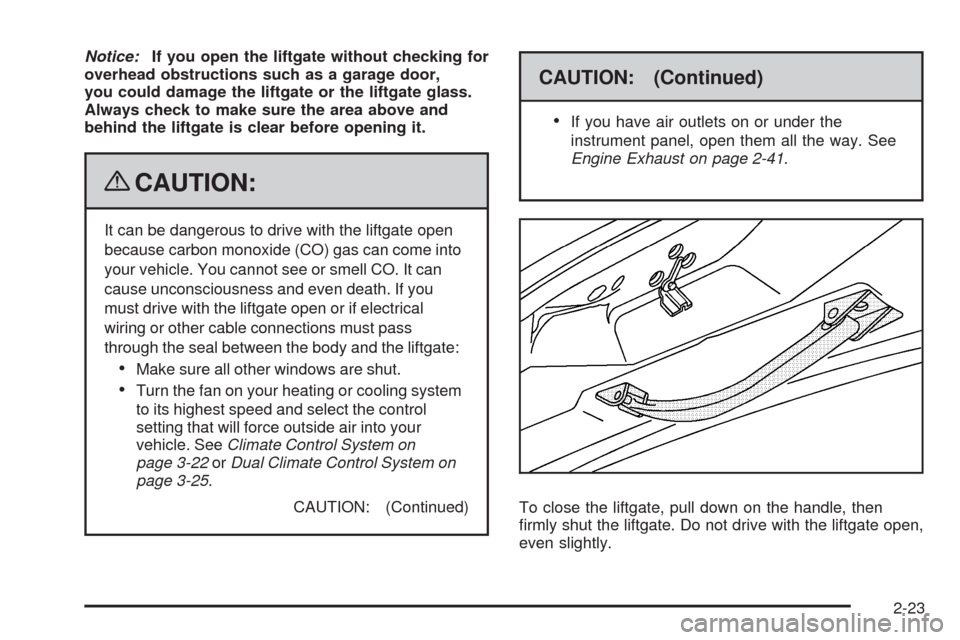
To close the liftgate, pull down on the handle, then
rmly shut the liftgate. Do not drive with the liftgate open,
even slightly.
2-23
Page 135 of 464
Warm-Up Shift
Your vehicle has a computer controlled transmission
designed to warm up the engine faster when the outside
temperature is 35°F (2°C) or colder. You may notice
that the transmission will shift at a higher vehicle speed
until the engine is warmed up. This is a normal
condition designed to provide heat to the passenger
compartment and defrost the windows more quickly. See
Climate Control System on page 3-22andDual
Climate Control System on page 3-25for more
information.
THIRD (3):This position is also used for normal driving.
It reduces vehicle speed more than DRIVE (D) without
using your brakes. You might choose THIRD (3) instead
of DRIVE (D) when driving on hilly, winding roads,
when towing a trailer, so there is less shifting between
gears and when going down a steep hill.
SECOND (2):This position reduces vehicle speed more
than DRIVE (D) without using your brakes. You can use
SECOND (2) on hills. It can help control your speed as
you go down steep mountain roads, but then you would
also want to use your brakes off and on.Notice:Driving in SECOND (2) for more than
25 miles (40 km) or at speeds over 55 mph (90 km/h)
may damage the transmission. Also, shifting into
SECOND (2) at speeds above 65 mph (105 km/h) can
cause damage. Drive in THIRD (3) or DRIVE (D)
instead of SECOND (2).
Notice:If your vehicle seems to start up rather
slowly, or if it seems not to shift gears as you go
faster, something may be wrong with a transmission
system sensor. If you drive very far that way, your
vehicle can be damaged. So, if this happens, have
your vehicle serviced right away. Until then, you can
use SECOND (2) when you are driving less than
35 mph (55 km/h) and THIRD (3) for higher speeds.
FIRST (1):This position reduces vehicle speed even
more than SECOND (2) without using your brakes.
You can use it on very steep hills, or in deep snow or
mud. If the shift lever is put in FIRST (1) while the
vehicle is moving forward, the transmission will not shift
into rst gear until the vehicle is going slowly enough.
Notice:Spinning the tires or holding the vehicle in
one place on a hill using only the accelerator
pedal may damage the transmission. The repair will
not be covered by your warranty. If you are stuck,
do not spin the tires. When stopping on a hill,
use the brakes to hold the vehicle in place.
2-37
Page 142 of 464
Outside Heated Mirrors
For vehicles with heated mirrors:
<(Rear Window Defogger):Press to heat the
mirrors. See “Rear Window Defogger” underClimate
Control System on page 3-22.
Object Detection Systems
Ultrasonic Rear Parking
Assist (URPA)
If the vehicle has the URPA system, it helps you park
easier and avoid other vehicles while in R (Reverse). It
operates at speeds less than 3 mph (5 km/h). It can
determine how close objects are to the rear bumper, up
to 5 feet (1.5 m) behind the vehicle. The distance
sensors are located on the rear bumper.
{CAUTION:
The Ultrasonic Rear Parking Assist (URPA)
system does not replace driver vision. It cannot
detect:
objects that are below the bumper,
underneath the vehicle, or if they are too
close or far from the vehicle
children, pedestrians, bicyclists, or pets.
If you do not use proper care before and while
backing; vehicle damage, injury, or death could
occur. Even with URPA, always check behind the
vehicle before backing up. While backing, be sure
to look for objects and check the vehicle’s mirrors.
2-44
Page 161 of 464
Instrument Panel Overview...............................3-4
Hazard Warning Flashers................................3-6
Other Warning Devices...................................3-6
Horn .............................................................3-6
Tilt Wheel.....................................................3-6
Turn Signal/Multifunction Lever.........................3-7
Turn and Lane-Change Signals........................3-7
Headlamp High/Low-Beam Changer..................3-8
Flash-to-Pass.................................................3-8
Windshield Wipers..........................................3-8
Windshield Washer.........................................3-9
Rear Window Wiper/Washer.............................3-9
Cruise Control..............................................3-10
Exterior Lamps.............................................3-13
Wiper Activated Headlamps............................3-14
Daytime Running Lamps (DRL)/
Automatic Headlamp System.......................3-14
Instrument Panel Brightness...........................3-15
Interior Lamps Control...................................3-15
Dome Lamp .................................................3-16
Entry Lighting...............................................3-16
Delayed Lighting...........................................3-16
Exit Lighting.................................................3-17
Front Reading Lamps....................................3-17
Rear Reading Lamps....................................3-17
Cargo Lamp.................................................3-17Electric Power Management...........................3-18
Battery Run-Down Protection..........................3-19
Overhead Console Switchbank.......................3-19
Accessory Power Outlet(s).............................3-20
Power Outlet 115 Volt Alternating Current........3-21
Cigarette Lighter...........................................3-22
Climate Controls............................................3-22
Climate Control System.................................3-22
Dual Climate Control System..........................3-25
Outlet Adjustment.........................................3-27
Rear Climate Control System.........................3-28
Passenger Compartment Air Filter...................3-29
Warning Lights, Gages, and Indicators............3-30
Instrument Panel Cluster................................3-31
Speedometer and Odometer...........................3-32
Trip Odometer..............................................3-32
Tachometer.................................................3-32
Safety Belt Reminders...................................3-32
Airbag Readiness Light..................................3-33
Passenger Airbag Status Indicator...................3-34
Charging System Light..................................3-35
Brake System Warning Light..........................3-35
Antilock Brake System (ABS) Warning Light.....3-36
Traction Control System (TCS) Warning Light. . . .3-37
Engine Coolant Temperature Gage..................3-37
Section 3 Instrument Panel
3-1
Page 165 of 464
The main components of the instrument panel are the following:
A.Outlet Adjustment on page 3-27.
B.Turn Signal/Multifunction Lever on page 3-7.
C.Audio Steering Wheel Controls on page 3-111
(If Equipped).
D.Instrument Panel Cluster on page 3-31.
E.Driver Information Center (DIC) on page 3-43
(If Equipped).
F.Traction Control System (TCS) on page 4-6
(If Equipped).
G.Hazard Warning Flashers on page 3-6.
H.Passenger Airbag Status Indicator on page 3-34
andSafety Belt Reminders on page 3-32.
I.Audio System(s) on page 3-76.J.Exterior Lamps on page 3-13.
K.Interior Lamps Control on page 3-15.Instrument
Panel Brightness on page 3-15.
L.Hood Release on page 5-13.
M.Parking Brake on page 2-38.
N.Horn on page 3-6.
O.Cruise Control on page 3-10(If Equipped).
P.Climate Control System on page 3-22.Dual Climate
Control System on page 3-25.
Q.Heated Seats on page 1-3(If Equipped).
R.Glove Box on page 2-55.
3-5
Page 178 of 464
Electric Power Management
The vehicle has Electric Power Management (EPM)
that estimates the battery’s temperature and state
of charge. It then adjusts the voltage for best
performance and extended life of the battery.
When the battery’s state of charge is low, the voltage is
raised slightly to quickly put the charge back in. When the
state of charge is high, the voltage is lowered slightly to
prevent overcharging. If the vehicle has a voltmeter gage
or a voltage display on the Driver Information Center
(DIC), you may see the voltage move up or down. This is
normal. If there is a problem, an alert will be displayed.
The battery can be discharged at idle if the electrical
loads are very high. This is true for all vehicles. This is
because the generator (alternator) may not be
spinning fast enough at idle to produce all the power
that is needed for very high electrical loads.A high electrical load occurs when several of the
following loads are on: headlamps, high beams, fog
lamps, rear window defogger, climate control fan at
high speed, heated seats, engine cooling fans, trailer
loads, and loads plugged into accessory power outlets.
EPM works to prevent excessive discharge of the
battery. It does this by balancing the generator’s output
and the vehicle’s electrical needs. It can increase engine
idle speed to generate more power, whenever needed.
It can temporarily reduce the power demands of some
accessories.
Normally, these actions occur in steps or levels, without
being noticeable. In rare cases at the highest levels of
corrective action, this action may be noticeable to the
driver. If so, a Driver Information Center (DIC) message
might be displayed, such as Battery Saver Active or
Service Battery Charging System. If this message is
displayed, it is recommended that the driver reduce the
electrical loads as much as possible. SeeDIC Warnings
and Messages on page 3-51.
3-18
Page 180 of 464
Accessory Power Outlet(s)
The accessory power outlets can be used to plug in
electrical equipment, such as a cellular phone.
The vehicle may have two accessory power outlets.
There may be one outlet located below the climate
controls on the instrument panel and one outlet
located in the rear compartment on the driver side.
Pull the cover down to use the accessory power outlet.
When not in use, keep the cover on.
To remove the rear accessory power outlet cover, pull
the tab on the cover. To put the cover back on, line up the
tabs at the back of the cover and put the cover in place.
Push down the tab to secure the cover. When not in use,
always cover the rear accessory power outlet with the
protective cap.
Notice:Leaving electrical equipment on for
extended periods will drain the battery. Always
unplug electrical equipment when not in use and do
not plug in equipment that exceeds the maximum
amperage rating of 20 amperes.Certain electrical accessories may not be compatible
with the accessory power outlet and could result in blown
vehicle or adapter fuses. If you experience a problem
see your dealer/retailer for additional information on
accessory power outlets.
Notice:Adding any electrical equipment to the
vehicle can damage it or keep other components
from working as they should. The repairs would not
be covered by the vehicle warranty. Do not use
equipment exceeding maximum amperage rating of
20 amperes. Check with your dealer/retailer before
adding electrical equipment.
When adding electrical equipment, be sure to follow
the proper installation instructions included with
the equipment.
Notice:Improper use of the power outlet can cause
damage not covered by your warranty. Do not hang
any type of accessory or accessory bracket from the
plug because the power outlets are designed for
accessory power plugs only.
3-20
Page 182 of 464
Cigarette Lighter
For vehicles with a cigarette lighter, it is located on the
instrument panel below the climate controls. Push
the lighter in all the way and let go. It pops back out
when it is ready to be used.
Notice:Holding a cigarette lighter in while it is
heating does not let the lighter back away from the
heating element when it is hot. Damage from
overheating can occur to the lighter or heating
element, or a fuse could be blown. Do not hold a
cigarette lighter in while it is heating.
Notice:If papers, pins, or other ammable items
are put in the ashtray, hot cigarettes or other
smoking materials could ignite them and possibly
damage your vehicle. Never put ammable items in
the ashtray.
Climate Controls
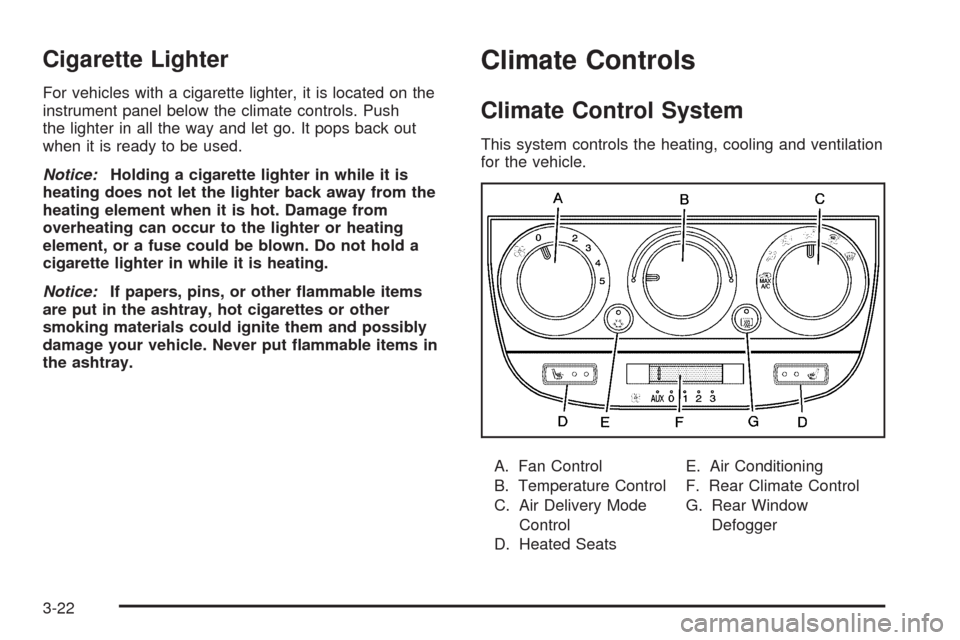
Climate Control System
This system controls the heating, cooling and ventilation
for the vehicle.
A. Fan Control
B. Temperature Control
C. Air Delivery Mode
Control
D. Heated SeatsE. Air Conditioning
F. Rear Climate Control
G. Rear Window
Defogger
3-22