keyless CHEVROLET UPLANDER 2009 1.G User Guide
[x] Cancel search | Manufacturer: CHEVROLET, Model Year: 2009, Model line: UPLANDER, Model: CHEVROLET UPLANDER 2009 1.GPages: 464, PDF Size: 2.59 MB
Page 125 of 464
Sun Visors
To block out glare, swing down the sun visors. You can
also remove them from the center mount and swing
them to the side. The sun visors can also slide along the
rod to cover different areas of the front window.
Visor Vanity Mirror
Your vehicle may have a visor vanity mirror. Pull down
the sun visor to access the vanity mirror.
Lighted Vanity Mirror
Your vehicle may have a lighted vanity mirror. Pull down
the sun visor and ip up the cover to expose the
vanity mirror. The lamps will come on when you ip up
the cover.
Theft-Deterrent Systems
Vehicle theft is big business, especially in some cities.
This vehicle has theft-deterrent features, however,
they do not make it impossible to steal.
Content Theft-Deterrent
Your vehicle may have a theft-deterrent alarm system.
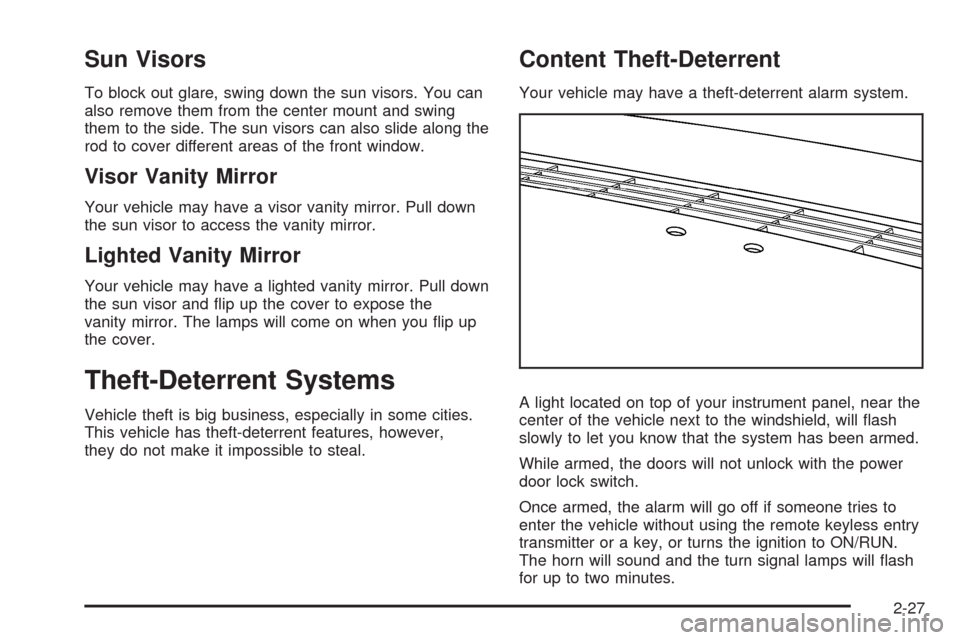
A light located on top of your instrument panel, near the
center of the vehicle next to the windshield, will ash
slowly to let you know that the system has been armed.
While armed, the doors will not unlock with the power
door lock switch.
Once armed, the alarm will go off if someone tries to
enter the vehicle without using the remote keyless entry
transmitter or a key, or turns the ignition to ON/RUN.
The horn will sound and the turn signal lamps will ash
for up to two minutes.
2-27
Page 126 of 464
Arming with the Power Lock Switch
Your alarm system will arm when the key is removed
from the ignition and you use the driver’s power
door lock switch, with the driver’s door open or the
passenger’s door power door lock switch with the
passenger’s door open to lock the vehicle. If you would
like to turn on power door lock switch arming, see
DIC Vehicle Personalization (Uplevel Only) on
page 3-68.
When the security light ashes quickly the system is
arming. After all doors and the liftgate are closed
and locked, the security light will begin ashing at a
very slow rate to let you know the system is armed.
Arming with the Remote Keyless Entry
Transmitter
Your alarm system will arm if the key is not in the
ignition and you use your remote keyless entry
transmitter to lock the doors. The security light will ash
to let you know the system is arming. If you press
the transmitter’s lock button twice within ve seconds,
the horn will sound. After all doors and the liftgate
are closed and locked, the security light will begin
ashing at a very slow rate to let you know the system
is armed.
Arming with Your Key
Your alarm system will arm when you use your key to
lock the driver’s door. The security light will ash to
let you know the system is arming. After all doors and
the liftgate are closed and locked, the security light
will begin ashing at a very slow rate to let you know the
system is armed. If you would like your key not to
arm the system, seeDIC Vehicle Personalization
(Uplevel Only) on page 3-68.
Arming Conrmation
If remote unlock conrmation is on, the turn signal
lamps will ash briey to let you know when your alarm
system has disarmed. If you would not like the turn
signal lamps to ash, seeDIC Vehicle Personalization
(Uplevel Only) on page 3-68.
Disarming with the Remote Keyless
Entry Transmitter
Your alarm system will disarm when you use your
remote keyless entry transmitter to unlock the doors.
The security light will stop ashing to let you know the
system is no longer armed.
2-28
Page 176 of 464
Dome Lamp
The dome lamp is located in the headliner and has two
buttons to manually turn it on or off. The dome lamp
comes on each time a door is opened, unless the interior
lamps override feature is turned on. SeeInterior
Lamps Control on page 3-15.
Entry Lighting
The interior lights come on if the door is unlocked using
the key or remote keyless entry transmitter and the
ignition is in LOCK/OFF. The lights remain on for about
20 seconds and then goes out, except under the
following conditions:
All the doors are locked using the key.
The lock is pressed on the power door lock switch.
The lock is pressed on the remote keyless entry
transmitter.
The interior lights stay on while any door or the liftgate
is open, and go out when all doors and the liftgate
are closed. The entry lighting is cancelled when any
door is opened.The lights may stay on for up to 25 seconds after all
doors have been closed if they have not been locked.
SeeDelayed Lighting on page 3-16.
To turn the entry lighting feature off or on, seeDIC
Vehicle Personalization (Uplevel Only) on page 3-68.
Delayed Lighting
The delayed lighting feature lights the interior for
20 seconds after all doors have been closed. Delayed
lighting will not occur while the ignition is in ON/RUN or
ACC/ACCESSORY. The interior lights remain on for
about 20 seconds and then goes out, except under the
following conditions:
The ignition is turned to ON/RUN or
ACC/ACCESSORY.
All doors are locked using the remote keyless entry
transmitter.
All doors are locked using the power door lock
switch or the key.
To turn the delayed lighting feature off or on, seeDIC
Vehicle Personalization (Uplevel Only) on page 3-68.
3-16
Page 177 of 464
Exit Lighting
The interior lights come on for about 25 seconds
whenever the key is removed from the ignition. If the
ignition key is turned to ON/RUN or ACC/ACCESSORY,
the lights fade out. The lights also fade out if the doors
are locked with the power door lock switch or the remote
keyless entry transmitter.
Exit lighting is cancelled when any door is opened.
The interior lights stay on while any door or the liftgate
is open, and go out when all doors and the liftgate
are closed.
The interior lights may stay on for up to 20 seconds
after all doors have been closed if they have not been
locked. SeeDelayed Lighting on page 3-16.
To turn the exit lighting feature off or on, seeDIC
Vehicle Personalization (Uplevel Only) on page 3-68.
Front Reading Lamps
There are two reading lamps and one courtesy lamp in
the overhead console. Press either lamp to turn each
on or off. The courtesy lamp comes on each time a door
is opened, unless the interior lamps override feature
is turned on. SeeInterior Lamps Control on page 3-15.
Rear Reading Lamps
There are two reading lamps in the third row headliner.
Press either lamp to turn each on or off.
There may also be a reading lamp in the second row,
integrated with the dome lamp. Press the button next to
the lamp lens to turn the second row reading lamp
on or off.
Cargo Lamp
The cargo lamp is located in the rear of the vehicle,
above the liftgate opening, and does not have a switch.
The cargo lamp comes on each time a door is
opened, unless the interior lamps override is turned on.
SeeInterior Lamps Control on page 3-15.
3-17
Page 203 of 464
Low Fuel Warning Light
The light next to the fuel gage will come on briey when
you are starting the engine.
This light comes on when the fuel tank is low on fuel.
To turn it off, add fuel to the fuel tank.
Driver Information Center (DIC)
Your vehicle has a Driver Information Center (DIC).
All messages appear in the DIC display located in the
instrument panel cluster, below the tachometer. The DIC
buttons are located on the center of the instrument
panel, below the center outlets.
The DIC comes on when the ignition is on. After a short
delay, the DIC displays WELCOME DRIVER (1 or 2) if a
personalized key 1 or 2 is used, and then the information
that was last displayed before the engine was turned off.
The driver number also corresponds to the numbers,
1 or 2, on the back of the remote keyless entry
transmitters.The DIC displays the odometer, trip odometers, fuel
economy, trip computer, vehicle system information, and
compass display, if equipped. It also displays warning
messages if a system problem is detected. In addition,
the DIC displays phone numbers that are called using the
OnStar
®system, if equipped. SeeOnStar®System on
page 2-47.
On some vehicles, the outside air temperature
automatically appears in the bottom right corner of the
DIC display when viewing all of the information screens,
except for the oil life screens. If the outside air
temperature is at or below 37°F (3°C), the temperature
reading will toggle between displaying the outside
temperature and the word ICE for two minutes. If there is
a problem with the system that controls the temperature
display, the letters OC (open circuit) or SC (short circuit)
will appear on the display. If this occurs, have the vehicle
serviced by your dealer/retailer.
The DIC also allows some features to be customized
or personalized, if equipped. SeeDIC Vehicle
Personalization (Uplevel Only) on page 3-68for
more information.
3-43
Page 214 of 464
DELAYED LOCKING
This message displays to inform the driver that even
though a door lock switch or the lock button on the
Remote Keyless Entry (RKE) transmitter has been
pressed, that actual locking of the doors is being
delayed because the delayed locking feature has been
activated in the DIC. See “DELAYED LOCKING”
underDIC Vehicle Personalization (Uplevel Only) on
page 3-68for more information.
This message appears and a chime sounds when the
ignition is off.
This message cannot be acknowledged.
DRIVER’S DOOR AJAR
This message displays when the driver door is not
closed properly. Make sure that the door is closed
completely.
This message displays while the ignition is in ON/RUN.
A chime sounds when the gear position is shifted out of
P (Park). Press any of the DIC buttons to acknowledge
this message and to clear it from the screen.This message continues to display for two seconds if it
has not been acknowledged when the engine is
turned off. It also re-displays for two seconds if the
message has been acknowledged, but the condition still
exists when the engine is turned off.
If the condition still exists, the message re-appears
when the engine is turned on.
DRIVER’S REAR DOOR AJAR
This message displays when the driver side rear door is
not closed properly. Make sure that the door is closed
completely.
This message displays while the ignition is in ON/RUN.
A chime sounds when the gear position is shifted out of
P (Park). Press any of the DIC buttons to acknowledge
this message and to clear it from the screen.
This message continues to display for two seconds if it
has not been acknowledged when the engine is
turned off. It also re-displays for two seconds if the
message has been acknowledged, but the condition still
exists when the engine is turned off.
If the condition still exists, the message re-appears
when the engine is turned on.
3-54
Page 216 of 464
HOOD AJAR
If your vehicle has the remote start feature, this
message displays when the hood is not closed properly.
Make sure that the hood is closed completely. See
Hood Release on page 5-13.
This message displays while the ignition is in ON/RUN.
Press any of the DIC buttons to acknowledge this
message and to clear it from the screen.
This message continues to display for two seconds if it
has not been acknowledged when the engine is turned
off. It also re-displays for two seconds if the message has
been acknowledged, but the condition still exists when
the engine is turned off.
If the condition still exists, the message re-appears
when the engine is turned on.
KEY FOB BATTERY LOW
This message displays when the battery in the Remote
Keyless Entry (RKE) transmitter needs to be replaced.
To replace the battery, see “Battery Replacement” under
Remote Keyless Entry (RKE) System Operation on
page 2-5.This message displays while the ignition is in ON/RUN.
Press any of the DIC buttons to acknowledge this
message and to clear it from the screen.
This message continues to display for two seconds if it
has not been acknowledged when the engine is turned
off. It also re-displays for two seconds if the message has
been acknowledged, but the condition still exists when
the engine is turned off.
If the condition still exists, the message re-appears
when the engine is turned on.
KEY IN IGNITION
This message displays and a chime sounds continuously
when the driver’s door is open and the key is in
ACC/ACCESSORY or LOCK/OFF.
This message cannot be acknowledged.
This message disappears and the chiming stops when
the key is removed from the ignition.
3-56
Page 222 of 464
REMOTE START DISABLED
If your vehicle has the remote start feature, this
message displays if a remote start attempt is
unsuccessful. This may be caused if any of the following
conditions are true when a remote start attempt is made:
The remote start system is disabled through the DIC.
The key is in the ignition.
The hood or the doors are not closed.
There is an emission control system malfunction.
The engine coolant temperature is too high.
The oil pressure is low.
The hazard warning ashers are turned on.
The maximum number of remote starts or remote
start attempts between ignition cycles has been
reached.
The content theft-deterrent alarm is on while
attempting to remote start the vehicle.
See “REMOTE START” underDIC Vehicle
Personalization (Uplevel Only) on page 3-68and
“Remote Vehicle Start” underRemote Keyless Entry
(RKE) System Operation on page 2-5for more
information.
REMOTE START ON
If your vehicle has the remote start feature, this
message displays when a remote start is initiated.
See “Remote Vehicle Start” underRemote Keyless Entry
(RKE) System Operation on page 2-5for more
information.
RIGHT FRONT TURN LAMP OUT
This message displays when the right front turn signal
bulb needs to be replaced. SeeHeadlamps and
Sidemarker Lamps on page 5-42.
This message displays while the ignition is in ON/RUN.
Press any of the DIC buttons to acknowledge this
message and to clear it from the screen.
This message continues to display for two seconds if it
has not been acknowledged when the engine is turned
off. It also re-displays for two seconds if the message has
been acknowledged, but the condition still exists when
the engine is turned off.
If the condition still exists, the message re-appears
when the engine is turned on.
3-62
Page 228 of 464
DIC Vehicle Personalization
(Uplevel Only)
Your vehicle may have customization capabilities that
allow you to program certain features to one preferred
setting. Customization features can only be programmed
to one setting on the vehicle and cannot be programmed
to a preferred setting for two different drivers. The
customization features include the following:
Exterior lighting delay
Interior lighting delay
Delayed locking
Content theft
Remote keyless entry feedback
Remote start
Rear park chime
Your vehicle may also have personalization capabilities
that allow you to program certain features to a
preferred setting for up to two drivers. The rst
personalized key corresponds to driver 1 and the second
personalized key corresponds to driver 2. The driver
number also corresponds to the numbers, 1 or 2, on the
back of the Remote Keyless Entry (RKE) transmitters.The personalization features include the following:
Radio station presets
Auto door unlock preferences
Remote keyless entry unlock preferences
All of the customization and personalization options may
not be available on your vehicle. Only the options
available will be displayed on your DIC.
The default settings for the customization and
personalization features were set when your vehicle left
the factory, but may have been changed from their
default setting since then.
The customization preferences are automatically
recalled.
The driver’s personalization preferences are recalled
by using the key programmed for driver 1 or 2. The
driver number also corresponds to the numbers, 1 or 2,
on the back of the RKE transmitters.
To change customization and personalization
preferences, use the following procedure.
3-68
Page 235 of 464
Press the menu button until AUTO UNLOCK ON
appears on the DIC display. Press the set/reset button
to scroll through the following choices:
KEY-OUT:The door(s) will unlock when the key is
taken out of the ignition.
PARK (default):The door(s) will unlock when the
vehicle is shifted into P (Park).
To select a setting and move on to the next feature,
press the menu button while the desired setting is
displayed on the DIC.
FOB UNLOCK ON 1ST PRESS
This feature allows the selection of which doors will
unlock on the rst press of the unlock button on the RKE
transmitter. SeeRemote Keyless Entry (RKE) System
Operation on page 2-5for more information.
Press the menu button until FOB UNLOCK ON 1ST
PRESS appears on the DIC display. Press the set/reset
button to scroll through the following choices:
DRIVER (default):The driver’s door will unlock on the
rst press of the unlock button on the RKE transmitter.
ALL:All of the doors will unlock on the rst press of the
unlock button on the RKE transmitter.To select a setting, press the menu button while the
desired setting is displayed on the DIC. The DIC
will then display PRESS UNLOCK SWITCH ON KEY
FOB. Press the unlock button on the RKE transmitter
and your setting will be saved for that RKE transmitter.
After programming the last option, the message KEY
FOB NOW PERSONALIZED will appear on the
DIC display for a few seconds if you personalized the
key. Next, the message PERSONAL OPTIONS SAVED
will appear briey on the DIC display, then the display
will return to the PERSONAL PROGRAM main screen.
Exiting the Personal Program Menu
The personal program menu will be exited when any of
the following occurs:
The vehicle is shifted out of P (Park).
The vehicle is no longer in ON/RUN.
The end of the personal program menu is reached.
3-75