CD player CHEVROLET UPLANDER 2009 1.G Owner's Manual
[x] Cancel search | Manufacturer: CHEVROLET, Model Year: 2009, Model line: UPLANDER, Model: CHEVROLET UPLANDER 2009 1.GPages: 464, PDF Size: 2.59 MB
Page 269 of 464
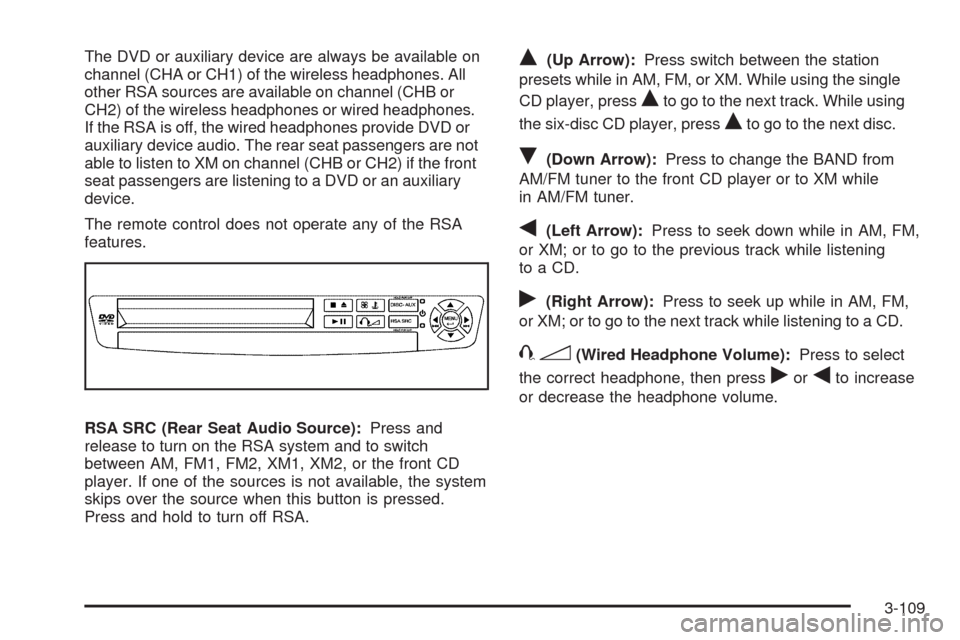
The DVD or auxiliary device are always be available on
channel (CHA or CH1) of the wireless headphones. All
other RSA sources are available on channel (CHB or
CH2) of the wireless headphones or wired headphones.
If the RSA is off, the wired headphones provide DVD or
auxiliary device audio. The rear seat passengers are not
able to listen to XM on channel (CHB or CH2) if the front
seat passengers are listening to a DVD or an auxiliary
device.
The remote control does not operate any of the RSA
features.
RSA SRC (Rear Seat Audio Source):Press and
release to turn on the RSA system and to switch
between AM, FM1, FM2, XM1, XM2, or the front CD
player. If one of the sources is not available, the system
skips over the source when this button is pressed.
Press and hold to turn off RSA.Q(Up Arrow):Press switch between the station
presets while in AM, FM, or XM. While using the single
CD player, press
Qto go to the next track. While using
the six-disc CD player, press
Qto go to the next disc.
R(Down Arrow):Press to change the BAND from
AM/FM tuner to the front CD player or to XM while
in AM/FM tuner.
q(Left Arrow):Press to seek down while in AM, FM,
or XM; or to go to the previous track while listening
to a CD.
r(Right Arrow):Press to seek up while in AM, FM,
or XM; or to go to the next track while listening to a CD.
43(Wired Headphone Volume):Press to select
the correct headphone, then press
rorqto increase
or decrease the headphone volume.
3-109
Page 270 of 464
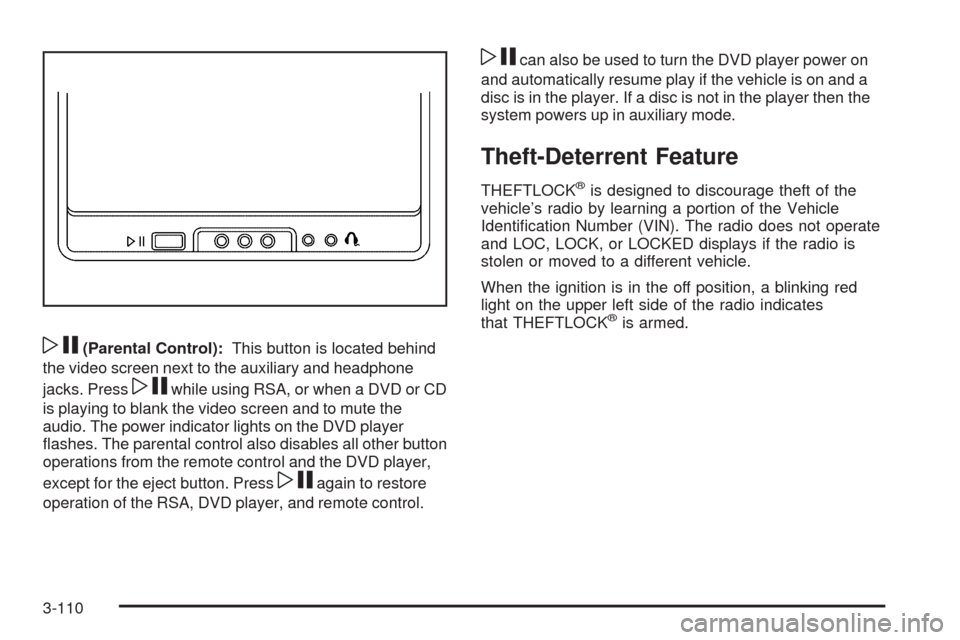
wj(Parental Control):This button is located behind
the video screen next to the auxiliary and headphone
jacks. Press
wjwhile using RSA, or when a DVD or CD
is playing to blank the video screen and to mute the
audio. The power indicator lights on the DVD player
ashes. The parental control also disables all other button
operations from the remote control and the DVD player,
except for the eject button. Press
wjagain to restore
operation of the RSA, DVD player, and remote control.
wjcan also be used to turn the DVD player power on
and automatically resume play if the vehicle is on and a
disc is in the player. If a disc is not in the player then the
system powers up in auxiliary mode.
Theft-Deterrent Feature
THEFTLOCK®is designed to discourage theft of the
vehicle’s radio by learning a portion of the Vehicle
Identication Number (VIN). The radio does not operate
and LOC, LOCK, or LOCKED displays if the radio is
stolen or moved to a different vehicle.
When the ignition is in the off position, a blinking red
light on the upper left side of the radio indicates
that THEFTLOCK
®is armed.
3-110
Page 271 of 464
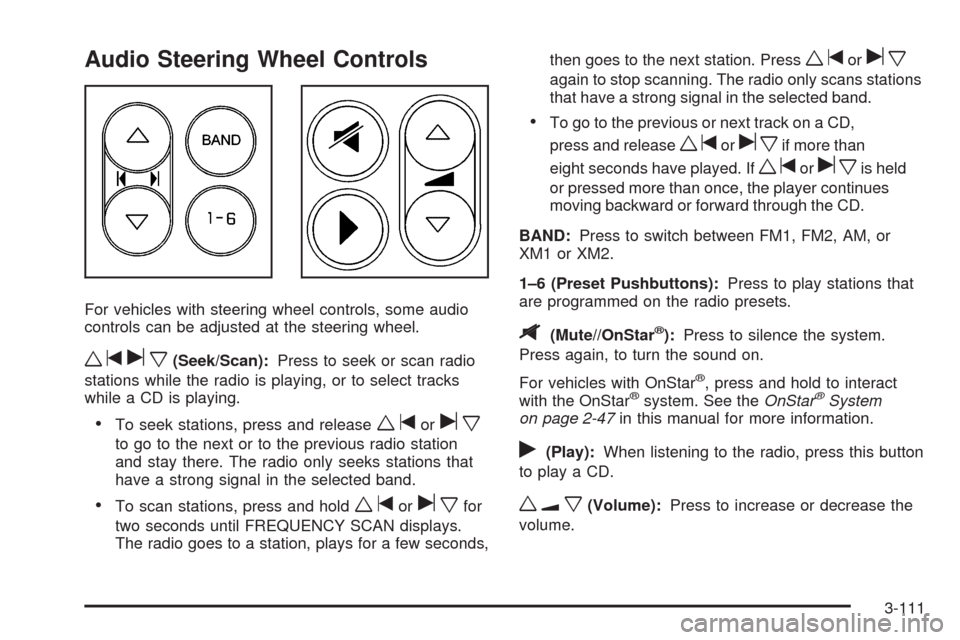
Audio Steering Wheel Controls
For vehicles with steering wheel controls, some audio
controls can be adjusted at the steering wheel.
wtux(Seek/Scan):Press to seek or scan radio
stations while the radio is playing, or to select tracks
while a CD is playing.
To seek stations, press and releasewtorux
to go to the next or to the previous radio station
and stay there. The radio only seeks stations that
have a strong signal in the selected band.
To scan stations, press and holdwtoruxfor
two seconds until FREQUENCY SCAN displays.
The radio goes to a station, plays for a few seconds,then goes to the next station. Press
wtorux
again to stop scanning. The radio only scans stations
that have a strong signal in the selected band.
To go to the previous or next track on a CD,
press and release
wtoruxif more than
eight seconds have played. If
wtoruxis held
or pressed more than once, the player continues
moving backward or forward through the CD.
BAND:Press to switch between FM1, FM2, AM, or
XM1orXM2.
1–6 (Preset Pushbuttons):Press to play stations that
are programmed on the radio presets.
$(Mute//OnStar®):Press to silence the system.
Press again, to turn the sound on.
For vehicles with OnStar
®, press and hold to interact
with the OnStar®system. See theOnStar®System
on page 2-47in this manual for more information.
r(Play):When listening to the radio, press this button
to play a CD.
wux(Volume):Press to increase or decrease the
volume.
3-111
Page 409 of 464
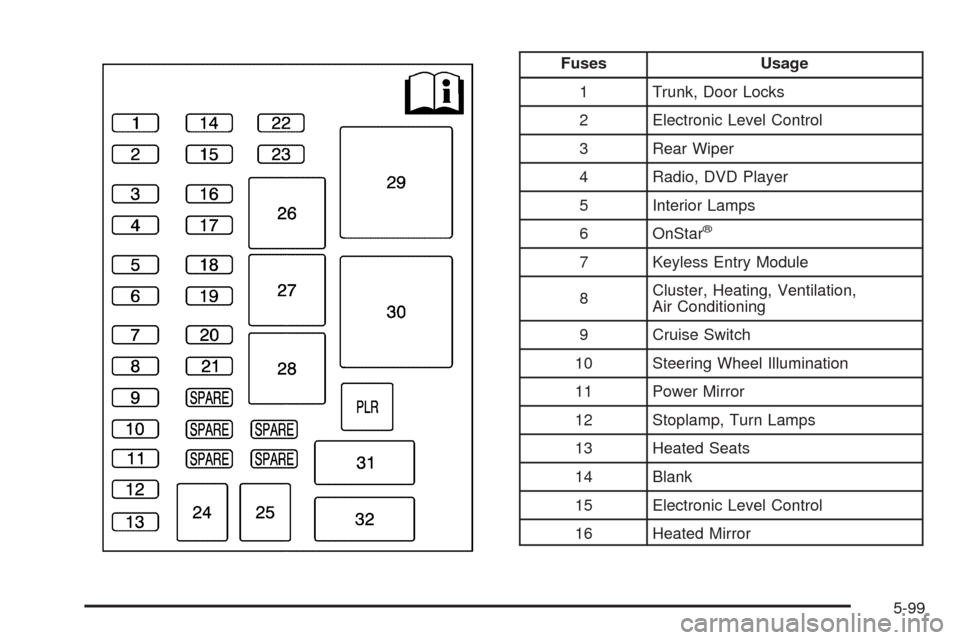
Fuses Usage
1 Trunk, Door Locks
2 Electronic Level Control
3 Rear Wiper
4 Radio, DVD Player
5 Interior Lamps
6 OnStar
®
7 Keyless Entry Module
8Cluster, Heating, Ventilation,
Air Conditioning
9 Cruise Switch
10 Steering Wheel Illumination
11 Power Mirror
12 Stoplamp, Turn Lamps
13 Heated Seats
14 Blank
15 Electronic Level Control
16 Heated Mirror
5-99