display CHEVROLET UPLANDER 2009 1.G Repair Manual
[x] Cancel search | Manufacturer: CHEVROLET, Model Year: 2009, Model line: UPLANDER, Model: CHEVROLET UPLANDER 2009 1.GPages: 464, PDF Size: 2.59 MB
Page 259 of 464
l(Fast Forward):Press to fast forward the DVD and
CD. To stop forwarding, press
rjorcY. While
the DVD is playing the copyright information or previews,
lmay not work.
MENU (Disc):Press to view the main DVD menu. The
menu is different on every disc. Use
q,Q,r,or
Rto move the cursor around the menu. After making a
selection, press
r.
r(Enter/Select):Press to select the choice that is
highlighted in any menu.
z(Display Control Button):Press to open the RSE
On-Screen Display (OSD) menus to adjust the color,
tint, brightness, contrast, and display modes.
For vehicles without rear seat climate control,z
can take the place of9C.
For vehicles with rear seat climate control,zis
also found on the remote control.
Playing a Disc
To play a disc, insert the disc with the label side up into
the loading slot. The DVD player continues loading
the disc and the player automatically starts if the vehicle
is in ACC/ACCESSORY, ON/RUN, or RAP.
If a disc is already in the player make sure that the DVD
player is on, then press
rjon the player faceplate or
on the remote control. Press DVD AUX on the player
faceplate, or CD AUX on the radio faceplate until RSE
displays, to start playing a disc.
Some DVDs do not allow fast forwarding or skipping of
the copyright information or previews. Some DVDs
begins playing after the previews have nished. If the
DVD does not begin playing at the main title, refer to the
on-screen instructions.
To stop playing a disc, press
cYon the DVD player
faceplate or the remote control.
To resume playback, press
rjon the DVD player
faceplate or the remote control. The movie should
resume play from where it was last stopped if the disc
has not been ejected.
If the disc has been ejected, the disc resumes play at
the beginning of the disc.
3-99
Page 261 of 464
v(Title):Press to display the current title number.
Each press moves the disc to the next available title.
q,Q,r,R(Menu Navigation Arrows):Press
to move through the DVD menus.
The up and down arrows move through MP3 folders.
r(Enter):Press to select the highlighted choice in
any menu.
z(Display Control Button):Press to open the RSE
On-Screen Display (OSD) menus to adjust the color,
tint, brightness, contrast, and display modes.
y(Main Menu):Press to view the main DVD menu.
The menu is different on every disc. Use the navigation
arrows to move the cursor around the menu. After
making a selection press
r.
q(Return):Press to go back one step in the RSE
On-Screen Display (OSD) menu and some DVD menus.
Press
qagain to exit the current menu and to
move to the previous menu.
c(Stop):Press to stop playing, rewinding, or fast
forwarding a disc.
s(Play/Pause):Press this button to start play of a
disc. Press this button while a disc is playing to pause it.
Press it again to continue playing the disc.
t(Previous Chapter/Track):Press to go to the
beginning of the current chapter or track. Press
tagain
to return to the previous chapter or track. This button
might not work while the DVD is playing the copyright
information or previews.
u(Next Chapter/Track):Press to go to the beginning
of the next chapter or track. This button might not work
while the DVD is playing the copyright information or the
previews.
3-101
Page 262 of 464
r(Fast Reverse):Press to fast reverse the DVD
and CD. To stop reversing, press
rjorcY.
This button might not work while the DVD is playing the
copyright information or the previews.
[(Fast Forward):Press to fast forward the DVD and
CD. To stop fast forwarding, press
rjorcY.
This button might not work while the DVD is playing the
copyright information or the previews.
e(Sound):Press to display the current audio track.
Each press moves the DVD to the next language
or commentary. The format and content of this function
vary for each disc.
{(Subtitles):Press to display the current subtitles.
Each press of this button moves the DVD to the
next available subtitle option (English, Spanish, French,
etc., if available). The format and content of this
function vary for each disc.AUX (Auxiliary):Press this button to switch the system
between the DVD player and an auxiliary source.
d(Camera):Press to display the current camera
angle on DVDs that have this feature. Each press moves
the DVD to the next available camera angle. The
format and content of this function vary for each disc.
0 through 9 (Numeric Keypad):The numeric keypad
provides the capability of direct chapter or track
number selection.
\(Clear):To clear all numeric inputs press within
two seconds after entering a numeric selection.
}10 (Multiple Digit Entries):Press before entering a
number greater than 9 to select a chapter or track
number greater than 9.
3-102
Page 263 of 464
RSE On-Screen Display (OSD) Menu
To use the RSE OSD menu when using a DVD or an
auxiliary device:
1. Press
zon the remote control or on the DVD
faceplate, if the vehicle does not have rear seat
climate control.
2. Use
q,Q,r,Randrto navigate the
screen.
This menu lets you select default preferences for video
format, language preference, brightness, color, contrast,
and tint. Not all DVDs support all the feature defaults in
the setup menus. If a feature is not supported, the
defaults are provided by the DVD media. To exit this
menu press
z,orqon the remote control, or
faceplate if there is no rear seat climate control, or wait
for the menu to time out.
The default language selection applies to all
future DVDs.To use the RSE OSD menu when using a CD or
an MP3:
1. Press
zon the remote control or on the DVD
faceplate, if the vehicle does not have rear seat
climate control.
2. Use
q,Q,r,Randrto navigate the
screen.
This menu lets you select default preferences for
language and playback settings. To exit this menu press
z,orqon the remote control, or faceplate if there
is no rear seat climate control, or wait for the menu
to time out.
Battery Replacement
To change the remote control batteries, do the following:
1. Slide the rear cover back on the remote control.
2. Replace the two batteries in the compartment. Make
sure that they are installed correctly using the
diagram on the inside of the battery compartment.
3. Replace the battery cover.
If the remote control is to be stored for a long period of
time, remove the batteries and keep them in a cool,
dry place.
3-103
Page 265 of 464
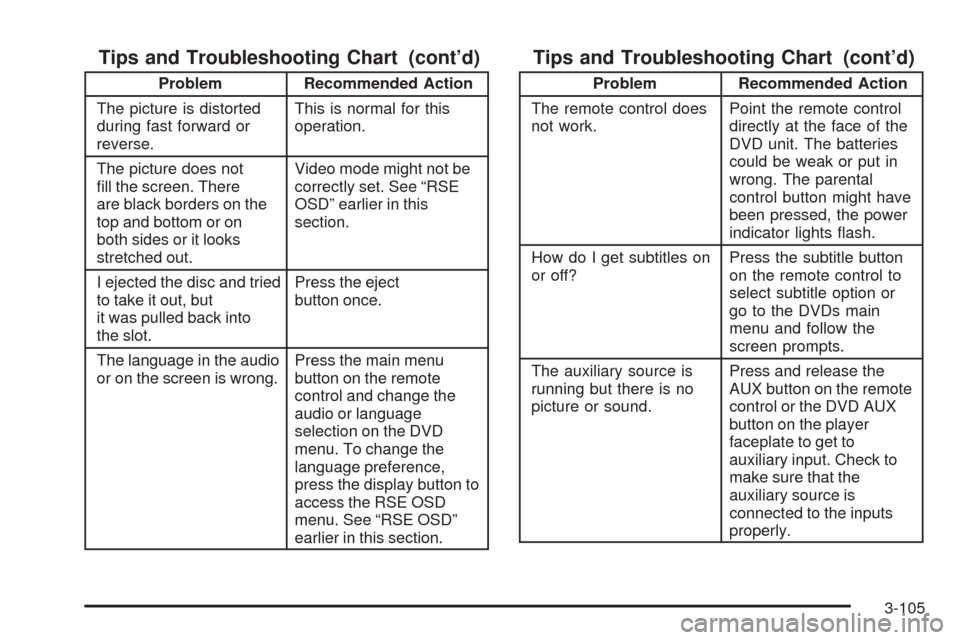
Tips and Troubleshooting Chart (cont’d)
Problem Recommended Action
The picture is distorted
during fast forward or
reverse.This is normal for this
operation.
The picture does not
ll the screen. There
are black borders on the
top and bottom or on
both sides or it looks
stretched out.Video mode might not be
correctly set. See “RSE
OSD” earlier in this
section.
I ejected the disc and tried
to take it out, but
it was pulled back into
the slot.Press the eject
button once.
The language in the audio
or on the screen is wrong.Press the main menu
button on the remote
control and change the
audio or language
selection on the DVD
menu. To change the
language preference,
press the display button to
access the RSE OSD
menu. See “RSE OSD”
earlier in this section.
Tips and Troubleshooting Chart (cont’d)
Problem Recommended Action
The remote control does
not work.Point the remote control
directly at the face of the
DVD unit. The batteries
could be weak or put in
wrong. The parental
control button might have
been pressed, the power
indicator lights ash.
How do I get subtitles on
or off?Press the subtitle button
on the remote control to
select subtitle option or
go to the DVDs main
menu and follow the
screen prompts.
The auxiliary source is
running but there is no
picture or sound.Press and release the
AUX button on the remote
control or the DVD AUX
button on the player
faceplate to get to
auxiliary input. Check to
make sure that the
auxiliary source is
connected to the inputs
properly.
3-105
Page 267 of 464
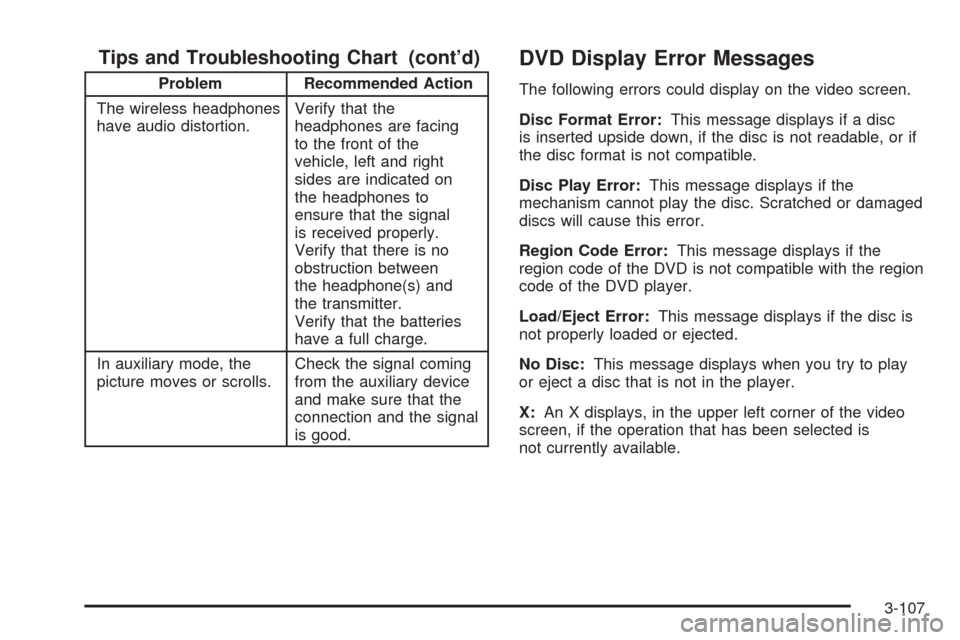
Tips and Troubleshooting Chart (cont’d)
Problem Recommended Action
The wireless headphones
have audio distortion.Verify that the
headphones are facing
to the front of the
vehicle, left and right
sides are indicated on
the headphones to
ensure that the signal
is received properly.
Verify that there is no
obstruction between
the headphone(s) and
the transmitter.
Verify that the batteries
have a full charge.
In auxiliary mode, the
picture moves or scrolls.Check the signal coming
from the auxiliary device
and make sure that the
connection and the signal
is good.
DVD Display Error Messages
The following errors could display on the video screen.
Disc Format Error:This message displays if a disc
is inserted upside down, if the disc is not readable, or if
the disc format is not compatible.
Disc Play Error:This message displays if the
mechanism cannot play the disc. Scratched or damaged
discs will cause this error.
Region Code Error:This message displays if the
region code of the DVD is not compatible with the region
code of the DVD player.
Load/Eject Error:This message displays if the disc is
not properly loaded or ejected.
No Disc:This message displays when you try to play
or eject a disc that is not in the player.
X:An X displays, in the upper left corner of the video
screen, if the operation that has been selected is
not currently available.
3-107
Page 270 of 464
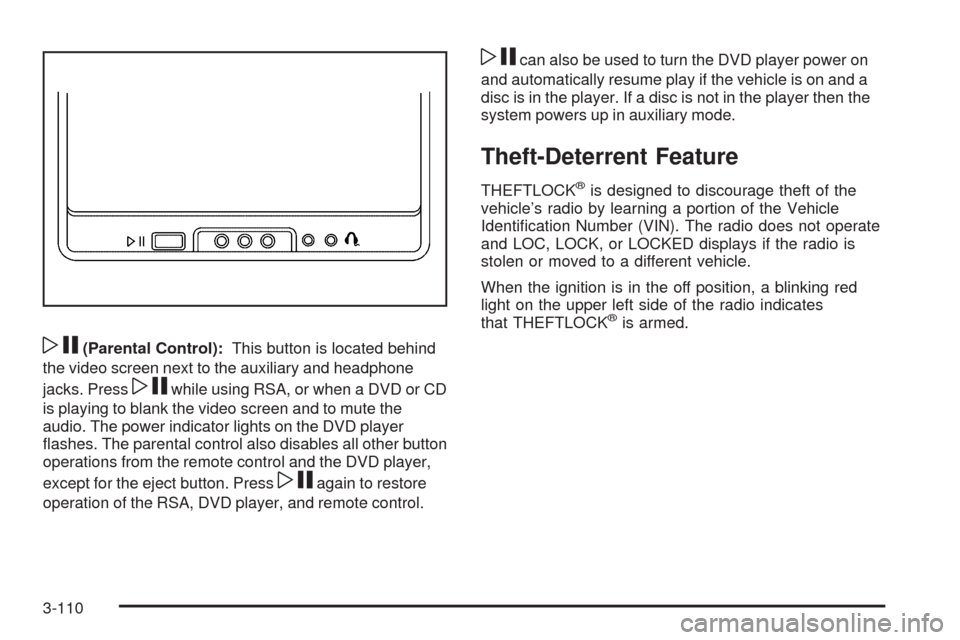
wj(Parental Control):This button is located behind
the video screen next to the auxiliary and headphone
jacks. Press
wjwhile using RSA, or when a DVD or CD
is playing to blank the video screen and to mute the
audio. The power indicator lights on the DVD player
ashes. The parental control also disables all other button
operations from the remote control and the DVD player,
except for the eject button. Press
wjagain to restore
operation of the RSA, DVD player, and remote control.
wjcan also be used to turn the DVD player power on
and automatically resume play if the vehicle is on and a
disc is in the player. If a disc is not in the player then the
system powers up in auxiliary mode.
Theft-Deterrent Feature
THEFTLOCK®is designed to discourage theft of the
vehicle’s radio by learning a portion of the Vehicle
Identication Number (VIN). The radio does not operate
and LOC, LOCK, or LOCKED displays if the radio is
stolen or moved to a different vehicle.
When the ignition is in the off position, a blinking red
light on the upper left side of the radio indicates
that THEFTLOCK
®is armed.
3-110
Page 271 of 464
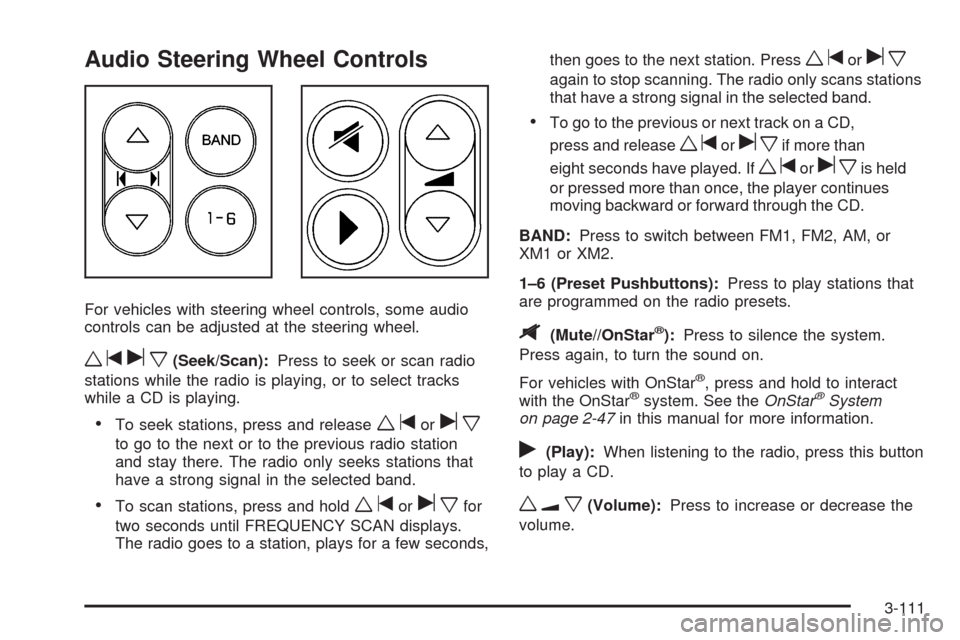
Audio Steering Wheel Controls
For vehicles with steering wheel controls, some audio
controls can be adjusted at the steering wheel.
wtux(Seek/Scan):Press to seek or scan radio
stations while the radio is playing, or to select tracks
while a CD is playing.
To seek stations, press and releasewtorux
to go to the next or to the previous radio station
and stay there. The radio only seeks stations that
have a strong signal in the selected band.
To scan stations, press and holdwtoruxfor
two seconds until FREQUENCY SCAN displays.
The radio goes to a station, plays for a few seconds,then goes to the next station. Press
wtorux
again to stop scanning. The radio only scans stations
that have a strong signal in the selected band.
To go to the previous or next track on a CD,
press and release
wtoruxif more than
eight seconds have played. If
wtoruxis held
or pressed more than once, the player continues
moving backward or forward through the CD.
BAND:Press to switch between FM1, FM2, AM, or
XM1orXM2.
1–6 (Preset Pushbuttons):Press to play stations that
are programmed on the radio presets.
$(Mute//OnStar®):Press to silence the system.
Press again, to turn the sound on.
For vehicles with OnStar
®, press and hold to interact
with the OnStar®system. See theOnStar®System
on page 2-47in this manual for more information.
r(Play):When listening to the radio, press this button
to play a CD.
wux(Volume):Press to increase or decrease the
volume.
3-111
Page 273 of 464
Fixed Mast Antenna
The xed mast antenna can withstand most car washes
without being damaged as long as it is securely
attached to the base. If the mast becomes slightly bent,
straighten it out by hand. If the mast is badly bent,
replace it.
Occasionally check to make sure the antenna is
tightened to its base. If tightening is required, tighten
by hand until fully seated plus one quarter turn.
XM™ Satellite Radio Antenna
System
The XM Satellite Radio antenna is located on the roof of
the vehicle. Keep the antenna clear of obstructions for
clear radio reception.
Chime Level Adjustment
The radio is used to adjust the vehicle’s chime volume
level. To adjust the chime volume level:
1. Turn the radio off with the ignition in the ON/RUN
position.
2. Press and hold pushbutton 6, the volume level will
change from the normal level to loud, and LOUD
will appear on the radio display.
If the chime volume is at the normal level, it
changes to the loud level and LOUD appears on
the radio display.
If the chime volume is at the loud level, it
changes to the normal level and NORMAL
appears on the radio display.
Removing the radio and not replacing it with a factory
radio or chime module disables the chimes.
3-113
Page 281 of 464
The traction control system automatically comes on
whenever you start your vehicle. To limit wheel spin,
especially in slippery road conditions, you should always
leave the system on. But you can turn the traction control
system off if you ever need to. You should turn the
system off if your vehicle ever gets stuck in sand, mud or
snow and rocking the vehicle is required. SeeRocking
Your Vehicle to Get It Out on page 4-18andIf Your
Vehicle is Stuck in Sand, Mud, Ice, or Snow on
page 4-18.
To turn the system off,
press the traction control
button located on the
center of the instrument
panel.
If the system is limiting wheel spin when you press the
button, the TRACTION CONTROL ACTIVE message will
go off, but the system will not turn off until there is no
longer a current need to limit wheel spin. The TRACTION
CONTROL OFF message will come on to remind you the
system is off. You can turn the system back on at any
time by pressing the button again. The traction control
system warning message should go off.Adding non-dealer/non-retailer accessories can affect
your vehicle’s performance. SeeAccessories and
Modifications on page 5-3for more information.
StabiliTrak®System
Your vehicle may be equipped with StabiliTrak which
combines anti-lock brake, traction and stability control
systems and helps the driver maintain directional control
of the vehicle in most driving conditions.
When you rst start your vehicle and begin to drive
away, the system performs several diagnostic checks to
insure there are no problems. You may hear or feel
the system working. This is normal and does not mean
there is a problem with your vehicle.
If the system fails to turn on or activate, the SERVICE
STABILITY SYSTEM message will be displayed on
the Driver Information Center (DIC). If the vehicle has
gone through heavy acceleration or braking or multiple
turns during the rst two miles of driving after starting
your vehicle, the STABILITY CONTROL OFF message
may appear on the DIC. If this is the case, your
vehicle does not need servicing. You will need to turn
the vehicle off and then restart it to initialize StabiliTrak.
If either message appears on the DIC, and your
vehicle has not gone through hard acceleration, braking
or multiple turns in the rst two miles of driving, your
vehicle should be taken in for service.
4-7