display CHEVROLET UPLANDER 2009 1.G Workshop Manual
[x] Cancel search | Manufacturer: CHEVROLET, Model Year: 2009, Model line: UPLANDER, Model: CHEVROLET UPLANDER 2009 1.GPages: 464, PDF Size: 2.59 MB
Page 246 of 464
RPT (Repeat):Press to hear a track or depending on
the radio, an entire CD.
To use repeat, do one of the following:
Press and release until REPEAT displays, to repeat
a track.
Press and release, depending on the radio,
until REPEAT ONE DISC displays, to repeat
an entire CD.
To turn off repeated play, press and release until
REPEAT OFF displays.
tSEEKu:Press the left arrow to go to the start of
the current track, if more than eight seconds have
played. Press the right arrow to go to the next track.
If either arrow is held or pressed more than once,
the player continues moving backward or forward
through the CD.
tSCANu:To scan one CD, press and hold either
arrow for more than two seconds until SCAN displays and
a beep sounds. The radio goes to the next track, plays for
10 seconds, then goes to the next track. Press either
arrow again, to stop scanning.To scan all loaded CDs, press and hold either arrow for
more than four seconds until DISC SCAN displays and a
beep sounds. Use this feature to listen to 10 seconds of
the rst track of each loaded CD. Press either arrow
again, to stop scanning.
BAND:Press to listen to the radio when a CD is
playing. The inactive CD(s) remains inside the radio for
future listening.
CD/AUX (CD/Auxiliary):Press to play a CD when
listening to the radio. The CD icon and track number
appears on the display when a CD is in the player.
Press again and the system automatically searches for
an auxiliary input device, such as a portable audio player.
If a portable audio player is connected the “AUX INPUT
DEVICE” displays. If the portable audio player is not
connected, the “AUX INPUT DEVICE” message does not
display.
AUTO EQ (Automatic Equalization):Press to select
the equalization setting while playing a CD. The
equalization is stored while a CD is played. For more
information on AUTO EQ, see “AUTO EQ” listed
previously in this section.
3-86
Page 247 of 464
Playing an MP3 CD-R Disc
The vehicle’s radio system has the MP3 feature that is
capable of playing an MP3 CD-R disc. For more
information on how to play an MP3 CD-R disc, see
Using an MP3 on page 3-89later in this section.
UsingR(Song List) Mode (Single CD
and Six-Disc CD)
This feature is capable of saving 20 track selections.
To save tracks into the song list feature, perform
the following steps:
1. Turn the CD player on and load it with at least
one CD.
2. Check to see that the CD player is not in song
list mode. S-LIST (sound list) should not display.
If S-LIST is present, press the song list button
to turn it off.
3. Select the desired CD by pressing the numbered
pushbutton and then use the left SEEK arrow or
turn the
O/eknob to locate the track to be
saved. The track begins to play.4. Press and hold the
Rbutton to save the track into
memory. When song list is pressed, one beep
sounds. ADDED SONG displays.
5. Repeat Steps 3 and 4 for saving other selections.
SONGLIST FULL displays if more than 20 selections are
saved.
To play the song list, press the
Rbutton. The recorded
tracks begins to play in the order they were saved.
Seek through the song list by using the SEEK arrows.
Seeking past the last saved track returns to the rst
saved track.
To delete tracks from the song list, perform the following
steps:
1. Turn the CD player on.
2. Press the
Rbutton to turn song list on. S-LIST
displays.
3. Press either SEEK arrow or turn the
O/eknob
to select the desired track to be deleted.
4. Press and hold the
Rbutton for two seconds.
Release this button when SONG REMOVED
displays.
3-87
Page 248 of 464
After a track has been deleted, the remaining tracks are
moved up the list. When another track is added to
the song list, the track is added to the end of the list.
To delete the entire song list, perform the following
steps:
1. Turn the CD player on.
2. Press the
Rbutton to turn song list on. S-LIST
displays.
3. Press and hold the
Rbutton for more than
four seconds. Two beeps will sound. SONGLIST
EMPTY displays indicating the song list has
been deleted.
If a CD is ejected, and the song list contains saved
tracks from that CD, those tracks are automatically
deleted from the song list. Additional tracks saved to the
song list are added to the bottom of the list.
To end song list mode, press the song list button. One
beep sounds and S-LIST is removed from the display.
CD Messages
CHECK CD:If this message displays and/or the CD
comes out, it could be for one of the following reasons:
It is very hot. When the temperature returns to
normal, the CD should play.
You are driving on a very rough road. When the
road becomes smoother, the CD should play.
The CD is dirty, scratched, wet, or upside down.
The air is very humid. If so, wait about an hour and
try again.
There may have been a problem while burning
the CD.
The label may be caught in the CD player.
If the CD is not playing correctly, for any other reason,
try a known good CD.
If any error occurs repeatedly or if an error cannot be
corrected, contact your dealer/retailer. If the radio
displays an error message, write it down and provide it
to your dealer/retailer when reporting the problem.
3-88
Page 249 of 464
Using the Auxiliary Input Jack
The radio system has an auxiliary input jack located on
the upper right side of the faceplate. This is not an audio
output; do not plug the headphone set into the front
auxiliary input jack. However, an external audio device
such as an iPod, laptop computer, MP3 player, CD
changer, or cassette tape player, etc. can be connected
to the auxiliary input jack for use as another source for
audio listening.
Drivers are encouraged to set up any auxiliary device
while the vehicle is in PARK (P). SeeDefensive Driving
on page 4-2.
To use a portable audio player, connect a 3.5 mm
(1/8 inch) cable to the radio’s front auxiliary input jack.
When a device is connected, the radio displays AUX
INPUT DEVICE and begins playing audio from
that device.
Top Knob (Power/Volume):Turn clockwise or
counterclockwise to increase or decrease the volume of
the portable player. Additional volume adjustments
might need to be made from the portable device.BAND:Press to listen to the radio while a portable
audio device is playing. The portable audio device
continues playing, so you might want to stop it or
turn it off.
CD/AUX (CD/Auxiliary):Press to play a CD or other
optional remote audio features, while a portable
audio device is playing. If the external audio device is
disconnected from the faceplate, the radio automatically
returns to the last station that was set.
Using an MP3
MP3 CD-R Disc
MP3 Format
If you burn your own MP3 disc on a personal computer:
Make sure the MP3 les are recorded on a
CD-R disc.
Do not mix standard audio and MP3 les on
one disc.
Make sure playlists have a .mp3 or .wpl extension,
other le extensions may not work.
3-89
Page 250 of 464
Files can be recorded with a variety of xed or
variable bit rates. Song title, artist name, and album
are available for display by the radio when
recorded using ID3 tags version 1 and 2.
Create a folder structure that makes it easy to nd
songs while driving. Organize songs by albums
using one folder for each album. Each folder
or album should contain 18 songs or less.
Make sure to nalize the disc when burning an MP3
disc, using multiple sessions. It is usually better to
burn the disc all at once.
Do not use CD-RW discs.
Do not use colored discs.
The player is able to read and play a maximum of
50 folders, 50 playlists, 10 sessions, and 255 les. Long
le names, folder names, or playlist names could use
more disc memory space than necessary. To conserve
space on the disc, minimize the length of the le, folder,
or playlist names. You can also play an MP3 CD that was
recorded using no le folders. The system can support up
to 11 folders in depth, though, keep the depth of the
folders to a minimum in order to keep down the
complexity and confusion in trying to locate a particular
folder during playback. If a CD contains more than the
maximum of 50 folders, 50 playlists, 10 sessions, and
255 les the player lets you access and navigate up to
the maximum, but all items over the maximum are
ignored.
Root Directory
The root directory is treated as a folder. If the root
directory has compressed audio les, the directory is
displayed as F1 ROOT. All les contained directly under
the root directory are accessed prior to any root
directory folders. However, playlists (Px) are always
accessed before root folders or les.
Empty Directory or Folder
If a root directory or a folder exists somewhere in the
le structure that contains only folders/subfolders and no
compressed les directly beneath them, the player
advances to the next folder in the le structure
that contains compressed audio les. The empty folder
does not display.
No Folder
When the CD contains only compressed les, the les
will be located under the root folder. The next and
previous folder functions do not function on a CD that was
recorded without folders or playlists. When displaying the
name of the folder the radio displays ROOT.
When the CD contains only playlists and compressed
audio les, but no folders, all les are located under the
root folder. The folder down and the folder up buttons
search playlists (Px) rst and then go to the root folder.
When the radio displays the name of the folder the
radio displays ROOT.
3-90
Page 251 of 464
Order of Play
Tracks are played in the following order:
Play begins from the rst track in the rst playlist
and continues sequentially through all tracks in
each playlist. When the last track of the last playlist
has played, play continues from the rst track of
the rst playlist.
If the CD does not contain any playlists, then play
begins from the rst track under the root directory.
When all tracks from the root directory have played,
play continues from les according to their numerical
listing. After playing the last track from the last folder,
play begins again at the rst track of the rst folder or
root directory.
When play enters a new folder, the display does not
automatically show the new folder name unless
the folder mode was chosen as the default display. See
the information button later in this section for more
information. The new track name displays.
File System and Naming
The song name that displays is the song name that is
contained in the ID3 tag. If the song name is not present
in the ID3 tag, then the radio displays the le name
without the extension (such as .mp3) as the track name.Track names longer than 32 characters or four pages
are shortened. Parts of words on the last page of
text and the extension of the lename does not display.
Preprogrammed Playlists
Preprogrammed playlists that were created using
WinAmp™, MusicMatch™, or Real Jukebox™ software
can be accessed, however, they cannot be edited
using the radio. These playlists are treated as special
folders containing compressed audio song les.
Playing an MP3
Insert a CD-R partway into the slot (Single CD Player),
or press the load button and wait for the message to
insert disc (Six-Disc CD Player), label side up. The
player pulls it in, and the CD-R should begin playing.
{(Previous Folder):Press to go to the rst track in
the previous folder. Press and hold to reverse through
the current track.
|(Next Folder):Press to go to the rst track in
the next folder. Press and hold to fast forward the
current track.
3-91
Page 252 of 464
RDM (Random):Press to hear the tracks in random,
rather than sequential order, on one CD, one folder,
or all of the loaded CDs.
To use random, do one of the following:
Press and release until RANDOM DISC PLAY
displays, to play the tracks on a CD in random order.
Press and release until RANDOM FOLDER displays,
to play the tracks in a folder in random order.
Press and release until RANDOM ALL DISCS
displays, to play the tracks on all of the CDs that are
loaded in random order.
Press and release the RDM button until RANDOM OFF
displays, to turn off random play.
RPT (Repeat):Press to hear a track, CD, or a folder
over again.
To use repeat, do one of the following:
Press and release until REPEAT displays, to repeat
a track.
Press and release until REPEAT ONE DISC
displays, to repeat a CD.
Press and release until REPEAT FOLDER displays,
to repeat a folder.Press and release the RPT button until REPEAT OFF
displays, to turn off repeated play.
4(Information):Press to display the artist name and
album contained in the ID3 tag.
XM Radio Messages
xL (Explicit Language Channels):These
channels, or any others, can be blocked by calling
1-800-852-XMXM (9696).
Updating:The encryption code in the receiver is being
updated, and no action is required. This process
should take no longer than 30 seconds.
No Signal:The system is functioning correctly, but the
vehicle is in a location that is blocking the XM signal.
When the vehicle is moved into an open area, the signal
should return.
Loading XM:The audio system is acquiring and
processing audio and text data. No action is needed.
This message should disappear shortly.
CH Off Air:This channel is not currently in service.
Tune in to another channel.
3-92
Page 253 of 464
CH Unauth:This channel is blocked or cannot be
received with your XM Subscription package.
CH Unavail:This previously assigned channel is no
longer assigned. Tune to another station. If this station
was one of the presets, choose another station for
that preset button.
No Info:No artist, song title, category, or text
information is available at this time on this channel. The
system is working properly.
Not Found:There are no channels available for the
selected category. The system is working properly.
XM Locked:The XM receiver in the vehicle may have
previously been in another vehicle. For security
purposes, XM receivers cannot be swapped between
vehicles. If this message is received after having
the vehicle serviced, check with your dealer/retailer.
Radio ID:If tuned to channel 0, this message will
alternate with the XM Radio 8 digit radio ID label. This
label is needed to activate the service.Unknown:If this message is received when tuned to
channel 0, there may be a receiver fault. Consult
with your dealer/retailer.
Chk XMRcvr:If this message does not clear within a
short period of time, the receiver may have a fault.
Consult with your dealer/retailer.
Rear Seat Entertainment (RSE)
System
Vehicles with an RSE system have a video display
screen, auxiliary inputs, two sets of wireless
headphones, a DVD player, and a remote control.
Before Driving
The RSE is designed for rear seat passengers only.
The driver cannot safely view the video screen
while driving and should not try to do so.
Normal operation could be limited under extremely low
or high temperatures in order to protect the system
from damage. Operate the RSE system under normal or
comfortable cabin temperature ranges.
3-93
Page 255 of 464
To use the auxiliary audio and video inputs, connect an
external auxiliary device such as a camcorder to the
RCA jacks and turn on both the auxiliary device power
and the power on the front of the RSE player.
If a disc is present when the RSE power is turned on,
the player automatically begins playing the disc.
Press the AUX button on the remote control or the
DVD AUX button on the DVD player faceplate to switch
the system between the DVD player and the auxiliary
device. See “DVD Player” and “Remote Control” later in
this section for more information.
Parental Control
wj
(Parental Control):This button is located behind
the video screen next to the auxiliary and headphone
jacks. Press
wjwhile using RSA, or when a DVD or CD
is playing to blank the video screen and to mute the
audio. The power indicator lights on the DVD player
ashes. The parental control also disables all other button
operations from the remote control and the DVD player,
except for the eject button. Press
wjagain to restore
operation of the RSA, DVD player, and remote control.
wjcan also be used to turn the DVD player power on
and automatically resume play if the vehicle is on and a
disc is in the player. If a disc is not in the player then the
system powers up in auxiliary mode.
Audio Output
Audio from the DVD player or auxiliary inputs can be
heard through the following sources:
Vehicle Speakers
Wireless Headphones
Wired Headphones (not included)
Vehicle Speakers
Only one audio source can be heard through the
vehicle’s speakers at a time.
The RSE system or an auxiliary device can be heard
through all of the vehicle’s speakers when the following
occurs:
A DVD or auxiliary device is playing
The front audio system is on and the CD AUX
button is pressed to enable the RSE system
DVD appears on the radio display when the RSE
system is on.
To turn the vehicles speakers on and off, press the
CD AUX button on the radio. The audio from the RSE
system can be heard through the wireless headphones
and the vehicles speakers at the same time. The
volume on the radio varies when switching between the
radio, CD, DVD, MP3, or an auxiliary device.
3-95
Page 258 of 464
An error message could display if any other type of
media is inserted into the DVD player.
If an error message displays on the video screen, see
“DVD Messages” later in this section.
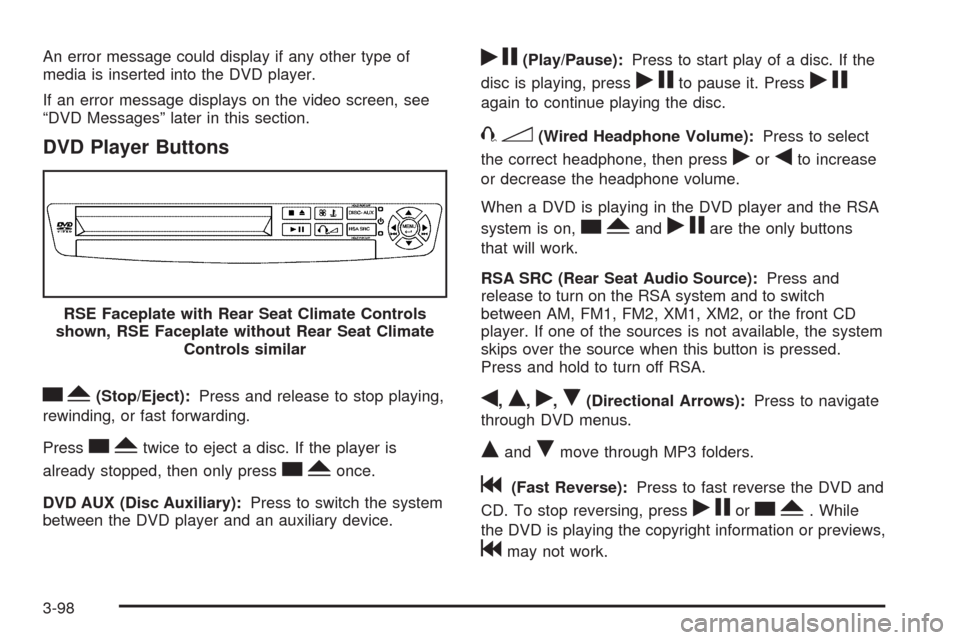
DVD Player Buttons
cY(Stop/Eject):Press and release to stop playing,
rewinding, or fast forwarding.
Press
cYtwice to eject a disc. If the player is
already stopped, then only press
cYonce.
DVD AUX (Disc Auxiliary):Press to switch the system
between the DVD player and an auxiliary device.
rj(Play/Pause):Press to start play of a disc. If the
disc is playing, press
rjto pause it. Pressrj
again to continue playing the disc.
43(Wired Headphone Volume):Press to select
the correct headphone, then press
rorqto increase
or decrease the headphone volume.
When a DVD is playing in the DVD player and the RSA
system is on,
cYandrjare the only buttons
that will work.
RSA SRC (Rear Seat Audio Source):Press and
release to turn on the RSA system and to switch
between AM, FM1, FM2, XM1, XM2, or the front CD
player. If one of the sources is not available, the system
skips over the source when this button is pressed.
Press and hold to turn off RSA.
q,Q,r,R(Directional Arrows):Press to navigate
through DVD menus.
QandRmove through MP3 folders.
g(Fast Reverse):Press to fast reverse the DVD and
CD. To stop reversing, press
rjorcY. While
the DVD is playing the copyright information or previews,
gmay not work. RSE Faceplate with Rear Seat Climate Controls
shown, RSE Faceplate without Rear Seat Climate
Controls similar
3-98