engine CHEVROLET VENTURE 2003 1.G Owner's Manual
[x] Cancel search | Manufacturer: CHEVROLET, Model Year: 2003, Model line: VENTURE, Model: CHEVROLET VENTURE 2003 1.GPages: 486, PDF Size: 3.3 MB
Page 206 of 486

)(Bi-Level):This mode directs half of the air to the
instrument panel outlets, then directs the remaining
air to the ¯oor outlets. Cooler air is directed to the upper
outlets and warmer air to the ¯oor outlets.
6(Floor):This mode directs most of the air to the
¯oor outlets. Use this mode to send air to the rear of the
vehicle. Keep the area under the front seats free of
objects that could obstruct air¯ow to the rear of
the vehicle.
The right knob can also be used to select defog or
defrost mode. For more information, see ªDefogging and
Defrostingº later in this section.
9(Fan):Turn the left knob clockwise or
counterclockwise to increase or decrease the fan speed.
Turn the knob to OFF to turn off the fan. The fan
must be turned on for the air conditioning compressor to
operate.
:(Outside Air):Press this button to turn the
outside air mode on or off. When this mode is on,
outside air will circulate throughout your vehicle. When
this mode is on, an indicator light in the button will
come on to let you know that it is activated. The outside
air mode can be used with all modes, but it cannot
be used with the recirculation mode.
?(Recirculation):This mode keeps outside air
from coming in the vehicle. It can be used to prevent
outside air and odors from entering your vehicle or help
heat or cool the air inside your vehicle more quickly.
Press this button to turn the recirculation mode on or off.
When the button is pressed, an indicator light will
come on. The air-conditioning compressor also comes
on. The recirculation mode can be used with vent
and bi-level modes, but it cannot be used with ¯oor,
defog, defrost or outside air modes.
Temperature Control:Turn the center knob clockwise
or counterclockwise to increase or decrease the air
temperature inside your vehicle.
#A/C (Air Conditioning):Press this button to turn
the air-conditioning system on or off. When A/C is
pressed, an indicator light in the button will come on to
let you know that air conditioning is activated.
You may notice a slight change in engine performance
when the air-conditioning compressor shuts off and
turns on again. This is normal. The system is designed
to make adjustments to help with fuel economy while
still maintaining the selected temperature.
On hot days, open the windows to let hot inside air
escape; then close them. This helps to reduce the time
it takes for your vehicle to cool down. It also helps
the system to operate more efficiently.
3-26
Page 207 of 486

For quick cool down on hot days, do the following:
1. Select the vent mode.
2. Select the recirculation mode.
3. Select A/C.
4. Select the coolest temperature.
5. Select the highest fan speed.
Using these settings together for long periods of time
may cause the air inside of your vehicle to become too
dry. To prevent this from happening, after the air
inside of your vehicle has cooled, turn the recirculation
mode off.
The air-conditioning system removes moisture from the
air, so you may sometimes notice a small amount of
water dripping underneath your vehicle while idling
or after turning off the engine. This is normal.
Defogging and Defrosting
Fog on the inside of windows is a result of high humidity
(moisture) condensing on the cool window glass. This
can be minimized if the climate control system is
used properly. There are two modes to clear fog or frostfrom your windshield. Use the defog mode to clear the
windows of fog or moisture and warm the passengers.
Use the defrost mode to remove fog or frost from
the windshield more quickly.
Turn the right knob to select the defog or defrost mode.
-(Defog):This mode directs air to the windshield
and the ¯oor outlets. When you select this mode,
the system turns off recirculation and runs the
air-conditioning compressor unless the outside
temperature is at or below freezing. The recirculation
mode cannot be selected while in the defog mode.
0(Defrost):Pressing this button directs most of the
air to the windshield and the side window outlets,
with some air directed to the ¯oor outlets. In this mode,
the system will automatically turn off recirculation
and run the air-conditioning compressor, unless the
outside temperature is at or below freezing.
Recirculation cannot be selected while in the
defrost mode.
Do not drive the vehicle until all the windows are clear.
3-27
Page 208 of 486
Rear Window Defogger
The rear window defogger uses a warming grid to
remove fog from the rear window.
will come on to let you know that the rear window
defogger is activated.
The rear window defogger will turn off about 10 minutes
after the button is pressed. If turned on again, the
defogger will only run for about ®ve minutes before
turning off. The defogger can also be turned off
by pressing the button again or by turning off the engine.
Notice:Don't use anything sharp on the inside of
the rear window. If you do, you could cut or damage
the warming grid, and the repairs wouldn't be
covered by your warranty. Do not attach a temporary
vehicle license, tape, a decal or anything similar
to the defogger grid.
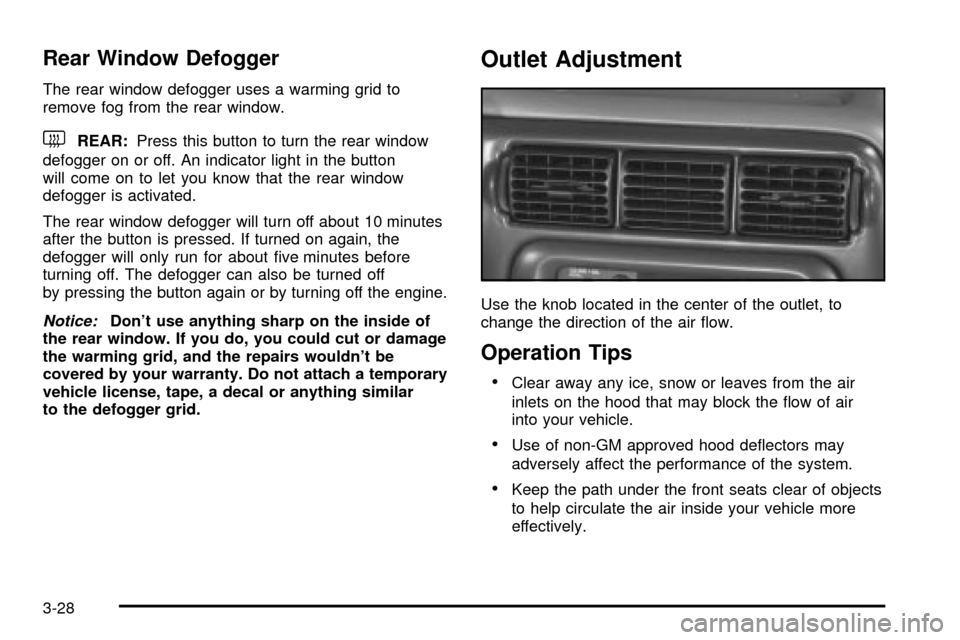
Outlet Adjustment
Use the knob located in the center of the outlet, to
change the direction of the air ¯ow.
Operation Tips
·Clear away any ice, snow or leaves from the air
inlets on the hood that may block the ¯ow of air
into your vehicle.
·Use of non-GM approved hood de¯ectors may
adversely affect the performance of the system.
·Keep the path under the front seats clear of objects
to help circulate the air inside your vehicle more
effectively.
3-28
Page 215 of 486

Warning Lights, Gages and
Indicators
This part describes the warning lights and gages that
may be on your vehicle. The pictures will help you
locate them.
Warning lights and gages can signal that something is
wrong before it becomes serious enough to cause
an expensive repair or replacement. Paying attention to
your warning lights and gages could also save you
or others from injury.
Warning lights come on when there may be or is a
problem with one of your vehicle's functions. As you will
see in the details on the next few pages, some
warning lights come on brie¯y when you start the
engine just to let you know they're working. If you are
familiar with this section, you should not be alarmed
when this happens.Gages can indicate when there may be or is a problem
with one of your vehicle's functions. Often gages
and warning lights work together to let you know when
there's a problem with your vehicle.
When one of the warning lights comes on and stays on
when you are driving, or when one of the gages
shows there may be a problem, check the section that
tells you what to do about it. Please follow this
manual's advice. Waiting to do repairs can be
costly ± and even dangerous. So please get to know
your warning lights and gages. They're a big help.
Your vehicle also has a message center that works
along with the warning lights and gages. See
Message
Center on page 3-50.
3-35
Page 218 of 486

Speedometer and Odometer
Your speedometer lets you see your speed in both
miles per hour (mph) and kilometers per hour (km/h).
Your odometer shows how far your vehicle has
been driven, in either miles (used in the United States)
or kilometers (used in Canada).
Your vehicle has a tamper-resistant odometer.
You may wonder what happens if your vehicle needs a
new odometer installed. If the new one can be set to
the mileage total of the old odometer, then that will
be done. If it can't, then it's set at zero and a label must
be put on the driver's door to show the old mileage
reading when the new odometer was installed.
Dual Trip Odometers
In addition to the standard odometer, the cluster can
also display two separate trip odometers (designated by
the letter A or B in the display window) as well as
your vehicle's Engine Oil Life (designated by the word
OIL in the display window). The display can be
toggled between the odometer, the trip odometers and
engine oil life by quickly pressing and releasing the
trip/reset button located to the right of the temperature
gage. The display toggles once each time the trip/reset
button is pressed for less than 1.5 seconds. The
display toggles in the following sequence: Odometer -
Trip Odometer A - Trip Odometer B - Engine Oil Life. If
the engine oil life is left on the display, it will
automatically toggle back to the odometer after about
15 seconds. Each of the two trip odometers can be used
to keep track of different trip distances (for example,
the mileage of a long trip and the mileage driven on the
current tank of fuel). The trip odometers will continue
to keep track of miles (kilometers) driven even if they are
not currently displayed. To reset the odometer to
zero (0), press and hold the trip/reset button for at least
1.5 seconds, but less than three seconds. Only the
trip odometer that is showing in the display will be reset.
3-38
Page 219 of 486

Retro-Active Reset
Each of the two trip odometers has a feature called
retro-active reset. This feature can be used to set either
(or both) trip odometer(s) to the number of miles
(kilometers) driven since the ignition was last turned on.
This can be used if you forget to reset your trip
odometer at the beginning of a trip. To use the
retro-active reset feature, press and hold the trip/reset
button for at least three seconds. The trip odometer
will then display the number of miles (kilometers) driven
since the ignition was last turned on and you began
driving. (If you use the retro-active reset feature
after you have started the vehicle, but before you begin
moving, the display will show the number of miles
(kilometers) you drove during the last ignition cycle.)
Once you begin driving, the trip odometer will
accumulate mileage. For example, if you have driven
5.0 miles (8.0 km) since you started your vehicle,
and then activate the retro-active reset feature, the
display will show 5.0 miles (8.0 km). As you drive, the
display will then increase to 5.1 miles (8.2 km), 5.2 miles
(8.4 km), etc. Only the trip odometer that is displayed
will be affected by the retro-active reset so that both trip
odometers can be used separately.
Tachometer
Your vehicle may have a tachometer that displays the
engine speed in revolutions per minute (rpm).
Notice:If you operate the engine with the
tachometer in the shaded warning area, your vehicle
could be damaged, and the damages would not
be covered by your warranty. Do not operate
the engine with the tachometer in the shaded
warning area.
3-39
Page 222 of 486

If the light comes on while you are driving, pull off the
road and stop carefully. You may notice that the pedal is
harder to push. Or, the pedal may go closer to the
¯oor. It may take longer to stop. If the light is still on,
have the vehicle towed for service. See
Anti-Lock Brake
System Warning Light on page 3-42andTowing Your
Vehicle on page 4-32.
{CAUTION:
Your brake system may not be working
properly if the brake system warning light is
on. Driving with the brake system warning light
on can lead to an accident. If the light is still
on after you have pulled off the road and
stopped carefully, have the vehicle towed
for service.
Anti-Lock Brake System
Warning Light
Your vehicle may have this
light. If it does, the
anti-lock brake system
warning light should come
on for a few seconds
when you turn the ignition
key to RUN.
If the anti-lock brake system warning light stays on
longer than normal after you've started your engine, turn
the ignition off. Or, if the light comes on and stays on
when you're driving, stop as soon as possible and turn
the ignition off. Then start the engine again to reset
the system. If the light still stays on, or comes on again
while you're driving, the anti-lock brake system needs
service and you don't have anti-lock brakes.
The anti-lock brake system warning light should come
on brie¯y when you turn the ignition key to RUN. If
the light doesn't come on then, have it ®xed so it will be
ready to warn you if there is a problem.
3-42
Page 223 of 486

Traction Control System (TCS)
Warning Light
Your vehicle may have a traction control system
warning light. The traction control system warning light
may come on for the following reasons:
·If you turn the system off by pressing the TCS
button located in the instrument panel switchbank
the warning light will come on and stay on. To
turn the system back on, press the button again.
The warning light should go off. See
Traction
Control System (TCS) on page 4-8for more
information.
·If there's a brake system problem that is speci®cally
related to traction control, the traction control
system will turn off and the warning light will come
on. If your brakes begin to overheat, the traction
control system will turn off and the warning light will
come on until your brakes cool down.
·If the traction control system is affected by an
engine-related problem, the system will turn off and
the warning light will come on.
If the traction control system warning light comes on
and stays on for an extended period of time when the
system is turned on, your vehicle needs service. United States
Canada
3-43
Page 224 of 486

Engine Coolant Temperature Gage
This gage shows the engine coolant temperature. If the
gage pointer moves into the red area, your engine is
too hot!
It means that your engine coolant has overheated. If
you have been operating your vehicle under normal
driving conditions, you should pull off the road, stop your
vehicle and turn off the engine as soon as possible.
See
Engine Overheating on page 5-26. United States
CanadaCluster with Tachometer
version (United States)
Cluster with Tachometer
version (Canada)
3-44
Page 225 of 486

Malfunction Indicator Lamp
Service Engine Soon Light in the
United States or Check Engine Light in
Canada
Your vehicle is equipped with a computer which
monitors operation of the fuel, ignition and emission
control systems.
This system is called OBD II (On-Board
Diagnostics-Second Generation) and is intended to
assure that emissions are at acceptable levels for the
life of the vehicle, helping to produce a cleaner
environment. The SERVICE ENGINE SOON or CHECK
ENGINE light comes on to indicate that there is aproblem and service is required. Malfunctions often will
be indicated by the system before any problem is
apparent. This may prevent more serious damage to
your vehicle. This system is also designed to assist your
service technician in correctly diagnosing any
malfunction.
Notice:If you keep driving your vehicle with this
light on, after a while, your emission controls
may not work as well, your fuel economy may not
be as good and your engine may not run as
smoothly. This could lead to costly repairs that may
not be covered by your warranty.
Notice:Modi®cations made to the engine,
transaxle, exhaust, intake or fuel system of your
vehicle or the replacement of the original tires with
other than those of the same Tire Performance
Criteria (TPC) can affect your vehicle's emission
controls and may cause this light to come on.
Modi®cations to these systems could lead to costly
repairs not covered by your warranty. This may
also result in a failure to pass a required Emission
Inspection/Maintenance test. United States
Canada
3-45