buttons CHEVROLET VENTURE 2003 1.G Owners Manual
[x] Cancel search | Manufacturer: CHEVROLET, Model Year: 2003, Model line: VENTURE, Model: CHEVROLET VENTURE 2003 1.GPages: 486, PDF Size: 3.3 MB
Page 117 of 486

Remote Alarm
When you press the horn button on the remote keyless
entry transmitter, the parking lamps will ¯ash and the
horn will sound. This will allow you to attract attention,
if needed.
Press this button again to stop the alarm from sounding.
Remote Power Sliding Door Operation
If your vehicle has the power sliding door, your
remote keyless entry transmitter will have a button that
has a van symbol on it. Press it to open or close the
sliding door. See
Power Sliding Door (PSD) on
page 2-17.
If your vehicle has the dual power sliding doors, your
remote keyless entry transmitter will have two buttons
that have a van symbol on them. The van symbol on the
left is for the driver's side sliding door and the van
symbol on the right is for the passenger's side sliding
door. See
Power Sliding Door (PSD) on page 2-17.
If the power sliding door(s) is locked, ®rst unlock
all doors, then press the van symbol to open the power
sliding door(s). The parking lamps will ¯ash when
the right button with the van symbol is pressed and they
will not ¯ash when the left button with the van symbol
is pressed. Press the van symbol again to close
the sliding door(s). See
Power Sliding Door (PSD) on
page 2-17for more information.You can operate the power sliding door(s) with the
remote keyless entry transmitter only when the power
sliding door override switch(es) on the overhead console
is turned off. See
Power Sliding Door (PSD) on
page 2-17.
If your vehicle's fuel ®ller door is opened, the driver's
side power sliding door will not open completely. Do not
try to force the door. Once the fuel ®ller door is
closed, the driver's side sliding door can be opened
normally.
Matching Transmitter(s) to Your
Vehicle
Each remote keyless entry transmitter is coded to
prevent another transmitter from unlocking your vehicle.
If a transmitter is lost or stolen, a replacement can
be purchased through your dealer. Remember to bring
any remaining transmitters with you when you go to
your dealer. When the dealer matches the replacement
transmitter to your vehicle, any remaining transmitters
must also be matched. Once your dealer has coded the
new transmitter, the lost transmitter will not unlock
your vehicle. Each vehicle can have a maximum of four
transmitters matched to it.
See your dealer to match transmitters to another
vehicle.
2-7
Page 118 of 486
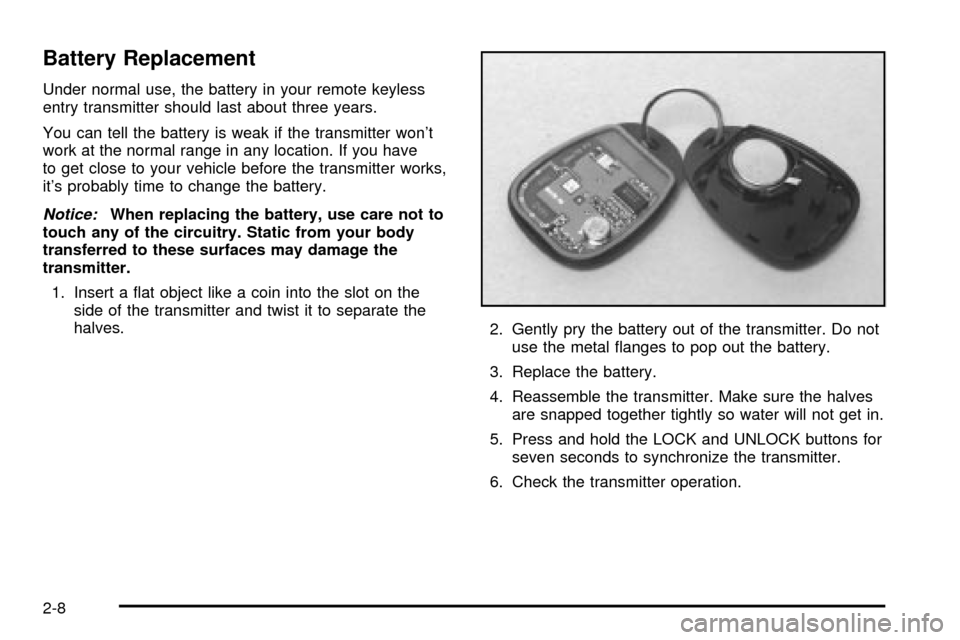
Battery Replacement
Under normal use, the battery in your remote keyless
entry transmitter should last about three years.
You can tell the battery is weak if the transmitter won't
work at the normal range in any location. If you have
to get close to your vehicle before the transmitter works,
it's probably time to change the battery.
Notice:When replacing the battery, use care not to
touch any of the circuitry. Static from your body
transferred to these surfaces may damage the
transmitter.
1. Insert a ¯at object like a coin into the slot on the
side of the transmitter and twist it to separate the
halves.
2. Gently pry the battery out of the transmitter. Do not
use the metal ¯anges to pop out the battery.
3. Replace the battery.
4. Reassemble the transmitter. Make sure the halves
are snapped together tightly so water will not get in.
5. Press and hold the LOCK and UNLOCK buttons for
seven seconds to synchronize the transmitter.
6. Check the transmitter operation.
2-8
Page 158 of 486

Programming the HomeLinkž
Transmitter
Do not use the HomeLinkžTransmitter with any garage
door opener that does not have the ªstop and reverseº
feature. This includes any garage door opener model
manufactured before April 1, 1982. If you have a newer
garage door opener with rolling codes, please be
sure to follow steps 6 through 8 to complete the
programming of your HomeLink
žTransmitter.
Read the instructions completely before attempting to
program the HomeLink
žTransmitter. Because of
the steps involved, it may be helpful to have another
person available to assist you in programming the
transmitter.
Keep the original transmitter for use in other vehicles as
well as for future HomeLink
žprogramming. It is also
recommended that upon the sale of the vehicle,
the programmed HomeLink
žbuttons should be erased
for security purposes. Refer to ªErasing HomeLinkž
Buttonsº or, for assistance, contact HomeLinkžon the
internet at: www.homelink.com or by calling
1-800-355-3515.
Be sure that people and objects are clear of the garage
door or gate operator you are programming. When
programming a garage door, it is advised to park outside
of the garage.It is recommended that a new battery be installed in
your hand-held transmitter for quicker and more
accurate transmission of the radio frequency.
Your vehicle's engine should be turned off while
programming the transmitter. Follow these steps to
program up to three channels:
1. Press and hold down the two outside buttons,
releasing only when the indicator light begins to
¯ash, after 20 seconds. Do not hold down the
buttons for longer than 30 seconds and do not
repeat this step to program a second and/or third
transmitter to the remaining two HomeLink
žbuttons.
2. Position the end of your hand-held transmitter about
1 to 3 inches (3 to 8 cm) away from the HomeLink
ž
buttons while keeping the indicator light in view.
3. Simultaneously press and hold both the desired
button on HomeLink
žand the hand-held transmitter
button. Do not release the buttons until Step 4
has been completed.
Some entry gates and garage door openers may
require you to substitute Step 3 with the procedure
noted in ªGate Operator and Canadian
Programmingº later in this section.
4. The indicator light will ¯ash slowly at ®rst and then
rapidly after HomeLink
žsuccessfully receives the
frequency signal from the hand-held transmitter.
Release both buttons.
2-48
Page 159 of 486

5. Press and hold the newly-trained HomeLinkžbutton
and observe the indicator light.
If the indicator light stays on constantly,
programming is complete and your device should
activate when the HomeLink
žbutton is pressed and
released.
To program the remaining two HomeLink
žbuttons,
begin with Step 2 under ªProgramming HomeLinkž.º
Do not repeat Step 1 as this will erase all of the
programmed channels.
If the indicator light blinks rapidly for two seconds
and then turns to a constant light, continue with
Steps 6 through 8 following to complete the
programming of a rolling-code equipped device
(most commonly, a garage door opener).
6. Locate in the garage, the garage door opener
receiver (motor-head unit). Locate the ªLearnº
or ªSmartº button. This can usually be found where
the hanging antenna wire is attached to the
motor-head unit.7. Firmly press and release the ªLearnº or ªSmartº
button. The name and color of the button may
vary by manufacturer.
You will have 30 seconds to start Step 8.
8. Return to the vehicle. Firmly press and hold the
programmed HomeLink
žbutton for two seconds,
then release. Repeat the press/hold/release
sequence a second time, and depending on the
brand of the garage door opener (or other rolling
code device), repeat this sequence a third time
to complete the programming.
HomeLink
žshould now activate your rolling-code
equipped device.
To program the remaining two HomeLink
žbuttons,
begin with Step 2 of ªProgramming HomeLinkž.º Do not
repeat Step 1.
2-49
Page 160 of 486

Gate Operator and Canadian
Programming
Canadian radio-frequency laws require transmitter
signals to ªtime outº or quit after several seconds of
transmission. This may not be long enough for
HomeLink
žto pick up the signal during programming.
Similarly, some U.S. gate operators are manufactured to
ªtime outº in the same manner.
If you live in Canada, or you are having difficulty
programming a gate operator by using the
ªProgramming HomeLink
žº procedures (regardless of
where you live), replace Step 3 under ªProgramming
HomeLink
žº with the following:
Continue to press and hold the HomeLink
žbutton while
you press and release every two seconds (cycle)
your hand-held transmitter until the frequency signal has
been successfully accepted by HomeLink
ž. The
indicator light will ¯ash slowly at ®rst and then rapidly.
Proceed with Step 4 under ªProgramming HomeLink
žº
to complete.
Using HomeLinkž
Press and hold the appropriate HomeLinkžbutton for at
least half of a second. The indicator light will come
on while the signal is being transmitted.
Erasing HomeLinkžButtons
To erase programming from the three buttons do the
following:
1. Press and hold down the two outside buttons until
the indicator light begins to ¯ash, after 20 seconds.
2. Release both buttons. Do not hold for longer than
30 seconds.
HomeLink
žis now in the train (learning) mode and can
be programmed at any time beginning with Step 2
under ªProgramming HomeLink
ž.º
Individual buttons can not be erased, but they can be
reprogrammed. See ªReprogramming a Single
HomeLink
žButtonº next.
2-50
Page 161 of 486

Reprogramming a Single HomeLinkž
Button
To program a device to HomeLinkžusing a HomeLinkž
button previously trained, follow these steps:
1. Press and hold the desired HomeLink
žbutton. Do
not release the button.
2. The indicator light will begin to ¯ash after
20 seconds. While still holding the HomeLink
ž
button, proceed with Step 2 under ªProgramming
HomeLinkž.º
Resetting Defaults
To reset HomeLinkžto default settings do the following:
1. Hold down the two outside buttons for about
20 seconds until the indicator light begins to ¯ash.
2. Continue to hold both buttons until the HomeLink
ž
indicator light turns off.
3. Release both buttons.
For questions or comments, contact HomeLink
žat
1-800-355-3515, or on the internet at
www.homelink.com.
Storage Areas
Your vehicle's large carrying capacity can store many
items. If you have the extended wheelbase version, you
can carry things as large as a 4' x 8' piece of plywood.
You can also use the ¯oor pins that are used to
attach the seats, to secure larger loads.
Glove Box
Your vehicle has a glove box below the instrument
panel. To open the glove box, lift the latch release.
The glove box door has a detent to prevent the door
from lowering too far. Open the glove box until the door
is partway open, then pull the door down if you need
it fully open. To close the glove box, the door must
be pushed up past the detent.
Cupholder(s)
There are cupholders located below the center
instrument panel switchbank. The cupholders have a
removable liner for larger size cups and for cleaning the
cupholders.
To use the cupholders, simply pull out the tray. Keep
the tray stowed in when not in use.
Your vehicle also has cupholders on the bottom inboard
side of the second row driver's side captain's chairs
and the seatbacks have cupholders that can be
used when the seatbacks are folded forward.
2-51
Page 162 of 486
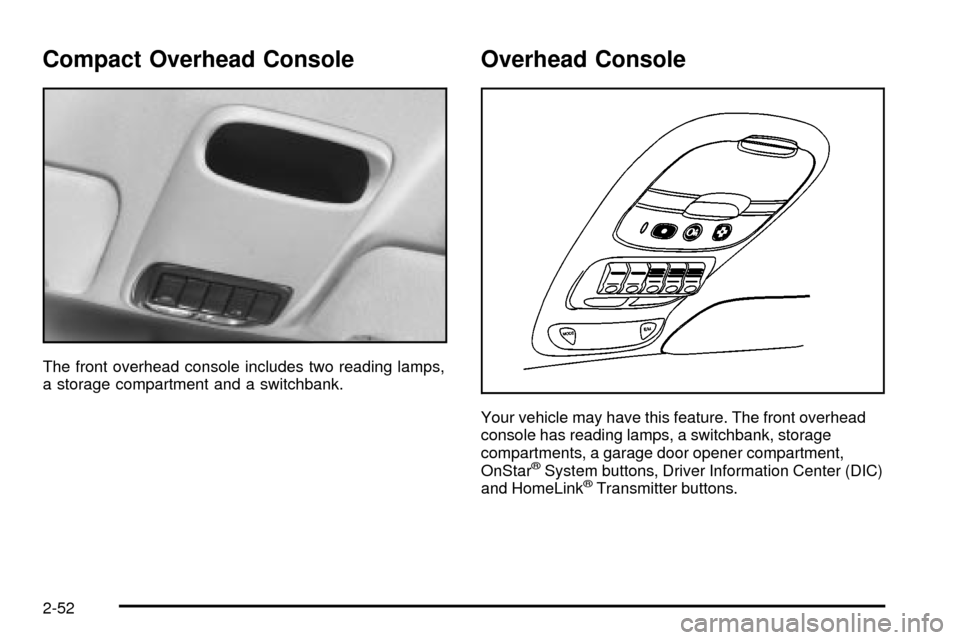
Compact Overhead Console
The front overhead console includes two reading lamps,
a storage compartment and a switchbank.
Overhead Console
Your vehicle may have this feature. The front overhead
console has reading lamps, a switchbank, storage
compartments, a garage door opener compartment,
OnStar
žSystem buttons, Driver Information Center (DIC)
and HomeLinkžTransmitter buttons.
2-52
Page 163 of 486

If your vehicle has the HomeLinkžtransmitter buttons,
they will take the place of the garage door opener
compartment. The garage door opener compartment is
explained next. For information on the other features
listed, see each of them in the Index.
Garage Door Opener Compartment
You can store your garage door opener in the rear
compartment of your overhead console, and operate it
from this position. To install your garage door opener,
follow these instructions:
1. Open the compartment by pressing the latch
forward.
2. Peel the protective backing from the hook and loop
fastener and press it ®rmly to the back of your
garage door opener.3. Line up the button of the garage door opener with
one of the four buttons on the compartment door.
Make sure the garage door opener button is
facing down and press the opener ®rmly into place.
4. Once the opener is installed, use the black
pegs inside the compartment door to make sure the
lined area on the compartment door will contact
the control button on your garage door opener when
pressed.
2-53
Page 198 of 486

Dome Lamp
The dome lamp is located in the headliner and has two
buttons to manually turn on and off the lamp. The
dome lamp will come on each time you open a door,
unless you turn on the interior lamps override feature.
See ªInterior Lamps Overrideº earlier in this section.
Entry Lighting
With entry lighting, the interior of your vehicle is
illuminated so that you can see inside before you enter
your vehicle. The lamps will come on for 40 seconds
if you unlock your door using your key or the remote
keyless entry transmitter and the ignition is in LOCK or
OFF. After 40 seconds have passed, the interior
lamps will slowly fade out. The lamps will turn off before
the 40 seconds if you:
·Lock all the doors using the key,
·press LOCK on the power door lock switch, or
·press LOCK on the remote keyless entry
transmitter.
When any door is opened, entry lighting is cancelled.
The interior lamps will stay on while any door or liftgate
is open, and slowly fade out when all doors and the
liftgate are closed.The interior lamps may stay on for up to 25 seconds
after all doors have been closed if they have not been
locked. See ªDelayed Lightingº following.
To turn the entry lighting feature off or on, see
Vehicle
Personalization on page 2-61.
Delayed Lighting
The delayed lighting feature will continue to illuminate
the interior for 25 seconds after all doors have been
closed so that you can ®nd your ignition and buckle your
safety belt at night. Delayed lighting will not occur
while the ignition is in RUN or ACCESSORY. After
25 seconds have passed, the interior lamps will slowly
fade out. The lamps will fade out before the 25 seconds
have passed if you:
·Turn the ignition to RUN or ACCESSORY,
·lock all doors using the remote keyless entry
transmitter, or
·lock all the doors using the power door lock switch
or the key.
To turn the delayed lighting feature off or on, see
Vehicle Personalization on page 2-61.
3-18
Page 212 of 486

Directing the Air¯ow
To direct the air¯ow to the rear-seating area, use the
right knob located on the main climate-control panel.
·Select vent or bi-level mode to direct air to the
rear of the vehicle through the overhead outlets.
·Select ¯oor, defog or defrost mode to direct air to
the rear of the vehicle through the ¯oor outlets.
Generally the upper outlets are used for air conditioning
and the ¯oor outlets are used for heating.
Selecting the Fan Speed
If the driver is adjusting the fan speed, use the following
control:
9(Fan):Turn the fan knob on the rear fan control
located below the main climate-control system on
the switchbank to numeral 1, 2, or 3 to increase or
decrease air¯ow to the rear-seating area. Turn the fan
knob on the rear fan control to 0 to turn off the fan.If a rear-seat passenger is adjusting the fan speed, use
the following control:
FAN:Press the FAN button on the rear control panel.
The display will show the current setting. Press the
left and right arrow buttons to cycle through the available
settings: OFF, LOW, MED and HIGH.
Setting the Temperature
If the driver is adjusting the temperature, do the
following:
To increase or decrease the temperature for the entire
vehicle, use the temperature controls located on the
main climate-control panel.
If using the main climate-control panel, then the
air-conditioning system must be on to direct cooled air
to the rear of the vehicle. If it is not on, then the
temperature in the rear of the vehicle will remain at
cabin temperature.
If a rear-seat passenger is adjusting the temperature, do
the following:
Press the TEMP button on the rear control panel. Use
the left arrow button to make the air cooler. Use the right
arrow button to make the air warmer.
3-32