reset CHEVROLET VENTURE 2004 1.G Owner's Manual
[x] Cancel search | Manufacturer: CHEVROLET, Model Year: 2004, Model line: VENTURE, Model: CHEVROLET VENTURE 2004 1.GPages: 516, PDF Size: 3.33 MB
Page 301 of 516
qr(Tune):When listening to the radio, press the
right or the left arrow to go to the next or the previous
station and stay there. This function is inactive if
the front seat passengers are listening to the radio.
When a CD is playing, press the right arrow to go to the
next track on the CD. Press the left arrow to go to the
start of the current track, if more than eight seconds
have played. This function is inactive if the front
seat passengers are listening to a CD.
P.SET SCAN (Preset Scan):Press and hold this
button to scan the preset radio stations set on the
pushbuttons on the main radio. The radio will go to a
preset station stored on the pushbuttons, play for a few
seconds, then go on to the next preset station. The
selected radio station will appear on the display above
the video screen. Press this button again to stop
scanning presets. This function is inactive if the front
seat passengers are listening to the radio.
When a CD is playing in the six-disc CD changer, press
this button to select the next CD, if multiple CDs are
loaded. This function is inactive if the front seat
passengers are listening to a CD.
CD TAPE:Press this button to switch between playing
a CD, a DVD, or an auxiliary device when the
headphones are on channel B. If one of the devices are
not loaded, the system will skip over the device when
this button is pressed.Theft-Deterrent Feature
(Non-RDS Radios)
THEFTLOCK®is designed to discourage theft of your
vehicle’s radio. The feature works automatically by
learning a portion of the Vehicle Identication Number
(VIN). If the radio is moved to a different vehicle, it
will not operate and LOCKED will appear on the display.
When the radio and vehicle are turned off, the blinking
red light indicates that THEFTLOCK
®is armed.
With THEFTLOCK
®activated, the radio will not operate
if stolen.
Theft-Deterrent Feature
(RDS Radios)
THEFTLOCK®is designed to discourage theft of your
vehicle’s radio. The feature works automatically by
learning a portion of the Vehicle Identication Number
(VIN). If the radio is moved to a different vehicle, it
will not operate and LOCKED will appear on the display.
When the ignition is off and RAP is not active, the
blinking red light indicates that THEFTLOCK
®is armed.
With THEFTLOCK
®activated, the radio will not
operate if stolen.
3-119
Page 302 of 516
Audio Steering Wheel Controls
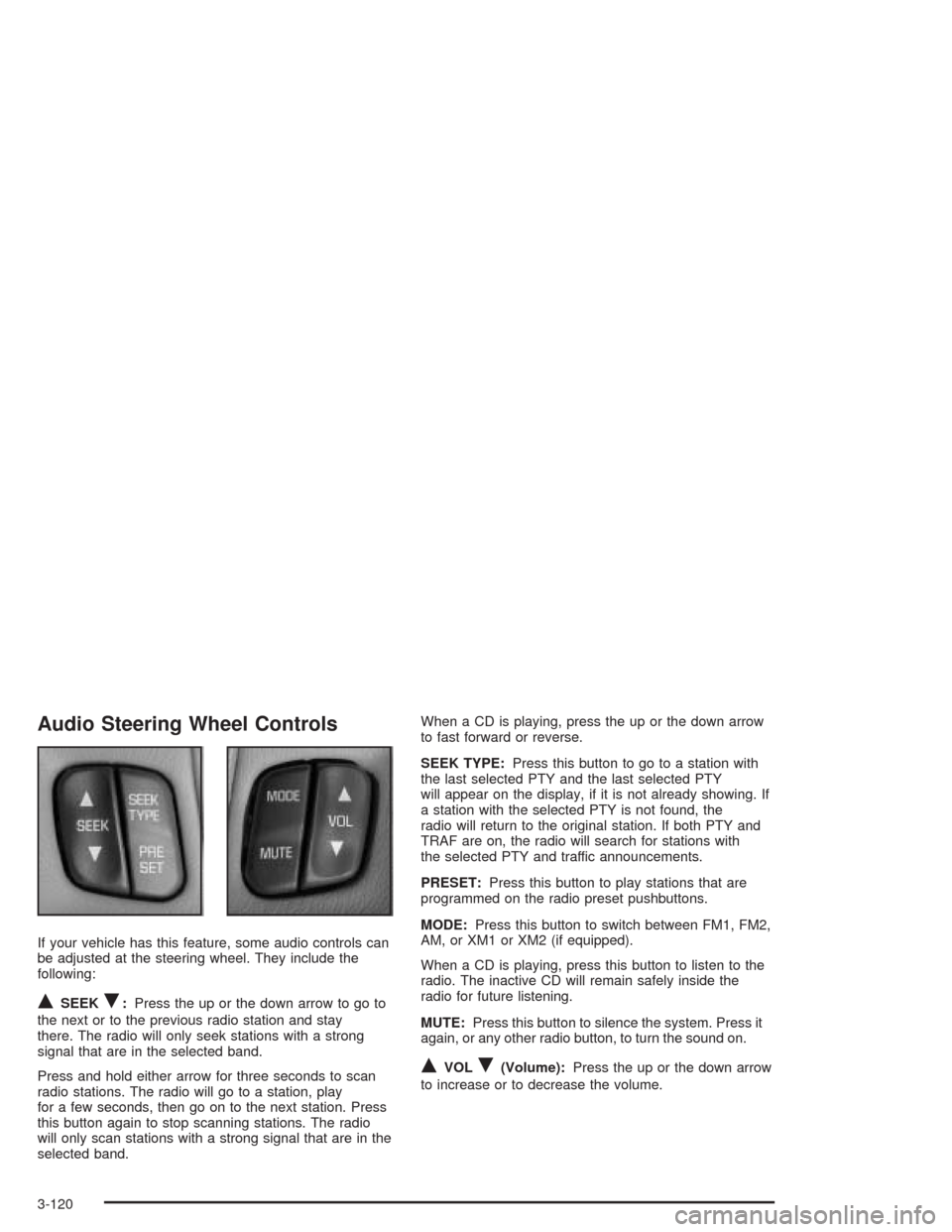
If your vehicle has this feature, some audio controls can
be adjusted at the steering wheel. They include the
following:
QSEEKR:Press the up or the down arrow to go to
the next or to the previous radio station and stay
there. The radio will only seek stations with a strong
signal that are in the selected band.
Press and hold either arrow for three seconds to scan
radio stations. The radio will go to a station, play
for a few seconds, then go on to the next station. Press
this button again to stop scanning stations. The radio
will only scan stations with a strong signal that are in the
selected band.When a CD is playing, press the up or the down arrow
to fast forward or reverse.
SEEK TYPE:Press this button to go to a station with
the last selected PTY and the last selected PTY
will appear on the display, if it is not already showing. If
a station with the selected PTY is not found, the
radio will return to the original station. If both PTY and
TRAF are on, the radio will search for stations with
the selected PTY and traffic announcements.
PRESET:Press this button to play stations that are
programmed on the radio preset pushbuttons.
MODE:Press this button to switch between FM1, FM2,
AM, or XM1 or XM2 (if equipped).
When a CD is playing, press this button to listen to the
radio. The inactive CD will remain safely inside the
radio for future listening.
MUTE:Press this button to silence the system. Press it
again, or any other radio button, to turn the sound on.
QVOLR(Volume):Press the up or the down arrow
to increase or to decrease the volume.
3-120
Page 369 of 516
When to Change Engine Oil
(GM Oil Life System)
Your vehicle has a computer system that lets you know
when to change the engine oil and lter. This is based on
engine revolutions and engine temperature, and not on
mileage. Based on driving conditions, the mileage at
which an oil change will be indicated can vary
considerably. For the oil life system to work properly, you
must reset the system every time the oil is changed.
When the system has calculated that oil life has been
diminished, it will indicate that an oil change is
necessary. A CHANGE ENGINE OIL message will
come on. Change your oil as soon as possible within
the next two times you stop for fuel. It is possible that, if
you are driving under the best conditions, the oil life
system may not indicate that an oil change is necessary
for over a year. However, your engine oil and lter
must be changed at least once a year and at this time
the system must be reset. Your dealer has GM-trained
people who will perform this work using genuine
GM parts and reset the system. It is also important to
check your oil regularly and keep it at the proper level.
If the system is ever reset accidentally, you must
change your oil at 3,000 miles (5 000 km) since your
last oil change. Remember to reset the oil life system
whenever the oil is changed.
How to Reset the Change Engine Oil
Message
The GM Oil Life System calculates when to change
your engine oil and lter based on vehicle use. Anytime
your oil is changed, reset the system so it can
calculate when the next oil change is required. If a
situation occurs where you change your oil prior to a
CHANGE ENGINE OIL message being turned on, reset
the system.
1. With the ignition key in RUN but the engine off,
repeatedly push the trip/reset button until OIL is
displayed on the Driver Information Center (DIC).
2. Once OIL is displayed, push and hold the trip/reset
button for ve seconds. The number will disappear
and be replaced by 100 (indicating 100% oil life
remaining).
3. Turn the key to OFF.
If the CHANGE ENGINE OIL message comes back on
when you start your vehicle, the engine oil life system
has not reset. Repeat the procedure.
5-17
Page 378 of 516
Overheated Engine Protection
Operating Mode
This emergency operating mode allows your vehicle to
be driven to a safe place in an emergency situation.
If an overheated engine condition exists, an overheat
protection mode which alternates ring groups of
cylinders helps prevent engine damage. In this mode,
you will notice a signicant loss in power and engine
performance. The temperature gage will indicate
an overheat condition exists. Driving extended
miles (km) and/or towing a trailer in the overheat
protection mode should be avoided.
Notice:After driving in the overheated engine
protection operating mode, to avoid engine damage,
allow the engine to cool before attempting any
repair. The engine oil will be severely degraded.
Repair the cause of coolant loss, change the oil and
reset the oil life system. SeeEngine Oil on
page 5-13.
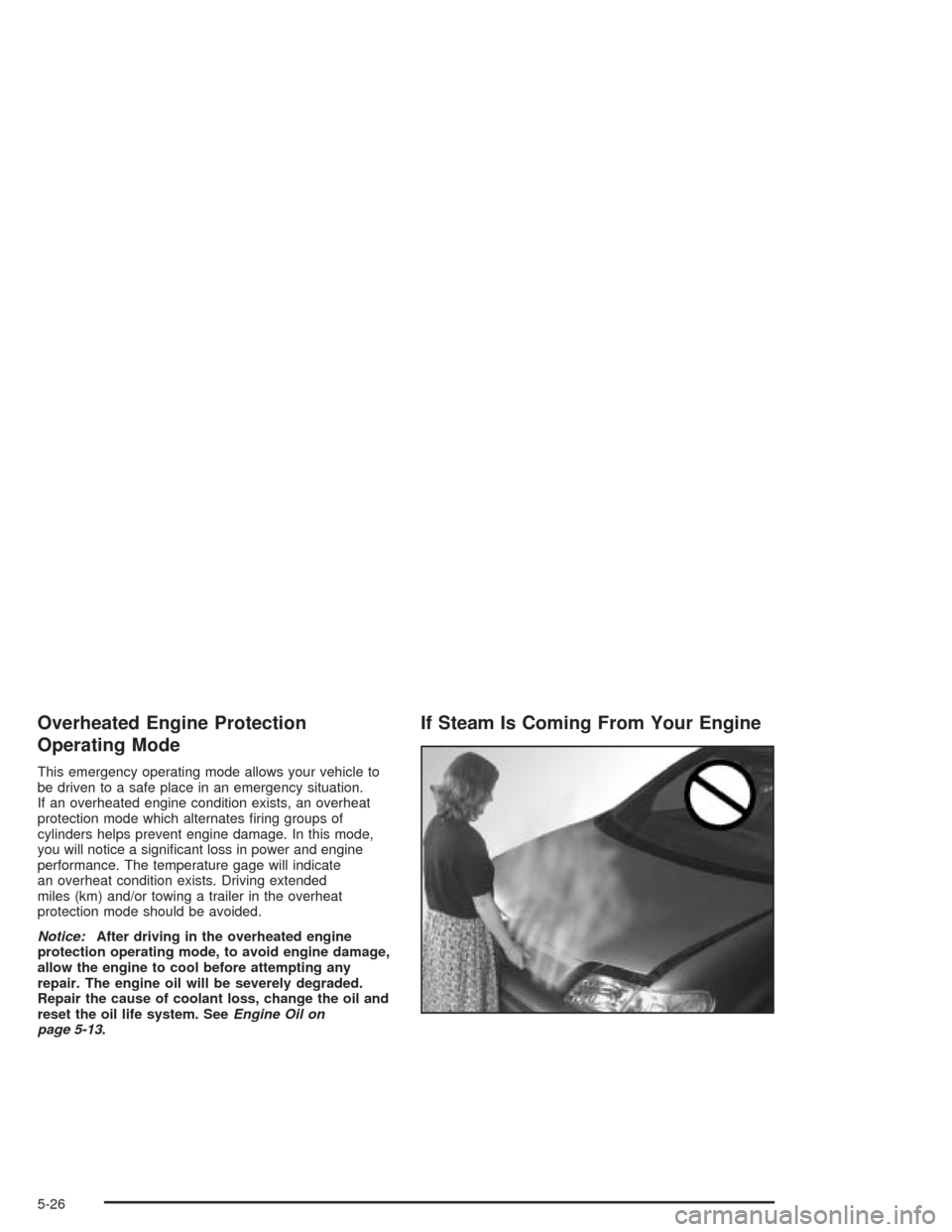
If Steam Is Coming From Your Engine
5-26
Page 426 of 516
Wheel Alignment and Tire Balance
The wheels on your vehicle were aligned and balanced
carefully at the factory to give you the longest tire life
and best overall performance.
Scheduled wheel alignment and wheel balancing are
not needed. However, if you notice unusual tire wear or
your vehicle pulling one way or the other, the alignment
may need to be reset. If you notice your vehicle
vibrating when driving on a smooth road, your wheels
may need to be rebalanced.
Wheel Replacement
Replace any wheel that is bent, cracked or badly rusted
or corroded. If wheel nuts keep coming loose, the
wheel, wheel bolts and wheel nuts should be replaced.
If the wheel leaks air, replace it (except some
aluminum wheels, which can sometimes be repaired).
See your dealer if any of these conditions exist.
Your dealer will know the kind of wheel you need.Each new wheel should have the same load-carrying
capacity, diameter, width, offset and be mounted
the same way as the one it replaces.
If you need to replace any of your wheels, wheel bolts or
wheel nuts, replace them only with new GM original
equipment parts. This way, you will be sure to have the
right wheel, wheel bolts and wheel nuts for your vehicle.
{CAUTION:
Using the wrong replacement wheels, wheel
bolts or wheel nuts on your vehicle can be
dangerous. It could affect the braking and
handling of your vehicle, make your tires lose
air and make you lose control. You could have
a collision in which you or others could be
injured. Always use the correct wheel, wheel
bolts and wheel nuts for replacement.
5-74
Page 470 of 516
Scheduled Maintenance
When the change engine oil message comes on, it
means that service is required for your vehicle. Have
your vehicle serviced as soon as possible within the next
600 miles (1 000 km). It is possible that, if you are
driving under the best conditions, the engine oil
life system may not indicate that vehicle service is
necessary for over a year. However, your engine oil
and lter must be changed at least once a year and at
this time the system must be reset. Your
GM Goodwrench dealer has GM-trained service
technicians who will perform this work using genuine
GM parts and reset the system.
If the engine oil life system is ever reset accidentally,
you must service your vehicle within 3,000 miles
(5 000 km) since your last service. Remember to reset
the oil life system whenever the oil is changed. See
Engine Oil on page 5-13for information on the Engine
Oil Life System and resetting the system.When the change engine oil message appears, certain
services, checks and inspections are required.
Required services are described in the following for
“MaintenanceI” and “MaintenanceII.” Generally,
it is recommended that your rst service be
MaintenanceI, your second service be MaintenanceII
and that you alternate MaintenanceIand MaintenanceII
thereafter. However, in some cases, MaintenanceII
may be required more often.
MaintenanceI— Use MaintenanceIif the change
engine oil message comes on within ten months since
vehicle was purchased or MaintenanceIIwas
performed.
MaintenanceII— Use MaintenanceIIif the previous
service performed was MaintenanceI. Always use
MaintenanceIIwhenever the message comes on ten
months or more since the last service or if the message
has not come on at all for one year.
6-4
Page 471 of 516
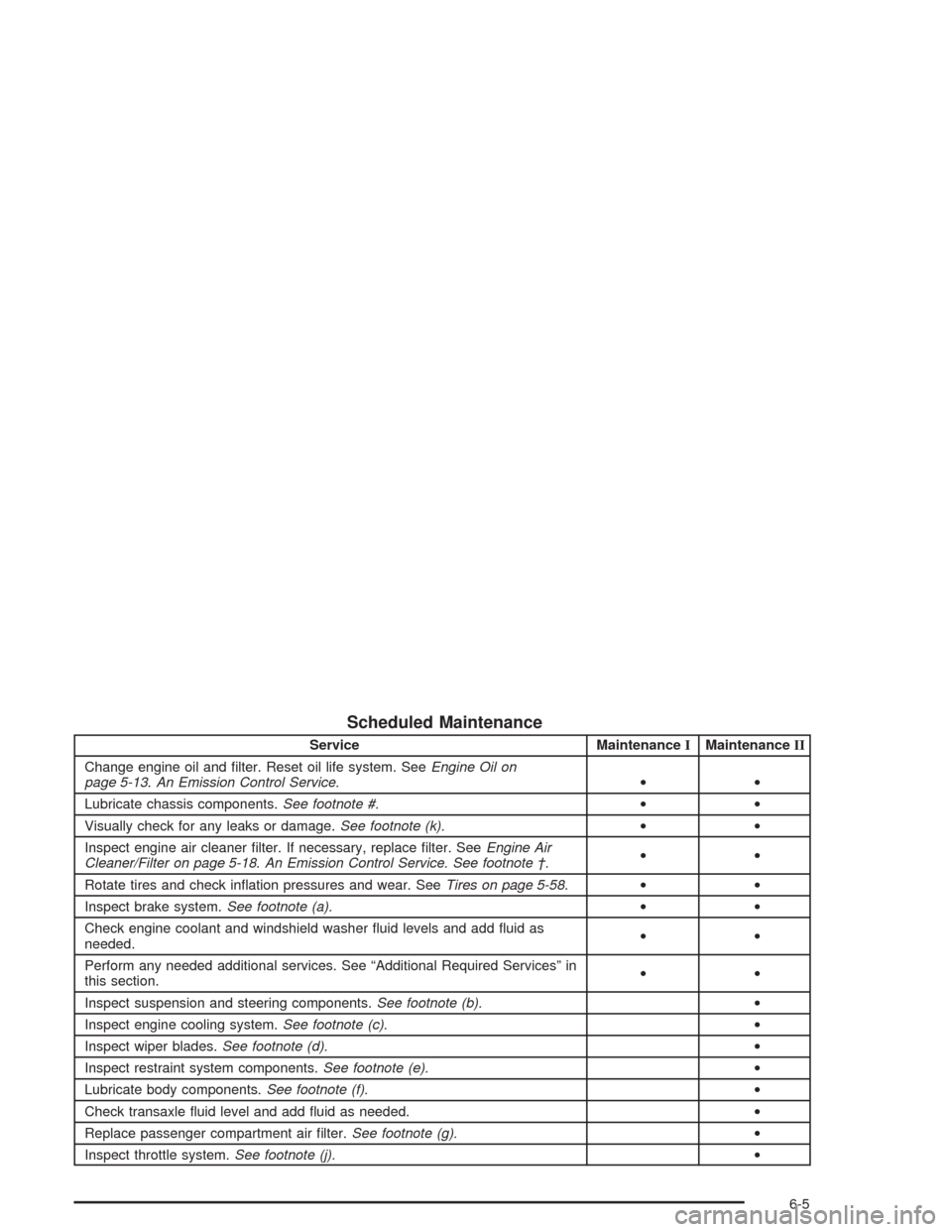
Scheduled Maintenance
Service MaintenanceIMaintenanceII
Change engine oil and lter. Reset oil life system. SeeEngine Oil on
page 5-13.An Emission Control Service.••
Lubricate chassis components.See footnote #.••
Visually check for any leaks or damage.See footnote (k).••
Inspect engine air cleaner lter. If necessary, replace lter. SeeEngine Air
Cleaner/Filter on page 5-18.An Emission Control Service. See footnote †.••
Rotate tires and check ination pressures and wear. SeeTires on page 5-58.••
Inspect brake system.See footnote (a).••
Check engine coolant and windshield washer uid levels and add uid as
needed.••
Perform any needed additional services. See “Additional Required Services” in
this section.••
Inspect suspension and steering components.See footnote (b).•
Inspect engine cooling system.See footnote (c).•
Inspect wiper blades.See footnote (d).•
Inspect restraint system components.See footnote (e).•
Lubricate body components.See footnote (f).•
Check transaxle uid level and add uid as needed.•
Replace passenger compartment air lter.See footnote (g).•
Inspect throttle system.See footnote (j).•
6-5
Page 511 of 516
RDS Messages..............................3-70, 3-82, 3-98
Rear Climate Control System...................3-29, 3-32
Rear Hatch Ajar Warning Message....................3-56
Rear Reading Lamps......................................3-20
Rear Safety Belt Comfort Guides......................1-50
Rear Seat Audio (RSA)........................3-116, 3-118
Rear Seat Operation......................................... 1-6
Rear Seat Outside Passenger Positions.............1-46
Rear Seat Passengers, Safety Belts..................1-46
Rear Seat Radio Controls...............................3-116
Rear Storage Area..........................................2-58
Rear Window Defogger....................................3-28
Rearview Mirrors.............................................2-45
Reclining Seatbacks.......................................... 1-4
Recommended Fluids and Lubricants.................6-12
Recreational Vehicle Towing.............................4-34
Remote Alarm.................................................. 2-6
Remote Control.............................................3-113
Remote Driver Unlock Control...........................2-66
Remote Keyless Entry System............................ 2-4
Remote Keyless Entry System, Operation............ 2-5
Remote Lock and Unlock Conrmation...............2-67
Remote Power Sliding Door Operation................. 2-7
Removing the Bucket Seats.............................1-16Removing the Captain’s Chairs.........................1-21
Removing the Child from the Built-In Child
Restraint....................................................1-89
Removing the Convenience Center....................2-60
Removing the Flat Tire and Installing
the Spare Tire.............................................5-85
Removing the Spare Tire and Tools...................5-80
Removing the Split Bench Seat........................1-10
Removing the Stowable Seat............................1-25
Removing the Wheel Covers............................5-85
Replacement Bulbs.........................................5-56
Replacing Brake System Parts..........................5-42
Replacing the Bucket Seats..............................1-18
Replacing the Captain’s Chairs.........................1-22
Replacing the Convenience Center....................2-60
Replacing the Split Bench Seats.......................1-12
Replacing the Stowable Seat............................1-26
Reporting Safety Defects
Canadian Government..................................7-12
General Motors...........................................7-12
United States Government............................7-12
Reprogramming a Single HomeLink
®Button.......2-52
Resetting Defaults...........................................2-52
Resetting the Power Sliding Door......................2-21
13
Page 512 of 516
Restraint System Check
Checking Your Restraint Systems.................1-102
Replacing Restraint System Parts After
a Crash................................................1-103
Restraint Systems
Checking..................................................1-102
Replacing Parts.........................................1-103
Retained Accessory Power (RAP)......................2-32
Retro-Active Reset..........................................3-40
Right Front Passenger Position, Safety Belts......1-42
Roadside
Assistance Program....................................... 7-6
Rocking Your Vehicle To Get It Out...................4-33
Routing, Engine Drive Belt...............................6-15
Running Your Engine While You Are Parked.......2-44
S
Safety Belt
Pretensioners..............................................1-52
Reminder Light............................................3-41
Stowage, Second Row Seat........................... 1-6
Safety Belts
Care of Safety Belts and Built-in Child
Restraint Harness...................................5-100
Center Passenger Position....................1-43, 1-44
Driver Position............................................1-32Safety Belts (cont.)
How to Wear Safety Belts Properly................1-32
Questions and Answers About Safety Belts.....1-31
Rear Safety Belt Comfort Guides for Children
and Small Adults......................................1-50
Rear Seat Passengers.................................1-46
Right Front Passenger Position......................1-42
Safety Belt Extender....................................1-52
Safety Belt Use During Pregnancy.................1-42
Safety Belts Are for Everyone.......................1-27
Safety Chains.................................................4-44
Safety Warnings and Symbols.............................. iii
Scheduled Maintenance..................................... 6-4
Seats
Bucket Seats, Rear......................................1-14
Captain Chairs............................................1-20
Flip and Fold Feature.................................... 1-7
Head Restraints............................................ 1-6
Manual........................................................ 1-3
Rear Seat Operation...................................... 1-6
Reclining Seatbacks...................................... 1-4
Six-Way Power Seats.................................... 1-4
Split Bench Seats......................................... 1-8
Stowable Seat............................................1-24
Second Row Safety Belt Stowage....................... 1-6
Securing a Child in the Built-In Child Restraint....1-83
14
Page 513 of 516
Securing a Child Restraint
Center Seat Position............................1-73, 1-75
Designed for the LATCH System...................1-69
Rear Outside Seat Position...........................1-69
Right Front Seat Position..............................1-78
Security Message, PASS-Key
®III ......................3-56
Security While You Travel.................................. 7-6
Service........................................................... 5-3
Adding Equipment to the Outside of Your
Vehicle..................................................... 5-4
Doing Your Own Work................................... 5-3
Engine Soon Light.......................................3-45
Publications Ordering Information...................7-13
Traction System Warning Message.................3-50
Service Bulletins.............................................7-13
Service Engine Soon Light in the United States
or Check Engine Light in Canada..................3-45
Service Manuals.............................................7-13
Setting Preset PTYs (RDS Only).......................3-98
Setting Preset Stations............3-63, 3-67, 3-79, 3-95
Setting the Time
Radios with Radio Data Systems (RDS).........3-61
Radios without Radio Data Systems (RDS).....3-61
Setting the Tone (Bass/Treble) . . . 3-63, 3-68, 3-80, 3-96
Sheet Metal Damage.....................................5-102
Shifting Into Park (P).......................................2-40
Shifting Out of Park (P)...................................2-42
Shoulder Belt Height Adjuster...........................1-35Side Window Latches......................................2-25
Skidding........................................................4-16
Sliding Door Delayed Locking...........................2-12
Sliding Door Lock...........................................2-14
Sliding Door, Power........................................2-16
Sliding Door Security Lock...............................2-15
Sliding Doors, Dual.........................................2-13
Some Other Rainy Weather Tips.......................4-22
Special Fabric Cleaning Problems.....................5-98
Specications, Capacities...............................5-113
Speedometer..................................................3-39
Split Bench Seats............................................. 1-8
Starting Your Engine.......................................2-33
Steering........................................................4-12
Steering in Emergencies..................................4-13
Steering Tips..................................................4-12
Steering Wheel Controls, Audio.......................3-120
Steering Wheel, Tilt Wheel................................. 3-7
Stereo RCA Jacks.........................................3-110
Storage Areas................................................2-52
Compact Overhead Console..........................2-53
Convenience Center.....................................2-59
Convenience Net.........................................2-58
Cupholder(s)...............................................2-53
Front Seat Storage Net................................2-56
Glove Box..................................................2-52
Luggage Carrier..........................................2-56
Overhead Console.......................................2-54
Rear Storage Area.......................................2-58
15