audio CHEVROLET VOLT 2011 User Guide
[x] Cancel search | Manufacturer: CHEVROLET, Model Year: 2011, Model line: VOLT, Model: CHEVROLET VOLT 2011Pages: 516, PDF Size: 6.61 MB
Page 200 of 516

Black plate (10,1)Chevrolet Volt Owner Manual - 2011
7-10 Infotainment System
Radio
AM-FM Radio
Playing the Radio
Audio Source Menu
VOL/
O(Volume/Power):
1. Press to turn the radio on or off.
2. Turn to increase or decrease the volume. The volume is
adjusted for the current audio
source, active navigation voice
guidance, voice prompts,
or audio cues.
The steering wheel controls can
also be used to adjust the volume.
See Steering Wheel Controls on
page 5‑6 for more information.
TUNE/MENU: Turn to change
the radio station. See “Finding a
Station” in this section for more
information. RADIO BAND:
Press to select the
AM, FM, and XM (if equipped) band.
The audio sources can also be
changed by using the steering
wheel controls. See Steering
Wheel Controls on page 5‑6
for more information.
HDD/DVD/AUX: Change to the
Hard Drive, CD, DVD, USB, or AUX
by pressing the HDD/DVD/AUX
button until the desired source is
selected.
If the audio source is on while
viewing a map screen, a source
indicator button displays at the
top of the map screen.
Press the source indicator button
to display the current audio source
screen. The display shows a split
screen with the audio source screen
on the left side and the map or
guidance screen on the right side.
Press the Full Map button to exit the
split screen.
Page 201 of 516

Black plate (11,1)Chevrolet Volt Owner Manual - 2011
Infotainment System 7-11
Navigation Audio System
Sound Menu
To access the Sound menu, press
the TONE button.
Use the Sound menu to adjust the
following features:
.Setting the Tone
.Adjusting the Speakers
Setting the Tone
To adjust the tone using the
Sound menu:
.Treble: Press + or −to change
the level.
.Mid (Midrange): Press + or −to
change the level.
.Bass: Press + or −to change
the level. Adjusting the Speakers
To adjust the speaker balance using
the Sound menu:
.Press and hold the left arrow
for more sound from the left
speakers or the right arrow
for more sound from the right
speakers. The middle position
balances the sound between
the left and right speakers.
To adjust the speaker fade:
.Press and hold the front arrow
for more sound from the front
speakers and the rear arrow
for more sound from the rear
speakers. The middle position
balances the sound between
the front and rear speakers. EQ SettingsEQ (Equalization):
The EQ
settings are selected through
the Sound menu. If the vehicle is
equipped with the Bose
®Energy
Efficient Series sound system,
EQ provides a choice of Manual
or Talk settings.
Page 202 of 516
Black plate (12,1)Chevrolet Volt Owner Manual - 2011
7-12 Infotainment System
Radio Menu
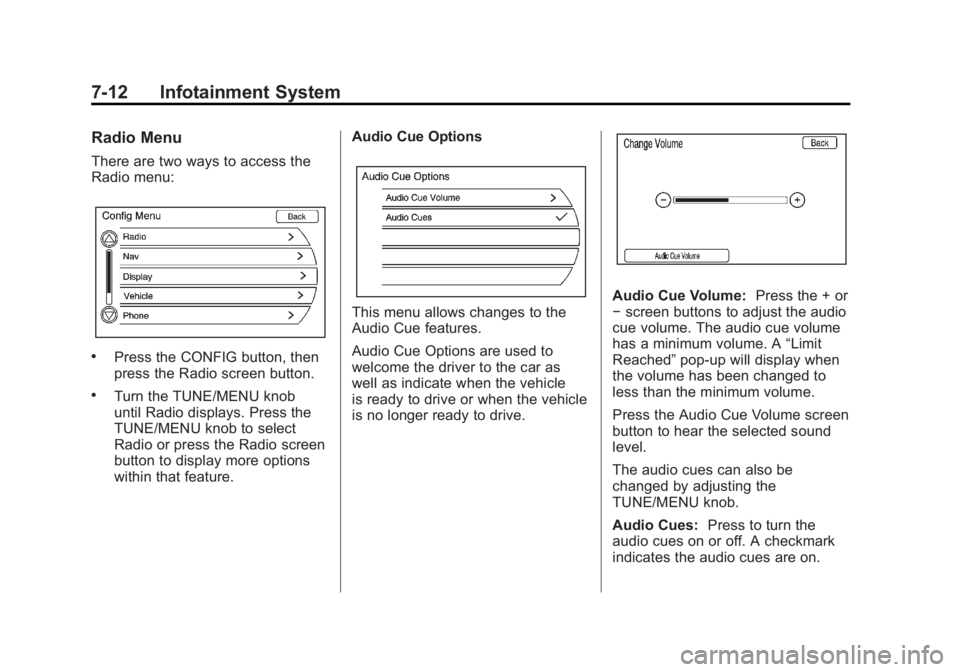
There are two ways to access the
Radio menu:
.Press the CONFIG button, then
press the Radio screen button.
.Turn the TUNE/MENU knob
until Radio displays. Press the
TUNE/MENU knob to select
Radio or press the Radio screen
button to display more options
within that feature.Audio Cue Options
This menu allows changes to the
Audio Cue features.
Audio Cue Options are used to
welcome the driver to the car as
well as indicate when the vehicle
is ready to drive or when the vehicle
is no longer ready to drive.
Audio Cue Volume:
Press the + or
− screen buttons to adjust the audio
cue volume. The audio cue volume
has a minimum volume. A “Limit
Reached” pop-up will display when
the volume has been changed to
less than the minimum volume.
Press the Audio Cue Volume screen
button to hear the selected sound
level.
The audio cues can also be
changed by adjusting the
TUNE/MENU knob.
Audio Cues: Press to turn the
audio cues on or off. A checkmark
indicates the audio cues are on.
Page 203 of 516
Black plate (13,1)Chevrolet Volt Owner Manual - 2011
Infotainment System 7-13
Auto Volume
Select OFF, Low, Medium, or High
sensitivity to automatically adjust
the volume to minimize the effects
of unwanted background noise
that can result from changing road
surfaces, driving speeds, or open
windows. This feature works best
at lower volume settings where
background noise is typically louder
than the sound system volume.
Number of Favorite Pages
Change the number of mixed-band
preset pages when using the FAV
button. Press 1-6 to select the
number of preset lists.
HDD FAV Pages (Number
of Favorite Categories for
HDD Mode)
Select the categories such as
Playlist, Artist, Album, and Genre
to be used as a favorite category
during HDD mode.Show/Hide XM Categories
Configure favorite categories to be
used during XM mode.
DivX Registration Code
Display the DivX registration code
used for DivX media playback.
Finding a Station
To select the band, see
“Audio
Source Menu” earlier in this section.
Turn the TUNE/MENU knob to find
a radio station. To select a preset
station, press the corresponding
preset button.
See “Mixed-Band Presets” later for
more information.
Seeking a Station
Press
rSEEK/SEEK[to search
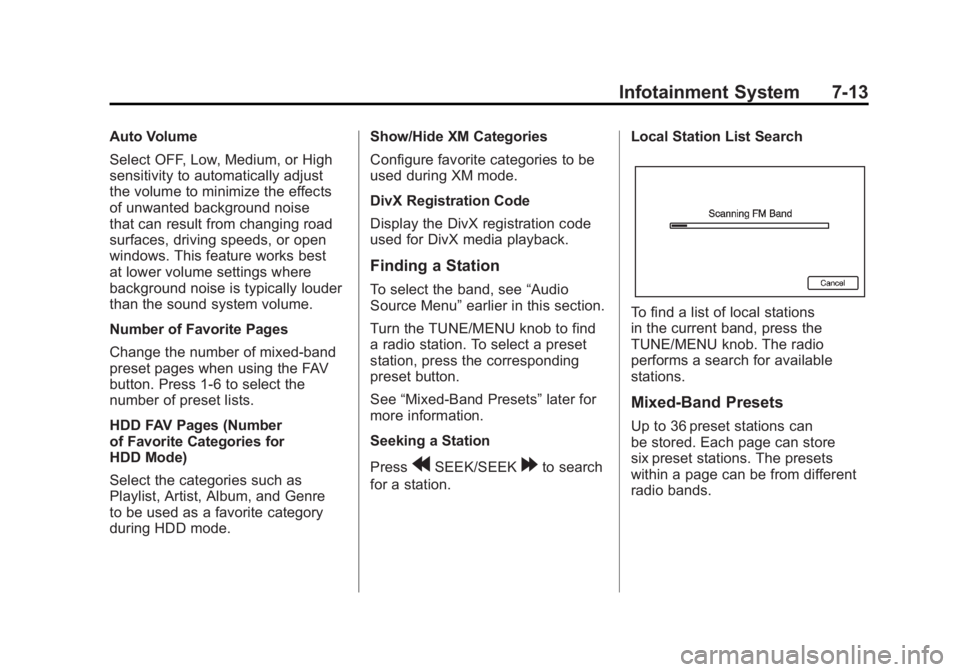
for a station. Local Station List Search
To find a list of local stations
in the current band, press the
TUNE/MENU knob. The radio
performs a search for available
stations.
Mixed-Band Presets
Up to 36 preset stations can
be stored. Each page can store
six preset stations. The presets
within a page can be from different
radio bands.
Page 204 of 516
Black plate (14,1)Chevrolet Volt Owner Manual - 2011
7-14 Infotainment System
To scroll through the pages, press
the FAV button. The current page
number displays above the preset
buttons. The stored stations for
each list display on the preset
buttons at the bottom of the screen.
The number of preset FAV lists can
be changed.
To store a radio station to a
mixed-band preset list:
1. Press the RADIO BAND button,then press AM, FM, or XM,
if equipped, to select the
desired band.
2. Tune to the station.
3. Press the FAV button to scroll to the list. 4. Press and hold one of the
preset buttons for more than
two seconds. The station
frequency appears on the
preset button at the bottom
of the display.
5. Repeat the steps for each preset in each page.
To recall a preset station from a
FAV page:
1. Press the FAV button to scroll to the page.
2. Press the preset button. The stored preset station
is recalled.Timeshift
The timeshift feature automatically
begins recording the audio when
listening to the radio.
The recording allows playback of
content that was missed.
Timeshift stores up to 20 minutes
of content. After 20 minutes, it
removes the oldest content and
continues recording new content.
While listening to the radio, press
k(Play/Pause) to stop hearing the
information through the speaker.
During this paused time, timeshift
keeps recording. A status bar
displays the length of the recording.
Page 205 of 516
Black plate (15,1)Chevrolet Volt Owner Manual - 2011
Infotainment System 7-15
To resume listening to the broadcast
at the point left off, press
kagain.
Timeshift stops recording and
erases the buffer when the vehicle
is turned off or the station or source
is changed.
Before turning the vehicle off, press
kso that timeshift keeps recording
for 20 minutes. If the vehicle is still
off after 20 minutes, the system
stops recording and all information
is lost. If a low 12-volt battery
condition occurs, timeshift stops
recording and all information is
erased.
Radio Data System (RDS)
The audio system has a Radio
Data System (RDS). RDS features
are available for use only on
FM stations that broadcast
RDS information. With RDS,
the radio can:
.Seek to stations broadcasting
the selected type of
programming.
.Receive announcements
concerning local and national
emergencies.
.Display messages from radio
stations. This system relies on receiving
specific information from these
stations and only works when
the information is available.
In rare cases, a radio station could
broadcast incorrect information
that causes the radio features to
work improperly. If this happens,
contact the radio station.
The RDS system is always on.
When information is broadcast from
the current FM station, the station
name or call letters display on the
audio screen. RDS can provide a
program type (PTY) for current
programming and the name of
the program being broadcasted.
Page 206 of 516

Black plate (16,1)Chevrolet Volt Owner Manual - 2011
7-16 Infotainment System
Satellite Radio
XM™Satellite Radio Service
Vehicles with an XM satellite radio
tuner and an XM satellite radio
subscription can receive XM
programming.
XM is a satellite radio service based
in the 48 contiguous United States
and 10 Canadian provinces. XM
satellite radio has a wide variety of
programming and commercial-free
music, coast to coast, and in
digital-quality sound. A service
fee is required to receive the XM
service. For more information,
see www.xmradio.com or call
1-800-929-2100 in the U.S.
In Canada, see www.xmradio.ca
or call 1-877-438-9677.
When XM is active, the channel
name and number, category name,
song title, and artist display on the
screen.
XM Categories
XM stations are organized in
categories.
Removing or Adding Categories
1. Press the CONFIG button.
Turn the TUNE/MENU knob
until Radio displays. Press the
TUNE/MENU knob or press
Radio to display the radio
settings menu.
2. Select the Show/Hide XM Categories screen button.
3. Press the category buttons on the screen to show or hide the
category.
XM Messages
XL (Explicit Language
Channels): These channels, or any
others, can be blocked by request,
by calling 1-800-929-2100 in the
U.S., and 1-877-438-9677 in
Canada. XM Updating:
The encryption code
in the receiver is being updated.
No action is required. This process
should take no longer than
30 seconds.
Loading XM: The audio system
is acquiring and processing audio
and text data. No action is needed.
This message should disappear
shortly.
Channel Off Air: This channel is
not currently in service. Tune in to
another channel.
Channel Unauth: This channel is
blocked or cannot be received with
your XM subscription package.
Channel Unavailable: This
previously assigned channel is
no longer assigned. Tune to
another station.
No Artist Info: The system
is working properly. No artist
information is available at this
time on this channel.
Page 208 of 516

Black plate (18,1)Chevrolet Volt Owner Manual - 2011
7-18 Infotainment System
AM
The range for most AM stations is
greater than for FM, especially at
night. The longer range can cause
station frequencies to interfere with
each other. Static can occur when
things like storms and power lines
interfere with radio reception. When
this happens, try reducing the treble
on the radio.
XM™Satellite Radio Service
XM Satellite Radio Service gives
digital radio reception from coast
to coast in the 48 contiguous
United States, and in Canada.
Just as with FM, tall buildings or
hills can interfere with satellite radio
signals, causing the sound to fade
in and out. In addition, traveling
or standing under heavy foliage,
bridges, garages, or tunnels may
cause loss of the XM signal for a
period of time.
Cellular Phone Usage
Cellular phone usage can cause
interference with the vehicle's radio.
Multi-Band Antenna
The multi-band antenna is on the
roof of the vehicle. The antenna
is used for the AM‐FM radio,
OnStar, the XM Satellite Radio
Service System, and GPS (Global
Positioning System), if the vehicle
has these features. Keep the
antenna clear of obstructions
for clear reception.
Audio Players
CD/DVD Player
The player can be used for CD,
MP3, and DVD audio, and as a
DVD video player.
With the vehicle on, insert a
CD/DVD into the slot, label side
up. The player pulls it in and
begins playing. While playing,
the navigation system is available.
The vehicle must be in P (Park) for
video to display.
The DVD player is only compatible
with DVDs of the appropriate region
code printed on the jacket of
most DVDs.
Page 209 of 516
Black plate (19,1)Chevrolet Volt Owner Manual - 2011
Infotainment System 7-19
The system is capable of playing:
.Most audio CDs
.CD-R
.CD-RW
.MP3 or unprotected WMA
formats
.DVD-Video
.DVD-Audio
.DVD-R/RW
.DVD+R/RW
When playing any compatible
recordable disc, the sound quality
can be reduced due to disc quality,
the method of recording, the quality
of the music or video that has been
recorded, or the way the disc has
been handled. There can be increased skipping,
difficulty in recording tracks,
difficulty in finding tracks/chapters,
and/or difficulty in loading and
ejecting. If these problems occur,
check the disc for damage or try
a known good disc.
To avoid damage to the CD/DVD
player:
.Do not use scratched or
damaged discs.
.Do not apply labels to discs.
The labels could get caught
in the player.
.Insert only one disc at a time.
.Keep the loading slot free of
foreign materials, liquids,
and debris.
.Use a marking pen to label the
top of the disc.
Loading and Ejecting Discs
To load a disc:
1. Turn the vehicle on.
2. Insert a disc into the slot, label
side up. The player pulls it in
the rest of the way. If the disc is
damaged or improperly loaded,
there is an error and the disc
ejects.
The disc automatically plays once
loaded.
Press
Xto eject a disc from the
CD/DVD player.
Playing a CD/DVD
A disc must be loaded to select the
source.
When a disc is loaded, the disc icon
displays.
Page 210 of 516
Black plate (20,1)Chevrolet Volt Owner Manual - 2011
7-20 Infotainment System
There are two ways to play a
CD/DVD:
.Insert the disc and play starts
automatically.
.Press the HDD/DVD/AUX
button, then press the disc
screen button.
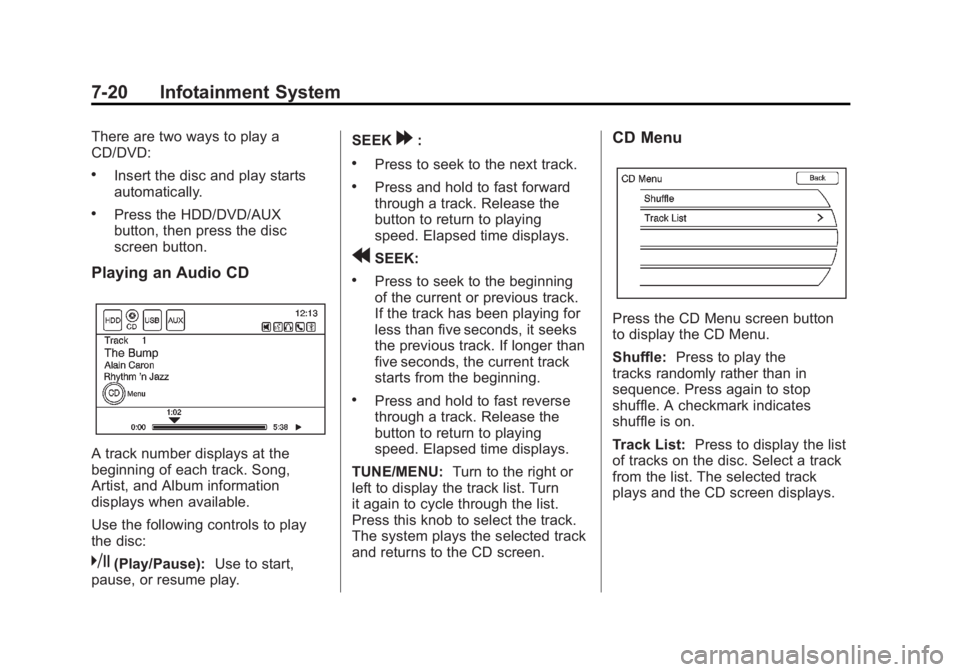
Playing an Audio CD
A track number displays at the
beginning of each track. Song,
Artist, and Album information
displays when available.
Use the following controls to play
the disc:
k(Play/Pause):Use to start,
pause, or resume play. SEEK
[:
.Press to seek to the next track.
.Press and hold to fast forward
through a track. Release the
button to return to playing
speed. Elapsed time displays.
rSEEK:
.Press to seek to the beginning
of the current or previous track.
If the track has been playing for
less than five seconds, it seeks
the previous track. If longer than
five seconds, the current track
starts from the beginning.
.Press and hold to fast reverse
through a track. Release the
button to return to playing
speed. Elapsed time displays.
TUNE/MENU: Turn to the right or
left to display the track list. Turn
it again to cycle through the list.
Press this knob to select the track.
The system plays the selected track
and returns to the CD screen.
CD Menu
Press the CD Menu screen button
to display the CD Menu.
Shuffle: Press to play the
tracks randomly rather than in
sequence. Press again to stop
shuffle. A checkmark indicates
shuffle is on.
Track List: Press to display the list
of tracks on the disc. Select a track
from the list. The selected track
plays and the CD screen displays.