manual radio set CHEVROLET VOLT 2011 User Guide
[x] Cancel search | Manufacturer: CHEVROLET, Model Year: 2011, Model line: VOLT, Model: CHEVROLET VOLT 2011Pages: 516, PDF Size: 6.61 MB
Page 267 of 516
Black plate (77,1)Chevrolet Volt Owner Manual - 2011
Infotainment System 7-77
Database Coverage
Explanations
Coverage areas vary with respect to
the level of map detail available for
any given area. Some areas feature
greater levels of detail than others.
If this happens, it does not mean
there is a problem with the system.
As the map data is updated, more
detail can become available for
areas which previously had limited
detail. SeeOrdering Map DVDs on
page 7‑76 for more information.
Voice Recognition
The navigation system's voice
recognition allows for hands-free
operation of the navigation system
and the audio system features.
Voice recognition only works if the
map database is installed in the
system.
If the radio is off, the only
commands would be Hands
Free and Help.
Navigation voice commands are not
available until the I Agree button
has been selected.
Voice recognition can be used when
the vehicle is on or when Retained
Accessory Power (RAP) is active.
SeeRetained Accessory Power
(RAP) on page 9‑22 for more
information.
Using Voice Recognition
1. Press and release theb g
steering wheel button. The audio
system mutes, and a beep is
heard. A voice prompt stating,
“Please start speaking after the
beep” might be heard.
If there is no beep, make sure
that the voice volume setting is
not turned down. See Configure
Menu on page 7‑66 for more
information.
While voice recognition is active,
the system displays a
gsymbol.
2. Clearly speak one of the commands listed later in this
section.
Page 269 of 516
Black plate (79,1)Chevrolet Volt Owner Manual - 2011
Infotainment System 7-79
.This system is able to recognize
commands in different
languages, such as English,
French Canadian, and Spanish.
The system only recognizes
commands based on the
language selected.
.To increase or decrease the
voice volume during a voice
recognition session, turn
the volume knob of the radio,
or press the volume steering
wheel buttons. If the volume
is adjusted during a voice
recognition session, a Voice
Volume bar appears on the
screen showing the voice
volume level as it is being
adjusted. This also changes
the volume of the guidance
prompts.
Voice Recognition Help
To enter the help playback session,
clearly speak one of the help
commands.
Help:The system plays back
more specific help commands
(such as Radio Help, Display Help,
Navigation Help) for the user to
choose from.
Radio (help): The system plays
back helpful advice about radio
commands, and some common
radio commands which are
available. Use this command
to learn about how to select a
band (AM, FM, or XM), and how
to change radio stations (by
speaking frequency numbers).
(CD/DVD/Disc) (help): The system
plays back helpful advice about
disc commands, and some common
disc commands which are available.
Use this command to learn about
how to select Disc mode playback,
and how to change track numbers. Display (help):
The system plays
back helpful advice about display
commands, and some common
display commands which are
available to adjust the display
setting.
Navigation (help): The system
plays back helpful advice about
navigation commands, and some
common navigation commands
which are available.
Voice Recognition Commands
The following list shows the
voice commands available for
the navigation system with a brief
description of each. The commands
are listed with the optional words
in brackets. To use the voice
commands, see the instructions
listed previously.
Page 270 of 516
Black plate (80,1)Chevrolet Volt Owner Manual - 2011
7-80 Infotainment System
Display Commands
Display (set) day (mode),
display (select) day (mode):
This command instructs the system
to switch the display to day mode.
Display (set) night (mode),
display (select) night (mode):
This command instructs the system
to switch the display to night mode.
Display (set) auto (mode),
display (select) auto (mode):
This command instructs the system
to switch the display to auto mode.
Display (help):This command
instructs the system to play back
helpful advice about display
commands, and some common
display commands which are
available to adjust the display
setting.Radio Commands
Radio AM, radio (band) AM,
radio FM, radio (band) FM,
radio XM, radio (band) XM:
These commands instruct the
system to go to either the AM,
FM, or XM radio bands.
Radio select (frequency) AM,
radio select (frequency) FM:
These commands instruct the
system to go to a specific frequency
on either the AM or FM band.
For example, radio select ninety
seven point one FM or radio select
ten forty AM.
Radio select (channel) XM:
This command instructs the
system to go to a specific channel
on the XM band (if equipped).
For example, radio select one
fifty one XM.
Radio (help): This command
instructs the system to play back
some helpful advice about radio
commands, and some common
radio commands which are available
to the user.
CD/DVD/Disc Commands
The following commands are only
available when a CD, MP3, or DVD
is loaded:
Radio CD, radio DVD, radio disc:
These commands instruct the
system to go to Disc mode.
Radio CD select (track number),
radio DVD select (track number),
radio disc select (track number):
These commands instruct the
system to play a specific track on
the disc. For example, radio disc
select ten. This command supports
up to 254 tracks.
CD (help), DVD (help), disc
(help): This command instructs
the system to play back helpful
advice about disc commands, and
some common disc commands
which are available.
Page 273 of 516
Black plate (83,1)Chevrolet Volt Owner Manual - 2011
Infotainment System 7-83
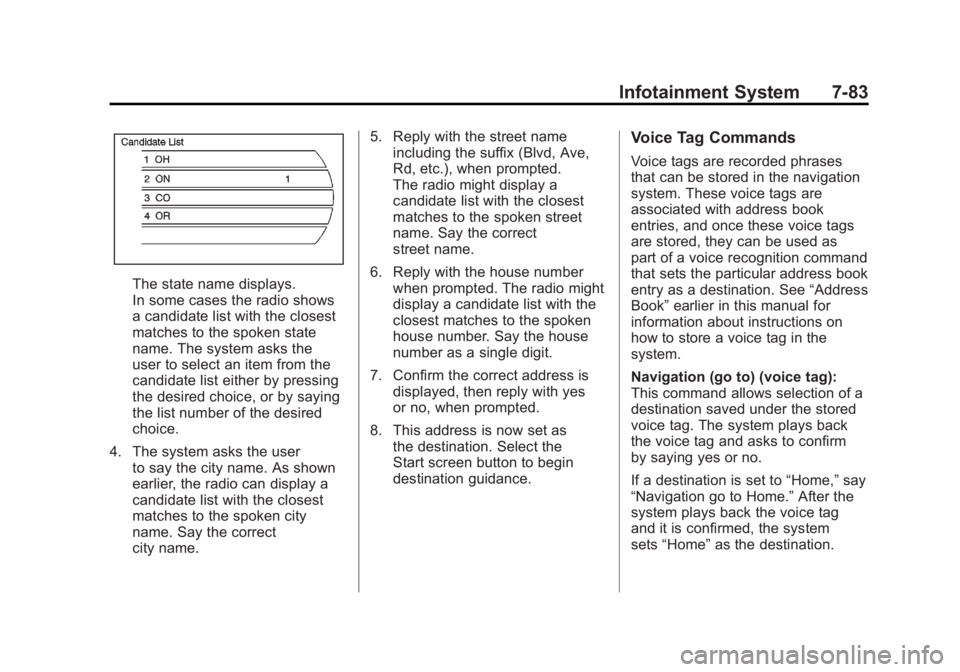
The state name displays.
In some cases the radio shows
a candidate list with the closest
matches to the spoken state
name. The system asks the
user to select an item from the
candidate list either by pressing
the desired choice, or by saying
the list number of the desired
choice.
4. The system asks the user to say the city name. As shown
earlier, the radio can display a
candidate list with the closest
matches to the spoken city
name. Say the correct
city name. 5. Reply with the street name
including the suffix (Blvd, Ave,
Rd, etc.), when prompted.
The radio might display a
candidate list with the closest
matches to the spoken street
name. Say the correct
street name.
6. Reply with the house number when prompted. The radio might
display a candidate list with the
closest matches to the spoken
house number. Say the house
number as a single digit.
7. Confirm the correct address is displayed, then reply with yes
or no, when prompted.
8. This address is now set as the destination. Select the
Start screen button to begin
destination guidance.
Voice Tag Commands
Voice tags are recorded phrases
that can be stored in the navigation
system. These voice tags are
associated with address book
entries, and once these voice tags
are stored, they can be used as
part of a voice recognition command
that sets the particular address book
entry as a destination. See “Address
Book” earlier in this manual for
information about instructions on
how to store a voice tag in the
system.
Navigation (go to) (voice tag):
This command allows selection of a
destination saved under the stored
voice tag. The system plays back
the voice tag and asks to confirm
by saying yes or no.
If a destination is set to “Home,”say
“Navigation go to Home.” After the
system plays back the voice tag
and it is confirmed, the system
sets “Home” as the destination.
Page 274 of 516
Black plate (84,1)Chevrolet Volt Owner Manual - 2011
7-84 Infotainment System
OnStar (if equipped) Command
Hands Free:This command
instructs the system to enter the
OnStar voice recognition system.
See “Hands-Free Calling” in the
OnStar Owner's Guide for more
information.
Help Commands Help
Radio (help)
CD (help), DVD (help),
Disc (help)
Display (help)
Navigation (help)
Display Commands Display (set/select) day (mode)
Display (set/select) night (mode)
Display (set/select) auto (mode)
Radio Commands (radio/radio band) AM
(radio/radio band) FM
(radio/radio band) XM
Radio select
Radio select
Radio select
Radio (CD/DVD/Disc)
Radio (CD/DVD/Disc) select
Page 446 of 516
Black plate (80,1)Chevrolet Volt Owner Manual - 2011
10-80 Vehicle Care
Jump Starting the Volt
If the Volt won't start, the 12‐volt
battery may be run down. To jump
start the Volt use the underhood
remote positive (+) and negative (−)
terminals.
1. The other vehicle used to jumpstart the Volt must have a 12‐volt
battery with a negative ground
system.
Notice: Only use a vehicle
that has a 12-volt system with
a negative ground for jump
starting. If the other vehicle does
not have a 12-volt system with a
negative ground, both vehicles
can be damaged.
2. Park both vehicles close enough so that the jumper cables can
reach both vehicles' positive (+)
and negative (−) terminals.
The vehicles must not touch
each other. It could cause an
unwanted ground connection
that could damage both vehicles'
electrical systems. Put both vehicles in P (Park) for
an automatic transmission or
electric drive unit. For a manual
transmission, place the vehicle
in N (Neutral) and set the
parking brake.
Notice: If the radio or other
accessories are left on during
the jump starting procedure, they
could be damaged. The repairs
would not be covered by the
warranty. Always turn off the
radio and other accessories
when jump starting the vehicle.
3. Turn off the ignition on the other vehicle. Turn off the radio,
all lamps, and accessories that
are not needed in both vehicles.
Unplug accessories from the
cigarette lighter or the accessory
power outlets. This avoids
sparks and helps save both
batteries and accessories.
4. Locate the positive (+) and negative (−) terminals on the
other vehicle.
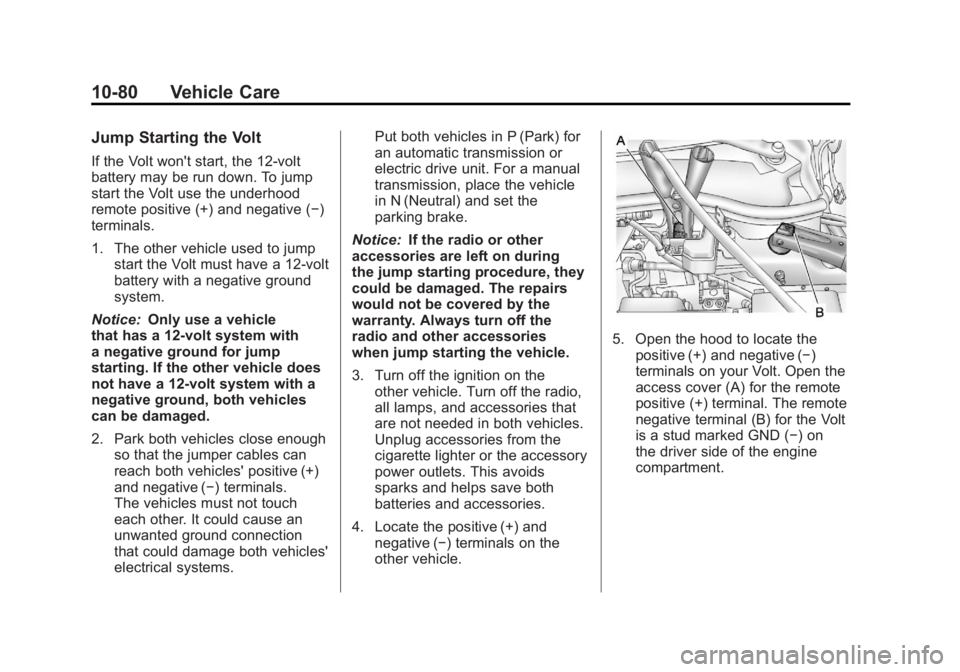
5. Open the hood to locate thepositive (+) and negative (−)
terminals on your Volt. Open the
access cover (A) for the remote
positive (+) terminal. The remote
negative terminal (B) for the Volt
is a stud marked GND (−) on
the driver side of the engine
compartment.
Page 448 of 516
Black plate (82,1)Chevrolet Volt Owner Manual - 2011
10-82 Vehicle Care
Disconnecting the Jumper Cables
1. Disconnect the blacknegative (−) jumper cable
from the Volt. Do not let the
other end of the cable touch
anything until after the next step.
2. Disconnect the black negative (−) jumper cable
from the other vehicle with
the good battery.
3. Disconnect the red positive (+) jumper cable from the other
vehicle. Do not let the other
end of the cable touch anything
until after the next step.
4. Disconnect the red positive (+) jumper cable from the Volt.
5. Return the positive (+) and negative (−) terminal covers
to their original positions.Jump Starting Another Vehicle
When using the Volt to jump
start another vehicle with a
run‐down battery, jumper cables
are connected directly to the
positive (+) and negative (−)
terminals on the 12‐volt battery in
the rear cargo area. Do not use the
remote terminals under the hood.
This could cause a fuse to overload
in the Volt.
1. Check the other vehicle. It must
have a 12‐volt battery with a
negative ground system.
Notice: Only use a vehicle
that has a 12-volt system with
a negative ground for jump
starting. If the other vehicle does
not have a 12-volt system with a
negative ground, both vehicles
can be damaged.
2. Park both vehicles close enough so that the jumper cables can
reach both vehicles' positive (+)
and negative (−) terminals.
The vehicles must not touch
each other. It could cause an unwanted ground connection
that could damage both vehicles'
electrical systems.
Put both vehicles in P (Park) for
an automatic transmission or
electric drive unit. For a manual
transmission, place the vehicle
in N (Neutral) and set the
parking brake.
Notice: If the radio or other
accessories are left on during
the jump starting procedure, they
could be damaged. The repairs
would not be covered by the
warranty. Always turn off the
radio and other accessories
when jump starting the vehicle.
3. Turn off both vehicles. Turn off the radio, all lamps,
and accessories that are not
needed in both vehicles. Unplug
accessories from the cigarette
lighter or the accessory power
outlets. This avoids sparks and
helps save both batteries and
accessories.
Page 502 of 516
Black plate (26,1)Chevrolet Volt Owner Manual - 2011
13-26 Customer Information
Vehicle Data
Recording and
Privacy
This GM vehicle has a number of
sophisticated computers that record
information about the vehicle’s
performance and how it is driven.
For example, the vehicle uses
computer modules to monitor and
control engine and electric drive
unit performance, to monitor the
conditions for airbag deployment
and to deploy airbags in a crash,
and to provide antilock braking to
help the driver control the vehicle.
These modules may store data to
help your dealer technician service
the vehicle. Some modules may
also store data about how you
operate the vehicle, such as rate of
fuel consumption or average speed.
These modules may also retain the
owner’s personal preferences, such
as radio pre-sets, seat positions,
and temperature settings.
Event Data Recorders
This vehicle has an Event Data
Recorder (EDR). The main purpose
of an EDR is to record, in certain
crash or near crash-like situations,
such as an airbag deployment or
hitting a road obstacle, data that
will assist in understanding how
a vehicle's systems performed.
The EDR is designed to record data
related to vehicle dynamics and
safety systems for a short period of
time, typically 30 seconds or less.
The EDR in this vehicle is designed
to record such data as:
.How various systems in the
vehicle were operating.
.Whether or not the driver and
passenger safety belts were
buckled/fastened.
.How far, if at all, the driver was
pressing the accelerator and/or
brake pedal.
.How fast the vehicle was
traveling. This data can help provide a better
understanding of the circumstances
in which crashes and injuries occur.
Important:
EDR data is recorded
by the vehicle only if a non-trivial
crash situation occurs; no data is
recorded by the EDR under normal
driving conditions and no personal
data (e.g., name, gender, age,
and crash location) is recorded.
However, other parties, such as
law enforcement, could combine
the EDR data with the type of
personally identifying data
routinely acquired during a
crash investigation.
To read data recorded by an EDR,
special equipment is required, and
access to the vehicle or the EDR is
needed. In addition to the vehicle
manufacturer, other parties, such
as law enforcement, that have the
special equipment, can read the
information if they have access to
the vehicle or the EDR.