brake light CHEVROLET VOLT 2011 Owner's Manual
[x] Cancel search | Manufacturer: CHEVROLET, Model Year: 2011, Model line: VOLT, Model: CHEVROLET VOLT 2011Pages: 516, PDF Size: 6.61 MB
Page 1 of 516
Black plate (1,1)Chevrolet Volt Owner Manual - 2011
2011 Chevrolet Volt Owner ManualM
In Brief. . . . . . . . . . . . . . . . . . . . . . . . 1-1
Instrument Panel . . . . . . . . . . . . . . 1-2
Initial Drive Information . . . . . . . . 1-4
Vehicle Features . . . . . . . . . . . . . 1-15
Battery and Efficiency . . . . . . . . 1-18
Performance and
Maintenance . . . . . . . . . . . . . . . . 1-23
Keys, Doors and Windows . . . 2-1
Keys and Locks . . . . . . . . . . . . . . . 2-2
Doors . . . . . . . . . . . . . . . . . . . . . . . . 2-12
Vehicle Security . . . . . . . . . . . . . . 2-13
Exterior Mirrors . . . . . . . . . . . . . . . 2-15
Interior Mirrors . . . . . . . . . . . . . . . . 2-16
Windows . . . . . . . . . . . . . . . . . . . . . 2-16
Seats and Restraints . . . . . . . . . 3-1
Head Restraints . . . . . . . . . . . . . . . 3-2
Front Seats . . . . . . . . . . . . . . . . . . . . 3-4
Rear Seats . . . . . . . . . . . . . . . . . . . . 3-8
Safety Belts . . . . . . . . . . . . . . . . . . 3-10
Airbag System . . . . . . . . . . . . . . . . 3-25
Child Restraints . . . . . . . . . . . . . . 3-41 Storage
. . . . . . . . . . . . . . . . . . . . . . . 4-1
Storage Compartments . . . . . . . . 4-1
Additional Storage Features . . . 4-2
Instruments and Controls . . . . 5-1
Instrument Panel Overview . . . . 5-4
Controls . . . . . . . . . . . . . . . . . . . . . . . 5-6
Warning Lights, Gauges, and
Indicators . . . . . . . . . . . . . . . . . . . . 5-9
Information Displays . . . . . . . . . . 5-31
Vehicle Messages . . . . . . . . . . . . 5-45
Vehicle Personalization . . . . . . . 5-53
Universal Remote System . . . . 5-60
Lighting . . . . . . . . . . . . . . . . . . . . . . . 6-1
Exterior Lighting . . . . . . . . . . . . . . . 6-1
Interior Lighting . . . . . . . . . . . . . . . . 6-5
Lighting Features . . . . . . . . . . . . . . 6-5
Infotainment System . . . . . . . . . 7-1
Introduction . . . . . . . . . . . . . . . . . . . . 7-2
Radio . . . . . . . . . . . . . . . . . . . . . . . . . 7-10
Audio Players . . . . . . . . . . . . . . . . 7-18 Navigation . . . . . . . . . . . . . . . . . . . . 7-39
Voice Recognition . . . . . . . . . . . . 7-77
Phone . . . . . . . . . . . . . . . . . . . . . . . . 7-85
Climate Controls . . . . . . . . . . . . . 8-1
Climate Control Systems . . . . . . 8-1
Air Vents . . . . . . . . . . . . . . . . . . . . . . . 8-9
Driving and Operating . . . . . . . . 9-1
Driving Information . . . . . . . . . . . . . 9-2
Starting and Operating . . . . . . . 9-18
Electric Vehicle Operating Modes . . . . . . . . . . . . . . . . . . . . . . 9-24
Engine Exhaust . . . . . . . . . . . . . . 9-30
Electric Drive Unit . . . . . . . . . . . . 9-32
Brakes . . . . . . . . . . . . . . . . . . . . . . . 9-33
Ride Control Systems . . . . . . . . 9-37
Cruise Control . . . . . . . . . . . . . . . . 9-40
Object Detection Systems . . . . 9-43
Charging . . . . . . . . . . . . . . . . . . . . . 9-49
Fuel . . . . . . . . . . . . . . . . . . . . . . . . . . 9-57
Towing . . . . . . . . . . . . . . . . . . . . . . . 9-62
Conversions and Add-Ons . . . 9-63
Page 5 of 516
Black plate (5,1)Chevrolet Volt Owner Manual - 2011
Introduction v
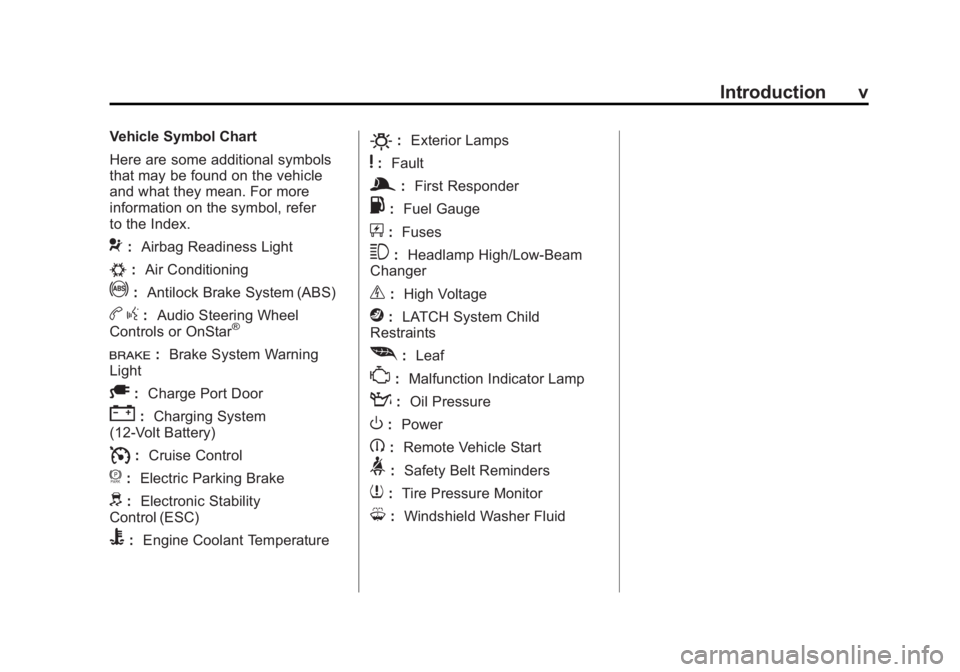
Vehicle Symbol Chart
Here are some additional symbols
that may be found on the vehicle
and what they mean. For more
information on the symbol, refer
to the Index.
9:Airbag Readiness Light
#:Air Conditioning
!:Antilock Brake System (ABS)
bg: Audio Steering Wheel
Controls or OnStar®
I: Brake System Warning
Light
A: Charge Port Door
":Charging System
(12‐Volt Battery)
I: Cruise Control
f: Electric Parking Brake
d:Electronic Stability
Control (ESC)
B: Engine Coolant Temperature
O:Exterior Lamps
y:Fault
g:First Responder
.: Fuel Gauge
+:Fuses
3: Headlamp High/Low-Beam
Changer
_: High Voltage
j:LATCH System Child
Restraints
[: Leaf
*:Malfunction Indicator Lamp
::Oil Pressure
O:Power
B:Remote Vehicle Start
>:Safety Belt Reminders
7:Tire Pressure Monitor
M:Windshield Washer Fluid
Page 9 of 516
Black plate (3,1)Chevrolet Volt Owner Manual - 2011
In Brief 1-3
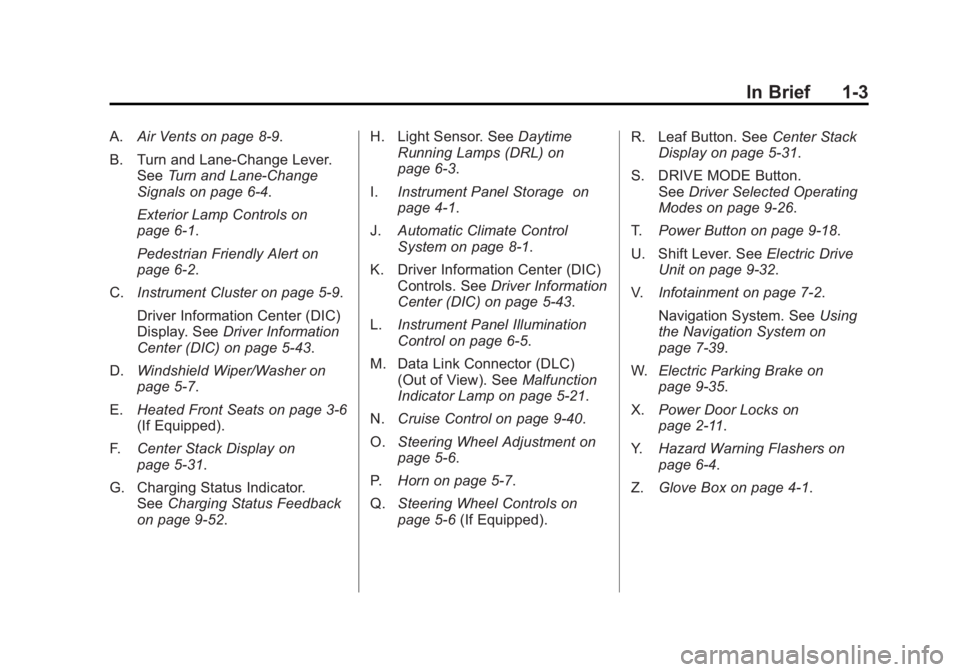
A.Air Vents on page 8‑9.
B. Turn and Lane‐Change Lever. See Turn and Lane-Change
Signals on page 6‑4.
Exterior Lamp Controls on
page 6‑1.
Pedestrian Friendly Alert on
page 6‑2.
C. Instrument Cluster on page 5‑9.
Driver Information Center (DIC)
Display. See Driver Information
Center (DIC) on page 5‑43.
D. Windshield Wiper/Washer on
page 5‑7.
E. Heated Front Seats on page 3‑6
(If Equipped).
F. Center Stack Display on
page 5‑31.
G. Charging Status Indicator. See Charging Status Feedback
on page 9‑52. H. Light Sensor. See
Daytime
Running Lamps (DRL) on
page 6‑3.
I. Instrument Panel Storage on
page 4‑1.
J. Automatic Climate Control
System on page 8‑1.
K. Driver Information Center (DIC) Controls. See Driver Information
Center (DIC) on page 5‑43.
L. Instrument Panel Illumination
Control on page 6‑5.
M. Data Link Connector (DLC) (Out of View). See Malfunction
Indicator Lamp on page 5‑21.
N. Cruise Control on page 9‑40.
O. Steering Wheel Adjustment on
page 5‑6.
P. Horn on page 5‑7.
Q. Steering Wheel Controls on
page 5‑6 (If Equipped). R. Leaf Button. See
Center Stack
Display on page 5‑31.
S. DRIVE MODE Button. See Driver Selected Operating
Modes on page 9‑26.
T. Power Button on page 9‑18.
U. Shift Lever. See Electric Drive
Unit on page 9‑32.
V. Infotainment on page 7‑2.
Navigation System. See Using
the Navigation System on
page 7‑39.
W. Electric Parking Brake on
page 9‑35.
X. Power Door Locks on
page 2‑11.
Y. Hazard Warning Flashers on
page 6‑4.
Z. Glove Box on page 4‑1.
Page 121 of 516
Black plate (1,1)Chevrolet Volt Owner Manual - 2011
Instruments and Controls 5-1
Instruments and
Controls
Instrument Panel Overview
Instrument Panel Overview . . . . 5-4
Controls
Steering Wheel Adjustment . . . 5-6
Steering Wheel Controls . . . . . . 5-6
Horn . . . . . . . . . . . . . . . . . . . . . . . . . . 5-7
Windshield Wiper/Washer . . . . . 5-7
Power Outlets . . . . . . . . . . . . . . . . . 5-8
Warning Lights, Gauges, and
Indicators
Warning Lights, Gauges, andIndicators . . . . . . . . . . . . . . . . . . . . 5-9
Instrument Cluster . . . . . . . . . . . . 5-9
Speedometer . . . . . . . . . . . . . . . . 5-15
Odometer . . . . . . . . . . . . . . . . . . . . 5-15
Trip Odometer . . . . . . . . . . . . . . . 5-15
Compass . . . . . . . . . . . . . . . . . . . . 5-16 Battery Gauge (High
Voltage) . . . . . . . . . . . . . . . . . . . . 5-16
Fuel Gauge . . . . . . . . . . . . . . . . . . 5-16
Driver Efficiency Gauge . . . . . . 5-17
Total Vehicle Range . . . . . . . . . 5-17
Safety Belt Reminders . . . . . . . 5-18
Airbag Readiness Light . . . . . . 5-19
Passenger Airbag Status Indicator . . . . . . . . . . . . . . . . . . . . 5-20
Charging System Light (12-Volt Battery) . . . . . . . . . . . . 5-21
Malfunction Indicator Lamp . . . . . . . . . . . . . 5-21
Brake System Warning Light . . . . . . . . . . . . . . . . . . . . . . . 5-24
Electric Parking Brake Light . . . . . . . . . . . . . . . . . . . . . . . 5-25
Service Electric Parking Brake Light . . . . . . . . . . . . . . . . . . . . . . . 5-25
Antilock Brake System (ABS) Warning Light . . . . . . . . . . . . . . 5-26
Sport Mode Light . . . . . . . . . . . . 5-26
Mountain Mode Light . . . . . . . . 5-26 Traction Control System
(TCS)/StabiliTrak
®Light . . . . 5-27
Engine Coolant Temperature Warning Light . . . . . . . . . . . . . . 5-27
Tire Pressure Light . . . . . . . . . . 5-27
Engine Oil Pressure Light . . . . 5-28
Low Fuel Warning Light . . . . . . 5-28
Security Light . . . . . . . . . . . . . . . . 5-29
High-Beam On Light . . . . . . . . . 5-29
Lamps On Reminder . . . . . . . . . 5-29
Cruise Control Light . . . . . . . . . 5-29
Door, Hood, or Hatch Open
Light . . . . . . . . . . . . . . . . . . . . . . . 5-30
Information Displays
Center Stack Display . . . . . . . . 5-31
Power Flows . . . . . . . . . . . . . . . . . 5-31
Charging . . . . . . . . . . . . . . . . . . . . . 5-33
Energy Information . . . . . . . . . . 5-41
Clock . . . . . . . . . . . . . . . . . . . . . . . . 5-42
Driver InformationCenter (DIC) . . . . . . . . . . . . . . . 5-43
Page 125 of 516
Black plate (5,1)Chevrolet Volt Owner Manual - 2011
Instruments and Controls 5-5
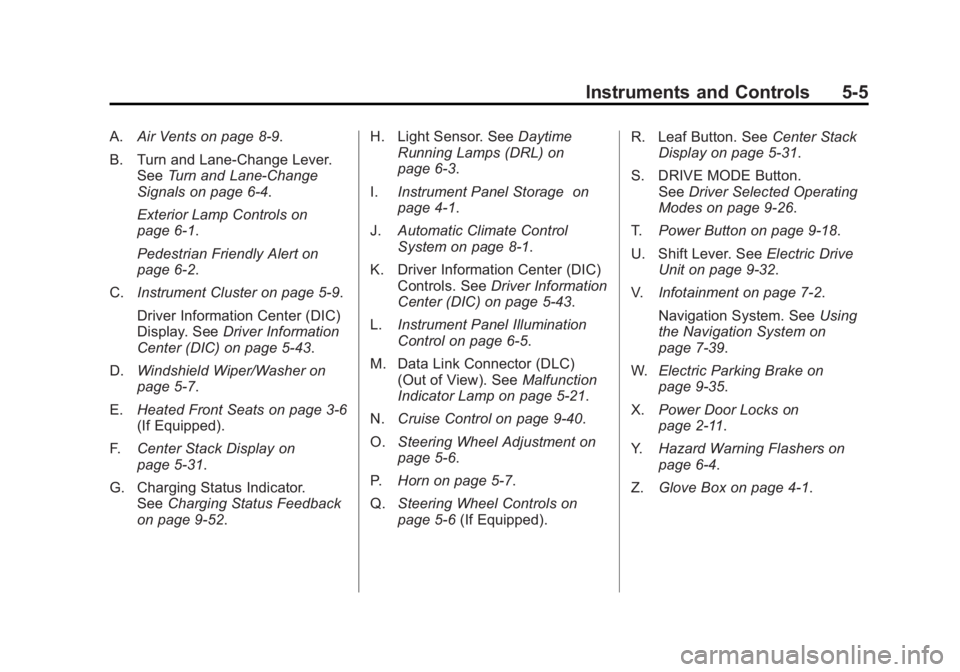
A.Air Vents on page 8‑9.
B. Turn and Lane‐Change Lever. See Turn and Lane-Change
Signals on page 6‑4.
Exterior Lamp Controls on
page 6‑1.
Pedestrian Friendly Alert on
page 6‑2.
C. Instrument Cluster on page 5‑9.
Driver Information Center (DIC)
Display. See Driver Information
Center (DIC) on page 5‑43.
D. Windshield Wiper/Washer on
page 5‑7.
E. Heated Front Seats on page 3‑6
(If Equipped).
F. Center Stack Display on
page 5‑31.
G. Charging Status Indicator. See Charging Status Feedback
on page 9‑52. H. Light Sensor. See
Daytime
Running Lamps (DRL) on
page 6‑3.
I. Instrument Panel Storage on
page 4‑1.
J. Automatic Climate Control
System on page 8‑1.
K. Driver Information Center (DIC) Controls. See Driver Information
Center (DIC) on page 5‑43.
L. Instrument Panel Illumination
Control on page 6‑5.
M. Data Link Connector (DLC) (Out of View). See Malfunction
Indicator Lamp on page 5‑21.
N. Cruise Control on page 9‑40.
O. Steering Wheel Adjustment on
page 5‑6.
P. Horn on page 5‑7.
Q. Steering Wheel Controls on
page 5‑6 (If Equipped). R. Leaf Button. See
Center Stack
Display on page 5‑31.
S. DRIVE MODE Button. See Driver Selected Operating
Modes on page 9‑26.
T. Power Button on page 9‑18.
U. Shift Lever. See Electric Drive
Unit on page 9‑32.
V. Infotainment on page 7‑2.
Navigation System. See Using
the Navigation System on
page 7‑39.
W. Electric Parking Brake on
page 9‑35.
X. Power Door Locks on
page 2‑11.
Y. Hazard Warning Flashers on
page 6‑4.
Z. Glove Box on page 4‑1.
Page 133 of 516
Black plate (13,1)Chevrolet Volt Owner Manual - 2011
Instruments and Controls 5-13
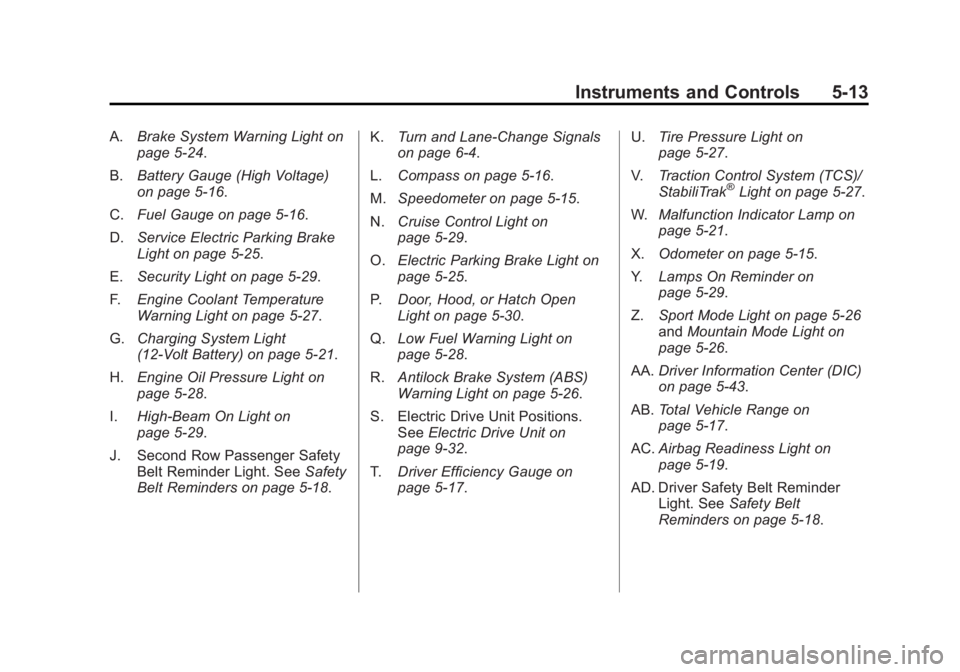
A.Brake System Warning Light on
page 5‑24.
B. Battery Gauge (High Voltage)
on page 5‑16.
C. Fuel Gauge on page 5‑16.
D. Service Electric Parking Brake
Light on page 5‑25.
E. Security Light on page 5‑29.
F. Engine Coolant Temperature
Warning Light on page 5‑27.
G. Charging System Light
(12-Volt Battery) on page 5‑21.
H. Engine Oil Pressure Light on
page 5‑28.
I. High-Beam On Light on
page 5‑29.
J. Second Row Passenger Safety Belt Reminder Light. See Safety
Belt Reminders on page 5‑18. K.
Turn and Lane-Change Signals
on page 6‑4.
L. Compass on page 5‑16.
M. Speedometer on page 5‑15.
N. Cruise Control Light on
page 5‑29.
O. Electric Parking Brake Light on
page 5‑25.
P. Door, Hood, or Hatch Open
Light on page 5‑30.
Q. Low Fuel Warning Light on
page 5‑28.
R. Antilock Brake System (ABS)
Warning Light on page 5‑26.
S. Electric Drive Unit Positions. See Electric Drive Unit on
page 9‑32.
T. Driver Efficiency Gauge on
page 5‑17. U.
Tire Pressure Light on
page 5‑27.
V. Traction Control System (TCS)/
StabiliTrak
®Light on page 5‑27.
W. Malfunction Indicator Lamp on
page 5‑21.
X. Odometer on page 5‑15.
Y. Lamps On Reminder on
page 5‑29.
Z. Sport Mode Light on page 5‑26
and Mountain Mode Light on
page 5‑26.
AA. Driver Information Center (DIC)
on page 5‑43.
AB. Total Vehicle Range on
page 5‑17.
AC. Airbag Readiness Light on
page 5‑19.
AD. Driver Safety Belt Reminder Light. See Safety Belt
Reminders on page 5‑18.
Page 144 of 516
Black plate (24,1)Chevrolet Volt Owner Manual - 2011
5-24 Instruments and Controls
.The vehicle will not pass
this inspection if the OBD II
(On-Board Diagnostic) system
determines that critical emission
control systems have not been
completely diagnosed by the
system. The vehicle would
be considered not ready for
inspection. This can happen
if the 12‐volt battery has
recently been replaced or
if the 12‐volt battery has run
down. The diagnostic system
is designed to evaluate critical
emission control systems during
normal driving. This can take
several days of routine driving.
If this has been done and the
vehicle still does not pass the
inspection for lack of OBD II
system readiness, your dealer
can prepare the vehicle for
inspection.Brake System Warning
Light
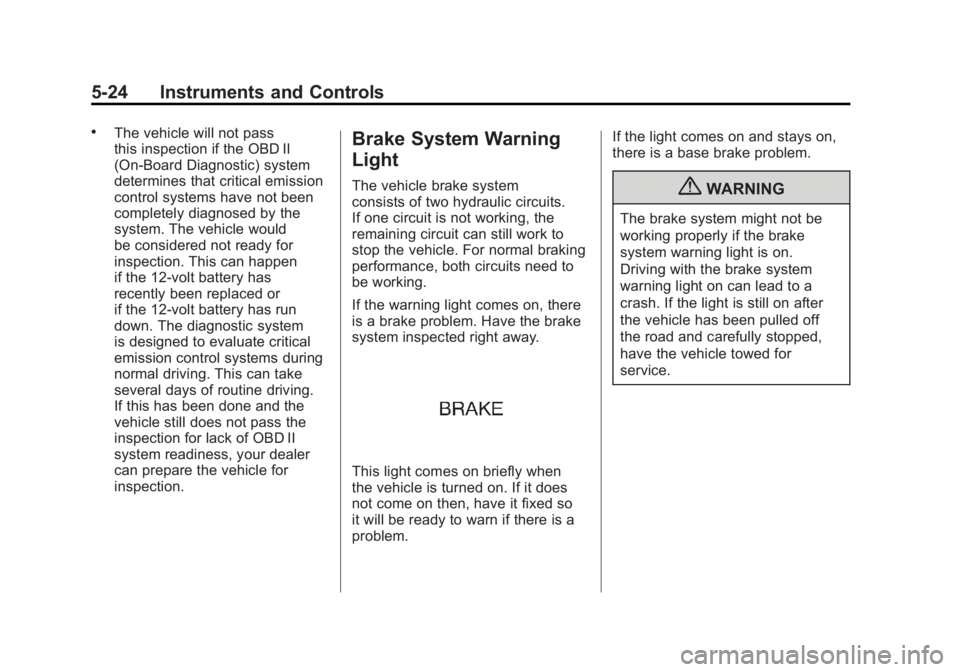
The vehicle brake system
consists of two hydraulic circuits.
If one circuit is not working, the
remaining circuit can still work to
stop the vehicle. For normal braking
performance, both circuits need to
be working.
If the warning light comes on, there
is a brake problem. Have the brake
system inspected right away.
This light comes on briefly when
the vehicle is turned on. If it does
not come on then, have it fixed so
it will be ready to warn if there is a
problem.If the light comes on and stays on,
there is a base brake problem.
{WARNING
The brake system might not be
working properly if the brake
system warning light is on.
Driving with the brake system
warning light on can lead to a
crash. If the light is still on after
the vehicle has been pulled off
the road and carefully stopped,
have the vehicle towed for
service.
Page 145 of 516
Black plate (25,1)Chevrolet Volt Owner Manual - 2011
Instruments and Controls 5-25
Electric Parking Brake
Light
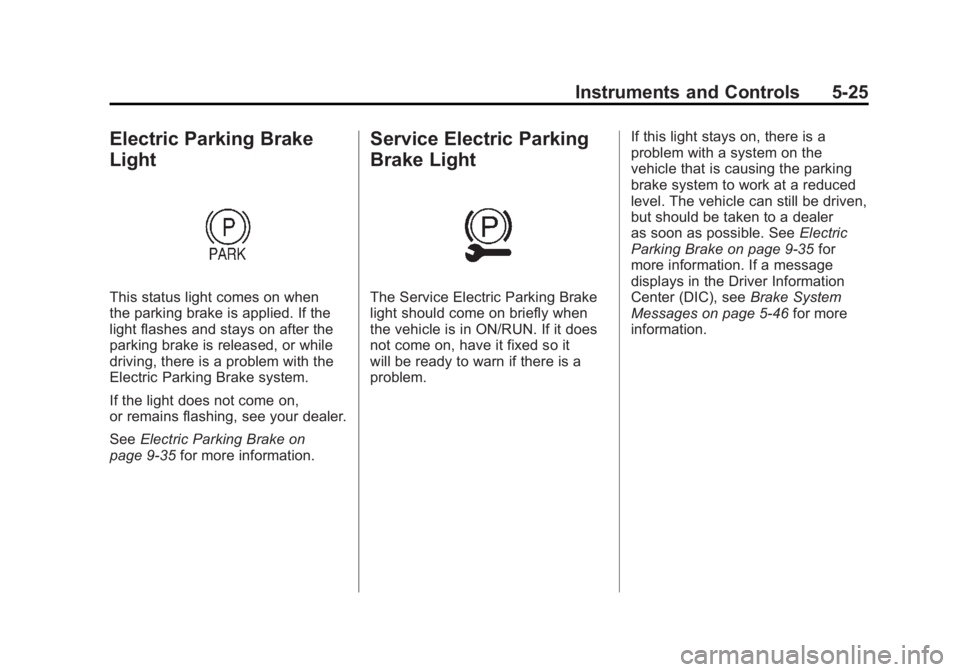
This status light comes on when
the parking brake is applied. If the
light flashes and stays on after the
parking brake is released, or while
driving, there is a problem with the
Electric Parking Brake system.
If the light does not come on,
or remains flashing, see your dealer.
SeeElectric Parking Brake on
page 9‑35 for more information.
Service Electric Parking
Brake Light
The Service Electric Parking Brake
light should come on briefly when
the vehicle is in ON/RUN. If it does
not come on, have it fixed so it
will be ready to warn if there is a
problem. If this light stays on, there is a
problem with a system on the
vehicle that is causing the parking
brake system to work at a reduced
level. The vehicle can still be driven,
but should be taken to a dealer
as soon as possible. See
Electric
Parking Brake on page 9‑35 for
more information. If a message
displays in the Driver Information
Center (DIC), see Brake System
Messages on page 5‑46 for more
information.
Page 146 of 516
Black plate (26,1)Chevrolet Volt Owner Manual - 2011
5-26 Instruments and Controls
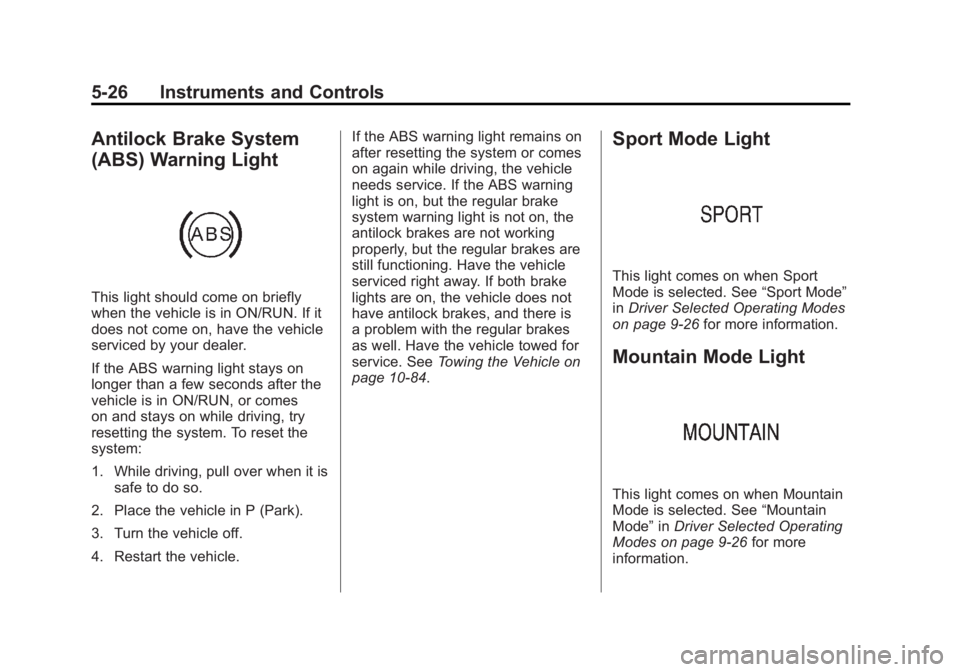
Antilock Brake System
(ABS) Warning Light
This light should come on briefly
when the vehicle is in ON/RUN. If it
does not come on, have the vehicle
serviced by your dealer.
If the ABS warning light stays on
longer than a few seconds after the
vehicle is in ON/RUN, or comes
on and stays on while driving, try
resetting the system. To reset the
system:
1. While driving, pull over when it issafe to do so.
2. Place the vehicle in P (Park).
3. Turn the vehicle off.
4. Restart the vehicle. If the ABS warning light remains on
after resetting the system or comes
on again while driving, the vehicle
needs service. If the ABS warning
light is on, but the regular brake
system warning light is not on, the
antilock brakes are not working
properly, but the regular brakes are
still functioning. Have the vehicle
serviced right away. If both brake
lights are on, the vehicle does not
have antilock brakes, and there is
a problem with the regular brakes
as well. Have the vehicle towed for
service. See
Towing the Vehicle on
page 10‑84.
Sport Mode Light
This light comes on when Sport
Mode is selected. See “Sport Mode”
in Driver Selected Operating Modes
on page 9‑26 for more information.
Mountain Mode Light
This light comes on when Mountain
Mode is selected. See “Mountain
Mode” inDriver Selected Operating
Modes on page 9‑26 for more
information.
Page 166 of 516
Black plate (46,1)Chevrolet Volt Owner Manual - 2011
5-46 Instruments and Controls
SERVICE HIGH VOLTAGE
CHARGING SYSTEM
This message displays when there
is a problem with the high voltage
charging system. See your dealer
for service.
Brake System Messages
BRAKE FLUID LOW
This message displays when the
brake fluid level is low. SeeBrake
Fluid on page 10‑26.
RELEASE PARKING BRAKE
This message displays if the electric
parking brake is on while the vehicle
is in motion. Release it before
attempting to drive. See Electric
Parking Brake on page 9‑35 for
more information.
SERVICE BRAKE ASSIST
This message displays when there
is a problem with the brake boost
assist system. When this message
displays, the brake boost assist
motor might be heard operating
and a pulsation may be felt in the
brake pedal. Take the vehicle to
your dealer for service.
SERVICE PARKING BRAKE
This message displays when there
is a problem with the parking brake.
Take the vehicle to your dealer for
service.
STEP ON BRAKE TO
RELEASE PARK BRAKE
This message displays when
attempting to release the electric
parking brake without the brake
pedal applied. See Electric Parking
Brake on page 9‑35 for more
information.
Cruise Control Messages
CRUISE SET TO XXX
This message displays when the
cruise control is set and shows the
speed it was set to. See Cruise
Control on page 9‑40 for more
information.
Door Ajar Messages
DOOR(S) OPEN, HOOD OPEN,
HATCH OPEN
A symbol will appear on the display
showing the area that is open.
See Door, Hood, or Hatch Open
Light on page 5‑30.