remote start CHEVROLET VOLT 2011 User Guide
[x] Cancel search | Manufacturer: CHEVROLET, Model Year: 2011, Model line: VOLT, Model: CHEVROLET VOLT 2011Pages: 516, PDF Size: 6.61 MB
Page 42 of 516
Black plate (6,1)Chevrolet Volt Owner Manual - 2011
2-6 Keys, Doors and Windows
This procedure will take
approximately 30 minutes to
complete. The vehicle must be
off and all of the transmitters
must be in the vehicle.
1. Insert the vehicle key of thetransmitter into the key lock
cylinder on the outside of the
driver door and turn the key to
the unlock position five times
within 10 seconds.
The Driver Information Center
(DIC) displays REMOTE LEARN
PENDING, PLEASE WAIT.
2. Wait for 10 minutes until the DIC displays PRESS START
BUTTON TO LEARN and then
press the POWER
Obutton on
the center stack.
The DIC display will again show
REMOTE LEARN PENDING,
PLEASE WAIT. 3. Repeat Step 2 two more times.
After the third time, all previously
known transmitters will no longer
work with the vehicle. Remaining
transmitters can be programmed
during the next steps.
The DIC display should
now show READY FOR
REMOTE # 1.
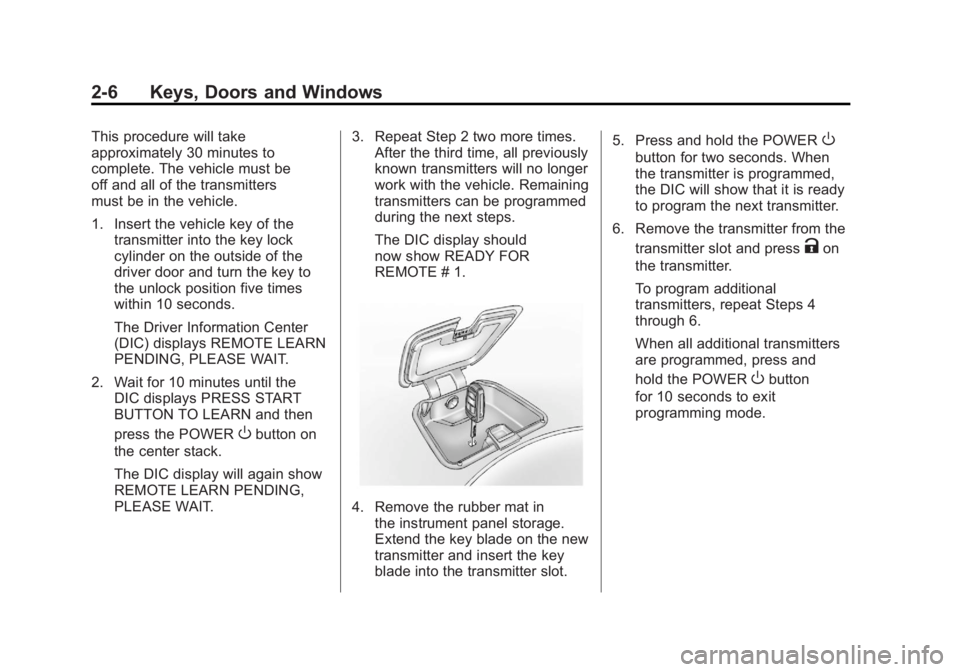
4. Remove the rubber mat in
the instrument panel storage.
Extend the key blade on the new
transmitter and insert the key
blade into the transmitter slot. 5. Press and hold the POWER
O
button for two seconds. When
the transmitter is programmed,
the DIC will show that it is ready
to program the next transmitter.
6. Remove the transmitter from the transmitter slot and press
Kon
the transmitter.
To program additional
transmitters, repeat Steps 4
through 6.
When all additional transmitters
are programmed, press and
hold the POWER
Obutton
for 10 seconds to exit
programming mode.
Page 43 of 516
Black plate (7,1)Chevrolet Volt Owner Manual - 2011
Keys, Doors and Windows 2-7
Starting the Vehicle with a Low
Transmitter Battery
If the transmitter battery is weak,
the DIC may display NO REMOTE
DETECTED when you try to
start the vehicle. The REPLACE
BATTERY IN REMOTE KEY
message may also be displayed
at this time.
To start the vehicle:
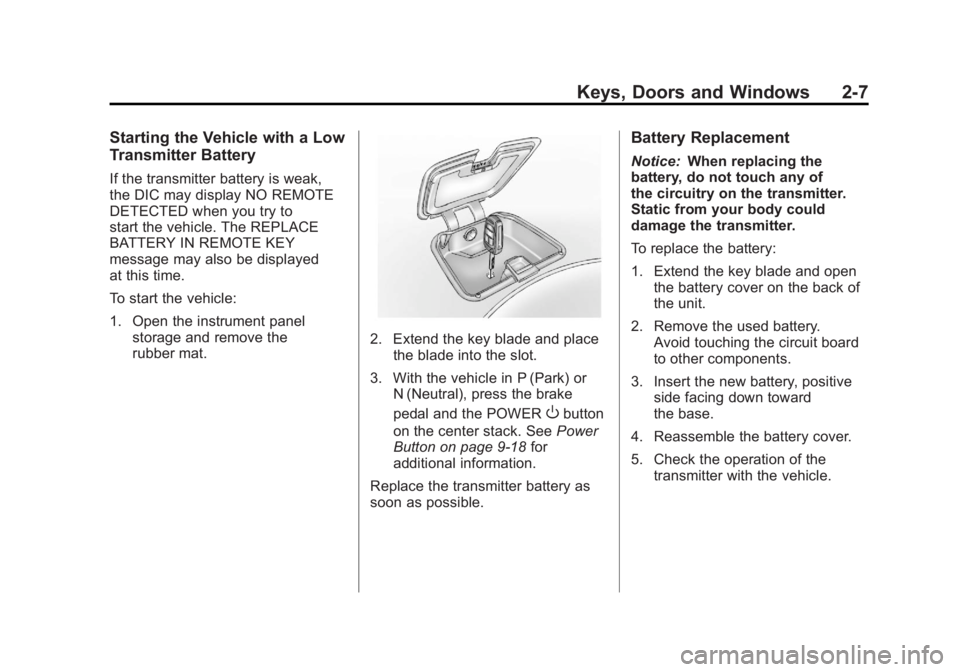
1. Open the instrument panelstorage and remove the
rubber mat.
2. Extend the key blade and placethe blade into the slot.
3. With the vehicle in P (Park) or N (Neutral), press the brake
pedal and the POWER
Obutton
on the center stack. See Power
Button on page 9‑18 for
additional information.
Replace the transmitter battery as
soon as possible.
Battery Replacement
Notice: When replacing the
battery, do not touch any of
the circuitry on the transmitter.
Static from your body could
damage the transmitter.
To replace the battery:
1. Extend the key blade and open the battery cover on the back of
the unit.
2. Remove the used battery. Avoid touching the circuit board
to other components.
3. Insert the new battery, positive side facing down toward
the base.
4. Reassemble the battery cover.
5. Check the operation of the transmitter with the vehicle.
Page 44 of 516

Black plate (8,1)Chevrolet Volt Owner Manual - 2011
2-8 Keys, Doors and Windows
Remote Start
This feature starts the heating or
air conditioning systems and rear
window defogger from outside the
vehicle. Use remote start to heat or
cool the interior when the vehicle
plugged in to maximize the electric
range by utilizing electricity from the
electrical outlet. Normal operation
of the system will return after the
vehicle has been turned on.
B(Remote Start):This button is
on the RKE transmitter.
During remote start:
.The climate control system
will typically default to the last
climate settings. If Fan Off or
Fan Only were selected, the
air conditioning or heat will turn
on as needed. See Automatic
Climate Control System on
page 8‑1 for more information.
.If the vehicle has heated
seats, and this feature has
been enabled through vehicle
personalization, the heated
seats will turn on during
colder outside temperatures.
See“Remote Start Heated
Seats” underHeated Front
Seats on page 3‑6 andVehicle
Personalization on page 5‑53
for additional information.
.The rear defogger will turn
on during colder outside
temperatures.
.Selecting1during colder
outside temperatures before
shutting the vehicle off will
help windshield clearing.
.Shutting the vehicle off in ECO
Mode without
1selected will
minimize the impact to electric
range. Shutting the vehicle off
in other modes will maximize
heating or air conditioning.
.The engine may start to provide
energy for heating and cooling,
independent of the vehicle being
plugged in or completely
charged.
.Vehicle range may decrease
if the vehicle is not plugged
into an electrical outlet. If the
vehicle is plugged in, much of
the energy needed to support
this feature will be provided from
the utility, not from the high
voltage battery.
Laws in some communities
may restrict the use of features
that remotely start the engine.
For example, some laws may
require a person using the remote
start feature to have the vehicle in
view when doing so. Check local
regulations for any requirements
on remote starting of vehicles.
Page 45 of 516
Black plate (9,1)Chevrolet Volt Owner Manual - 2011
Keys, Doors and Windows 2-9
With the remote start feature, the
RKE transmitter functions will have
an increased range of operation.
However, the range may be less
while the vehicle is running.
Other conditions can affect the
performance of the transmitter.
SeeRemote Keyless Entry (RKE)
System on page 2‑3 for additional
information.
Activating the Remote Start
To heat or cool the passenger
compartment using remote start:
1. Aim the RKE transmitter at the vehicle.
2. Press
Qon the RKE transmitter;
the doors will lock.
3. Within five seconds press and hold
Buntil the turn signal
lamps flash or for approximately
four seconds. Pressing
Bagain
during a remote start will turn the
feature off. Remote start will automatically shut
off after 10 minutes unless a time
extension is done.
While the remote start is active,
the parking lamps will turn on and
remain on.
After entering the vehicle during a
remote start, press the POWER
O
button on the center stack with the
brake pedal applied to operate as
normal.
The remote start can be initiated
two separate times between
driving. For each remote start, the
passenger compartment will be
heated or cooled for 10 minutes.
Extending the Time
To extend the time of the first
remote start, repeat the steps for
activating remote start. Remote
start can only be extended one
time between driving.
Canceling Remote Start
To cancel a remote start, do any of
the following:
.Aim the RKE transmitter at the
vehicle and press and hold
B
until the parking lamps turn off.
.Turn on the hazard warning
flashers.
.Press the POWERObutton on
the center stack, with the brake
pedal applied, then press the
POWER
Obutton again to turn
the vehicle off.
Page 46 of 516

Black plate (10,1)Chevrolet Volt Owner Manual - 2011
2-10 Keys, Doors and Windows
Conditions in Which Remote
Start May Not Work
Conditions in which a remote start
may not occur include:
.An open hood.
.Vehicle propulsion system
fault conditions, including an
emission control system
malfunction.
.High voltage battery fault
conditions.
A second remote start or extension
will not occur if the fuel level is low.
During a remote start, conditions
in which a remote start may be
canceled include:
.Vehicle propulsion system
or high voltage battery fault
conditions.
.Low engine oil pressure.
.Engine coolant temperature that
is too high.
Door Locks
{WARNING
Unlocked doors can be
dangerous.
.Passengers, especially
children, can easily open the
doors and fall out of a moving
vehicle. The chance of being
thrown out of the vehicle in
a crash is increased if the
doors are not locked. So, all
passengers should wear
safety belts properly and
the doors should be locked
whenever the vehicle is
driven. (Continued)
WARNING (Continued)
.Young children who get into
unlocked vehicles may be
unable to get out. A child can
be overcome by extreme heat
and can suffer permanent
injuries or even death from
heat stroke. Always lock the
vehicle whenever leaving it.
.Outsiders can easily enter
through an unlocked door
when slowing or stopping
the vehicle. Lock the doors
to help prevent this from
happening.
To lock or unlock the door, use
the Remote Keyless Entry (RKE)
transmitter or the key from outside
the vehicle. Use the door lock knob
or switch from inside the vehicle.
Page 63 of 516
Black plate (7,1)Chevrolet Volt Owner Manual - 2011
Seats and Restraints 3-7
When the vehicle is on, this feature
will automatically activate the
heated seats at the level required
by the vehicle's interior temperature.
The active high, medium, low, or off
heated seat level will be indicated
by the manual heated seat button
lights on the center stack. Use the
touch screen buttons or the manual
heated seat buttons on the center
stack to turn auto heated seats off.
If the passenger seat is unoccupied,
the auto heated seats feature will
not activate that seat.
The auto heated seats feature
can be programmed to always be
enabled when the vehicle is on.
See“Auto Heated Seats” under
Vehicle Personalization on
page 5‑53 for more information. Remote Start Heated Seats
When it is cold outside, the heated
seats can be programmed to turn
on automatically during a remote
vehicle start. Unless the auto
heated seats feature is available
and enabled, the heated seats will
be canceled when the vehicle is
turned on. If the vehicle has auto
heated seats and the feature is
enabled, the seat heating level will
automatically change to the level
required by the vehicle's interior
temperature when the vehicle is
turned on.
The indicator lights on the heated
seat buttons do not turn on during a
remote start.
The temperature performance of an
unoccupied seat may be reduced.
This is normal.
The heated seats will not turn on
during a remote start unless the
heated seats feature is enabled in
the vehicle personalization menu.
See
“Remote Start Auto Heat Seats”
under Vehicle Personalization on
page 5‑53 for more information.
Page 122 of 516

Black plate (2,1)Chevrolet Volt Owner Manual - 2011
5-2 Instruments and Controls
Vehicle Messages
Vehicle Messages . . . . . . . . . . . 5-45
Battery and ChargingMessages . . . . . . . . . . . . . . . . . . 5-45
Brake System Messages . . . . 5-46
Cruise Control Messages . . . . 5-46
Door Ajar Messages . . . . . . . . . 5-46
Drive Mode Messages . . . . . . . 5-47
Electric Drive Unit Messages . . . . . . . . . . . . . . . . . . 5-47
Engine Cooling System Messages . . . . . . . . . . . . . . . . . . 5-47
Engine Oil Messages . . . . . . . . 5-48
Fuel System Messages . . . . . . 5-48
Key and Lock Messages . . . . . 5-48
Lamp Messages . . . . . . . . . . . . . 5-49
Object Detection System Messages . . . . . . . . . . . . . . . . . . 5-49
Propulsion Power Messages . . . . . . . . . . . . . . . . . . 5-50 Ride Control System
Messages . . . . . . . . . . . . . . . . . . 5-50
Airbag System Messages . . . . 5-51
Anti-theft Alarm System Messages . . . . . . . . . . . . . . . . . . 5-51
Service Vehicle Messages . . . 5-51
Starting the Vehicle Messages . . . . . . . . . . . . . . . . . . 5-52
Tire Messages . . . . . . . . . . . . . . . 5-52
Vehicle Speed Messages . . . . 5-53
Washer Fluid Messages . . . . . 5-53
Vehicle Personalization
Vehicle Personalization . . . . . . 5-53
Universal Remote System
Universal Remote System . . . 5-60
Universal Remote System Programming . . . . . . . . . . . . . . . 5-60
Universal Remote System Operation . . . . . . . . . . . . . . . . . . 5-63
Page 169 of 516
Black plate (49,1)Chevrolet Volt Owner Manual - 2011
Instruments and Controls 5-49
NO REMOTE DETECTED
This message displays when the
RKE transmitter is not detected
while attempting to start the vehicle.
The transmitter battery may be
weak. See“Starting the Vehicle
with a Low Transmitter Battery”
under Remote Keyless Entry (RKE)
System Operation on page 2‑3 for
more information.
NO REMOTE DETECTED,
PRESS BRAKE TO RESTART
This message displays if the RKE
transmitter is no longer detected
in the vehicle. Press the brake
pedal and the POWER
Obutton
to restart the vehicle, or press the
POWER
Obutton without pressing
the brake pedal to turn the vehicle
off. If the vehicle is turned off and
a valid transmitter is not available,
the vehicle will not restart.
REMINDER: KEY LEFT IN
VEHICLE
This message displays when
leaving the vehicle with the RKE
transmitter still inside.
REPLACE BATTERY IN
REMOTE KEY
This message displays when the
battery in the RKE transmitter needs
to be replaced.
SERVICE KEYLESS START
SYSTEM
This message displays when the
keyless start system needs service.
Take the vehicle to your dealer.
Lamp Messages
AUTOMATIC LIGHT CONTROL
ON OR OFF
A message will display when the
automatic light control has been
turned on or off.
CHECK LAMP or LAMP
FAILURE
Depending on the lamp, one of
these messages may display.
See Bulb Replacement on
page 10‑34.
TURN SIGNAL ON
This message displays if the turn
signal has been left on. Turn off the
turn signal.
Object Detection System
Messages
PARK ASSIST OFF
This message displays when the
park assist system has been turned
off. See Ultrasonic Parking Assist
on page 9‑43.
SERVICE PARKING ASSIST
This message displays if there is a
problem with the park assist system.
Take the vehicle to your dealer for
service.
Page 174 of 516
Black plate (54,1)Chevrolet Volt Owner Manual - 2011
5-54 Instruments and Controls
Turning a Function On or Off
1. Turn the TUNE/MENU knob tohighlight the function.
2. Press the TUNE/MENU knob to turn the function on or off.
A checkmark next to the function
indicates that the function is on.
Using the Touch Screen
Use the touch screen icons and
menus on the center stack display
to select personalization features.
w:Touch to scroll up.
x:Touch to scroll down.
Back: Touch Back in the upper
right corner of the display to return
to the previous menu. Submenus
An arrow on the right‐hand edge
of the menu indicates that it has a
submenu with other options.
Selecting a Menu Option
Touch any one of the available
menu options on the touch screen
to select the option. A checkmark
next to the option indicates the
selected option.
Turning a Function On or Off
Touch the screen where the
available function is listed to turn it
on or off. A checkmark next to the
function indicates that the function
is on.
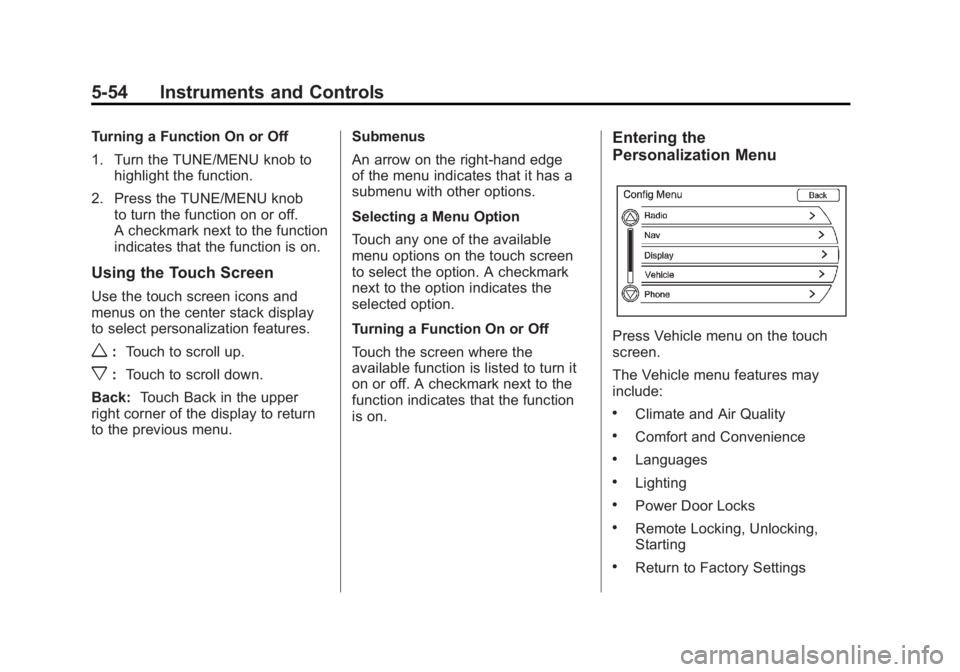
Entering the
Personalization Menu
Press Vehicle menu on the touch
screen.
The Vehicle menu features may
include:
.Climate and Air Quality
.Comfort and Convenience
.Languages
.Lighting
.Power Door Locks
.Remote Locking, Unlocking,
Starting
.Return to Factory Settings
Page 175 of 516
Black plate (55,1)Chevrolet Volt Owner Manual - 2011
Instruments and Controls 5-55
Climate and Air Quality
Select the Climate and Air Quality
menu to display:
.Auto Fan Speed
.Auto Heated Seats
.Remote Start Auto Heat Seats
.Auto Defog
Auto Fan Speed
This feature sets the automatic
fan speed to maintain the desired
interior tempurature. This selection
is available on vehicles with the
Automatic Climate Control system.
Choose a blower setting:
High: Increased speed.
Medium: Moderate speed.
Low: Reduced speed.
To select the auto fan speed:
1. Press the Vehicle menu.
2. Select Climate and Air Quality. 3. Select Auto Fan Speed.
4. Select the fan speed.
5. Press Back to return to the
previous menu.
Auto Heated Seats
When enabled, the auto heated
seat buttons on the touch screen
will be highlighted. This feature will
automatically activate heated seats
at the level required by the interior
temperature. The auto heated seats
can be turned off by using the
heated seat buttons on the center
stack.
To turn the auto heated seats on
or off:
1. Press the Vehicle menu.
2. Select Climate and Air Quality.
3. Turn the auto heated seats feature on or off.
4. Press Back to return to the previous menu. Remote Start Auto Heat Seats
When on, this feature will turn the
heated seats on when using remote
start.
To turn the remote start auto heat
seats on or off:
1. Press the Vehicle menu.
2. Select Climate and Air Quality.
3. Turn the remote start auto heat
seats feature on or off.
4. Press Back to return to the previous menu.
Auto Defog
When on and high humidity is
detected, the Climate Control
system will adjust the outside air,
air conditioner, or heat to decrease
fogging. The fan speed may
increase. When high humidity is
no longer detected, the system
will return to previous operation.