air condition CHEVROLET VOLT 2011 Owner's Guide
[x] Cancel search | Manufacturer: CHEVROLET, Model Year: 2011, Model line: VOLT, Model: CHEVROLET VOLT 2011Pages: 516, PDF Size: 6.61 MB
Page 298 of 516
Black plate (6,1)Chevrolet Volt Owner Manual - 2011
8-6 Climate Controls
Manual Operation
A(Fan Control):Press the
fan control buttons or the touch
screen fan control, to increase or
decrease the fan speed. The fan
speed setting displays. Pressing
either button cancels automatic
fan control and the fan can be
controlled manually. Press AUTO
to return to automatic operation.
Press the fan down button
repeatedly to turn off the fan
and the climate control system.
If the fan is manually turned off
while in ECO or Comfort mode,
the display will automatically change
to Fan Only mode. When the fan is
turned back on either by manually
increasing fan speed or pressing
the AUTO button, the climate
mode will revert back to ECO
or Comfort mode. Air Delivery Mode Control:
Press CLIMATE to select the
Climate touch screen. Press the
air delivery mode touch screen
button to change the direction of
the airflow. The selected air delivery
mode button is lit. Pressing any
of the air delivery buttons cancels
automatic air delivery control and
the direction of the airflow can be
controlled manually. Press AUTO
to return to automatic operation.
To change the current mode,
select one of the following:
Y(Vent):
Air is directed to the
instrument panel outlets.
\(Bi-Level): Air is divided
between the instrument panel
outlets and the floor outlets.
[(Floor): Air is directed to the
floor outlets.
-(Defog): Air is directed to the
windshield and floor outlets. Clears
the windows of fog or moisture.
0(Defrost): Air is directed to
the windshield. The windshield is
cleared of fog or frost more quickly.
Selecting
0will disable automatic
control and the AUTO button
indicator will not be lit.
Selecting
0again will return to the
previous climate settings.
For best results, clear all snow and
ice from the windshield before
defrosting.
If
0is selected in Fan Only or
ECO mode, air conditioning or
electric heat may turn on and have
a noticeable effect on vehicle
electric range and fuel economy.
Page 300 of 516
Black plate (8,1)Chevrolet Volt Owner Manual - 2011
8-8 Climate Controls
Rear Window Defogger
=(Rear Window Defogger):
Press to turn the rear window
defogger on or off.
The rear window defogger
turns off automatically after about
five minutes. If turned on again,
it runs for about five minutes
before turning off. The defogger
can also be turned off by turning
the vehicle off.
For vehicles with heated outside
rearview mirrors, they turn on when
the rear window defogger button
is on and help to clear fog or frost
from the surface of the mirror.
See Heated Mirrors on page 2‑16. Notice:
Do not try to clear frost
or other material from the inside
of the front windshield and rear
window with a razor blade or
anything else that is sharp.
This may damage the rear
window defogger grid and affect
the radio's ability to pick up
stations clearly. The repairs
wouldn't be covered by the
vehicle warranty.
Remote Start: For vehicles with
this feature, the climate control
system may be started by using
the Remote Keyless Entry (RKE)
transmitter. The climate control
system will default to an appropriate
heating or cooling mode.
See Remote Start on page 2‑8.
The rear window defogger turns on
if it is cold outside.
Compressor
The vehicle has an electric powered
air conditioning compressor.
This allows for continuous air
conditioning and/or high voltage
battery cooling operation, without
running the engine.
The compressor operating speed
is not tied to the engine speed, so
some noise may be heard from the
compressor, especially when air
conditioning use is high and the
engine has turned off. This is
normal.
Page 305 of 516
Black plate (3,1)Chevrolet Volt Owner Manual - 2011
Driving and Operating 9-3
Drive Mode and PRNDL Selection
Use Normal Mode when possible.
Sport Mode provides more
responsive acceleration than
Normal Mode but can reduce
efficiency.
Use Mountain Mode prior to
climbing long, steep grades in
mountainous areas. Be sure to
engage Mountain Mode before
starting to climb. Mountain Mode
reduces electric range and power
but may be needed to maintain
speeds above 96 km/h (60 mph)
when climbing grades of 5% or
greater.
Use L (Low) in heavy stop‐and‐go
traffic or when traveling downhill.
L (Low) requires less brake
pedal application and provides
a controlled, efficient way to
slow the vehicle down.Climate Setting
Using the heat and air conditioning
systems decreases the energy
available for electric driving.
Optimal energy efficiency is
achieved with the heat, air
conditioning, and fan turned off.
Less energy is used at low fan
speeds. When using the fan:
.Fan Only is the most energy
efficient climate setting as long
as
0is not selected.
.ECO is for moderate air
conditioning and heater
operation and is the next
most energy efficient setting as
long as
0is not selected.
.Comfort provides the most
comfort but is the least energy
efficient.
Use the auto heated seat feature
instead of climate settings. Heating
the seat uses less energy than
heating the vehicle interior. Use remote start to heat or cool the
interior when the vehicle is plugged
in to maximize the electric range by
utilizing electricity from the electrical
outlet.
In hot weather, avoid parking in
direct sunlight or use sunshades
inside the vehicle.
Turn off the front and rear window
defog/defrost when they are no
longer needed.
Avoid driving with the windows open
at highway speeds.
Vehicle Charging/Maintenance
Charging
Keep the vehicle plugged in, even
when fully charged, to keep the
battery temperature ready for the
next drive. This is important when
outside temperatures are extremely
hot or cold.
Page 310 of 516
Black plate (8,1)Chevrolet Volt Owner Manual - 2011
9-8 Driving and Operating
Off-Road Recovery
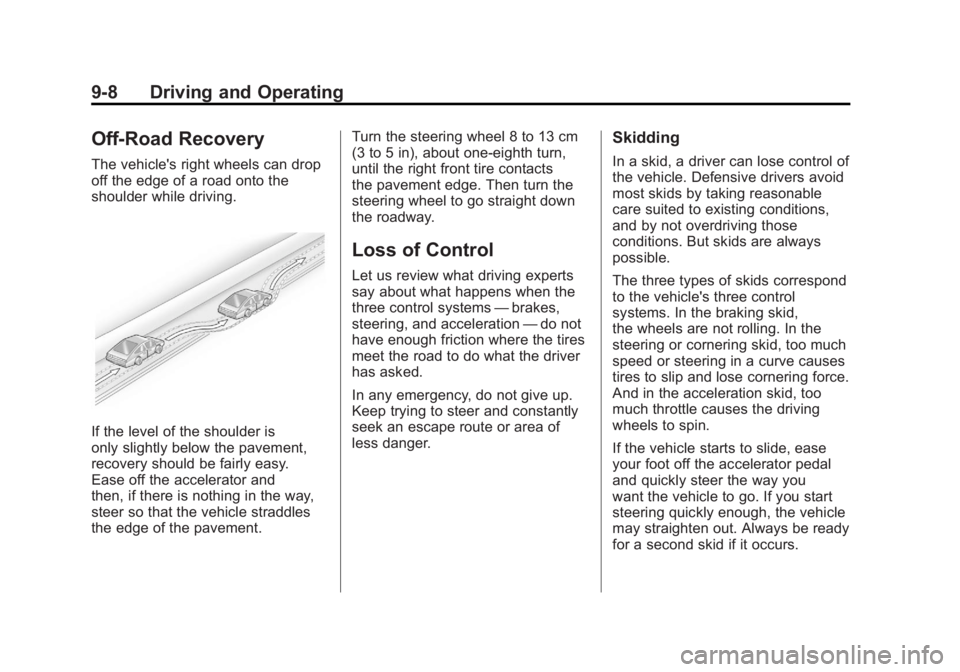
The vehicle's right wheels can drop
off the edge of a road onto the
shoulder while driving.
If the level of the shoulder is
only slightly below the pavement,
recovery should be fairly easy.
Ease off the accelerator and
then, if there is nothing in the way,
steer so that the vehicle straddles
the edge of the pavement.Turn the steering wheel 8 to 13 cm
(3 to 5 in), about one-eighth turn,
until the right front tire contacts
the pavement edge. Then turn the
steering wheel to go straight down
the roadway.
Loss of Control
Let us review what driving experts
say about what happens when the
three control systems
—brakes,
steering, and acceleration —do not
have enough friction where the tires
meet the road to do what the driver
has asked.
In any emergency, do not give up.
Keep trying to steer and constantly
seek an escape route or area of
less danger.
Skidding
In a skid, a driver can lose control of
the vehicle. Defensive drivers avoid
most skids by taking reasonable
care suited to existing conditions,
and by not overdriving those
conditions. But skids are always
possible.
The three types of skids correspond
to the vehicle's three control
systems. In the braking skid,
the wheels are not rolling. In the
steering or cornering skid, too much
speed or steering in a curve causes
tires to slip and lose cornering force.
And in the acceleration skid, too
much throttle causes the driving
wheels to spin.
If the vehicle starts to slide, ease
your foot off the accelerator pedal
and quickly steer the way you
want the vehicle to go. If you start
steering quickly enough, the vehicle
may straighten out. Always be ready
for a second skid if it occurs.
Page 314 of 516
Black plate (12,1)Chevrolet Volt Owner Manual - 2011
9-12 Driving and Operating
Blizzard Conditions
Being stuck in snow can be
a serious situation. Stay with
the vehicle unless there is help
nearby. If possible, use the
Roadside Assistance Program.
To get help and keep everyone
in the vehicle safe:
.Turn on the hazard warning
flashers.
.Tie a red cloth to an outside
mirror.
{WARNING
Snow can trap engine exhaust
under the vehicle. This may
cause exhaust gases to get
inside. Engine exhaust contains
Carbon Monoxide (CO) which
cannot be seen or smelled. It can
cause unconsciousness and even
death.(Continued)
WARNING (Continued)
If the vehicle is stuck in the snow:
.Clear away snow from
around the base of the
vehicle, especially any that
is blocking the exhaust pipe.
.Check again from time to
time to be sure snow does
not collect there.
.Open a window about 5 cm
(2 in) on the side of the
vehicle that is away from
the wind to bring in fresh air.
.Fully open the air outlets
on or under the instrument
panel.
.Adjust the climate control
system to a setting that
circulates the air inside
the vehicle and set the fan
speed to the highest setting.
See Climate Control Systems
in the Index.(Continued)
WARNING (Continued)
For more information about
carbon monoxide, see Engine
Exhaust on page 9‑30.
To conserve energy, run the
vehicle for only short periods as
needed to warm the vehicle and
then shut the vehicle off and close
the window most of the way to
save heat. Repeat this until help
arrives but only when you feel really
uncomfortable from the cold. Moving
about to keep warm also helps.
If it takes some time for help to
arrive, start the vehicle. The engine
may start to charge the 12‐volt
battery. Turn off unnecessary
accessories to conserve energy.
Page 324 of 516
Black plate (22,1)Chevrolet Volt Owner Manual - 2011
9-22 Driving and Operating
Restarting Procedure
If the vehicle must be restarted
while it is still moving, move the
shift lever to N (Neutral) and
press the POWER
Obutton twice
without pressing the brake pedal.
The propulsion system will not
restart in any other position.
Computers determine when the
engine needs to run. The engine
may start, if required, when the
propulsion system is on. Some
vehicle conditions that force the
engine to run are:
.Cold ambient temperatures.
.The hood is open or not
completely latched.
.The high voltage battery has a
low charge.
.The engine is needed to
maintain the high voltage
battery temperature.
.The engine needs to run for
maintenance. See
Maintenance Modes on
page 9‑28.
A chime will sound if the driver
door is opened while the vehicle
is in ON/RUN. Always press the
POWER
Obutton to turn the
vehicle off before exiting.
Stopping Procedure
For information on how to turn the
vehicle off, see Power Button on
page 9‑18.
Retained Accessory
Power (RAP)
The following features will operate
for up to 10 minutes or until the
driver door is opened:
.Audio System
.Power Windows
.Accessory Power Outlets
Shifting Into Park
{WARNING
It can be dangerous to get out of
the vehicle if the shift lever is not
fully in P (Park) with the parking
brake firmly set. The vehicle can
roll. If you have left the propulsion
system on, the vehicle can move
suddenly. You or others could be
injured. To be sure the vehicle will
not move, even when you are on
fairly level ground, use the steps
that follow.
1. Hold the brake pedal down and set the parking brake.
See Electric Parking Brake on
page 9‑35 for more information.
2. Move the shift lever into P (Park) by pushing the lever all the way
toward the front of the vehicle.
3. Turn the vehicle off.
Page 347 of 516
Black plate (45,1)Chevrolet Volt Owner Manual - 2011
Driving and Operating 9-45
Turning the System On and Off
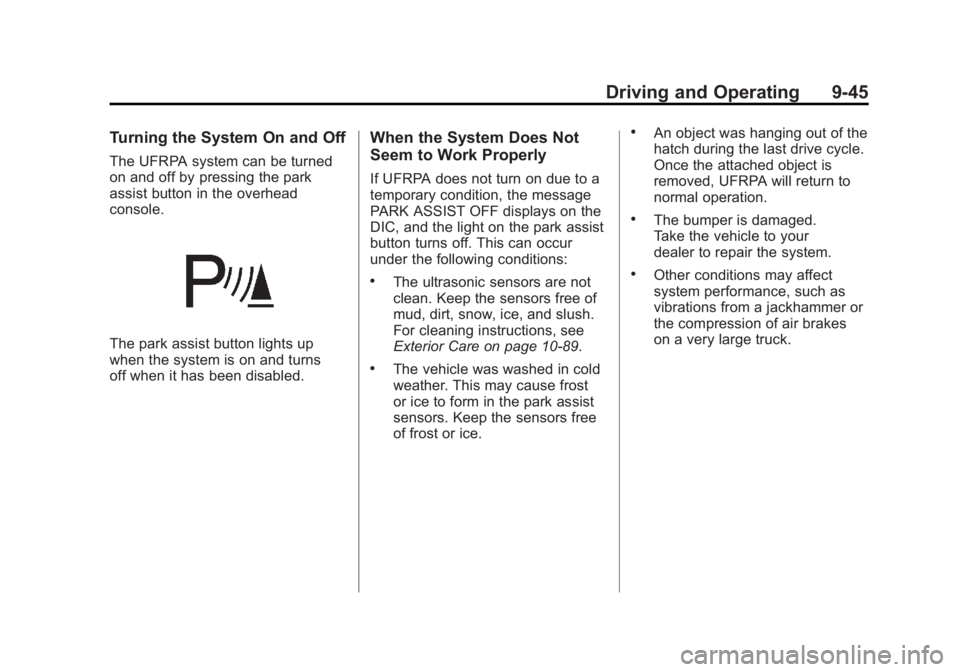
The UFRPA system can be turned
on and off by pressing the park
assist button in the overhead
console.
The park assist button lights up
when the system is on and turns
off when it has been disabled.
When the System Does Not
Seem to Work Properly
If UFRPA does not turn on due to a
temporary condition, the message
PARK ASSIST OFF displays on the
DIC, and the light on the park assist
button turns off. This can occur
under the following conditions:
.The ultrasonic sensors are not
clean. Keep the sensors free of
mud, dirt, snow, ice, and slush.
For cleaning instructions, see
Exterior Care on page 10‑89.
.The vehicle was washed in cold
weather. This may cause frost
or ice to form in the park assist
sensors. Keep the sensors free
of frost or ice.
.An object was hanging out of the
hatch during the last drive cycle.
Once the attached object is
removed, UFRPA will return to
normal operation.
.The bumper is damaged.
Take the vehicle to your
dealer to repair the system.
.Other conditions may affect
system performance, such as
vibrations from a jackhammer or
the compression of air brakes
on a very large truck.
Page 357 of 516
Black plate (55,1)Chevrolet Volt Owner Manual - 2011
Driving and Operating 9-55
A portable charge cord used to
charge the vehicle high voltage
battery is stored under the rear
luggage compartment.
The charge cord used to charge the
vehicle is a high‐powered electrical
device. During normal operation, the
AC wall plug of the charge cord may
feel warm. The AC wall plug must fit
tightly into an AC outlet that is in
good condition.
{WARNING
Using the charge cord with a
worn or damaged AC outlet
may cause burns or start a fire.
Periodically, check the AC wall
plug and charge cord while the
vehicle is charging. If the AC wall
plug feels hot, unplug the charge
cord and have the AC outlet
replaced by a qualified electrician.
Replace the charge cord if the AC
wall plug or cord are damaged.
Do not use an AC outlet that is
worn or damaged.
{WARNING
An extension cord should not
be used to charge the vehicle.
Use of an extension cord may
increase the risk of electric
shock or other hazards.
If an extension cord is used
because of limited access
to 120V AC power, use the
following safeguards:
The 120V AC outlet should be
GFCI protected.
The extension cord should be:
.GFCI protected.
.12 or 14 gage, 3 conductor.
.Rated for outdoor.
Charge Cord Status Indicators
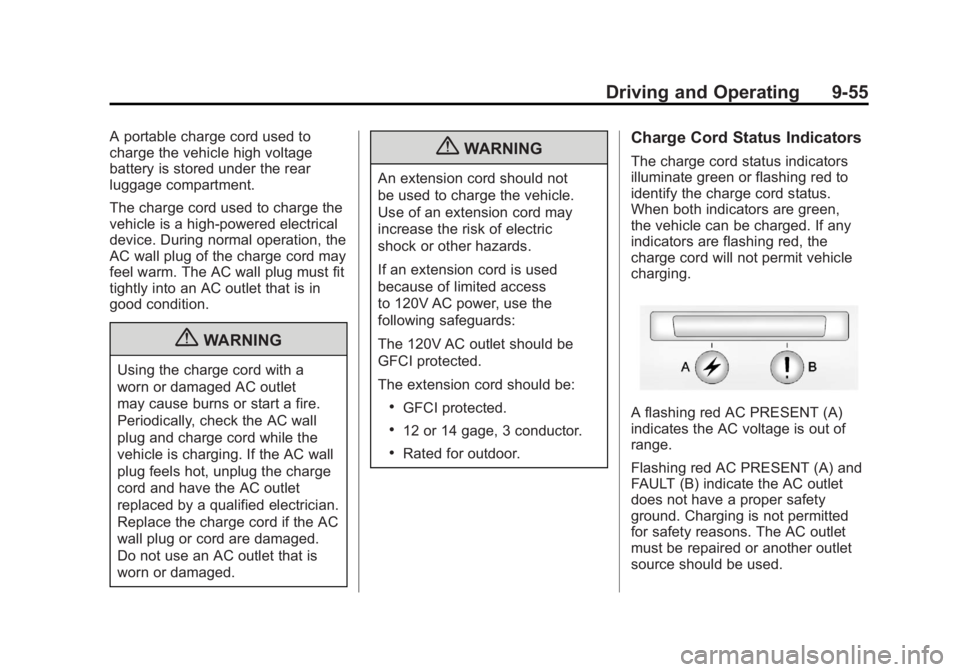
The charge cord status indicators
illuminate green or flashing red to
identify the charge cord status.
When both indicators are green,
the vehicle can be charged. If any
indicators are flashing red, the
charge cord will not permit vehicle
charging.
A flashing red AC PRESENT (A)
indicates the AC voltage is out of
range.
Flashing red AC PRESENT (A) and
FAULT (B) indicate the AC outlet
does not have a proper safety
ground. Charging is not permitted
for safety reasons. The AC outlet
must be repaired or another outlet
source should be used.
Page 360 of 516
Black plate (58,1)Chevrolet Volt Owner Manual - 2011
9-58 Driving and Operating
Gasoline Specifications
(U.S. and Canada Only)
At a minimum, gasoline should
meet ASTM specification
D 4814 in the United States or
CAN/CGSB‐3.5 or 3.511 in Canada.
Some gasolines contain an
octane-enhancing additive called
methylcyclopentadienyl manganese
tricarbonyl (MMT). We recommend
against the use of gasolines
containing MMT. SeeFuel Additives
on page 9‑59 for additional
information.
California Fuel
Requirements
If the vehicle is certified to meet
California Emissions Standards,
it is designed to operate on fuels
that meet California specifications.
See the underhood emission control
label. If this fuel is not available in
states adopting California Emissions
Standards, the vehicle will operate
satisfactorily on fuels meeting
federal specifications, but emission
control system performance might
be affected. The malfunction
indicator lamp could turn on and the
vehicle might fail a smog‐check test.
See Malfunction Indicator Lamp on
page 5‑21. If this occurs, return to
your authorized dealer for diagnosis.
If it is determined that the condition
is caused by the type of fuel used,
repairs might not be covered by the
vehicle warranty.
Fuels in Foreign
Countries
Never use leaded gasoline or any
other fuel not recommended in the
previous text on fuel. Costly repairs
caused by use of improper fuel
would not be covered by the vehicle
warranty.
To check the fuel availability, ask
an auto club, or contact a major oil
company that does business in the
country where you will be driving.
Page 382 of 516

Black plate (16,1)Chevrolet Volt Owner Manual - 2011
10-16 Vehicle Care
When the system has calculated
that oil life has been diminished,
it indicates that an oil change is
necessary. A CHANGE ENGINE
OIL SOON message comes on.
Change the oil as soon as possible
within the next 1 000 km (600 mi).
It is possible that, if driving under
the best conditions, the oil life
system might indicate that an oil
change is not necessary for up
to two years. The engine oil and
filter must be changed at least
once every two years and, at this
time, the system must be reset.
Your dealer has trained service
people who will perform this work
and reset the system. It is also
important to check the oil regularly
over the course of an oil drain
interval and keep it at the proper
level.
If the system is ever reset
accidentally, the oil must be
changed at 5 000 km (3,000 mi)
since the last oil change.
Remember to reset the oil life
system whenever the oil is changed.How to Reset the Engine Oil
Life System
Reset the system whenever the
engine oil is changed so that the
system can calculate the next
engine oil change. To reset the
system:
1. Use the SELECT knob to selectOIL LIFE on the DIC menu.
2. Press SELECT to start the OIL LIFE reset procedure.
3. The DIC menu will display “Are
you sure that you want to reset?”
Use SELECT to choose YES to
reset oil life or NO to exit and
return to the previous menu.
4. If YES is selected, the DIC menu will display RESET OIL LIFE for
a short time and then 100% OIL
LIFE will be displayed when
OIL LIFE is successfully reset.
If the CHANGE ENGINE OIL SOON
message comes back on when the
vehicle is started, the engine oil life
system has not reset. Repeat the
procedure.
Engine Air Cleaner/Filter
See Engine Compartment Overview
on page 10‑10 for the location of the
engine air cleaner/filter.
When to Inspect the Engine Air
Filter
Inspect the air filter at the scheduled
maintenance intervals and replace
it at the first oil change after each
80 000 km (50,000 mi) interval.
See Scheduled Maintenance on
page 11‑2 for more information.
If driving in dusty/dirty conditions,
inspect the air filter at each engine
oil change.
How to Inspect the Engine Air
Filter
To inspect the air filter, remove it
from the engine air cleaner/filter
assembly and lightly shake to
release loose dust and dirt. If the
air filter remains covered with dirt,
a new air filter is required.