change time CHEVROLET VOLT 2011 Owner's Guide
[x] Cancel search | Manufacturer: CHEVROLET, Model Year: 2011, Model line: VOLT, Model: CHEVROLET VOLT 2011Pages: 516, PDF Size: 6.61 MB
Page 237 of 516
Black plate (47,1)Chevrolet Volt Owner Manual - 2011
Infotainment System 7-47
Navigation Symbols
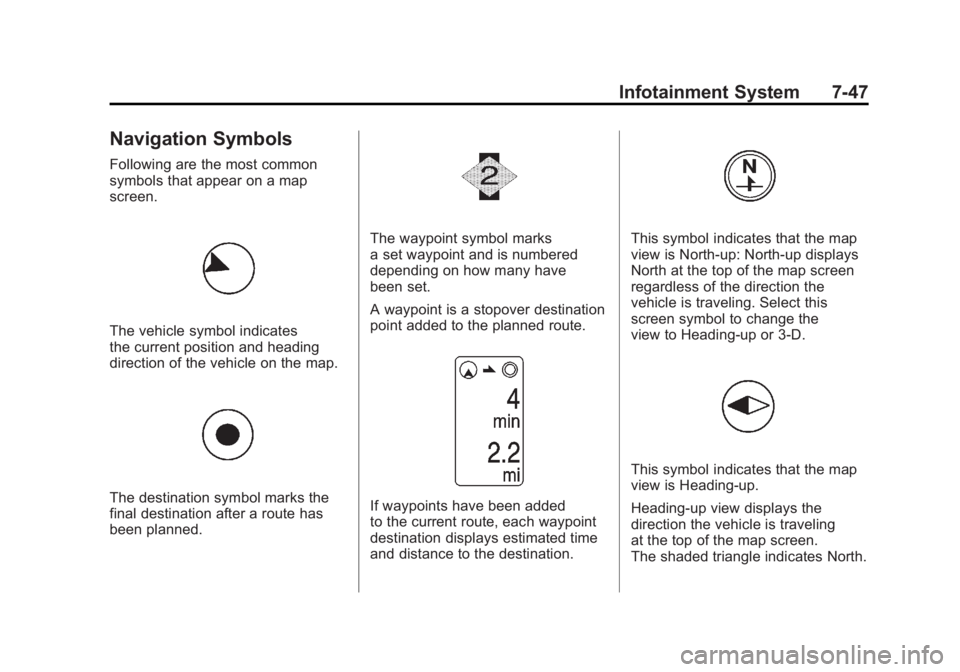
Following are the most common
symbols that appear on a map
screen.
The vehicle symbol indicates
the current position and heading
direction of the vehicle on the map.
The destination symbol marks the
final destination after a route has
been planned.
The waypoint symbol marks
a set waypoint and is numbered
depending on how many have
been set.
A waypoint is a stopover destination
point added to the planned route.
If waypoints have been added
to the current route, each waypoint
destination displays estimated time
and distance to the destination.
This symbol indicates that the map
view is North-up: North-up displays
North at the top of the map screen
regardless of the direction the
vehicle is traveling. Select this
screen symbol to change the
view to Heading-up or 3-D.
This symbol indicates that the map
view is Heading-up.
Heading-up view displays the
direction the vehicle is traveling
at the top of the map screen.
The shaded triangle indicates North.
Page 256 of 516

Black plate (66,1)Chevrolet Volt Owner Manual - 2011
7-66 Infotainment System
Previous Destinations
Previously downloaded OnStar
destinations are saved under
Previous Destinations in the
navigation system where they
can be accessed or saved to
the address book.
Map Destination Screen Functions
Destination Map Screen
If the map screen is used to show
destination, it has map screen
capabilities such as Go, Save,
Zoom, Scroll, etc. The address is
shown at the top of the screen.
Configure Menu
Adjust features and preferences
through the Configure Menu.
The last selected menu screen
displays. Adjust features for Sound,
Radio, Nav (navigation), Display,
or Time.
Radio
Press the CONFIG button to
enter the Menu options. Turn the
TUNE/MENU knob to scroll through
the available menu options. Press
the TUNE/MENU knob or press
Radio to display the radio settings.
Press this feature to make changes
for radio information displayed,
preset pages, Auto Volume, Audio
Cue Options, and XM Categories
Restore. See Satellite Radio on
page 7‑16 for more information.
Nav (Navigation)
Press the CONFIG button to
enter the Menu options. Turn the
TUNE/MENU knob to scroll through
the available menu options. Press
the TUNE/MENU knob or press the
Nav screen button.
XM NavTraffic®(if equipped)
The navigation system might
have an XM NavTraffic receiver.
It is a subscription service provided
through XM Satellite Radio.
A service fee is required to
receive the XM NavTraffic service.
Real-time traffic information is
provided to fully integrate the
navigation system to display
current traffic conditions for
the chosen route.
A screen displays to indicate if the
XM NavTraffic subscription is not
activated.
Page 264 of 516

Black plate (74,1)Chevrolet Volt Owner Manual - 2011
7-74 Infotainment System
Display
Press the CONFIG button to
enter the menu options. Turn the
TUNE/MENU knob to scroll through
the available setup features. Press
the TUNE/MENU knob or press the
Display screen button to display
other options within that feature.
Dimming Mode
Auto (Automatic):The screen
background automatically adjusts
depending on exterior lighting
conditions.
Day: The map background
brightens. Night:
The map background
darkens.
To change the overall brightness
setting for the display, use the
vehicle interior lighting dimming
control.
Setting the Clock
To set the time:
1. Press the TP (Time Program)
button to go directly to the
time setting page or press the
CONFIG button and select
Time from the list.
2. Press + or –to decrease or
increase the Hours and Minutes
displayed on the clock.
12/24 HR Format: Press the 12 HR
screen button for standard time;
press the 24 HR screen button for
military time.
Day + or Day –:Press the day + or
day –display buttons to increase or
decrease the day. Display:
Press Display to turn the
display of the time on the screen on
or off.
Global Positioning
System (GPS)
The position of the vehicle is
determined by using satellite
signals, various vehicle signals,
and map data.
At times, other interferences such
as the satellite condition, road
configuration, the condition of the
vehicle, and/or other circumstances
can interfere with the navigation
system's ability to determine the
accurate position of the vehicle.
The GPS shows the current position
of the vehicle using signals sent by
the GPS Satellites of the United
States Department of Defense.
Page 265 of 516

Black plate (75,1)Chevrolet Volt Owner Manual - 2011
Infotainment System 7-75
When the vehicle is not receiving
signals from the satellites, a symbol
appears on the map screen. See
Navigation Symbols on page 7‑47.
This system might not be available
or interferences can occur if any of
the following is true:
.Signals are obstructed by tall
buildings, trees, large trucks,
or a tunnel.
.Satellites are being repaired or
improved.
For more information if the GPS
is not functioning properly, see
“If the System Needs Service” and
“Problems with Route Guidance.”
Vehicle Positioning
At times, the position of the vehicle
on the map could be inaccurate
due to one or more of the following
reasons:
.The road system has changed.
.The vehicle is driving on slippery
road surfaces such as in sand,
gravel, and/or snow.
.The vehicle is traveling on
winding roads or long straight
roads.
.Approaching a tall building or a
large vehicle.
.The surface streets run parallel
to a freeway.
.The vehicle has been transferred
by a vehicle carrier or a ferry.
.The current position calibration
is set incorrectly.
.The vehicle is traveling at high
speed.
.The vehicle changes directions
more than once, or the vehicle
is turning on a turn table in a
parking lot.
.The vehicle is entering and/or
exiting a parking lot, garage,
or a lot with a roof.
.The GPS signal is not received.
.A roof carrier is installed on the
vehicle.
.Tire chains have been installed.
.The tires are replaced or worn.
.The tire pressure for the tires is
incorrect.
.This is the first navigation use
after the map data is updated.
.The 12-volt battery is
disconnected for several days.
.The vehicle is driving in heavy
traffic where driving is at low
speeds, and the vehicle is
stopped and started repeatedly.
Page 266 of 516
Black plate (76,1)Chevrolet Volt Owner Manual - 2011
7-76 Infotainment System
Problems with Route
Guidance
Inappropriate route guidance can
occur under one or more of the
following conditions:
.The turn was not made on the
road indicated.
.Route guidance might not be
available when using automatic
rerouting for the next right or
left turn.
.The route might not be changed
when using automatic rerouting.
.There is no route guidance when
turning at an intersection.
.Plural names of places might be
announced occasionally.
.It could take a long time to
operate automatic rerouting
during high-speed driving.
.Automatic rerouting might
display a route returning to the
set waypoint if heading for a
destination without passing
through a set waypoint.
.The route prohibits the entry
of a vehicle due to a regulation
by time or season or any other
regulation which may be given.
.Some routes might not be
searched.
.The route to the destination
might not be shown if there
are new roads, if roads have
recently changed, or if certain
roads are not listed in the map
data. SeeMaps on page 7‑44
for more information.
To recalibrate the vehicle's position
on the map, park with the vehicle
on for two to five minutes, until the
vehicle position updates.
If the System Needs
Service
If the navigation system needs
service and the steps listed here
have been followed but there are
still problems, see your dealer for
assistance.
Ordering Map DVDs
The map data in the vehicle is
the most up-to-date information
available when the vehicle was
produced. The map data is updated
periodically, provided that the map
information has changed.
For questions about the operation of
the navigation system or the update
process, contact the GM Nav Disc
Center toll‐free phone number,
1‐877‐NAV‐DISC (1‐877‐628‐3472)
or go to the center's website,
www.gmnavdisc.com. If updates
are needed, call the GM Nav Disc
Center or order a new disc online.
To order a disc, have the vehicle's
Vehicle Identification Number (VIN)
available. See “Vehicle Identification
Number (VIN).”
After receiving the updated disc,
see “Installing the DVD Map Disc”
under Maps on page 7‑44 for more
information.
Page 277 of 516
Black plate (87,1)Chevrolet Volt Owner Manual - 2011
Infotainment System 7-87
Connecting to a Different Phone
To connect to a different cell phone,
the Bluetooth system looks for the
next available cell phone in the
order in which all available cell
phones were paired. Depending
on which cell phone you want to
connect to, you may have to use
this command several times.
1. Press
bg. Say “Hands Free”
after the tone.
2. Say “Bluetooth.”
3. Say “Change phone.”
.If another cell phone is
found, the response will
be“
connected.”
.If another cell phone is not
found, the original phone
remains connected.
Storing and Deleting Phone
Numbers
The system can store up to
30 phone numbers as name tags
in the Hands-Free Directory that is
shared between the Bluetooth and
OnStar systems.
The following commands are used
to delete and store phone numbers.
Store: This command will store
a phone number, or a group of
numbers as a name tag.
Digit Store: This command allows
a phone number to be stored as a
name tag by entering the digits one
at a time.
Delete: This command is used to
delete individual name tags.
Delete All Name Tags: This
command deletes all stored
name tags in the Hands-Free
Calling Directory and the OnStar
Turn-by-Turn Destinations Directory. Using the
“Store”Command
1. Pressb g. Say “Hands Free”
after the tone.
2. Say “Store.”
3. Say the phone number or group of numbers to store all at once
with no pauses, then follow the
directions given by the system to
save a name tag for this number.
Using the “Digit Store” Command
If an unwanted number is
recognized by the system, say
“Clear” at any time to clear the
last number.
To hear all of the numbers
recognized by the system,
say “Verify” at any time.
1. Press
b g. Say “Hands Free”
after the tone.
2. Say “Digit Store.”
Page 278 of 516
Black plate (88,1)Chevrolet Volt Owner Manual - 2011
7-88 Infotainment System
3. One at a time, say each numberto store. After each number is
entered, the system repeats
back the number it heard
followed by a tone. After the
last number has been entered,
say “Store,” and then follow the
directions given by the system to
save a name tag for this number.
Using the “Delete”Command
1. Press
b g. Say “Hands Free”
after the tone.
2. Say “Delete.”
3. Say the name tag you want to delete. Using the
“Delete All Name Tags”
Command
This command deletes all stored
name tags in the Hands-Free
Calling Directory and the OnStar
Turn-by-Turn Destinations Directory.
To delete all name tags:
1. Press
b g. Say “Hands Free”
after the tone.
2. Say “Delete all name tags.”
Listing Stored Numbers
The list command will list all the
stored numbers and name tags.
Using the “List”Command
1. Press
b g. Say “Hands Free”
after the tone.
2. Say “Directory.”
3. Say “Hands-Free Calling.”
4. Say “List.”
Making a Call
Calls can be made using the
following commands:
Dial or Call: The dial or
call command can be used
interchangeably to dial a phone
number or a stored name tag.
Digit Dial: This command allows
a phone number to be dialed by
entering the digits one at a time.
Re‐dial: This command is used to
dial the last number used on the cell
phone.
Using the “Dial”or“Call”
Command
1. Press
b g. Say “Hands Free”
after the tone.
2. Say “Dial”or“Call.”
3. Say the entire number without pausing or say the name tag.
Once connected, the person called
will be heard through the audio
speakers.
Page 329 of 516
Black plate (27,1)Chevrolet Volt Owner Manual - 2011
Driving and Operating 9-27
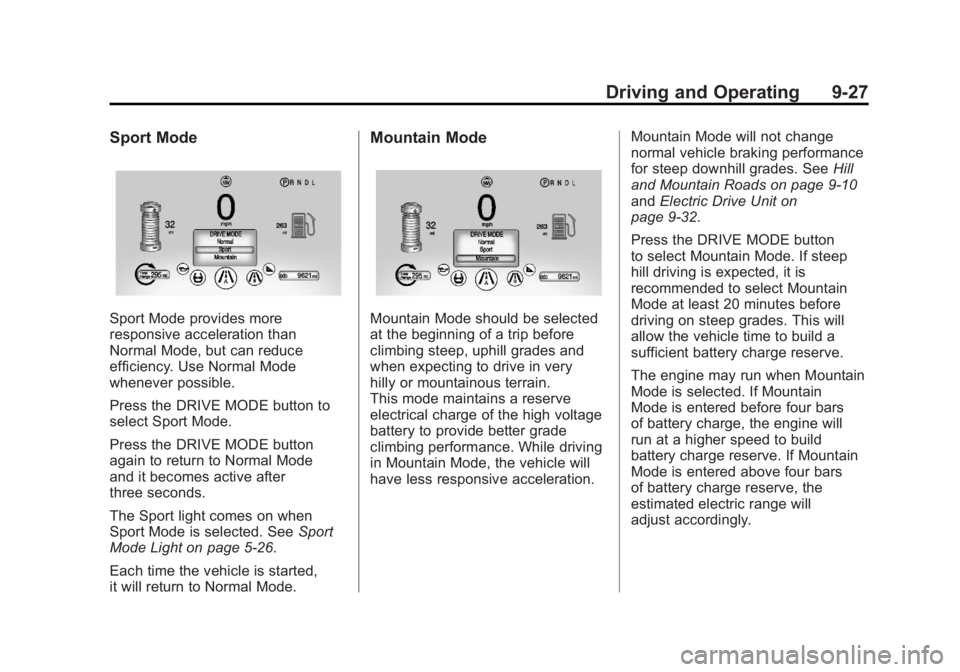
Sport Mode
Sport Mode provides more
responsive acceleration than
Normal Mode, but can reduce
efficiency. Use Normal Mode
whenever possible.
Press the DRIVE MODE button to
select Sport Mode.
Press the DRIVE MODE button
again to return to Normal Mode
and it becomes active after
three seconds.
The Sport light comes on when
Sport Mode is selected. SeeSport
Mode Light on page 5‑26.
Each time the vehicle is started,
it will return to Normal Mode.
Mountain Mode
Mountain Mode should be selected
at the beginning of a trip before
climbing steep, uphill grades and
when expecting to drive in very
hilly or mountainous terrain.
This mode maintains a reserve
electrical charge of the high voltage
battery to provide better grade
climbing performance. While driving
in Mountain Mode, the vehicle will
have less responsive acceleration. Mountain Mode will not change
normal vehicle braking performance
for steep downhill grades. See
Hill
and Mountain Roads on page 9‑10
and Electric Drive Unit on
page 9‑32.
Press the DRIVE MODE button
to select Mountain Mode. If steep
hill driving is expected, it is
recommended to select Mountain
Mode at least 20 minutes before
driving on steep grades. This will
allow the vehicle time to build a
sufficient battery charge reserve.
The engine may run when Mountain
Mode is selected. If Mountain
Mode is entered before four bars
of battery charge, the engine will
run at a higher speed to build
battery charge reserve. If Mountain
Mode is entered above four bars
of battery charge reserve, the
estimated electric range will
adjust accordingly.
Page 336 of 516
Black plate (34,1)Chevrolet Volt Owner Manual - 2011
9-34 Driving and Operating
If there is a problem with ABS, this
warning light stays on. SeeAntilock
Brake System (ABS) Warning Light
on page 5‑26.
If driving safely on a wet road
and it becomes necessary to
slam on the brakes and continue
braking to avoid a sudden obstacle,
a computer senses that the wheels
are slowing down. If one of the
wheels is about to stop rolling, the
computer will separately work the
brakes at each wheel. ABS can change the brake pressure
to each wheel, as required, faster
than any driver could. This can help
the driver steer around the obstacle
while braking hard.
As the brakes are applied, the
computer keeps receiving updates
on wheel speed and controls
braking pressure accordingly.
Remember: ABS does not change
the time needed to get a foot up to
the brake pedal or always decrease
stopping distance. If you get too
close to the vehicle in front of you,
there will not be enough time to
apply the brakes if that vehicle
suddenly slows or stops. Always
leave enough room up ahead to
stop, even with ABS.
Using ABS
Do not pump the brakes. Just hold
the brake pedal down firmly and let
ABS work. You might hear the ABS
pump or motor operating and feel
the brake pedal pulsate, but this is
normal.
Braking in Emergencies
ABS allows the driver to steer and
brake at the same time. In many
emergencies, steering can help
more than even the very best
braking.
Page 358 of 516
Black plate (56,1)Chevrolet Volt Owner Manual - 2011
9-56 Driving and Operating
A flashing red FAULT (B) indicates a
charge cord fault. The charge cord
will attempt to reset automatically.
If the flashing red FAULT (B)
continues for more than
30 seconds, unplug the charge
cord from the wall to reset. If the
fault remains, see your dealer for
service.
Charge Level Button
Two charge levels are available by
pressing the charge level button.
Select reduced or normal level.
The charge level cannot be
changed when the vehicle plug is
plugged into the charge port on the
vehicle. If the charge level button
is pressed while the vehicle plug is
plugged into the charge port on the
vehicle, the charge level indicatorswill flash briefly. To change the
charge level, unplug the vehicle
plug from the charge port on the
vehicle and select the desired
charge level.
Normal Level:
This level is
recommended. All four charge
level indicators will be lit.
Reduced Level: Use when the
electrical current is limited. Two
charge level indicators will be lit.
Vehicle Plug
The vehicle plug attaches to the
charge port on the vehicle. There
is a flashlight built into the vehicle
plug that can be used by squeezing
the vehicle plug lever. The flashlight
will turn off when the connection is
complete and the lever is released.
Electrical Requirements
for Battery Charging
The AC outlet must have a
grounded, dedicated, 15 amp or
greater, three‐prong wall plug.
That means there should be no
other major appliances connected
to the same circuit. If it is not a
dedicated circuit, the current rating
of the outlet circuit breaker could
be exceeded and cause it to trip
or open. The vehicle can be
charged in the reduced level mode.
See “Charge Level Button” in this
section. Reduced level mode allows
a non‐dedicated circuit to be used
but increases the charging time.
This vehicle is capable of being
charged with a variety of standard
vehicle charging equipment.