instrument panel CHEVROLET VOLT 2011 Owner's Guide
[x] Cancel search | Manufacturer: CHEVROLET, Model Year: 2011, Model line: VOLT, Model: CHEVROLET VOLT 2011Pages: 516, PDF Size: 6.61 MB
Page 124 of 516
Black plate (4,1)Chevrolet Volt Owner Manual - 2011
5-4 Instruments and Controls
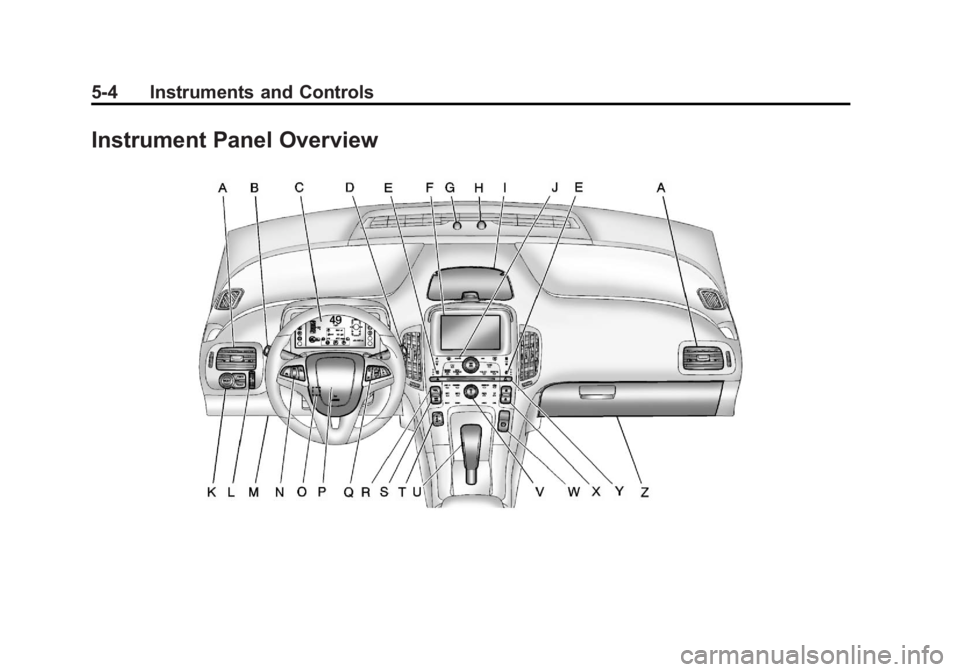
Instrument Panel Overview
Page 125 of 516
Black plate (5,1)Chevrolet Volt Owner Manual - 2011
Instruments and Controls 5-5
A.Air Vents on page 8‑9.
B. Turn and Lane‐Change Lever. See Turn and Lane-Change
Signals on page 6‑4.
Exterior Lamp Controls on
page 6‑1.
Pedestrian Friendly Alert on
page 6‑2.
C. Instrument Cluster on page 5‑9.
Driver Information Center (DIC)
Display. See Driver Information
Center (DIC) on page 5‑43.
D. Windshield Wiper/Washer on
page 5‑7.
E. Heated Front Seats on page 3‑6
(If Equipped).
F. Center Stack Display on
page 5‑31.
G. Charging Status Indicator. See Charging Status Feedback
on page 9‑52. H. Light Sensor. See
Daytime
Running Lamps (DRL) on
page 6‑3.
I. Instrument Panel Storage on
page 4‑1.
J. Automatic Climate Control
System on page 8‑1.
K. Driver Information Center (DIC) Controls. See Driver Information
Center (DIC) on page 5‑43.
L. Instrument Panel Illumination
Control on page 6‑5.
M. Data Link Connector (DLC) (Out of View). See Malfunction
Indicator Lamp on page 5‑21.
N. Cruise Control on page 9‑40.
O. Steering Wheel Adjustment on
page 5‑6.
P. Horn on page 5‑7.
Q. Steering Wheel Controls on
page 5‑6 (If Equipped). R. Leaf Button. See
Center Stack
Display on page 5‑31.
S. DRIVE MODE Button. See Driver Selected Operating
Modes on page 9‑26.
T. Power Button on page 9‑18.
U. Shift Lever. See Electric Drive
Unit on page 9‑32.
V. Infotainment on page 7‑2.
Navigation System. See Using
the Navigation System on
page 7‑39.
W. Electric Parking Brake on
page 9‑35.
X. Power Door Locks on
page 2‑11.
Y. Hazard Warning Flashers on
page 6‑4.
Z. Glove Box on page 4‑1.
Page 128 of 516
Black plate (8,1)Chevrolet Volt Owner Manual - 2011
5-8 Instruments and Controls
Clear ice and snow from the wiper
blades before using them. If frozen
to the windshield, carefully loosen or
thaw them. Damaged wiper blades
should be replaced. SeeWiper
Blade Replacement on page 10‑31.
Heavy snow or ice can overload the
wipers. If the wiper motor overheats,
the windshield wipers will stop until
the motor cools and the wiper
control is turned off. See Electrical
System Overload on page 10‑37.
Wipe Parking
If the vehicle is turned off, while the
wipers are on 1, 2, or
G, they will
stop immediately.
If the windshield wiper lever is then
moved to off before the driver door
is opened or within 10 minutes, the
wipers will restart and move to the
base of the windshield.
If the vehicle is turned off during a
windshield wash, the wipers will
stop when they reach the base of
the windshield.
Windshield Washer
Pull the windshield wiper lever
toward you to spray windshield
washer fluid and activate the wipers.
The washer and wipers will continue
until the lever is released or the
maximum wash time is reached.
When the windshield wiper lever
is released, additional wipes may
occur depending on how long
the windshield washer had been
activated. See Washer Fluid on
page 10‑24 for information on
filling the windshield washer fluid
reservoir.
{WARNING
In freezing weather, do not use
the washer until the windshield is
warmed. Otherwise the washer
fluid can form ice on the
windshield, blocking your vision.
Power Outlets
The accessory power outlets can be
used to plug in electrical equipment,
such as a cell phone or MP3 player.
There are three accessory power
outlets:
.Inside the front of the center
floor console.
.On the rear of the center floor
console.
.Inside the instrument panel
storage area.
The power outlets supply power
while the vehicle is on, or if the
vehicle is in Retained Accessory
Power (RAP). See Retained
Accessory Power (RAP) on
page 9‑22.
Page 185 of 516
Black plate (1,1)Chevrolet Volt Owner Manual - 2011
Lighting 6-1
Lighting
Exterior Lighting
Exterior Lamp Controls . . . . . . . . 6-1
Headlamp High/Low-BeamChanger . . . . . . . . . . . . . . . . . . . . . 6-2
Flash-to-Pass . . . . . . . . . . . . . . . . . 6-2
Pedestrian Friendly Alert . . . . . . 6-2
Daytime Running Lamps (DRL) . . . . . . . . . . . . . . . . 6-3
Hazard Warning Flashers . . . . . 6-4
Turn and Lane-Change Signals . . . . . . . . . . . . . . . . . . . . . . 6-4
Interior Lighting
Instrument Panel IlluminationControl . . . . . . . . . . . . . . . . . . . . . . 6-5
Dome Lamps . . . . . . . . . . . . . . . . . 6-5
Reading Lamps . . . . . . . . . . . . . . . 6-5
Lighting Features
Entry Lighting . . . . . . . . . . . . . . . . . 6-5
Exit Lighting . . . . . . . . . . . . . . . . . . . 6-6
Battery Power Protection . . . . . . 6-6
Exterior Lighting
Exterior Lamp Controls
The exterior lamp control is on the
turn signal/lane change lever.
O(Exterior Lamp Control):
Operates the exterior lamps. Turn to
one of the following positions:
O(Off): Turns the exterior
lamps off. AUTO (Automatic Headlamps):
Turns the exterior lamps on and off
automatically depending on the
exterior light.
;(Parking Lamps):
Turns on
the parking lamps together with the
following:
.Sidemarker Lamps
.Taillamps
.License Plate Lamps
.Instrument Panel Lights
5(Headlamps): Turns on the
headlamps, together with the
previously listed lamps and lights.
Page 187 of 516

Black plate (3,1)Chevrolet Volt Owner Manual - 2011
Lighting 6-3
Daytime Running
Lamps (DRL)
The Daytime Running Lamps (DRL)
system comes on in daylight when
the following conditions are met:
.The vehicle is on.
.The exterior lamp control is in
the automatic position.
.The electric drive unit is not in
P (Park).
.The light sensor determines it is
daytime.A light sensor on top of the
instrument panel makes the DRL
work, so be sure it is not covered.
Fully functional DRL are required on
all vehicles first sold in Canada.When the DRL are on, the taillamps,
sidemarker lamps, instrument panel
lights, and other lamps will not be
on. The instrument cluster will be lit.
When the exterior lamp control band
is turned to the headlamp position,
the low-beam headlamps come on.
The other lamps that come on with
the headlamps will also come on.
When the vehicle is on and you are
stopped, the DRL can be turned off
by moving the shift lever to P (Park).
The DRL will stay off until the shift
lever is moved out of the P (Park)
position.
The regular headlamp system
should be turned on when needed.
Page 189 of 516

Black plate (5,1)Chevrolet Volt Owner Manual - 2011
Lighting 6-5
Interior Lighting
Instrument Panel
Illumination Control
The brightness of the instrument
panel cluster display, infotainment
display and controls, steering wheel
controls, and all other illuminated
controls, as well as feature status
indicators can be adjusted.The thumbwheel is on the
instrument panel to the left
of the steering column.
Move the thumbwheel up or down to
brighten or dim the lights.
Dome Lamps
The dome lamp controls are in the
overhead console.
To operate, press the following
buttons:
+(On):
Press to turn on the
dome lamps.
1(Door): Press to turn the lamps
on automatically when a door is
opened.
*(Off): Press to turn the lamps
off, even when a door is open.
Reading Lamps
The front reading lamps are in the
overhead console.
# $: Press to turn each lamp on
or off.
Lighting Features
Entry Lighting
The headlamps, parking lamps,
taillamps, back‐up lamps, and the
interior lights turn on briefly, when
the Remote Keyless Entry (RKE)
transmitter
Kis pressed. The lights
turn off immediately when the
POWER
Obutton is pressed or
automatically after a brief period.
Page 298 of 516

Black plate (6,1)Chevrolet Volt Owner Manual - 2011
8-6 Climate Controls
Manual Operation
A(Fan Control):Press the
fan control buttons or the touch
screen fan control, to increase or
decrease the fan speed. The fan
speed setting displays. Pressing
either button cancels automatic
fan control and the fan can be
controlled manually. Press AUTO
to return to automatic operation.
Press the fan down button
repeatedly to turn off the fan
and the climate control system.
If the fan is manually turned off
while in ECO or Comfort mode,
the display will automatically change
to Fan Only mode. When the fan is
turned back on either by manually
increasing fan speed or pressing
the AUTO button, the climate
mode will revert back to ECO
or Comfort mode. Air Delivery Mode Control:
Press CLIMATE to select the
Climate touch screen. Press the
air delivery mode touch screen
button to change the direction of
the airflow. The selected air delivery
mode button is lit. Pressing any
of the air delivery buttons cancels
automatic air delivery control and
the direction of the airflow can be
controlled manually. Press AUTO
to return to automatic operation.
To change the current mode,
select one of the following:
Y(Vent):
Air is directed to the
instrument panel outlets.
\(Bi-Level): Air is divided
between the instrument panel
outlets and the floor outlets.
[(Floor): Air is directed to the
floor outlets.
-(Defog): Air is directed to the
windshield and floor outlets. Clears
the windows of fog or moisture.
0(Defrost): Air is directed to
the windshield. The windshield is
cleared of fog or frost more quickly.
Selecting
0will disable automatic
control and the AUTO button
indicator will not be lit.
Selecting
0again will return to the
previous climate settings.
For best results, clear all snow and
ice from the windshield before
defrosting.
If
0is selected in Fan Only or
ECO mode, air conditioning or
electric heat may turn on and have
a noticeable effect on vehicle
electric range and fuel economy.
Page 301 of 516
Black plate (9,1)Chevrolet Volt Owner Manual - 2011
Climate Controls 8-9
Sensors
Solar Sensor
The solar sensor is located on top
of the instrument panel, near the
windshield, where it monitors solar
intensity.
The climate control system
uses the sensor information to
adjust the temperature, fan speed,
recirculation, and air delivery
mode for best comfort.
Do not cover the sensor; otherwise
the automatic climate control system
may not work properly.Humidity Sensor
The humidity sensor is near the
base of the inside rearview mirror.
The climate control system uses
the sensor information to adjust the
temperature and recirculation for
best comfort.
Outside Air Temperature Sensor
The outside air temperature sensor
is located behind the front grille
of the vehicle. The vehicle uses
the sensor information to display
outside air temperature. The climate
control system uses the information
to adjust the climate system
operation.
Air Vents
Use the louvers on the air vents to
change the direction of the airflow.
Use the thumbwheels near each
vent to open and close off the
airflow.
Operation Tips
.Keep all outlets open whenever
possible for best system
performance.
.Keep the path under all seats
clear of objects to help circulate
the air inside the vehicle more
effectively.
.Use of non-GM approved hood
deflectors can adversely affect
the performance of the system.
Page 314 of 516
Black plate (12,1)Chevrolet Volt Owner Manual - 2011
9-12 Driving and Operating
Blizzard Conditions
Being stuck in snow can be
a serious situation. Stay with
the vehicle unless there is help
nearby. If possible, use the
Roadside Assistance Program.
To get help and keep everyone
in the vehicle safe:
.Turn on the hazard warning
flashers.
.Tie a red cloth to an outside
mirror.
{WARNING
Snow can trap engine exhaust
under the vehicle. This may
cause exhaust gases to get
inside. Engine exhaust contains
Carbon Monoxide (CO) which
cannot be seen or smelled. It can
cause unconsciousness and even
death.(Continued)
WARNING (Continued)
If the vehicle is stuck in the snow:
.Clear away snow from
around the base of the
vehicle, especially any that
is blocking the exhaust pipe.
.Check again from time to
time to be sure snow does
not collect there.
.Open a window about 5 cm
(2 in) on the side of the
vehicle that is away from
the wind to bring in fresh air.
.Fully open the air outlets
on or under the instrument
panel.
.Adjust the climate control
system to a setting that
circulates the air inside
the vehicle and set the fan
speed to the highest setting.
See Climate Control Systems
in the Index.(Continued)
WARNING (Continued)
For more information about
carbon monoxide, see Engine
Exhaust on page 9‑30.
To conserve energy, run the
vehicle for only short periods as
needed to warm the vehicle and
then shut the vehicle off and close
the window most of the way to
save heat. Repeat this until help
arrives but only when you feel really
uncomfortable from the cold. Moving
about to keep warm also helps.
If it takes some time for help to
arrive, start the vehicle. The engine
may start to charge the 12‐volt
battery. Turn off unnecessary
accessories to conserve energy.
Page 352 of 516
Black plate (50,1)Chevrolet Volt Owner Manual - 2011
9-50 Driving and Operating
In cold weather conditions, ice
may form around the charge port
door. The charge port door may
not open on the first attempt.
Remove ice from the area and
repeat attempting to open the
charge port door.
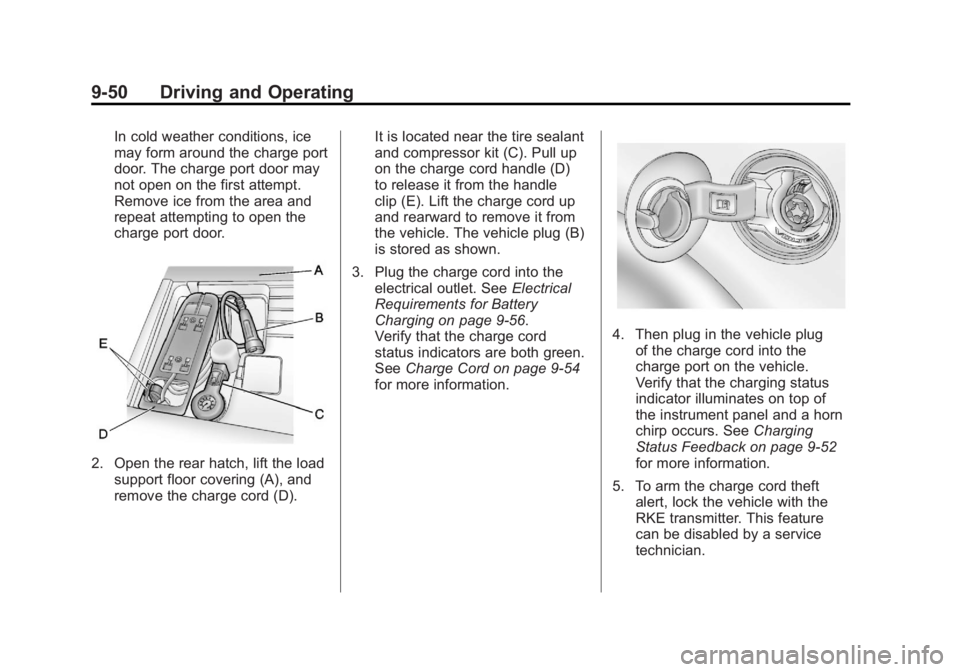
2. Open the rear hatch, lift the loadsupport floor covering (A), and
remove the charge cord (D). It is located near the tire sealant
and compressor kit (C). Pull up
on the charge cord handle (D)
to release it from the handle
clip (E). Lift the charge cord up
and rearward to remove it from
the vehicle. The vehicle plug (B)
is stored as shown.
3. Plug the charge cord into the electrical outlet. See Electrical
Requirements for Battery
Charging on page 9‑56.
Verify that the charge cord
status indicators are both green.
See Charge Cord on page 9‑54
for more information.
4. Then plug in the vehicle plug of the charge cord into the
charge port on the vehicle.
Verify that the charging status
indicator illuminates on top of
the instrument panel and a horn
chirp occurs. See Charging
Status Feedback on page 9‑52
for more information.
5. To arm the charge cord theft alert, lock the vehicle with the
RKE transmitter. This feature
can be disabled by a service
technician.