ECU CHEVROLET VOLT 2011 Owner's Guide
[x] Cancel search | Manufacturer: CHEVROLET, Model Year: 2011, Model line: VOLT, Model: CHEVROLET VOLT 2011Pages: 516, PDF Size: 6.61 MB
Page 116 of 516
Black plate (60,1)Chevrolet Volt Owner Manual - 2011
3-60 Seats and Restraints
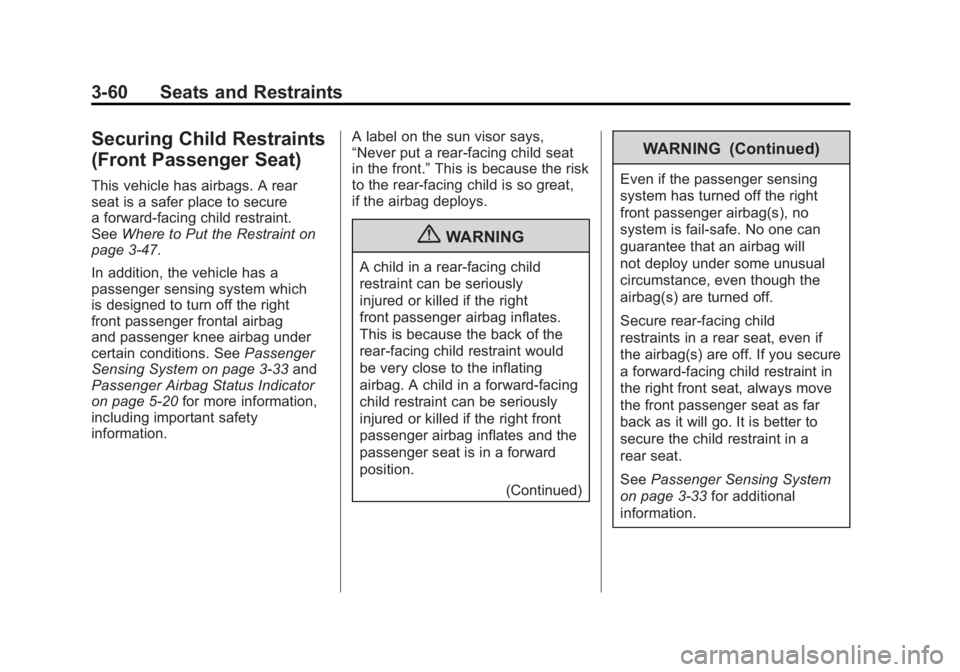
Securing Child Restraints
(Front Passenger Seat)
This vehicle has airbags. A rear
seat is a safer place to secure
a forward-facing child restraint.
SeeWhere to Put the Restraint on
page 3‑47.
In addition, the vehicle has a
passenger sensing system which
is designed to turn off the right
front passenger frontal airbag
and passenger knee airbag under
certain conditions. See Passenger
Sensing System on page 3‑33 and
Passenger Airbag Status Indicator
on page 5‑20 for more information,
including important safety
information. A label on the sun visor says,
“Never put a rear-facing child seat
in the front.”
This is because the risk
to the rear-facing child is so great,
if the airbag deploys.
{WARNING
A child in a rear-facing child
restraint can be seriously
injured or killed if the right
front passenger airbag inflates.
This is because the back of the
rear-facing child restraint would
be very close to the inflating
airbag. A child in a forward-facing
child restraint can be seriously
injured or killed if the right front
passenger airbag inflates and the
passenger seat is in a forward
position.
(Continued)
WARNING (Continued)
Even if the passenger sensing
system has turned off the right
front passenger airbag(s), no
system is fail-safe. No one can
guarantee that an airbag will
not deploy under some unusual
circumstance, even though the
airbag(s) are turned off.
Secure rear-facing child
restraints in a rear seat, even if
the airbag(s) are off. If you secure
a forward-facing child restraint in
the right front seat, always move
the front passenger seat as far
back as it will go. It is better to
secure the child restraint in a
rear seat.
SeePassenger Sensing System
on page 3‑33 for additional
information.
Page 117 of 516
Black plate (61,1)Chevrolet Volt Owner Manual - 2011
Seats and Restraints 3-61
If the child restraint has the LATCH
system, seeLower Anchors and
Tethers for Children (LATCH
System) on page 3‑49 for how and
where to install the child restraint
using LATCH. If a child restraint is
secured using a safety belt and
it uses a top tether, see Lower
Anchors and Tethers for Children
(LATCH System) on page 3‑49
for top tether anchor locations.
Do not secure a child seat in a
position without a top tether anchor
if a national or local law requires
that the top tether be anchored, or if
the instructions that come with the
child restraint say that the top strap
must be anchored.
In Canada, the law requires that
forward-facing child restraints have
a top tether, and that the tether be
attached. You will be using the lap-shoulder
belt to secure the child restraint in
this position. Follow the instructions
that came with the child restraint.
1. Move the seat as far back as
it will go before securing the
forward-facing child restraint.
When the passenger sensing
system has turned off the right
front passenger frontal airbag
and passenger knee airbag, the
off indicator on the passenger
airbag status indicator should
light and stay lit when you start
the vehicle. See Passenger
Airbag Status Indicator on
page 5‑20.
2. Put the child restraint on the seat.
3. Pick up the latch plate, and run the lap and shoulder portions of
the vehicle's safety belt through
or around the restraint. The child
restraint instructions will show
you how.
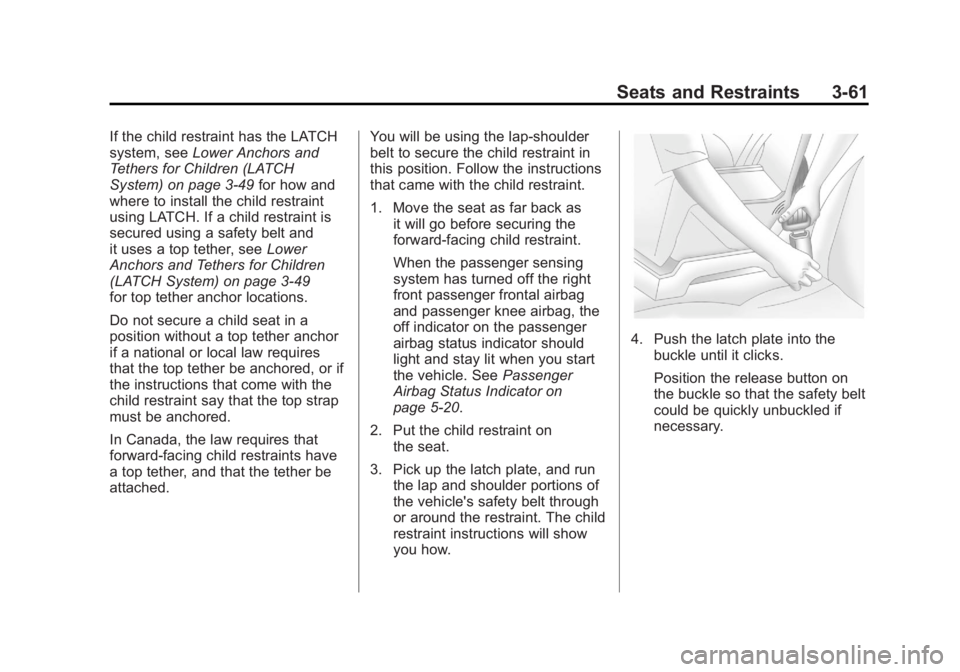
4. Push the latch plate into thebuckle until it clicks.
Position the release button on
the buckle so that the safety belt
could be quickly unbuckled if
necessary.
Page 118 of 516
Black plate (62,1)Chevrolet Volt Owner Manual - 2011
3-62 Seats and Restraints
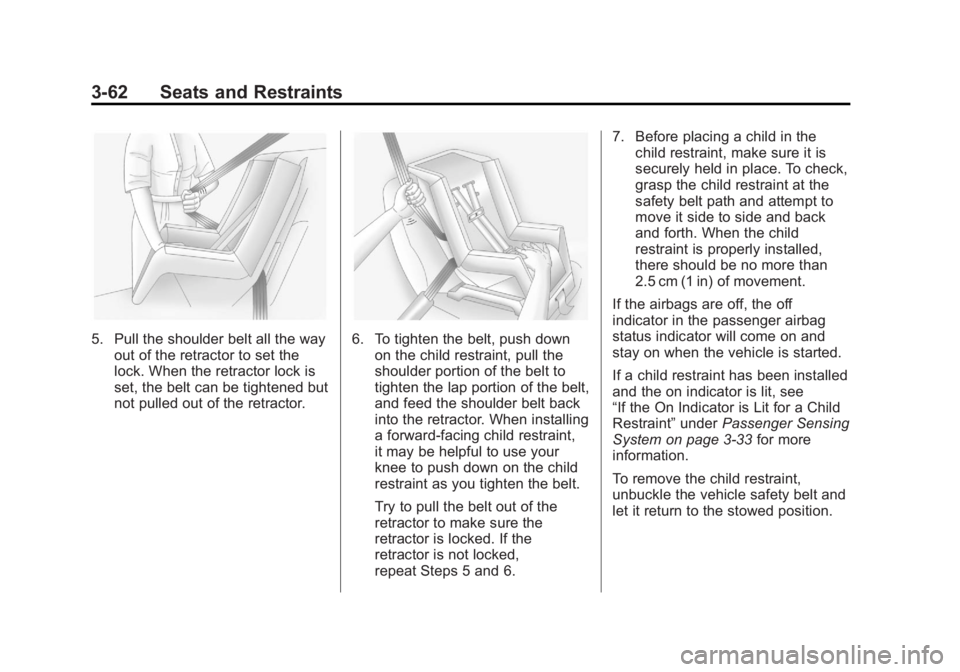
5. Pull the shoulder belt all the wayout of the retractor to set the
lock. When the retractor lock is
set, the belt can be tightened but
not pulled out of the retractor.6. To tighten the belt, push downon the child restraint, pull the
shoulder portion of the belt to
tighten the lap portion of the belt,
and feed the shoulder belt back
into the retractor. When installing
a forward-facing child restraint,
it may be helpful to use your
knee to push down on the child
restraint as you tighten the belt.
Try to pull the belt out of the
retractor to make sure the
retractor is locked. If the
retractor is not locked,
repeat Steps 5 and 6. 7. Before placing a child in the
child restraint, make sure it is
securely held in place. To check,
grasp the child restraint at the
safety belt path and attempt to
move it side to side and back
and forth. When the child
restraint is properly installed,
there should be no more than
2.5 cm (1 in) of movement.
If the airbags are off, the off
indicator in the passenger airbag
status indicator will come on and
stay on when the vehicle is started.
If a child restraint has been installed
and the on indicator is lit, see
“If the On Indicator is Lit for a Child
Restraint” underPassenger Sensing
System on page 3‑33 for more
information.
To remove the child restraint,
unbuckle the vehicle safety belt and
let it return to the stowed position.
Page 121 of 516
Black plate (1,1)Chevrolet Volt Owner Manual - 2011
Instruments and Controls 5-1
Instruments and
Controls
Instrument Panel Overview
Instrument Panel Overview . . . . 5-4
Controls
Steering Wheel Adjustment . . . 5-6
Steering Wheel Controls . . . . . . 5-6
Horn . . . . . . . . . . . . . . . . . . . . . . . . . . 5-7
Windshield Wiper/Washer . . . . . 5-7
Power Outlets . . . . . . . . . . . . . . . . . 5-8
Warning Lights, Gauges, and
Indicators
Warning Lights, Gauges, andIndicators . . . . . . . . . . . . . . . . . . . . 5-9
Instrument Cluster . . . . . . . . . . . . 5-9
Speedometer . . . . . . . . . . . . . . . . 5-15
Odometer . . . . . . . . . . . . . . . . . . . . 5-15
Trip Odometer . . . . . . . . . . . . . . . 5-15
Compass . . . . . . . . . . . . . . . . . . . . 5-16 Battery Gauge (High
Voltage) . . . . . . . . . . . . . . . . . . . . 5-16
Fuel Gauge . . . . . . . . . . . . . . . . . . 5-16
Driver Efficiency Gauge . . . . . . 5-17
Total Vehicle Range . . . . . . . . . 5-17
Safety Belt Reminders . . . . . . . 5-18
Airbag Readiness Light . . . . . . 5-19
Passenger Airbag Status Indicator . . . . . . . . . . . . . . . . . . . . 5-20
Charging System Light (12-Volt Battery) . . . . . . . . . . . . 5-21
Malfunction Indicator Lamp . . . . . . . . . . . . . 5-21
Brake System Warning Light . . . . . . . . . . . . . . . . . . . . . . . 5-24
Electric Parking Brake Light . . . . . . . . . . . . . . . . . . . . . . . 5-25
Service Electric Parking Brake Light . . . . . . . . . . . . . . . . . . . . . . . 5-25
Antilock Brake System (ABS) Warning Light . . . . . . . . . . . . . . 5-26
Sport Mode Light . . . . . . . . . . . . 5-26
Mountain Mode Light . . . . . . . . 5-26 Traction Control System
(TCS)/StabiliTrak
®Light . . . . 5-27
Engine Coolant Temperature Warning Light . . . . . . . . . . . . . . 5-27
Tire Pressure Light . . . . . . . . . . 5-27
Engine Oil Pressure Light . . . . 5-28
Low Fuel Warning Light . . . . . . 5-28
Security Light . . . . . . . . . . . . . . . . 5-29
High-Beam On Light . . . . . . . . . 5-29
Lamps On Reminder . . . . . . . . . 5-29
Cruise Control Light . . . . . . . . . 5-29
Door, Hood, or Hatch Open
Light . . . . . . . . . . . . . . . . . . . . . . . 5-30
Information Displays
Center Stack Display . . . . . . . . 5-31
Power Flows . . . . . . . . . . . . . . . . . 5-31
Charging . . . . . . . . . . . . . . . . . . . . . 5-33
Energy Information . . . . . . . . . . 5-41
Clock . . . . . . . . . . . . . . . . . . . . . . . . 5-42
Driver InformationCenter (DIC) . . . . . . . . . . . . . . . 5-43
Page 133 of 516
Black plate (13,1)Chevrolet Volt Owner Manual - 2011
Instruments and Controls 5-13
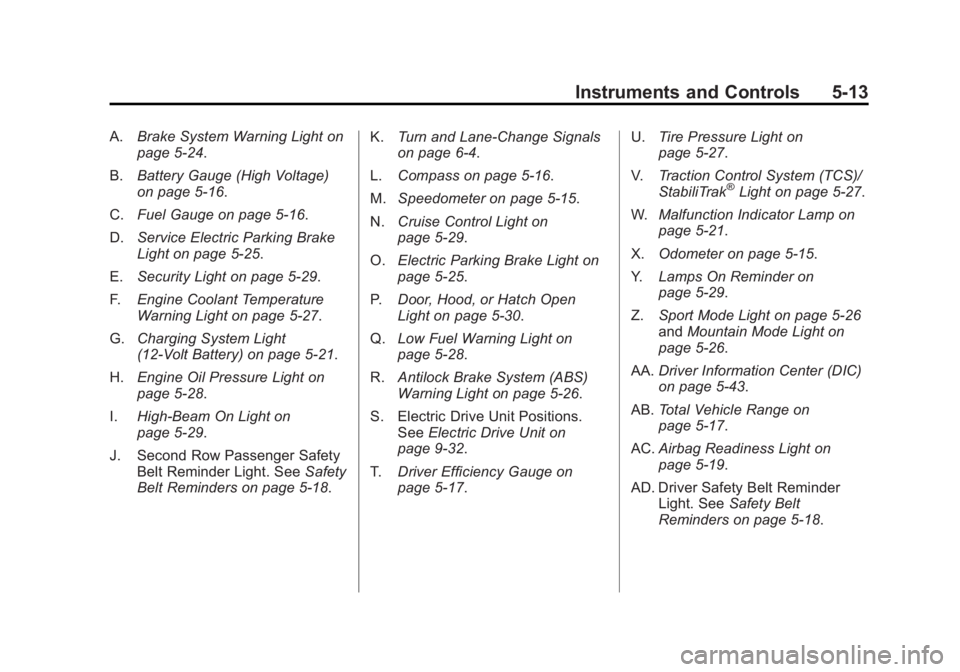
A.Brake System Warning Light on
page 5‑24.
B. Battery Gauge (High Voltage)
on page 5‑16.
C. Fuel Gauge on page 5‑16.
D. Service Electric Parking Brake
Light on page 5‑25.
E. Security Light on page 5‑29.
F. Engine Coolant Temperature
Warning Light on page 5‑27.
G. Charging System Light
(12-Volt Battery) on page 5‑21.
H. Engine Oil Pressure Light on
page 5‑28.
I. High-Beam On Light on
page 5‑29.
J. Second Row Passenger Safety Belt Reminder Light. See Safety
Belt Reminders on page 5‑18. K.
Turn and Lane-Change Signals
on page 6‑4.
L. Compass on page 5‑16.
M. Speedometer on page 5‑15.
N. Cruise Control Light on
page 5‑29.
O. Electric Parking Brake Light on
page 5‑25.
P. Door, Hood, or Hatch Open
Light on page 5‑30.
Q. Low Fuel Warning Light on
page 5‑28.
R. Antilock Brake System (ABS)
Warning Light on page 5‑26.
S. Electric Drive Unit Positions. See Electric Drive Unit on
page 9‑32.
T. Driver Efficiency Gauge on
page 5‑17. U.
Tire Pressure Light on
page 5‑27.
V. Traction Control System (TCS)/
StabiliTrak
®Light on page 5‑27.
W. Malfunction Indicator Lamp on
page 5‑21.
X. Odometer on page 5‑15.
Y. Lamps On Reminder on
page 5‑29.
Z. Sport Mode Light on page 5‑26
and Mountain Mode Light on
page 5‑26.
AA. Driver Information Center (DIC)
on page 5‑43.
AB. Total Vehicle Range on
page 5‑17.
AC. Airbag Readiness Light on
page 5‑19.
AD. Driver Safety Belt Reminder Light. See Safety Belt
Reminders on page 5‑18.
Page 149 of 516

Black plate (29,1)Chevrolet Volt Owner Manual - 2011
Instruments and Controls 5-29
Security Light
This light comes on briefly when the
vehicle is started.
If the light remains on while driving,
there is a problem with the security
system. See your dealer for service.
For more information, seeVehicle
Security on page 2‑13.
High-Beam On Light
The high-beam on light comes on
when the high-beam headlamps are
in use.
See Headlamp High/Low-Beam
Changer on page 6‑2 for more
information.
Lamps On Reminder
This light comes on when the
parking lamps, headlamps,
or taillamps are on.
Cruise Control Light
The cruise control light comes on
when the cruise control is turned on
and turns green when cruise control
is engaged.
See Cruise Control on page 9‑40 for
more information.
Page 158 of 516
Black plate (38,1)Chevrolet Volt Owner Manual - 2011
5-38 Instruments and Controls
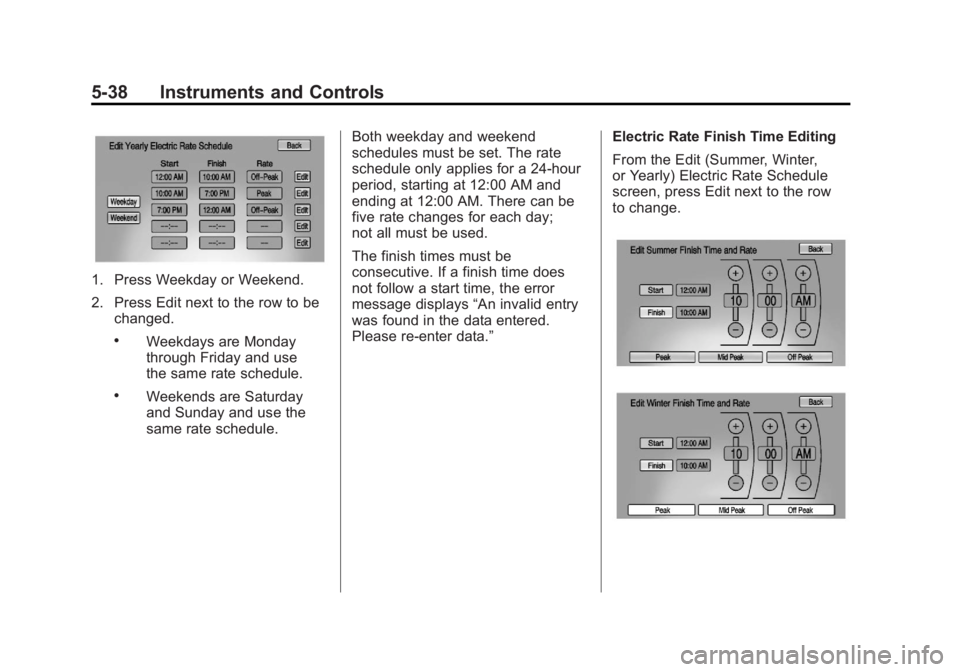
1. Press Weekday or Weekend.
2. Press Edit next to the row to bechanged.
.Weekdays are Monday
through Friday and use
the same rate schedule.
.Weekends are Saturday
and Sunday and use the
same rate schedule. Both weekday and weekend
schedules must be set. The rate
schedule only applies for a 24-hour
period, starting at 12:00 AM and
ending at 12:00 AM. There can be
five rate changes for each day;
not all must be used.
The finish times must be
consecutive. If a finish time does
not follow a start time, the error
message displays
“An invalid entry
was found in the data entered.
Please re‐enter data.” Electric Rate Finish Time Editing
From the Edit (Summer, Winter,
or Yearly) Electric Rate Schedule
screen, press Edit next to the row
to change.
Page 180 of 516

Black plate (60,1)Chevrolet Volt Owner Manual - 2011
5-60 Instruments and Controls
Remote Left in Vehicle Reminder
When on, the horn will chirp rapidly
three times if an RKE transmitter is
left in the vehicle.
To turn the remote left in vehicle
reminder feature on or off:
1. Press the Vehicle menu.
2. Select Remote Locking,Unlocking, Starting.
3. Turn the remote left in vehicle reminder feature on or off.
4. Press Back to return to the previous menu.
Return to Factory Settings
This returns all of the vehicle
personalization settings to the
factory settings.
1. Press the Vehicle menu.
2. Select Return to FactorySettings.
3. Select Yes or No.
4. Press Back to return to the previous menu.
Universal Remote
System
See Radio Frequency
Statement on page 13‑28 for
information regarding Part 15
of the Federal Communications
Commission (FCC) rules and
Industry Canada Standards
RSS-210/220/310.
Universal Remote System
Programming
If the vehicle has this feature, you
will see these buttons with one
LED indicator next to them in the
overhead console. This system provides a way to
replace up to three remote control
transmitters used to activate
devices such as garage door
openers, security systems, and
home automation devices.
Do not use the Universal Remote
system with any garage door opener
that does not have the stop and
reverse feature. This includes
any garage door opener model
manufactured before April 1,1982.
Read the instructions completely
before attempting to program
the Universal Remote system.
Because of the steps involved, it
may be helpful to have another
person available to assist with
programming the Universal
Remote system.
Page 181 of 516

Black plate (61,1)Chevrolet Volt Owner Manual - 2011
Instruments and Controls 5-61
Keep the original hand-held
transmitter for use in other vehicles
as well as for future Universal
Remote system programming.
It is also recommended that
upon the sale of the vehicle, the
programmed Universal Remote
system buttons be erased for
security purposes. See“Erasing
Universal Remote System Buttons”
later in this section.
When programming a garage door,
park outside of the garage. Park
directly in line with and facing the
garage door opener motor-head
or gate motor-head. Be sure that
people and objects are clear of
the garage door or gate being
programmed.
It is recommended that a new
battery be installed in the hand-held
transmitter for quicker and more
accurate transmission of the
radio-frequency signal.Programming the Universal
Remote System
For questions or help programming
the Universal Remote system,
call 1‐800‐355‐3515 or go to
www.homelink.com.
Programming a garage door opener
involves time-sensitive actions, so
read the entire procedure before
starting. Otherwise, the device will
time out and the procedure will have
to be repeated.
To program up to three devices:
1. Hold the end of the hand-held transmitter about 3 to 8 cm
(1 to 3 in) away from the
Universal Remote system
buttons while keeping
the indicator light in view.
The hand-held transmitter was
supplied by the manufacturer
of the garage door opener
receiver (motor-head unit). 2. At the same time, press
and hold both the hand-held
transmitter button and one
of the three Universal Remote
system buttons to be used to
operate the garage door. Do not
release the Universal Remote
system button or the hand-held
transmitter button until the
indicator light changes from a
slowly to a rapidly flashing light.
You now may release both
buttons.
Some entry gates and garage
door openers may require
substitution of Step 2 with
the procedure noted in “Gate
Operator and Canadian
Programming” later in this
section.
Page 320 of 516
Black plate (18,1)Chevrolet Volt Owner Manual - 2011
9-18 Driving and Operating
If you put things inside the
vehicle—like suitcases,
tools, packages, or anything
else —they will go as fast as
the vehicle goes. If you have to
stop or turn quickly, or if there is
a crash, they will keep going.
{WARNING
Things inside the vehicle can
strike and injure people in a
sudden stop or turn, or in a
crash.
.Put things in the cargo
area of the vehicle. In the
cargo area, put them as
far forward as possible.
Try to spread the weight
evenly.
(Continued)
WARNING (Continued)
.Never stack heavier
things, like suitcases,
inside the vehicle so that
some of them are above
the tops of the seats.
.Do not leave an
unsecured child restraint
in the vehicle.
.Secure loose items in the
vehicle.
.Do not leave a seat folded
down unless needed.
Starting and
Operating
New Vehicle Break-In
Notice: The vehicle does not
require a break-in period. Vehicle
break‐in is performed during
manufacturing.
Power Button
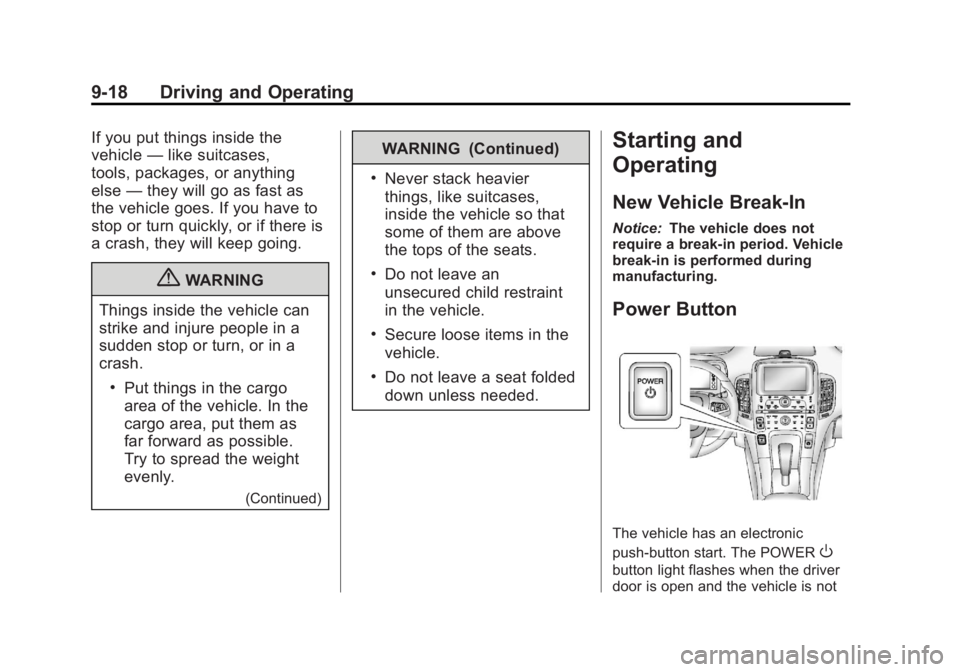
The vehicle has an electronic
push‐button start. The POWER
O
button light flashes when the driver
door is open and the vehicle is not