airbag CHEVROLET VOLT 2011 Owner's Guide
[x] Cancel search | Manufacturer: CHEVROLET, Model Year: 2011, Model line: VOLT, Model: CHEVROLET VOLT 2011Pages: 516, PDF Size: 6.61 MB
Page 117 of 516
Black plate (61,1)Chevrolet Volt Owner Manual - 2011
Seats and Restraints 3-61
If the child restraint has the LATCH
system, seeLower Anchors and
Tethers for Children (LATCH
System) on page 3‑49 for how and
where to install the child restraint
using LATCH. If a child restraint is
secured using a safety belt and
it uses a top tether, see Lower
Anchors and Tethers for Children
(LATCH System) on page 3‑49
for top tether anchor locations.
Do not secure a child seat in a
position without a top tether anchor
if a national or local law requires
that the top tether be anchored, or if
the instructions that come with the
child restraint say that the top strap
must be anchored.
In Canada, the law requires that
forward-facing child restraints have
a top tether, and that the tether be
attached. You will be using the lap-shoulder
belt to secure the child restraint in
this position. Follow the instructions
that came with the child restraint.
1. Move the seat as far back as
it will go before securing the
forward-facing child restraint.
When the passenger sensing
system has turned off the right
front passenger frontal airbag
and passenger knee airbag, the
off indicator on the passenger
airbag status indicator should
light and stay lit when you start
the vehicle. See Passenger
Airbag Status Indicator on
page 5‑20.
2. Put the child restraint on the seat.
3. Pick up the latch plate, and run the lap and shoulder portions of
the vehicle's safety belt through
or around the restraint. The child
restraint instructions will show
you how.
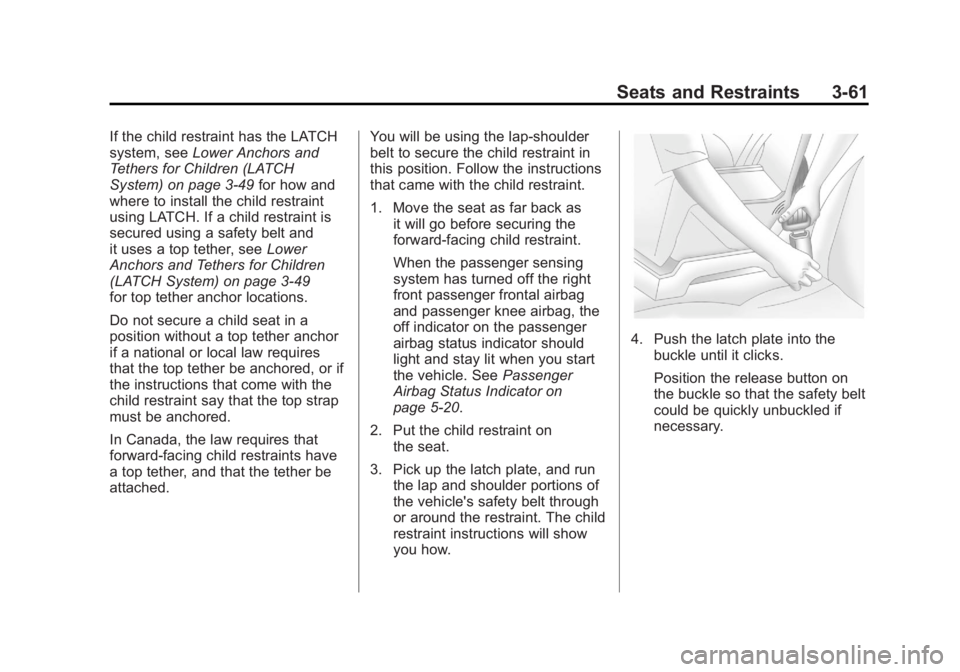
4. Push the latch plate into thebuckle until it clicks.
Position the release button on
the buckle so that the safety belt
could be quickly unbuckled if
necessary.
Page 118 of 516
Black plate (62,1)Chevrolet Volt Owner Manual - 2011
3-62 Seats and Restraints
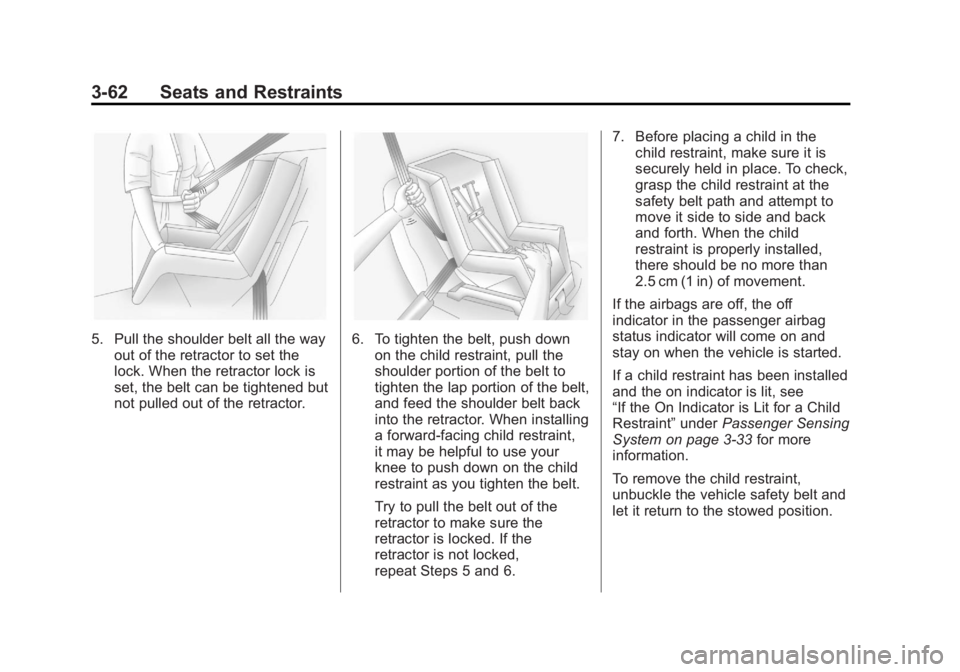
5. Pull the shoulder belt all the wayout of the retractor to set the
lock. When the retractor lock is
set, the belt can be tightened but
not pulled out of the retractor.6. To tighten the belt, push downon the child restraint, pull the
shoulder portion of the belt to
tighten the lap portion of the belt,
and feed the shoulder belt back
into the retractor. When installing
a forward-facing child restraint,
it may be helpful to use your
knee to push down on the child
restraint as you tighten the belt.
Try to pull the belt out of the
retractor to make sure the
retractor is locked. If the
retractor is not locked,
repeat Steps 5 and 6. 7. Before placing a child in the
child restraint, make sure it is
securely held in place. To check,
grasp the child restraint at the
safety belt path and attempt to
move it side to side and back
and forth. When the child
restraint is properly installed,
there should be no more than
2.5 cm (1 in) of movement.
If the airbags are off, the off
indicator in the passenger airbag
status indicator will come on and
stay on when the vehicle is started.
If a child restraint has been installed
and the on indicator is lit, see
“If the On Indicator is Lit for a Child
Restraint” underPassenger Sensing
System on page 3‑33 for more
information.
To remove the child restraint,
unbuckle the vehicle safety belt and
let it return to the stowed position.
Page 121 of 516
Black plate (1,1)Chevrolet Volt Owner Manual - 2011
Instruments and Controls 5-1
Instruments and
Controls
Instrument Panel Overview
Instrument Panel Overview . . . . 5-4
Controls
Steering Wheel Adjustment . . . 5-6
Steering Wheel Controls . . . . . . 5-6
Horn . . . . . . . . . . . . . . . . . . . . . . . . . . 5-7
Windshield Wiper/Washer . . . . . 5-7
Power Outlets . . . . . . . . . . . . . . . . . 5-8
Warning Lights, Gauges, and
Indicators
Warning Lights, Gauges, andIndicators . . . . . . . . . . . . . . . . . . . . 5-9
Instrument Cluster . . . . . . . . . . . . 5-9
Speedometer . . . . . . . . . . . . . . . . 5-15
Odometer . . . . . . . . . . . . . . . . . . . . 5-15
Trip Odometer . . . . . . . . . . . . . . . 5-15
Compass . . . . . . . . . . . . . . . . . . . . 5-16 Battery Gauge (High
Voltage) . . . . . . . . . . . . . . . . . . . . 5-16
Fuel Gauge . . . . . . . . . . . . . . . . . . 5-16
Driver Efficiency Gauge . . . . . . 5-17
Total Vehicle Range . . . . . . . . . 5-17
Safety Belt Reminders . . . . . . . 5-18
Airbag Readiness Light . . . . . . 5-19
Passenger Airbag Status Indicator . . . . . . . . . . . . . . . . . . . . 5-20
Charging System Light (12-Volt Battery) . . . . . . . . . . . . 5-21
Malfunction Indicator Lamp . . . . . . . . . . . . . 5-21
Brake System Warning Light . . . . . . . . . . . . . . . . . . . . . . . 5-24
Electric Parking Brake Light . . . . . . . . . . . . . . . . . . . . . . . 5-25
Service Electric Parking Brake Light . . . . . . . . . . . . . . . . . . . . . . . 5-25
Antilock Brake System (ABS) Warning Light . . . . . . . . . . . . . . 5-26
Sport Mode Light . . . . . . . . . . . . 5-26
Mountain Mode Light . . . . . . . . 5-26 Traction Control System
(TCS)/StabiliTrak
®Light . . . . 5-27
Engine Coolant Temperature Warning Light . . . . . . . . . . . . . . 5-27
Tire Pressure Light . . . . . . . . . . 5-27
Engine Oil Pressure Light . . . . 5-28
Low Fuel Warning Light . . . . . . 5-28
Security Light . . . . . . . . . . . . . . . . 5-29
High-Beam On Light . . . . . . . . . 5-29
Lamps On Reminder . . . . . . . . . 5-29
Cruise Control Light . . . . . . . . . 5-29
Door, Hood, or Hatch Open
Light . . . . . . . . . . . . . . . . . . . . . . . 5-30
Information Displays
Center Stack Display . . . . . . . . 5-31
Power Flows . . . . . . . . . . . . . . . . . 5-31
Charging . . . . . . . . . . . . . . . . . . . . . 5-33
Energy Information . . . . . . . . . . 5-41
Clock . . . . . . . . . . . . . . . . . . . . . . . . 5-42
Driver InformationCenter (DIC) . . . . . . . . . . . . . . . 5-43
Page 122 of 516

Black plate (2,1)Chevrolet Volt Owner Manual - 2011
5-2 Instruments and Controls
Vehicle Messages
Vehicle Messages . . . . . . . . . . . 5-45
Battery and ChargingMessages . . . . . . . . . . . . . . . . . . 5-45
Brake System Messages . . . . 5-46
Cruise Control Messages . . . . 5-46
Door Ajar Messages . . . . . . . . . 5-46
Drive Mode Messages . . . . . . . 5-47
Electric Drive Unit Messages . . . . . . . . . . . . . . . . . . 5-47
Engine Cooling System Messages . . . . . . . . . . . . . . . . . . 5-47
Engine Oil Messages . . . . . . . . 5-48
Fuel System Messages . . . . . . 5-48
Key and Lock Messages . . . . . 5-48
Lamp Messages . . . . . . . . . . . . . 5-49
Object Detection System Messages . . . . . . . . . . . . . . . . . . 5-49
Propulsion Power Messages . . . . . . . . . . . . . . . . . . 5-50 Ride Control System
Messages . . . . . . . . . . . . . . . . . . 5-50
Airbag System Messages . . . . 5-51
Anti-theft Alarm System Messages . . . . . . . . . . . . . . . . . . 5-51
Service Vehicle Messages . . . 5-51
Starting the Vehicle Messages . . . . . . . . . . . . . . . . . . 5-52
Tire Messages . . . . . . . . . . . . . . . 5-52
Vehicle Speed Messages . . . . 5-53
Washer Fluid Messages . . . . . 5-53
Vehicle Personalization
Vehicle Personalization . . . . . . 5-53
Universal Remote System
Universal Remote System . . . 5-60
Universal Remote System Programming . . . . . . . . . . . . . . . 5-60
Universal Remote System Operation . . . . . . . . . . . . . . . . . . 5-63
Page 133 of 516
Black plate (13,1)Chevrolet Volt Owner Manual - 2011
Instruments and Controls 5-13
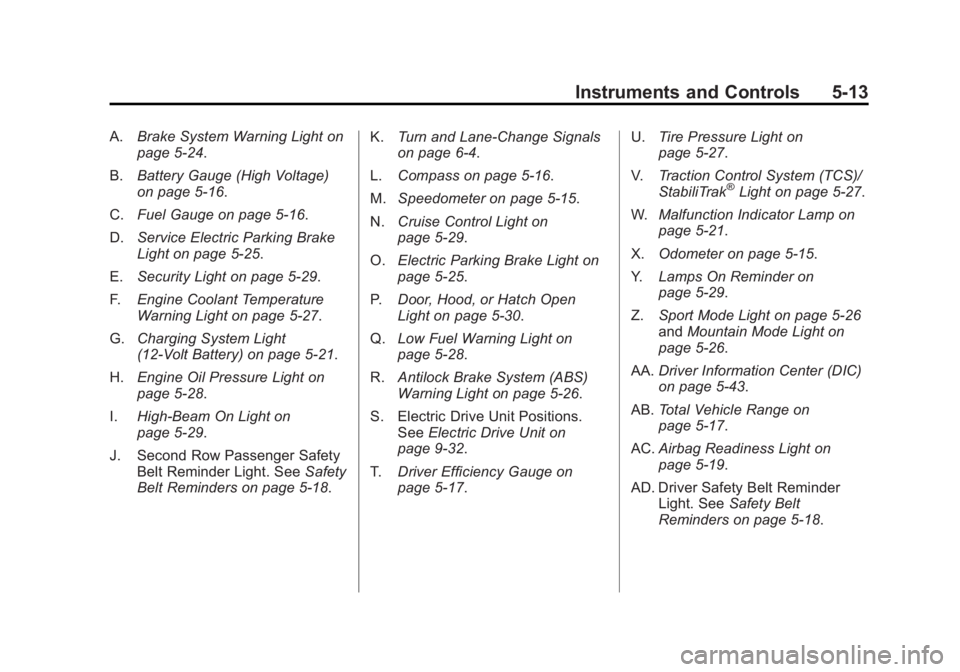
A.Brake System Warning Light on
page 5‑24.
B. Battery Gauge (High Voltage)
on page 5‑16.
C. Fuel Gauge on page 5‑16.
D. Service Electric Parking Brake
Light on page 5‑25.
E. Security Light on page 5‑29.
F. Engine Coolant Temperature
Warning Light on page 5‑27.
G. Charging System Light
(12-Volt Battery) on page 5‑21.
H. Engine Oil Pressure Light on
page 5‑28.
I. High-Beam On Light on
page 5‑29.
J. Second Row Passenger Safety Belt Reminder Light. See Safety
Belt Reminders on page 5‑18. K.
Turn and Lane-Change Signals
on page 6‑4.
L. Compass on page 5‑16.
M. Speedometer on page 5‑15.
N. Cruise Control Light on
page 5‑29.
O. Electric Parking Brake Light on
page 5‑25.
P. Door, Hood, or Hatch Open
Light on page 5‑30.
Q. Low Fuel Warning Light on
page 5‑28.
R. Antilock Brake System (ABS)
Warning Light on page 5‑26.
S. Electric Drive Unit Positions. See Electric Drive Unit on
page 9‑32.
T. Driver Efficiency Gauge on
page 5‑17. U.
Tire Pressure Light on
page 5‑27.
V. Traction Control System (TCS)/
StabiliTrak
®Light on page 5‑27.
W. Malfunction Indicator Lamp on
page 5‑21.
X. Odometer on page 5‑15.
Y. Lamps On Reminder on
page 5‑29.
Z. Sport Mode Light on page 5‑26
and Mountain Mode Light on
page 5‑26.
AA. Driver Information Center (DIC)
on page 5‑43.
AB. Total Vehicle Range on
page 5‑17.
AC. Airbag Readiness Light on
page 5‑19.
AD. Driver Safety Belt Reminder Light. See Safety Belt
Reminders on page 5‑18.
Page 139 of 516
Black plate (19,1)Chevrolet Volt Owner Manual - 2011
Instruments and Controls 5-19
Second Row Passenger Safety
Belt Reminder Light
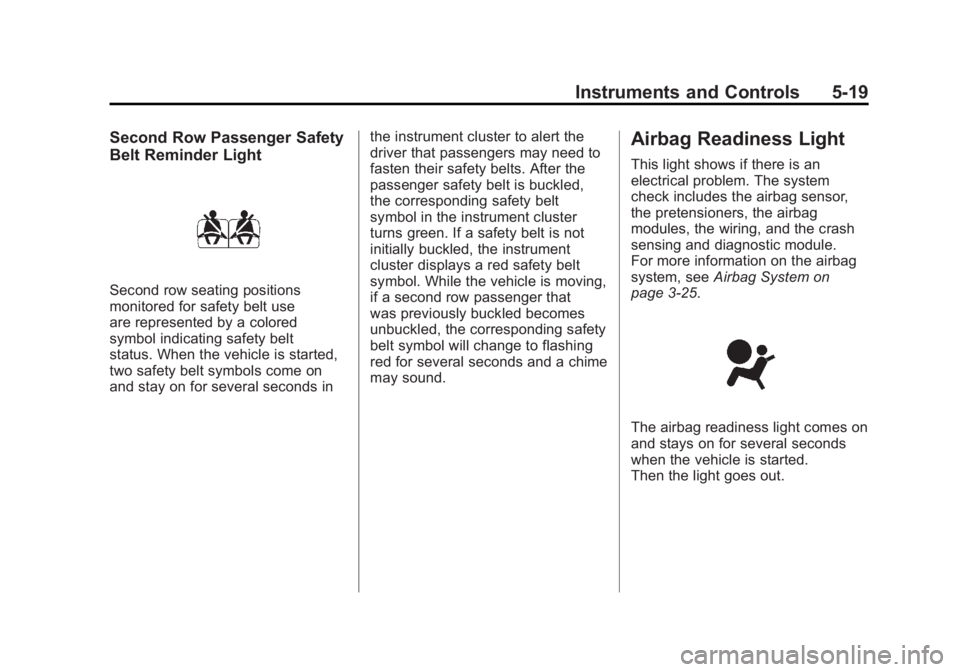
Second row seating positions
monitored for safety belt use
are represented by a colored
symbol indicating safety belt
status. When the vehicle is started,
two safety belt symbols come on
and stay on for several seconds inthe instrument cluster to alert the
driver that passengers may need to
fasten their safety belts. After the
passenger safety belt is buckled,
the corresponding safety belt
symbol in the instrument cluster
turns green. If a safety belt is not
initially buckled, the instrument
cluster displays a red safety belt
symbol. While the vehicle is moving,
if a second row passenger that
was previously buckled becomes
unbuckled, the corresponding safety
belt symbol will change to flashing
red for several seconds and a chime
may sound.
Airbag Readiness Light
This light shows if there is an
electrical problem. The system
check includes the airbag sensor,
the pretensioners, the airbag
modules, the wiring, and the crash
sensing and diagnostic module.
For more information on the airbag
system, see
Airbag System on
page 3‑25.
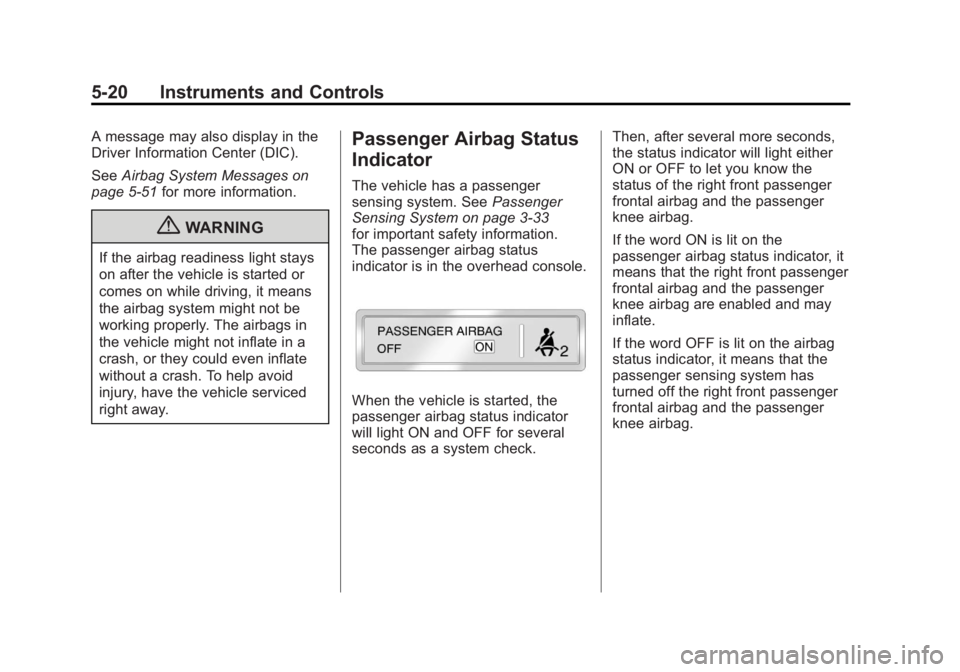
The airbag readiness light comes on
and stays on for several seconds
when the vehicle is started.
Then the light goes out.
Page 140 of 516
Black plate (20,1)Chevrolet Volt Owner Manual - 2011
5-20 Instruments and Controls
A message may also display in the
Driver Information Center (DIC).
SeeAirbag System Messages on
page 5‑51 for more information.
{WARNING
If the airbag readiness light stays
on after the vehicle is started or
comes on while driving, it means
the airbag system might not be
working properly. The airbags in
the vehicle might not inflate in a
crash, or they could even inflate
without a crash. To help avoid
injury, have the vehicle serviced
right away.
Passenger Airbag Status
Indicator
The vehicle has a passenger
sensing system. See Passenger
Sensing System on page 3‑33
for important safety information.
The passenger airbag status
indicator is in the overhead console.
When the vehicle is started, the
passenger airbag status indicator
will light ON and OFF for several
seconds as a system check. Then, after several more seconds,
the status indicator will light either
ON or OFF to let you know the
status of the right front passenger
frontal airbag and the passenger
knee airbag.
If the word ON is lit on the
passenger airbag status indicator, it
means that the right front passenger
frontal airbag and the passenger
knee airbag are enabled and may
inflate.
If the word OFF is lit on the airbag
status indicator, it means that the
passenger sensing system has
turned off the right front passenger
frontal airbag and the passenger
knee airbag.
Page 141 of 516
Black plate (21,1)Chevrolet Volt Owner Manual - 2011
Instruments and Controls 5-21
If, after several seconds, both
status indicator lights remain on,
or if there are no lights at all, there
may be a problem with the lights
or the passenger sensing system.
See your dealer for service.
{WARNING
If the airbag readiness light ever
comes on and stays on, it means
that something may be wrong
with the airbag system. To help
avoid injury to yourself or others,
have the vehicle serviced right
away. SeeAirbag Readiness
Light on page 5‑19 for more
information, including important
safety information.
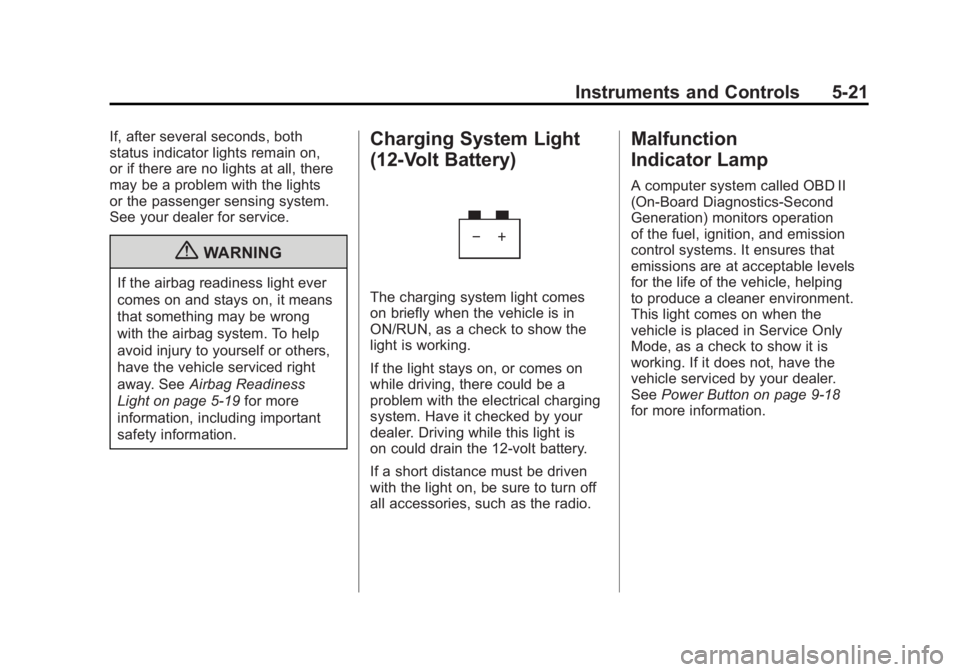
Charging System Light
(12-Volt Battery)
The charging system light comes
on briefly when the vehicle is in
ON/RUN, as a check to show the
light is working.
If the light stays on, or comes on
while driving, there could be a
problem with the electrical charging
system. Have it checked by your
dealer. Driving while this light is
on could drain the 12‐volt battery.
If a short distance must be driven
with the light on, be sure to turn off
all accessories, such as the radio.
Malfunction
Indicator Lamp
A computer system called OBD II
(On-Board Diagnostics-Second
Generation) monitors operation
of the fuel, ignition, and emission
control systems. It ensures that
emissions are at acceptable levels
for the life of the vehicle, helping
to produce a cleaner environment.
This light comes on when the
vehicle is placed in Service Only
Mode, as a check to show it is
working. If it does not, have the
vehicle serviced by your dealer.
See Power Button on page 9‑18
for more information.
Page 171 of 516
Black plate (51,1)Chevrolet Volt Owner Manual - 2011
Instruments and Controls 5-51
SERVICE TRACTION
CONTROL
This message displays when there
is a problem detected with the
Traction Control System (TCS).
The vehicle is safe to drive, but the
TCS is not operational. SeeTraction
Control System (TCS) on page 9‑37
for information on resetting the
system.
Airbag System Messages
SERVICE AIRBAG
This message displays if there is
a problem with the airbag system.
Take the vehicle to your dealer for
service.
Anti-theft Alarm System
Messages
SERVICE THEFT ALARM
This message displays if there is a
problem with the alarm. See your
dealer for service.
SERVICE THEFT DETERRENT
SYSTEM
This message displays if there is
a problem with the theft-deterrent
system. See your dealer for service.
Service Vehicle Messages
ENGINE MAINTENANCE XXX%
COMPLETE
This message displays when
the Engine Maintenance Mode is
running. See “Engine Maintenance
Mode” underMaintenance Modes
on page 9‑28.
ENGINE NOT AVAILABLE
SERVICE SOON
This message displays when the
engine is not available due to a
malfunction that will not allow the
engine to start. The vehicle can
continue to be driven in Electric
Mode until the battery is depleted,
but will have reduced acceleration.
When this message is displayed,
the vehicle should be taken to
your dealer for service as soon as
possible. See Out of Fuel/Engine
Unavailable on page 9‑28.
SERVICE AC SYSTEM
This message displays if there is a
problem with the air conditioning
system. Take the vehicle to your
dealer for service.
SERVICE HEATER SOON
This message displays if there is
a problem with the heater system.
Take the vehicle to your dealer for
service.
Page 172 of 516
Black plate (52,1)Chevrolet Volt Owner Manual - 2011
5-52 Instruments and Controls
SERVICE POWER STEERING
This message displays if there is a
problem with the power steering
system. Take the vehicle to your
dealer for service.
SERVICE VEHICLE SOON
This message displays if there is a
problem with the vehicle. Take the
vehicle to your dealer for service.
Depending on the severity of a
crash, this message may come
on along with the airbag readiness
light.
Starting the Vehicle
Messages
PRESS BRAKE TO START
VEHICLE
This message displays when
attempting to start the vehicle
without first pressing the brake
pedal.
PRESS BUTTON AGAIN TO
TURN OFF
This message displays as a
reminder to press the POWER
O
button to turn the vehicle off when
an attempt is made to turn off the
vehicle while it is in motion.
Tire Messages
SERVICE TIRE MONITOR
SYSTEM
This message displays if there is
a problem with the Tire Pressure
Monitor System (TPMS). SeeTire
Pressure Monitor Operation on
page 10‑57 for more information.
TIRE LEARNING ACTIVE
This message displays when
the system is learning new tires.
SeeTire Pressure Monitor
Operation on page 10‑57 for
more information.
TIRE LOW ADD AIR TO TIRE
This message displays when the
pressure in one or more of the tires
is low.
This message also displays
LEFT FRONT, RIGHT FRONT,
LEFT REAR, or RIGHT REAR to
indicate the location of the low tire.
The low tire pressure warning
light will also come on. See Tire
Pressure Light on page 5‑27.
If a tire pressure message appears
on the DIC, stop as soon as you
can. Inflate the tires by adding air
until the tire pressure is equal to
the values shown on the Tire and
Loading Information label. See Tires
on page 10‑48, Vehicle Load Limits
on page 9‑14, and Tire Pressure on
page 10‑54.
You can receive more than one
tire pressure message at a time.
The DIC also shows the tire
pressure values. See Driver
Information Center (DIC) on
page 5‑43.