seats CHEVROLET VOLT 2011 Manual PDF
[x] Cancel search | Manufacturer: CHEVROLET, Model Year: 2011, Model line: VOLT, Model: CHEVROLET VOLT 2011Pages: 516, PDF Size: 6.61 MB
Page 118 of 516
Black plate (62,1)Chevrolet Volt Owner Manual - 2011
3-62 Seats and Restraints
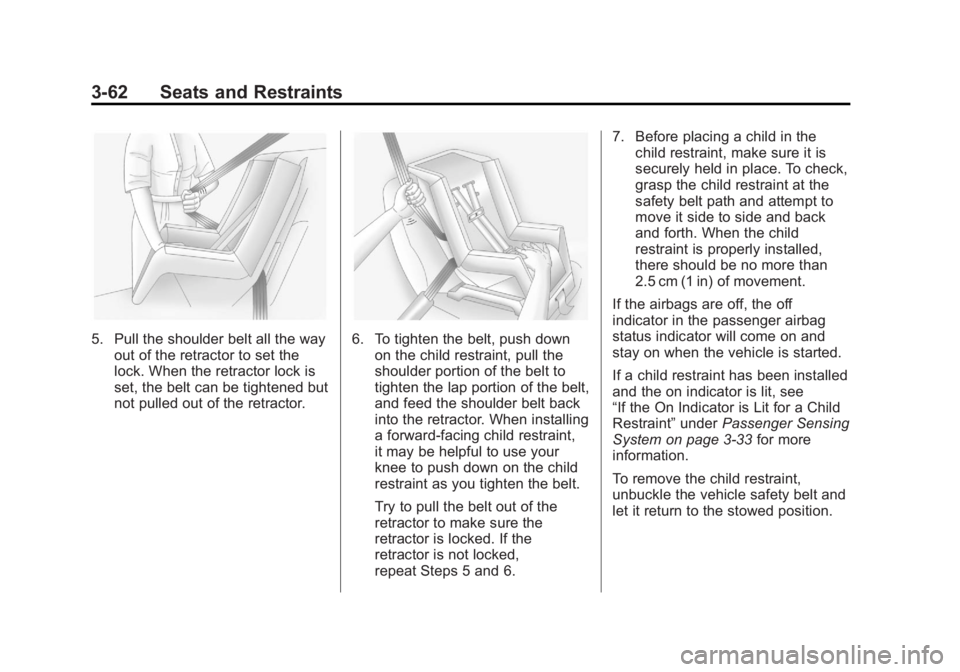
5. Pull the shoulder belt all the wayout of the retractor to set the
lock. When the retractor lock is
set, the belt can be tightened but
not pulled out of the retractor.6. To tighten the belt, push downon the child restraint, pull the
shoulder portion of the belt to
tighten the lap portion of the belt,
and feed the shoulder belt back
into the retractor. When installing
a forward-facing child restraint,
it may be helpful to use your
knee to push down on the child
restraint as you tighten the belt.
Try to pull the belt out of the
retractor to make sure the
retractor is locked. If the
retractor is not locked,
repeat Steps 5 and 6. 7. Before placing a child in the
child restraint, make sure it is
securely held in place. To check,
grasp the child restraint at the
safety belt path and attempt to
move it side to side and back
and forth. When the child
restraint is properly installed,
there should be no more than
2.5 cm (1 in) of movement.
If the airbags are off, the off
indicator in the passenger airbag
status indicator will come on and
stay on when the vehicle is started.
If a child restraint has been installed
and the on indicator is lit, see
“If the On Indicator is Lit for a Child
Restraint” underPassenger Sensing
System on page 3‑33 for more
information.
To remove the child restraint,
unbuckle the vehicle safety belt and
let it return to the stowed position.
Page 125 of 516
Black plate (5,1)Chevrolet Volt Owner Manual - 2011
Instruments and Controls 5-5
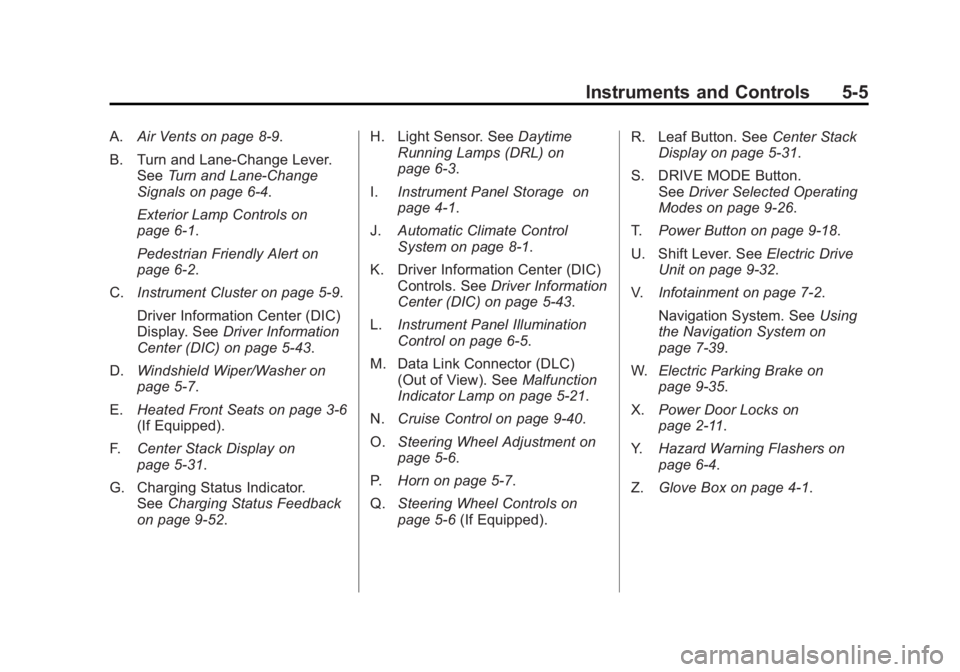
A.Air Vents on page 8‑9.
B. Turn and Lane‐Change Lever. See Turn and Lane-Change
Signals on page 6‑4.
Exterior Lamp Controls on
page 6‑1.
Pedestrian Friendly Alert on
page 6‑2.
C. Instrument Cluster on page 5‑9.
Driver Information Center (DIC)
Display. See Driver Information
Center (DIC) on page 5‑43.
D. Windshield Wiper/Washer on
page 5‑7.
E. Heated Front Seats on page 3‑6
(If Equipped).
F. Center Stack Display on
page 5‑31.
G. Charging Status Indicator. See Charging Status Feedback
on page 9‑52. H. Light Sensor. See
Daytime
Running Lamps (DRL) on
page 6‑3.
I. Instrument Panel Storage on
page 4‑1.
J. Automatic Climate Control
System on page 8‑1.
K. Driver Information Center (DIC) Controls. See Driver Information
Center (DIC) on page 5‑43.
L. Instrument Panel Illumination
Control on page 6‑5.
M. Data Link Connector (DLC) (Out of View). See Malfunction
Indicator Lamp on page 5‑21.
N. Cruise Control on page 9‑40.
O. Steering Wheel Adjustment on
page 5‑6.
P. Horn on page 5‑7.
Q. Steering Wheel Controls on
page 5‑6 (If Equipped). R. Leaf Button. See
Center Stack
Display on page 5‑31.
S. DRIVE MODE Button. See Driver Selected Operating
Modes on page 9‑26.
T. Power Button on page 9‑18.
U. Shift Lever. See Electric Drive
Unit on page 9‑32.
V. Infotainment on page 7‑2.
Navigation System. See Using
the Navigation System on
page 7‑39.
W. Electric Parking Brake on
page 9‑35.
X. Power Door Locks on
page 2‑11.
Y. Hazard Warning Flashers on
page 6‑4.
Z. Glove Box on page 4‑1.
Page 175 of 516
Black plate (55,1)Chevrolet Volt Owner Manual - 2011
Instruments and Controls 5-55
Climate and Air Quality
Select the Climate and Air Quality
menu to display:
.Auto Fan Speed
.Auto Heated Seats
.Remote Start Auto Heat Seats
.Auto Defog
Auto Fan Speed
This feature sets the automatic
fan speed to maintain the desired
interior tempurature. This selection
is available on vehicles with the
Automatic Climate Control system.
Choose a blower setting:
High: Increased speed.
Medium: Moderate speed.
Low: Reduced speed.
To select the auto fan speed:
1. Press the Vehicle menu.
2. Select Climate and Air Quality. 3. Select Auto Fan Speed.
4. Select the fan speed.
5. Press Back to return to the
previous menu.
Auto Heated Seats
When enabled, the auto heated
seat buttons on the touch screen
will be highlighted. This feature will
automatically activate heated seats
at the level required by the interior
temperature. The auto heated seats
can be turned off by using the
heated seat buttons on the center
stack.
To turn the auto heated seats on
or off:
1. Press the Vehicle menu.
2. Select Climate and Air Quality.
3. Turn the auto heated seats feature on or off.
4. Press Back to return to the previous menu. Remote Start Auto Heat Seats
When on, this feature will turn the
heated seats on when using remote
start.
To turn the remote start auto heat
seats on or off:
1. Press the Vehicle menu.
2. Select Climate and Air Quality.
3. Turn the remote start auto heat
seats feature on or off.
4. Press Back to return to the previous menu.
Auto Defog
When on and high humidity is
detected, the Climate Control
system will adjust the outside air,
air conditioner, or heat to decrease
fogging. The fan speed may
increase. When high humidity is
no longer detected, the system
will return to previous operation.
Page 294 of 516
Black plate (2,1)Chevrolet Volt Owner Manual - 2011
8-2 Climate Controls
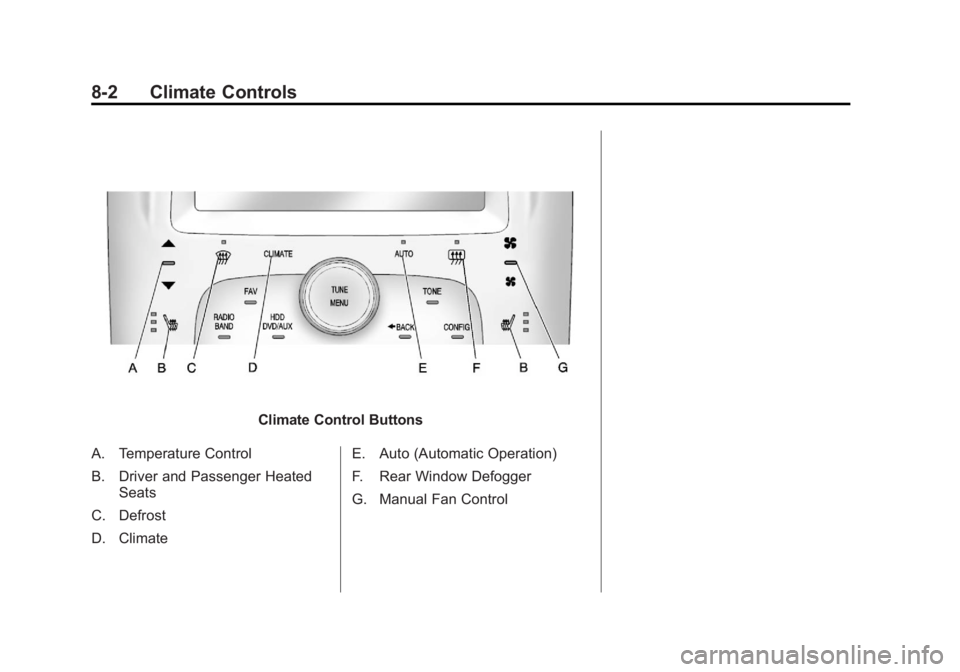
Climate Control Buttons
A. Temperature Control
B. Driver and Passenger Heated Seats
C. Defrost
D. Climate E. Auto (Automatic Operation)
F. Rear Window Defogger
G. Manual Fan Control
Page 295 of 516
Black plate (3,1)Chevrolet Volt Owner Manual - 2011
Climate Controls 8-3
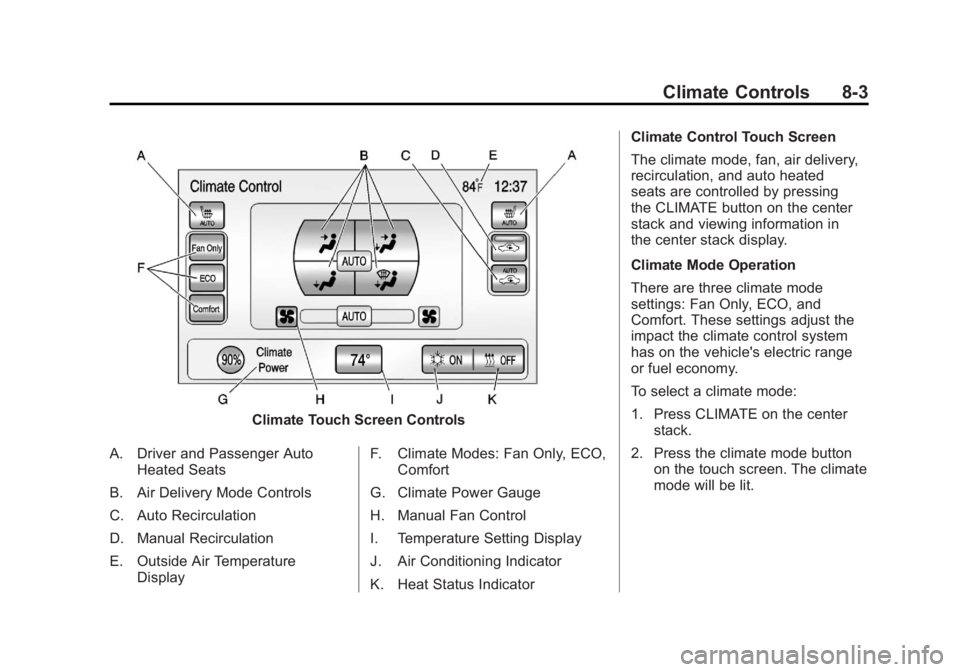
Climate Touch Screen Controls
A. Driver and Passenger Auto Heated Seats
B. Air Delivery Mode Controls
C. Auto Recirculation
D. Manual Recirculation
E. Outside Air Temperature Display F. Climate Modes: Fan Only, ECO,
Comfort
G. Climate Power Gauge
H. Manual Fan Control
I. Temperature Setting Display
J. Air Conditioning Indicator
K. Heat Status Indicator Climate Control Touch Screen
The climate mode, fan, air delivery,
recirculation, and auto heated
seats are controlled by pressing
the CLIMATE button on the center
stack and viewing information in
the center stack display.
Climate Mode Operation
There are three climate mode
settings: Fan Only, ECO, and
Comfort. These settings adjust the
impact the climate control system
has on the vehicle's electric range
or fuel economy.
To select a climate mode:
1. Press CLIMATE on the center
stack.
2. Press the climate mode button on the touch screen. The climate
mode will be lit.
Page 299 of 516

Black plate (7,1)Chevrolet Volt Owner Manual - 2011
Climate Controls 8-7
AUTOh(Auto Recirculation):
Press to allow the system to
automatically choose the air
supply mode for best performance
in terms of comfort, efficiency,
and defogging. Air is recirculated
or outside air is pulled into the
vehicle. The touch screen button
is lit.
h(Manual Recirculation):
Press to alternate between
recirculating air inside the
vehicle or pulling in outside air.
When selected, the touch screen
button lights up to indicate that
air is being recirculated. This helps
to quickly cool the air inside the
vehicle or prevent outside air
and odors from entering. Pressing this button cancels
automatic recirculation. Press
AUTO or AUTO
hto return to
automatic operation; recirculation
runs automatically as needed.
Manual recirculation mode is not
available when in Defrost or Defog
modes.
M/L(Manual Heated Seats):
If available, the controls are on the
center stack. To operate, the vehicle
must be on.
Press
MorLto heat the driver
or passenger seat cushion and
seatback. For more information,
see Heated Front Seats on
page 3‑6.
MAUTO/LAUTO (Auto Heated
Seats): If available, the controls
are on the touch screen on the
center stack. Press the touch screen
LAUTO or
MAUTO button. The button color
will change to green when this
feature is on. When the vehicle is
on, this feature will automatically
activate the heated seats at the
level required by the vehicle's
interior temperature. The active
high, medium, low, or off heated
seat level will be indicated by the
manual heated seat button lights
on the center stack. Use the touch
screen buttons or the manual
heated seat buttons on the center
stack to turn auto heated seats off.
For more information, see Heated
Front Seats on page 3‑6.
Page 301 of 516
Black plate (9,1)Chevrolet Volt Owner Manual - 2011
Climate Controls 8-9
Sensors
Solar Sensor
The solar sensor is located on top
of the instrument panel, near the
windshield, where it monitors solar
intensity.
The climate control system
uses the sensor information to
adjust the temperature, fan speed,
recirculation, and air delivery
mode for best comfort.
Do not cover the sensor; otherwise
the automatic climate control system
may not work properly.Humidity Sensor
The humidity sensor is near the
base of the inside rearview mirror.
The climate control system uses
the sensor information to adjust the
temperature and recirculation for
best comfort.
Outside Air Temperature Sensor
The outside air temperature sensor
is located behind the front grille
of the vehicle. The vehicle uses
the sensor information to display
outside air temperature. The climate
control system uses the information
to adjust the climate system
operation.
Air Vents
Use the louvers on the air vents to
change the direction of the airflow.
Use the thumbwheels near each
vent to open and close off the
airflow.
Operation Tips
.Keep all outlets open whenever
possible for best system
performance.
.Keep the path under all seats
clear of objects to help circulate
the air inside the vehicle more
effectively.
.Use of non-GM approved hood
deflectors can adversely affect
the performance of the system.
Page 320 of 516
Black plate (18,1)Chevrolet Volt Owner Manual - 2011
9-18 Driving and Operating
If you put things inside the
vehicle—like suitcases,
tools, packages, or anything
else —they will go as fast as
the vehicle goes. If you have to
stop or turn quickly, or if there is
a crash, they will keep going.
{WARNING
Things inside the vehicle can
strike and injure people in a
sudden stop or turn, or in a
crash.
.Put things in the cargo
area of the vehicle. In the
cargo area, put them as
far forward as possible.
Try to spread the weight
evenly.
(Continued)
WARNING (Continued)
.Never stack heavier
things, like suitcases,
inside the vehicle so that
some of them are above
the tops of the seats.
.Do not leave an
unsecured child restraint
in the vehicle.
.Secure loose items in the
vehicle.
.Do not leave a seat folded
down unless needed.
Starting and
Operating
New Vehicle Break-In
Notice: The vehicle does not
require a break-in period. Vehicle
break‐in is performed during
manufacturing.
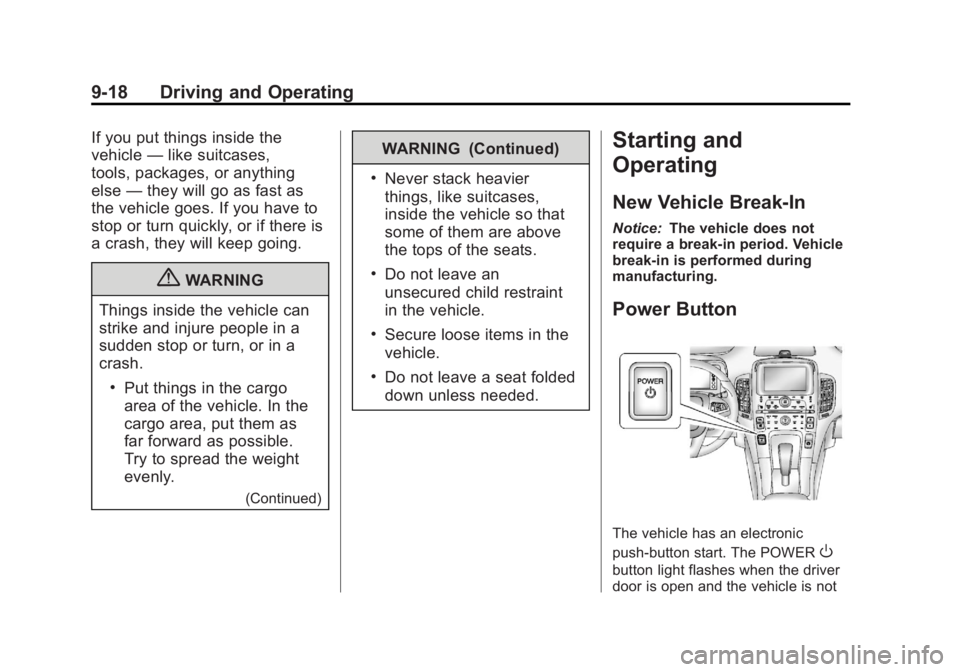
Power Button
The vehicle has an electronic
push‐button start. The POWER
O
button light flashes when the driver
door is open and the vehicle is not
Page 334 of 516
Black plate (32,1)Chevrolet Volt Owner Manual - 2011
9-32 Driving and Operating
Electric Drive Unit
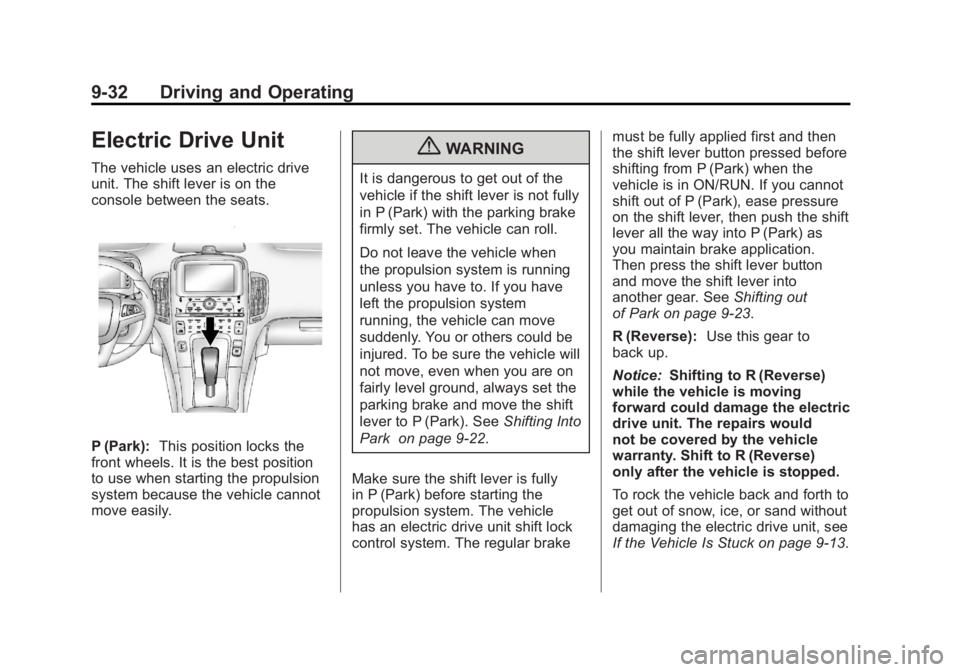
The vehicle uses an electric drive
unit. The shift lever is on the
console between the seats.
P (Park):This position locks the
front wheels. It is the best position
to use when starting the propulsion
system because the vehicle cannot
move easily.
{WARNING
It is dangerous to get out of the
vehicle if the shift lever is not fully
in P (Park) with the parking brake
firmly set. The vehicle can roll.
Do not leave the vehicle when
the propulsion system is running
unless you have to. If you have
left the propulsion system
running, the vehicle can move
suddenly. You or others could be
injured. To be sure the vehicle will
not move, even when you are on
fairly level ground, always set the
parking brake and move the shift
lever to P (Park). See Shifting Into
Park on page 9‑22.
Make sure the shift lever is fully
in P (Park) before starting the
propulsion system. The vehicle
has an electric drive unit shift lock
control system. The regular brake must be fully applied first and then
the shift lever button pressed before
shifting from P (Park) when the
vehicle is in ON/RUN. If you cannot
shift out of P (Park), ease pressure
on the shift lever, then push the shift
lever all the way into P (Park) as
you maintain brake application.
Then press the shift lever button
and move the shift lever into
another gear. See
Shifting out
of Park on page 9‑23.
R (Reverse): Use this gear to
back up.
Notice: Shifting to R (Reverse)
while the vehicle is moving
forward could damage the electric
drive unit. The repairs would
not be covered by the vehicle
warranty. Shift to R (Reverse)
only after the vehicle is stopped.
To rock the vehicle back and forth to
get out of snow, ice, or sand without
damaging the electric drive unit, see
If the Vehicle Is Stuck on page 9‑13.
Page 412 of 516

Black plate (46,1)Chevrolet Volt Owner Manual - 2011
10-46 Vehicle Care
A fuse puller is located in the engine
compartment fuse block.
The vehicle may not have all of the
fuses, relays, and features shown.Fuses Usage
F1 Empty
F2 Fuel System Control
Module Fuses Usage
F3 Passive Start
Module
F4 Heated Seats
(If Equipped)
F5 Driver Door
Switches (Outside
Rearview Mirror/
Charge Port Door
Release/Refuel
Request/Driver
Window Switch)
F6 Fuel (Diurnal
Valve and Evap.
Leak Check Module)
F7 Accessory Power
Module Cooling Fan
F8 Amplifier
(If Equipped)
F9 Empty