low oil pressure CHEVROLET VOLT 2011 Owner's Manual
[x] Cancel search | Manufacturer: CHEVROLET, Model Year: 2011, Model line: VOLT, Model: CHEVROLET VOLT 2011Pages: 516, PDF Size: 6.61 MB
Page 5 of 516
Black plate (5,1)Chevrolet Volt Owner Manual - 2011
Introduction v
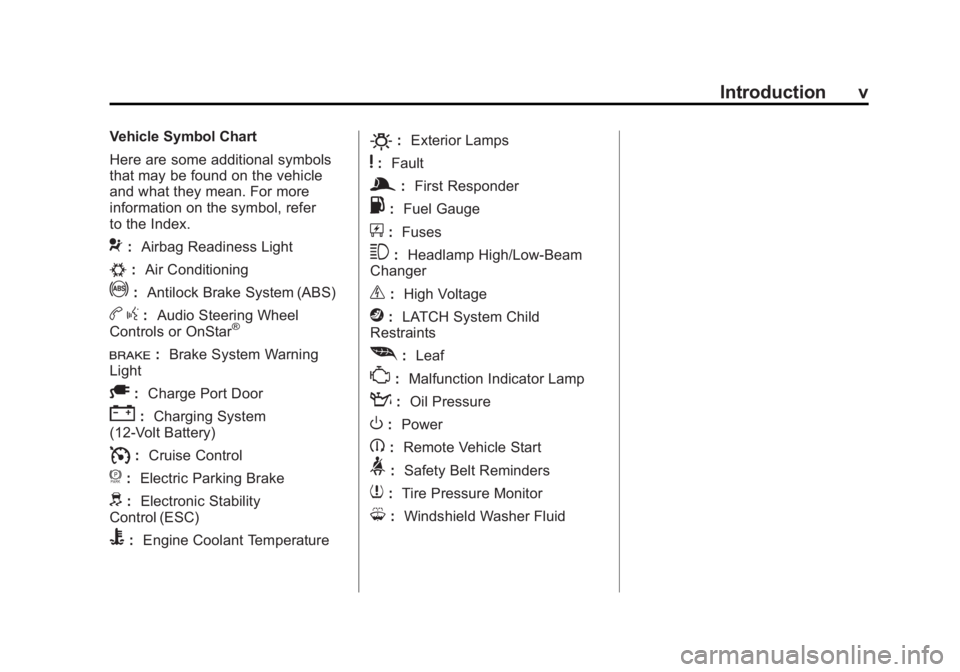
Vehicle Symbol Chart
Here are some additional symbols
that may be found on the vehicle
and what they mean. For more
information on the symbol, refer
to the Index.
9:Airbag Readiness Light
#:Air Conditioning
!:Antilock Brake System (ABS)
bg: Audio Steering Wheel
Controls or OnStar®
I: Brake System Warning
Light
A: Charge Port Door
":Charging System
(12‐Volt Battery)
I: Cruise Control
f: Electric Parking Brake
d:Electronic Stability
Control (ESC)
B: Engine Coolant Temperature
O:Exterior Lamps
y:Fault
g:First Responder
.: Fuel Gauge
+:Fuses
3: Headlamp High/Low-Beam
Changer
_: High Voltage
j:LATCH System Child
Restraints
[: Leaf
*:Malfunction Indicator Lamp
::Oil Pressure
O:Power
B:Remote Vehicle Start
>:Safety Belt Reminders
7:Tire Pressure Monitor
M:Windshield Washer Fluid
Page 30 of 516
Black plate (24,1)Chevrolet Volt Owner Manual - 2011
1-24 In Brief
During cooler conditions, the low tire
pressure warning light may appear
when the vehicle is first started and
then turn off. This may be an early
indicator that the tire pressures are
getting low and the tires need to be
inflated to the proper pressure.
The TPMS does not replace normal
monthly tire maintenance. It is the
driver’s responsibility to maintain
correct tire pressures.
See Tire Pressure Monitor System
on page 10‑55.Tire Sealant and
Compressor Kit
This vehicle may have a tire sealant
and compressor kit that can be used
to seal small punctures in the tread
area of the tire. Significant sidewall
damage will require the tire to be
replaced.
See Tire Sealant and Compressor
Kit on page 10‑71 for complete
operating information.
Engine Oil Life System
The engine oil life system calculates
engine oil life based on vehicle use
and displays the CHANGE ENGINE
OIL SOON message when it is time
to change the engine oil and filter.
The oil life system should be reset
to 100% only following an oil
change. Resetting the Oil Life System
1. Use the SELECT knob to select
OIL LIFE on the DIC menu.
2. Press SELECT to start the OIL LIFE reset procedure.
3. The DIC menu will display “Are
you sure that you want to reset?”
Use SELECT to choose YES to
reset oil life or NO to exit and
return to the previous menu.
4. If YES is selected, the DIC menu will display RESET OIL LIFE for
a short time and then 100% OIL
LIFE will be displayed when
OIL LIFE is successfully reset.
See Engine Oil Life System on
page 10‑15.
Page 46 of 516

Black plate (10,1)Chevrolet Volt Owner Manual - 2011
2-10 Keys, Doors and Windows
Conditions in Which Remote
Start May Not Work
Conditions in which a remote start
may not occur include:
.An open hood.
.Vehicle propulsion system
fault conditions, including an
emission control system
malfunction.
.High voltage battery fault
conditions.
A second remote start or extension
will not occur if the fuel level is low.
During a remote start, conditions
in which a remote start may be
canceled include:
.Vehicle propulsion system
or high voltage battery fault
conditions.
.Low engine oil pressure.
.Engine coolant temperature that
is too high.
Door Locks
{WARNING
Unlocked doors can be
dangerous.
.Passengers, especially
children, can easily open the
doors and fall out of a moving
vehicle. The chance of being
thrown out of the vehicle in
a crash is increased if the
doors are not locked. So, all
passengers should wear
safety belts properly and
the doors should be locked
whenever the vehicle is
driven. (Continued)
WARNING (Continued)
.Young children who get into
unlocked vehicles may be
unable to get out. A child can
be overcome by extreme heat
and can suffer permanent
injuries or even death from
heat stroke. Always lock the
vehicle whenever leaving it.
.Outsiders can easily enter
through an unlocked door
when slowing or stopping
the vehicle. Lock the doors
to help prevent this from
happening.
To lock or unlock the door, use
the Remote Keyless Entry (RKE)
transmitter or the key from outside
the vehicle. Use the door lock knob
or switch from inside the vehicle.
Page 121 of 516
Black plate (1,1)Chevrolet Volt Owner Manual - 2011
Instruments and Controls 5-1
Instruments and
Controls
Instrument Panel Overview
Instrument Panel Overview . . . . 5-4
Controls
Steering Wheel Adjustment . . . 5-6
Steering Wheel Controls . . . . . . 5-6
Horn . . . . . . . . . . . . . . . . . . . . . . . . . . 5-7
Windshield Wiper/Washer . . . . . 5-7
Power Outlets . . . . . . . . . . . . . . . . . 5-8
Warning Lights, Gauges, and
Indicators
Warning Lights, Gauges, andIndicators . . . . . . . . . . . . . . . . . . . . 5-9
Instrument Cluster . . . . . . . . . . . . 5-9
Speedometer . . . . . . . . . . . . . . . . 5-15
Odometer . . . . . . . . . . . . . . . . . . . . 5-15
Trip Odometer . . . . . . . . . . . . . . . 5-15
Compass . . . . . . . . . . . . . . . . . . . . 5-16 Battery Gauge (High
Voltage) . . . . . . . . . . . . . . . . . . . . 5-16
Fuel Gauge . . . . . . . . . . . . . . . . . . 5-16
Driver Efficiency Gauge . . . . . . 5-17
Total Vehicle Range . . . . . . . . . 5-17
Safety Belt Reminders . . . . . . . 5-18
Airbag Readiness Light . . . . . . 5-19
Passenger Airbag Status Indicator . . . . . . . . . . . . . . . . . . . . 5-20
Charging System Light (12-Volt Battery) . . . . . . . . . . . . 5-21
Malfunction Indicator Lamp . . . . . . . . . . . . . 5-21
Brake System Warning Light . . . . . . . . . . . . . . . . . . . . . . . 5-24
Electric Parking Brake Light . . . . . . . . . . . . . . . . . . . . . . . 5-25
Service Electric Parking Brake Light . . . . . . . . . . . . . . . . . . . . . . . 5-25
Antilock Brake System (ABS) Warning Light . . . . . . . . . . . . . . 5-26
Sport Mode Light . . . . . . . . . . . . 5-26
Mountain Mode Light . . . . . . . . 5-26 Traction Control System
(TCS)/StabiliTrak
®Light . . . . 5-27
Engine Coolant Temperature Warning Light . . . . . . . . . . . . . . 5-27
Tire Pressure Light . . . . . . . . . . 5-27
Engine Oil Pressure Light . . . . 5-28
Low Fuel Warning Light . . . . . . 5-28
Security Light . . . . . . . . . . . . . . . . 5-29
High-Beam On Light . . . . . . . . . 5-29
Lamps On Reminder . . . . . . . . . 5-29
Cruise Control Light . . . . . . . . . 5-29
Door, Hood, or Hatch Open
Light . . . . . . . . . . . . . . . . . . . . . . . 5-30
Information Displays
Center Stack Display . . . . . . . . 5-31
Power Flows . . . . . . . . . . . . . . . . . 5-31
Charging . . . . . . . . . . . . . . . . . . . . . 5-33
Energy Information . . . . . . . . . . 5-41
Clock . . . . . . . . . . . . . . . . . . . . . . . . 5-42
Driver InformationCenter (DIC) . . . . . . . . . . . . . . . 5-43
Page 133 of 516
Black plate (13,1)Chevrolet Volt Owner Manual - 2011
Instruments and Controls 5-13
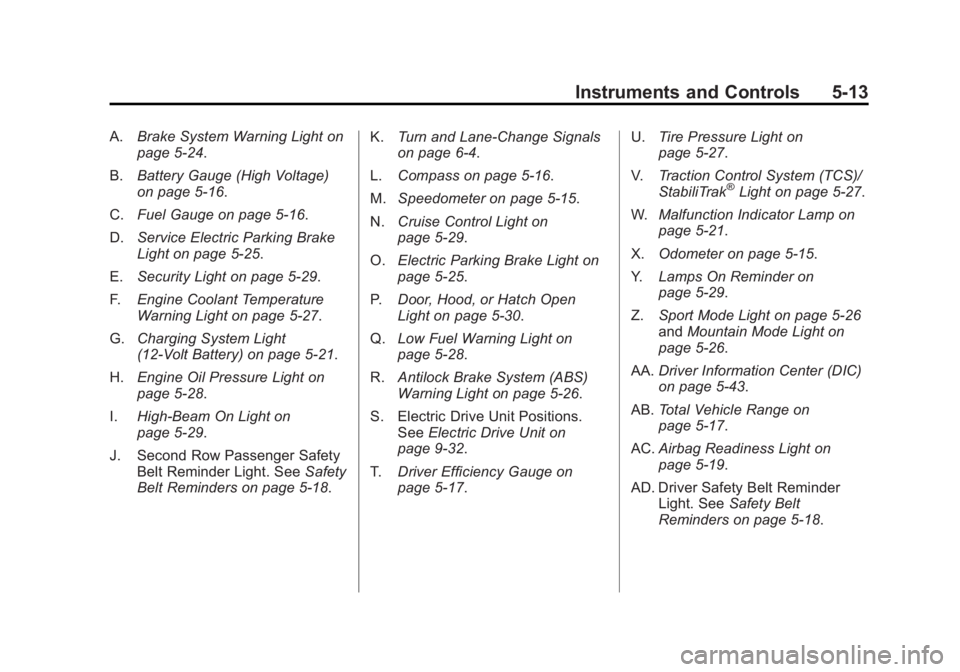
A.Brake System Warning Light on
page 5‑24.
B. Battery Gauge (High Voltage)
on page 5‑16.
C. Fuel Gauge on page 5‑16.
D. Service Electric Parking Brake
Light on page 5‑25.
E. Security Light on page 5‑29.
F. Engine Coolant Temperature
Warning Light on page 5‑27.
G. Charging System Light
(12-Volt Battery) on page 5‑21.
H. Engine Oil Pressure Light on
page 5‑28.
I. High-Beam On Light on
page 5‑29.
J. Second Row Passenger Safety Belt Reminder Light. See Safety
Belt Reminders on page 5‑18. K.
Turn and Lane-Change Signals
on page 6‑4.
L. Compass on page 5‑16.
M. Speedometer on page 5‑15.
N. Cruise Control Light on
page 5‑29.
O. Electric Parking Brake Light on
page 5‑25.
P. Door, Hood, or Hatch Open
Light on page 5‑30.
Q. Low Fuel Warning Light on
page 5‑28.
R. Antilock Brake System (ABS)
Warning Light on page 5‑26.
S. Electric Drive Unit Positions. See Electric Drive Unit on
page 9‑32.
T. Driver Efficiency Gauge on
page 5‑17. U.
Tire Pressure Light on
page 5‑27.
V. Traction Control System (TCS)/
StabiliTrak
®Light on page 5‑27.
W. Malfunction Indicator Lamp on
page 5‑21.
X. Odometer on page 5‑15.
Y. Lamps On Reminder on
page 5‑29.
Z. Sport Mode Light on page 5‑26
and Mountain Mode Light on
page 5‑26.
AA. Driver Information Center (DIC)
on page 5‑43.
AB. Total Vehicle Range on
page 5‑17.
AC. Airbag Readiness Light on
page 5‑19.
AD. Driver Safety Belt Reminder Light. See Safety Belt
Reminders on page 5‑18.
Page 148 of 516

Black plate (28,1)Chevrolet Volt Owner Manual - 2011
5-28 Instruments and Controls
When the Light Flashes First and
Then is On Steady
This indicates that there may be
a problem with the Tire Pressure
Monitor System. The light flashes
for about one minute and stays on
steady until the vehicle is in OFF.
This sequence repeats each time
the vehicle is in ON/RUN. SeeTire
Pressure Monitor System on
page 10‑55 for more information.
Engine Oil Pressure Light
{WARNING
Do not keep driving if the oil
pressure is low. The engine can
become so hot that it catches
fire. Someone could be burned.
Check the oil as soon as possible
and have the vehicle serviced. Notice:
Lack of proper engine
oil maintenance can damage the
engine. The repairs would not be
covered by the vehicle warranty.
Always follow the maintenance
schedule for changing engine oil.
The oil pressure light should come
on briefly as the vehicle is started.
If it does not come on have the
vehicle serviced by your dealer.
If the light comes on and stays on, it
means that oil is not flowing through
the engine properly. The vehicle
could be low on oil and might
have some other system problem.
See your dealer.
Low Fuel Warning Light
The low fuel warning light comes on
briefly when the vehicle is started.
This light also comes on when the
fuel level is low. When fuel is added,
the light should go off. If it does not,
have the vehicle serviced.
Page 164 of 516
Black plate (44,1)Chevrolet Volt Owner Manual - 2011
5-44 Instruments and Controls
Trip A and Trip B
The trip displays show fuel used,
average fuel economy, and distance
traveled since the last trip reset.
Reset the trip data by pressing and
holding the SELECT button when
either Trip A or Trip B is displayed.
Oil Life
This displays the percentage
of remaining oil life. The lower
the percentage, the closer the
vehicle is to needing an oil change.
When the oil life is depleted, the
CHANGE ENGINE OIL SOON
message displays. Change the oil
as soon as possible. Additional
maintenance is also recommended
in the Maintenance Schedule.
SeeScheduled Maintenance on
page 11‑2 andEngine Oil on
page 10‑12. The oil life must be reset after
each oil change. Avoid accidental
resetting of the Engine Oil Life
System. It cannot be reset
accurately until the next oil change.
To reset the Engine Oil Life System,
see
Engine Oil Life System on
page 10‑15. The system is reset
when 100% displays.
Tire Pressure
The display will show a vehicle with
the approximate pressures of all
four tires. Tire pressure is displayed
in either kilopascals (kPa) or in
pounds per square inch (psi).
If a low or high tire pressure is
detected, a message is displayed
advising to check the tire pressure
in the specified tire. See Tire
Pressure on page 10‑54 andTire
Messages on page 5‑52 for more
information.
If the tire pressure display shows
dashes instead of a value, there
may be a problem with the vehicle.
See your dealer for service. Vehicle Messages
Turn the SELECT knob to scroll
through any active warning
messages. Press SELECT
to review the messages.
Units
Turn the SELECT knob to change
the unit display to METRIC or US
when the display is active. Press
SELECT to confirm the setting.
This will change the displays on
the cluster and DIC to either metric
or English (US) measurements.
Tutorial Mode
Select this menu item to view a
screen that explains some of the
unique features of the cluster.
Tutorial mode is only available when
the vehicle is in P (Park).
Page 168 of 516
Black plate (48,1)Chevrolet Volt Owner Manual - 2011
5-48 Instruments and Controls
Engine Oil Messages
CHANGE ENGINE OIL SOON
This message displays when the
engine oil needs to be changed.
After changing the engine oil,
the Engine Oil Life System must
be reset. SeeEngine Oil Life
System on page 10‑15 and
Driver Information Center (DIC) on
page 5‑43 for information on how
to reset the system. See Engine
Oil on page 10‑12 andScheduled
Maintenance on page 11‑2 for
more information.
OIL PRESSURE LOW —TURN
VEHICLE OFF
This message displays if low oil
pressure levels occur. Stop the
vehicle as soon as safely possible
and do not operate it until the cause
of the low oil pressure has been
corrected. Check the oil as soon
as possible and have the vehicle
serviced by your dealer.
Fuel System Messages
CLOSE FUEL DOOR
This message displays when the
fuel door is open and the vehicle is
moving.
ENGINE NOT AVAILABLE
ADD FUEL
This message displays when
the engine is not available due to
running out of fuel. The vehicle can
continue to be driven in Electric
Mode until the battery is depleted,
but will have reduced acceleration.
When this message is displayed,
refuel the vehicle. See Out of Fuel/
Engine Unavailable on page 9‑28.
FUEL LEVEL LOW
This message displays when the
vehicle is low on fuel. Refuel as
soon as possible.
READY TO REFUEL
This message displays when the
fuel system is depressurized and
the vehicle can be refueled.
TIGHTEN GAS CAP
This message displays when the
fuel cap is not on tight. Tighten the
fuel cap.
WAIT TO REFUEL
This message displays when the
fuel system is pressurized and you
must to wait to refuel the vehicle.
Key and Lock Messages
When programming new Remote
Keyless Entry (RKE) transmitters,
DIC messages display. See Remote
Keyless Entry (RKE) System
Operation on page 2‑3 for more
information.
Page 388 of 516
Black plate (22,1)Chevrolet Volt Owner Manual - 2011
10-22 Vehicle Care
Checking Coolant
The vehicle must be on a level
surface when checking the coolant
level.
Check to see if coolant is visible
in the coolant surge tank. If the
coolant inside the coolant surge
tank is boiling, do not do anything
else until it cools down. If coolant
is visible but the coolant level is not
at or above the cold fill mark, add
a 50/50 mixture of clean, drinkable
water and DEX-COOL coolant at the
coolant surge tank, but be sure the
cooling system is cool before this is
done. SeeEngine Overheating on
page 10‑23 for more information.
The coolant reservoir is located
on the passenger side of the
engine compartment. See Engine
Compartment Overview on
page 10‑10 for more information
on location. The coolant level should be at
or above the cold fill line on the
coolant surge tank. If it is not,
there could be a leak in the
cooling system.
How to Add Coolant to the
Coolant Surge Tank
{WARNING
You can be burned if you spill
coolant on hot engine parts.
Coolant contains ethylene glycol
and it will burn if the engine parts
are hot enough. Do not spill
coolant on a hot engine.
Notice: This vehicle has a
specific coolant fill procedure.
Failure to follow this procedure
could cause the engine to
overheat and be severely
damaged.
{WARNING
The electric cooling fans under
the hood can start up even when
the engine is not running and
can cause injury. Keep hands,
clothing, and tools away from
any underhood electric fan.
{WARNING
Steam and scalding liquids from a
hot cooling system can blow out
and burn you badly. They are
under pressure, and if you
turn the surge tank pressure
cap —even a little —they can
come out at high speed. Never
turn the cap when the cooling
system, including the surge tank
pressure cap, is hot. Wait for the
cooling system and surge tank
pressure cap to cool if you ever
have to turn the pressure cap.
Page 459 of 516
Black plate (93,1)Chevrolet Volt Owner Manual - 2011
Vehicle Care 10-93
Interior Care
The interior will continue to look
its best if it is cleaned often.
Dust and dirt can accumulate
on the upholstery and cause
damage to the carpet, fabric,
leather, and plastic surfaces.
Stains should be removed quickly
as extreme heat could cause
them to set rapidly.
Lighter colored interiors may
require more frequent cleaning.
Newspapers and garments that can
transfer color to home furnishings
can also transfer color to the
interior.
Remove dust from small buttons
and knobs with a small brush with
soft bristles.
Your dealer has products for
cleaning the interior. When cleaning
the interior, only use cleaners
specifically designed for the
surfaces that are being cleaned.Permanent damage can result
from using cleaners on surfaces
for which they were not intended.
Apply the cleaner directly to the
cleaning cloth to prevent over-spray.
Remove any accidental over-spray
from other surfaces immediately.
Notice:
Using abrasive cleaners
when cleaning glass surfaces
on the vehicle, could scratch the
glass and/or cause damage to
the rear window defogger. When
cleaning the glass on the vehicle,
use only a soft cloth and glass
cleaner.
Cleaners can contain solvents that
can become concentrated in the
interior. Before using cleaners,
read and adhere to all safety
instructions on the label. While
cleaning the interior, maintain
adequate ventilation by opening
the doors and windows. Do not clean the interior using the
following cleaners or techniques:.Never use a knife or any other
sharp object to remove a soil
from any interior surface.
.Never use a stiff brush. It can
cause damage.
.Never apply heavy pressure or
rub aggressively with a cleaning
cloth. Use of heavy pressure can
damage the interior and does
not improve the effectiveness
of soil removal.
.Avoid laundry detergents
or dishwashing soaps with
degreasers. Using too much
soap will leave a residue that
leaves streaks and attracts
dirt. For liquid cleaners, about
20 drops per 3.78 L (1 gal) of
water is a good guide. Use only
mild, neutral-pH soaps.
.Do not heavily saturate the
upholstery while cleaning.
.Cleaners that contain solvents
can damage the interior.