change time CHEVROLET VOLT 2012 1.G Owner's Manual
[x] Cancel search | Manufacturer: CHEVROLET, Model Year: 2012, Model line: VOLT, Model: CHEVROLET VOLT 2012 1.GPages: 454, PDF Size: 7.89 MB
Page 235 of 454
Black plate (5,1)Chevrolet Volt Owner Manual - 2012
Climate Controls 8-5
The air conditioning and electric
heat could be on at the same time
when dehumidification is required in
ECO or Comfort modes.
In Fan Only mode, occasionally the
air conditioning and/or heating
status will be on if the Auto Defog
function is enabled and high
humidity is detected. See“Climate
and Air Quality” underVehicle
Personalization on page 5‑56, for
details on enabling or disabling the
Auto Defog function.
The air conditioning may also run if
0is selected, regardless of the
climate mode.
Automatic Operation
The system automatically controls
the fan speed, air delivery mode,
and recirculation to heat or cool the
vehicle to the selected temperature.
When the AUTO indicator light is
on, the system is in full automatic
operation. If the air delivery mode, fan speed, or recirculation setting is
adjusted, the AUTO indicator turns
off and the selected settings display.
For automatic operation:
1. Press AUTO.
2. Set the temperature. An initial
setting of 23°C (74°F) is
recommended. Allow the system
time to stabilize. Adjust the
temperature as needed.
Q/R(Temperature Control):
Press to increase or decrease the
temperature.
Auto Defog: The system will
monitor high humidity inside the
vehicle. When high humidity is
detected, the climate control system
may adjust to outside air supply and
turn on the air conditioner or the
heater. The fan speed may slightly
increase to help prevent fogging.
When high humidity is no longer
detected, the system will return to
its prior operation. To turn Auto Defog off or on, see
“Climate and
Air Quality” underVehicle
Personalization on page 5‑56.
Manual Operation
A(Fan Control): Press the fan
control buttons or the touch screen
fan control, to increase or decrease
the fan speed. The fan speed
setting displays. Pressing either
button cancels automatic fan control
and the fan can be controlled
manually. Press AUTO to return to
automatic operation. Press the fan
down button repeatedly to turn off
the fan and the climate control
system.
If the fan is manually turned off
while in ECO or Comfort mode, the
display will automatically change to
Fan Only mode. When the fan is
turned back on either by manually
increasing fan speed or pressing the
AUTO button, the climate mode will
revert back to ECO or
Comfort mode.
Page 264 of 454
Black plate (26,1)Chevrolet Volt Owner Manual - 2012
9-26 Driving and Operating
If in Sport or Mountain Mode, either
may become unavailable and the
vehicle will return to Normal Mode.
The indicator light goes off and a
DIC message displays. See
Propulsion Power Messages on
page 5‑52.
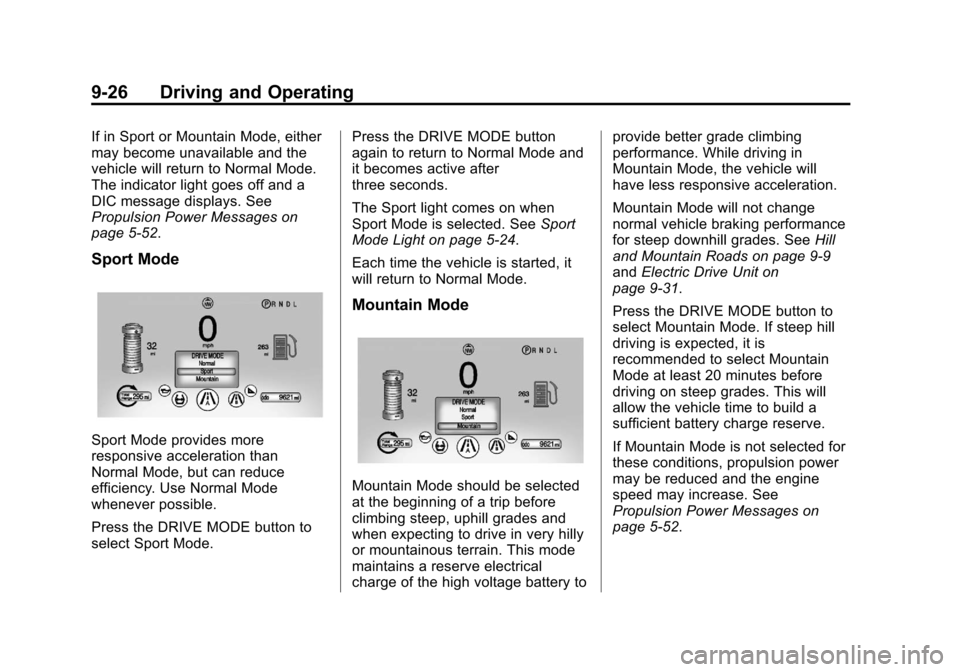
Sport Mode
Sport Mode provides more
responsive acceleration than
Normal Mode, but can reduce
efficiency. Use Normal Mode
whenever possible.
Press the DRIVE MODE button to
select Sport Mode.Press the DRIVE MODE button
again to return to Normal Mode and
it becomes active after
three seconds.
The Sport light comes on when
Sport Mode is selected. See
Sport
Mode Light on page 5‑24.
Each time the vehicle is started, it
will return to Normal Mode.
Mountain Mode
Mountain Mode should be selected
at the beginning of a trip before
climbing steep, uphill grades and
when expecting to drive in very hilly
or mountainous terrain. This mode
maintains a reserve electrical
charge of the high voltage battery to provide better grade climbing
performance. While driving in
Mountain Mode, the vehicle will
have less responsive acceleration.
Mountain Mode will not change
normal vehicle braking performance
for steep downhill grades. See
Hill
and Mountain Roads on page 9‑9
and Electric Drive Unit on
page 9‑31.
Press the DRIVE MODE button to
select Mountain Mode. If steep hill
driving is expected, it is
recommended to select Mountain
Mode at least 20 minutes before
driving on steep grades. This will
allow the vehicle time to build a
sufficient battery charge reserve.
If Mountain Mode is not selected for
these conditions, propulsion power
may be reduced and the engine
speed may increase. See
Propulsion Power Messages on
page 5‑52.
Page 271 of 454
Black plate (33,1)Chevrolet Volt Owner Manual - 2012
Driving and Operating 9-33
Brakes
Antilock Brake
System (ABS)
This vehicle has the Antilock Brake
System (ABS), an advanced
electronic braking system that helps
prevent a braking skid.
When propulsion is active and the
vehicle begins to drive away, ABS
checks itself. A momentary motor or
clicking noise might be heard while
this test is going on, and it might
even be noticed that the brake
pedal moves a little. This is normal.
If there is a problem with ABS, this
warning light stays on. SeeAntilock
Brake System (ABS) Warning Light
on page 5‑23. If driving safely on a wet road and it
becomes necessary to slam on the
brakes and continue braking to
avoid a sudden obstacle, a
computer senses that the wheels
are slowing down. If one of the
wheels is about to stop rolling, the
computer will separately work the
brakes at each wheel.
ABS can change the brake pressure
to each wheel, as required, faster
than any driver could. This can help
the driver steer around the obstacle
while braking hard.
As the brakes are applied, the
computer keeps receiving updates
on wheel speed and controls
braking pressure accordingly.
Remember: ABS does not change
the time needed to get a foot up to
the brake pedal or always decrease
stopping distance. If you get too
close to the vehicle in front of you,
there will not be enough time to
apply the brakes if that vehicle
suddenly slows or stops. Always
leave enough room up ahead to
stop, even with ABS.
Using ABS
Do not pump the brakes. Just hold
the brake pedal down firmly and let
ABS work. You might hear the ABS
pump or motor operating and feel
the brake pedal pulsate, but this is
normal.
Braking in Emergencies
ABS allows the driver to steer and
brake at the same time. In many
emergencies, steering can help
more than even the very best
braking.
Page 313 of 454
Black plate (9,1)Chevrolet Volt Owner Manual - 2012
Vehicle Care 10-9
A. Engine Coolant Surge Tank andPressure Cap. See Engine
Coolant on page 10‑18.
B. Engine Air Cleaner/Filter on
page 10‑13.
C. Engine Oil Dipstick. See Engine
Oil on page 10‑9.
D. High Voltage Battery Coolant Reservoir and Pressure Cap.
See Cooling System (Engine)
on page 10‑15 orCooling
System (High Voltage Battery)
on page 10‑16 orCooling
System (Power Electronics and
Charger Modules) on
page 10‑17.
E. Engine Cover.
F. Engine Oil Fill Cap. See Engine
Oil on page 10‑9.
G. Power Electronics Coolant Reservoir and Pressure Cap.
See Cooling System (Engine)
on page 10‑15 orCooling
System (High Voltage Battery)
on page 10‑16 orCooling System (Power Electronics and
Charger Modules) on
page 10‑17.
H. Brake Fluid Reservoir. See “Brake Fluid” underBrakes on
page 10‑22.
I. High Voltage Cables (Orange Color).
J. Remote Positive (+) Terminal. See Jump Starting on
page 10‑75.
K. Power Electronics Module.
L. Windshield Washer Fluid Reservoir. See “Adding Washer
Fluid” under Washer Fluid on
page 10‑21.
M. Remote Negative (−) Terminal. See Jump Starting on
page 10‑75.
N. Engine Compartment Fuse
Block on page 10‑34.Engine Oil
To ensure proper engine
performance and long life, careful
attention must be paid to engine oil.
Following these simple, but
important steps will help protect
your investment:
.Always use engine oil approved
to the proper specification and of
the proper viscosity grade. See
“Selecting the Right Engine Oil”
in this section.
.Check the engine oil level
regularly and maintain the
proper oil level. See “Checking
Engine Oil” and“When to Add
Engine Oil” in this section.
.Change the engine oil at the
appropriate time. See Engine Oil
Life System on page 10‑12.
.Always dispose of engine oil
properly. See “What to Do with
Used Oil” in this section.
Page 316 of 454
Black plate (12,1)Chevrolet Volt Owner Manual - 2012
10-12 Vehicle Care
What to Do with Used Oil
Used engine oil contains certain
elements that can be unhealthy for
your skin and could even cause
cancer. Do not let used oil stay on
your skin for very long. Clean your
skin and nails with soap and water,
or a good hand cleaner. Wash or
properly dispose of clothing or rags
containing used engine oil. See the
manufacturer's warnings about the
use and disposal of oil products.
Used oil can be a threat to the
environment. If you change your
own oil, be sure to drain all the oil
from the filter before disposal. Never
dispose of oil by putting it in the
trash or pouring it on the ground,
into sewers, or into streams or
bodies of water. Recycle it by taking
it to a place that collects used oil.
Engine Oil Life System
When to Change Engine Oil
This vehicle has a computer system
that indicates when to change the
engine oil and filter. This is based
on a combination of factors which
include engine revolutions, engine
temperature, and miles driven.
Based on driving conditions, the
mileage at which an oil change is
indicated can vary considerably. For
the oil life system to work properly,
the system must be reset every time
the oil is changed.
When the system has calculated
that oil life has been diminished, it
indicates that an oil change is
necessary. A CHANGE ENGINE
OIL SOON message comes on.
Change the oil as soon as possible
within the next 1 000 km (600 mi).It is possible that, if driving under
the best conditions, the oil life
system might indicate that an oil
change is not necessary for up to
two years. The engine oil and filter
must be changed at least once
every two years and, at this time,
the system must be reset. Your
dealer has trained service people
who will perform this work and reset
the system. It is also important to
check the oil regularly over the
course of an oil drain interval and
keep it at the proper level.
If the system is ever reset
accidentally, the oil must be
changed at 5 000 km (3,000 mi)
since the last oil change.
Remember to reset the oil life
system whenever the oil is changed.
Page 317 of 454
Black plate (13,1)Chevrolet Volt Owner Manual - 2012
Vehicle Care 10-13
How to Reset the Engine Oil
Life System
Reset the system whenever the
engine oil is changed so that the
system can calculate the next
engine oil change. To reset the
system:
1. Use the SELECT knob to selectOIL LIFE on the DIC menu.
2. Press SELECT to start the OIL LIFE reset procedure.
3. The DIC menu will display “Are
you sure that you want to reset?”
Use SELECT to choose YES to
reset oil life or NO to exit and
return to the previous menu.
4. If YES is selected, the DIC menu will display RESET OIL LIFE for
a short time and then 100% OIL
LIFE will be displayed when OIL
LIFE is successfully reset.
If the CHANGE ENGINE OIL SOON
message comes back on when the
vehicle is started, the engine oil life
system has not reset. Repeat the
procedure.
Engine Air Cleaner/Filter
See Engine Compartment Overview
on page 10‑8 for the location of the
engine air cleaner/filter.
When to Inspect the Engine Air
Filter
Inspect the air filter at the scheduled
maintenance intervals and replace it
at the first oil change after each
80 000 km (50,000 mi) interval. See
Maintenance Schedule on
page 11‑3 for more information.
If driving in dusty/dirty conditions,
inspect the air filter at each engine
oil change.
How to Inspect the Engine Air
Filter
To inspect the air filter, remove it
from the engine air cleaner/filter
assembly and lightly shake to
release loose dust and dirt. If the air
filter remains covered with dirt, a
new air filter is required.
To inspect or replace the air filter:
1. Open the hood. See Hood on
page 10‑7.
2. Locate the engine air cleaner/ filter assembly on the passenger
side of the engine compartment.
See Engine Compartment
Overview on page 10‑8.
Page 327 of 454
Black plate (23,1)Chevrolet Volt Owner Manual - 2012
Vehicle Care 10-23
Brake Pedal Travel
See your dealer if the brake pedal
does not return to normal height,
or if there is a rapid increase in
pedal travel. This could be a sign
that brake service might be
required.
Brake Adjustment
Every time the brakes are applied,
with or without the vehicle moving,
the brakes adjust for wear.
Replacing Brake System Parts
The braking system on a vehicle is
complex. Its many parts have to be
of top quality and work well together
if the vehicle is to have really good
braking. The vehicle was designed
and tested with top-quality brake
parts. When parts of the braking
system are replaced, be sure to get
new, approved replacement parts.If this is not done, the brakes might
not work properly. For example,
installing disc brake pads that are
wrong for the vehicle, can change
the balance between the front and
rear brakes
—for the worse. The
braking performance expected can
change in many other ways if the
wrong replacement brake parts are
installed.
Brake Fluid
The brake master cylinder reservoir
is filled with DOT 3 brake fluid as
indicated on the reservoir cap. See
Engine Compartment Overview on
page 10‑8 for the location of the
reservoir. There are only two reasons why the
brake fluid level in the reservoir
might go down:
.The brake fluid level goes down
because of normal brake lining
wear. When new linings are
installed, the fluid level goes
back up.
.A fluid leak in the brake
hydraulic system can also cause
a low fluid level. Have the brake
hydraulic system fixed, since a
leak means that sooner or later
the brakes will not work well.
Page 362 of 454
Black plate (58,1)Chevrolet Volt Owner Manual - 2012
10-58 Vehicle Care
Check that all wheel nuts are
properly tightened. See“Wheel
Nut Torque” underCapacities
and Specifications on
page 12‑2.
{WARNING
Rust or dirt on a wheel, or on
the parts to which it is
fastened, can make wheel
nuts become loose after a
time. The wheel could come
off and cause a crash. When
changing a wheel, remove any
rust or dirt from places where
the wheel attaches to the
vehicle. In an emergency, a
cloth or a paper towel can be
used, however, use a scraper
or wire brush to remove all
rust or dirt. Lightly coat the center of the
wheel hub with wheel bearing
grease after a wheel change or
tire rotation to prevent corrosion
or rust build-up. Do not get
grease on the flat wheel
mounting surface or on the
wheel nuts or bolts.
When It Is Time for New
Tires
Factors such as maintenance,
temperatures, driving speeds,
vehicle loading, and road conditions
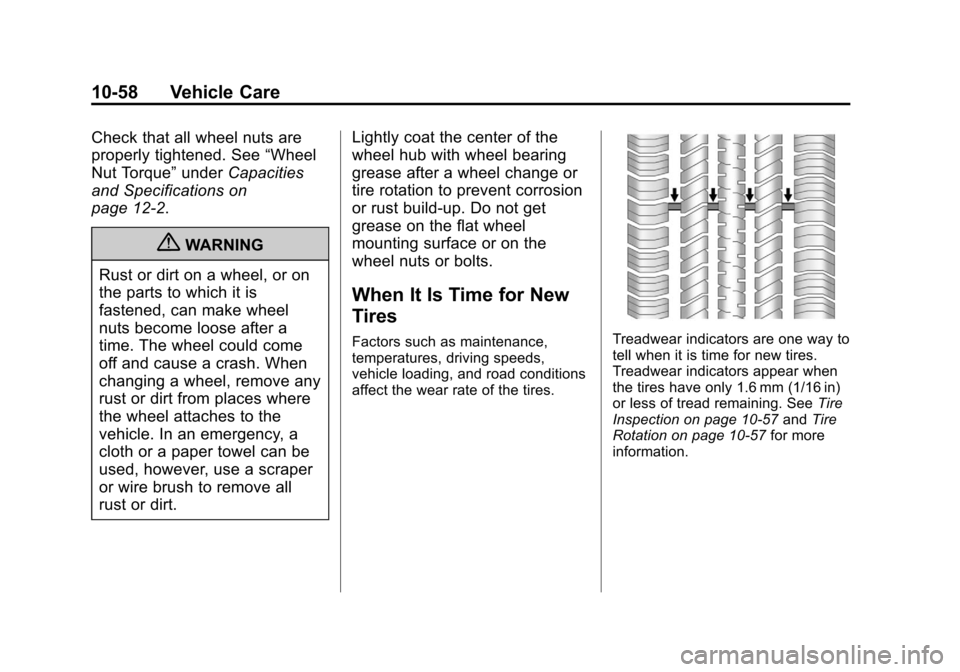
affect the wear rate of the tires.Treadwear indicators are one way to
tell when it is time for new tires.
Treadwear indicators appear when
the tires have only 1.6 mm (1/16 in)
or less of tread remaining. See
Tire
Inspection on page 10‑57 andTire
Rotation on page 10‑57 for more
information.
Page 422 of 454
Black plate (6,1)Chevrolet Volt Owner Manual - 2012
13-6 Customer Information
GM Mobility
Reimbursement Program
This program is available to
qualified applicants for cost
reimbursement of eligible
aftermarket adaptive equipment
required for the vehicle, such as
hand controls or a wheelchair/
scooter lift for the vehicle.
For more information on the limited
offer, visit www.gmmobility.com or
call the GM Mobility Assistance
Center at 1-800-323-9935. Text
Telephone (TTY) users, call
1-800-833-9935.General Motors of Canada also has
a Mobility Program. Call
1-800-GM-DRIVE (463-7483) for
details. TTY users call
1-800-263-3830.
Roadside Assistance
Program
From the U.S., call
1‐888‐811‐1926;
(Text Telephone (TTY):
1‐888‐889‐2438).
From Canada, call 1-800-268-6800.
Service is available 24 hours a day,
365 days a year.
Calling for Assistance
When calling Roadside Assistance,
have the following information
ready:
.Your name, home address, and
home telephone number.
.Telephone number of your
location.
.Location of the vehicle.
.Model, year, color, and license
plate number of the vehicle.
.Odometer reading, Vehicle
Identification Number (VIN), and
delivery date of the vehicle.
.Description of the problem.
Coverage
Services are provided up to 5 years/
160 000 km (100,000 mi), whichever
comes first.
In the U.S., anyone driving the
vehicle is covered. In Canada, a
person driving the vehicle without
permission from the owner is not
covered.
Roadside Assistance is not a part of
the New Vehicle Limited Warranty.
Chevrolet and General Motors of
Canada Limited reserve the right to
make any changes or discontinue
the Roadside Assistance program at
any time without notification.
Page 423 of 454
Black plate (7,1)Chevrolet Volt Owner Manual - 2012
Customer Information 13-7
Chevrolet and General Motors of
Canada Limited reserve the right to
limit services or payment to an
owner or driver if they decide the
claims are made too often, or the
same type of claim is made many
times.
Services Provided
.Emergency Fuel Delivery:
Delivery of enough fuel for the
vehicle to get to the nearest
service station.
.Lock‐Out Service:Service to
unlock the vehicle if you are
locked out. A remote unlock may
be available if you have OnStar.
For security reasons, the driver
must present identification
before this service is given.
.Emergency Tow from a Public
Road or Highway: Tow to the
nearest Chevrolet dealer for
warranty service, or if the vehicle
was in a crash and cannot be
driven. Assistance is also given
when the vehicle is stuck in the
sand, mud, or snow.
.Flat Tire Change: Service to
change a flat tire with the tire
sealant and compressor kit.
If the tire has been separated
from the wheel, has damaged
sidewalls, or has a large
puncture, the tire is too severely
damaged for the tire sealant and
compressor kit to be effective.
It is the owner's responsibility for
the repair or replacement of the
tire if it is not covered by the
warranty.
.Battery Jump Start: Service to
jump start a dead battery.
Services Not Included in
Roadside Assistance
.Impound towing caused by
violation of any laws.
.Legal fines.
.Mounting, dismounting,
or changing of snow tires,
chains, or other traction devices.
.Towing or services for vehicles
driven on a non-public road or
highway.
Services Specific to Canadian
Vehicles
.Fuel Delivery: Reimbursement
is approximately $5 Canadian.
Diesel fuel delivery may be
restricted. Propane and other
fuels are not provided through
this service.
.Lock-Out Service: Vehicle
registration is required.