door lock CHEVROLET VOLT 2012 1.G Owner's Guide
[x] Cancel search | Manufacturer: CHEVROLET, Model Year: 2012, Model line: VOLT, Model: CHEVROLET VOLT 2012 1.GPages: 454, PDF Size: 7.89 MB
Page 120 of 454

Black plate (4,1)Chevrolet Volt Owner Manual - 2012
5-4 Instruments and Controls
A.Air Vents on page 8‑8.
B. Turn and Lane‐Change Lever. See Turn and Lane-Change
Signals on page 6‑4.
Exterior Lamp Controls on
page 6‑1.
Pedestrian Friendly Alert on
page 5‑6.
C. Instrument Cluster on page 5‑9.
Driver Information Center (DIC)
Display. See Driver Information
Center (DIC) on page 5‑45.
D. Windshield Wiper/Washer on
page 5‑6.
E. Heated Front Seats on page 3‑6
(If Equipped).
F. Center Stack Display on
page 5‑29.
G. Charging Status Indicator. See Charging Status Feedback on
page 9‑52. H. Light Sensor. See
Daytime
Running Lamps (DRL) on
page 6‑2.
I. Instrument Panel Storage on
page 4‑1.
J. Automatic Climate Control
System on page 8‑1.
K. Driver Information Center (DIC) Controls. See Driver Information
Center (DIC) on page 5‑45.
L. Instrument Panel Illumination
Control on page 6‑4.
M. Data Link Connector (DLC) (Out of View). See Malfunction
Indicator Lamp on page 5‑19.
N. Cruise Control on page 9‑40.
O. Steering Wheel Adjustment on
page 5‑5.
P. Horn on page 5‑6. Q.
Steering Wheel Controls on
page 5‑5 (If Equipped).
R. Leaf Button. See Center Stack
Display on page 5‑29.
S. DRIVE MODE Button. See Driver Selected Operating
Modes on page 9‑25.
T. Power Button on page 9‑18.
U. Shift Lever. See Electric Drive
Unit on page 9‑31.
V. Infotainment on page 7‑1.
Navigation System. See the
separate navigation system
manual.
W. Electric Parking Brake on
page 9‑34.
X. Power Door Locks on
page 2‑12.
Y. Hazard Warning Flashers on
page 6‑3.
Page 123 of 454
Black plate (7,1)Chevrolet Volt Owner Manual - 2012
Instruments and Controls 5-7
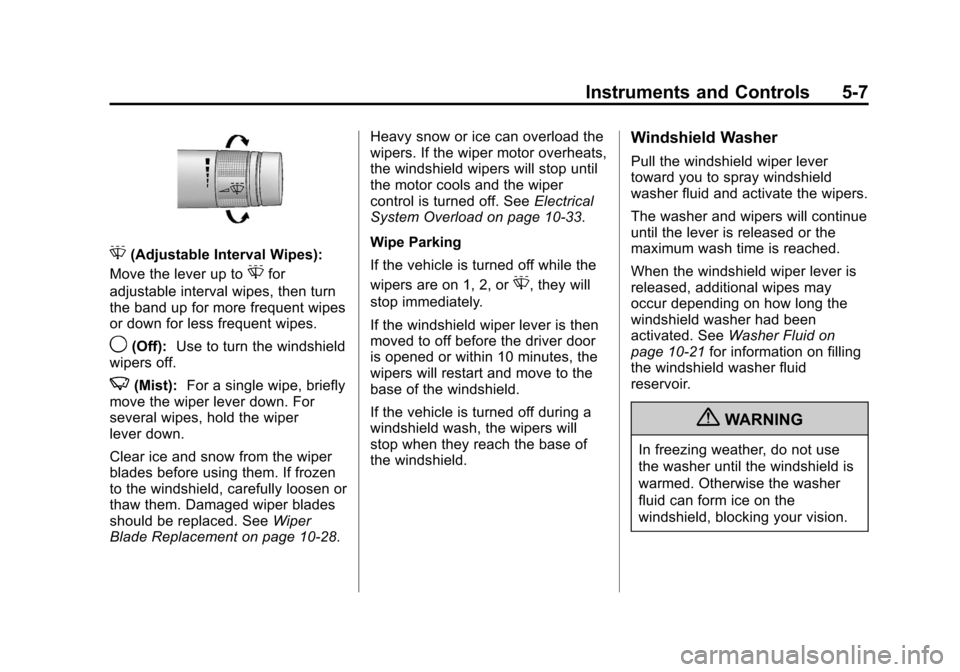
G(Adjustable Interval Wipes):
Move the lever up to
Gfor
adjustable interval wipes, then turn
the band up for more frequent wipes
or down for less frequent wipes.
9(Off): Use to turn the windshield
wipers off.
3(Mist): For a single wipe, briefly
move the wiper lever down. For
several wipes, hold the wiper
lever down.
Clear ice and snow from the wiper
blades before using them. If frozen
to the windshield, carefully loosen or
thaw them. Damaged wiper blades
should be replaced. See Wiper
Blade Replacement on page 10‑28. Heavy snow or ice can overload the
wipers. If the wiper motor overheats,
the windshield wipers will stop until
the motor cools and the wiper
control is turned off. See
Electrical
System Overload on page 10‑33.
Wipe Parking
If the vehicle is turned off while the
wipers are on 1, 2, or
G, they will
stop immediately.
If the windshield wiper lever is then
moved to off before the driver door
is opened or within 10 minutes, the
wipers will restart and move to the
base of the windshield.
If the vehicle is turned off during a
windshield wash, the wipers will
stop when they reach the base of
the windshield.
Windshield Washer
Pull the windshield wiper lever
toward you to spray windshield
washer fluid and activate the wipers.
The washer and wipers will continue
until the lever is released or the
maximum wash time is reached.
When the windshield wiper lever is
released, additional wipes may
occur depending on how long the
windshield washer had been
activated. See Washer Fluid on
page 10‑21 for information on filling
the windshield washer fluid
reservoir.
{WARNING
In freezing weather, do not use
the washer until the windshield is
warmed. Otherwise the washer
fluid can form ice on the
windshield, blocking your vision.
Page 128 of 454

Black plate (12,1)Chevrolet Volt Owner Manual - 2012
5-12 Instruments and Controls
A.Battery Gauge (High Voltage)
on page 5‑14.
B. Fuel Gauge on page 5‑15.
C. Service Electric Parking Brake
Light on page 5‑23.
D. Security Light on page 5‑27.
E. Engine Coolant Temperature
Warning Light on page 5‑25.
F. Charging System Light (12-Volt
Battery) on page 5‑19.
G. Engine Oil Pressure Light on
page 5‑26.
H. High-Beam On Light on
page 5‑27.
I. Second Row Passenger Safety Belt Reminder Light. See Safety
Belt Reminders on page 5‑16.
J. Turn and Lane-Change Signals
on page 6‑4.
K. Compass on page 5‑14.
L. Speedometer on page 5‑14. M.
Cruise Control Light on
page 5‑28.
N. Electric Parking Brake Light on
page 5‑22.
O. Door, Hood, or Hatch Open
Light on page 5‑28.
P. Low Fuel Warning Light on
page 5‑27.
Q. Antilock Brake System (ABS)
Warning Light on page 5‑23.
R. Electric Drive Unit Positions. See Electric Drive Unit on
page 9‑31.
S. Driver Efficiency Gauge on
page 5‑15.
T. Brake System Warning Light on
page 5‑22.
U. Driver Safety Belt Reminder Light. See Safety Belt
Reminders on page 5‑16.
V. Airbag Readiness Light on
page 5‑17. W.
Total Vehicle Range on
page 5‑15.
X. Vehicle Ready Light on
page 5‑27.
Y. StabiliTrak
®OFF Light on
page 5‑24.
Z. Driver Information Center (DIC)
on page 5‑45.
AA. Traction Off Light on page 5‑24.
AB. Sport Mode Light on page 5‑24
and Mountain Mode Light on
page 5‑24.
AC. Lamps On Reminder on
page 5‑28.
AD. Odometer on page 5‑14.
AE. Malfunction Indicator Lamp on
page 5‑19.
AF. Traction Control System (TCS)/
StabiliTrak
®Light on page 5‑25.
AG. Tire Pressure Light on
page 5‑25.
Page 148 of 454
Black plate (32,1)Chevrolet Volt Owner Manual - 2012
5-32 Instruments and Controls
Charging
Programmable Charging
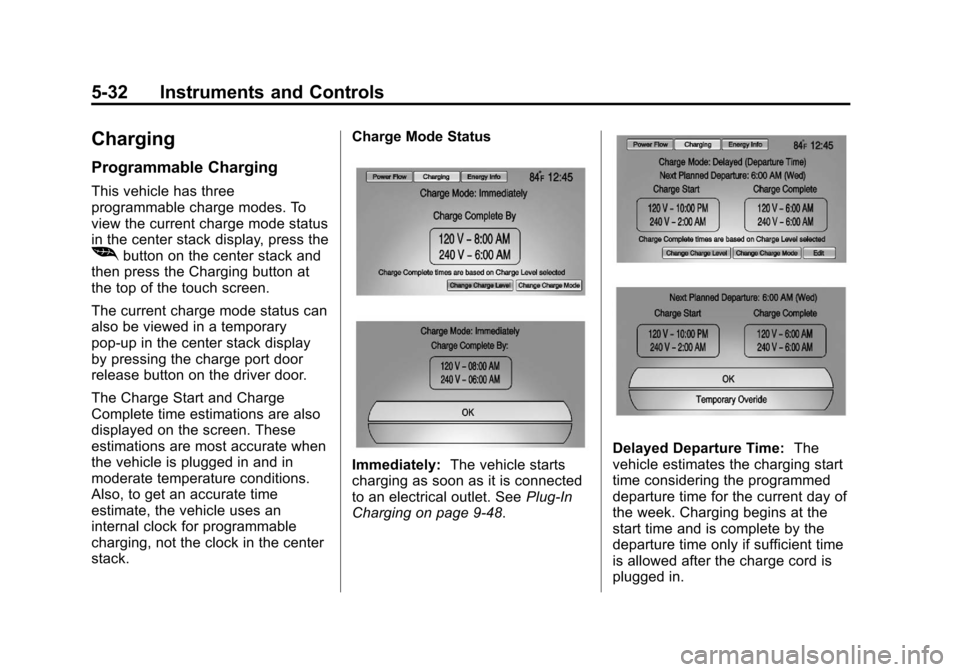
This vehicle has three
programmable charge modes. To
view the current charge mode status
in the center stack display, press the
[button on the center stack and
then press the Charging button at
the top of the touch screen.
The current charge mode status can
also be viewed in a temporary
pop-up in the center stack display
by pressing the charge port door
release button on the driver door.
The Charge Start and Charge
Complete time estimations are also
displayed on the screen. These
estimations are most accurate when
the vehicle is plugged in and in
moderate temperature conditions.
Also, to get an accurate time
estimate, the vehicle uses an
internal clock for programmable
charging, not the clock in the center
stack. Charge Mode Status
Immediately:
The vehicle starts
charging as soon as it is connected
to an electrical outlet. See Plug-In
Charging on page 9‑48.
Delayed Departure Time: The
vehicle estimates the charging start
time considering the programmed
departure time for the current day of
the week. Charging begins at the
start time and is complete by the
departure time only if sufficient time
is allowed after the charge cord is
plugged in.
Page 173 of 454
Black plate (57,1)Chevrolet Volt Owner Manual - 2012
Instruments and Controls 5-57
Selecting a Menu Option
Touch any one of the available
menu options on the touch screen
to select the option. A checkmark
next to the option indicates the
selected option.
Turning a Function On or Off
Touch the screen where the
available function is listed to turn it
on or off. A checkmark next to the
function indicates that the function
is on.Entering the
Personalization Menu
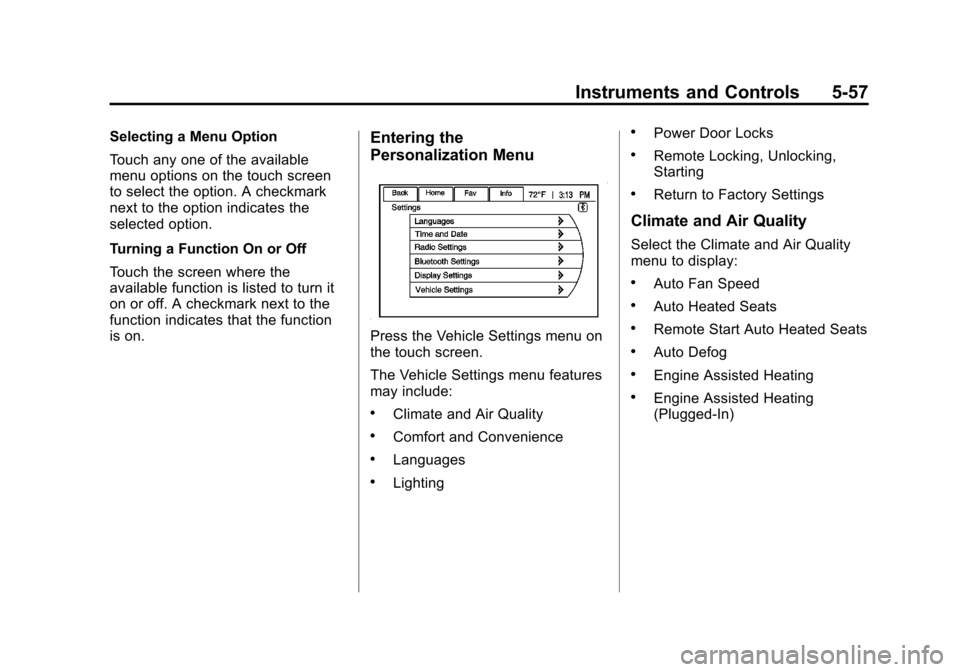
Press the Vehicle Settings menu on
the touch screen.
The Vehicle Settings menu features
may include:
.Climate and Air Quality
.Comfort and Convenience
.Languages
.Lighting
.Power Door Locks
.Remote Locking, Unlocking,
Starting
.Return to Factory Settings
Climate and Air Quality
Select the Climate and Air Quality
menu to display:
.Auto Fan Speed
.Auto Heated Seats
.Remote Start Auto Heated Seats
.Auto Defog
.Engine Assisted Heating
.Engine Assisted Heating
(Plugged‐In)
Page 177 of 454
Black plate (61,1)Chevrolet Volt Owner Manual - 2012
Instruments and Controls 5-61
3. Select English, French,or Spanish.
4. Press Back to return to the previous menu.
Lighting
Select the Lighting menu and the
following will be displayed:
.Exit Lighting
.Vehicle Locator Lights
Exit Lighting
This allows the selection of how
long the exterior lamps stay on
when leaving the vehicle and it is
dark outside.
The available options are:
.OFF
.30 seconds
.1 minute
.2 minutes To select the length of time the
exterior lamps will remain on:
1. Press the Vehicle
Settings menu.
2. Select Lighting.
3. Select Exit Lighting.
4. Select the length of time the exterior lamps will remain on.
5. Press Back to return to the previous menu.
Vehicle Locator Lights
This allows the vehicle locator lights
to be turned on or off. When on, the
headlamps, parking lamps,
taillamps, license plate lamps, and
back-up lamps will illuminate when
Kis pressed on the RKE
transmitter. To turn the vehicle locator lights on
or off:
1. Press the Vehicle
Settings menu.
2. Select Lighting.
3. Select Vehicle Locator Lights.
4. Turn the vehicle locator lights on or off.
5. Press Back to return to the previous menu.
Power Door Locks
Select Power Door Locks and the
following will be displayed:
.Auto Door Unlock
.Unlocked Door Anti Lock Out
.Delayed Door Lock
Page 178 of 454
Black plate (62,1)Chevrolet Volt Owner Manual - 2012
5-62 Instruments and Controls
Auto Door Unlock
This allows selection of which doors
will automatically unlock when the
vehicle is shifted into P (Park).
The available options are:
.All Doors
.Driver Door
.OFF
To select how the doors will
automatically unlock:
1. Press the Vehicle Settings menu.
2. Select Power Door Locks.
3. Select Auto Door Unlock.
4. Select how the doors will automatically unlock.
5. Press Back to return to the previous menu. Unlocked Door Anti Lock Out
When on, this feature will keep the
driver door from locking until the
door is closed. If this feature is
turned on, the Delayed Door Lock
menu will not be available.
To turn the unlocked door anti lock
out feature on or off:
1. Press the Vehicle
Settings menu.
2. Select Power Door Locks.
3. Select Unlocked Door Anti Lock Out.
4. Turn the unlocked door anti lock out feature on or off.
5. Press Back to return to the previous menu.
Delayed Door Lock
When on, this feature will delay the
locking of the doors. To override the
delay, press the power door lock
switch on the center stack. To turn the delayed door lock
feature on or off:
1. Press the Vehicle
Settings menu.
2. Select Power Door Locks.
3. Select Delayed Door Lock.
4. Turn the delayed door lock feature on or off.
5. Press Back to return to the previous menu.
Remote Locking, Unlocking,
Starting
Select Remote Locking, Unlocking,
Starting and the following will be
displayed:
.Remote Lock Feedback
.Remote Unlock Light Feedback
.Door Unlock or Remote Door
Unlock
.Remote Left in Vehicle Reminder
.Passive Door Unlock
.Passive Door Lock
Page 179 of 454
Black plate (63,1)Chevrolet Volt Owner Manual - 2012
Instruments and Controls 5-63
Remote Lock Feedback
This allows selection of what
feedback is provided when
unlocking the vehicle with the RKE
transmitter.
The available options are:
.Lights and Horn
.Lights Only
.Horn Only
.OFF
To select the remote lock feedback:
1. Press the Vehicle Settings menu.
2. Select Remote Locking, Unlocking, Starting.
3. Select Remote Lock Feedback.
4. Select the remote feedback.
5. Press Back to return to the previous menu. Remote Unlock Light Feedback
When on, the exterior lamps will
flash when unlocking the vehicle
with the RKE transmitter.
To turn the remote unlock light
feedback feature on or off:
1. Press the Vehicle
Settings menu.
2. Select Remote Locking, Unlocking, Starting.
3. Select Remote Unlock Light Feedback.
4. Turn the remote unlock light feedback feature on or off.
5. Press Back to return to the previous menu. Door Unlock or Remote Door
Unlock
This allows selection of which doors
will unlock when pressing
Kon the
RKE transmitter.
The available options are:
.All Doors
.Driver Door
If All Doors is selected, all doors will
be unlocked.
If Driver Door is selected, only the
driver door will be unlocked on the
first press of
K. All doors will be
unlocked on the second press of
K
within five seconds of the prior
press.
To select how the doors will unlock
with the RKE transmitter:
1. Press the Vehicle Settings menu.
2. Select Remote Locking, Unlocking, Starting.
Page 180 of 454

Black plate (64,1)Chevrolet Volt Owner Manual - 2012
5-64 Instruments and Controls
3. Select Door Unlock or RemoteDoor Unlock.
4. Select how the doors will unlock.
5. Press Back to return to the previous menu.
Remote Left in Vehicle Reminder
When on, the horn will chirp rapidly
three times if an RKE transmitter is
left in the vehicle.
To turn the remote left in vehicle
reminder feature on or off:
1. Press the Vehicle Settings menu.
2. Select Remote Locking, Unlocking, Starting.
3. Select Remote Left in Vehicle Reminder.
4. Turn the remote left in vehicle reminder feature on or off.
5. Press Back to return to the previous menu. Passive Door Unlock
This allows selection of which doors
are unlocked by pressing the button
on the outside door handle.
The available options are:
.All Doors
.Driver Door
To select how the doors will unlock:
1. Press the Vehicle Settings menu.
2. Select Remote Locking, Unlocking, Starting.
3. Select Passive Door Unlock.
4. Select which doors to unlock.
5. Press Back to return to the previous menu. Passive Door Lock
This allows passive locking to be
turned on or off and select what
type of feedback.
The available options are:
.Off
.On
.On with Active Horn Chirp
To select doors locking feedback:
1. Press the Vehicle Settings menu.
2. Select Remote Locking, Unlocking, Starting.
3. Select Passive Door Lock.
4. Select On, Off, or On with Active Horn Chirp.
5. Press Back to return to the previous menu.
Page 251 of 454
Black plate (13,1)Chevrolet Volt Owner Manual - 2012
Driving and Operating 9-13
{WARNING
Do not load the vehicle any
heavier than the Gross
Vehicle Weight Rating
(GVWR), or either the
maximum front or rear Gross
Axle Weight Rating (GAWR).
This can cause systems to
break and change the way the
vehicle handles. This could
cause loss of control and a
crash. Overloading can also
shorten the life of the vehicle. Tire and Loading Information
Label
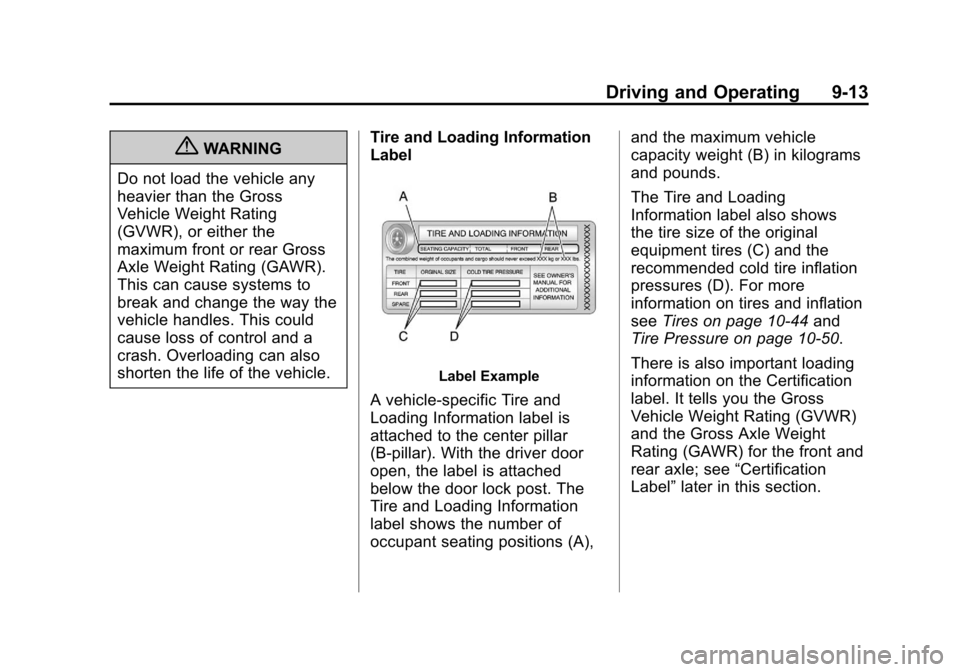
Label Example
A vehicle-specific Tire and
Loading Information label is
attached to the center pillar
(B-pillar). With the driver door
open, the label is attached
below the door lock post. The
Tire and Loading Information
label shows the number of
occupant seating positions (A), and the maximum vehicle
capacity weight (B) in kilograms
and pounds.
The Tire and Loading
Information label also shows
the tire size of the original
equipment tires (C) and the
recommended cold tire inflation
pressures (D). For more
information on tires and inflation
see
Tires on page 10‑44 and
Tire Pressure on page 10‑50.
There is also important loading
information on the Certification
label. It tells you the Gross
Vehicle Weight Rating (GVWR)
and the Gross Axle Weight
Rating (GAWR) for the front and
rear axle; see “Certification
Label” later in this section.