key CHEVROLET VOLT 2012 1.G Owner's Guide
[x] Cancel search | Manufacturer: CHEVROLET, Model Year: 2012, Model line: VOLT, Model: CHEVROLET VOLT 2012 1.GPages: 454, PDF Size: 7.89 MB
Page 75 of 454
Black plate (17,1)Chevrolet Volt Owner Manual - 2012
Seats and Restraints 3-17
Safety Belt Use During
Pregnancy
Safety belts work for everyone,
including pregnant women. Like all
occupants, they are more likely to
be seriously injured if they do not
wear safety belts.
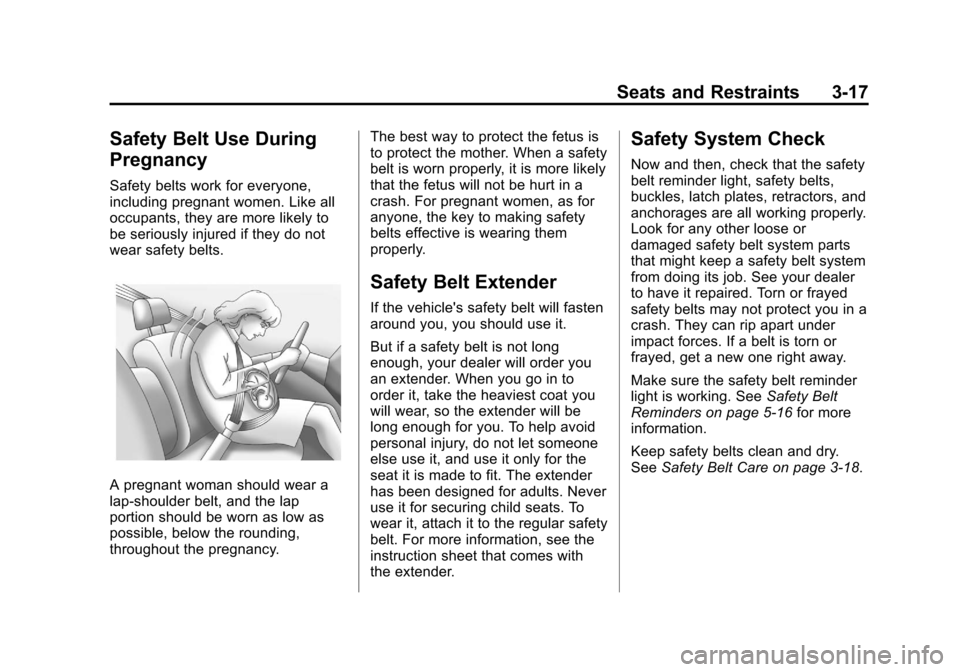
A pregnant woman should wear a
lap-shoulder belt, and the lap
portion should be worn as low as
possible, below the rounding,
throughout the pregnancy.The best way to protect the fetus is
to protect the mother. When a safety
belt is worn properly, it is more likely
that the fetus will not be hurt in a
crash. For pregnant women, as for
anyone, the key to making safety
belts effective is wearing them
properly.
Safety Belt Extender
If the vehicle's safety belt will fasten
around you, you should use it.
But if a safety belt is not long
enough, your dealer will order you
an extender. When you go in to
order it, take the heaviest coat you
will wear, so the extender will be
long enough for you. To help avoid
personal injury, do not let someone
else use it, and use it only for the
seat it is made to fit. The extender
has been designed for adults. Never
use it for securing child seats. To
wear it, attach it to the regular safety
belt. For more information, see the
instruction sheet that comes with
the extender.
Safety System Check
Now and then, check that the safety
belt reminder light, safety belts,
buckles, latch plates, retractors, and
anchorages are all working properly.
Look for any other loose or
damaged safety belt system parts
that might keep a safety belt system
from doing its job. See your dealer
to have it repaired. Torn or frayed
safety belts may not protect you in a
crash. They can rip apart under
impact forces. If a belt is torn or
frayed, get a new one right away.
Make sure the safety belt reminder
light is working. See
Safety Belt
Reminders on page 5‑16 for more
information.
Keep safety belts clean and dry.
See Safety Belt Care on page 3‑18.
Page 115 of 454
Black plate (1,1)Chevrolet Volt Owner Manual - 2012
Storage 4-1
Storage
Storage Compartments
Instrument Panel Storage . . . . . 4-1
Glove Box . . . . . . . . . . . . . . . . . . . . 4-1
Floor Console Storage . . . . . . . . 4-1
Umbrella Storage . . . . . . . . . . . . . 4-2
Additional Storage Features
Cargo Cover . . . . . . . . . . . . . . . . . . 4-2
Storage
Compartments
Instrument Panel Storage
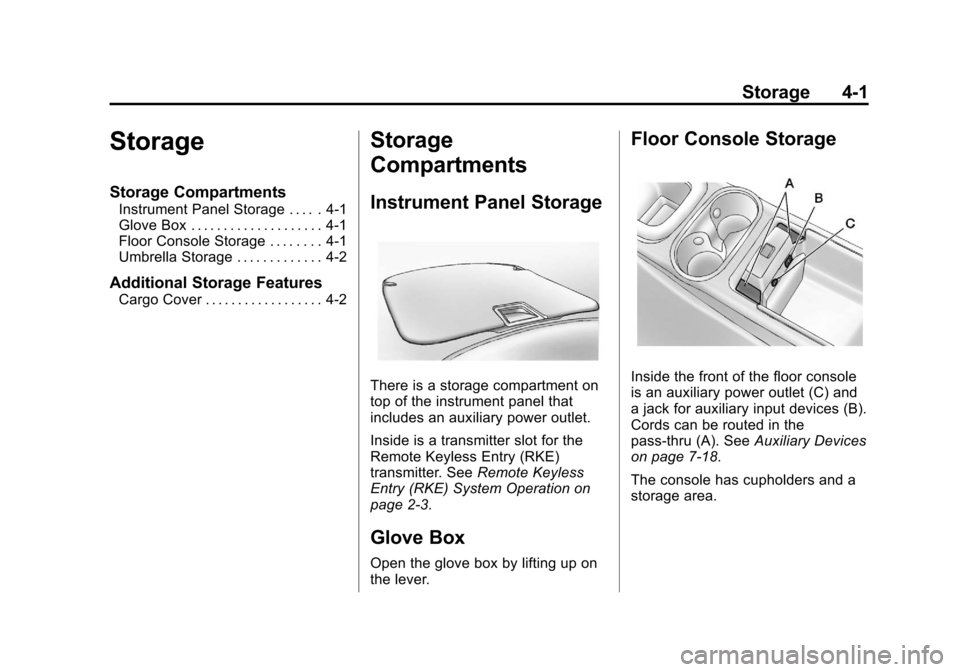
There is a storage compartment on
top of the instrument panel that
includes an auxiliary power outlet.
Inside is a transmitter slot for the
Remote Keyless Entry (RKE)
transmitter. SeeRemote Keyless
Entry (RKE) System Operation on
page 2‑3.
Glove Box
Open the glove box by lifting up on
the lever.
Floor Console Storage
Inside the front of the floor console
is an auxiliary power outlet (C) and
a jack for auxiliary input devices (B).
Cords can be routed in the
pass‐thru (A). See Auxiliary Devices
on page 7‑18.
The console has cupholders and a
storage area.
Page 118 of 454

Black plate (2,1)Chevrolet Volt Owner Manual - 2012
5-2 Instruments and Controls
Fuel System Messages . . . . . . 5-50
Key and Lock Messages . . . . . 5-51
Lamp Messages . . . . . . . . . . . . . 5-51
Object Detection SystemMessages . . . . . . . . . . . . . . . . . . 5-52
Propulsion Power Messages . . . . . . . . . . . . . . . . . . 5-52
Ride Control System Messages . . . . . . . . . . . . . . . . . . 5-53
Airbag System Messages . . . . 5-53
Anti-theft Alarm System Messages . . . . . . . . . . . . . . . . . . 5-53
Service Vehicle Messages . . . 5-54
Starting the Vehicle Messages . . . . . . . . . . . . . . . . . . 5-54
Tire Messages . . . . . . . . . . . . . . . 5-55
Vehicle Reminder Messages . . . . . . . . . . . . . . . . . . 5-55
Vehicle Speed Messages . . . . 5-55
Washer Fluid Messages . . . . . 5-55
Vehicle Personalization
Vehicle Personalization . . . . . . 5-56
Universal Remote System
Universal Remote System . . . 5-65
Universal Remote System Programming . . . . . . . . . . . . . . . 5-65
Universal Remote System Operation . . . . . . . . . . . . . . . . . . 5-68
Page 167 of 454
Black plate (51,1)Chevrolet Volt Owner Manual - 2012
Instruments and Controls 5-51
Key and Lock Messages
When programming new Remote
Keyless Entry (RKE) transmitters,
DIC messages display. SeeRemote
Keyless Entry (RKE) System
Operation on page 2‑3 for more
information.
NO REMOTE DETECTED
This message displays when the
RKE transmitter is not detected
while attempting to start the vehicle.
The transmitter battery may be
weak. See “Starting the Vehicle with
a Low Transmitter Battery” under
Remote Keyless Entry (RKE)
System Operation on page 2‑3 for
more information.
NO REMOTE DETECTED,
PRESS BRAKE TO RESTART
This message displays if the RKE
transmitter is no longer detected in
the vehicle. Press the brake pedal
and the POWER
Obutton to restart the vehicle, or press the POWER
O
button without pressing the brake
pedal to turn the vehicle off. If the
vehicle is turned off and a valid
transmitter is not available, the
vehicle will not restart.
REMINDER: KEY LEFT IN
VEHICLE
This message displays when
leaving the vehicle with the RKE
transmitter still inside.
REPLACE BATTERY IN
REMOTE KEY
This message displays when the
battery in the RKE transmitter needs
to be replaced.
SERVICE KEYLESS START
SYSTEM
This message displays when the
keyless start system needs service.
Take the vehicle to your dealer.
Lamp Messages
AUTOMATIC LIGHT CONTROL
ON OR OFF
A message will display when the
automatic light control has been
turned on or off.
CHECK LAMP or LAMP
FAILURE
Depending on the lamp, one of
these messages may display. See
Bulb Replacement on page 10‑29.
TURN SIGNAL ON
This message displays if the turn
signal has been left on. Turn off the
turn signal.
Page 192 of 454
Black plate (6,1)Chevrolet Volt Owner Manual - 2012
6-6 Lighting
Lighting Features
Entry Lighting
The headlamps, parking lamps,
taillamps, back‐up lamps, and the
interior lights turn on briefly when
the Remote Keyless Entry (RKE)
transmitter
Kis pressed. The lights
turn off immediately when the
POWER
Obutton is pressed or
automatically after a brief period.
Exit Lighting
The headlamps, parking lamps,
taillamps, back‐up lamps, and
license plate lamps come on when
the vehicle is turned off. Some
interior lights also come on when
the vehicle is turned off. The
exterior lamps and interior lights
remain on after the door is closed
for a brief period and then turn off.
The exit lighting feature can be
changed. See Vehicle
Personalization on page 5‑56.
Battery Power Protection
The battery saver feature is
designed to protect the vehicle's
12‐volt battery.
If the exterior lamps or any interior
lamp is left on and the vehicle is
turned off, the battery rundown
protection system automatically
turns the lamps off after about
10 minutes.
Page 237 of 454
Black plate (7,1)Chevrolet Volt Owner Manual - 2012
Climate Controls 8-7
MAUTO/LAUTO (Auto Heated
Seats): If available, the controls
are on the touch screen on the
center stack.
Press the touch screen
LAUTO or
MAUTO button. The button color
will change to green when this
feature is on. When the vehicle is
on, this feature will automatically
activate the heated seats at the
level required by the vehicle's
interior temperature. The active
high, medium, low, or off heated
seat level will be indicated by the
manual heated seat button lights on
the center stack. Use the touch
screen buttons or the manual
heated seat buttons on the center
stack to turn auto heated seats off.
For more information, see Heated
Front Seats on page 3‑6.
Rear Window Defogger
=(Rear Window Defogger):
Press to turn the rear window
defogger on or off.
The rear window defogger turns off
automatically after about
five minutes. If turned on again, it
runs for about five minutes before
turning off. The defogger can also
be turned off by turning the
vehicle off.
For vehicles with heated outside
rearview mirrors, they turn on when
the rear window defogger button is
on and help to clear fog or frost from
the surface of the mirror. See
Heated Mirrors on page 2‑17.
Notice: Do not try to clear frost
or other material from the inside
of the front windshield and rear
window with a razor blade or
anything else that is sharp. This
may damage the rear window
defogger grid and affect the
radio's ability to pick up stations
clearly. The repairs would not be
covered by the vehicle warranty. Remote Start:
For vehicles with
this feature, the climate control
system may be started by using the
Remote Keyless Entry (RKE)
transmitter. The climate control
system will default to an appropriate
heating or cooling mode. See
Remote Start on page 2‑8.
The rear window defogger turns on
if it is cold outside.
Compressor
The vehicle has an electric powered
air conditioning compressor. This
allows for continuous air
conditioning and/or high voltage
battery cooling operation, without
running the engine.
The compressor operating speed is
not tied to the engine speed, so
some noise may be heard from the
compressor, especially when air
conditioning use is high and the
engine has turned off. This is
normal.
Page 256 of 454
Black plate (18,1)Chevrolet Volt Owner Manual - 2012
9-18 Driving and Operating
Power Button
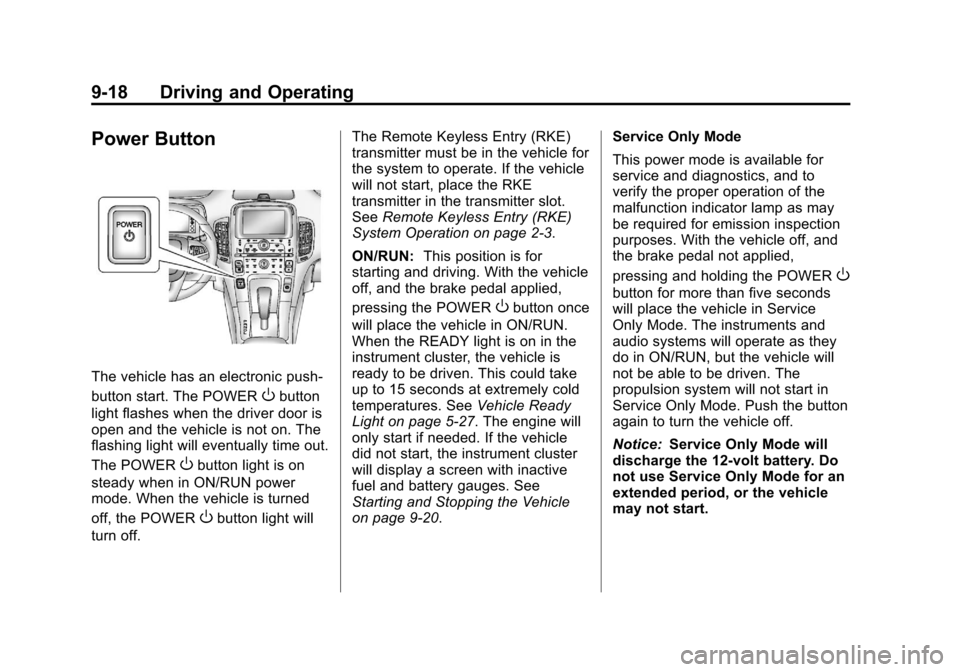
The vehicle has an electronic push‐
button start. The POWER
Obutton
light flashes when the driver door is
open and the vehicle is not on. The
flashing light will eventually time out.
The POWER
Obutton light is on
steady when in ON/RUN power
mode. When the vehicle is turned
off, the POWER
Obutton light will
turn off. The Remote Keyless Entry (RKE)
transmitter must be in the vehicle for
the system to operate. If the vehicle
will not start, place the RKE
transmitter in the transmitter slot.
See
Remote Keyless Entry (RKE)
System Operation on page 2‑3.
ON/RUN: This position is for
starting and driving. With the vehicle
off, and the brake pedal applied,
pressing the POWER
Obutton once
will place the vehicle in ON/RUN.
When the READY light is on in the
instrument cluster, the vehicle is
ready to be driven. This could take
up to 15 seconds at extremely cold
temperatures. See Vehicle Ready
Light on page 5‑27. The engine will
only start if needed. If the vehicle
did not start, the instrument cluster
will display a screen with inactive
fuel and battery gauges. See
Starting and Stopping the Vehicle
on page 9‑20. Service Only Mode
This power mode is available for
service and diagnostics, and to
verify the proper operation of the
malfunction indicator lamp as may
be required for emission inspection
purposes. With the vehicle off, and
the brake pedal not applied,
pressing and holding the POWER
O
button for more than five seconds
will place the vehicle in Service
Only Mode. The instruments and
audio systems will operate as they
do in ON/RUN, but the vehicle will
not be able to be driven. The
propulsion system will not start in
Service Only Mode. Push the button
again to turn the vehicle off.
Notice:
Service Only Mode will
discharge the 12‐volt battery. Do
not use Service Only Mode for an
extended period, or the vehicle
may not start.
Page 258 of 454
Black plate (20,1)Chevrolet Volt Owner Manual - 2012
9-20 Driving and Operating
Starting and Stopping the
Vehicle
Starting Procedure
Move the shift lever to P (Park) or
N (Neutral). The propulsion system
will not start in any other position.
Notice:Do not try to shift to
P (Park) if the vehicle is moving
or the electric drive unit could be
damaged. Shift to P (Park) only
when the vehicle is stopped.
Notice: The vehicle is designed
to work with the electronics in the
vehicle. If you add electrical parts
or accessories, you could change
the way the vehicle operates.
Before adding electrical
equipment, check with your
dealer. If you do not, the vehicle
might not perform properly. Any
resulting damage would not be
covered by the vehicle warranty. The Remote Keyless Entry (RKE)
transmitter must be in the vehicle.
Press the brake pedal and push and
release the POWER
Obutton.
If the RKE transmitter is not in the
vehicle or something is interfering
with the transmitter, a message
displays in the Driver Information
Center (DIC). See Key and Lock
Messages on page 5‑51.
If the vehicle will not start due to a
low RKE transmitter battery, the
vehicle can still be driven. See
“Starting the Vehicle with a Low
Transmitter Battery” inRemote
Keyless Entry (RKE) System
Operation on page 2‑3.
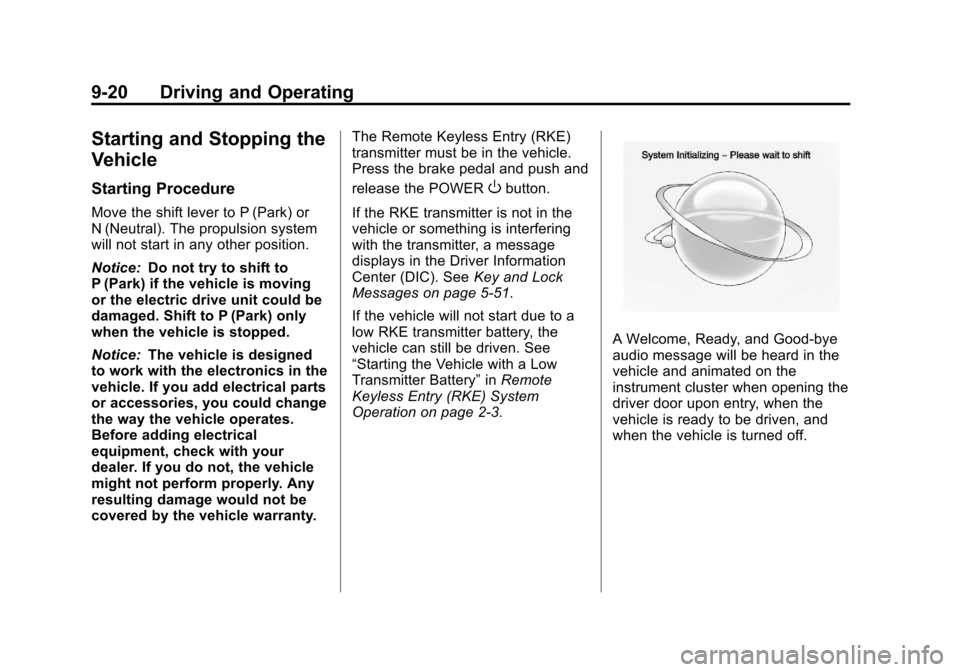
A Welcome, Ready, and Good‐bye
audio message will be heard in the
vehicle and animated on the
instrument cluster when opening the
driver door upon entry, when the
vehicle is ready to be driven, and
when the vehicle is turned off.
Page 287 of 454
Black plate (49,1)Chevrolet Volt Owner Manual - 2012
Driving and Operating 9-49
Charging
Start Charge
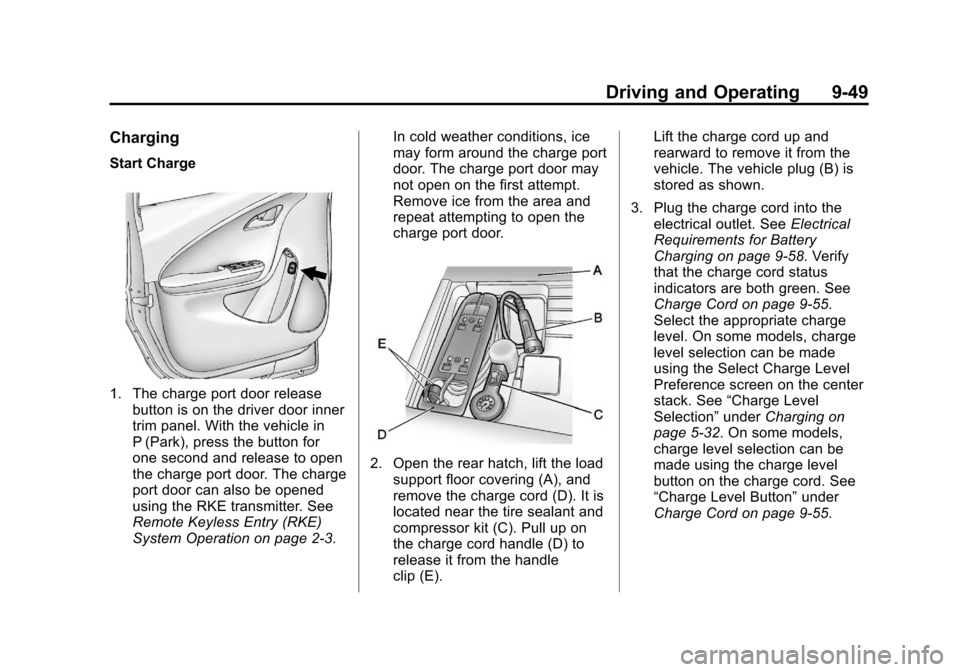
1. The charge port door releasebutton is on the driver door inner
trim panel. With the vehicle in
P (Park), press the button for
one second and release to open
the charge port door. The charge
port door can also be opened
using the RKE transmitter. See
Remote Keyless Entry (RKE)
System Operation on page 2‑3. In cold weather conditions, ice
may form around the charge port
door. The charge port door may
not open on the first attempt.
Remove ice from the area and
repeat attempting to open the
charge port door.
2. Open the rear hatch, lift the load
support floor covering (A), and
remove the charge cord (D). It is
located near the tire sealant and
compressor kit (C). Pull up on
the charge cord handle (D) to
release it from the handle
clip (E). Lift the charge cord up and
rearward to remove it from the
vehicle. The vehicle plug (B) is
stored as shown.
3. Plug the charge cord into the electrical outlet. See Electrical
Requirements for Battery
Charging on page 9‑58. Verify
that the charge cord status
indicators are both green. See
Charge Cord on page 9‑55.
Select the appropriate charge
level. On some models, charge
level selection can be made
using the Select Charge Level
Preference screen on the center
stack. See “Charge Level
Selection” underCharging on
page 5‑32. On some models,
charge level selection can be
made using the charge level
button on the charge cord. See
“Charge Level Button” under
Charge Cord on page 9‑55.
Page 296 of 454
Black plate (58,1)Chevrolet Volt Owner Manual - 2012
9-58 Driving and Operating
Utility Interruption of
Charging
For participating customers, this
vehicle will respond to remote
requests via OnStar to limit or
completely block electrical power
grid usage for brief time periods.
A utility interruption of charging may
increase vehicle charge time.
When electrical grid power is
completely blocked, the vehicle will
delay charging until the utility
interruption has expired. The vehicle
should be left plugged in so that,
when the utility interruption expires,
the vehicle can automatically begin
charging.
Changing the charge mode to
Immediate or performing a delayed
charging override will not disable a
utility interruption.A pop‐up will be displayed in the
center stack display during the key
cycle following any utility
interruption. See
“Charge Override/
Interruption Pop‐up” underCharging
on page 5‑32.
Text will be displayed on the
instrument cluster notifying the
customer that a utility interruption
has occurred. See Instrument
Cluster on page 5‑9.
Electrical Requirements
for Battery Charging
The AC outlet must have a
grounded, dedicated, 15 amp or
greater, three‐prong wall plug. That
means there should be no other
major appliances connected to the
same circuit. If it is not a dedicated
circuit, the current rating of the
outlet circuit breaker could be
exceeded and cause it to trip or
open. The vehicle can be charged in
the reduced level mode. See
“Charge Level Button” in thissection. Reduced level mode allows
a non‐dedicated circuit to be used
but increases the charging time.
This vehicle is capable of being
charged with standard vehicle
charging equipment complying to:
.SAE J1772™
.IEC 61851‐1
.IEC 61851‐22
.IEC 62196‐1
.IEC 62196‐2
The following are the minimum
requirements for circuits used to
charge this vehicle:
.120V/15Amp
.240V/20Amp