display CHEVROLET VOLT 2014 1.G User Guide
[x] Cancel search | Manufacturer: CHEVROLET, Model Year: 2014, Model line: VOLT, Model: CHEVROLET VOLT 2014 1.GPages: 394, PDF Size: 5.86 MB
Page 41 of 394
(7,1)Chevrolet VOLT Owner Manual (GMNA-Localizing-U.S./Canada-6014139) -
2014 - CRC - 9/16/13
Keys, Doors, and Windows 2-7
6. Press and hold the POWERO
button for two seconds. When
the transmitter is programmed,
the DIC will show that it is ready
to program the next transmitter.
7. Remove the transmitter from the transmitter slot and press
Kon
the transmitter.
To program additional
transmitters, repeat Steps 5–7.
When all additional transmitters
are programmed, press and hold
the POWER
Obutton for
12 seconds to exit
programming mode.
Starting the Vehicle with a Low
Transmitter Battery
If the transmitter battery is weak or
there is an interference with the
signal, the DIC may display NO
REMOTE DETECTED or PLACE
TRANSMITTER IN POCKET when
you try to start the vehicle. The REPLACE BATTERY IN REMOTE
KEY message may also be
displayed at this time.
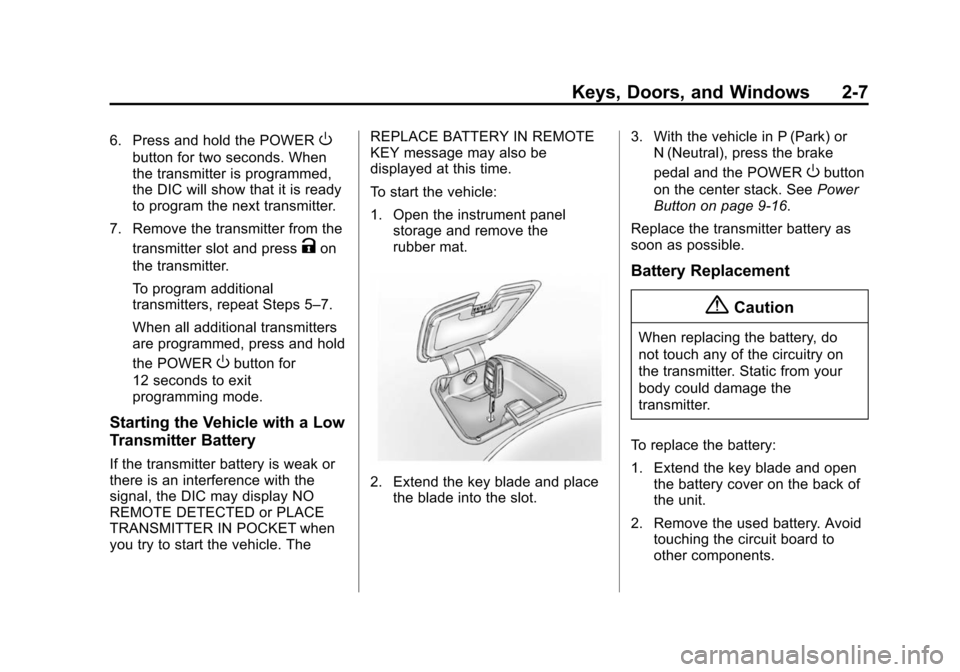
To start the vehicle:
1. Open the instrument panel
storage and remove the
rubber mat.
2. Extend the key blade and place
the blade into the slot. 3. With the vehicle in P (Park) or
N (Neutral), press the brake
pedal and the POWER
Obutton
on the center stack. See Power
Button on page 9-16.
Replace the transmitter battery as
soon as possible.
Battery Replacement
{Caution
When replacing the battery, do
not touch any of the circuitry on
the transmitter. Static from your
body could damage the
transmitter.
To replace the battery:
1. Extend the key blade and open the battery cover on the back of
the unit.
2. Remove the used battery. Avoid touching the circuit board to
other components.
Page 83 of 394
(29,1)Chevrolet VOLT Owner Manual (GMNA-Localizing-U.S./Canada-6014139) -
2014 - CRC - 9/16/13
Seats and Restraints 3-29
Airbag System Check
The airbag system does not need
regularly scheduled maintenance or
replacement. Make sure the airbag
readiness light is working. See
Airbag Readiness Light on
page 5-17.
{Caution
If an airbag covering is damaged,
opened, or broken, the airbag
may not work properly. Do not
open or break the airbag
coverings. If there are any
opened or broken airbag
coverings, have the airbag
covering and/or airbag module
replaced. For the location of the
airbags, seeWhere Are the
Airbags? on page 3-18. See your
dealer for service.
Replacing Airbag System
Parts after a Crash
{Warning
A crash can damage the airbag
systems in the vehicle.
A damaged airbag system may
not work properly and may not
protect you and your
passenger(s) in a crash, resulting
in serious injury or even death. To
help make sure the airbag
systems are working properly
after a crash, have them
inspected and any necessary
replacements made as soon as
possible. If an airbag inflates or the vehicle
has been in a crash, the sensing
system may shut down the high
voltage system. When this occurs,
the high voltage battery is
disconnected and the vehicle will
not start. The SERVICE VEHICLE
SOON message in the Driver
Information Center (DIC) will be
displayed. Before the vehicle can be
operated again, it must be serviced
at your dealer.
If an airbag inflates, you will need to
replace airbag system parts. See
your dealer for service.
If the airbag readiness light stays on
after the vehicle is started or comes
on when you are driving, the airbag
system may not work properly. Have
the vehicle serviced right away. See
Airbag Readiness Light on
page 5-17
for more information.
Page 109 of 394
(1,1)Chevrolet VOLT Owner Manual (GMNA-Localizing-U.S./Canada-6014139) -
2014 - CRC - 9/16/13
Instruments and Controls 5-1
Instruments and
Controls
Instrument Panel Overview
Instrument Panel Overview . . . . 5-3
Controls
Steering Wheel Adjustment . . . 5-5
Steering Wheel Controls . . . . . . 5-5
Horn . . . . . . . . . . . . . . . . . . . . . . . . . . 5-6
Pedestrian Friendly Alert . . . . . . 5-6
Windshield Wiper/Washer . . . . . 5-6
Power Outlets . . . . . . . . . . . . . . . . . 5-8
Warning Lights, Gauges, and
Indicators
Warning Lights, Gauges, andIndicators . . . . . . . . . . . . . . . . . . . . 5-8
Instrument Cluster . . . . . . . . . . . . 5-9
Speedometer . . . . . . . . . . . . . . . . 5-14
Odometer . . . . . . . . . . . . . . . . . . . . 5-14
Trip Odometer . . . . . . . . . . . . . . . 5-14
Compass . . . . . . . . . . . . . . . . . . . . 5-14
Battery Gauge (High Voltage) . . . . . . . . . . . . . . . . . . . . 5-14
Fuel Gauge . . . . . . . . . . . . . . . . . . 5-15
Driver Efficiency Gauge . . . . . . 5-15 Total Vehicle Range . . . . . . . . . 5-15
Safety Belt Reminders . . . . . . . 5-16
Airbag Readiness Light . . . . . . 5-17
Passenger Airbag Status
Indicator . . . . . . . . . . . . . . . . . . . . 5-17
Charging System Light (12-Volt Battery) . . . . . . . . . . . . 5-18
Malfunction Indicator Lamp . . . . . . . . . . . . . 5-19
Brake System Warning Light . . . . . . . . . . . . . . . . . . . . . . . 5-21
Electric Parking Brake Light . . . . . . . . . . . . . . . . . . . . . . . 5-22
Service Electric Parking Brake Light . . . . . . . . . . . . . . . . . . . . . . . 5-22
Antilock Brake System (ABS) Warning Light . . . . . . . . . . . . . . 5-22
Sport Mode Light . . . . . . . . . . . . 5-23
Mountain Mode Light . . . . . . . . 5-23
Hold Mode Light . . . . . . . . . . . . . 5-23
Lane Departure Warning (LDW) Light . . . . . . . . . . . . . . . . 5-24
Forward Collision Alert (FCA) Warning Light . . . . . . . . . . . . . . 5-24
Vehicle Ahead Indicator . . . . . . 5-24
Traction Off Light . . . . . . . . . . . . 5-24
StabiliTrak
®OFF Light . . . . . . . 5-25
Traction Control System (TCS)/StabiliTrak
®Light . . . . 5-25 Engine Coolant Temperature
Warning Light . . . . . . . . . . . . . . 5-25
Tire Pressure Light . . . . . . . . . . 5-26
Engine Oil Pressure Light . . . . 5-26
Low Fuel Warning Light . . . . . . 5-27
Security Light . . . . . . . . . . . . . . . . 5-27
Vehicle Ready Light . . . . . . . . . 5-27
High-Beam On Light . . . . . . . . . 5-27
Lamps On Reminder . . . . . . . . . 5-27
Cruise Control Light . . . . . . . . . 5-28
Door, Hood, or Hatch Open Light . . . . . . . . . . . . . . . . . . . . . . . 5-28
Information Displays
Center Stack Display . . . . . . . . 5-29
Power Flows . . . . . . . . . . . . . . . . . 5-29
Programmable Charging . . . . . 5-31
Energy Information . . . . . . . . . . 5-41
Clock . . . . . . . . . . . . . . . . . . . . . . . . 5-42
Driver InformationCenter (DIC) . . . . . . . . . . . . . . . 5-43
Vehicle Messages
Vehicle Messages . . . . . . . . . . . 5-45
Battery and ChargingMessages . . . . . . . . . . . . . . . . . . 5-45
Brake System Messages . . . . 5-46
Cruise Control Messages . . . . 5-47
Door Ajar Messages . . . . . . . . . 5-47
Page 112 of 394
(4,1)Chevrolet VOLT Owner Manual (GMNA-Localizing-U.S./Canada-6014139) -
2014 - CRC - 9/16/13
5-4 Instruments and Controls
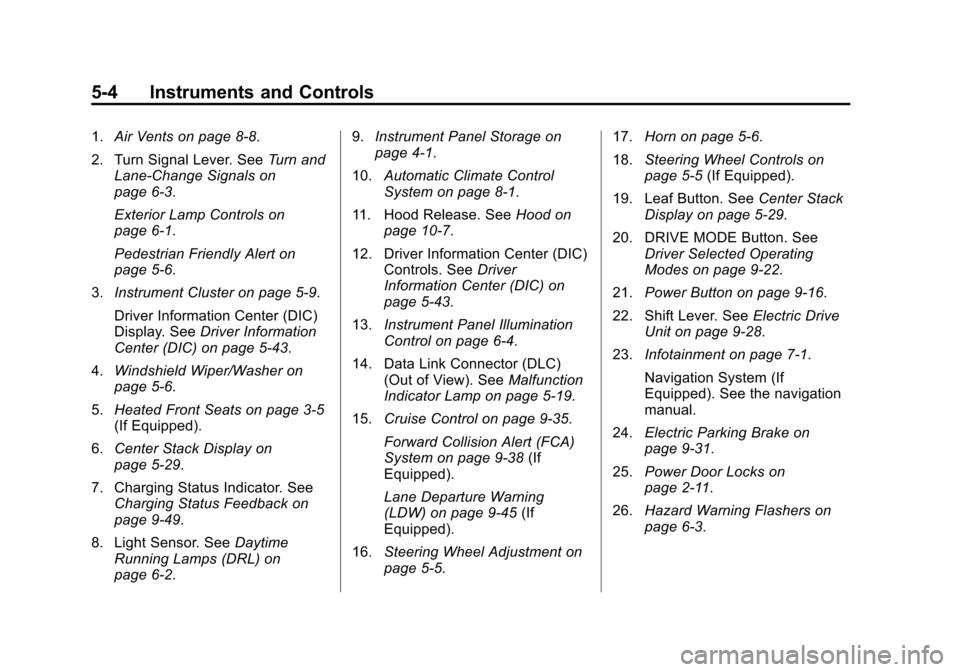
1.Air Vents on page 8-8.
2. Turn Signal Lever. See Turn and
Lane-Change Signals on
page 6-3.
Exterior Lamp Controls on
page 6-1.
Pedestrian Friendly Alert on
page 5-6.
3. Instrument Cluster on page 5-9.
Driver Information Center (DIC)
Display. See Driver Information
Center (DIC) on page 5-43.
4. Windshield Wiper/Washer on
page 5-6.
5. Heated Front Seats on page 3-5
(If Equipped).
6. Center Stack Display on
page 5-29.
7. Charging Status Indicator. See Charging Status Feedback on
page 9-49.
8. Light Sensor. See Daytime
Running Lamps (DRL) on
page 6-2. 9.
Instrument Panel Storage on
page 4-1.
10. Automatic Climate Control
System on page 8-1.
11. Hood Release. See Hood on
page 10-7.
12. Driver Information Center (DIC) Controls. See Driver
Information Center (DIC) on
page 5-43.
13. Instrument Panel Illumination
Control on page 6-4.
14. Data Link Connector (DLC) (Out of View). See Malfunction
Indicator Lamp on page 5-19.
15. Cruise Control on page 9-35.
Forward Collision Alert (FCA)
System on page 9-38 (If
Equipped).
Lane Departure Warning
(LDW) on page 9-45 (If
Equipped).
16. Steering Wheel Adjustment on
page 5-5. 17.
Horn on page 5-6.
18. Steering Wheel Controls on
page 5-5 (If Equipped).
19. Leaf Button. See Center Stack
Display on page 5-29.
20. DRIVE MODE Button. See Driver Selected Operating
Modes on page 9-22.
21. Power Button on page 9-16.
22. Shift Lever. See Electric Drive
Unit on page 9-28.
23. Infotainment on page 7-1.
Navigation System (If
Equipped). See the navigation
manual.
24. Electric Parking Brake on
page 9-31.
25. Power Door Locks on
page 2-11.
26. Hazard Warning Flashers on
page 6-3.
Page 117 of 394
(9,1)Chevrolet VOLT Owner Manual (GMNA-Localizing-U.S./Canada-6014139) -
2014 - CRC - 9/16/13
Instruments and Controls 5-9
When one of the warning lights
comes on and stays on while
driving, or when one of the gauges
shows there may be a problem,
check the section that explains what
to do. Waiting to do repairs can be
costly and even dangerous.
Instrument Cluster
The instrument cluster displays a
preview of information that includes
electric range, charging, odometer,
and battery status. This happens
upon entry when the driver door is
opened, and following the welcome
animation, before starting the
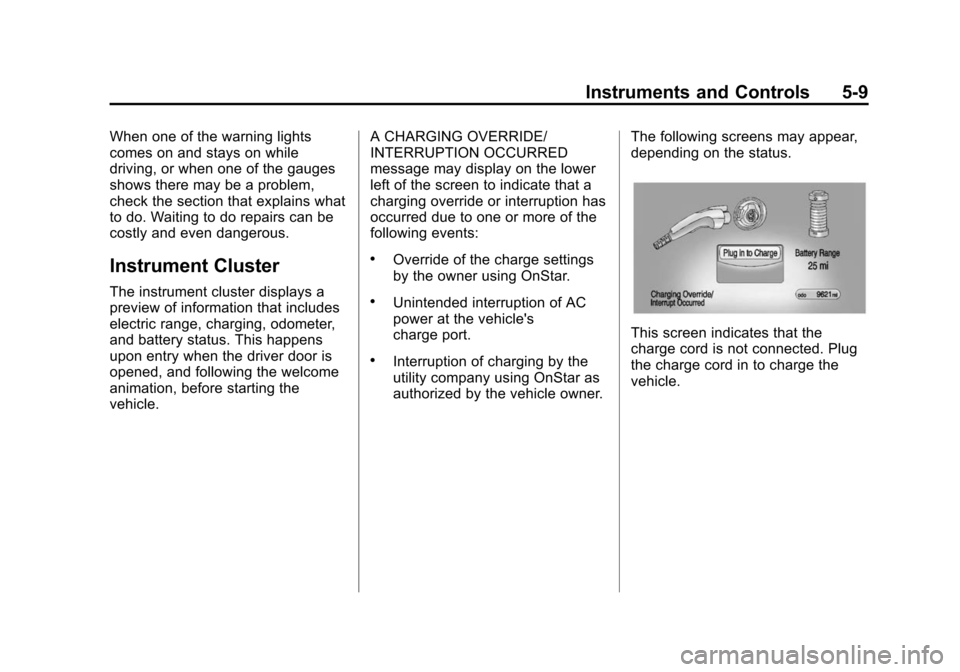
vehicle.A CHARGING OVERRIDE/
INTERRUPTION OCCURRED
message may display on the lower
left of the screen to indicate that a
charging override or interruption has
occurred due to one or more of the
following events:
.Override of the charge settings
by the owner using OnStar.
.Unintended interruption of AC
power at the vehicle's
charge port.
.Interruption of charging by the
utility company using OnStar as
authorized by the vehicle owner.
The following screens may appear,
depending on the status.
This screen indicates that the
charge cord is not connected. Plug
the charge cord in to charge the
vehicle.
Page 121 of 394
(13,1)Chevrolet VOLT Owner Manual (GMNA-Localizing-U.S./Canada-6014139) -
2014 - CRC - 9/16/13
Instruments and Controls 5-13
34.Traction Control System (TCS)/
StabiliTrak®Light on
page 5-25.
35. Tire Pressure Light on
page 5-26.
Instrument Cluster Display
Configurations
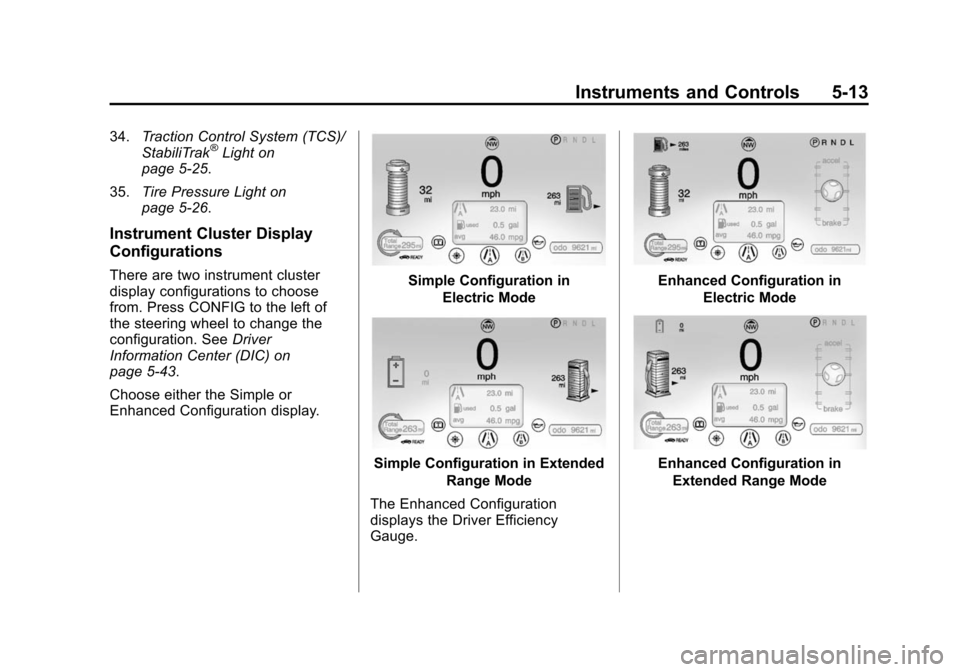
There are two instrument cluster
display configurations to choose
from. Press CONFIG to the left of
the steering wheel to change the
configuration. See Driver
Information Center (DIC) on
page 5-43.
Choose either the Simple or
Enhanced Configuration display.Simple Configuration in
Electric Mode
Simple Configuration in Extended Range Mode
The Enhanced Configuration
displays the Driver Efficiency
Gauge.
Enhanced Configuration in Electric Mode
Enhanced Configuration inExtended Range Mode
Page 122 of 394
(14,1)Chevrolet VOLT Owner Manual (GMNA-Localizing-U.S./Canada-6014139) -
2014 - CRC - 9/16/13
5-14 Instruments and Controls
Speedometer
The speedometer shows the vehicle
speed in both kilometers per hour
(km/h) and miles per hour (mph).
The DIC menu can be used to
change the units.
SeeDriver Information Center (DIC)
on page 5-43.
Odometer
The odometer shows how far the
vehicle has been driven, in either
kilometers or miles.
Trip Odometer
The trip odometer is within the
Driver Information Center. See
Driver Information Center (DIC) on
page 5-43 for more information.
Compass
The vehicle has a compass display
in the instrument cluster above the
speedometer. The compass
receives its heading and other
information from the Global
Positioning System (GPS) antenna
and vehicle speed information.
The compass system has automatic
calibration and zone adjustment
features.
Avoid covering the GPS antenna for
long periods of time with objects
that may interfere with the antenna's
ability to receive a satellite signal.
The compass system is designed to
operate for a certain number of
miles or degrees of turn before
needing a signal from the GPS
satellites. The compass system will
automatically determine when a
GPS signal is restored and provide
a heading.
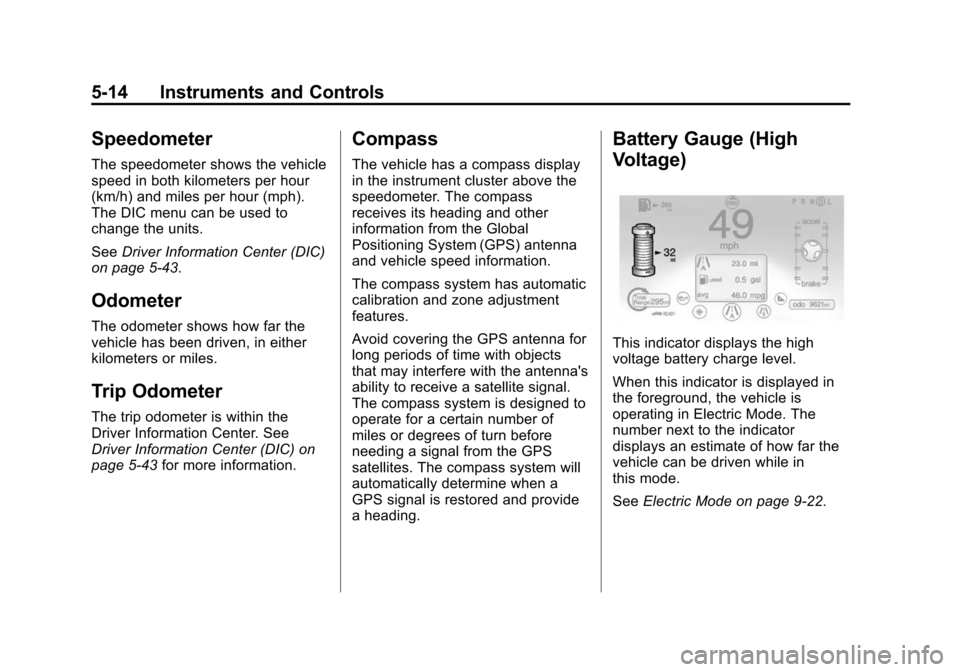
Battery Gauge (High
Voltage)
This indicator displays the high
voltage battery charge level.
When this indicator is displayed in
the foreground, the vehicle is
operating in Electric Mode. The
number next to the indicator
displays an estimate of how far the
vehicle can be driven while in
this mode.
SeeElectric Mode on page 9-22.
Page 123 of 394
(15,1)Chevrolet VOLT Owner Manual (GMNA-Localizing-U.S./Canada-6014139) -
2014 - CRC - 9/16/13
Instruments and Controls 5-15
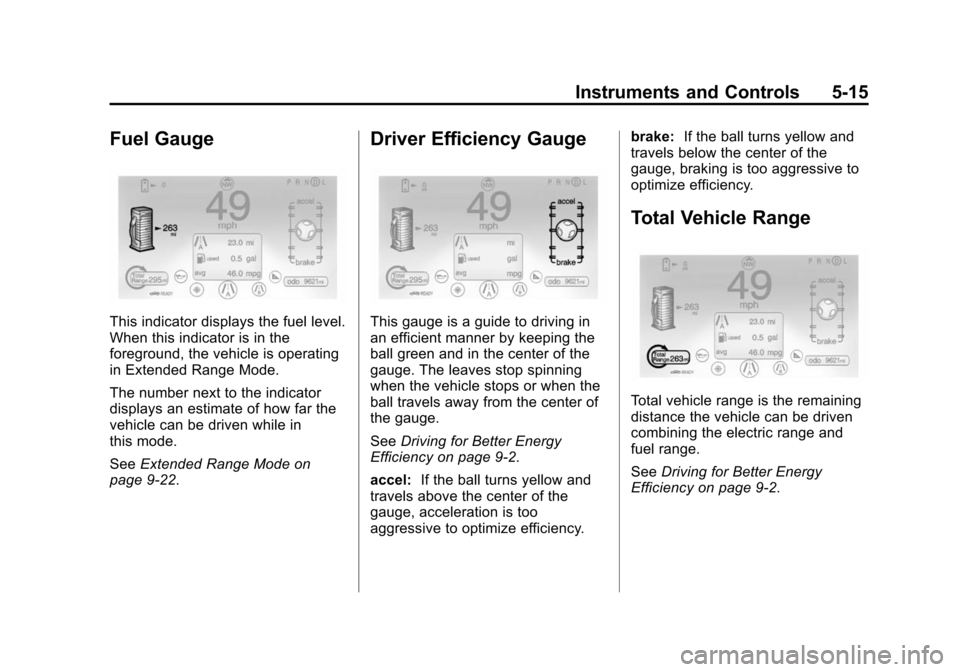
Fuel Gauge
This indicator displays the fuel level.
When this indicator is in the
foreground, the vehicle is operating
in Extended Range Mode.
The number next to the indicator
displays an estimate of how far the
vehicle can be driven while in
this mode.
SeeExtended Range Mode on
page 9-22.
Driver Efficiency Gauge
This gauge is a guide to driving in
an efficient manner by keeping the
ball green and in the center of the
gauge. The leaves stop spinning
when the vehicle stops or when the
ball travels away from the center of
the gauge.
See Driving for Better Energy
Efficiency on page 9-2.
accel: If the ball turns yellow and
travels above the center of the
gauge, acceleration is too
aggressive to optimize efficiency. brake:
If the ball turns yellow and
travels below the center of the
gauge, braking is too aggressive to
optimize efficiency.
Total Vehicle Range
Total vehicle range is the remaining
distance the vehicle can be driven
combining the electric range and
fuel range.
See Driving for Better Energy
Efficiency on page 9-2.
Page 125 of 394
(17,1)Chevrolet VOLT Owner Manual (GMNA-Localizing-U.S./Canada-6014139) -
2014 - CRC - 9/16/13
Instruments and Controls 5-17
need to fasten their safety belts.
After the passenger safety belt is
buckled, the corresponding safety
belt symbol in the instrument cluster
turns green. If a safety belt is not
initially buckled, the instrument
cluster displays a gray safety belt
symbol.
While the vehicle is moving, if a
second row passenger who was
previously buckled becomes
unbuckled, the corresponding safety
belt symbol will change to flashing
red for several seconds and a chime
may sound.
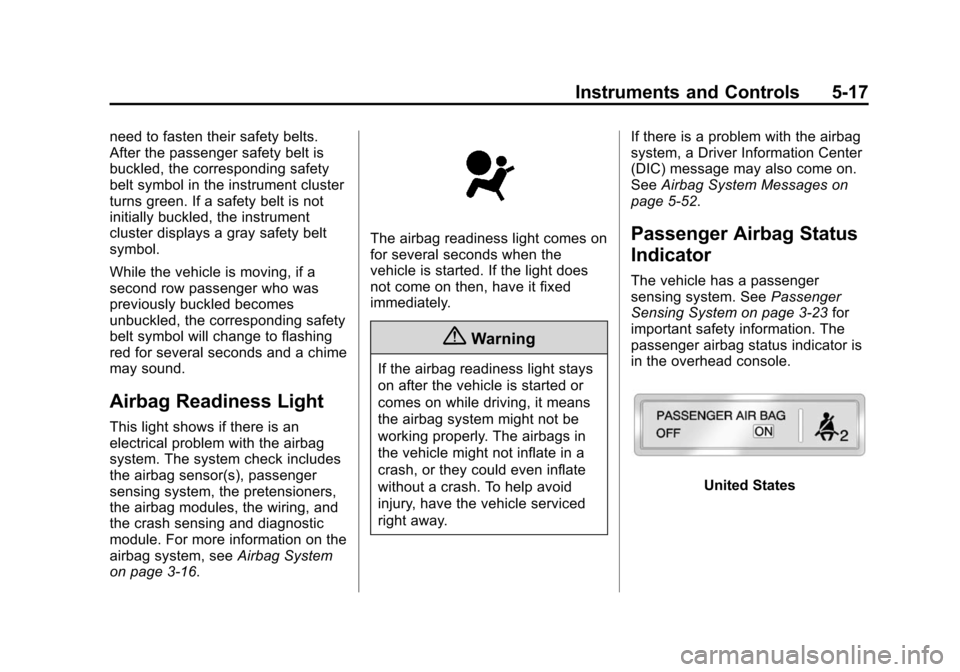
Airbag Readiness Light
This light shows if there is an
electrical problem with the airbag
system. The system check includes
the airbag sensor(s), passenger
sensing system, the pretensioners,
the airbag modules, the wiring, and
the crash sensing and diagnostic
module. For more information on the
airbag system, seeAirbag System
on page 3-16.
The airbag readiness light comes on
for several seconds when the
vehicle is started. If the light does
not come on then, have it fixed
immediately.
{Warning
If the airbag readiness light stays
on after the vehicle is started or
comes on while driving, it means
the airbag system might not be
working properly. The airbags in
the vehicle might not inflate in a
crash, or they could even inflate
without a crash. To help avoid
injury, have the vehicle serviced
right away. If there is a problem with the airbag
system, a Driver Information Center
(DIC) message may also come on.
See
Airbag System Messages on
page 5-52.
Passenger Airbag Status
Indicator
The vehicle has a passenger
sensing system. See Passenger
Sensing System on page 3-23 for
important safety information. The
passenger airbag status indicator is
in the overhead console.
United States
Page 130 of 394
(22,1)Chevrolet VOLT Owner Manual (GMNA-Localizing-U.S./Canada-6014139) -
2014 - CRC - 9/16/13
5-22 Instruments and Controls
{Warning
The brake system might not be
working properly if the brake
system warning light is on.
Driving with the brake system
warning light on can lead to a
crash. If the light is still on after
the vehicle has been pulled off
the road and carefully stopped,
have the vehicle towed for
service.
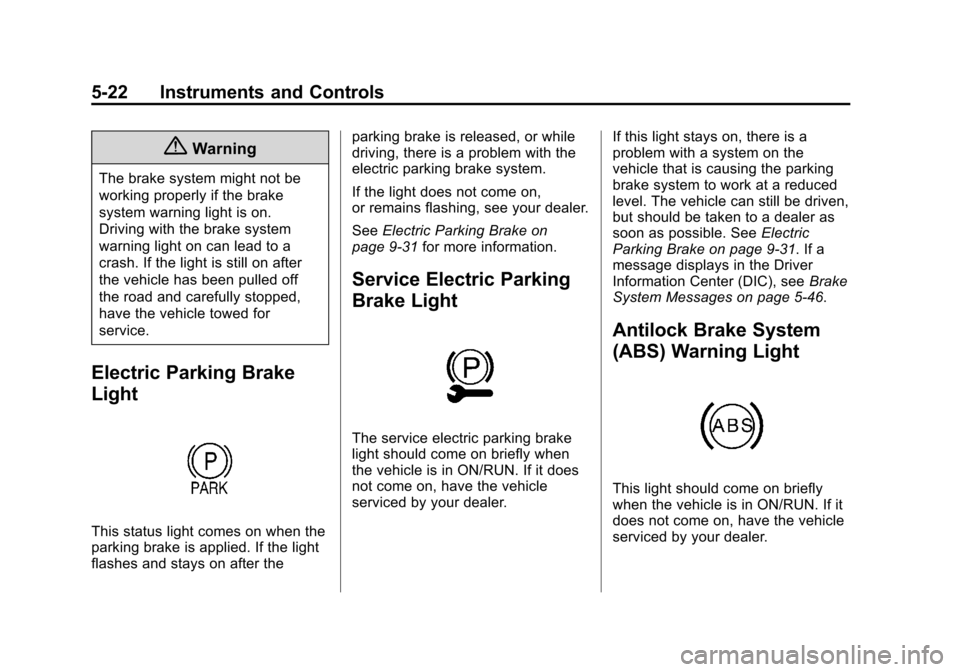
Electric Parking Brake
Light
This status light comes on when the
parking brake is applied. If the light
flashes and stays on after theparking brake is released, or while
driving, there is a problem with the
electric parking brake system.
If the light does not come on,
or remains flashing, see your dealer.
See
Electric Parking Brake on
page 9-31 for more information.
Service Electric Parking
Brake Light
The service electric parking brake
light should come on briefly when
the vehicle is in ON/RUN. If it does
not come on, have the vehicle
serviced by your dealer. If this light stays on, there is a
problem with a system on the
vehicle that is causing the parking
brake system to work at a reduced
level. The vehicle can still be driven,
but should be taken to a dealer as
soon as possible. See
Electric
Parking Brake on page 9-31. If a
message displays in the Driver
Information Center (DIC), see Brake
System Messages on page 5-46.
Antilock Brake System
(ABS) Warning Light
This light should come on briefly
when the vehicle is in ON/RUN. If it
does not come on, have the vehicle
serviced by your dealer.