display CHEVROLET VOLT 2014 1.G Owner's Manual
[x] Cancel search | Manufacturer: CHEVROLET, Model Year: 2014, Model line: VOLT, Model: CHEVROLET VOLT 2014 1.GPages: 394, PDF Size: 5.86 MB
Page 132 of 394
(24,1)Chevrolet VOLT Owner Manual (GMNA-Localizing-U.S./Canada-6014139) -
2014 - CRC - 9/16/13
5-24 Instruments and Controls
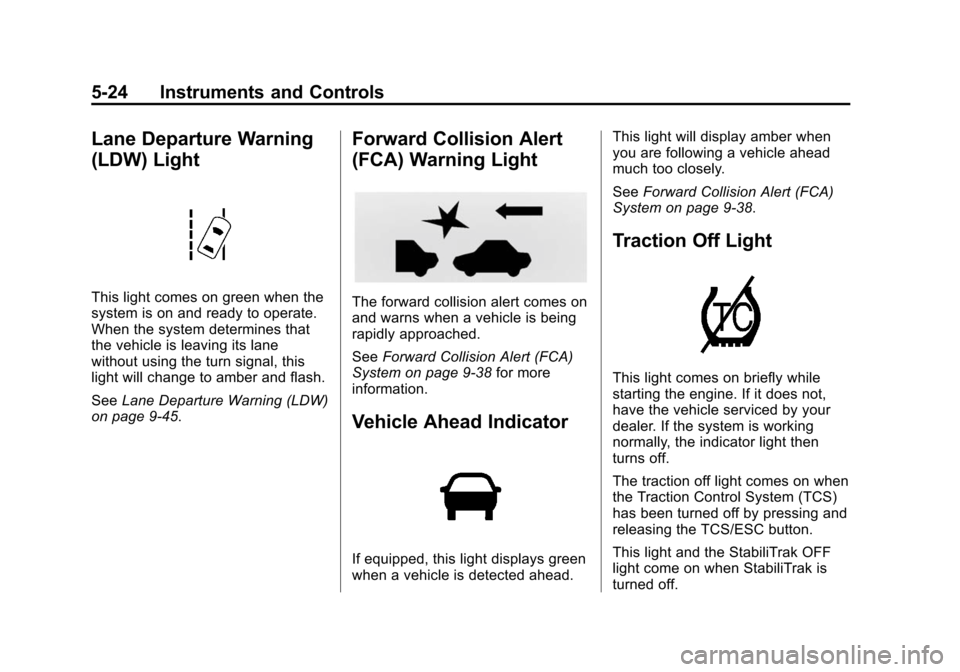
Lane Departure Warning
(LDW) Light
This light comes on green when the
system is on and ready to operate.
When the system determines that
the vehicle is leaving its lane
without using the turn signal, this
light will change to amber and flash.
SeeLane Departure Warning (LDW)
on page 9-45.
Forward Collision Alert
(FCA) Warning Light
The forward collision alert comes on
and warns when a vehicle is being
rapidly approached.
See Forward Collision Alert (FCA)
System on page 9-38 for more
information.
Vehicle Ahead Indicator
If equipped, this light displays green
when a vehicle is detected ahead. This light will display amber when
you are following a vehicle ahead
much too closely.
See
Forward Collision Alert (FCA)
System on page 9-38.
Traction Off Light
This light comes on briefly while
starting the engine. If it does not,
have the vehicle serviced by your
dealer. If the system is working
normally, the indicator light then
turns off.
The traction off light comes on when
the Traction Control System (TCS)
has been turned off by pressing and
releasing the TCS/ESC button.
This light and the StabiliTrak OFF
light come on when StabiliTrak is
turned off.
Page 134 of 394
(26,1)Chevrolet VOLT Owner Manual (GMNA-Localizing-U.S./Canada-6014139) -
2014 - CRC - 9/16/13
5-26 Instruments and Controls
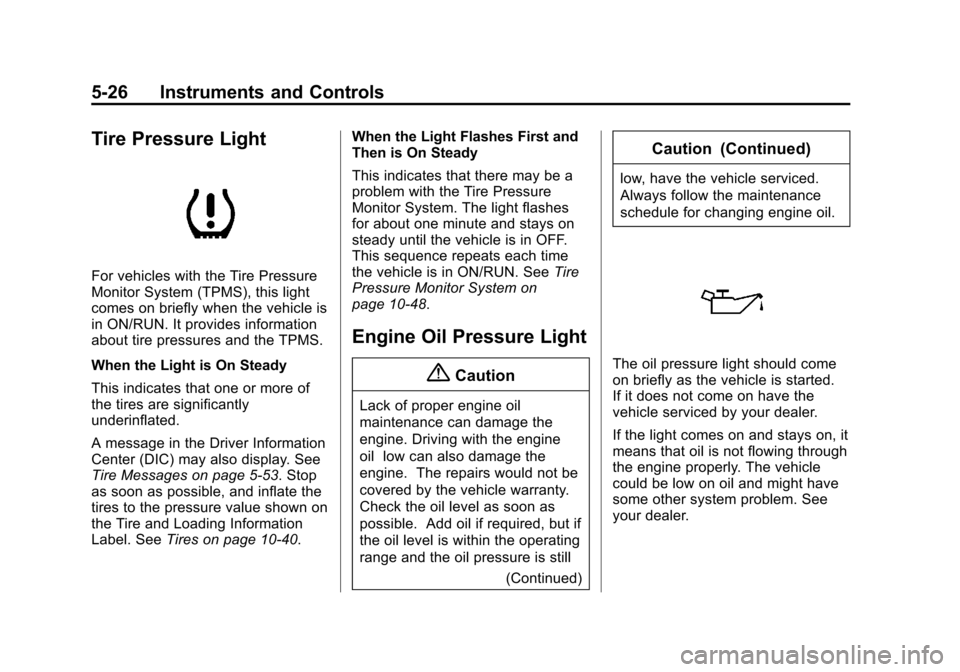
Tire Pressure Light
For vehicles with the Tire Pressure
Monitor System (TPMS), this light
comes on briefly when the vehicle is
in ON/RUN. It provides information
about tire pressures and the TPMS.
When the Light is On Steady
This indicates that one or more of
the tires are significantly
underinflated.
A message in the Driver Information
Center (DIC) may also display. See
Tire Messages on page 5-53. Stop
as soon as possible, and inflate the
tires to the pressure value shown on
the Tire and Loading Information
Label. SeeTires on page 10-40. When the Light Flashes First and
Then is On Steady
This indicates that there may be a
problem with the Tire Pressure
Monitor System. The light flashes
for about one minute and stays on
steady until the vehicle is in OFF.
This sequence repeats each time
the vehicle is in ON/RUN. See
Tire
Pressure Monitor System on
page 10-48.
Engine Oil Pressure Light
{Caution
Lack of proper engine oil
maintenance can damage the
engine. Driving with the engine
oil low can also damage the
engine. The repairs would not be
covered by the vehicle warranty.
Check the oil level as soon as
possible. Add oil if required, but if
the oil level is within the operating
range and the oil pressure is still
(Continued)
Caution (Continued)
low, have the vehicle serviced.
Always follow the maintenance
schedule for changing engine oil.
The oil pressure light should come
on briefly as the vehicle is started.
If it does not come on have the
vehicle serviced by your dealer.
If the light comes on and stays on, it
means that oil is not flowing through
the engine properly. The vehicle
could be low on oil and might have
some other system problem. See
your dealer.
Page 136 of 394
(28,1)Chevrolet VOLT Owner Manual (GMNA-Localizing-U.S./Canada-6014139) -
2014 - CRC - 9/16/13
5-28 Instruments and Controls
Cruise Control Light
The cruise control light comes on
when the cruise control is turned on
and turns green when cruise control
is engaged.
SeeCruise Control on page 9-35 for
more information.
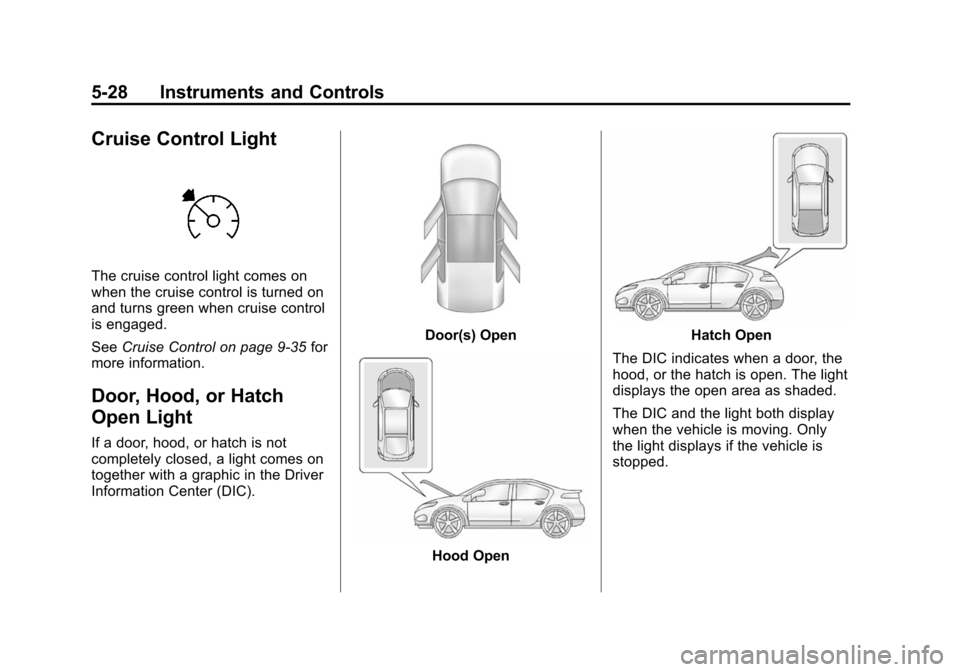
Door, Hood, or Hatch
Open Light
If a door, hood, or hatch is not
completely closed, a light comes on
together with a graphic in the Driver
Information Center (DIC).
Door(s) Open
Hood Open
Hatch Open
The DIC indicates when a door, the
hood, or the hatch is open. The light
displays the open area as shaded.
The DIC and the light both display
when the vehicle is moving. Only
the light displays if the vehicle is
stopped.
Page 137 of 394
(29,1)Chevrolet VOLT Owner Manual (GMNA-Localizing-U.S./Canada-6014139) -
2014 - CRC - 9/16/13
Instruments and Controls 5-29
Information Displays
Center Stack Display
The center stack screen displays
Charging, Power Flow, and Energy
Information. See the information that
follows.
Climate Control, Infotainment, and
Vehicle Personalization information
also displays in this screen. For
more information on these
systems, see:
.Automatic Climate Control
System on page 8-1.
.The infotainment system
manual.
.Vehicle Personalization on
page 5-54.
The center stack controls only need
a light touch to operate and work
best with bare hands. The controls
will work with most gloves although
they may take longer to respond.
Use the finger pad rather than the finger tip to minimize response time.
If the controls are not responding,
remove the gloves.
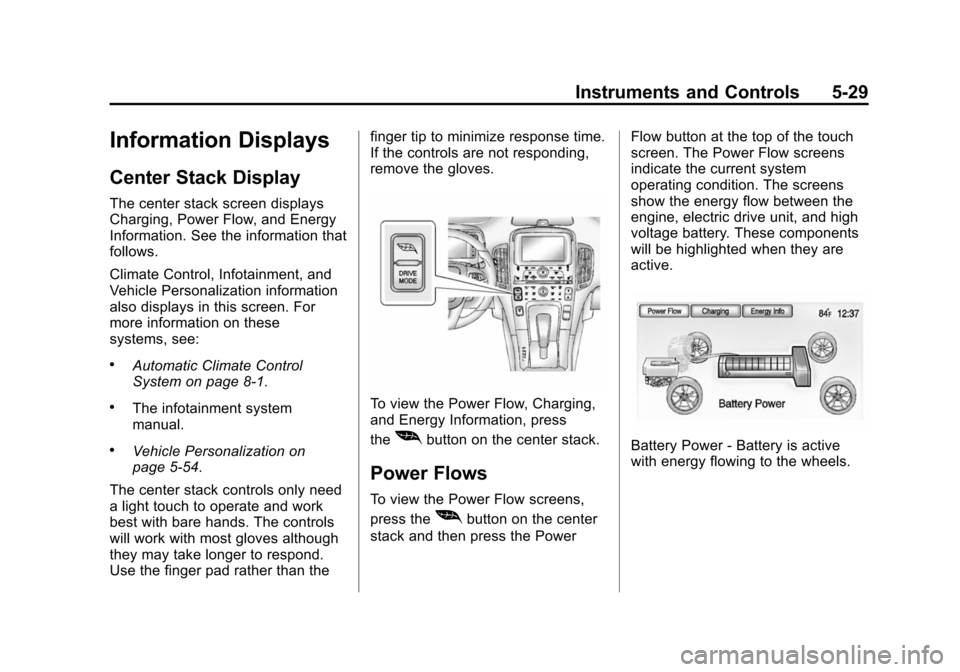
To view the Power Flow, Charging,
and Energy Information, press
the
[button on the center stack.
Power Flows
To view the Power Flow screens,
press the
[button on the center
stack and then press the Power Flow button at the top of the touch
screen. The Power Flow screens
indicate the current system
operating condition. The screens
show the energy flow between the
engine, electric drive unit, and high
voltage battery. These components
will be highlighted when they are
active.
Battery Power - Battery is active
with energy flowing to the wheels.
Page 140 of 394
(32,1)Chevrolet VOLT Owner Manual (GMNA-Localizing-U.S./Canada-6014139) -
2014 - CRC - 9/16/13
5-32 Instruments and Controls
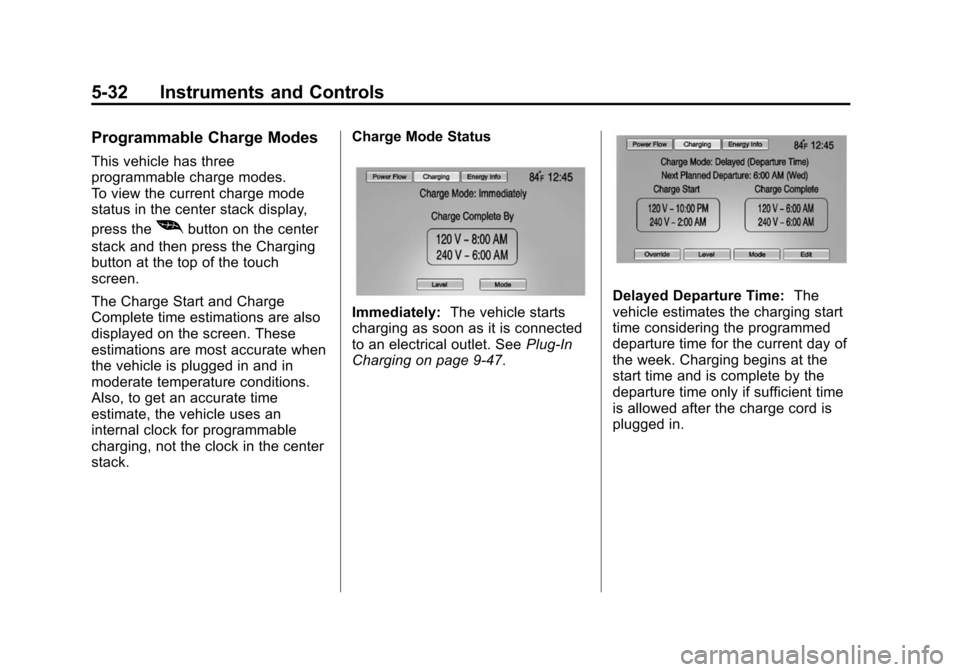
Programmable Charge Modes
This vehicle has three
programmable charge modes.
To view the current charge mode
status in the center stack display,
press the
[button on the center
stack and then press the Charging
button at the top of the touch
screen.
The Charge Start and Charge
Complete time estimations are also
displayed on the screen. These
estimations are most accurate when
the vehicle is plugged in and in
moderate temperature conditions.
Also, to get an accurate time
estimate, the vehicle uses an
internal clock for programmable
charging, not the clock in the center
stack. Charge Mode Status
Immediately:
The vehicle starts
charging as soon as it is connected
to an electrical outlet. See Plug-In
Charging on page 9-47.
Delayed Departure Time: The
vehicle estimates the charging start
time considering the programmed
departure time for the current day of
the week. Charging begins at the
start time and is complete by the
departure time only if sufficient time
is allowed after the charge cord is
plugged in.
Page 142 of 394
(34,1)Chevrolet VOLT Owner Manual (GMNA-Localizing-U.S./Canada-6014139) -
2014 - CRC - 9/16/13
5-34 Instruments and Controls
The Charge Level Preference
setting can be changed at any time
while the center stack display is
operable.
For some vehicles, the Charge
Level Preference must be updated
prior to the vehicle being charged
and the Charge Level Preference
will reset to a default value when the
vehicle is shifted from P (Park).
{Warning
Using a charge level that exceeds
the electrical circuit or electrical
outlet capacity may start a fire or
damage the electrical circuit. Use
the lowest charge level until a
qualified electrician inspects your
electrical circuit capacity. Use the
lowest charge level if the
electrical circuit or electrical outlet
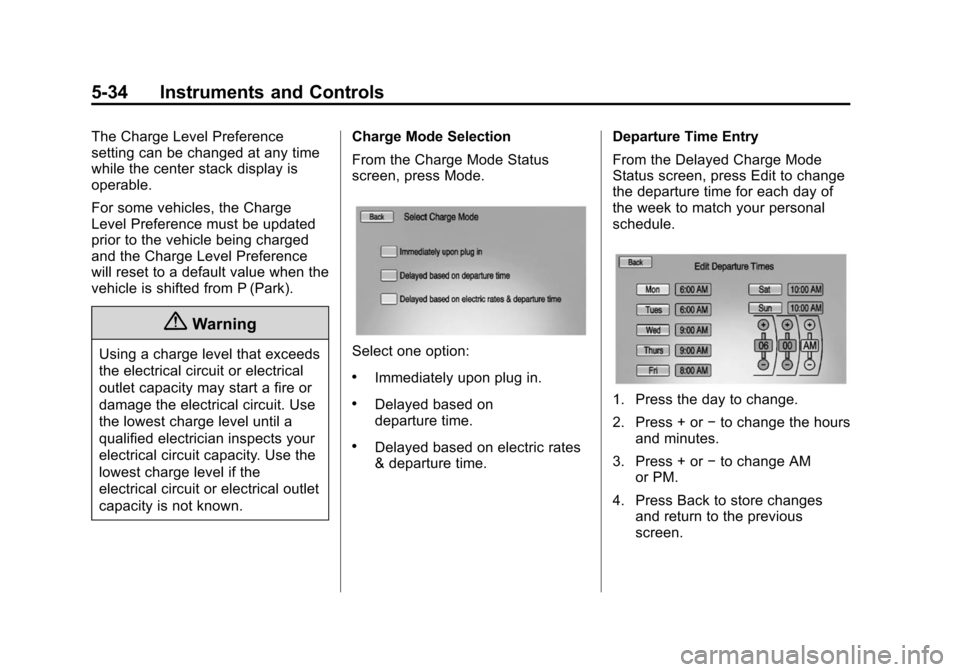
capacity is not known.Charge Mode Selection
From the Charge Mode Status
screen, press Mode.Select one option:
.Immediately upon plug in.
.Delayed based on
departure time.
.Delayed based on electric rates
& departure time.
Departure Time Entry
From the Delayed Charge Mode
Status screen, press Edit to change
the departure time for each day of
the week to match your personal
schedule.
1. Press the day to change.
2. Press + or
−to change the hours
and minutes.
3. Press + or −to change AM
or PM.
4. Press Back to store changes and return to the previous
screen.
Page 145 of 394
(37,1)Chevrolet VOLT Owner Manual (GMNA-Localizing-U.S./Canada-6014139) -
2014 - CRC - 9/16/13
Instruments and Controls 5-37
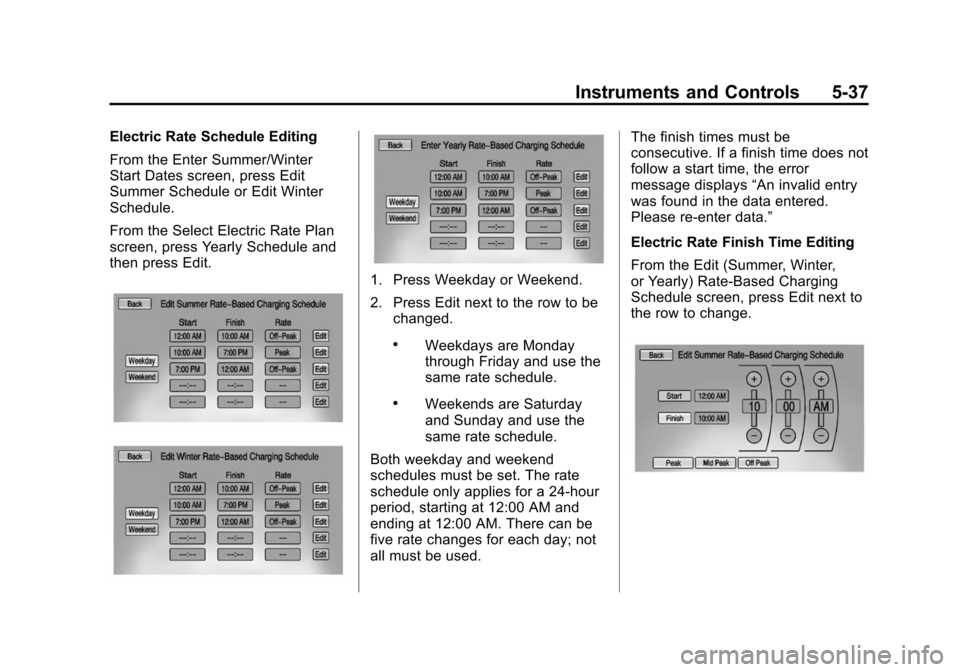
Electric Rate Schedule Editing
From the Enter Summer/Winter
Start Dates screen, press Edit
Summer Schedule or Edit Winter
Schedule.
From the Select Electric Rate Plan
screen, press Yearly Schedule and
then press Edit.
1. Press Weekday or Weekend.
2. Press Edit next to the row to bechanged.
.Weekdays are Monday
through Friday and use the
same rate schedule.
.Weekends are Saturday
and Sunday and use the
same rate schedule.
Both weekday and weekend
schedules must be set. The rate
schedule only applies for a 24-hour
period, starting at 12:00 AM and
ending at 12:00 AM. There can be
five rate changes for each day; not
all must be used. The finish times must be
consecutive. If a finish time does not
follow a start time, the error
message displays
“An invalid entry
was found in the data entered.
Please re-enter data.”
Electric Rate Finish Time Editing
From the Edit (Summer, Winter,
or Yearly) Rate-Based Charging
Schedule screen, press Edit next to
the row to change.
Page 147 of 394
(39,1)Chevrolet VOLT Owner Manual (GMNA-Localizing-U.S./Canada-6014139) -
2014 - CRC - 9/16/13
Instruments and Controls 5-39
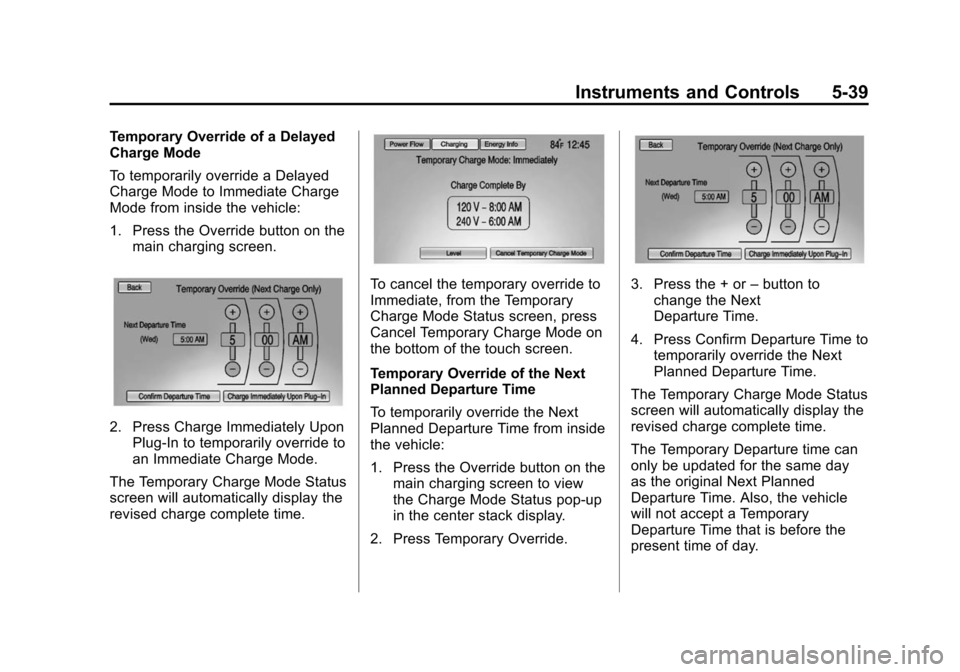
Temporary Override of a Delayed
Charge Mode
To temporarily override a Delayed
Charge Mode to Immediate Charge
Mode from inside the vehicle:
1. Press the Override button on themain charging screen.
2. Press Charge Immediately UponPlug-In to temporarily override to
an Immediate Charge Mode.
The Temporary Charge Mode Status
screen will automatically display the
revised charge complete time.
To cancel the temporary override to
Immediate, from the Temporary
Charge Mode Status screen, press
Cancel Temporary Charge Mode on
the bottom of the touch screen.
Temporary Override of the Next
Planned Departure Time
To temporarily override the Next
Planned Departure Time from inside
the vehicle:
1. Press the Override button on the main charging screen to view
the Charge Mode Status pop-up
in the center stack display.
2. Press Temporary Override.3. Press the + or –button to
change the Next
Departure Time.
4. Press Confirm Departure Time to temporarily override the Next
Planned Departure Time.
The Temporary Charge Mode Status
screen will automatically display the
revised charge complete time.
The Temporary Departure time can
only be updated for the same day
as the original Next Planned
Departure Time. Also, the vehicle
will not accept a Temporary
Departure Time that is before the
present time of day.
Page 149 of 394
(41,1)Chevrolet VOLT Owner Manual (GMNA-Localizing-U.S./Canada-6014139) -
2014 - CRC - 9/16/13
Instruments and Controls 5-41
Programmable Charging
Disabled
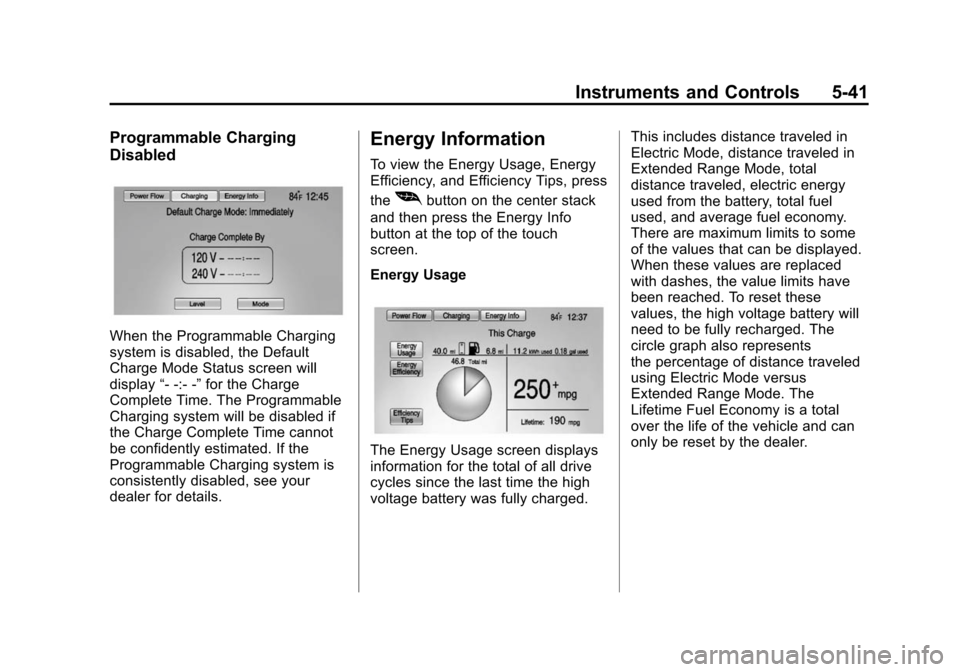
When the Programmable Charging
system is disabled, the Default
Charge Mode Status screen will
display“- -:- -”for the Charge
Complete Time. The Programmable
Charging system will be disabled if
the Charge Complete Time cannot
be confidently estimated. If the
Programmable Charging system is
consistently disabled, see your
dealer for details.
Energy Information
To view the Energy Usage, Energy
Efficiency, and Efficiency Tips, press
the
[button on the center stack
and then press the Energy Info
button at the top of the touch
screen.
Energy Usage
The Energy Usage screen displays
information for the total of all drive
cycles since the last time the high
voltage battery was fully charged. This includes distance traveled in
Electric Mode, distance traveled in
Extended Range Mode, total
distance traveled, electric energy
used from the battery, total fuel
used, and average fuel economy.
There are maximum limits to some
of the values that can be displayed.
When these values are replaced
with dashes, the value limits have
been reached. To reset these
values, the high voltage battery will
need to be fully recharged. The
circle graph also represents
the percentage of distance traveled
using Electric Mode versus
Extended Range Mode. The
Lifetime Fuel Economy is a total
over the life of the vehicle and can
only be reset by the dealer.
Page 150 of 394
(42,1)Chevrolet VOLT Owner Manual (GMNA-Localizing-U.S./Canada-6014139) -
2014 - CRC - 9/16/13
5-42 Instruments and Controls
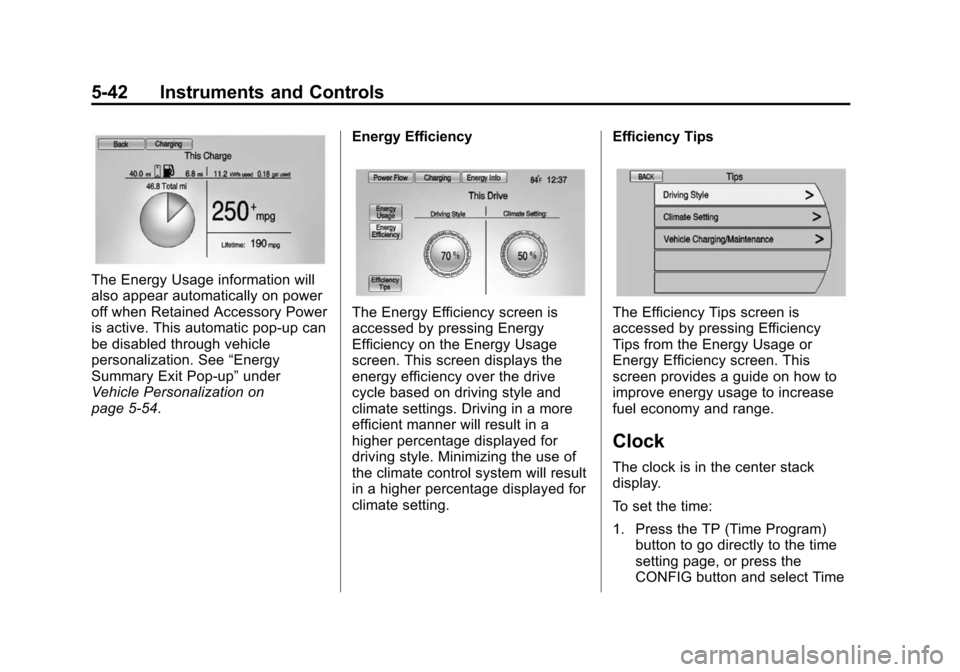
The Energy Usage information will
also appear automatically on power
off when Retained Accessory Power
is active. This automatic pop-up can
be disabled through vehicle
personalization. See“Energy
Summary Exit Pop-up” under
Vehicle Personalization on
page 5-54. Energy Efficiency
The Energy Efficiency screen is
accessed by pressing Energy
Efficiency on the Energy Usage
screen. This screen displays the
energy efficiency over the drive
cycle based on driving style and
climate settings. Driving in a more
efficient manner will result in a
higher percentage displayed for
driving style. Minimizing the use of
the climate control system will result
in a higher percentage displayed for
climate setting.Efficiency TipsThe Efficiency Tips screen is
accessed by pressing Efficiency
Tips from the Energy Usage or
Energy Efficiency screen. This
screen provides a guide on how to
improve energy usage to increase
fuel economy and range.
Clock
The clock is in the center stack
display.
To set the time:
1. Press the TP (Time Program)
button to go directly to the time
setting page, or press the
CONFIG button and select Time