engine CHEVROLET VOLT 2014 1.G Owner's Manual
[x] Cancel search | Manufacturer: CHEVROLET, Model Year: 2014, Model line: VOLT, Model: CHEVROLET VOLT 2014 1.GPages: 394, PDF Size: 5.86 MB
Page 137 of 394
(29,1)Chevrolet VOLT Owner Manual (GMNA-Localizing-U.S./Canada-6014139) -
2014 - CRC - 9/16/13
Instruments and Controls 5-29
Information Displays
Center Stack Display
The center stack screen displays
Charging, Power Flow, and Energy
Information. See the information that
follows.
Climate Control, Infotainment, and
Vehicle Personalization information
also displays in this screen. For
more information on these
systems, see:
.Automatic Climate Control
System on page 8-1.
.The infotainment system
manual.
.Vehicle Personalization on
page 5-54.
The center stack controls only need
a light touch to operate and work
best with bare hands. The controls
will work with most gloves although
they may take longer to respond.
Use the finger pad rather than the finger tip to minimize response time.
If the controls are not responding,
remove the gloves.
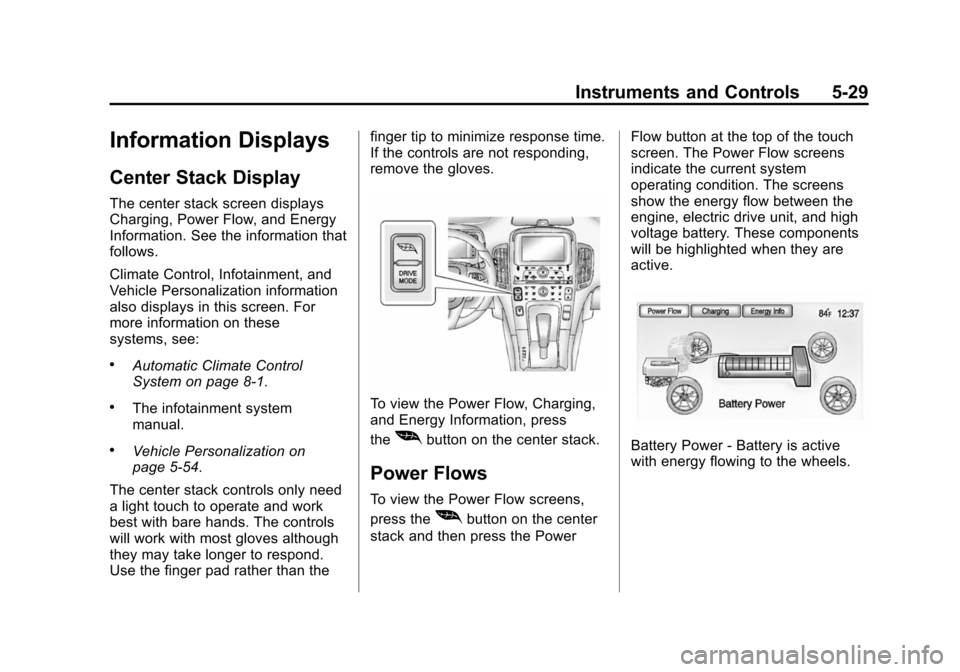
To view the Power Flow, Charging,
and Energy Information, press
the
[button on the center stack.
Power Flows
To view the Power Flow screens,
press the
[button on the center
stack and then press the Power Flow button at the top of the touch
screen. The Power Flow screens
indicate the current system
operating condition. The screens
show the energy flow between the
engine, electric drive unit, and high
voltage battery. These components
will be highlighted when they are
active.
Battery Power - Battery is active
with energy flowing to the wheels.
Page 138 of 394
(30,1)Chevrolet VOLT Owner Manual (GMNA-Localizing-U.S./Canada-6014139) -
2014 - CRC - 9/16/13
5-30 Instruments and Controls
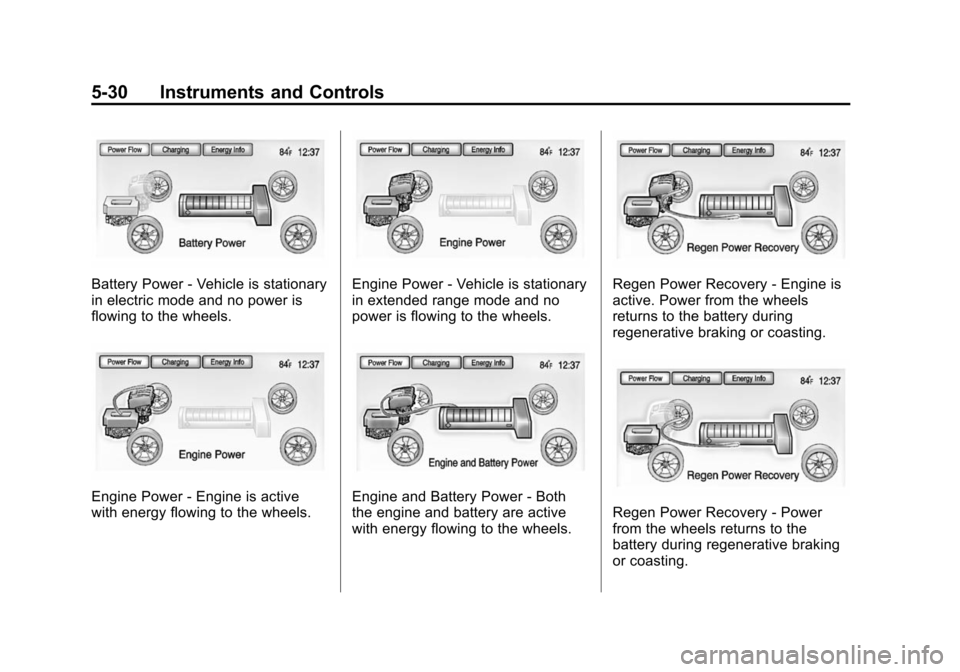
Battery Power - Vehicle is stationary
in electric mode and no power is
flowing to the wheels.
Engine Power - Engine is active
with energy flowing to the wheels.
Engine Power - Vehicle is stationary
in extended range mode and no
power is flowing to the wheels.
Engine and Battery Power - Both
the engine and battery are active
with energy flowing to the wheels.
Regen Power Recovery - Engine is
active. Power from the wheels
returns to the battery during
regenerative braking or coasting.
Regen Power Recovery - Power
from the wheels returns to the
battery during regenerative braking
or coasting.
Page 152 of 394
(44,1)Chevrolet VOLT Owner Manual (GMNA-Localizing-U.S./Canada-6014139) -
2014 - CRC - 9/16/13
5-44 Instruments and Controls
DIC Menu Items
At the main DIC menu:
1. Turn the SELECT knob to scrollthrough the possible DIC menus.
2. Press the center of the SELECT knob when a menu item is
highlighted to enter that menu.
3. Continue to turn and press the SELECT knob to scroll through
and select the available menu
items:
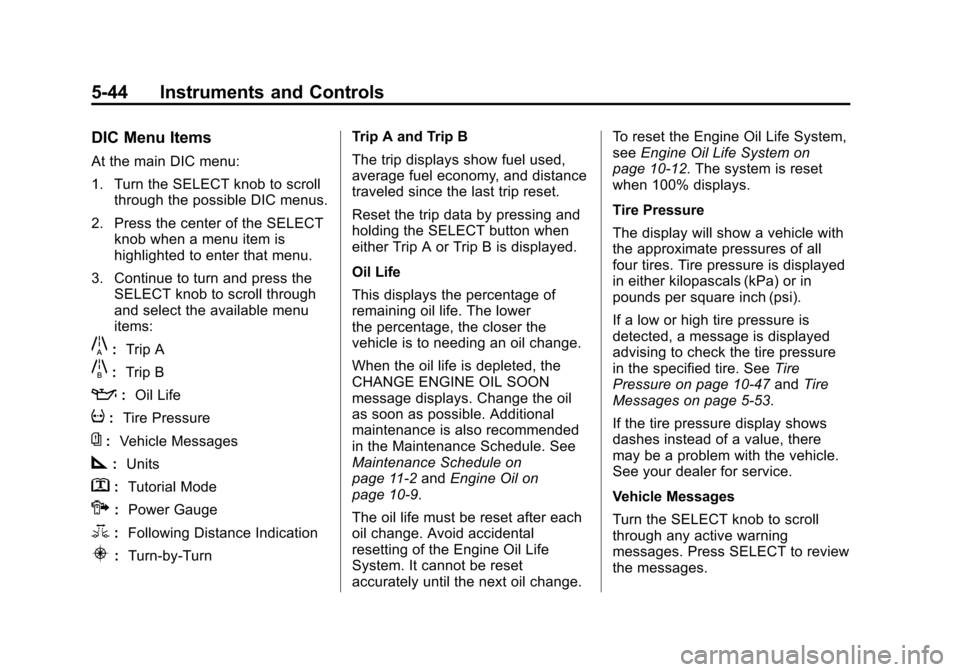
}:Trip A
x:Trip B
::Oil Life
v:Tire Pressure
{:Vehicle Messages
z:Units
y: Tutorial Mode
{:Power Gauge
3: Following Distance Indication
u:Turn-by-Turn Trip A and Trip B
The trip displays show fuel used,
average fuel economy, and distance
traveled since the last trip reset.
Reset the trip data by pressing and
holding the SELECT button when
either Trip A or Trip B is displayed.
Oil Life
This displays the percentage of
remaining oil life. The lower
the percentage, the closer the
vehicle is to needing an oil change.
When the oil life is depleted, the
CHANGE ENGINE OIL SOON
message displays. Change the oil
as soon as possible. Additional
maintenance is also recommended
in the Maintenance Schedule. See
Maintenance Schedule on
page 11-2
andEngine Oil on
page 10-9.
The oil life must be reset after each
oil change. Avoid accidental
resetting of the Engine Oil Life
System. It cannot be reset
accurately until the next oil change. To reset the Engine Oil Life System,
see
Engine Oil Life System on
page 10-12. The system is reset
when 100% displays.
Tire Pressure
The display will show a vehicle with
the approximate pressures of all
four tires. Tire pressure is displayed
in either kilopascals (kPa) or in
pounds per square inch (psi).
If a low or high tire pressure is
detected, a message is displayed
advising to check the tire pressure
in the specified tire. See Tire
Pressure on page 10-47 andTire
Messages on page 5-53.
If the tire pressure display shows
dashes instead of a value, there
may be a problem with the vehicle.
See your dealer for service.
Vehicle Messages
Turn the SELECT knob to scroll
through any active warning
messages. Press SELECT to review
the messages.
Page 153 of 394
(45,1)Chevrolet VOLT Owner Manual (GMNA-Localizing-U.S./Canada-6014139) -
2014 - CRC - 9/16/13
Instruments and Controls 5-45
Units
Turn the SELECT knob to change
the unit display to METRIC or US
when the display is active. Press
SELECT to confirm the setting. This
will change the displays on the
cluster and DIC to either metric or
English (US) measurements.
Tutorial Mode
Select this menu item to view a
screen that explains some of the
unique features of the cluster or the
Open Source Software information
for the cluster.
Tutorial mode is only available when
the vehicle is in P (Park).Power Gauge
Select this menu item the power
gauge.
The power gauge informs the driver
of the total power coming from the
engine or battery to operate the
vehicle. When in Regen mode, this
gauge will inform the driver of the
amount of power being restored to
the battery from the vehicle.
Following Distance Indication
Select this menu item to view the
following distance indication. See
“Following Distance Indication”
under
Forward Collision Alert (FCA)
System on page 9-38.
Turn-by-Turn
Select this menu item to view the
OnStar or Navigation System
Turn-by-Turn guidance. See the
infotainment manual.Vehicle Messages
Messages displayed in the DIC
indicate the status of the vehicle or
some action that may be needed to
correct a condition. Multiple
messages may display one after the
other.
Messages that do not require
immediate action can be
acknowledged and cleared by
pressing the SELECT knob. The
messages requiring immediate
action cannot be cleared until that
action is performed. All messages
should be taken seriously. Clearing
the messages does not correct the
problem.
Battery and Charging
Messages
BATTERY SAVER ACTIVE
This message displays when the
vehicle has detected that the 12-volt
battery voltage has dropped and
vehicle features are being disabled.
Page 155 of 394
(47,1)Chevrolet VOLT Owner Manual (GMNA-Localizing-U.S./Canada-6014139) -
2014 - CRC - 9/16/13
Instruments and Controls 5-47
STEP ON BRAKE TO
RELEASE PARK BRAKE
This message displays when
attempting to release the electric
parking brake without the brake
pedal applied. SeeElectric Parking
Brake on page 9-31.
Cruise Control Messages
CRUISE SET TO XXX
This message displays when the
cruise control is set and shows the
speed it was set to. See Cruise
Control on page 9-35.
Door Ajar Messages
DOOR(S) OPEN, HOOD OPEN,
HATCH OPEN
A symbol will appear on the display
showing the area that is open. See
Door, Hood, or Hatch Open Light on
page 5-28.
Drive Mode Messages
HOLD MODE NOT AVAILABLE
This message displays when in
Hold Mode and the mode becomes
unavailable. See “Hold Mode”under
Driver Selected Operating Modes on
page 9-22.
MOUNTAIN MODE NOT
AVAILABLE
This message displays when in
Mountain Mode and the mode
becomes unavailable. See
“Mountain Mode” underDriver
Selected Operating Modes on
page 9-22.
SPORT MODE NOT
AVAILABLE
This message displays when in
Sport Mode and the mode becomes
unavailable. See “Sport Mode”
under Driver Selected Operating
Modes on page 9-22.
Electric Drive Unit
Messages
SHIFT TO PARK
This message displays when the
vehicle should be shifted to
P (Park). This may appear when
attempting to turn off the vehicle
when it is not in P (Park).
Engine Cooling System
Messages
ENGINE OVERHEATED —
REDUCE SPEED
This message displays when the
engine coolant temperature or
engine oil is too hot. Reduce speed
and allow the vehicle to cool down.
ENGINE OVERHEATED —
TURN VEHICLE OFF
This message displays and a
continuous chime sounds if the
engine cooling system reaches
unsafe temperatures for operation.
Page 156 of 394
(48,1)Chevrolet VOLT Owner Manual (GMNA-Localizing-U.S./Canada-6014139) -
2014 - CRC - 9/16/13
5-48 Instruments and Controls
Stop and turn off the vehicle as
soon as it is safe to do so to avoid
severe damage. This message
clears when the engine has cooled
to a safe operating temperature.
ENGINE RUNNING DUE TO
TEMPERATURE
This message displays when the
high voltage battery is charged but
the engine has to come on because
of the outside temperature or high
voltage battery temperature.
Engine Oil Messages
CHANGE ENGINE OIL SOON
This message displays when the
engine oil needs to be changed.
After changing the engine oil, the
Engine Oil Life System must be
reset. SeeEngine Oil Life System
on page 10-12 andDriver
Information Center (DIC) on
page 5-43 for information on how to
reset the system. See Engine Oil on
page 10-9 andMaintenance
Schedule on page 11-2.
OIL PRESSURE LOW —TURN
VEHICLE OFF
This message displays if low oil
pressure levels occur. Stop the
vehicle as soon as safely possible
and do not operate it until the cause
of the low oil pressure has been
corrected. Check the oil as soon as
possible and have the vehicle
serviced by your dealer.
Fuel System Messages
CLOSE FUEL DOOR
This message displays when the
fuel door is open and the vehicle is
moving.
ENGINE NOT AVAILABLE
ADD FUEL
This message displays when the
engine is not available due to
running out of fuel. The vehicle can
continue to be driven in Electric
Mode until the battery is depleted,
but will have reduced acceleration. When this message is displayed,
refuel the vehicle. See
Out of Fuel/
Engine Unavailable on page 9-25.
FUEL LEVEL LOW
This message displays when the
vehicle is low on fuel. Refuel as
soon as possible.
READY TO REFUEL
This message displays when the
fuel system is depressurized and
the vehicle can be refueled.
TIGHTEN GAS CAP
This message displays when the
fuel cap is not on tight. Tighten the
fuel cap.
WAIT TO REFUEL
This message displays when the
fuel system is pressurized and you
must to wait to refuel the vehicle.
Page 159 of 394
(51,1)Chevrolet VOLT Owner Manual (GMNA-Localizing-U.S./Canada-6014139) -
2014 - CRC - 9/16/13
Instruments and Controls 5-51
next time the vehicle is driven. The
vehicle may be driven at a reduced
speed while this message is on, but
maximum acceleration and speed
may be reduced. If this message
stays on when the malfunction
indicator lamp is on, the vehicle
should be taken to your dealer for
service as soon as possible.
This message can display when
driving in mountainous terrain
without using Mountain Mode or by
not entering Mountain Mode soon
enough to build a sufficient battery
charge reserve before climbing
steep grades. This is normal
operation to protect the high voltage
battery. Only if both the
PROPULSION POWER IS
REDUCED message and the
malfunction indicator lamp are on
should the vehicle be taken to the
dealer for service.
While climbing the grade with this
message displayed, the vehicle
speed may be reduced until the
engine can recover the battery stateof charge to a normal level. See
“Mountain Mode”
underDriver
Selected Operating Modes on
page 9-22.
Ride Control System
Messages
LOW TRACTION
This message displays when the
Antilock Brake System (ABS) is
active and is working to assist the
driver with control of the vehicle in
difficult driving conditions.
SERVICE STABILITRAK
This message displays when there
is a problem detected with the
StabiliTrak system. The vehicle is
safe to drive, but the StabiliTrak
system is not operational. See
Traction Control/Electronic Stability
Control on page 9-33 for information
on resetting the system.
SERVICE TRACTION
CONTROL
This message displays when there
is a problem detected with the
Traction Control System (TCS). The
vehicle is safe to drive, but the TCS
is not operational. See Traction
Control/Electronic Stability Control
on page 9-33 for information on
resetting the system.
STABILITRAK OFF
This message displays when
StabiliTrak is turned off. Adjust your
driving accordingly.
TRACTION CONTROL OFF
This message displays when the
Traction Control System (TCS) is
turned off. Adjust your driving
accordingly.
TRACTION CONTROL ON
This message displays when the
Traction Control System (TCS) is
turned on.
Page 160 of 394
(52,1)Chevrolet VOLT Owner Manual (GMNA-Localizing-U.S./Canada-6014139) -
2014 - CRC - 9/16/13
5-52 Instruments and Controls
Airbag System Messages
SERVICE AIRBAG
This message displays if there is a
problem with the airbag system.
Take the vehicle to your dealer for
service.
Security Messages
SERVICE THEFT ALARM
This message displays if there is a
problem with the alarm. See your
dealer for service.
SERVICE THEFT DETERRENT
SYSTEM
This message displays if there is a
problem with the theft-deterrent
system. See your dealer for service.
Service Vehicle Messages
ENGINE MAINTENANCE XXX%
COMPLETE
This message displays when the
Engine Maintenance Mode is
running. See“Engine Maintenance
Mode” underMaintenance Modes
on page 9-25.
ENGINE NOT AVAILABLE
SERVICE SOON
This message displays when the
engine is not available due to a
malfunction that will not allow the
engine to start. The vehicle can
continue to be driven in Electric
Mode until the battery is depleted,
but will have reduced acceleration.
When this message is displayed,
the vehicle should be taken to your
dealer for service as soon as
possible. See Out of Fuel/Engine
Unavailable on page 9-25.
SERVICE AC SYSTEM
This message displays if there is a
problem with the air conditioning
system. Take the vehicle to your
dealer for service.
SERVICE HEATER SOON
This message displays if there is a
problem with the heater system.
Take the vehicle to your dealer for
service.
SERVICE POWER STEERING
This message displays if there is a
problem with the power steering
system. Take the vehicle to your
dealer for service.
SERVICE VEHICLE SOON
This message displays if there is a
problem with the vehicle. Take the
vehicle to your dealer for service.
Depending on the severity of a
crash, this message may come on
along with the airbag readiness
light.
Page 165 of 394
(57,1)Chevrolet VOLT Owner Manual (GMNA-Localizing-U.S./Canada-6014139) -
2014 - CRC - 9/16/13
Instruments and Controls 5-57
Sort
This feature allows the icons on the
Home Page to be moved.
Select and follow the screen
prompts.
Restore Home Page Defaults
This feature will restore the Home
Page to the factory settings.
Select and follow the screen
prompts.
Rear Camera Options
For more information on Rear
Camera Options, seeRear Vision
Camera (RVC) on page 9-42.
Display Off
Press to turn the display off. The
display will return when any radio
buttons are pressed or the screen is
touched (if equipped).
Map Settings
See “Map Settings” in“Configure
Menu” in the infotainment manual.
Vehicle Settings
Select and the following may
display:
.Climate and Air Quality
.Comfort and Convenience
.Lighting
.Power Door Locks
.Remote Lock/Unlock/Start
.Return to Factory Settings?
Climate and Air Quality
Select and the following may
display:
.Auto Fan Speed
.Auto Heated Seats
.Remote Start Auto Heated Seat
.Auto Defog
.Engine Assisted Heating
.Engine Assisted Heating
Plugged In Auto Fan Speed
This feature sets the automatic fan
speed to maintain the desired
interior temperature.
Select High, Medium, or Low.
Auto Heated Seats
When enabled, the auto heated seat
buttons on the touch screen will be
highlighted. This feature will
automatically activate heated seats
at the level required by the interior
temperature. The auto heated seats
can be turned off by using the
heated seat buttons on the center
stack.
Select to enable or disable.
Remote Start Auto Heated Seat
When on, this feature will turn the
heated seats on when using remote
start.
Select to enable or disable.
Page 166 of 394
(58,1)Chevrolet VOLT Owner Manual (GMNA-Localizing-U.S./Canada-6014139) -
2014 - CRC - 9/16/13
5-58 Instruments and Controls
Auto Defog
When on and high humidity is
detected, the climate control system
will adjust the outside air, air
conditioner, or heat to decrease
fogging. The fan speed may
increase. When high humidity is no
longer detected, the system will
return to previous operation.
Select to enable or disable.
Engine Assisted Heating
If equipped, this feature selects the
outside temperature level at which
the engine may run to assist heating
in Electric Mode. A change in
selection will not take affect until
after the vehicle is first
powered down.
Select At Cold Outside
Temperatures, for temperatures
below approximately 2°C (35°F) or
At Very Cold Outside Temperatures,
for temperatures below
approximately−10°C (15°F). Engine Assisted Heating
Plugged In
If equipped, this feature turns on or
off the ability for the engine to run to
help heat the vehicle when it is
plugged in. A change in setting will
not take affect until after the vehicle
is first powered down.
Select to enable or disable.
Comfort and Convenience
Select and the following may
display:
.Chime Volume
.Button Chime
.Energy Summary Exit Pop Up
.Charge Cord Theft Alert
.Charge Power Loss Alert
Chime Volume
This allows the selection of the
chime volume level to be changed.
Select Normal or High. Button Chime
This allows a tone to be heard when
a selection is made using the
infotainment system.
Select to enable or disable.
Energy Summary Exit Pop Up
This allows the feature to be turned
on or off:
Select to enable or disable.
Charge Cord Theft Alert
This allows the feature to be turned
on or off:
Select to enable or disable.
Charge Power Loss Alert
This allows the feature to be turned
on or off:
Select to enable or disable.