charging CHEVROLET VOLT 2015 2.G User Guide
[x] Cancel search | Manufacturer: CHEVROLET, Model Year: 2015, Model line: VOLT, Model: CHEVROLET VOLT 2015 2.GPages: 387, PDF Size: 12.83 MB
Page 38 of 387
Black plate (3,1)Chevrolet VOLT Owner Manual (GMNA-Localizing-U.S./Canada-7695131) -
2015 - crc - 4/25/14
Keys, Doors, and Windows 2-3
K(Unlock):Press once to unlock
the driver door. Press a second time
within five seconds to unlock all
doors.
The hazard warning lamps will flash
twice each time the button is
pressed and the alarm system will
be disarmed. See Vehicle Alarm
System on page 2-14.
On vehicles with remote operating
windows, pressing and holding
K
will open all of the vehicle's windows. See
Power Windows on
page 2-18. This feature can be
disabled by a dealer technician.
Q(Lock): Press to lock all doors.
The hazard warning lamps will flash
once and the alarm system will be
armed. See Vehicle Alarm System
on page 2-14.
If the driver door is open when
Qis
pressed, all doors lock and then the
driver door will unlock if the Open
Door Anti Lock Out feature is
enabled through the vehicle
personalization. See “Open Door
Anti Lock Out” underVehicle
Personalization on page 5-50. This
may vary based on vehicle
personalization.
7(Vehicle Locator/Panic
Alarm): Press and release to
initiate vehicle locator. The exterior
lamps flash and the horn chirps
three times. Press and hold for
three seconds to sound the panic
alarm. The horn sounds and the turn signals flash for 30 seconds.
Press again to cancel the panic
alarm.
B(Remote Vehicle Start):
Press
and release
Qand then immediately
press and hold
Bfor at least
four seconds to start the vehicle's
heating or air conditioning systems
and rear window defogger from
outside the vehicle using the RKE
transmitter. See Remote Start on
page 2-8.
A(Charge Vehicle/Delayed
Charging Override): Press and
hold to immediately charge the
vehicle and temporarily override the
delayed charging. See Plug-In
Charging on page 9-45.
Keyless Access Operation
To lock and unlock the doors and
access the hatch, the RKE
transmitter should be within 1 m
(3 ft) of the door or hatch.
Page 110 of 387
Black plate (1,1)Chevrolet VOLT Owner Manual (GMNA-Localizing-U.S./Canada-7695131) -
2015 - crc - 4/25/14
Instruments and Controls 5-1
Instruments and
Controls
Instrument Panel Overview
Instrument Panel Overview . . . . 5-3
Controls
Steering Wheel Adjustment . . . 5-5
Steering Wheel Controls . . . . . . 5-5
Horn . . . . . . . . . . . . . . . . . . . . . . . . . . 5-5
Pedestrian Friendly Alert . . . . . . 5-5
Windshield Wiper/Washer . . . . . 5-6
Power Outlets . . . . . . . . . . . . . . . . . 5-7
Warning Lights, Gauges, and
Indicators
Warning Lights, Gauges, andIndicators . . . . . . . . . . . . . . . . . . . . 5-8
Instrument Cluster . . . . . . . . . . . . 5-8
Speedometer . . . . . . . . . . . . . . . . 5-11
Odometer . . . . . . . . . . . . . . . . . . . . 5-11
Trip Odometer . . . . . . . . . . . . . . . 5-12
Compass . . . . . . . . . . . . . . . . . . . . 5-12
Battery Gauge (High Voltage) . . . . . . . . . . . . . . . . . . . . 5-12
Fuel Gauge . . . . . . . . . . . . . . . . . . 5-12
Driver Efficiency Gauge . . . . . . 5-13 Total Vehicle Range . . . . . . . . . 5-13
Safety Belt Reminders . . . . . . . 5-13
Airbag Readiness Light . . . . . . 5-14
Passenger Airbag Status
Indicator . . . . . . . . . . . . . . . . . . . . 5-15
Charging System Light (12-Volt Battery) . . . . . . . . . . . . 5-16
Malfunction Indicator Lamp . . . . . . . . . . . . . 5-16
Brake System Warning Light . . . . . . . . . . . . . . . . . . . . . . . 5-19
Electric Parking Brake Light . . . . . . . . . . . . . . . . . . . . . . . 5-19
Service Electric Parking Brake Light . . . . . . . . . . . . . . . . . . . . . . . 5-20
Antilock Brake System (ABS) Warning Light . . . . . . . . . . . . . . 5-20
Sport Mode Light . . . . . . . . . . . . 5-21
Mountain Mode Light . . . . . . . . 5-21
Hold Mode Light . . . . . . . . . . . . . 5-21
Lane Departure Warning (LDW) Light . . . . . . . . . . . . . . . . 5-21
Forward Collision Alert (FCA) Warning Light . . . . . . . . . . . . . . 5-22
Vehicle Ahead Indicator . . . . . . 5-22
Traction Off Light . . . . . . . . . . . . 5-22
StabiliTrak
®OFF Light . . . . . . . 5-22
Traction Control System (TCS)/StabiliTrak
®Light . . . . 5-23 Engine Coolant Temperature
Warning Light . . . . . . . . . . . . . . 5-23
Tire Pressure Light . . . . . . . . . . 5-23
Engine Oil Pressure Light . . . . 5-24
Low Fuel Warning Light . . . . . . 5-24
Security Light . . . . . . . . . . . . . . . . 5-24
Vehicle Ready Light . . . . . . . . . 5-25
High-Beam On Light . . . . . . . . . 5-25
Lamps On Reminder . . . . . . . . . 5-25
Cruise Control Light . . . . . . . . . 5-25
Door, Hood, or Hatch Open Light . . . . . . . . . . . . . . . . . . . . . . . 5-25
Information Displays
Center Stack Display . . . . . . . . 5-26
Power Flows . . . . . . . . . . . . . . . . . 5-27
Programmable Charging . . . . . 5-28
Energy Information . . . . . . . . . . 5-38
Clock . . . . . . . . . . . . . . . . . . . . . . . . 5-39
Driver InformationCenter (DIC) . . . . . . . . . . . . . . . 5-39
Vehicle Messages
Vehicle Messages . . . . . . . . . . . 5-42
Battery and ChargingMessages . . . . . . . . . . . . . . . . . . 5-42
Brake System Messages . . . . 5-43
Cruise Control Messages . . . . 5-43
Door Ajar Messages . . . . . . . . . 5-43
Page 113 of 387

Black plate (4,1)Chevrolet VOLT Owner Manual (GMNA-Localizing-U.S./Canada-7695131) -
2015 - crc - 4/25/14
5-4 Instruments and Controls
1.Air Vents on page 8-8.
2. Turn Signal Lever. See Turn and
Lane-Change Signals on
page 6-3.
Exterior Lamp Controls on
page 6-1.
Pedestrian Friendly Alert on
page 5-5.
3. Instrument Cluster on page 5-8.
Driver Information Center (DIC)
Display. See Driver Information
Center (DIC) on page 5-39.
4. Windshield Wiper/Washer on
page 5-6.
5. Heated Front Seats on page 3-5
(If Equipped).
6. Center Stack Display on
page 5-26.
7. Charging Status Indicator. See Charging Status Feedback on
page 9-48.
8. Light Sensor. See Daytime
Running Lamps (DRL) on
page 6-2. 9.
Instrument Panel Storage on
page 4-1.
10. Automatic Climate Control
System on page 8-1.
11. Hood Release. See Hood on
page 10-6.
12. Driver Information Center (DIC) Controls. See Driver
Information Center (DIC) on
page 5-39.
13. Instrument Panel Illumination
Control on page 6-4.
14. Data Link Connector (DLC) (Out of View). See Malfunction
Indicator Lamp on page 5-16.
15. Cruise Control on page 9-35.
Forward Collision Alert (FCA)
System on page 9-37 (If
Equipped).
Lane Departure Warning
(LDW) on page 9-44 (If
Equipped).
16. Steering Wheel Adjustment on
page 5-5. 17.
Horn on page 5-5.
18. Steering Wheel Controls on
page 5-5 (If Equipped).
19. Leaf Button. See Center Stack
Display on page 5-26.
20. DRIVE MODE Button. See Driver Selected Operating
Modes on page 9-22.
21. Power Button on page 9-16.
22. Shift Lever. See Electric Drive
Unit on page 9-28.
23. Infotainment on page 7-1.
Navigation System (If
Equipped). See the navigation
manual.
24. Electric Parking Brake on
page 9-31.
25. Power Door Locks on
page 2-11.
26. Hazard Warning Flashers on
page 6-3.
Page 117 of 387
Black plate (8,1)Chevrolet VOLT Owner Manual (GMNA-Localizing-U.S./Canada-7695131) -
2015 - crc - 4/25/14
5-8 Instruments and Controls
Warning Lights,
Gauges, and
Indicators
Warning lights and gauges can
signal that something is wrong
before it becomes serious enough
to cause an expensive repair or
replacement. Paying attention to the
warning lights and gauges could
prevent injury.
Warning lights come on when there
could be a problem with a vehicle
function. Some warning lights come
on briefly when the propulsion
system is started to indicate they
are working.
Gauges can indicate when there
could be a problem with a vehicle
function. Often gauges and warning
lights work together to indicate a
problem with the vehicle.When one of the warning lights
comes on and stays on while
driving, or when one of the gauges
shows there may be a problem,
check the section that explains what
to do. Waiting to do repairs can be
costly and even dangerous.
Instrument Cluster
The instrument cluster displays a
preview of information that includes
electric range, charging, odometer,
and battery status. This happens
upon entry when the driver door is
opened, and following the welcome
animation, before starting the
vehicle.
A CHARGING OVERRIDE/
INTERRUPTION OCCURRED
message may display on the lower
left of the screen to indicate that a
charging override or interruption has
occurred due to one or more of the
following events:
.Override of the charge settings
by the owner using OnStar.
.Unintended interruption of AC
power at the vehicle's
charge port.
.Interruption of charging by the
utility company using OnStar as
authorized by the vehicle owner.
There are several screens that will
display depending on the current
charging status.
Page 119 of 387

Black plate (10,1)Chevrolet VOLT Owner Manual (GMNA-Localizing-U.S./Canada-7695131) -
2015 - crc - 4/25/14
5-10 Instruments and Controls
1.Battery Gauge (High Voltage) on
page 5-12.
2. Vehicle Ahead Indicator on
page 5-22.
3. Fuel Gauge on page 5-12.
4. Service Electric Parking Brake
Light on page 5-20.
5. Security Light on page 5-24.
6. Engine Coolant Temperature
Warning Light on page 5-23.
7. Charging System Light (12-Volt
Battery) on page 5-16.
8. Engine Oil Pressure Light on
page 5-24.
9. High-Beam On Light on
page 5-25.
10. Second Row Passenger Safety Belt Reminder Light. See
Safety Belt Reminders on
page 5-13.
11. Turn and Lane-Change Signals
on page 6-3.
12. Compass on page 5-12. 13.
Speedometer on page 5-11.
14. Cruise Control Light on
page 5-25.
15. Electric Parking Brake Light on
page 5-19.
16. Door, Hood, or Hatch Open
Light on page 5-25.
17. Low Fuel Warning Light on
page 5-24.
18. Antilock Brake System (ABS)
Warning Light on page 5-20.
19. Electric Drive Unit Positions. SeeElectric Drive Unit on
page 9-28.
20. Driver Efficiency Gauge on
page 5-13.
21. Brake System Warning Light
on page 5-19.
22. Driver Safety Belt Reminder Light. See Safety Belt
Reminders on page 5-13.
23. Airbag Readiness Light on
page 5-14. 24.
Total Vehicle Range on
page 5-13.
25. Vehicle Ready Light on
page 5-25.
26. Lane Departure Warning
(LDW) Light on page 5-21.
27. StabiliTrak
®OFF Light on
page 5-22.
28. Driver Information Center (DIC)
on page 5-39.
29. Traction Off Light on
page 5-22.
30. Sport Mode Light on
page 5-21, Mountain Mode
Light on page 5-21, and Hold
Mode Light on page 5-21.
31. Lamps On Reminder on
page 5-25.
32. Odometer on page 5-11.
33. Malfunction Indicator Lamp on
page 5-16.
34. Traction Control System (TCS)/
StabiliTrak
®Light on
page 5-23.
Page 125 of 387
Black plate (16,1)Chevrolet VOLT Owner Manual (GMNA-Localizing-U.S./Canada-7695131) -
2015 - crc - 4/25/14
5-16 Instruments and Controls
If the word ON or the on symbol is
lit on the passenger airbag status
indicator, it means that the front
outboard passenger frontal airbag
and knee airbag are allowed to
inflate.
If the word OFF or the off symbol is
lit on the airbag status indicator, it
means that the passenger sensing
system has turned off the front
outboard passenger frontal airbag
and knee airbag.
If, after several seconds, both status
indicator lights remain on, or if there
are no lights at all, there may be a
problem with the lights or the
passenger sensing system. See
your dealer for service.
{Warning
If the airbag readiness light ever
comes on and stays on, it means
that something may be wrong
with the airbag system. To help
avoid injury to yourself or others,(Continued)
Warning (Continued)
have the vehicle serviced right
away. SeeAirbag Readiness
Light on page 5-14 for more
information, including important
safety information.
Charging System Light
(12-Volt Battery)
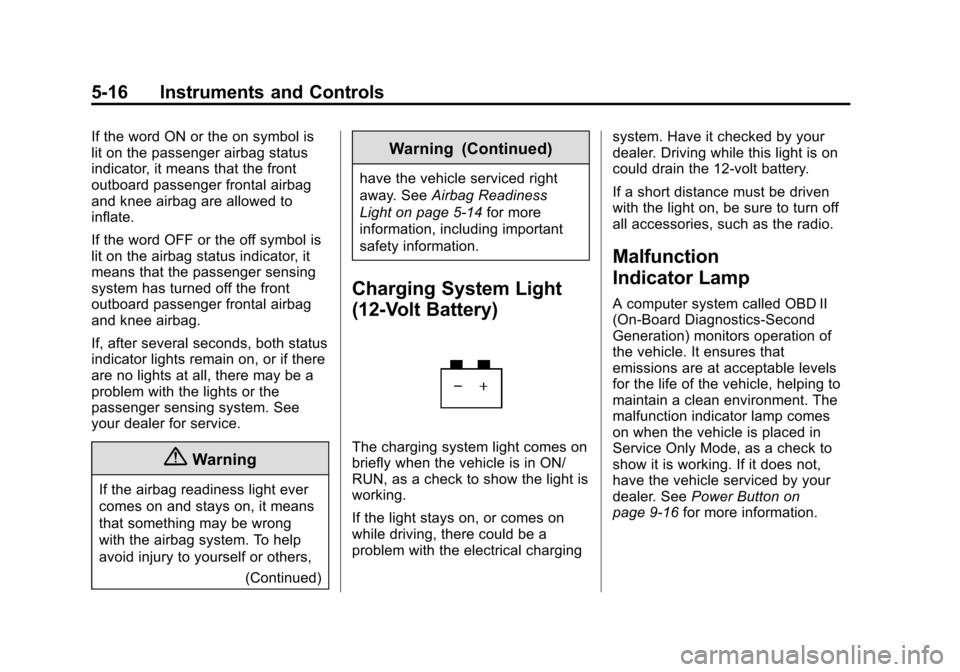
The charging system light comes on
briefly when the vehicle is in ON/
RUN, as a check to show the light is
working.
If the light stays on, or comes on
while driving, there could be a
problem with the electrical charging system. Have it checked by your
dealer. Driving while this light is on
could drain the 12‐volt battery.
If a short distance must be driven
with the light on, be sure to turn off
all accessories, such as the radio.
Malfunction
Indicator Lamp
A computer system called OBD II
(On-Board Diagnostics-Second
Generation) monitors operation of
the vehicle. It ensures that
emissions are at acceptable levels
for the life of the vehicle, helping to
maintain a clean environment. The
malfunction indicator lamp comes
on when the vehicle is placed in
Service Only Mode, as a check to
show it is working. If it does not,
have the vehicle serviced by your
dealer. See
Power Button on
page 9-16 for more information.
Page 135 of 387
Black plate (26,1)Chevrolet VOLT Owner Manual (GMNA-Localizing-U.S./Canada-7695131) -
2015 - crc - 4/25/14
5-26 Instruments and Controls
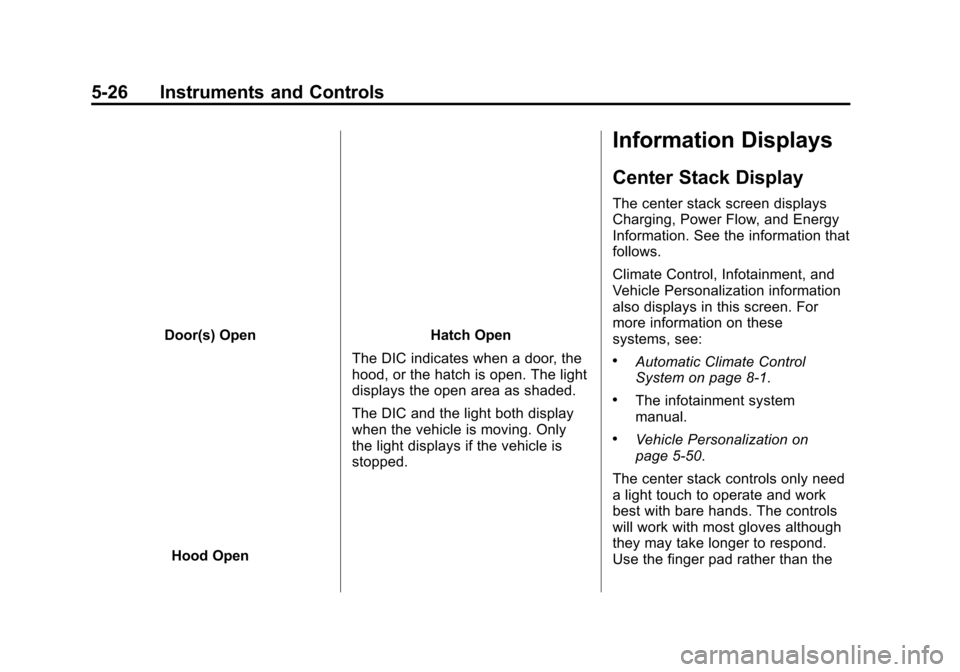
Door(s) Open
Hood Open
Hatch Open
The DIC indicates when a door, the
hood, or the hatch is open. The light
displays the open area as shaded.
The DIC and the light both display
when the vehicle is moving. Only
the light displays if the vehicle is
stopped.
Information Displays
Center Stack Display
The center stack screen displays
Charging, Power Flow, and Energy
Information. See the information that
follows.
Climate Control, Infotainment, and
Vehicle Personalization information
also displays in this screen. For
more information on these
systems, see:
.Automatic Climate Control
System on page 8-1.
.The infotainment system
manual.
.Vehicle Personalization on
page 5-50.
The center stack controls only need
a light touch to operate and work
best with bare hands. The controls
will work with most gloves although
they may take longer to respond.
Use the finger pad rather than the
Page 136 of 387
Black plate (27,1)Chevrolet VOLT Owner Manual (GMNA-Localizing-U.S./Canada-7695131) -
2015 - crc - 4/25/14
Instruments and Controls 5-27
finger tip to minimize response time.
If the controls are not responding,
remove the gloves.
To view the Power Flow, Charging,
and Energy Information, press the
[button on the center stack.
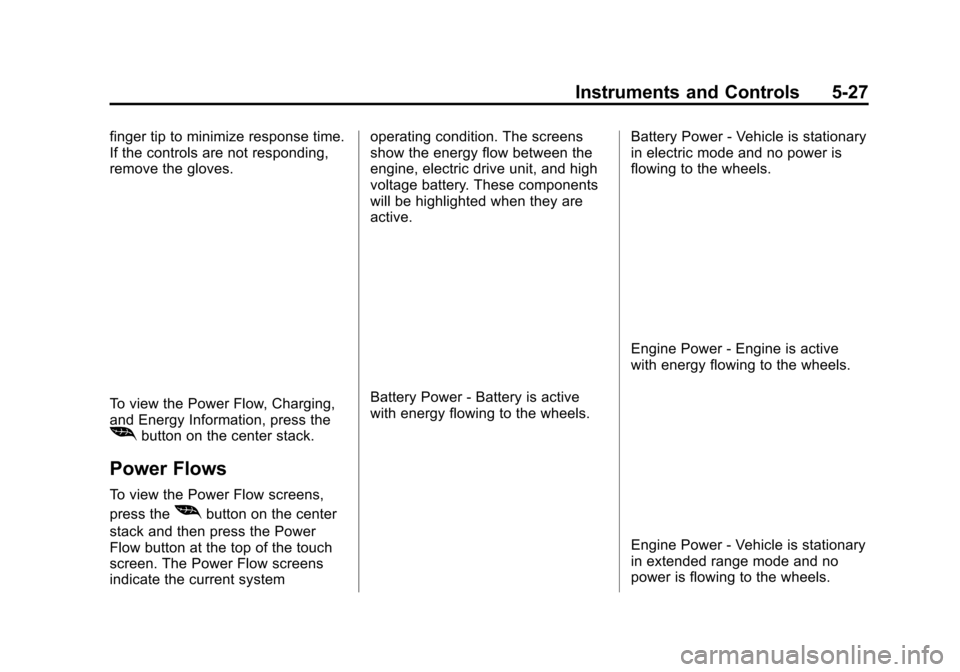
Power Flows
To view the Power Flow screens,
press the
[button on the center
stack and then press the Power
Flow button at the top of the touch
screen. The Power Flow screens
indicate the current system operating condition. The screens
show the energy flow between the
engine, electric drive unit, and high
voltage battery. These components
will be highlighted when they are
active.
Battery Power - Battery is active
with energy flowing to the wheels.
Battery Power - Vehicle is stationary
in electric mode and no power is
flowing to the wheels.
Engine Power - Engine is active
with energy flowing to the wheels.
Engine Power - Vehicle is stationary
in extended range mode and no
power is flowing to the wheels.
Page 137 of 387
Black plate (28,1)Chevrolet VOLT Owner Manual (GMNA-Localizing-U.S./Canada-7695131) -
2015 - crc - 4/25/14
5-28 Instruments and Controls
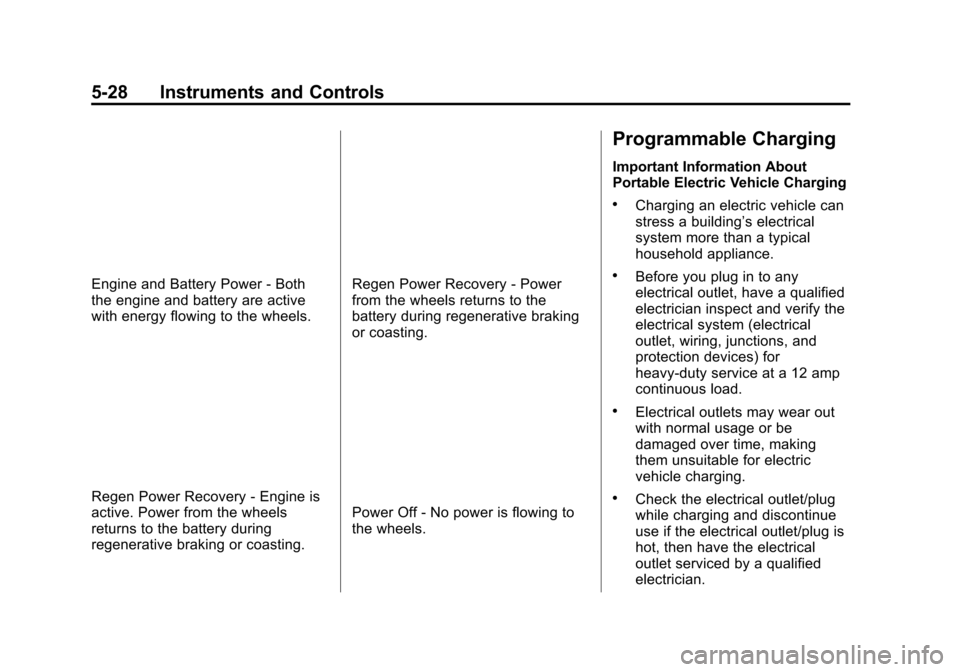
Engine and Battery Power - Both
the engine and battery are active
with energy flowing to the wheels.
Regen Power Recovery - Engine is
active. Power from the wheels
returns to the battery during
regenerative braking or coasting.
Regen Power Recovery - Power
from the wheels returns to the
battery during regenerative braking
or coasting.
Power Off - No power is flowing to
the wheels.
Programmable Charging
Important Information About
Portable Electric Vehicle Charging
.Charging an electric vehicle can
stress a building’s electrical
system more than a typical
household appliance.
.Before you plug in to any
electrical outlet, have a qualified
electrician inspect and verify the
electrical system (electrical
outlet, wiring, junctions, and
protection devices) for
heavy-duty service at a 12 amp
continuous load.
.Electrical outlets may wear out
with normal usage or be
damaged over time, making
them unsuitable for electric
vehicle charging.
.Check the electrical outlet/plug
while charging and discontinue
use if the electrical outlet/plug is
hot, then have the electrical
outlet serviced by a qualified
electrician.
Page 138 of 387
Black plate (29,1)Chevrolet VOLT Owner Manual (GMNA-Localizing-U.S./Canada-7695131) -
2015 - crc - 4/25/14
Instruments and Controls 5-29
.When outdoors, plug into an
electrical outlet that is
weather-proof while in use.
.Mount the charging cord to
reduce strain on the electrical
outlet/plug.
{Warning
Improper use of portable electric
vehicle charge cords may cause
a fire, electrical shock, or burns,
and may result in damage to
property, serious injury, or death.
.Do not use extension cords,
multi-outlet power strips,
splitters, grounding adaptors,
surge protectors, or similar
devices.
.Do not use an electrical outlet
that is worn or damaged,
or one that will not hold the
plug firmly in place.
.Do not use an electrical outlet
that is not properly grounded.(Continued)
Warning (Continued)
.Do not use an electrical outlet
that is on a circuit with other
electrical loads.
See the charge cord user guide.
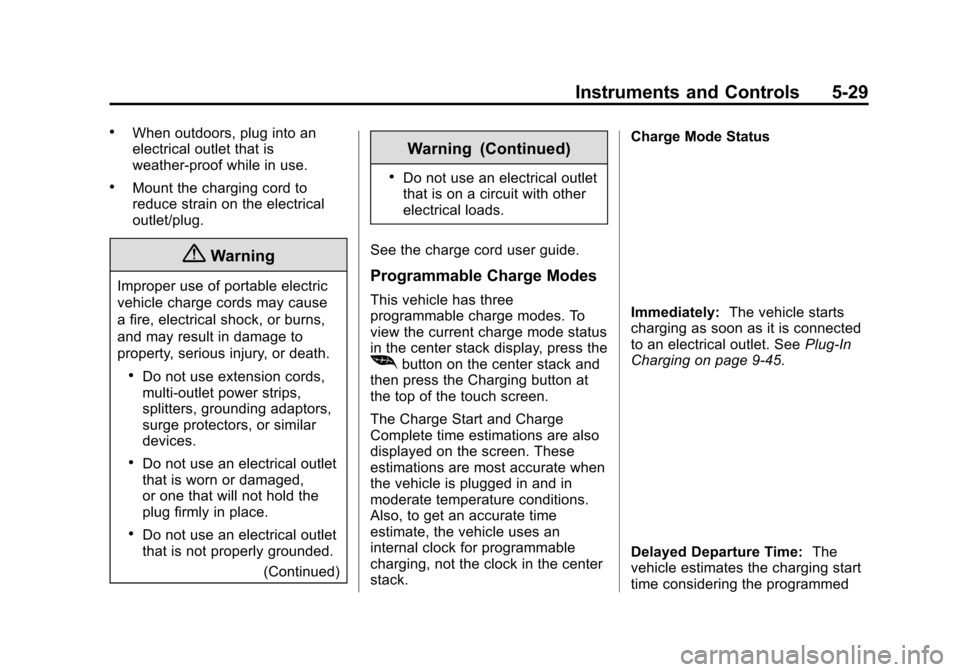
Programmable Charge Modes
This vehicle has three
programmable charge modes. To
view the current charge mode status
in the center stack display, press the
[button on the center stack and
then press the Charging button at
the top of the touch screen.
The Charge Start and Charge
Complete time estimations are also
displayed on the screen. These
estimations are most accurate when
the vehicle is plugged in and in
moderate temperature conditions.
Also, to get an accurate time
estimate, the vehicle uses an
internal clock for programmable
charging, not the clock in the center
stack. Charge Mode Status
Immediately:
The vehicle starts
charging as soon as it is connected
to an electrical outlet. See Plug-In
Charging on page 9-45.
Delayed Departure Time: The
vehicle estimates the charging start
time considering the programmed