charging CHEVROLET VOLT 2016 2.G Owner's Manual
[x] Cancel search | Manufacturer: CHEVROLET, Model Year: 2016, Model line: VOLT, Model: CHEVROLET VOLT 2016 2.GPages: 366, PDF Size: 5.4 MB
Page 126 of 366
Chevrolet VOLT Owner Manual (GMNA-Localizing-U.S/Canada/Mexico-
9159388) - 2016 - crc - 5/20/15
Instruments and Controls 125
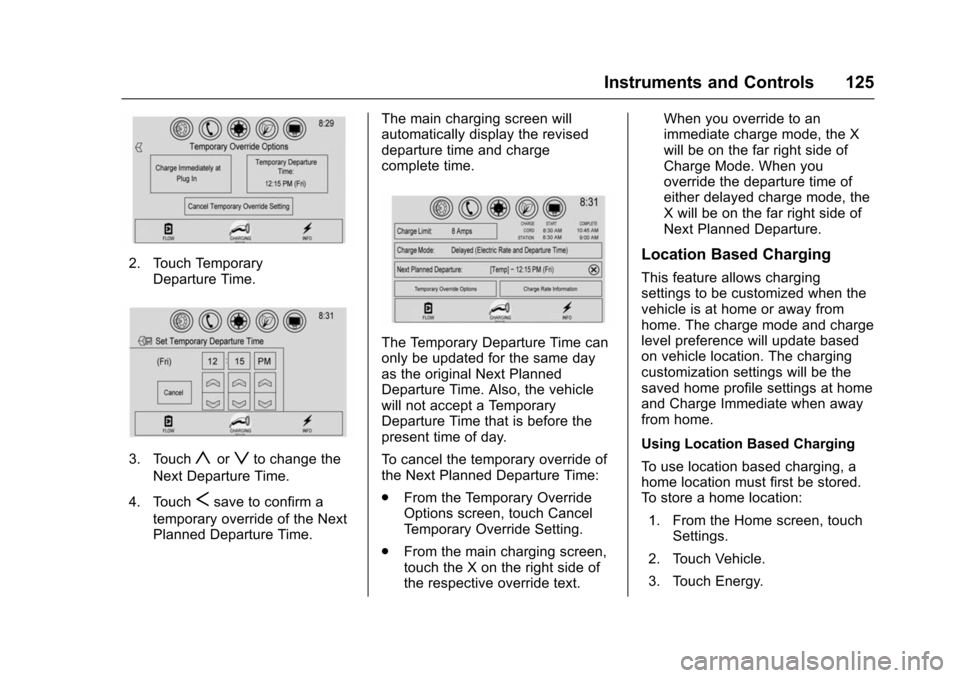
2. Touch TemporaryDeparture Time.
3. Touchyorzto change the
Next Departure Time.
4. Touch
Ssave to confirm a
temporary override of the Next
Planned Departure Time. The main charging screen will
automatically display the revised
departure time and charge
complete time.
The Temporary Departure Time can
only be updated for the same day
as the original Next Planned
Departure Time. Also, the vehicle
will not accept a Temporary
Departure Time that is before the
present time of day.
To cancel the temporary override of
the Next Planned Departure Time:
.
From the Temporary Override
Options screen, touch Cancel
Temporary Override Setting.
. From the main charging screen,
touch the X on the right side of
the respective override text. When you override to an
immediate charge mode, the X
will be on the far right side of
Charge Mode. When you
override the departure time of
either delayed charge mode, the
X will be on the far right side of
Next Planned Departure.
Location Based Charging
This feature allows charging
settings to be customized when the
vehicle is at home or away from
home. The charge mode and charge
level preference will update based
on vehicle location. The charging
customization settings will be the
saved home profile settings at home
and Charge Immediate when away
from home.
Using Location Based Charging
To use location based charging, a
home location must first be stored.
To store a home location:
1. From the Home screen, touch Settings.
2. Touch Vehicle.
3. Touch Energy.
Page 127 of 366
Chevrolet VOLT Owner Manual (GMNA-Localizing-U.S/Canada/Mexico-
9159388) - 2016 - crc - 5/20/15
126 Instruments and Controls
4. Touch Location BasedCharging.
5. Touch Set Home Location.
6. A pop-up will confirm the setting and the compass will be
lit. In addition, the Set Home
Location will change to Update
Home Location.
To turn location based charging on
or off:
1. Follow Steps 1–4 under “Using
Location Based Charging” to
get to the Location Based
Charging screen.
2. Touch ON or OFF to turn the system on or off.
Updating Home Location
To update the home location: 1. Follow Steps 1–4 under “Using
Location Based Charging” to
get to the Location Based
Charging screen.
2. Choose Update Home Location.
3. Choose: Update :
Use when the vehicle is
parked in a new location.
Cancel : Use to cancel this
operation and make no changes.
Remove : Use to remove the stored
home location from the vehicle. This
will turn the feature off because
there will be no home location
stored.
Expiration : Use to store the
charge level preference at the home
location for up to 90 days. After
90 days, a notification will display
on the screen and the charge level
preference will need to be reset for
the next 90 days.
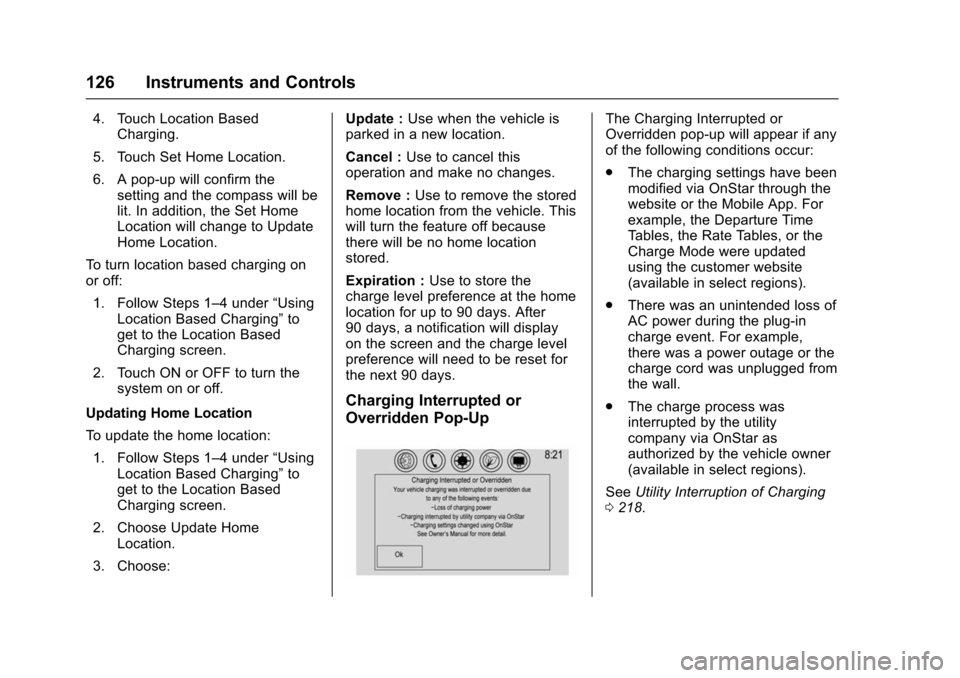
Charging Interrupted or
Overridden Pop-Up
The Charging Interrupted or
Overridden pop-up will appear if any
of the following conditions occur:
. The charging settings have been
modified via OnStar through the
website or the Mobile App. For
example, the Departure Time
Tables, the Rate Tables, or the
Charge Mode were updated
using the customer website
(available in select regions).
. There was an unintended loss of
AC power during the plug-in
charge event. For example,
there was a power outage or the
charge cord was unplugged from
the wall.
. The charge process was
interrupted by the utility
company via OnStar as
authorized by the vehicle owner
(available in select regions).
See Utility Interruption of Charging
0 218.
Page 128 of 366
Chevrolet VOLT Owner Manual (GMNA-Localizing-U.S/Canada/Mexico-
9159388) - 2016 - crc - 5/20/15
Instruments and Controls 127
Programmable Charging
Disabled
When the Programmable Charging
system is disabled, the main
charging screen will display“- -:- -”
for the Charge Complete Time. The
Programmable Charging system will
be disabled if the Charge Complete
Time cannot be confidently
estimated. If the Programmable
Charging system is consistently
disabled, see your dealer.
Energy Information
To view Energy Usage and Energy
Details, touch Energy on the
infotainment display and then touch
INFO at the bottom of the touch
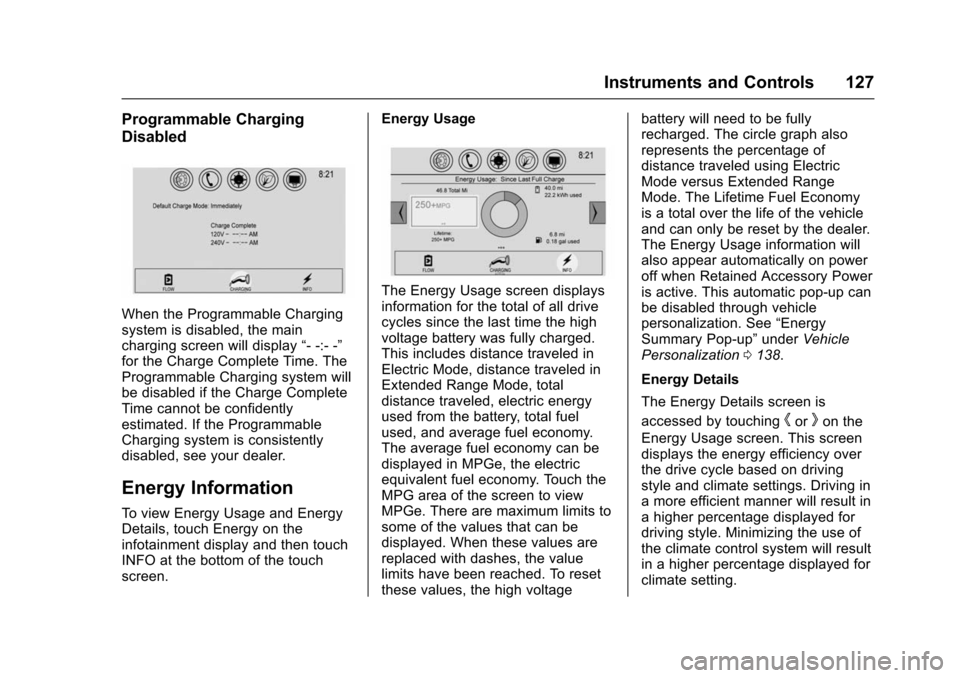
screen. Energy Usage
The Energy Usage screen displays
information for the total of all drive
cycles since the last time the high
voltage battery was fully charged.
This includes distance traveled in
Electric Mode, distance traveled in
Extended Range Mode, total
distance traveled, electric energy
used from the battery, total fuel
used, and average fuel economy.
The average fuel economy can be
displayed in MPGe, the electric
equivalent fuel economy. Touch the
MPG area of the screen to view
MPGe. There are maximum limits to
some of the values that can be
displayed. When these values are
replaced with dashes, the value
limits have been reached. To reset
these values, the high voltagebattery will need to be fully
recharged. The circle graph also
represents the percentage of
distance traveled using Electric
Mode versus Extended Range
Mode. The Lifetime Fuel Economy
is a total over the life of the vehicle
and can only be reset by the dealer.
The Energy Usage information will
also appear automatically on power
off when Retained Accessory Power
is active. This automatic pop-up can
be disabled through vehicle
personalization. See
“Energy
Summary Pop-up” underVehicle
Personalization 0138.
Energy Details
The Energy Details screen is
accessed by touching
horkon the
Energy Usage screen. This screen
displays the energy efficiency over
the drive cycle based on driving
style and climate settings. Driving in
a more efficient manner will result in
a higher percentage displayed for
driving style. Minimizing the use of
the climate control system will result
in a higher percentage displayed for
climate setting.
Page 131 of 366
Chevrolet VOLT Owner Manual (GMNA-Localizing-U.S/Canada/Mexico-
9159388) - 2016 - crc - 5/20/15
130 Instruments and Controls
Vehicle Messages
Messages displayed on the DIC
indicate the status of the vehicle or
some action that may be needed to
correct a condition. Multiple
messages may appear one after
another.
The messages that do not require
immediate action can be
acknowledged and cleared by
pressing
V.
The messages that require
immediate action cannot be cleared
until that action is performed.
All messages should be taken
seriously; clearing the message
does not correct the problem.
The following are the possible
messages and some information
about them.
Battery and Charging
Messages
BATTERY SAVER ACTIVE
This message displays when the
vehicle has detected that the 12-volt
battery voltage has dropped and
vehicle features are being disabled.
The 12-volt battery saver system
starts reducing certain features
trying to save the charge of the
12-volt battery. Turn off unnecessary
features to allow the battery to
recharge.
CHARGE CORD CONNECTED
This message displays when the
charge cord is connected to the
vehicle. The vehicle cannot be
shifted out of P (Park) with the
charge cord connected.
CHARGE DOOR OPEN
This message displays when the
charge door is open and the vehicle
is shifted out of P (Park). The
charge door should be kept fully
closed when the vehicle is not
charging.
LOW BATTERY
This message displays when the
12-volt battery voltage is low. See
Battery - North America 0245.
SERVICE BATTERY
CHARGING SYSTEM
This message displays when there
is a fault in the 12-volt battery
charging system. See your dealer
for service.
SERVICE HIGH VOLTAGE
CHARGING SYSTEM
This message displays when there
is a problem with the high voltage
charging system. See your dealer
for service.
Brake System Messages
BRAKE FLUID LOW
This message displays when the
brake fluid level is low. See Brake
Fluid 0243.
Page 142 of 366
Chevrolet VOLT Owner Manual (GMNA-Localizing-U.S/Canada/Mexico-
9159388) - 2016 - crc - 5/20/15
Instruments and Controls 141
Auto Collision Preparation
This feature will turn on or off the
Forward Collision Alert (FCA) and
Front Automatic Braking (FAB). The
Off setting disables all FCA and
FAB functions. With the Alert and
Brake setting, both FCA and FAB
are available. The Alert setting
disables FAB. SeeFront Automatic
Braking (FAB) System 0200.
Select Off, Alert, or Alert and Brake.
Rear Cross Traffic Alert
This allows the Rear Cross Traffic
Alert to be turned on or off.
Select Off or On. See Assistance
Systems for Parking or Backing
0 193.
Lane Change Alert
This allows the Lane Change Alert
feature to be turned on or off.
Select Off or On. See Lane Change
Alert (LCA) 0201.
Comfort and Convenience
Select and the following may
display: .
Chime Volume
. Extended Hill Start Assist
Chime Volume
This allows the selection of the
chime volume level.
Select + or −to adjust the volume.
Extended Hill Start Assist
This allows the duration of the Hill
Start Assist to be changed. See
“Extended Hill Start Assist (EHSA)”
in Hill Start Assist (HSA) 0186.
Select Extended Hold or
Standard Hold.
Energy
Select and the following may
display:
. Location Based Charging
. Energy Summary Pop-up
. Charge Status Feedback
. Charge Cord Theft Alert
. Charge Power Loss Alert Location Based Charging
This allows the feature to be turned
on or off.
Select Update Home Location, On,
or Off.
Energy Summary Pop-up
This allows the feature to be turned
on or off.
Select Off or On.
Charge Status Feedback
If the feature is on, horn chirps
are on.
Select Off or On.
Charge Cord Theft Alert
This allows the feature to be turned
on or off.
Select Off or On.
Charge Power Loss Alert
This allows the feature to be turned
on or off.
Select Off or On.
Page 162 of 366
Chevrolet VOLT Owner Manual (GMNA-Localizing-U.S/Canada/Mexico-
9159388) - 2016 - crc - 5/20/15
Driving and Operating 161
Driving and
Operating
Driving Information
Distracted Driving . . . . . . . . . . . . 162
Defensive Driving . . . . . . . . . . . . . 163
Drunk Driving . . . . . . . . . . . . . . . . . 163
Control of a Vehicle . . . . . . . . . . . 163
Braking . . . . . . . . . . . . . . . . . . . . . . . 163
Steering . . . . . . . . . . . . . . . . . . . . . . 164
Off-Road Recovery . . . . . . . . . . . 164
Loss of Control . . . . . . . . . . . . . . . 165
Driving on Wet Roads . . . . . . . . 165
Hill and Mountain Roads . . . . . 166
Winter Driving . . . . . . . . . . . . . . . . 167
If the Vehicle Is Stuck . . . . . . . . 168
Vehicle Load Limits . . . . . . . . . . . 168
Starting and Operating
New Vehicle Break-In . . . . . . . . . 171
Power Button . . . . . . . . . . . . . . . . . 171
Starting and Stopping theVehicle . . . . . . . . . . . . . . . . . . . . . . 173
Retained Accessory Power (RAP) . . . . . . . . . . . . . . . . 174
Shifting Into Park . . . . . . . . . . . . . 174
Shifting out of Park . . . . . . . . . . . 175
Parking over Things That Burn . . . . . . . . . . . . . . . . . . . 176
Electric Vehicle Operating
Modes
System Operation . . . . . . . . . . . . 176
Electric Mode . . . . . . . . . . . . . . . . . 176
Extended Range Mode . . . . . . . 176
Driver Selected OperatingModes . . . . . . . . . . . . . . . . . . . . . . 177
Out of Fuel/Engine Unavailable . . . . . . . . . . . . . . . . . 179
Maintenance Modes . . . . . . . . . . 180
Engine Exhaust
Engine Exhaust . . . . . . . . . . . . . . 182
Running the Vehicle While Parked . . . . . . . . . . . . . . . . . . . . . . 182
Electric Drive Unit
Electric Drive Unit . . . . . . . . . . . . 183
Brakes
Antilock BrakeSystem (ABS) . . . . . . . . . . . . . . . 184
Electric Parking Brake . . . . . . . . 185
Hill Start Assist (HSA) . . . . . . . . 186
Regenerative Braking . . . . . . . . 187
Ride Control Systems
Traction Control/Electronic Stability Control . . . . . . . . . . . . . 188
Driver Mode Control . . . . . . . . . . 190
Cruise Control
Cruise Control . . . . . . . . . . . . . . . . 190
Driver Assistance Systems
Driver Assistance Systems . . . 193
Assistance Systems for Parking or Backing . . . . . . . . . . 193
Assistance Systems for Driving . . . . . . . . . . . . . . . . . . . . . . 197
Forward Collision Alert (FCA) System . . . . . . . . . . . . . . . . . . . . . . 198
Front Automatic Braking (FAB) System . . . . . . . . . . . . . . . . . . . . . . 200
Side Blind Zone Alert (SBZA) . . . . . . . . . . . . . . . . 201
Lane Change Alert (LCA) . . . . . 201
Lane Departure Warning (LDW) . . . . . . . . . . . . . 203
Lane Keep Assist (LKA) . . . . . . 203
Charging
Plug-In Charging . . . . . . . . . . . . . 205
Delayed Charging Override . . . 206
Charging Status Feedback . . . 207
Charge Cord . . . . . . . . . . . . . . . . . 210
Utility Interruption of Charging . . . . . . . . . . . . . . . . . . . . 218
Electrical Requirements for Battery Charging . . . . . . . . . . . . 218
Page 176 of 366
Chevrolet VOLT Owner Manual (GMNA-Localizing-U.S/Canada/Mexico-
9159388) - 2016 - crc - 5/20/15
Driving and Operating 175
parking brake is firmly set before
you leave it. After you have moved
the shift lever into P (Park), hold
down the regular brake pedal. See if
you can move the shift lever away
from P (Park) without first pulling it
toward you. If you can, it means that
the shift lever was not fully locked
into P (Park).
Torque Lock
Torque lock is when the weight of
the vehicle puts too much force on
the parking pawl in the electric drive
unit. This happens when parking on
a hill and shifting the electric drive
unit into P (Park) is not done
properly and then it is difficult to
shift out of P (Park). To prevent
torque lock, set the parking brake
and then shift into P (Park).
If torque lock does occur, your
vehicle may need to be pushed
uphill by another vehicle to relieve
the parking pawl pressure, so you
can shift out of P (Park).
Shifting out of Park
To shift out of P (Park), the vehicle
must be in ON/RUN, the brake
pedal must be applied, and the
charge cord must be unplugged.
The vehicle has an electronic shift
lock release system. The shift lock
release is designed to:
.Prevent the vehicle from turning
off unless the shift lever is in
P (Park).
. Prevent moving the shift lever
out of P (Park), unless the
vehicle is in ON/RUN, the brake
pedal is applied, and the charge
cord is unplugged.
Parking the vehicle in extreme cold
for several days without the charge
cord connected may cause the
electric drive unit to be locked in
P (Park) until the propulsion system
has warmed sufficiently.
The shift lock is always functional
except in the case of an uncharged
or low charged 12-volt battery (less
than 9 volts). If the vehicle has an uncharged
12-volt battery or a 12-volt battery
with low voltage, try charging or
jump starting the 12-volt battery.
See
Battery - North America 0245
or Jump Starting - North America
0 295.
If the shift lever cannot be moved
out of P (Park): 1. Apply and maintain the regular brakes.
2. Turn the vehicle on using POWER
O. See Power Button
0 171.
3. Let up on the shift lever and make sure the shift lever is
pushed all the way into
P (Park).
4. Press the shift lever button.
5. Move the shift lever into the desired gear.
If you still cannot move the shift
lever from P (Park), see your dealer
or a professional towing service.
Page 206 of 366
Chevrolet VOLT Owner Manual (GMNA-Localizing-U.S/Canada/Mexico-
9159388) - 2016 - crc - 5/20/15
Driving and Operating 205
When the System Does Not
Seem to Work Properly
The system performance may be
affected by:
.Close vehicles ahead.
. Sudden lighting changes, such
as when driving through tunnels.
. Banked roads.
. Roads with poor lane markings,
such as two-lane roads.
If the LKA system is not functioning
properly when lane markings are
clearly visible, cleaning the
windshield may help.
LKA assistance and/or LDW alerts
may occur due to tar marks,
shadows, cracks in the road,
temporary or construction lane
markings, or other road
imperfections. This is normal system
operation; the vehicle does not need
service. Turn LKA off if these
conditions continue.
Charging
Plug-In Charging
This section explains the charging
of the vehicle's high voltage battery.
Do not allow the vehicle to remain in
extreme temperatures for long
periods without being driven or
plugged in. Plug the vehicle in when
temperatures are below 0 °C (32 °F)
and above 32 °C (90 °F) to
maximize the life of the high voltage
battery.
When using a 120-volt AC electrical
outlet, it will take approximately
13 hours to charge the vehicle with
the 12 amp AC current setting or
19 hours using the default 8 amp
AC current setting. When using a
240-volt charging station, it will take
approximately 4.5 hours to charge
the vehicle. Charge times will vary
with outside temperature. There are
three ways to program how the
vehicle is charged. See
Programmable Charging 0118.
The charging system may run fans
and pumps that result in sounds
from the vehicle while it is turned off. Additional unexpected clicking
sounds may be caused by the
electrical devices used while
charging.
While the charge cord is plugged
into the vehicle, the vehicle cannot
be driven.
Charging
Start Charge
1. Make sure the vehicle is parked. Select the appropriate
charge level using the Charge
Limit Preference screen on the
center stack. See “Charge
Limit Selection” under
Programmable Charging 0118.
Turn the vehicle off.
2. Push the rearward edge of the charge port door in and release
to open the door.
In cold weather conditions, ice
may form around the charge
port door. Remove ice from the
area before attempting to open
or close the charge port door.
Page 207 of 366
Chevrolet VOLT Owner Manual (GMNA-Localizing-U.S/Canada/Mexico-
9159388) - 2016 - crc - 5/20/15
206 Driving and Operating
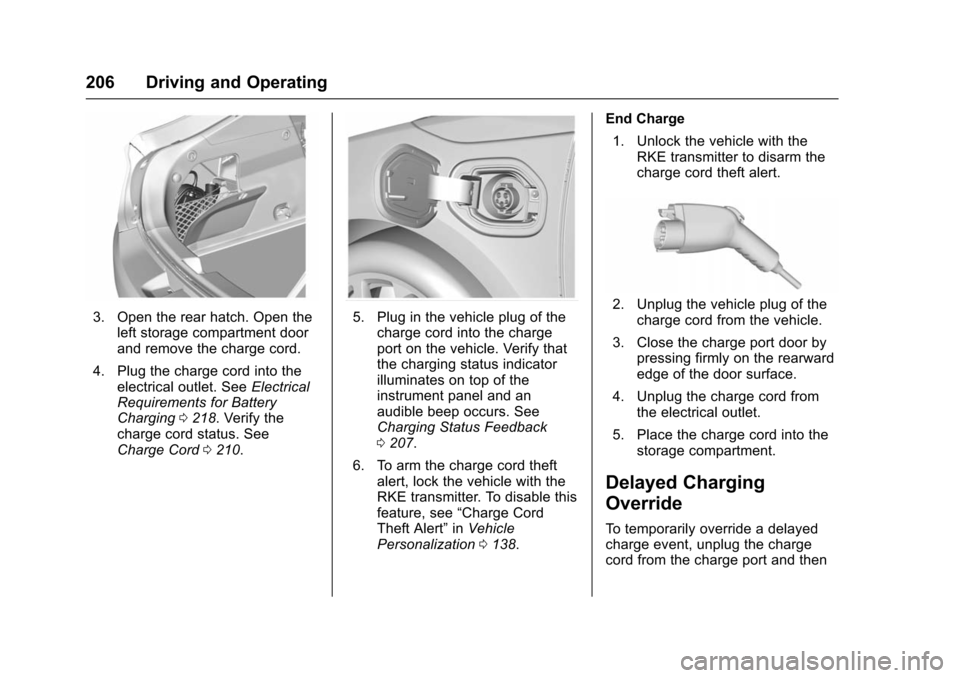
3. Open the rear hatch. Open theleft storage compartment door
and remove the charge cord.
4. Plug the charge cord into the electrical outlet. See Electrical
Requirements for Battery
Charging 0218. Verify the
charge cord status. See
Charge Cord 0210.5. Plug in the vehicle plug of the
charge cord into the charge
port on the vehicle. Verify that
the charging status indicator
illuminates on top of the
instrument panel and an
audible beep occurs. See
Charging Status Feedback
0207.
6. To arm the charge cord theft alert, lock the vehicle with the
RKE transmitter. To disable this
feature, see “Charge Cord
Theft Alert” inVehicle
Personalization 0138. End Charge
1. Unlock the vehicle with the RKE transmitter to disarm the
charge cord theft alert.2. Unplug the vehicle plug of thecharge cord from the vehicle.
3. Close the charge port door by pressing firmly on the rearward
edge of the door surface.
4. Unplug the charge cord from the electrical outlet.
5. Place the charge cord into the storage compartment.
Delayed Charging
Override
To temporarily override a delayed
charge event, unplug the charge
cord from the charge port and then
Page 208 of 366
Chevrolet VOLT Owner Manual (GMNA-Localizing-U.S/Canada/Mexico-
9159388) - 2016 - crc - 5/20/15
Driving and Operating 207
plug it back in within five seconds.
A single audible beep will sound
and charging will begin immediately.
To cancel a temporary override,
unplug the charge cord, wait for
10 seconds, and then plug the
charge cord back in. A double
audible beep will sound and
charging will be delayed.
SeeProgrammable Charging 0118
for advanced charge scheduling
options.
Charging Status
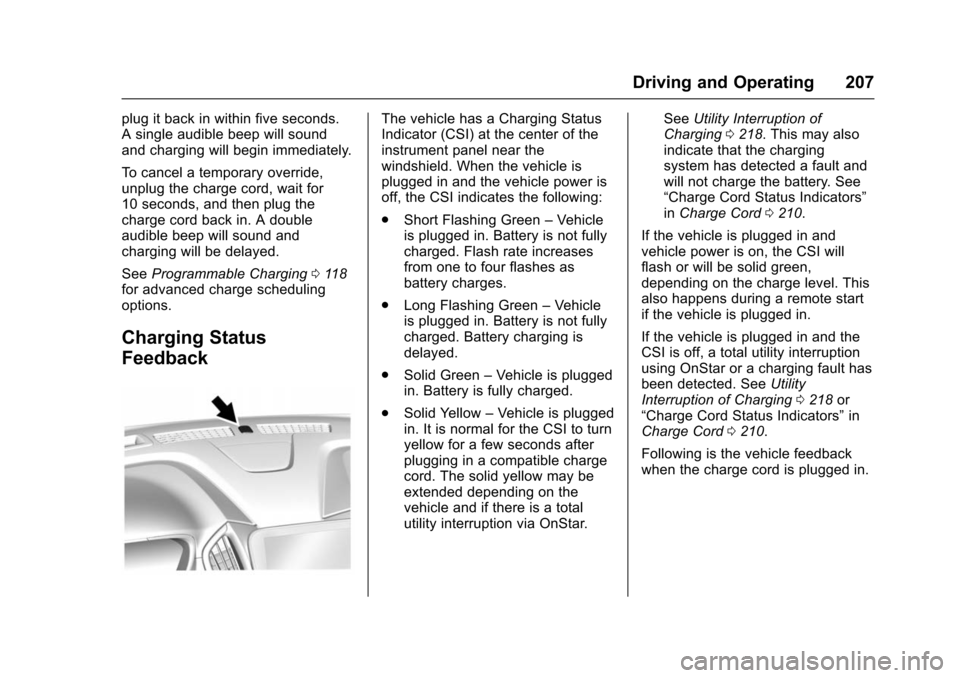
Feedback
The vehicle has a Charging Status
Indicator (CSI) at the center of the
instrument panel near the
windshield. When the vehicle is
plugged in and the vehicle power is
off, the CSI indicates the following:
. Short Flashing Green –Vehicle
is plugged in. Battery is not fully
charged. Flash rate increases
from one to four flashes as
battery charges.
. Long Flashing Green –Vehicle
is plugged in. Battery is not fully
charged. Battery charging is
delayed.
. Solid Green –Vehicle is plugged
in. Battery is fully charged.
. Solid Yellow –Vehicle is plugged
in. It is normal for the CSI to turn
yellow for a few seconds after
plugging in a compatible charge
cord. The solid yellow may be
extended depending on the
vehicle and if there is a total
utility interruption via OnStar. See
Utility Interruption of
Charging 0218. This may also
indicate that the charging
system has detected a fault and
will not charge the battery. See
“Charge Cord Status Indicators”
in Charge Cord 0210.
If the vehicle is plugged in and
vehicle power is on, the CSI will
flash or will be solid green,
depending on the charge level. This
also happens during a remote start
if the vehicle is plugged in.
If the vehicle is plugged in and the
CSI is off, a total utility interruption
using OnStar or a charging fault has
been detected. See Utility
Interruption of Charging 0218 or
“Charge Cord Status Indicators” in
Charge Cord 0210.
Following is the vehicle feedback
when the charge cord is plugged in.