battery CHEVROLET VOLT 2016 2.G Workshop Manual
[x] Cancel search | Manufacturer: CHEVROLET, Model Year: 2016, Model line: VOLT, Model: CHEVROLET VOLT 2016 2.GPages: 366, PDF Size: 5.4 MB
Page 206 of 366
Chevrolet VOLT Owner Manual (GMNA-Localizing-U.S/Canada/Mexico-
9159388) - 2016 - crc - 5/20/15
Driving and Operating 205
When the System Does Not
Seem to Work Properly
The system performance may be
affected by:
.Close vehicles ahead.
. Sudden lighting changes, such
as when driving through tunnels.
. Banked roads.
. Roads with poor lane markings,
such as two-lane roads.
If the LKA system is not functioning
properly when lane markings are
clearly visible, cleaning the
windshield may help.
LKA assistance and/or LDW alerts
may occur due to tar marks,
shadows, cracks in the road,
temporary or construction lane
markings, or other road
imperfections. This is normal system
operation; the vehicle does not need
service. Turn LKA off if these
conditions continue.
Charging
Plug-In Charging
This section explains the charging
of the vehicle's high voltage battery.
Do not allow the vehicle to remain in
extreme temperatures for long
periods without being driven or
plugged in. Plug the vehicle in when
temperatures are below 0 °C (32 °F)
and above 32 °C (90 °F) to
maximize the life of the high voltage
battery.
When using a 120-volt AC electrical
outlet, it will take approximately
13 hours to charge the vehicle with
the 12 amp AC current setting or
19 hours using the default 8 amp
AC current setting. When using a
240-volt charging station, it will take
approximately 4.5 hours to charge
the vehicle. Charge times will vary
with outside temperature. There are
three ways to program how the
vehicle is charged. See
Programmable Charging 0118.
The charging system may run fans
and pumps that result in sounds
from the vehicle while it is turned off. Additional unexpected clicking
sounds may be caused by the
electrical devices used while
charging.
While the charge cord is plugged
into the vehicle, the vehicle cannot
be driven.
Charging
Start Charge
1. Make sure the vehicle is parked. Select the appropriate
charge level using the Charge
Limit Preference screen on the
center stack. See “Charge
Limit Selection” under
Programmable Charging 0118.
Turn the vehicle off.
2. Push the rearward edge of the charge port door in and release
to open the door.
In cold weather conditions, ice
may form around the charge
port door. Remove ice from the
area before attempting to open
or close the charge port door.
Page 207 of 366
Chevrolet VOLT Owner Manual (GMNA-Localizing-U.S/Canada/Mexico-
9159388) - 2016 - crc - 5/20/15
206 Driving and Operating
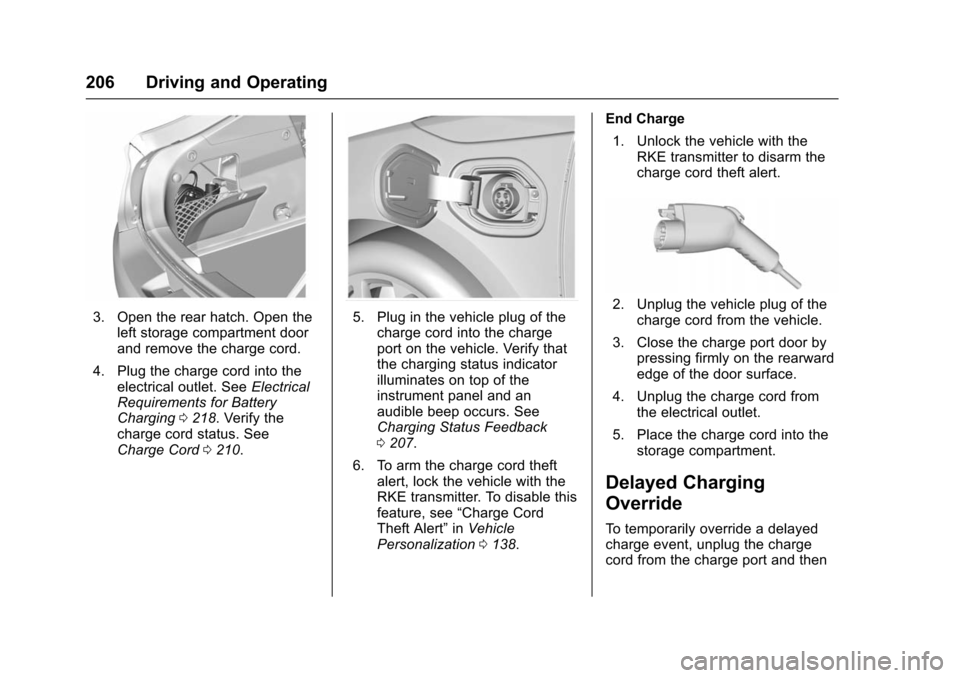
3. Open the rear hatch. Open theleft storage compartment door
and remove the charge cord.
4. Plug the charge cord into the electrical outlet. See Electrical
Requirements for Battery
Charging 0218. Verify the
charge cord status. See
Charge Cord 0210.5. Plug in the vehicle plug of the
charge cord into the charge
port on the vehicle. Verify that
the charging status indicator
illuminates on top of the
instrument panel and an
audible beep occurs. See
Charging Status Feedback
0207.
6. To arm the charge cord theft alert, lock the vehicle with the
RKE transmitter. To disable this
feature, see “Charge Cord
Theft Alert” inVehicle
Personalization 0138. End Charge
1. Unlock the vehicle with the RKE transmitter to disarm the
charge cord theft alert.2. Unplug the vehicle plug of thecharge cord from the vehicle.
3. Close the charge port door by pressing firmly on the rearward
edge of the door surface.
4. Unplug the charge cord from the electrical outlet.
5. Place the charge cord into the storage compartment.
Delayed Charging
Override
To temporarily override a delayed
charge event, unplug the charge
cord from the charge port and then
Page 208 of 366
Chevrolet VOLT Owner Manual (GMNA-Localizing-U.S/Canada/Mexico-
9159388) - 2016 - crc - 5/20/15
Driving and Operating 207
plug it back in within five seconds.
A single audible beep will sound
and charging will begin immediately.
To cancel a temporary override,
unplug the charge cord, wait for
10 seconds, and then plug the
charge cord back in. A double
audible beep will sound and
charging will be delayed.
SeeProgrammable Charging 0118
for advanced charge scheduling
options.
Charging Status
Feedback
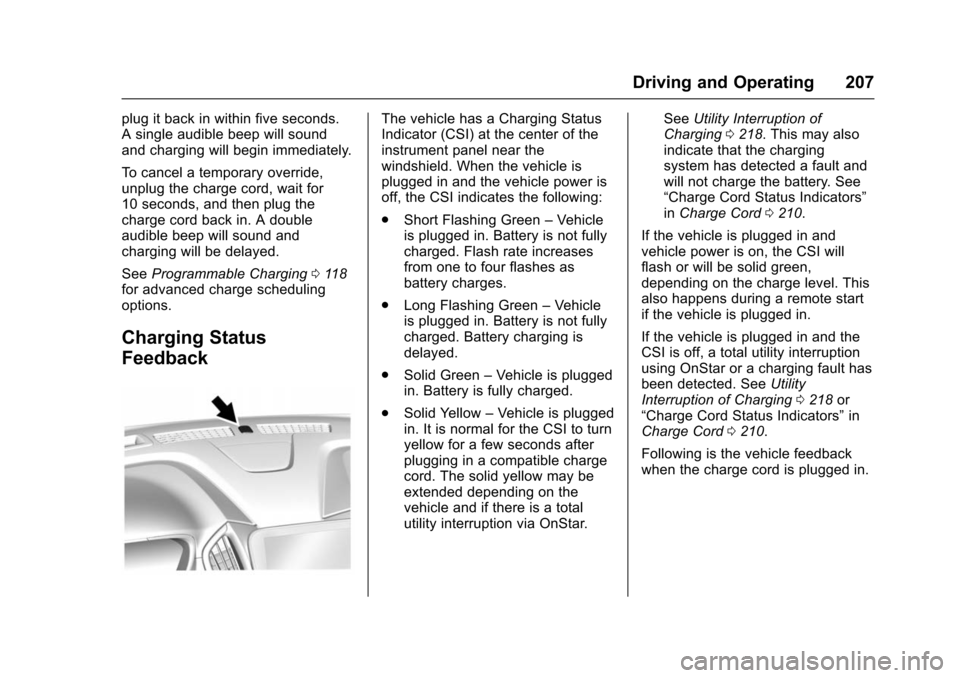
The vehicle has a Charging Status
Indicator (CSI) at the center of the
instrument panel near the
windshield. When the vehicle is
plugged in and the vehicle power is
off, the CSI indicates the following:
. Short Flashing Green –Vehicle
is plugged in. Battery is not fully
charged. Flash rate increases
from one to four flashes as
battery charges.
. Long Flashing Green –Vehicle
is plugged in. Battery is not fully
charged. Battery charging is
delayed.
. Solid Green –Vehicle is plugged
in. Battery is fully charged.
. Solid Yellow –Vehicle is plugged
in. It is normal for the CSI to turn
yellow for a few seconds after
plugging in a compatible charge
cord. The solid yellow may be
extended depending on the
vehicle and if there is a total
utility interruption via OnStar. See
Utility Interruption of
Charging 0218. This may also
indicate that the charging
system has detected a fault and
will not charge the battery. See
“Charge Cord Status Indicators”
in Charge Cord 0210.
If the vehicle is plugged in and
vehicle power is on, the CSI will
flash or will be solid green,
depending on the charge level. This
also happens during a remote start
if the vehicle is plugged in.
If the vehicle is plugged in and the
CSI is off, a total utility interruption
using OnStar or a charging fault has
been detected. See Utility
Interruption of Charging 0218 or
“Charge Cord Status Indicators” in
Charge Cord 0210.
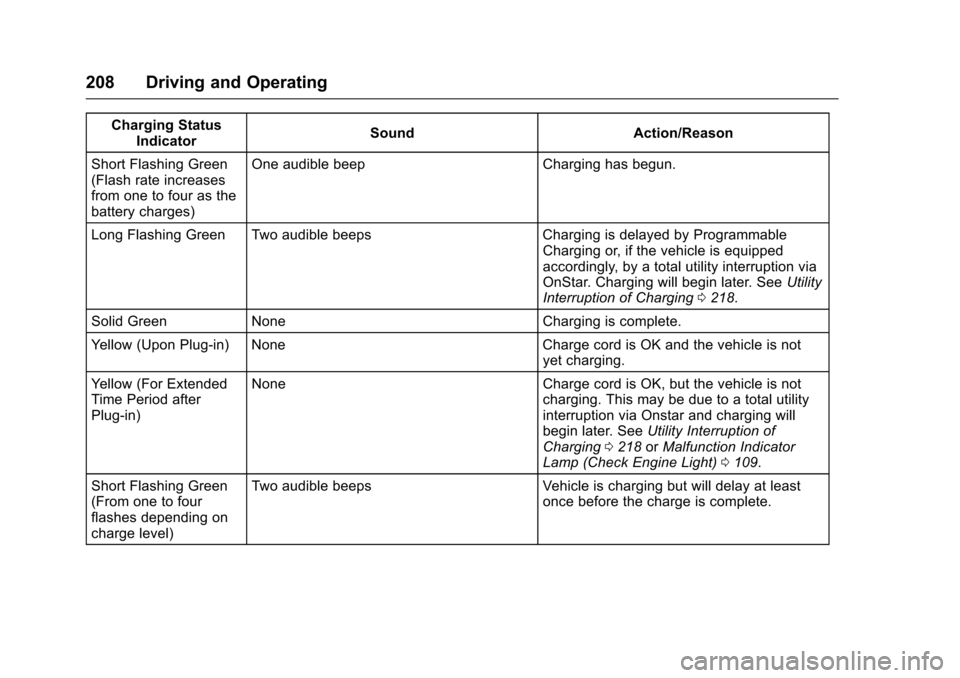
Following is the vehicle feedback
when the charge cord is plugged in.
Page 209 of 366
Chevrolet VOLT Owner Manual (GMNA-Localizing-U.S/Canada/Mexico-
9159388) - 2016 - crc - 5/20/15
208 Driving and Operating
Charging StatusIndicator Sound Action/Reason
Short Flashing Green
(Flash rate increases
from one to four as the
battery charges) One audible beep Charging has begun.
Long Flashing Green Two audible beeps Charging is delayed by Programmable Charging or, if the vehicle is equipped
accordingly, by a total utility interruption via
OnStar. Charging will begin later. SeeUtility
Interruption of Charging 0218.
Solid Green None Charging is complete.
Yellow (Upon Plug-in) None Charge cord is OK and the vehicle is not yet charging.
Yellow (For Extended
Time Period after
Plug-in) None Charge cord is OK, but the vehicle is not
charging. This may be due to a total utility
interruption via Onstar and charging will
begin later. SeeUtility Interruption of
Charging 0218 orMalfunction Indicator
Lamp (Check Engine Light) 0109.
Short Flashing Green
(From one to four
flashes depending on
charge level) Two audible beeps
Vehicle is charging but will delay at least
once before the charge is complete.
Page 210 of 366
Chevrolet VOLT Owner Manual (GMNA-Localizing-U.S/Canada/Mexico-
9159388) - 2016 - crc - 5/20/15
Driving and Operating 209
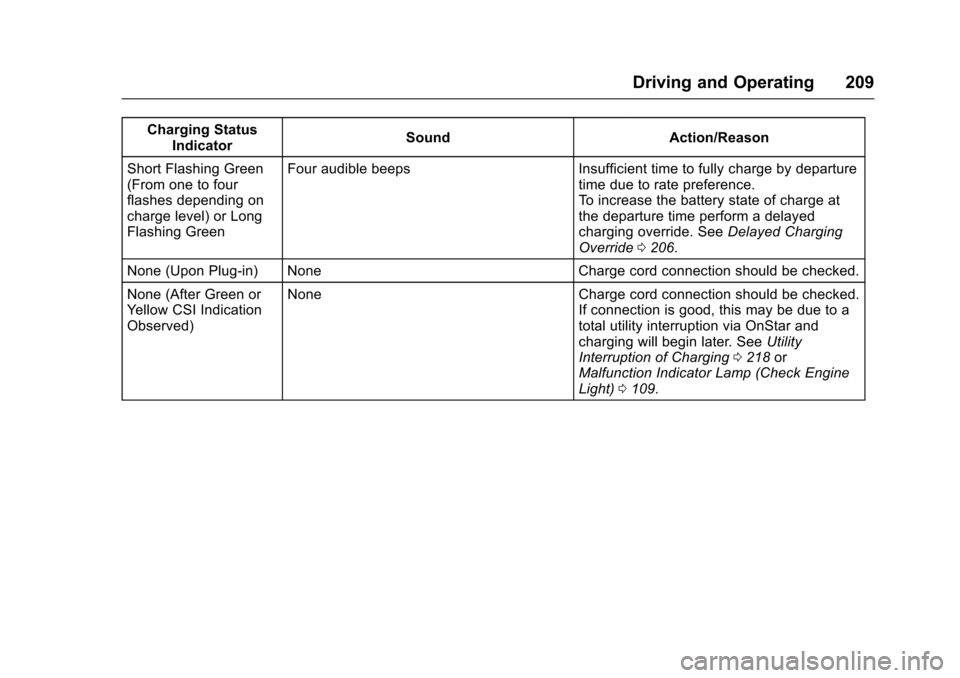
Charging StatusIndicator Sound Action/Reason
Short Flashing Green
(From one to four
flashes depending on
charge level) or Long
Flashing Green Four audible beeps Insufficient time to fully charge by departure
time due to rate preference.
To increase the battery state of charge at
the departure time perform a delayed
charging override. SeeDelayed Charging
Override 0206.
None (Upon Plug-in) None Charge cord connection should be checked.
None (After Green or
Yellow CSI Indication
Observed) None Charge cord connection should be checked.
If connection is good, this may be due to a
total utility interruption via OnStar and
charging will begin later. SeeUtility
Interruption of Charging 0218 or
Malfunction Indicator Lamp (Check Engine
Light) 0109.
Page 211 of 366
Chevrolet VOLT Owner Manual (GMNA-Localizing-U.S/Canada/Mexico-
9159388) - 2016 - crc - 5/20/15
210 Driving and Operating
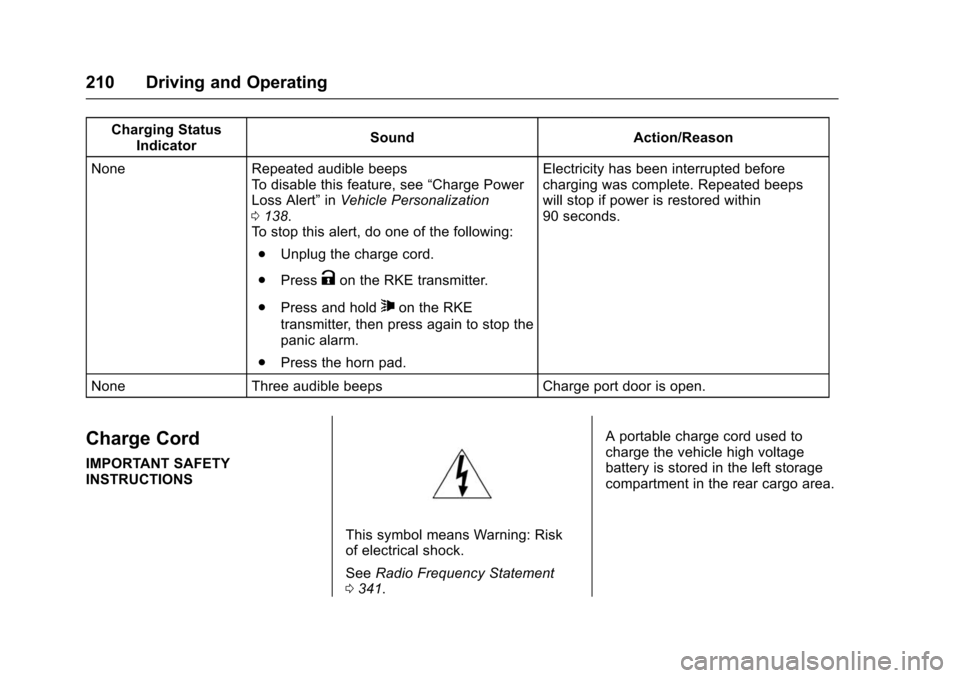
Charging StatusIndicator Sound Action/Reason
None Repeated audible beeps To disable this feature, see “Charge Power
Loss Alert” inVehicle Personalization
0 138.
To stop this alert, do one of the following:
. Unplug the charge cord.
. Press
Kon the RKE transmitter.
. Press and hold
7on the RKE
transmitter, then press again to stop the
panic alarm.
. Press the horn pad. Electricity has been interrupted before
charging was complete. Repeated beeps
will stop if power is restored within
90 seconds.
None Three audible beeps Charge port door is open.
Charge Cord
IMPORTANT SAFETY
INSTRUCTIONS
This symbol means Warning: Risk
of electrical shock.
See Radio Frequency Statement
0 341. A portable charge cord used to
charge the vehicle high voltage
battery is stored in the left storage
compartment in the rear cargo area.
Page 219 of 366
Chevrolet VOLT Owner Manual (GMNA-Localizing-U.S/Canada/Mexico-
9159388) - 2016 - crc - 5/20/15
218 Driving and Operating
.The device must accept any
interference received, including
interference that may cause
undesired operation of the
device.
Changes or modifications to any of
these systems by other than an
authorized service facility could void
authorization to use this equipment.
Utility Interruption of
Charging
If using AC charging, this vehicle
will respond to remote requests
through OnStar to limit or
completely block electrical power
grid usage for brief time periods.
A utility interruption of charging may
increase AC vehicle charge times.
When electrical grid power is
completely blocked, the vehicle will
delay charging until the utility
interruption has expired. The vehicle
should be left plugged in so that the
vehicle can automatically begin
charging. Changing the charge mode to
Immediate or performing a delayed
charging override will not disable a
utility interruption.
A pop-up will appear in the center
stack display during the key cycle
following any utility interruption. See
“Charging Interrupted or Overridden
Pop-Up”
underProgrammable
Charging 0118.
A message will display on the
instrument cluster indicating that a
utility interruption has occurred. See
Instrument Cluster 0100.
Charging Station
Troubleshooting
If the vehicle does not charge after
being plugged in to a residential
240-volt charging station:
1. Verify that the charge mode is set to Immediate.
2. Verify that the charging station’s circuit breaker has not
been tripped.
3. Plug the portable charge cord into the wall outlet, verify that
the indicator light on the charge cord is solid green, and
connect it to the vehicle. See
“Charge Cord Status
Indicators”
inCharge Cord
0 210.
4. If the vehicle charges with the portable charge cord, there
may be a problem with the
charging station. Try to charge
the vehicle with a different
240-volt charging station, such
as a public station. If both
attempts charge the vehicle,
contact the charging station
manufacturer.
Electrical Requirements
for Battery Charging
This vehicle is capable of being
charged with most standard vehicle
charging equipment complying with
one or more of the following:
.SAE J1772
. SAE J2847-2
. IEC 61851-1
. IEC 61851-22
. IEC 61851-23
Page 220 of 366
Chevrolet VOLT Owner Manual (GMNA-Localizing-U.S/Canada/Mexico-
9159388) - 2016 - crc - 5/20/15
Driving and Operating 219
.IEC 61851-24
. IEC 62196-1
. IEC 62196-2
. IEC 62196-3
. ISO 15118
The following are the minimum
requirements for circuits used to
charge this vehicle:
. 120 volts/15 amps
. 240 volts/20 amps
Charging equipment with a rating of
at least 240 volts/20 amps will
provide the fastest charging time
and best charging efficiency to
recharge the high voltage battery.
240 volt/40 amp circuits provide
flexibility for future vehicle charging
needs. Always follow the charging
equipment installation instructions.
Contact your dealer for more
information.Caution
Do not use portable or stationary
backup generating equipment to
charge the vehicle. This may
cause damage to the vehicle's
charging system. Only charge the
vehicle from utility supplied
power.
Fuel
Use of the recommended fuel is an
important part of the proper
maintenance of this vehicle. When
driving in the U.S. and Canada, to
help keep the engine clean and
maintain optimum vehicle
performance, we recommend using
TOP TIER Detergent Gasolines.
See www.toptiergas.com for a list of
TOP TIER Detergent Gasolines.
Use regular unleaded gasoline
meeting ASTM specification D4814
with a posted octane rating of 87 or
higher. Do not use gasoline with an
Page 225 of 366
Chevrolet VOLT Owner Manual (GMNA-Localizing-U.S/Canada/Mexico-
9159388) - 2016 - crc - 5/20/15
224 Driving and Operating
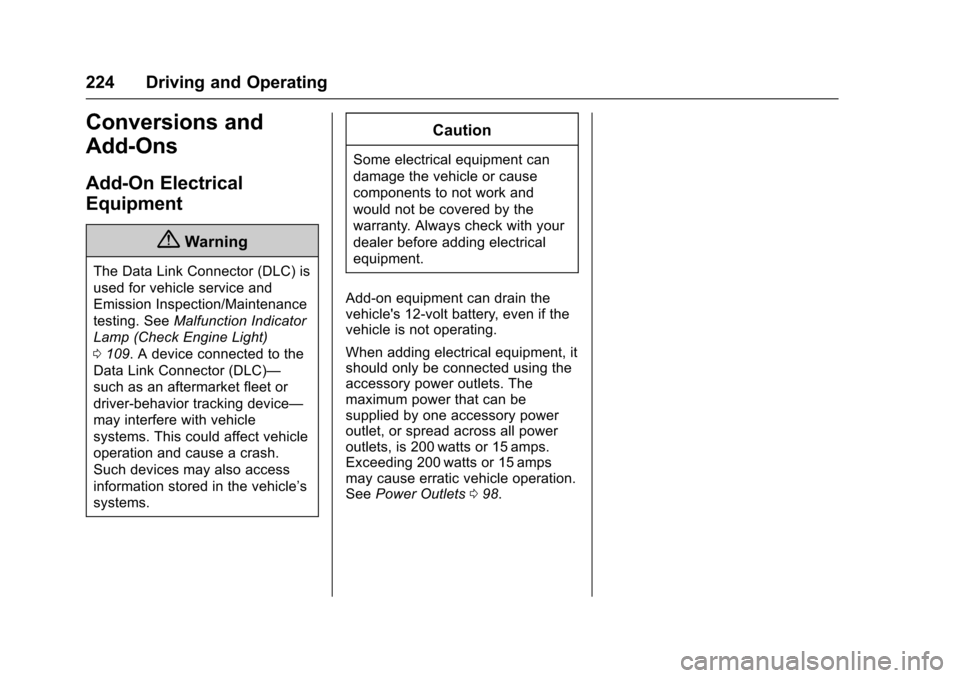
Conversions and
Add-Ons
Add-On Electrical
Equipment
{Warning
The Data Link Connector (DLC) is
used for vehicle service and
Emission Inspection/Maintenance
testing. SeeMalfunction Indicator
Lamp (Check Engine Light)
0 109. A device connected to the
Data Link Connector (DLC)—
such as an aftermarket fleet or
driver-behavior tracking device—
may interfere with vehicle
systems. This could affect vehicle
operation and cause a crash.
Such devices may also access
information stored in the vehicle’s
systems.
Caution
Some electrical equipment can
damage the vehicle or cause
components to not work and
would not be covered by the
warranty. Always check with your
dealer before adding electrical
equipment.
Add-on equipment can drain the
vehicle's 12-volt battery, even if the
vehicle is not operating.
When adding electrical equipment, it
should only be connected using the
accessory power outlets. The
maximum power that can be
supplied by one accessory power
outlet, or spread across all power
outlets, is 200 watts or 15 amps.
Exceeding 200 watts or 15 amps
may cause erratic vehicle operation.
See Power Outlets 098.
Page 226 of 366
Chevrolet VOLT Owner Manual (GMNA-Localizing-U.S/Canada/Mexico-
9159388) - 2016 - crc - 5/20/15
Vehicle Care 225
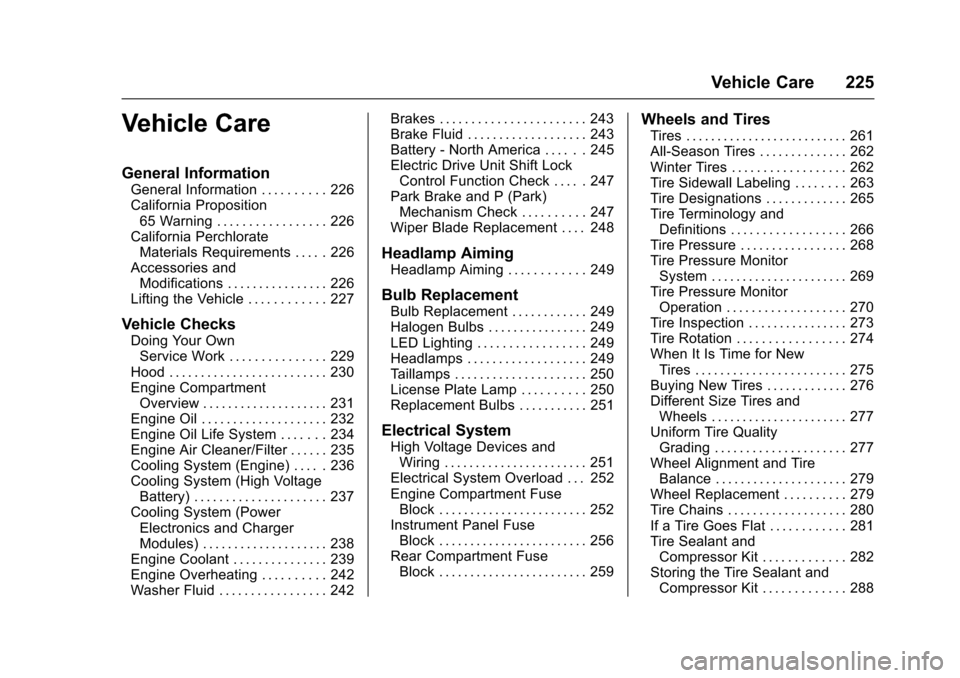
Vehicle Care
General Information
General Information . . . . . . . . . . 226
California Proposition65 Warning . . . . . . . . . . . . . . . . . 226
California Perchlorate Materials Requirements . . . . . 226
Accessories and Modifications . . . . . . . . . . . . . . . . 226
Lifting the Vehicle . . . . . . . . . . . . 227
Vehicle Checks
Doing Your Own Service Work . . . . . . . . . . . . . . . 229
Hood . . . . . . . . . . . . . . . . . . . . . . . . . 230
Engine Compartment Overview . . . . . . . . . . . . . . . . . . . . 231
Engine Oil . . . . . . . . . . . . . . . . . . . . 232
Engine Oil Life System . . . . . . . 234
Engine Air Cleaner/Filter . . . . . . 235
Cooling System (Engine) . . . . . 236
Cooling System (High Voltage Battery) . . . . . . . . . . . . . . . . . . . . . 237
Cooling System (Power Electronics and Charger
Modules) . . . . . . . . . . . . . . . . . . . . 238
Engine Coolant . . . . . . . . . . . . . . . 239
Engine Overheating . . . . . . . . . . 242
Washer Fluid . . . . . . . . . . . . . . . . . 242 Brakes . . . . . . . . . . . . . . . . . . . . . . . 243
Brake Fluid . . . . . . . . . . . . . . . . . . . 243
Battery - North America . . . . . . 245
Electric Drive Unit Shift Lock
Control Function Check . . . . . 247
Park Brake and P (Park) Mechanism Check . . . . . . . . . . 247
Wiper Blade Replacement . . . . 248
Headlamp Aiming
Headlamp Aiming . . . . . . . . . . . . 249
Bulb Replacement
Bulb Replacement . . . . . . . . . . . . 249
Halogen Bulbs . . . . . . . . . . . . . . . . 249
LED Lighting . . . . . . . . . . . . . . . . . 249
Headlamps . . . . . . . . . . . . . . . . . . . 249
Taillamps . . . . . . . . . . . . . . . . . . . . . 250
License Plate Lamp . . . . . . . . . . 250
Replacement Bulbs . . . . . . . . . . . 251
Electrical System
High Voltage Devices and Wiring . . . . . . . . . . . . . . . . . . . . . . . 251
Electrical System Overload . . . 252
Engine Compartment Fuse Block . . . . . . . . . . . . . . . . . . . . . . . . 252
Instrument Panel Fuse Block . . . . . . . . . . . . . . . . . . . . . . . . 256
Rear Compartment Fuse Block . . . . . . . . . . . . . . . . . . . . . . . . 259
Wheels and Tires
Tires . . . . . . . . . . . . . . . . . . . . . . . . . . 261
All-Season Tires . . . . . . . . . . . . . . 262
Winter Tires . . . . . . . . . . . . . . . . . . 262
Tire Sidewall Labeling . . . . . . . . 263
Tire Designations . . . . . . . . . . . . . 265
Tire Terminology andDefinitions . . . . . . . . . . . . . . . . . . 266
Tire Pressure . . . . . . . . . . . . . . . . . 268
Tire Pressure Monitor System . . . . . . . . . . . . . . . . . . . . . . 269
Tire Pressure Monitor Operation . . . . . . . . . . . . . . . . . . . 270
Tire Inspection . . . . . . . . . . . . . . . . 273
Tire Rotation . . . . . . . . . . . . . . . . . 274
When It Is Time for New Tires . . . . . . . . . . . . . . . . . . . . . . . . 275
Buying New Tires . . . . . . . . . . . . . 276
Different Size Tires and Wheels . . . . . . . . . . . . . . . . . . . . . . 277
Uniform Tire Quality Grading . . . . . . . . . . . . . . . . . . . . . 277
Wheel Alignment and Tire Balance . . . . . . . . . . . . . . . . . . . . . 279
Wheel Replacement . . . . . . . . . . 279
Tire Chains . . . . . . . . . . . . . . . . . . . 280
If a Tire Goes Flat . . . . . . . . . . . . 281
Tire Sealant and Compressor Kit . . . . . . . . . . . . . 282
Storing the Tire Sealant and Compressor Kit . . . . . . . . . . . . . 288