door lock CHEVROLET VOLT 2018 User Guide
[x] Cancel search | Manufacturer: CHEVROLET, Model Year: 2018, Model line: VOLT, Model: CHEVROLET VOLT 2018Pages: 379, PDF Size: 5.65 MB
Page 33 of 379
Chevrolet VOLT Owner Manual (GMNA-Localizing-U.S./Canada/Mexico-
11349113) - 2018 - crc - 10/12/17
32 Keys, Doors, and Windows
Remote Keyless Entry
(RKE) System Operation
The Keyless Access system allows
for vehicle entry when the Remote
Keyless Entry (RKE) transmitter is
within 1 m (3 ft). See“Keyless
Access Operation” later in this
section.
The RKE transmitter functions may
work up to 60 m (197 ft) away from
the vehicle.
Other conditions, such as those
previously stated, can impact the
performance of the transmitter.
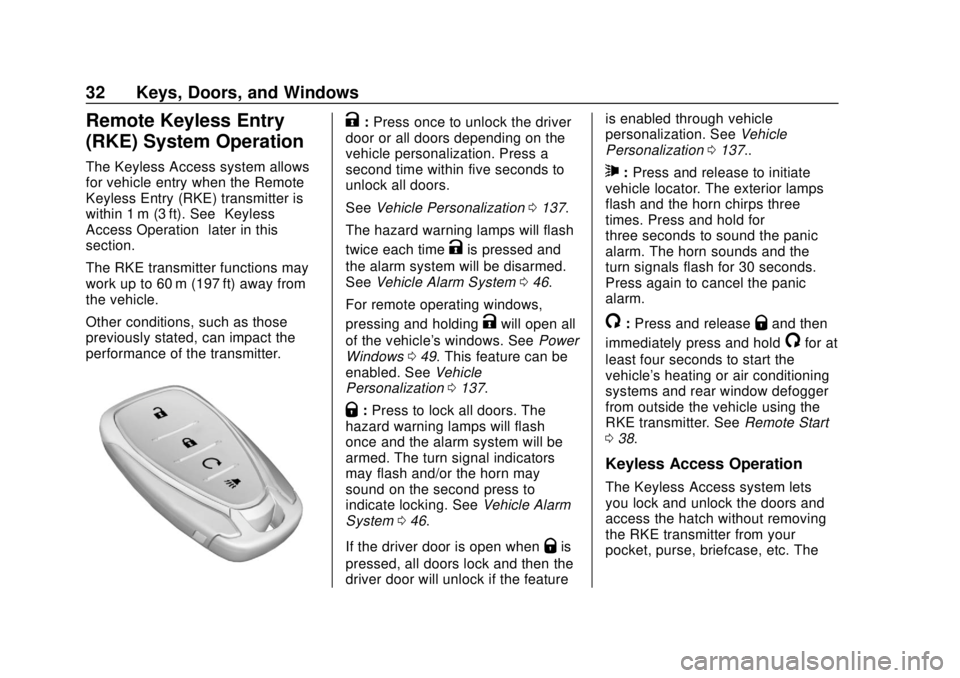
K: Press once to unlock the driver
door or all doors depending on the
vehicle personalization. Press a
second time within five seconds to
unlock all doors.
See Vehicle Personalization 0137.
The hazard warning lamps will flash
twice each time
Kis pressed and
the alarm system will be disarmed.
See Vehicle Alarm System 046.
For remote operating windows,
pressing and holding
Kwill open all
of the vehicle's windows. See Power
Windows 049. This feature can be
enabled. See Vehicle
Personalization 0137.
Q:Press to lock all doors. The
hazard warning lamps will flash
once and the alarm system will be
armed. The turn signal indicators
may flash and/or the horn may
sound on the second press to
indicate locking. See Vehicle Alarm
System 046.
If the driver door is open when
Qis
pressed, all doors lock and then the
driver door will unlock if the feature is enabled through vehicle
personalization. See
Vehicle
Personalization 0137..
7:Press and release to initiate
vehicle locator. The exterior lamps
flash and the horn chirps three
times. Press and hold for
three seconds to sound the panic
alarm. The horn sounds and the
turn signals flash for 30 seconds.
Press again to cancel the panic
alarm.
/: Press and releaseQand then
immediately press and hold
/for at
least four seconds to start the
vehicle's heating or air conditioning
systems and rear window defogger
from outside the vehicle using the
RKE transmitter. See Remote Start
0 38.
Keyless Access Operation
The Keyless Access system lets
you lock and unlock the doors and
access the hatch without removing
the RKE transmitter from your
pocket, purse, briefcase, etc. The
Page 34 of 379
Chevrolet VOLT Owner Manual (GMNA-Localizing-U.S./Canada/Mexico-
11349113) - 2018 - crc - 10/12/17
Keys, Doors, and Windows 33
RKE transmitter should be within
1 m (3 ft) to lock and unlock the
doors and access the hatch.
Keyless Access can be
programmed to unlock all doors on
the first lock/unlock press from the
driver door. SeeVehicle
Personalization 0137.
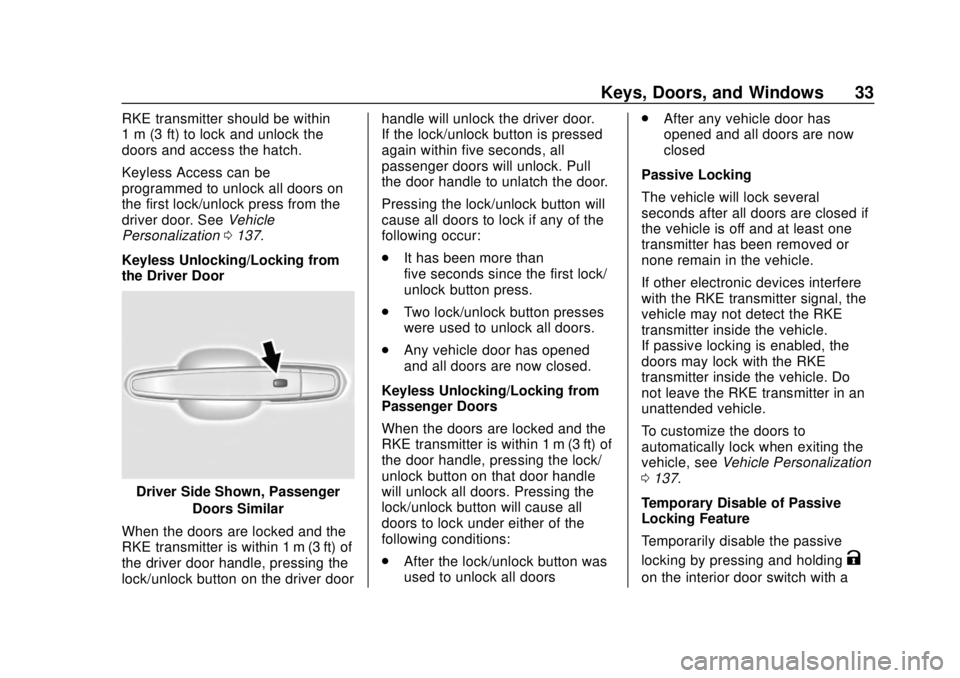
Keyless Unlocking/Locking from
the Driver Door
Driver Side Shown, Passenger Doors Similar
When the doors are locked and the
RKE transmitter is within 1 m (3 ft) of
the driver door handle, pressing the
lock/unlock button on the driver door handle will unlock the driver door.
If the lock/unlock button is pressed
again within five seconds, all
passenger doors will unlock. Pull
the door handle to unlatch the door.
Pressing the lock/unlock button will
cause all doors to lock if any of the
following occur:
.
It has been more than
five seconds since the first lock/
unlock button press.
. Two lock/unlock button presses
were used to unlock all doors.
. Any vehicle door has opened
and all doors are now closed.
Keyless Unlocking/Locking from
Passenger Doors
When the doors are locked and the
RKE transmitter is within 1 m (3 ft) of
the door handle, pressing the lock/
unlock button on that door handle
will unlock all doors. Pressing the
lock/unlock button will cause all
doors to lock under either of the
following conditions:
. After the lock/unlock button was
used to unlock all doors .
After any vehicle door has
opened and all doors are now
closed
Passive Locking
The vehicle will lock several
seconds after all doors are closed if
the vehicle is off and at least one
transmitter has been removed or
none remain in the vehicle.
If other electronic devices interfere
with the RKE transmitter signal, the
vehicle may not detect the RKE
transmitter inside the vehicle.
If passive locking is enabled, the
doors may lock with the RKE
transmitter inside the vehicle. Do
not leave the RKE transmitter in an
unattended vehicle.
To customize the doors to
automatically lock when exiting the
vehicle, see Vehicle Personalization
0 137.
Temporary Disable of Passive
Locking Feature
Temporarily disable the passive
locking by pressing and holding
K
on the interior door switch with a
Page 35 of 379
Chevrolet VOLT Owner Manual (GMNA-Localizing-U.S./Canada/Mexico-
11349113) - 2018 - crc - 10/12/17
34 Keys, Doors, and Windows
door open for at least four seconds,
or until three chimes are heard.
Passive locking will then remain
disabled until
Qon the interior door
switch is pressed, or until the
vehicle is turned on.
Remote Left in Vehicle Alert
When the vehicle is turned off and
an RKE transmitter is left in the
vehicle, the horn will chirp three
times after all doors are closed. To
turn on or off, see Vehicle
Personalization 0137.
Remote No Longer in Vehicle
If the vehicle is on, with a door
open, and then all doors are closed,
the vehicle will check for RKE
transmitters inside. If an RKE
transmitter is not detected, the DIC
will display NO REMOTE
DETECTED and the horn will chirp
three times.
Keyless Hatch Opening
Press the button on the underside of
the hatch and lift up to open if the
RKE transmitter is within 1 m (3 ft) and the doors are locked. If the
doors are unlocked, the transmitter
is not required to open the hatch.
Keyed Access
To access a vehicle with a weak
transmitter battery, see
Door Locks
0 40.
Programming Transmitters to
the Vehicle
Only RKE transmitters programmed
to this vehicle will work. If a
transmitter is lost or stolen, a
replacement can be purchased and
programmed through your dealer.
When the replacement transmitter is
programmed to this vehicle, all
remaining transmitters must also be
reprogrammed. Any lost or stolen
transmitters will no longer work
once the new transmitter is
programmed. Each vehicle can
have up to eight transmitters
matched to it. Programming with Recognized
Transmitters
A new transmitter can be
programmed to the vehicle when
there are two recognized
transmitters. To program, the vehicle
must be off and all of the
transmitters, both currently
recognized and new, must be in the
vehicle.
1. Place the two recognized transmitters in the cupholder.
2. Remove the key lock cylinder cap on the driver door handle.
See Door Locks 040. Insert
the vehicle key of the new
transmitter into the key lock
cylinder on the outside of the
driver door and turn the key
counterclockwise to the unlock
position five times within
10 seconds.
The Driver Information Center
(DIC) displays READY FOR
REMOTE #2, 3, 4 OR 5 etc.
Page 36 of 379
Chevrolet VOLT Owner Manual (GMNA-Localizing-U.S./Canada/Mexico-
11349113) - 2018 - crc - 10/12/17
Keys, Doors, and Windows 35
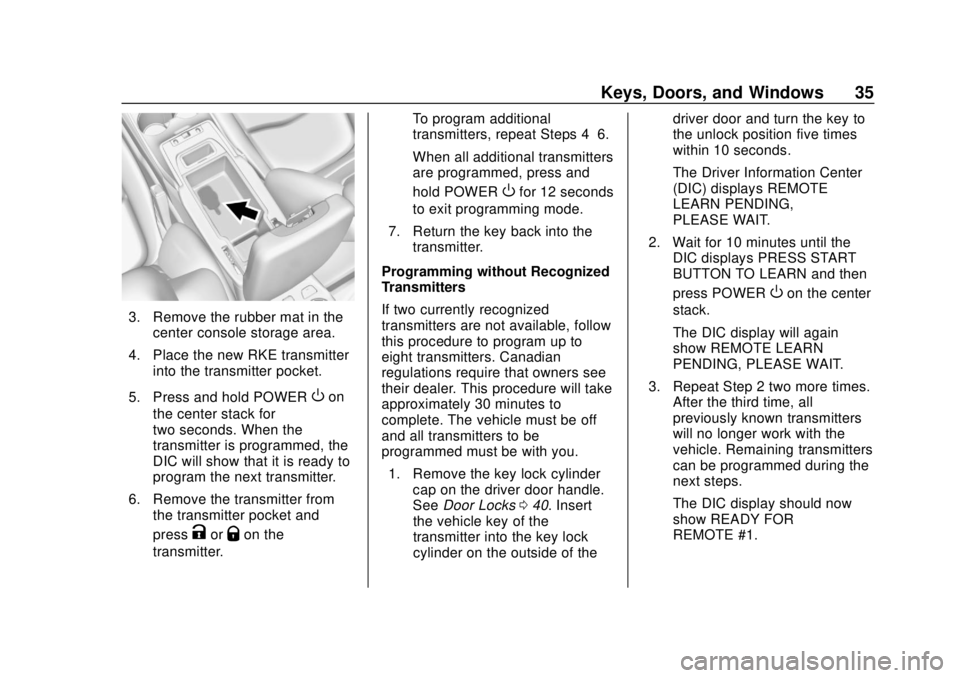
3. Remove the rubber mat in thecenter console storage area.
4. Place the new RKE transmitter into the transmitter pocket.
5. Press and hold POWER
Oon
the center stack for
two seconds. When the
transmitter is programmed, the
DIC will show that it is ready to
program the next transmitter.
6. Remove the transmitter from the transmitter pocket and
press
KorQon the
transmitter. To program additional
transmitters, repeat Steps 4–6.
When all additional transmitters
are programmed, press and
hold POWER
Ofor 12 seconds
to exit programming mode.
7. Return the key back into the transmitter.
Programming without Recognized
Transmitters
If two currently recognized
transmitters are not available, follow
this procedure to program up to
eight transmitters. Canadian
regulations require that owners see
their dealer. This procedure will take
approximately 30 minutes to
complete. The vehicle must be off
and all transmitters to be
programmed must be with you. 1. Remove the key lock cylinder cap on the driver door handle.
See Door Locks 040. Insert
the vehicle key of the
transmitter into the key lock
cylinder on the outside of the driver door and turn the key to
the unlock position five times
within 10 seconds.
The Driver Information Center
(DIC) displays REMOTE
LEARN PENDING,
PLEASE WAIT.
2. Wait for 10 minutes until the DIC displays PRESS START
BUTTON TO LEARN and then
press POWER
Oon the center
stack.
The DIC display will again
show REMOTE LEARN
PENDING, PLEASE WAIT.
3. Repeat Step 2 two more times. After the third time, all
previously known transmitters
will no longer work with the
vehicle. Remaining transmitters
can be programmed during the
next steps.
The DIC display should now
show READY FOR
REMOTE #1.
Page 40 of 379
Chevrolet VOLT Owner Manual (GMNA-Localizing-U.S./Canada/Mexico-
11349113) - 2018 - crc - 10/12/17
Keys, Doors, and Windows 39
Starting the Vehicle
To heat or cool the passenger
compartment using remote start:1. Press and release
Qon the
RKE transmitter; the doors
will lock.
2. Immediately press and hold
/
until the turn signal lamps
flash, or for at least
four seconds. Pressing
/
again during a remote start will
turn the feature off.
Remote start will automatically shut
off after 10 minutes unless a time
extension is done.
While the remote start is active, the
parking lamps will turn on and
remain on.
After entering the vehicle during a
remote start, press POWER
Oon
the center stack with the brake
pedal applied to operate as normal. The remote start can be initiated
two separate times between driving.
For each remote start, the
passenger compartment will be
heated or cooled for 10 minutes.
Extending Vehicle Run Time
The vehicle run time can also be
extended by another 10 minutes,
if during the first 10 minutes
Steps 1 and 2 are repeated while
the vehicle is still running. An
extension can be requested
30 seconds after starting. This
provides a total of 20 minutes.
The remote start can only be
extended once.
When the remote start is extended,
the second 10-minute period is
added on to the first 10 minutes for
a total of 20 minutes.
A maximum of two remote starts,
or a remote start with an extension,
are allowed between vehicle
operation.
The ignition must be turned on and
then off before the remote start
procedure can be used again.
Canceling Remote Start
To cancel a remote start, do any of
the following:
.
Aim the RKE transmitter at the
vehicle and press and hold
/
until the parking lamps turn off.
. Turn on the hazard warning
flashers.
. Press POWER
Oon the center
stack, with the brake pedal
applied, then press POWER
O
again to turn the vehicle off.
Conditions in Which Remote
Start May Not Work
Conditions in which a remote start
will not occur include:
. An open hood.
. The RKE transmitter is in the
vehicle.
. The vehicle is not in P (Park).
. Vehicle propulsion system fault
conditions, including an
emission control system
malfunction.
Page 41 of 379
Chevrolet VOLT Owner Manual (GMNA-Localizing-U.S./Canada/Mexico-
11349113) - 2018 - crc - 10/12/17
40 Keys, Doors, and Windows
.High voltage battery fault
conditions.
A second remote start or extension
will not occur if the fuel level is low.
During a remote start, conditions in
which a remote start will be
canceled include:
. Vehicle propulsion system or
high voltage battery fault
conditions.
. Low engine oil pressure.
. Engine coolant temperature that
is too high.
Door Locks
{Warning
Unlocked doors can be
dangerous.
. Passengers, especially
children, can easily open
the doors and fall out of a
moving vehicle. The doors
can be unlocked and
(Continued)
Warning (Continued)
opened while the vehicle is
moving. The chance of
being thrown out of the
vehicle in a crash is
increased if the doors are
not locked. So, all
passengers should wear
seat belts properly and the
doors should be locked
whenever the vehicle is
driven.
. Young children who get into
unlocked vehicles may be
unable to get out. A child
can be overcome by
extreme heat and can suffer
permanent injuries or even
death from heat stroke.
Always lock the vehicle
whenever leaving it.
. Outsiders can easily enter
through an unlocked door
when you slow down or stop
the vehicle. Locking the
doors can help prevent this
from happening. To lock or unlock the doors from
outside the vehicle:
.
PressQorKon the Remote
Keyless Entry (RKE) transmitter.
See Remote Keyless Entry
(RKE) System Operation 032.
. Use the key in the driver door.
The key lock cylinder is covered
with a cap.
To lock or unlock the doors from
inside the vehicle:
. Press
QorKon the power door
lock switch.
. Push down the manual lock
knob on the driver door to lock
all doors. Push down the manual
lock knob on a passenger door
to lock only that door.
. Pull an interior door handle to
unlock the door. Pull the door
handle again to unlatch it.
Page 42 of 379
Chevrolet VOLT Owner Manual (GMNA-Localizing-U.S./Canada/Mexico-
11349113) - 2018 - crc - 10/12/17
Keys, Doors, and Windows 41
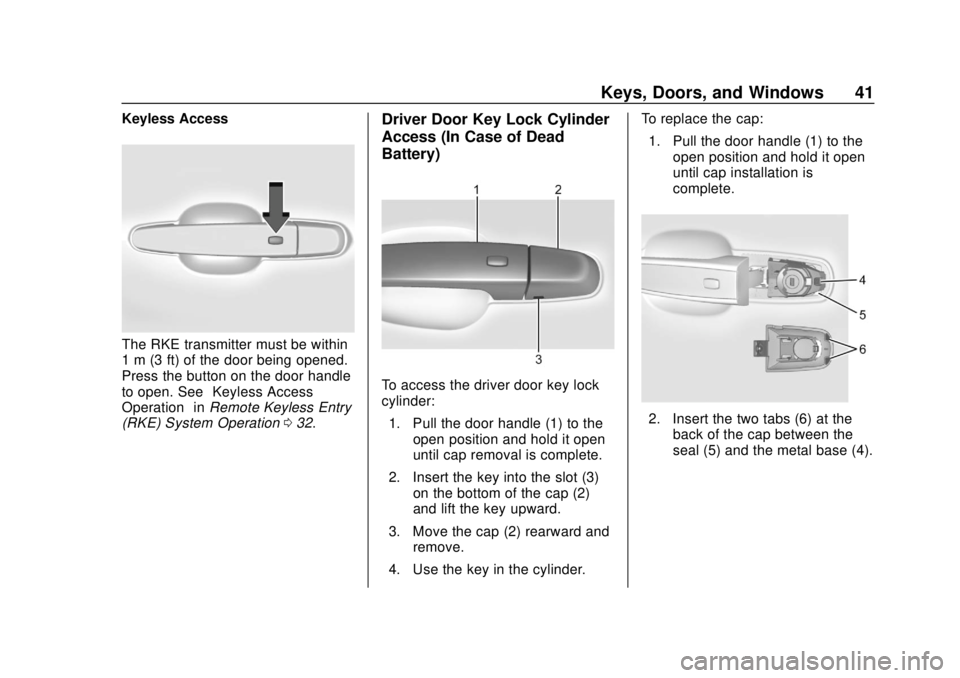
Keyless Access
The RKE transmitter must be within
1 m (3 ft) of the door being opened.
Press the button on the door handle
to open. See“Keyless Access
Operation” inRemote Keyless Entry
(RKE) System Operation 032.
Driver Door Key Lock Cylinder
Access (In Case of Dead
Battery)
To access the driver door key lock
cylinder:
1. Pull the door handle (1) to the open position and hold it open
until cap removal is complete.
2. Insert the key into the slot (3) on the bottom of the cap (2)
and lift the key upward.
3. Move the cap (2) rearward and remove.
4. Use the key in the cylinder. To replace the cap:
1. Pull the door handle (1) to the open position and hold it open
until cap installation is
complete.
2. Insert the two tabs (6) at theback of the cap between the
seal (5) and the metal base (4).
Page 43 of 379
Chevrolet VOLT Owner Manual (GMNA-Localizing-U.S./Canada/Mexico-
11349113) - 2018 - crc - 10/12/17
42 Keys, Doors, and Windows
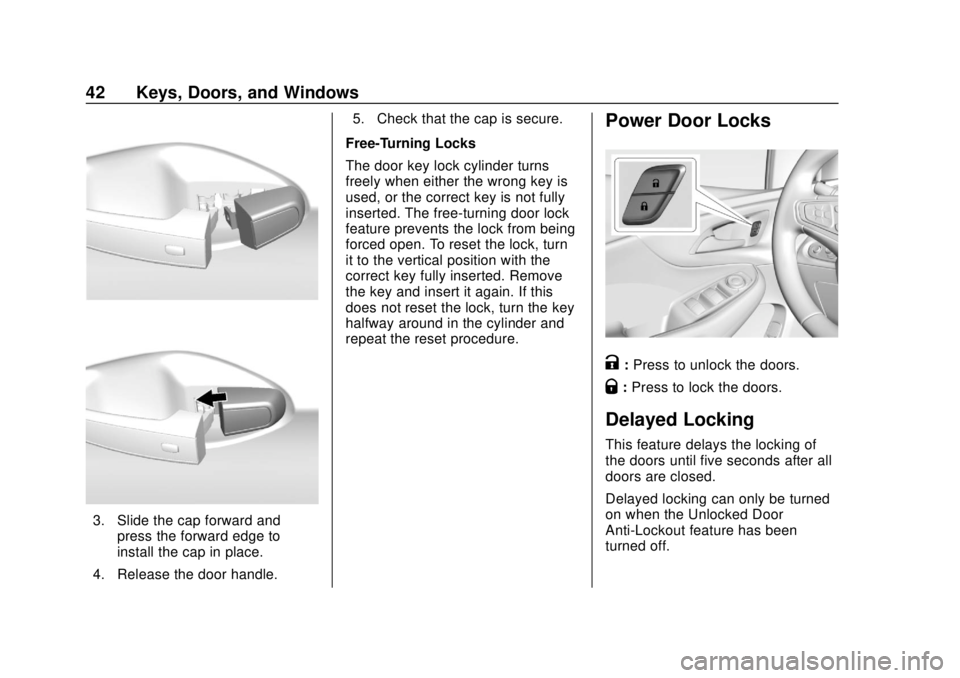
3. Slide the cap forward andpress the forward edge to
install the cap in place.
4. Release the door handle. 5. Check that the cap is secure.
Free-Turning Locks
The door key lock cylinder turns
freely when either the wrong key is
used, or the correct key is not fully
inserted. The free-turning door lock
feature prevents the lock from being
forced open. To reset the lock, turn
it to the vertical position with the
correct key fully inserted. Remove
the key and insert it again. If this
does not reset the lock, turn the key
halfway around in the cylinder and
repeat the reset procedure.
Power Door Locks
K: Press to unlock the doors.
Q: Press to lock the doors.
Delayed Locking
This feature delays the locking of
the doors until five seconds after all
doors are closed.
Delayed locking can only be turned
on when the Unlocked Door
Anti-Lockout feature has been
turned off.
Page 44 of 379
Chevrolet VOLT Owner Manual (GMNA-Localizing-U.S./Canada/Mexico-
11349113) - 2018 - crc - 10/12/17
Keys, Doors, and Windows 43
WhenQis pressed on the power
door lock switch while the door is
open, a chime will sound three
times indicating delayed locking is
active.
The doors will lock automatically
five seconds after all doors are
closed. If a door is reopened before
that time, the five-second timer will
reset when all doors are closed
again.
Press
Qon the door lock switch
again or press
Qon the RKE
transmitter to lock the doors
immediately.
This feature can also be
programmed. See Vehicle
Personalization 0137.
Automatic Door Locks
The doors will lock automatically
when all doors are closed, the
ignition is on, and the shift lever is
moved out of P (Park).
If a vehicle door is unlocked and
then opened and closed, the doors
will lock either when your foot is removed from the brake or the
vehicle speed becomes faster than
13 km/h (8 mph).
To unlock the doors:
.
Press
Kon a door.
. Move the shift lever into
P (Park).
Automatic door unlocking can be
programmed through the Driver
Information Center (DIC). See
Vehicle Personalization 0137.
Lockout Protection
If the vehicle is on or in ACC/
ACCESSORY and the power door
lock switch is pressed with the
driver door open, all the doors will
lock and only the driver door will
unlock.
If the vehicle is off and locking is
requested while a door is open,
when all doors are closed the
vehicle will check for RKE
transmitters inside. If an RKE
transmitter is detected and the
number of RKE transmitters inside has not reduced, the driver door will
unlock and the horn will chirp three
times.
Lockout Protection can be manually
overridden with the driver door open
by pressing and holding
Qon the
power door lock switch.
Unlocked Door Anti-Lockout
If Unlocked Door Anti-Lockout has
been turned on and the vehicle is
off, the driver door is open, and
locking is requested, all the doors
will lock and the driver door will
remain unlocked. Push the lock
button on the door or the RKE
transmitter a second time to lock the
driver door. The Unlocked Door
Anti-Lockout feature can be turned
on or off. See Vehicle
Personalization 0137.
Safety Locks
The rear door safety locks prevent
passengers from opening the rear
doors from inside the vehicle.
Page 45 of 379
Chevrolet VOLT Owner Manual (GMNA-Localizing-U.S./Canada/Mexico-
11349113) - 2018 - crc - 10/12/17
44 Keys, Doors, and Windows
Manual Safety Locks
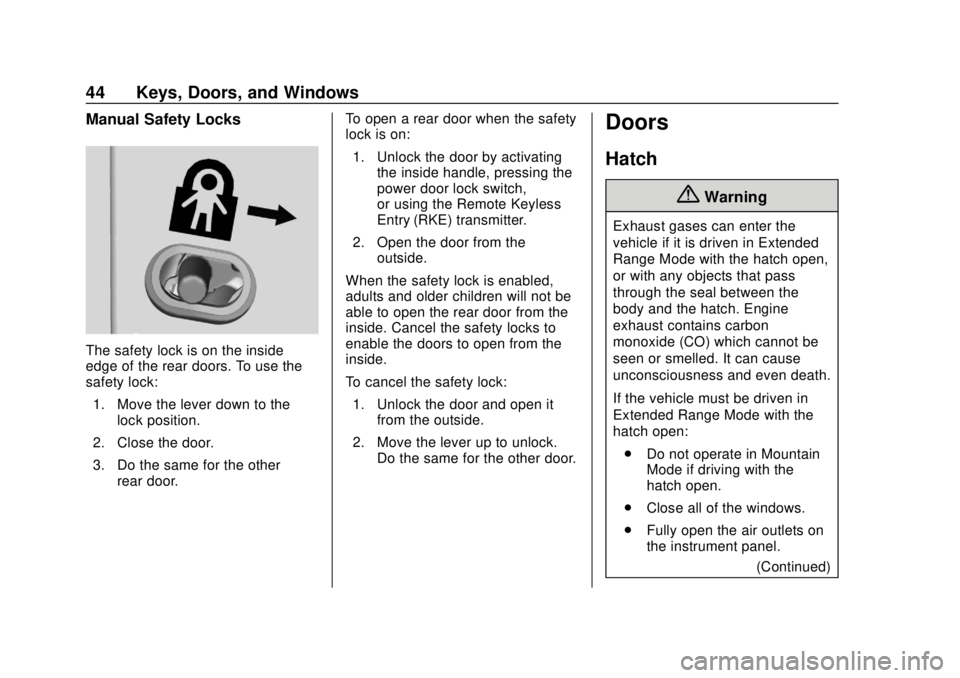
The safety lock is on the inside
edge of the rear doors. To use the
safety lock:1. Move the lever down to the lock position.
2. Close the door.
3. Do the same for the other rear door. To open a rear door when the safety
lock is on:
1. Unlock the door by activating the inside handle, pressing the
power door lock switch,
or using the Remote Keyless
Entry (RKE) transmitter.
2. Open the door from the outside.
When the safety lock is enabled,
adults and older children will not be
able to open the rear door from the
inside. Cancel the safety locks to
enable the doors to open from the
inside.
To cancel the safety lock: 1. Unlock the door and open it from the outside.
2. Move the lever up to unlock. Do the same for the other door.
Doors
Hatch
{Warning
Exhaust gases can enter the
vehicle if it is driven in Extended
Range Mode with the hatch open,
or with any objects that pass
through the seal between the
body and the hatch. Engine
exhaust contains carbon
monoxide (CO) which cannot be
seen or smelled. It can cause
unconsciousness and even death.
If the vehicle must be driven in
Extended Range Mode with the
hatch open:
. Do not operate in Mountain
Mode if driving with the
hatch open.
. Close all of the windows.
. Fully open the air outlets on
the instrument panel.
(Continued)