door lock CHEVROLET VOLT 2018 Service Manual
[x] Cancel search | Manufacturer: CHEVROLET, Model Year: 2018, Model line: VOLT, Model: CHEVROLET VOLT 2018Pages: 379, PDF Size: 5.65 MB
Page 296 of 379
Chevrolet VOLT Owner Manual (GMNA-Localizing-U.S./Canada/Mexico-
11349113) - 2018 - crc - 10/12/17
Vehicle Care 295
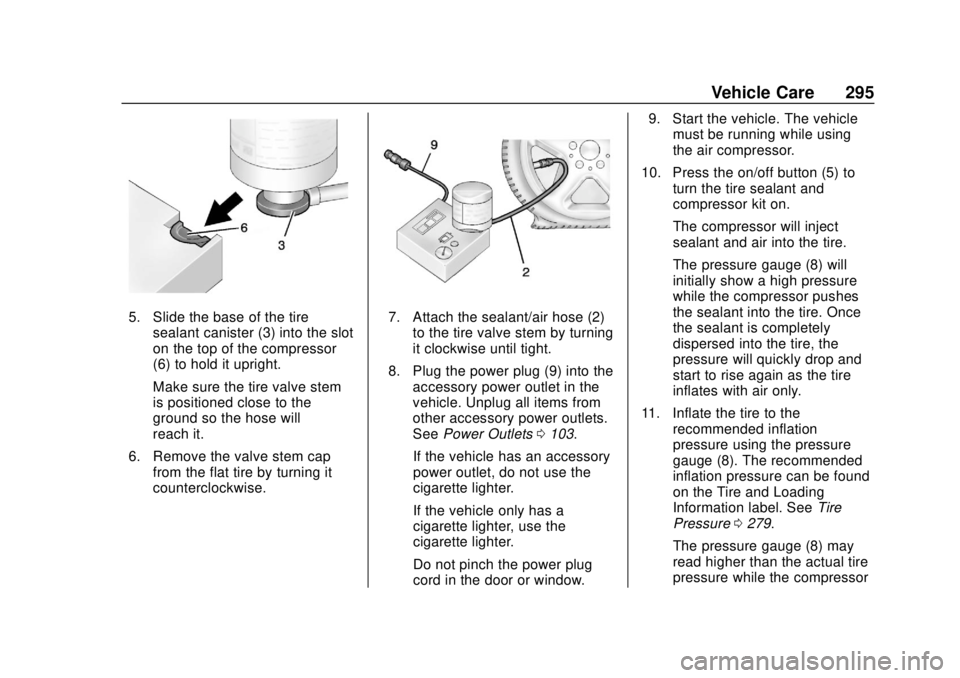
5. Slide the base of the tiresealant canister (3) into the slot
on the top of the compressor
(6) to hold it upright.
Make sure the tire valve stem
is positioned close to the
ground so the hose will
reach it.
6. Remove the valve stem cap from the flat tire by turning it
counterclockwise.7. Attach the sealant/air hose (2)
to the tire valve stem by turning
it clockwise until tight.
8. Plug the power plug (9) into the accessory power outlet in the
vehicle. Unplug all items from
other accessory power outlets.
See Power Outlets 0103.
If the vehicle has an accessory
power outlet, do not use the
cigarette lighter.
If the vehicle only has a
cigarette lighter, use the
cigarette lighter.
Do not pinch the power plug
cord in the door or window. 9. Start the vehicle. The vehicle
must be running while using
the air compressor.
10. Press the on/off button (5) to turn the tire sealant and
compressor kit on.
The compressor will inject
sealant and air into the tire.
The pressure gauge (8) will
initially show a high pressure
while the compressor pushes
the sealant into the tire. Once
the sealant is completely
dispersed into the tire, the
pressure will quickly drop and
start to rise again as the tire
inflates with air only.
11. Inflate the tire to the recommended inflation
pressure using the pressure
gauge (8). The recommended
inflation pressure can be found
on the Tire and Loading
Information label. See Tire
Pressure 0279.
The pressure gauge (8) may
read higher than the actual tire
pressure while the compressor
Page 299 of 379

Chevrolet VOLT Owner Manual (GMNA-Localizing-U.S./Canada/Mexico-
11349113) - 2018 - crc - 10/12/17
298 Vehicle Care
1. Remove the compressor fromits storage location. See
Storing the Tire Sealant and
Compressor Kit 0299.
2. Remove the air only hose (10) and the power plug (9) from the
bottom of the compressor.
3. Place the compressor on the ground near the flat tire.
Make sure the tire valve stem
is positioned close to the
ground so the hose will
reach it.
4. Remove the valve stem cap from the flat tire by turning it
counterclockwise.
5. Attach the air only hose (10) to the tire valve stem by turning it
clockwise until tight.
6. Plug the power plug (9) into the accessory power outlet in the
vehicle. Unplug all items from
other accessory power outlets.
See Power Outlets 0103.
If the vehicle has an accessory
power outlet, do not use the
cigarette lighter. If the vehicle only has a
cigarette lighter, use the
cigarette lighter.
Do not pinch the power plug
cord in the door or window.
7. Start the vehicle. The vehicle must be running while using
the air compressor.
8. Press the on/off button (5) to turn the tire sealant and
compressor kit on.
The compressor will inflate the
tire with air only.
9. Inflate the tire to the recommended inflation
pressure using the pressure
gauge (8). The recommended
inflation pressure can be found
on the Tire and Loading
Information label. See Tire
Pressure 0279.
The pressure gauge (8) may
read higher than the actual tire
pressure while the compressor
is on. Turn the compressor off
to get an accurate pressure reading. The compressor may
be turned on/off until the
correct pressure is reached.
Caution
If the recommended pressure
cannot be reached after
approximately 25 minutes, the
vehicle should not be driven
farther. The tire is too severely
damaged and the tire sealant and
compressor kit cannot inflate the
tire. Remove the power plug from
the accessory power outlet and
unscrew the inflating hose from
the tire valve. See
Roadside
Assistance Program 0345.
10. Press the on/off button (5) to turn the tire sealant and
compressor kit off.
Be careful while handling the
compressor as it could be
warm after usage.
11. Unplug the power plug (9) from the accessory power outlet in
the vehicle.
Page 320 of 379
Chevrolet VOLT Owner Manual (GMNA-Localizing-U.S./Canada/Mexico-
11349113) - 2018 - crc - 10/12/17
Vehicle Care 319
Caution
Using petroleum-based tire
dressing products on the vehicle
may damage the paint finish and/
or tires. When applying a tire
dressing, always wipe off any
overspray from all painted
surfaces on the vehicle.
Wheels and Trim—Aluminum
or Chrome
Use a soft, clean cloth with mild
soap and water to clean the wheels.
After rinsing thoroughly with clean
water, dry with a soft, clean towel.
A wax may then be applied.
Caution
Chrome wheels and other chrome
trim may be damaged if the
vehicle is not washed after driving
on roads that have been sprayed
with magnesium, calcium,
or sodium chloride. These
(Continued)
Caution (Continued)
chlorides are used on roads for
conditions such as ice and dust.
Always wash the chrome with
soap and water after exposure.
Caution
To avoid surface damage, do not
use strong soaps, chemicals,
abrasive polishes, cleaners,
brushes, or cleaners that contain
acid on aluminum or
chrome-plated wheels. Use only
approved cleaners. Also, never
drive a vehicle with aluminum or
chrome-plated wheels through an
automatic car wash that uses
silicone carbide tire cleaning
brushes. Damage could occur
and the repairs would not be
covered by the vehicle warranty.
Brake System
Visually inspect brake lines and
hoses for proper hook-up, binding,
leaks, cracks, chafing, etc. Inspect
disc brake pads for wear and rotors
for surface condition. Inspect drum
brake linings/shoes for wear or
cracks. Inspect all other brake parts.
Steering, Suspension, and
Chassis Components
Visually inspect steering,
suspension, and chassis
components for damaged, loose,
or missing parts or signs of wear at
least once a year.
Inspect power steering for proper
attachment, connections, binding,
leaks, cracks, chafing, etc.
Visually check constant velocity joint
boots and axle seals for leaks.
Body Component Lubrication
Lubricate all key lock cylinders,
hood hinges, hatch/liftgate hinges,
and the steel fuel door hinge unless
the components are plastic.
Applying silicone grease on
Page 358 of 379
Chevrolet VOLT Owner Manual (GMNA-Localizing-U.S./Canada/Mexico-
11349113) - 2018 - crc - 10/12/17
OnStar 357
Security
If equipped, OnStar provides these
services:
.With Stolen Vehicle Assistance,
OnStar Advisors can use GPS to
pinpoint the vehicle and help
authorities quickly recover it.
. With Remote Ignition Block,
if equipped, OnStar can block
the engine from being restarted.
. With Stolen Vehicle Slowdown,
if equipped, OnStar can work
with law enforcement to
gradually slow the vehicle down.
Theft Alarm Notification
If equipped, if the doors are locked
and the vehicle alarm sounds, a
notification by text, e-mail, or phone
call will be sent. If the vehicle is
stolen, an OnStar Advisor can work
with authorities to recover the
vehicle.
Navigation
OnStar navigation requires a
specific OnStar service plan.
Press
Qto receive Turn-by-Turn
directions or have them sent to the
vehicle’s navigation screen,
if equipped.
Turn-by-Turn Navigation
1. PressQto connect to an
Advisor.
2. Request directions to be downloaded to the vehicle.
3. Follow the voice-guided commands.
Using Voice Commands
During a Planned Route
Functionality of the Voice Command
button may vary by vehicle and
region. For some vehicles, press
=
to open the OnStar app on the
infotainment display. For other
vehicles press
=as follows. Cancel Route
1. Press
=. System responds:
“OnStar ready,” then a tone.
2. Say “Cancel route.” System
responds: “Do you want to
cancel directions?”
3. Say “Yes.”System responds:
“OK, request completed, thank
you, goodbye.”
Route Preview
1. Press
=. System responds:
“OnStar ready,” then a tone.
2. Say “Route preview.” System
responds with the next three
maneuvers.
Repeat
1. Press
=. System responds:
“OnStar ready,” then a tone.
2. Say “Repeat.” System
responds with the last direction
given, then responds with
“OnStar ready,” then a tone.
Page 360 of 379
Chevrolet VOLT Owner Manual (GMNA-Localizing-U.S./Canada/Mexico-
11349113) - 2018 - crc - 10/12/17
OnStar 359
After initial set-up, your vehicle’s
Wi-Fi hotspot will connect
automatically to your mobile
devices. Manage data usage by
turning Wi-Fi on or off on your
mobile device, using the
myChevrolet mobile app, or by
contacting an OnStar Advisor. On
some vehicles, Wi-Fi can also be
managed from the Wi-Fi
Hotspot menu.
myChevrolet Mobile App (If
Available)
Download the myChevrolet mobile
app to compatible Apple and
Android smartphones. Chevrolet
users can access the following
services from a smartphone:
.Remotely start/stop the vehicle,
if factory-equipped.
. Lock/unlock doors, if equipped
with automatic locks.
. Activate the horn and lamps.
. Check the vehicle’s energy level,
range or tire pressure,
if factory-equipped with the Tire
Pressure Monitor System. .
Send destinations to the vehicle.
. Locate the vehicle on a map
(U.S. market only).
. Turn the vehicle's Wi-Fi hotspot
on/off, manage settings, and
monitor data consumption,
if equipped.
. Locate a dealer and schedule
service.
. Request roadside assistance.
. Set a parking reminder with pin
drop, take a photo, make a note,
and set a timer.
. Connect with Chevrolet on social
media.
. Set the climate control settings.
For myChevrolet mobile app
information and compatibility, see
www.my.chevrolet.com.
An active OnStar service plan,
compatible device, factory-installed
remote start, and power locks are
required. Data rates apply. See
www.onstar.com for details and
system limitations.Remote Services
Contact an OnStar Advisor to
unlock the doors or sound the horn
and flash the lamps.
OnStar AtYourService
OnStar Advisors can provide offers
from restaurants and retailers on
your route, help locate hotels,
or book a room. These services
vary by market.
OnStar Hands-Free Calling
Make and receive calls with the
built-in wireless calling service,
which requires available minutes.
Functionality of the Voice Command
button may vary by vehicle and
region. For some vehicles, press
=
to open the OnStar app on the
infotainment display, then select
Hands-Free calling. For other
vehicles press
=as follows.
Make a Call
1. Press
=. System responds:
“OnStar ready.”
Page 364 of 379
Chevrolet VOLT Owner Manual (GMNA-Localizing-U.S./Canada/Mexico-
11349113) - 2018 - crc - 10/12/17
OnStar 363
change the OnStar PIN, contact an
OnStar Advisor by pressing
Qor
calling 1-888-4ONSTAR.
Warranty
OnStar equipment may be
warranted as part of the vehicle
warranty.
Languages
The vehicle can be programmed to
respond in multiple languages.
Press
Qand ask for an Advisor.
Advisors are available in English,
Spanish, and French. Available
languages may vary by country.
Potential Issues
OnStar cannot perform Remote
Door Unlock or Stolen Vehicle
Assistance after the vehicle has
been off continuously for 10 days
without an ignition cycle. If the
vehicle has not been started for
10 days, OnStar can contact
Roadside Assistance or a locksmith
to help gain access to the vehicle.
Global Positioning
System (GPS)
. Obstruction of the GPS can
occur in a large city with tall
buildings; in parking garages;
around airports; in tunnels and
underpasses; or in an area with
very dense trees. If GPS signals
are not available, the OnStar
system should still operate to
call OnStar. However, OnStar
could have difficulty identifying
the exact location.
. In emergency situations, OnStar
can use the last stored GPS
location to send to emergency
responders.
A temporary loss of GPS can cause
loss of the ability to send a
Turn-by-Turn Navigation route. The
Advisor may give a verbal route or
may ask for a call back after the
vehicle is driven into an open area.
Cellular and GPS Antennas
Cellular reception is required for
OnStar to send remote signals to
the vehicle. Do not place items over or near the antenna to prevent
blocking cellular and GPS signal
reception.
Unable to Connect to OnStar
Message
If there is limited cellular coverage
or the cellular network has reached
maximum capacity, this message
may come on. Press
Qto try the
call again or try again after driving a
few miles into another cellular area.
Vehicle and Power Issues
OnStar services require a vehicle
electrical system, wireless service,
and GPS satellite technologies to be
available and operating for features
to function properly. These systems
may not operate if the battery is
discharged or disconnected.
Add-on Electrical Equipment
The OnStar system is integrated
into the electrical architecture of the
vehicle. Do not add any electrical
equipment. See Add-On Electrical
Equipment 0232. Added electrical
Page 368 of 379

Chevrolet VOLT Owner Manual (GMNA-Localizing-U.S./Canada/Mexico-
11349113) - 2018 - crc - 10/12/17
Index 367
IndexA
Accessories andModifications . . . . . . . . . . . . . . . . . . 236
Accessory Power . . . . . . . . . . . . . . . 174
Adaptive Cruise Control . . . . . . . . 193
Add-On Electrical Equipment . . . 232
Additional Information OnStar . . . . . . . . . . . . . . . . . . . . . . . 361
Additional Maintenance and Care . . . . . . . . . . . . . . . . . . . . . . 332
Air Cleaner/Filter, Engine . . . . . . . 243
Air Conditioning . . . . . . . . . . . . . . . . 153
Air Filter, Passenger Compartment . . . . . . . . . . . . . . . . . 159
Air Vents . . . . . . . . . . . . . . . . . . . . . . . 158
Airbag System Check . . . . . . . . . . . . . . . . . . . . . . . . . . 77
How Does an AirbagRestrain? . . . . . . . . . . . . . . . . . . . . . 69
Passenger Sensing System . . . . 71
What Makes an Airbag Inflate? . . . . . . . . . . . . . . . . . . . . . . . . 69
What Will You See after an Airbag Inflates? . . . . . . . . . . . . . . . 70
When Should an Airbag Inflate? . . . . . . . . . . . . . . . . . . . . . . . . 68
Where Are the Airbags? . . . . . . . . 66 Airbags
Adding Equipment to the
Vehicle . . . . . . . . . . . . . . . . . . . . . . . . 76
Passenger Status Indicator . . . .113
Readiness Light . . . . . . . . . . . . . . .113
Servicing Airbag-Equipped Vehicles . . . . . . . . . . . . . . . . . . . . . . . 76
System Check . . . . . . . . . . . . . . . . . . 65
Alarm Vehicle Security . . . . . . . . . . . . . . . . 46
Alert
Lane Change . . . . . . . . . . . . . . . . . 209
Side Blind Zone (SBZA) . . . . . . 209
All-Season Tires . . . . . . . . . . . . . . . . 272
Antilock Brake System (ABS) . . . 185 Warning Light . . . . . . . . . . . . . . . . . .117
Appearance Care Exterior . . . . . . . . . . . . . . . . . . . . . . . 315
Interior . . . . . . . . . . . . . . . . . . . . . . . . 320
Assistance Program, Roadside . . . . . . . . . . . . . . . . . . . . . . 345
Assistance Systems for Driving . . . . . . . . . . . . . . . . . . . . . . . . 205
Assistance Systems for Parking and Backing . . . . . . . . . . 201
Automatic Climate Control System . . . . . . . 153
Door Locks . . . . . . . . . . . . . . . . . . . . . 43
Page 370 of 379

Chevrolet VOLT Owner Manual (GMNA-Localizing-U.S./Canada/Mexico-
11349113) - 2018 - crc - 10/12/17
Index 369
Compass . . . . . . . . . . . . . . . . . . . . . . . 102
Compressor Kit, Tire Sealant . . . 292
ConnectionsOnStar . . . . . . . . . . . . . . . . . . . . . . . 358
Control Traction and ElectronicStability . . . . . . . . . . . . . . . . . . . . . 189
Control of a Vehicle . . . . . . . . . . . . . 162
Convex Mirrors . . . . . . . . . . . . . . . . . . 48
Coolant Engine Temperature
Warning Light . . . . . . . . . . . . . . . 120
Cooling . . . . . . . . . . . . . . . . . . . . . . . . . 153
Cooling System . . . . . . .245, 248, 249
Courtesy Transportation Program . . . . . . . . . . . . . . . . . . . . . . . 347
Cover Cargo . . . . . . . . . . . . . . . . . . . . . . . . . . . 97
Cruise Control . . . . . . . . . . . . . . . . . . 191 Light . . . . . . . . . . . . . . . . . . . . . . . . . . 122
Cruise Control, Adaptive . . . . . . . . 193
Customer Assistance . . . . . . . . . . . 344
Offices . . . . . . . . . . . . . . . . . . . . . . . . 343
Text Telephone (TTY)Users . . . . . . . . . . . . . . . . . . . . . . . 344 Customer Information
Service Publications
Ordering Information . . . . . . . . 351
Customer Satisfaction Procedure . . . . . . . . . . . . . . . . . . . . . 341
D
Damage Repair, Collision . . . . . . . 348
Danger, Warning, and Caution . . . . 2
Data CollectionInfotainment System . . . . . . . . . . 354
OnStar . . . . . . . . . . . . . . . . . . . . . . . 354
Data Recorders, Event . . . . . . . . . 353
Daytime Running Lamps (DRL) . . . . . . . . . . . . . . . . . . 147
Defensive Driving . . . . . . . . . . . . . . . 162
Delayed Charging Override . . . . . 215
Delayed Locking . . . . . . . . . . . . . . . . . 42
Diagnostics OnStar . . . . . . . . . . . . . . . . . . . . . . . 360
Distracted Driving . . . . . . . . . . . . . . . 161
Dome Lamps . . . . . . . . . . . . . . . . . . . 150
Door
Ajar Light . . . . . . . . . . . . . . . . . . . . . 122
Delayed Locking . . . . . . . . . . . . . . . . 42
Locks . . . . . . . . . . . . . . . . . . . . . . . . . . . 40
Power Locks . . . . . . . . . . . . . . . . . . . . 42 Drive Belt Routing, Engine . . . . . . 340
Drive Unit
Electric . . . . . . . . . . . . . . . . . . . . . . . 183
Driver Assistance Systems . . . . . 200
Driver Efficiency Gauge . . . . . . . . 111
Driver Information Center (DIC) . . . . . . . . . . . . . . . . . . 133
Driver Mode Control . . . . . . . . . . . . 190
Driver Selected Operating Modes . . . . . . . . . . . . . . . . . . . . . . . . 177
Driving
Assistance Systems . . . . . . . . . . 205
Defensive . . . . . . . . . . . . . . . . . . . . . 162
Drunk . . . . . . . . . . . . . . . . . . . . . . . . . 162
Hill and Mountain Roads . . . . . . 165
If the Vehicle is Stuck . . . . . . . . . 167
Loss of Control . . . . . . . . . . . . . . . 164
Off-Road Recovery . . . . . . . . . . . 163
Vehicle Load Limits . . . . . . . . . . . 167
Wet Roads . . . . . . . . . . . . . . . . . . . 164
Winter . . . . . . . . . . . . . . . . . . . . . . . . 166
Driving for Better Energy Efficiency . . . . . . . . . . . . . . . . . . . . . . 27
Page 373 of 379

Chevrolet VOLT Owner Manual (GMNA-Localizing-U.S./Canada/Mexico-
11349113) - 2018 - crc - 10/12/17
372 Index
L
Labeling, Tire Sidewall . . . . . . . . . . 273
LampsDaytime Running (DRL) . . . . . . 147
Dome . . . . . . . . . . . . . . . . . . . . . . . . . 150
Exterior Controls . . . . . . . . . . . . . . 145
License Plate . . . . . . . . . . . . . . . . . 260
Malfunction Indicator(Check Engine) . . . . . . . . . . . . . .114
On Reminder . . . . . . . . . . . . . . . . . 122
Reading . . . . . . . . . . . . . . . . . . . . . . 150
Taillamps . . . . . . . . . . . . . . . . . . . . . 259
Lane Change Alert (LCA) . . . . . . . 209
Lane Departure Warning (LDW) . . . . . . . . . . . . . . . . 211
Lane Keep Assist (LKA) . . . . . . . . 211
Lane Keep Assist Light . . . . . . . . . 118
Lap-Shoulder Belt . . . . . . . . . . . . . . . 61
LATCH System Replacing Parts after aCrash . . . . . . . . . . . . . . . . . . . . . . . . . 90
LATCH, Lower Anchors and Tethers for Children . . . . . . . . . . . . 84
LED Lighting . . . . . . . . . . . . . . . . . . . . 258
Lighting
Entry . . . . . . . . . . . . . . . . . . . . . . . . . 151
Exit . . . . . . . . . . . . . . . . . . . . . . . . . . . 151
Illumination Control . . . . . . . . . . . 149 Lighting (cont'd)
LED . . . . . . . . . . . . . . . . . . . . . . . . . . 258
Lights Airbag Readiness . . . . . . . . . . . . . .113
Antilock Brake System
(ABS) Warning . . . . . . . . . . . . . . .117
Brake System Warning . . . . . . . .116
Charging System . . . . . . . . . . . . . .114
Check Engine (Malfunction Indicator) . . . . . . . . . . . . . . . . . . . . .114
Cruise Control . . . . . . . . . . . . . . . . 122
Door Ajar . . . . . . . . . . . . . . . . . . . . . 122
Electric Parking Brake . . . . . . . . .117
Engine Coolant Temperature Warning . . . . . . . 120
Engine Oil Pressure . . . . . . . . . . 120
Flash-to-Pass . . . . . . . . . . . . . . . . . 147
High-Beam On . . . . . . . . . . . . . . . . 122
High/Low Beam Changer . . . . . 147
Hold Mode . . . . . . . . . . . . . . . . . . . . .118
Lane Keep Assist . . . . . . . . . . . . . .118
Low Fuel Warning . . . . . . . . . . . . 121
Mountain Mode . . . . . . . . . . . . . . . .118
Seat Belt Reminders . . . . . . . . . . .112
Security . . . . . . . . . . . . . . . . . . . . . . 121
Service Electric Parking Brake . . . . . . . . . . . . . . . . . . . . . . . .117
Sport Mode . . . . . . . . . . . . . . . . . . . .118 Lights (cont'd)
StabiliTrak OFF . . . . . . . . . . . . . . . .119
Tire Pressure . . . . . . . . . . . . . . . . . 120
Traction Control System
(TCS)/StabiliTrak . . . . . . . . . . . . .119
Traction Off . . . . . . . . . . . . . . . . . . . .119
Vehicle Ready . . . . . . . . . . . . . . . . 121
Locks Automatic Door . . . . . . . . . . . . . . . . . 43
Delayed Locking . . . . . . . . . . . . . . . . 42
Door . . . . . . . . . . . . . . . . . . . . . . . . . . . . 40
Lockout Protection . . . . . . . . . . . . . . 43
Power Door . . . . . . . . . . . . . . . . . . . . . 42
Safety . . . . . . . . . . . . . . . . . . . . . . . . . . 43
Loss of Control . . . . . . . . . . . . . . . . . 164
Low Fuel Warning Light . . . . . . . . . 121
Low-Profile Tires . . . . . . . . . . . . . . . . 273
Lower Anchors and Tethers for Children (LATCH
System) . . . . . . . . . . . . . . . . . . . . . . . . 84
M
MaintenanceRecords . . . . . . . . . . . . . . . . . . . . . . 337
Maintenance and Care Additional . . . . . . . . . . . . . . . . . . . . . 332
Maintenance Modes . . . . . . . . . . . . 180
Maintenance Schedule . . . . . . . . . 327
Page 375 of 379

Chevrolet VOLT Owner Manual (GMNA-Localizing-U.S./Canada/Mexico-
11349113) - 2018 - crc - 10/12/17
374 Index
Plug-In Charging . . . . . . . . . . . . . . . 213
PowerButton . . . . . . . . . . . . . . . . . . . . . . . . 171
Door Locks . . . . . . . . . . . . . . . . . . . . . 42
Flows . . . . . . . . . . . . . . . . . . . . . . . . . 123
Indicator Gauge . . . . . . . . . . . . . . .112
Mirrors . . . . . . . . . . . . . . . . . . . . . . . . . . 48
Outlets . . . . . . . . . . . . . . . . . . . . . . . 103
Protection, Battery . . . . . . . . . . . . 151
Retained Accessory (RAP) . . . 174
Windows . . . . . . . . . . . . . . . . . . . . . . . 49
Pregnancy, Using Seat Belts . . . . 63
Privacy Vehicle Data Recording . . . . . . . 353
Program Courtesy Transportation . . . . . . 347
Programmable Charging . . . . . . . . 123
Proposition 65 Warning,
California . . . . . . . . . . . .235, 253, 306, Back Cover
Propulsion Power Messages . . . 136
R
Radio Frequency Statement . . . . 351
Reading Lamps . . . . . . . . . . . . . . . . . 150
Ready Indicator . . . . . . . . . . . . . . . . . 121
Rear Seats . . . . . . . . . . . . . . . . . . . . . . 57 Rear Seats (cont'd)
Heated . . . . . . . . . . . . . . . . . . . . . . . . . 58
Rear Storage . . . . . . . . . . . . . . . . . . . . 96
Rear Vision Camera (RVC) . . . . . 201
Rearview Mirrors . . . . . . . . . . . . . . . . 49 Automatic Dimming . . . . . . . . . . . . . 49
Reclining Seatbacks . . . . . . . . . . . . . 54
Recommended Fluids and Lubricants . . . . . . . . . . . . . . . . . . . . . 335
Records Maintenance . . . . . . . . . . . . . . . . . . 337
Recreational Vehicle Towing . . . . 313
Regenerative Braking . . . . . . . . . . . 187
Reimbursement Program, GM Mobility . . . . . . . . . . . . . . . . . . . 345
Remote Keyless Entry (RKE) System . . . . . . . . . . . . . . 31, 32
Remote Start . . . . . . . . . . . . . . . . . . . . 38
Replacement Parts
Airbags . . . . . . . . . . . . . . . . . . . . . . . . . 77
Maintenance . . . . . . . . . . . . . . . . . . 336
Replacing Airbag System . . . . . . . . 77
Replacing LATCH System Parts after a Crash . . . . . . . . . . . . . 90
Replacing Seat Belt System Parts after a Crash . . . . . . . . . . . . . 64
Reporting Safety Defects Canadian Government . . . . . . . . 352 Reporting Safety Defects (cont'd)
General Motors . . . . . . . . . . . . . . . 352
U.S. Government . . . . . . . . . . . . . 352
Requirements
Electrical Battery Charging . . . 227
Restraints Where to Put . . . . . . . . . . . . . . . . . . . 83
Retained Accessory Power (RAP) . . . . . . . . . . . . . . . . . . 174
Roads Driving, Wet . . . . . . . . . . . . . . . . . . 164
Roadside Assistance Program . . . . . . . . . . . . . . . . . . . . . . . 345
Rotation, Tires . . . . . . . . . . . . . . . . . . 284
Routing, Engine Drive Belt . . . . . . 340
Running the Vehicle While
Parked . . . . . . . . . . . . . . . . . . . . . . . . 183
S
Safety Defects ReportingCanadian Government . . . . . . . . 352
General Motors . . . . . . . . . . . . . . . 352
U.S. Government . . . . . . . . . . . . . 352
Safety Locks . . . . . . . . . . . . . . . . . . . . . 43
Safety Signal
Pedestrian . . . . . . . . . . . . . . . . . . . . 100
Safety System Check . . . . . . . . . . . . 63
Scheduling Appointments . . . . . . . 347