light CHEVROLET VOLT 2018 Manual Online
[x] Cancel search | Manufacturer: CHEVROLET, Model Year: 2018, Model line: VOLT, Model: CHEVROLET VOLT 2018Pages: 379, PDF Size: 5.65 MB
Page 218 of 379
Chevrolet VOLT Owner Manual (GMNA-Localizing-U.S./Canada/Mexico-
11349113) - 2018 - crc - 10/12/17
Driving and Operating 217
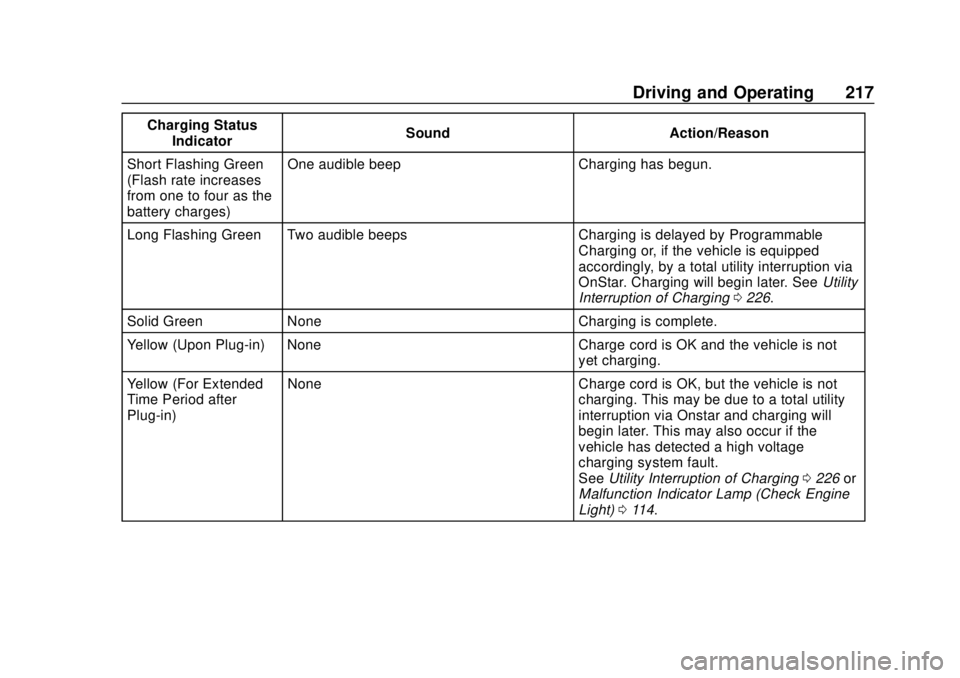
Charging StatusIndicator Sound Action/Reason
Short Flashing Green
(Flash rate increases
from one to four as the
battery charges) One audible beep Charging has begun.
Long Flashing Green Two audible beeps Charging is delayed by Programmable Charging or, if the vehicle is equipped
accordingly, by a total utility interruption via
OnStar. Charging will begin later. SeeUtility
Interruption of Charging 0226.
Solid Green None Charging is complete.
Yellow (Upon Plug-in) None Charge cord is OK and the vehicle is not yet charging.
Yellow (For Extended
Time Period after
Plug-in) None Charge cord is OK, but the vehicle is not
charging. This may be due to a total utility
interruption via Onstar and charging will
begin later. This may also occur if the
vehicle has detected a high voltage
charging system fault.
SeeUtility Interruption of Charging 0226 or
Malfunction Indicator Lamp (Check Engine
Light) 0114.
Page 219 of 379
Chevrolet VOLT Owner Manual (GMNA-Localizing-U.S./Canada/Mexico-
11349113) - 2018 - crc - 10/12/17
218 Driving and Operating
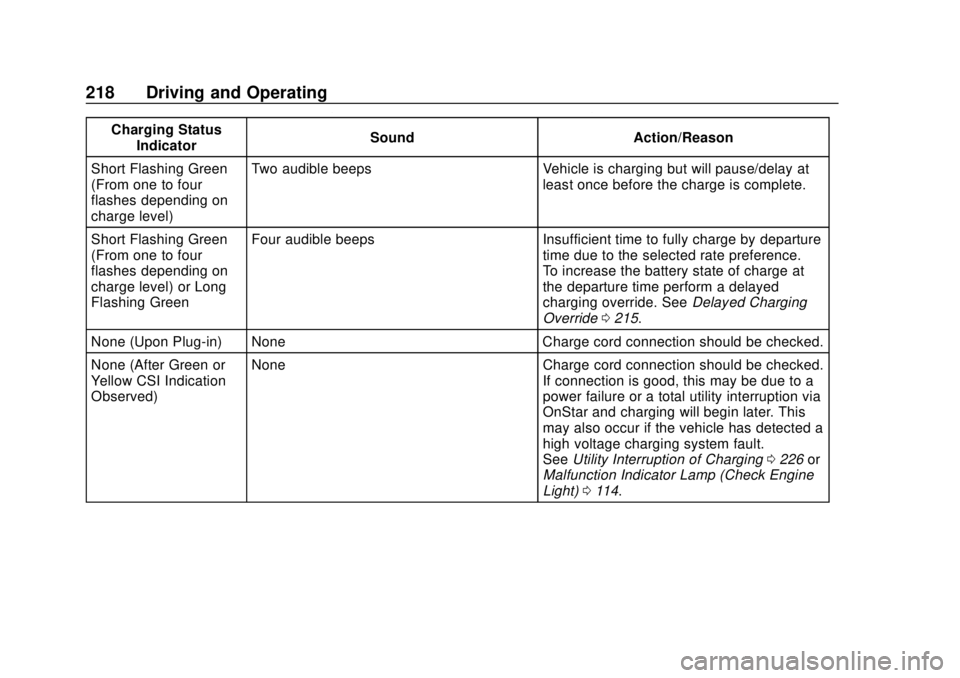
Charging StatusIndicator Sound Action/Reason
Short Flashing Green
(From one to four
flashes depending on
charge level) Two audible beeps Vehicle is charging but will pause/delay at
least once before the charge is complete.
Short Flashing Green
(From one to four
flashes depending on
charge level) or Long
Flashing Green Four audible beeps Insufficient time to fully charge by departure
time due to the selected rate preference.
To increase the battery state of charge at
the departure time perform a delayed
charging override. SeeDelayed Charging
Override 0215.
None (Upon Plug-in) None Charge cord connection should be checked.
None (After Green or
Yellow CSI Indication
Observed) None Charge cord connection should be checked.
If connection is good, this may be due to a
power failure or a total utility interruption via
OnStar and charging will begin later. This
may also occur if the vehicle has detected a
high voltage charging system fault.
SeeUtility Interruption of Charging 0226 or
Malfunction Indicator Lamp (Check Engine
Light) 0114.
Page 224 of 379
Chevrolet VOLT Owner Manual (GMNA-Localizing-U.S./Canada/Mexico-
11349113) - 2018 - crc - 10/12/17
Driving and Operating 223
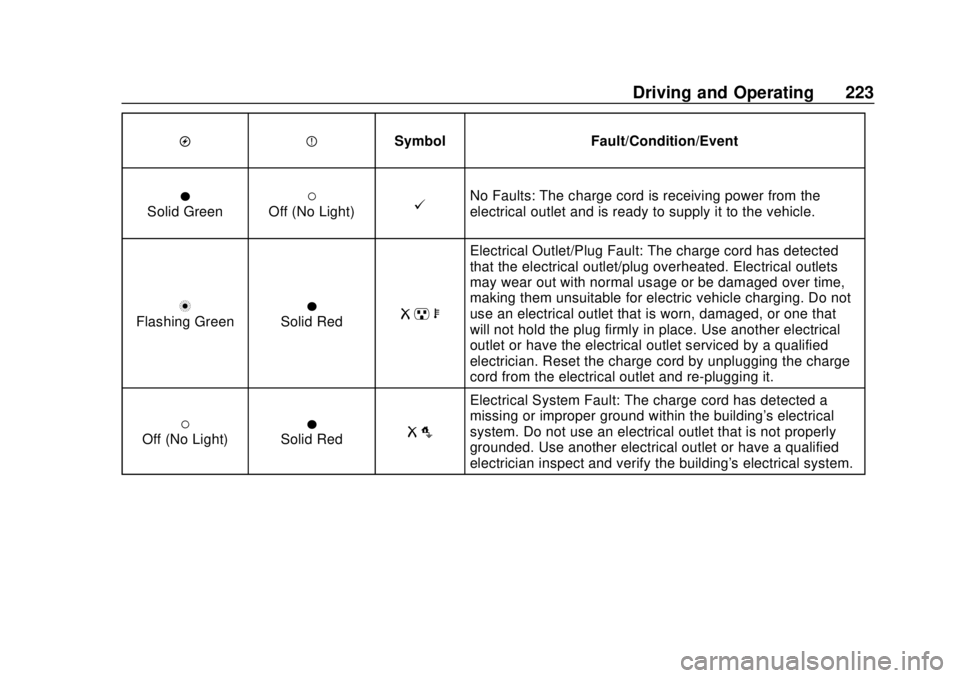
OPSymbol Fault/Condition/Event
OSolid Green(Off (No Light)@No Faults: The charge cord is receiving power from the
electrical outlet and is ready to supply it to the vehicle.
nFlashing GreenOSolid RedR pb
Electrical Outlet/Plug Fault: The charge cord has detected
that the electrical outlet/plug overheated. Electrical outlets
may wear out with normal usage or be damaged over time,
making them unsuitable for electric vehicle charging. Do not
use an electrical outlet that is worn, damaged, or one that
will not hold the plug firmly in place. Use another electrical
outlet or have the electrical outlet serviced by a qualified
electrician. Reset the charge cord by unplugging the charge
cord from the electrical outlet and re-plugging it.
(Off (No Light)OSolid RedR o
Electrical System Fault: The charge cord has detected a
missing or improper ground within the building's electrical
system. Do not use an electrical outlet that is not properly
grounded. Use another electrical outlet or have a qualified
electrician inspect and verify the building's electrical system.
Page 225 of 379
Chevrolet VOLT Owner Manual (GMNA-Localizing-U.S./Canada/Mexico-
11349113) - 2018 - crc - 10/12/17
224 Driving and Operating
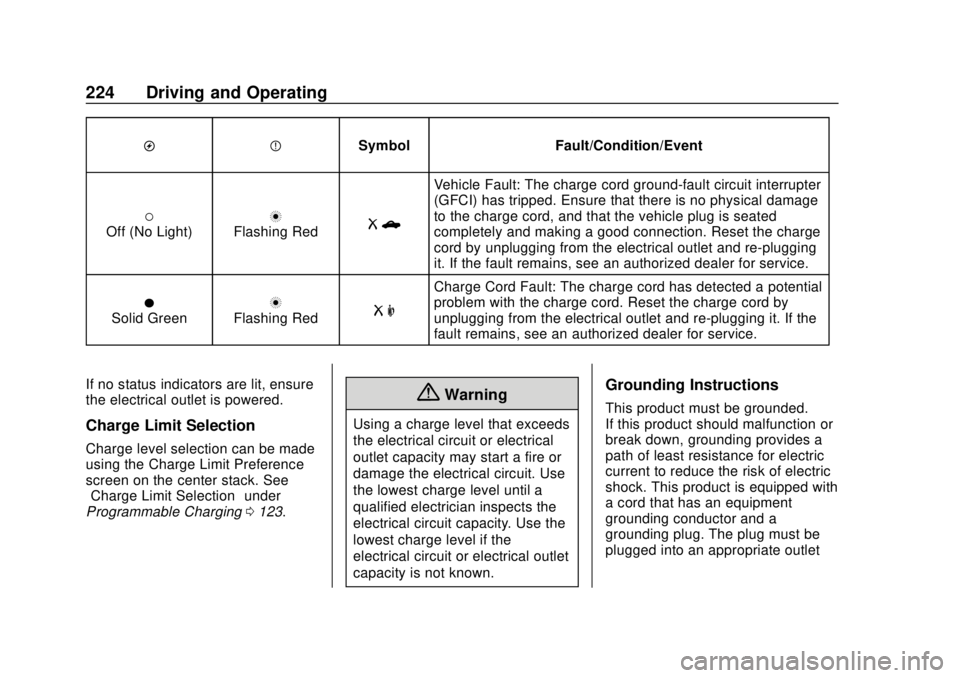
OPSymbol Fault/Condition/Event
(Off (No Light)nFlashing RedRb
Vehicle Fault: The charge cord ground-fault circuit interrupter
(GFCI) has tripped. Ensure that there is no physical damage
to the charge cord, and that the vehicle plug is seated
completely and making a good connection. Reset the charge
cord by unplugging from the electrical outlet and re-plugging
it. If the fault remains, see an authorized dealer for service.
OSolid GreennFlashing RedR m
Charge Cord Fault: The charge cord has detected a potential
problem with the charge cord. Reset the charge cord by
unplugging from the electrical outlet and re-plugging it. If the
fault remains, see an authorized dealer for service.
If no status indicators are lit, ensure
the electrical outlet is powered.
Charge Limit Selection
Charge level selection can be made
using the Charge Limit Preference
screen on the center stack. See
“Charge Limit Selection” under
Programmable Charging 0123.
{Warning
Using a charge level that exceeds
the electrical circuit or electrical
outlet capacity may start a fire or
damage the electrical circuit. Use
the lowest charge level until a
qualified electrician inspects the
electrical circuit capacity. Use the
lowest charge level if the
electrical circuit or electrical outlet
capacity is not known.
Grounding Instructions
This product must be grounded.
If this product should malfunction or
break down, grounding provides a
path of least resistance for electric
current to reduce the risk of electric
shock. This product is equipped with
a cord that has an equipment
grounding conductor and a
grounding plug. The plug must be
plugged into an appropriate outlet
Page 228 of 379
Chevrolet VOLT Owner Manual (GMNA-Localizing-U.S./Canada/Mexico-
11349113) - 2018 - crc - 10/12/17
Driving and Operating 227
Changing the charge mode to
Immediate or performing a delayed
charging override will not disable a
utility interruption.
A pop-up will appear in the
infotainment display during the key
cycle following any utility
interruption. See“Charging
Interrupted or Overridden Pop-Up”
under Programmable Charging
0 123.
A message will display on the
instrument cluster indicating that a
utility interruption has occurred. See
Instrument Cluster 0106.
Charging Station
Troubleshooting
If the vehicle does not charge after
being plugged in to a residential
240-volt charging station:
1. Verify that the charge mode is set to Immediate.
2. Verify that the charging station’s circuit breaker has not
been tripped. 3. Plug the portable charge cord
into the wall outlet, verify that
the indicator light on the charge
cord is solid green, and
connect it to the vehicle. See
“Charge Cord Status
Indicators” inCharge Cord
0 220.
4. If the vehicle charges with the portable charge cord, there
may be a problem with the
charging station. Try to charge
the vehicle with a different
240-volt charging station, such
as a public station. If both
attempts charge the vehicle,
contact the charging station
manufacturer.Electrical Requirements
for Battery Charging
This vehicle is capable of being
charged with most standard vehicle
charging equipment complying with
one or more of the following:
.SAE J1772
. SAE J2847-2 .
IEC 61851-1
. IEC 61851-22
. IEC 61851-23
. IEC 61851-24
. IEC 62196-1
. IEC 62196-2
. IEC 62196-3
. ISO 15118
. GB/T 18487.1
. GB/T 20234.1
. GB/T 20234.2
The following are the minimum
requirements for circuits used to
charge this vehicle:
. 120 volts/15 amps
. 240 volts/20 amps
Charging equipment with a rating of
at least 240 volts/20 amps will
provide the fastest charging time
and best charging efficiency to
recharge the high voltage battery.
240 volt/40 amp circuits provide
flexibility for future vehicle charging
needs. Always follow the charging
Page 230 of 379
Chevrolet VOLT Owner Manual (GMNA-Localizing-U.S./Canada/Mexico-
11349113) - 2018 - crc - 10/12/17
Driving and Operating 229
Caution (Continued)
.Fuel containing metals such
as methylcyclopentadienyl
manganese tricarbonyl
(MMT), which can damage
the emissions control
system and spark plugs.
. Fuel with a posted octane
rating of less than the
recommended fuel. Using
this fuel will lower fuel
economy and performance,
and may decrease the life of
the emissions catalyst.
California Fuel
Requirements
If the vehicle is certified to meet
California Emissions Standards, it is
designed to operate on fuels that
meet California specifications. See
the underhood emission control
label. If this fuel is not available in
states adopting California Emissions
Standards, the vehicle will operate
satisfactorily on fuels meeting federal specifications, but emission
control system performance may be
affected. The malfunction indicator
lamp could turn on and the vehicle
may not pass a smog-check test.
See
Malfunction Indicator Lamp
(Check Engine Light) 0114. If this
occurs, return to your authorized
dealer for diagnosis. If it is
determined that the condition is
caused by the type of fuel used,
repairs may not be covered by the
vehicle warranty.
Fuels in Foreign
Countries
The U.S., Canada, and Mexico post
fuel octane ratings in anti-knock
index (AKI). For fuel not to use in a
foreign country, see “Prohibited
Fuels” inFuel 0228.
Fuel Additives
To keep fuel systems clean, TOP
TIER detergent gasoline is
recommended. See Fuel0228. If TOP TIER detergent gasoline is
not available, one bottle of GM Fuel
System Treatment Cleaner added to
the fuel tank at every engine oil
change, can help. GM Fuel System
Treatment Cleaner is the only
gasoline additive recommended by
General Motors. It is available at
your dealer.
Filling the Tank
{Warning
Fuel vapors and fuel fires burn
violently and can cause injury or
death.
. To help avoid injuries to you
and others, read and follow
all the instructions on the
fuel pump island.
. Turn off the engine when
refueling.
. Keep sparks, flames, and
smoking materials away
from fuel.
(Continued)
Page 232 of 379
Chevrolet VOLT Owner Manual (GMNA-Localizing-U.S./Canada/Mexico-
11349113) - 2018 - crc - 10/12/17
Driving and Operating 231
4. After refueling, reinstall the fuelcap by turning it clockwise until
it clicks. Close the fuel door.
{Warning
Overfilling the fuel tank by more
than three clicks of a standard fill
nozzle may cause:
. Vehicle performance issues,
including engine stalling and
damage to the fuel system.
. Fuel spills.
. Potential fuel fires.
Be careful not to spill fuel. Wait a
few seconds after you have finished
pumping before removing the
nozzle. Clean fuel from painted
surfaces as soon as possible. See
Exterior Care 0315.
{Warning
If a fire starts while you are
refueling, do not remove the
nozzle. Shut off the flow of fuel by
shutting off the pump or by
notifying the station attendant.
Leave the area immediately.
Caution
If a new fuel cap is needed, be
sure to get the right type of cap
from your dealer. The wrong type
of fuel cap may not fit properly,
may cause the malfunction
indicator lamp to light, and could
damage the fuel tank and
emissions system. See
Malfunction Indicator Lamp
(Check Engine Light) 0114.
Filling a Portable Fuel
Container
{Warning
Filling a portable fuel container
while it is in the vehicle can cause
fuel vapors that can ignite either
by static electricity or other
means. You or others could be
badly burned and the vehicle
could be damaged. Always:
. Use approved fuel
containers.
. Remove the container from
the vehicle, trunk, or pickup
bed before filling.
. Place the container on the
ground.
. Place the nozzle inside the
fill opening of the container
before dispensing fuel, and
keep it in contact with the fill
opening until filling is
complete.
(Continued)
Page 233 of 379
Chevrolet VOLT Owner Manual (GMNA-Localizing-U.S./Canada/Mexico-
11349113) - 2018 - crc - 10/12/17
232 Driving and Operating
Warning (Continued)
.Fill the container no more
than 95% full to allow for
expansion.
. Do not smoke, light
matches, or use lighters
while pumping fuel.
. Avoid using cell phones or
other electronic devices.
Trailer Towing
General Towing
Information
The vehicle is neither designed nor
intended to tow a trailer or another
vehicle.
For information on towing a disabled
vehicle, see Towing the Vehicle
0 311. For information on towing the
vehicle behind another vehicle such
as a motor home, see Recreational
Vehicle Towing 0313.
Conversions and
Add-Ons
Add-On Electrical
Equipment
{Warning
The Data Link Connector (DLC) is
used for vehicle service and
Emission Inspection/Maintenance
testing. See Malfunction
Indicator Lamp (Check Engine
Light) 0114. A device connected
to the DLC —such as an
aftermarket fleet or
driver-behavior tracking device —
may interfere with vehicle
systems. This could affect vehicle
operation and cause a crash.
Such devices may also access
information stored in the vehicle’s
systems.
Page 235 of 379
Chevrolet VOLT Owner Manual (GMNA-Localizing-U.S./Canada/Mexico-
11349113) - 2018 - crc - 10/12/17
234 Vehicle Care
Vehicle Care
General Information
General Information . . . . . . . . . . 235
California Proposition65 Warning . . . . . . . . . . . . . . . . . 235
California Perchlorate Materials Requirements . . . . . 236
Accessories and Modifications . . . . . . . . . . . . . . . . 236
Vehicle Checks
Doing Your OwnService Work . . . . . . . . . . . . . . . 236
Hood . . . . . . . . . . . . . . . . . . . . . . . . . 237
Engine Compartment Overview . . . . . . . . . . . . . . . . . . . . 239
Engine Oil . . . . . . . . . . . . . . . . . . . . 240
Engine Oil Life System . . . . . . . 242
Engine Air Cleaner/Filter . . . . . . 243
Cooling System (Engine) . . . . . 245
Cooling System (High Voltage Battery) . . . . . . . . . . . . . . . . . . . . . 248
Cooling System (Power Electronics and Charger
Modules) . . . . . . . . . . . . . . . . . . . . 249
Engine Overheating . . . . . . . . . . 250
Washer Fluid . . . . . . . . . . . . . . . . . 250
Brakes . . . . . . . . . . . . . . . . . . . . . . . 251 Brake Fluid . . . . . . . . . . . . . . . . . . . 252
Battery - North America . . . . . . 253
Electric Drive Unit Shift Lock
Control Function Check . . . . . 255
Park Brake and P (Park)
Mechanism Check . . . . . . . . . . 256
Wiper Blade Replacement . . . . 256
Gas Strut(s) . . . . . . . . . . . . . . . . . . 257
Headlamp Aiming
Headlamp Aiming . . . . . . . . . . . . 258
Bulb Replacement
Bulb Replacement . . . . . . . . . . . . 258
Halogen Bulbs . . . . . . . . . . . . . . . . 258
LED Lighting . . . . . . . . . . . . . . . . . 258
Headlamps . . . . . . . . . . . . . . . . . . . 258
Taillamps . . . . . . . . . . . . . . . . . . . . . 259
License Plate Lamp . . . . . . . . . . 260
Electrical System
High Voltage Devices and Wiring . . . . . . . . . . . . . . . . . . . . . . . 261
Electrical System Overload . . . 261
Fuses and Circuit Breakers . . . 262
Engine Compartment Fuse Block . . . . . . . . . . . . . . . . . . . . . . . . 262
Instrument Panel Fuse Block . . . . . . . . . . . . . . . . . . . . . . . . 266
Rear Compartment Fuse Block . . . . . . . . . . . . . . . . . . . . . . . . 269
Wheels and Tires
Tires . . . . . . . . . . . . . . . . . . . . . . . . . . 271
All-Season Tires . . . . . . . . . . . . . . 272
Winter Tires . . . . . . . . . . . . . . . . . . 272
Low-Profile Tires . . . . . . . . . . . . . 273
Tire Sidewall Labeling . . . . . . . . 273
Tire Designations . . . . . . . . . . . . . 275
Tire Terminology andDefinitions . . . . . . . . . . . . . . . . . . 276
Tire Pressure . . . . . . . . . . . . . . . . . 279
Tire Pressure Monitor System . . . . . . . . . . . . . . . . . . . . . . 280
Tire Pressure Monitor Operation . . . . . . . . . . . . . . . . . . . 281
Tire Inspection . . . . . . . . . . . . . . . . 284
Tire Rotation . . . . . . . . . . . . . . . . . 284
When It Is Time for New Tires . . . . . . . . . . . . . . . . . . . . . . . . 285
Buying New Tires . . . . . . . . . . . . . 286
Different Size Tires and Wheels . . . . . . . . . . . . . . . . . . . . . . 287
Uniform Tire Quality Grading . . . . . . . . . . . . . . . . . . . . . 288
Wheel Alignment and Tire Balance . . . . . . . . . . . . . . . . . . . . . 289
Wheel Replacement . . . . . . . . . . 289
Tire Chains . . . . . . . . . . . . . . . . . . . 291
If a Tire Goes Flat . . . . . . . . . . . . 291
Tire Sealant and Compressor Kit . . . . . . . . . . . . . 292
Page 245 of 379
Chevrolet VOLT Owner Manual (GMNA-Localizing-U.S./Canada/Mexico-
11349113) - 2018 - crc - 10/12/17
244 Vehicle Care
filter, make sure that the engine air
cleaner/filter housing and nearby
components are free of dirt and
debris. Remove the engine air
cleaner/filter. Lightly tap and shake
the engine air cleaner/filter (away
from the vehicle), to release loose
dust and dirt. Inspect the engine air
cleaner/filter for damage, and
replace if damaged. Do not clean
the engine air cleaner/filter or
components with water or
compressed air.
To inspect or replace the air filter:1. Open the hood. See Hood
0 237.
2. Locate the engine air cleaner/ filter assembly on the
passenger side of the engine
compartment. See Engine
Compartment Overview 0239.
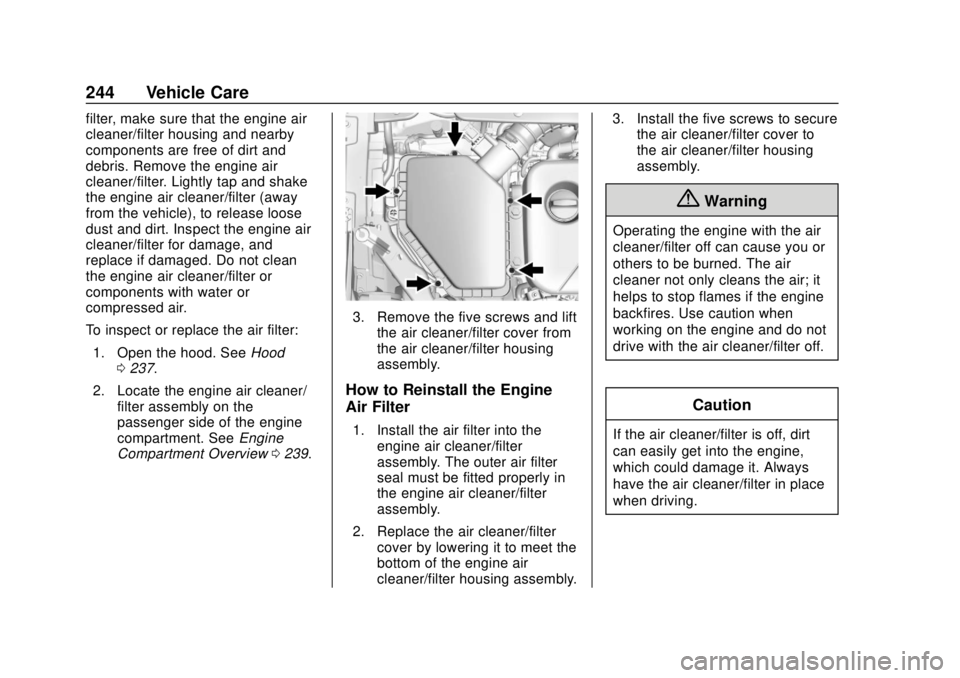
3. Remove the five screws and lift
the air cleaner/filter cover from
the air cleaner/filter housing
assembly.
How to Reinstall the Engine
Air Filter
1. Install the air filter into theengine air cleaner/filter
assembly. The outer air filter
seal must be fitted properly in
the engine air cleaner/filter
assembly.
2. Replace the air cleaner/filter cover by lowering it to meet the
bottom of the engine air
cleaner/filter housing assembly. 3. Install the five screws to secure
the air cleaner/filter cover to
the air cleaner/filter housing
assembly.
{Warning
Operating the engine with the air
cleaner/filter off can cause you or
others to be burned. The air
cleaner not only cleans the air; it
helps to stop flames if the engine
backfires. Use caution when
working on the engine and do not
drive with the air cleaner/filter off.
Caution
If the air cleaner/filter is off, dirt
can easily get into the engine,
which could damage it. Always
have the air cleaner/filter in place
when driving.