remote start CHEVROLET VOLT 2019 Owner's Guide
[x] Cancel search | Manufacturer: CHEVROLET, Model Year: 2019, Model line: VOLT, Model: CHEVROLET VOLT 2019Pages: 373, PDF Size: 5.66 MB
Page 304 of 373
Chevrolet VOLT Owner Manual (GMNA-Localizing-U.S./Canada/Mexico-
12163007) - 2019 - CRC - 11/5/18
Vehicle Care 303
2. Disconnect the blacknegative (−) jumper cable from
the other vehicle with the good
battery.
3. Disconnect the red positive (+) jumper cable from the other
vehicle. Do not let the other
end of the cable touch anything
until after the next step.
4. Disconnect the red positive (+) jumper cable from the Volt.
5. Return the positive (+) and negative (−) terminal covers to
their original positions.
After starting the disabled vehicle
and removing the jumper cables,
allow it to idle for several minutes.
Jump Starting Another Vehicle
When using the Volt to jump start
another vehicle with a run-down
battery, jumper cables are
connected directly to the positive (+)
and negative (−) terminals on the
12-volt battery in the rear cargo
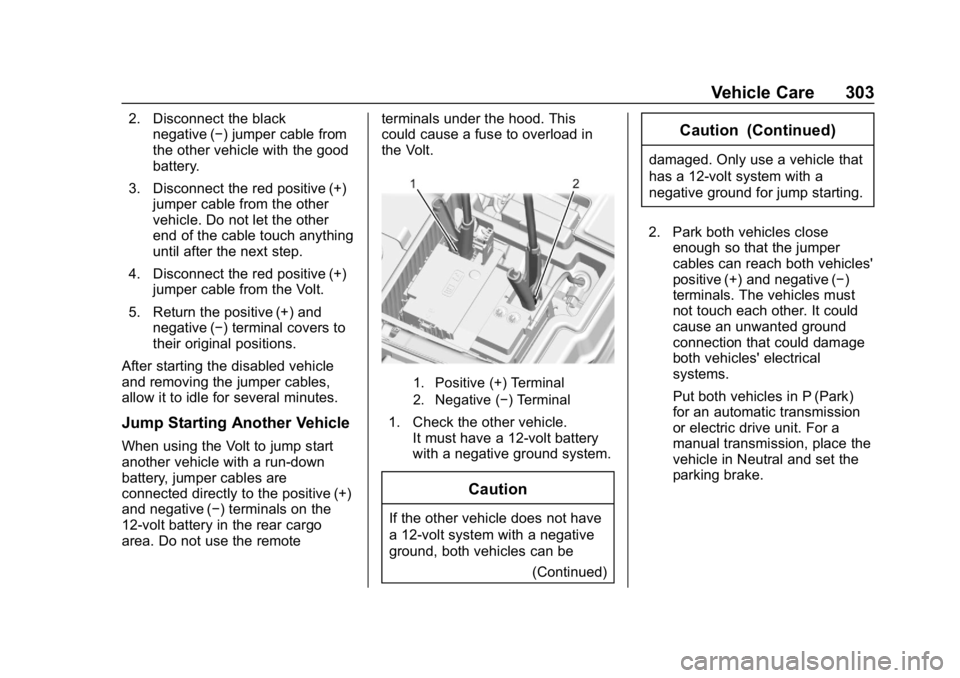
area. Do not use the remote terminals under the hood. This
could cause a fuse to overload in
the Volt.
1. Positive (+) Terminal
2. Negative (−) Terminal
1. Check the other vehicle.
It must have a 12-volt battery
with a negative ground system.
Caution
If the other vehicle does not have
a 12-volt system with a negative
ground, both vehicles can be
(Continued)
Caution (Continued)
damaged. Only use a vehicle that
has a 12-volt system with a
negative ground for jump starting.
2. Park both vehicles close enough so that the jumper
cables can reach both vehicles'
positive (+) and negative (−)
terminals. The vehicles must
not touch each other. It could
cause an unwanted ground
connection that could damage
both vehicles' electrical
systems.
Put both vehicles in P (Park)
for an automatic transmission
or electric drive unit. For a
manual transmission, place the
vehicle in Neutral and set the
parking brake.
Page 305 of 373

Chevrolet VOLT Owner Manual (GMNA-Localizing-U.S./Canada/Mexico-
12163007) - 2019 - CRC - 11/5/18
304 Vehicle Care
Caution
If any accessories are left on or
plugged in during the jump
starting procedure, they could be
damaged. The repairs would not
be covered by the vehicle
warranty. Whenever possible, turn
off or unplug all accessories on
either vehicle when jump starting.
3. Turn off both vehicles. Turn off the radio, all lamps, and
accessories that are not
needed in both vehicles.
Unplug accessories from the
cigarette lighter or the
accessory power outlets. This
avoids sparks and helps save
both batteries and accessories.
4. Locate the positive (+) and negative (−) terminals on the
vehicle with the run-down
battery.
5. Locate the positive (+) and negative (−) battery terminals
on the Volt. The 12-volt battery
is under the load floor in the rear cargo area. Open the
access covers for the
positive (+) terminal (1) and the
negative (−) terminal (2).
6. Check that the jumper cables do not have loose or missing
insulation or a shock could
result and the vehicles could
be damaged.
Before connecting the jumper
cables, here are some basic
things to know. Positive (+)
jumper cable goes to
positive (+) battery terminal or
a remote positive (+) terminal if
available. Negative (−) jumper
cable goes to remote
negative (−) terminal if
available, or a heavy,
unpainted metal engine part or
a solid engine ground on the
vehicle with the run-down
battery.
Do not connect positive (+) to
negative (−) or there will be a
short that may damage the
battery or other parts of the
vehicle. Do not connect the
negative (−) cable to the negative (−) terminal on the
run-down battery because this
can cause sparks.
Caution
If the jumper cables are
connected or removed in the
wrong order, electrical shorting
may occur and damage the
vehicle. The repairs would not be
covered by the vehicle warranty.
Always connect and remove the
jumper cables in the correct order,
making sure that the cables do
not touch each other or other
metal.
Connecting the Jumper Cables 1. Connect the red positive (+) jumper cable to the positive (+)
terminal of the other vehicle
with the run-down battery. Use
a remote positive (+) terminal if
available. Do not let the other
end touch metal.
Page 306 of 373
Chevrolet VOLT Owner Manual (GMNA-Localizing-U.S./Canada/Mexico-
12163007) - 2019 - CRC - 11/5/18
Vehicle Care 305
2. Connect the other end of thered positive (+) jumper cable to
the positive (+) battery terminal
of the Volt.
3. Connect the black negative (−) jumper cable to the
negative (−) battery terminal of
the Volt. Do not let the other
end touch anything until the
next step.
4. Make the final connection to a heavy, unpainted metal engine
part or to the remote
negative (−) terminal on the
other vehicle with the run-down
battery.
5. Press POWER
Oto start the
Volt. This will wake up the
electronics on the Volt. The
engine will only start if it is
needed.
6. Try to start the other vehicle that had the run-down battery.
If it will not start after a few
tries, it probably needs service. Disconnecting the Jumper Cables
1. Disconnect the black negative (−) jumper cable from
the other vehicle that had the
run-down battery. Do not let the
other end of the cable touch
anything until after the
next step.
2. Disconnect the black negative (−) jumper cable from
the Volt.
3. Disconnect the red positive (+) jumper cable from the Volt. Do
not let the other end of the
cable touch anything until after
the next step.
4. Disconnect the red positive (+) jumper cable from the other
vehicle.
5. Return the positive (+) and negative (−) terminal covers to
their original positions.
After starting the disabled vehicle
and removing the jumper cables,
allow it to idle for several minutes.
Towing the Vehicle
Caution
Incorrectly towing a disabled
vehicle may cause damage. The
damage would not be covered by
the vehicle warranty. Do not lash
or hook to suspension
components. Use the proper
straps around the tires to secure
the vehicle. Do not drag a locked
wheel/tire while loading the
vehicle. Do not use a sling type
lift to tow the vehicle. This could
damage the vehicle.
GM recommends a flatbed tow truck
to transport a disabled vehicle. Use
ramps to help reduce approach
angles, if necessary. A towed
vehicle should have its drive wheels
off the ground. Contact Roadside
Assistance or a professional towing
service if the disabled vehicle must
be towed.
Page 341 of 373
Chevrolet VOLT Owner Manual (GMNA-Localizing-U.S./Canada/Mexico-
12163007) - 2019 - CRC - 11/5/18
340 Customer Information
Coverage
Services are provided for the
duration of the vehicle’s powertrain
warranty.
In the U.S., anyone driving the
vehicle is covered. In Canada, a
person driving the vehicle without
permission from the owner is not
covered.
Roadside Assistance is not a part of
the New Vehicle Limited Warranty.
General Motors North America and
Chevrolet reserve the right to make
any changes or discontinue the
Roadside Assistance program at
any time without notification.
General Motors North America and
Chevrolet reserve the right to limit
services or payment to an owner or
driver if they decide the claims are
made too often, or the same type of
claim is made many times.
Services Provided
.Emergency Fuel Delivery:
Delivery of enough fuel for the
vehicle to get to the nearest
service station. .
Lock-Out Service: Service to
unlock the vehicle if you are
locked out. A remote unlock may
be available if you have OnStar.
For security reasons, the driver
must present identification
before this service is given.
. Emergency Tow from a Public
Road or Highway: Tow to the
nearest certified Volt or ELR
dealer for warranty service, or if
the vehicle was in a crash and
cannot be driven. Assistance is
not given when the vehicle is
stuck in the sand, mud, or snow.
Emergency towing may be
covered during the Extended
Vehicle (EV) warranty.
. Flat Tire Change: Service to
change a flat tire with the tire
sealant and compressor kit.
If the tire has been separated
from the wheel, has damaged
sidewalls, or has a large
puncture, the tire is too severely
damaged for the tire sealant and
compressor kit to be effective
and the vehicle will have to be
towed. It is the owner's responsibility for the repair or
replacement of the tire if it is not
covered by the warranty.
. Battery Jump Start: Service to
jump start a dead battery.
. Trip Interruption Benefits and
Assistance: If your trip is
interrupted due to a warranty
event, incidental expenses may
be reimbursed within the
Powertrain warranty period.
Items considered are reasonable
and customary hotel, meals,
rental car, or a vehicle being
delivered back to the customer,
up to 500 mi.
Services Not Included in
Roadside Assistance
. Impound towing caused by
violation of any laws.
. Legal fines.
. Mounting, dismounting,
or changing of snow tires,
chains, or other traction devices.
Service is not provided if a vehicle
is in an area that is not accessible
to the service vehicle or is not a
Page 352 of 373
Chevrolet VOLT Owner Manual (GMNA-Localizing-U.S./Canada/Mexico-
12163007) - 2019 - CRC - 11/5/18
OnStar 351
Security
If equipped, OnStar provides these
services:
.With Stolen Vehicle Assistance,
OnStar Advisors can use GPS to
pinpoint the vehicle and help
authorities quickly recover it.
. With Remote Ignition Block,
if equipped, OnStar can block
the vehicle from being restarted.
. With Stolen Vehicle Slowdown,
if equipped, OnStar can work
with law enforcement to
gradually slow the vehicle down.
Theft Alarm Notification
If equipped, if the doors are locked
and the vehicle alarm sounds, a
notification by text, e-mail, or phone
call will be sent. If the vehicle is
stolen, an OnStar Advisor can work
with authorities to recover the
vehicle.
OnStar Additional
Information
In-Vehicle Audio Messages
Audio messages may play important
information at the following times:
.Prior to vehicle purchase.
Press
Qto set up an account.
. After change in ownership and
at 90 days.
Transferring Service
PressQto request account transfer
eligibility information. The Advisor
can cancel or change account
information.
Selling/Transferring the
Vehicle
Call 1-888-4ONSTAR
(1-888-466-7827) immediately to
terminate your OnStar or connected
services if the vehicle is disposed
of, sold, transferred, or if the
lease ends.
Reactivation for Subsequent
Owners
PressQand follow the prompts to
speak to an Advisor as soon as
possible. The Advisor will update
vehicle records and explain OnStar
or connected service options.
How OnStar Service Works
Automatic Crash Response,
Emergency Services, Crisis Assist,
Stolen Vehicle Assistance, Remote
Services, Roadside Assistance, and
Hands-Free Calling are available on
most vehicles. Not all OnStar
services are available everywhere
or on all vehicles. For more
information, a full description of
OnStar services, system limitations,
and OnStar User Terms, Privacy
Statement, and Software Terms:
. Call 1-888-4ONSTAR
(1-888-466-7827).
. See www.onstar.com (U.S.).
. See www.onstar.ca (Canada).
. Call TTY 1-877-248-2080.
Page 354 of 373
Chevrolet VOLT Owner Manual (GMNA-Localizing-U.S./Canada/Mexico-
12163007) - 2019 - CRC - 11/5/18
OnStar 353
Languages
The vehicle can be programmed to
respond in multiple languages.
Press
Qand ask for an Advisor.
Advisors are available in English,
Spanish, and French. Available
languages may vary by country.
Potential Issues
OnStar cannot perform Remote
Door Unlock or Stolen Vehicle
Assistance after the vehicle has
been off continuously for 10 days
without an ignition cycle. If the
vehicle has not been started for
10 days, OnStar can contact
Roadside Assistance or a locksmith
to help gain access to the vehicle.
Global Positioning
System (GPS)
. Obstruction of the GPS can
occur in a large city with tall
buildings; in parking garages;
around airports; in tunnels and
underpasses; or in an area with
very dense trees. If GPS signals
are not available, the OnStar
system should still operate to call OnStar. However, OnStar
could have difficulty identifying
the exact location.
. In emergency situations, OnStar
can use the last stored GPS
location to send to emergency
responders.
A temporary loss of GPS can cause
loss of the ability to send a
Turn-by-Turn Navigation route. The
Advisor may give a verbal route or
may ask for a call back after the
vehicle is driven into an open area.
Cellular and GPS Antennas
Cellular reception is required for
OnStar to send remote signals to
the vehicle. Do not place items over
or near the antenna to prevent
blocking cellular and GPS signal
reception.
Unable to Connect to OnStar
Message
If there is limited cellular coverage
or the cellular network has reached
maximum capacity, this message may come on. Press
Qto try the
call again or try again after driving a
few miles into another cellular area.
Vehicle and Power Issues
OnStar services require a vehicle
electrical system, wireless service,
and GPS satellite technologies to be
available and operating for features
to function properly. These systems
may not operate if the battery is
discharged or disconnected.
Add-on Electrical Equipment
The OnStar system is integrated
into the electrical architecture of the
vehicle. Do not add any electrical
equipment. See Add-On Electrical
Equipment 0233. Added electrical
equipment may interfere with the
operation of the OnStar system and
cause it to not operate.
Vehicle Software Updates
OnStar or GM may remotely deliver
software updates or changes to the
vehicle without further notice or
consent. These updates or changes
may enhance or maintain safety,
Page 360 of 373
Chevrolet VOLT Owner Manual (GMNA-Localizing-U.S./Canada/Mexico-
12163007) - 2019 - CRC - 11/5/18
Connected Services 359
vehicles, the SSID and
password can be changed in
the Wi-Fi Hotspot menu.
After initial set-up, your vehicle’s
Wi-Fi hotspot will connect
automatically to your mobile
devices. Manage data usage by
turning Wi-Fi on or off on your
mobile device, using the
myChevrolet mobile app, or by
contacting an OnStar Advisor. On
some vehicles, Wi-Fi can also be
managed from the Wi-Fi
Hotspot menu.
myChevrolet Mobile App (If
Available)
Download the myChevrolet mobile
app to compatible Apple and
Android smartphones. Chevrolet
users can access the following
services from a smartphone:
. Remotely start/stop the vehicle,
if factory-equipped.
. Lock/unlock doors, if equipped
with automatic locks.
. Activate the horn and lamps. .
Check the vehicle’s energy level,
range or tire pressure,
if factory-equipped with the Tire
Pressure Monitor System.
. Send destinations to the vehicle.
. Locate the vehicle on a map
(U.S. market only).
. Turn the vehicle's Wi-Fi hotspot
on/off, manage settings, and
monitor data consumption,
if equipped.
. Locate a dealer and schedule
service.
. Request roadside assistance.
. Set a parking reminder with pin
drop, take a photo, make a note,
and set a timer.
. Connect with Chevrolet on social
media.
Features are subject to change. For
myChevrolet mobile app information
and compatibility, see
my.chevrolet.com.
An active OnStar or connected
service plan may be required.
A compatible device, factory-installed remote start, and
power locks are required. Data rates
apply. See www.onstar.com for
details and system limitations.
Remote Services
Contact an OnStar Advisor to
unlock the doors or sound the horn
and flash the lamps.
Marketplace
OnStar Advisors can provide offers
from restaurants and retailers on
your route, help locate hotels,
or book a room. These services
vary by market.
OnStar Hands-Free Calling
Make and receive calls with the
built-in wireless calling service,
which requires available minutes.
Functionality of the Voice Command
button may vary by vehicle and
region. For some vehicles, press
=
to open the OnStar app on the
infotainment display, then select
Hands-Free calling. For other
vehicles press
=as follows.
Page 367 of 373

Chevrolet VOLT Owner Manual (GMNA-Localizing-U.S./Canada/Mexico-
12163007) - 2019 - CRC - 11/5/18
366 Index
J
Jump Starting - NorthAmerica . . . . . . . . . . . . . . . . . . . . . . . 299
K
Keyless EntryRemote (RKE) System . . . . . . . . . 31
Keys . . . . . . . . . . . . . . . . . . . . . . . . . . . . . 30
L
Labeling, Tire Sidewall . . . . . . . . . . 274
Lamps Daytime Running (DRL) . . . . . . 144
Dome . . . . . . . . . . . . . . . . . . . . . . . . . 147
Exterior Controls . . . . . . . . . . . . . . 142
Exterior Lighting BatterySaver . . . . . . . . . . . . . . . . . . . . . . . 148
License Plate . . . . . . . . . . . . . . . . . 262
Malfunction Indicator (Check Engine) . . . . . . . . . . . . . .114
On Reminder . . . . . . . . . . . . . . . . . 122
Reading . . . . . . . . . . . . . . . . . . . . . . 147
Taillamps . . . . . . . . . . . . . . . . . . . . . 261
Lane Change Alert (LCA) . . . . . . . 210
Lane Departure Warning (LDW) . . . . . . . . . . . . . . . . 212
Lane Keep Assist (LKA) . . . . . . . . 212
Lane Keep Assist Light . . . . . . . . . 118
Lap-Shoulder Belt . . . . . . . . . . . . . . . 63 LATCH System
Replacing Parts after a
Crash . . . . . . . . . . . . . . . . . . . . . . . . . 92
LATCH, Lower Anchors and Tethers for Children . . . . . . . . . . . . 87
LED Lighting . . . . . . . . . . . . . . . . . . . . 260
Lighting Entry . . . . . . . . . . . . . . . . . . . . . . . . . 148
Exit . . . . . . . . . . . . . . . . . . . . . . . . . . . 148
Illumination Control . . . . . . . . . . . 146
LED . . . . . . . . . . . . . . . . . . . . . . . . . . 260
Lights Airbag Readiness . . . . . . . . . . . . . .113
Antilock Brake System(ABS) Warning . . . . . . . . . . . . . . .117
Brake System Warning . . . . . . . .116
Charging System . . . . . . . . . . . . . .114
Check Engine (Malfunction
Indicator) . . . . . . . . . . . . . . . . . . . . .114
Cruise Control . . . . . . . . . . . . . . . . 122
Door Ajar . . . . . . . . . . . . . . . . . . . . . 123
Electric Parking Brake . . . . . . . . .117
Engine Coolant Temperature Warning . . . . . . . 120
Engine Oil Pressure . . . . . . . . . . 121
Flash-to-Pass . . . . . . . . . . . . . . . . . 144
High-Beam On . . . . . . . . . . . . . . . . 122
High/Low Beam Changer . . . . . 144 Lights (cont'd)
Hold Mode . . . . . . . . . . . . . . . . . . . . .118
Lane Keep Assist . . . . . . . . . . . . . .118
Low Fuel Warning . . . . . . . . . . . . 121
Mountain Mode . . . . . . . . . . . . . . . .118
Seat Belt Reminders . . . . . . . . . . .112
Security . . . . . . . . . . . . . . . . . . . . . . 121
Service Electric Parking
Brake . . . . . . . . . . . . . . . . . . . . . . . .117
Sport Mode . . . . . . . . . . . . . . . . . . . .118
StabiliTrak OFF . . . . . . . . . . . . . . . .119
Tire Pressure . . . . . . . . . . . . . . . . . 120
Traction Control System (TCS)/StabiliTrak . . . . . . . . . . . . .119
Traction Off . . . . . . . . . . . . . . . . . . . .119
Vehicle Ready . . . . . . . . . . . . . . . . 122
Locks Automatic Door . . . . . . . . . . . . . . . . . 43
Delayed Locking . . . . . . . . . . . . . . . . 43
Door . . . . . . . . . . . . . . . . . . . . . . . . . . . . 40
Lockout Protection . . . . . . . . . . . . . . 43
Power Door . . . . . . . . . . . . . . . . . . . . . 43
Safety . . . . . . . . . . . . . . . . . . . . . . . . . . 44
Loss of Control . . . . . . . . . . . . . . . . . 161
Low Fuel Warning Light . . . . . . . . . 121
Low-Profile Tires . . . . . . . . . . . . . . . . 274
Page 369 of 373

Chevrolet VOLT Owner Manual (GMNA-Localizing-U.S./Canada/Mexico-
12163007) - 2019 - CRC - 11/5/18
368 Index
Passenger Sensing System . . . . . 74
Pedestrian Safety Signal . . . . . . . 102
Perchlorate MaterialsRequirements, California . . . . . . 237
Personalization Vehicle . . . . . . . . . . . . . . . . . . . . . . . 137
Plug-In Charging . . . . . . . . . . . . . . . 214
Power
Button . . . . . . . . . . . . . . . . . . . . . . . . 168
Door Locks . . . . . . . . . . . . . . . . . . . . . 43
Flows . . . . . . . . . . . . . . . . . . . . . . . . . 123
Indicator Gauge . . . . . . . . . . . . . . .112
Mirrors . . . . . . . . . . . . . . . . . . . . . . . . . . 48
Outlets . . . . . . . . . . . . . . . . . . . . . . . 104
Protection, Battery . . . . . . . . . . . . 148
Retained Accessory (RAP) . . . 171
Seat Adjustment . . . . . . . . . . . . . . . . 55
Windows . . . . . . . . . . . . . . . . . . . . . . . 50
Pregnancy, Using Seat Belts . . . . 65
Privacy Vehicle Data Recording . . . . . . . 347
Program Courtesy Transportation . . . . . . 341
Programmable Charging . . . . . . . . 123
Prohibited Fuels . . . . . . . . . . . . . . . . 229 Proposition
65 Warning,
California . . . . . . . . . . . .236, 255, 299,
Back Cover
Propulsion Power Messages . . . 136
Publication Ordering Information . . . . . . . . . . . . . . . . . . . . 345
R
Radio Frequency Statement . . . . 345
Reading Lamps . . . . . . . . . . . . . . . . . 147
Ready Indicator . . . . . . . . . . . . . . . . . 122
Rear Seats . . . . . . . . . . . . . . . . . . . . . . 58
Heated . . . . . . . . . . . . . . . . . . . . . . . . . 60
Rear Storage . . . . . . . . . . . . . . . . . . . . 98
Rear Vision Camera (RVC) . . . . . 202
Rearview Mirrors . . . . . . . . . . . . . . . . 49 Automatic Dimming . . . . . . . . . . . . . 49
Reclining Seatbacks . . . . . . . . . . . . . 55
Recommended Fuel . . . . . . . . . . . . . . . . . . . . . . . . . . 229
Recommended Fluids and Lubricants . . . . . . . . . . . . . . . . . . . . . 329
Records Maintenance . . . . . . . . . . . . . . . . . . 331
Recreational Vehicle Towing . . . . 307
Regenerative Braking . . . . . . . . . . . 185 Reimbursement Program,
GM Mobility . . . . . . . . . . . . . . . . . . . 339
Remote Keyless Entry (RKE) System . . . . . . . . . . . . . . . . . . . . . . . . . 31
Remote Start . . . . . . . . . . . . . . . . . . . . 38
Replacement Parts Airbags . . . . . . . . . . . . . . . . . . . . . . . . . 80
Maintenance . . . . . . . . . . . . . . . . . . 330
Replacing Airbag System . . . . . . . . 80
Replacing LATCH System Parts after a Crash . . . . . . . . . . . . . 92
Replacing Seat Belt System Parts after a Crash . . . . . . . . . . . . . 67
Reporting Safety Defects Canadian Government . . . . . . . . 346
General Motors . . . . . . . . . . . . . . . 347
U.S. Government . . . . . . . . . . . . . 346
Requirements Electrical Battery Charging . . . 228
Restraints Where to Put . . . . . . . . . . . . . . . . . . . 85
Retained Accessory Power (RAP) . . . . . . . . . . . . . . . . . . 171
Roads Driving, Wet . . . . . . . . . . . . . . . . . . 161
Roadside Assistance Program . . . . . . . . . . . . . . . . . . . . . . . 339
Rotation, Tires . . . . . . . . . . . . . . . . . . 284
Page 370 of 373

Chevrolet VOLT Owner Manual (GMNA-Localizing-U.S./Canada/Mexico-
12163007) - 2019 - CRC - 11/5/18
Index 369
Routing, Engine Drive Belt . . . . . . 334
Running the Vehicle WhileParked . . . . . . . . . . . . . . . . . . . . . . . . 180
S
Safety Defects ReportingCanadian Government . . . . . . . . 346
General Motors . . . . . . . . . . . . . . . 347
U.S. Government . . . . . . . . . . . . . 346
Safety Locks . . . . . . . . . . . . . . . . . . . . . 44
Safety Signal Pedestrian . . . . . . . . . . . . . . . . . . . . 102
Safety System Check . . . . . . . . . . . . 66
Scheduling Appointments . . . . . . . 341
Sealant Kit, Tire . . . . . . . . . . . . . . . . 292
Seat Belts . . . . . . . . . . . . . . . . . . . . . . . 60 Care . . . . . . . . . . . . . . . . . . . . . . . . . . . . 66
Extender . . . . . . . . . . . . . . . . . . . . . . . . 66
How to Wear Seat Belts
Properly . . . . . . . . . . . . . . . . . . . . . . . 61
Lap-Shoulder Belt . . . . . . . . . . . . . . 63
Reminders . . . . . . . . . . . . . . . . . . . . .112
Replacing after a Crash . . . . . . . . 67
Use During Pregnancy . . . . . . . . . . 65
Seats Adjustment, Front . . . . . . . . . . . . . . . 54
Head Restraints . . . . . . . . . . . . . . . . 53
Heated Front . . . . . . . . . . . . . . . . . . . 57 Seats (cont'd)
Heated, Rear . . . . . . . . . . . . . . . . . . . 60
Lumbar Adjustment, Front . . . . . . 55
Power Adjustment, Front . . . . . . . 55
Rear . . . . . . . . . . . . . . . . . . . . . . . . . . . . 58
Reclining Seatbacks . . . . . . . . . . . . 55
Securing Child Restraints . . . . 93, 95
Security Light . . . . . . . . . . . . . . . . . . . . . . . . . . 121
OnStar . . . . . . . . . . . . . . . . . . . . . . . 351
Vehicle . . . . . . . . . . . . . . . . . . . . . . . . . 46
Vehicle Alarm . . . . . . . . . . . . . . . . . . . 46
Service . . . . . . . . . . . . . . . . . . . . . . . . . 156 Accessories and
Modifications . . . . . . . . . . . . . . . . 237
Doing Your Own Work . . . . . . . . 237
Maintenance Records . . . . . . . . 331
Maintenance, General Information . . . . . . . . . . . . . . . . . . 319
Parts Identification Label . . . . . 332
Scheduling Appointments . . . . . 341
Service Electric Parking Brake Light . . . . . . . . . . . . . . . . . . . . 117
Services Special Application . . . . . . . . . . . 326
Servicing the Airbag . . . . . . . . . . . . . 78
Shifting Into Park . . . . . . . . . . . . . . . . . . . . . . 171 Shifting (cont'd)
Out of Park . . . . . . . . . . . . . . . . . . . 172
Side Blind Zone Alert (SBZA) . . . 210
Signals, Turn and Lane-Change . . . . . . . . . . . . . . . . . 146
Special Application Services . . . . 326
Specifications and Capacities . . . . . . . . . . . . . . . . . . . . . 333
Speedometer . . . . . . . . . . . . . . . . . . . 110
Sport Mode Light . . . . . . . . . . . . . . . 118
StabiliTrak
OFF Light . . . . . . . . . . . . . . . . . . . . . .119
Start Remote . . . . . . . . . . . . . . . . . . . . . . . . . 38
Start Assist, Hill . . . . . . . . . . . . . . . . . 184
Starting and Stopping the Vehicle . . . . . . . . . . . . . . . . . . . . . . . . 170
Status Screens
Charging . . . . . . . . . . . . . . . . . . . . . 216
Steering . . . . . . . . . . . . . . . . . . . . . . . . 160 Heated Wheel . . . . . . . . . . . . . . . . 102
Wheel Adjustment . . . . . . . . . . . . 102
Wheel Controls . . . . . . . . . . . . . . . 102
Storage Rear . . . . . . . . . . . . . . . . . . . . . . . . . . . . 98
Storage Areas Cargo Cover . . . . . . . . . . . . . . . . . . . . 99
Center Console . . . . . . . . . . . . . . . . . 99