parking brake CHEVROLET VOLT 2019 Owner's Manual
[x] Cancel search | Manufacturer: CHEVROLET, Model Year: 2019, Model line: VOLT, Model: CHEVROLET VOLT 2019Pages: 373, PDF Size: 5.66 MB
Page 8 of 373

Chevrolet VOLT Owner Manual (GMNA-Localizing-U.S./Canada/Mexico-
12163007) - 2019 - CRC - 11/5/18
In Brief 7
1.Air Vents 0155.
2. Turn Signal Lever. See Turn
and Lane-Change Signals
0 146.
IntelliBeam
®System Button (If
Equipped). See Exterior Lamp
Controls 0142.
3. Instrument Cluster 0107.
Driver Information Center (DIC)
Display. See Driver Information
Center (DIC) 0133.
4. Windshield Wiper/Washer
0103.
5. Charging Status Indicator. See Charging Status Feedback
0216.
Light Sensor. See Automatic
Headlamp System 0145.
6. Infotainment. See the infotainment manual.
Navigation System (If
Equipped). See the
infotainment manual. 7.
Automatic Climate Control
System 0150.
Heated Front Seats 057 (If
Equipped).
8. Power Outlets 0104.
USB Port. See the infotainment
manual.
Auxiliary Jack. See the
infotainment manual.
SD Card Slot. See the
infotainment manual.
9. Shift Lever. See Electric Drive
Unit 0181.
10. Drive MODE Button. See Driver Selected Operating
Modes 0174.
Assistance Systems for
Parking or Backing 0202 (If
Equipped).
Traction Control/Electronic
Stability Control 0186.
11. Hazard Warning Flashers
0145. 12.
Electric Parking Brake 0183.
13. Power Button 0168.
14. Steering Wheel Controls. See the infotainment manual.
15. Volume Switches (Out of View) (If Equipped). See “Steering
Wheel Controls” in the
infotainment manual.
16. Horn 0102.
17. Steering Wheel Adjustment
0102 (Out of View).
18. Regen on Demand Paddle (Out of View). See Regenerative
Braking 0185.
19. Cruise Control 0188.
Adaptive Cruise Control 0191
(If Equipped).
Heated Steering Wheel 0102
(If Equipped).
Forward Collision Alert (FCA)
System 0206 (If Equipped).
Lane Keep Assist (LKA) 0212
(If Equipped).
Page 10 of 373
Chevrolet VOLT Owner Manual (GMNA-Localizing-U.S./Canada/Mexico-
12163007) - 2019 - CRC - 11/5/18
In Brief 9
/:Press and releaseQand then
immediately press and hold
/for at
least four seconds to start the
vehicle's heating or air conditioning
systems and rear window defogger
from outside the vehicle using the
RKE transmitter. See Remote Start
0 38.
See Keys 030 and Remote Keyless
Entry (RKE) System Operation 031.
Remote Start
Use remote start to heat or cool the
interior when the vehicle is plugged
in to maximize electric range by
utilizing electricity from the electrical
outlet. The engine may start to
support the climate control
operation. Normal operation of the
system will return after the vehicle
has been turned on.
Starting the Vehicle
1. Press and releaseQon the
RKE transmitter. 2. Immediately press and hold
/
for at least four seconds or until
the turn signal lamps flash.
3. After entering the vehicle during a remote start, press
POWER
Owith the brake
pedal applied to operate as
normal.
When the vehicle starts, the parking
lamps will turn on.
Remote start run time can be
extended.
Canceling Remote Start
To cancel a remote start, do any of
the following:
. Press and hold
/until the
parking lamps turn off.
. Turn on the hazard warning
flashers.
. Press POWER
Owith the brake
pedal applied, then press
POWER
Oagain to turn the
vehicle off.
See Remote Start 038.
Door Locks
To lock or unlock the doors from
outside the vehicle:
.
Use the key. The driver door key
cylinder is covered with a cap.
See Door Locks 040.
. Press
QorKon the RKE
transmitter. See Remote Keyless
Entry (RKE) System Operation
0 31.
To lock or unlock the doors from
inside the vehicle:
. Press
QorKon the power door
lock switch.
. Push down the manual lock
knob on the driver door to lock
all doors. Push down the manual
lock knob on a passenger door
to lock only that door.
. Pull once on the door handle to
unlock the door and again to
open the door. Press the power
door lock switch to lock or
unlock all doors.
Page 40 of 373
Chevrolet VOLT Owner Manual (GMNA-Localizing-U.S./Canada/Mexico-
12163007) - 2019 - CRC - 11/5/18
Keys, Doors, and Windows 39
.Vehicle range may decrease if
the vehicle is not plugged into
an electrical outlet. If the vehicle
is plugged in, much of the
energy needed to support this
feature will be provided from the
electrical outlet, not from the
high voltage battery.
. When plugged in, select the eco
climate setting to prevent high
voltage battery charge loss. This
may limit the performance of the
heating and air conditioning
systems.
Laws in some communities may
restrict the use of features that
remotely start the engine. For
example, some laws may require a
person using the remote start
feature to have the vehicle in view
when doing so. Check local
regulations for any requirements on
remote starting of vehicles.
The RKE transmitter range may be
less while the vehicle is running. Other conditions can affect the
performance of the transmitter. See
Remote Keyless Entry (RKE)
System
031.
Starting the Vehicle
To heat or cool the passenger
compartment using remote start:
1. Press and release
Qon the
RKE transmitter; the doors
will lock.
2. Immediately press and hold
/
until the turn signal lamps
flash, or for at least
four seconds. Pressing
/
again during a remote start will
turn the feature off.
Remote start will automatically shut
off after 15 minutes unless a time
extension is done.
While the remote start is active, the
parking lamps will turn on and
remain on. After entering the vehicle during a
remote start, press POWER
Oon
the center stack with the brake
pedal applied to operate as normal.
Extending Vehicle Run Time
The vehicle run time can also be
extended by another 15 minutes,
if during the first 15 minutes
Steps 1 and 2 are repeated while
the vehicle is still running. An
extension can be requested
30 seconds after starting. This
provides a total of 30 minutes.
The remote start can only be
extended once.
When the remote start is extended,
the second 15-minute period is
added on to the first 15 minutes for
a total of 30 minutes.
A maximum of two remote starts,
or a remote start with an extension,
are allowed between vehicle
operation.
The ignition must be turned on and
then off before the remote start
procedure can be used again.
Page 41 of 373
Chevrolet VOLT Owner Manual (GMNA-Localizing-U.S./Canada/Mexico-
12163007) - 2019 - CRC - 11/5/18
40 Keys, Doors, and Windows
Canceling Remote Start
To cancel a remote start, do any of
the following:
.Aim the RKE transmitter at the
vehicle and press and hold
/
until the parking lamps turn off.
. Turn on the hazard warning
flashers.
. Press POWER
Oon the center
stack, with the brake pedal
applied, then press POWER
O
again to turn the vehicle off.
Conditions in Which Remote
Start May Not Work
Conditions in which a remote start
will not occur include:
. An open hood.
. The RKE transmitter is in the
vehicle.
. The vehicle is not in P (Park).
. Vehicle propulsion system fault
conditions, including an
emission control system
malfunction. .
High voltage battery fault
conditions.
A second remote start or extension
will not occur if the fuel level is low.
During a remote start, conditions in
which a remote start will be
canceled include:
. Vehicle propulsion system or
high voltage battery fault
conditions.
. Low engine oil pressure.
. Engine coolant temperature that
is too high.
Door Locks
{Warning
Unlocked doors can be
dangerous.
. Passengers, especially
children, can easily open
the doors and fall out of a
moving vehicle. The doors
can be unlocked and
(Continued)
Warning (Continued)
opened while the vehicle is
moving. The chance of
being thrown out of the
vehicle in a crash is
increased if the doors are
not locked. So, all
passengers should wear
seat belts properly and the
doors should be locked
whenever the vehicle is
driven.
. Young children who get into
unlocked vehicles may be
unable to get out. A child
can be overcome by
extreme heat and can suffer
permanent injuries or even
death from heat stroke.
Always lock the vehicle
whenever leaving it.
. Outsiders can easily enter
through an unlocked door
when you slow down or stop
the vehicle. Locking the
doors can help prevent this
from happening.
Page 102 of 373
Chevrolet VOLT Owner Manual (GMNA-Localizing-U.S./Canada/Mexico-
12163007) - 2019 - CRC - 11/5/18
Instruments and Controls 101
Instruments and
Controls
Controls
Steering Wheel Adjustment . . . 102
Steering Wheel Controls . . . . . . 102
Heated Steering Wheel . . . . . . . 102
Horn . . . . . . . . . . . . . . . . . . . . . . . . . . 102
Pedestrian Safety Signal . . . . . 102
Windshield Wiper/Washer . . . . 103
Compass . . . . . . . . . . . . . . . . . . . . . 104
Clock . . . . . . . . . . . . . . . . . . . . . . . . . 104
Power Outlets . . . . . . . . . . . . . . . . 104
Wireless Charging . . . . . . . . . . . . 105
Warning Lights, Gauges, and
Indicators
Warning Lights, Gauges, andIndicators . . . . . . . . . . . . . . . . . . . 107
Instrument Cluster . . . . . . . . . . . . 107
Speedometer . . . . . . . . . . . . . . . . . 110
Odometer . . . . . . . . . . . . . . . . . . . . . 110
Trip Odometer . . . . . . . . . . . . . . . . 110
Battery Gauge (High Voltage) . . . . . . . . . . . . . . . . . . . . . 110
Fuel Gauge . . . . . . . . . . . . . . . . . . . 111
Driver Efficiency Gauge . . . . . . . 111
Power Indicator Gauge . . . . . . . 112 Seat Belt Reminders . . . . . . . . . . 112
Airbag Readiness Light . . . . . . . 113
Passenger Airbag Status
Indicator . . . . . . . . . . . . . . . . . . . . . 113
Charging System Light (12-Volt
Battery) . . . . . . . . . . . . . . . . . . . . . 114
Malfunction Indicator Lamp (Check Engine Light) . . . . . . . . 114
Brake System Warning Light . . . . . . . . . . . . . . . . . . . . . . . . 116
Electric Parking Brake Light . . . . . . . . . . . . . . . . . . . . . . . . 117
Service Electric Parking Brake Light . . . . . . . . . . . . . . . . . . . . . . . . 117
Antilock Brake System (ABS) Warning Light . . . . . . . . . . . . . . . 117
Sport Mode Light . . . . . . . . . . . . . 118
Mountain Mode Light . . . . . . . . . 118
Hold Mode Light . . . . . . . . . . . . . . 118
Lane Keep Assist (LKA) Light . . . . . . . . . . . . . . . . . . . . . . . . 118
Vehicle Ahead Indicator . . . . . . . 119
Traction Off Light . . . . . . . . . . . . . 119
StabiliTrak OFF Light . . . . . . . . . 119
Traction Control System (TCS)/ StabiliTrak Light . . . . . . . . . . . . . 119
Engine Coolant Temperature Warning Light . . . . . . . . . . . . . . . 120
Tire Pressure Light . . . . . . . . . . . 120
Engine Oil Pressure Light . . . . 121 Low Fuel Warning Light . . . . . . 121
Security Light . . . . . . . . . . . . . . . . . 121
Vehicle Ready Light . . . . . . . . . . 122
High-Beam On Light . . . . . . . . . . 122
Lamps On Reminder . . . . . . . . . 122
Cruise Control Light . . . . . . . . . . 122
Door Ajar Light . . . . . . . . . . . . . . . 123
Information Displays
Power Flows . . . . . . . . . . . . . . . . . 123
Programmable Charging . . . . . . 123
Energy Information . . . . . . . . . . . 131
Driver Information
Center (DIC) . . . . . . . . . . . . . . . . 133
Vehicle Messages
Vehicle Messages . . . . . . . . . . . . 135
Propulsion PowerMessages . . . . . . . . . . . . . . . . . . . 136
Vehicle Speed Messages . . . . . 136
Vehicle Personalization
Vehicle Personalization . . . . . . . 137
Page 118 of 373
Chevrolet VOLT Owner Manual (GMNA-Localizing-U.S./Canada/Mexico-
12163007) - 2019 - CRC - 11/5/18
Instruments and Controls 117
Warning (Continued)
the road and carefully stopped,
have the vehicle towed for
service.
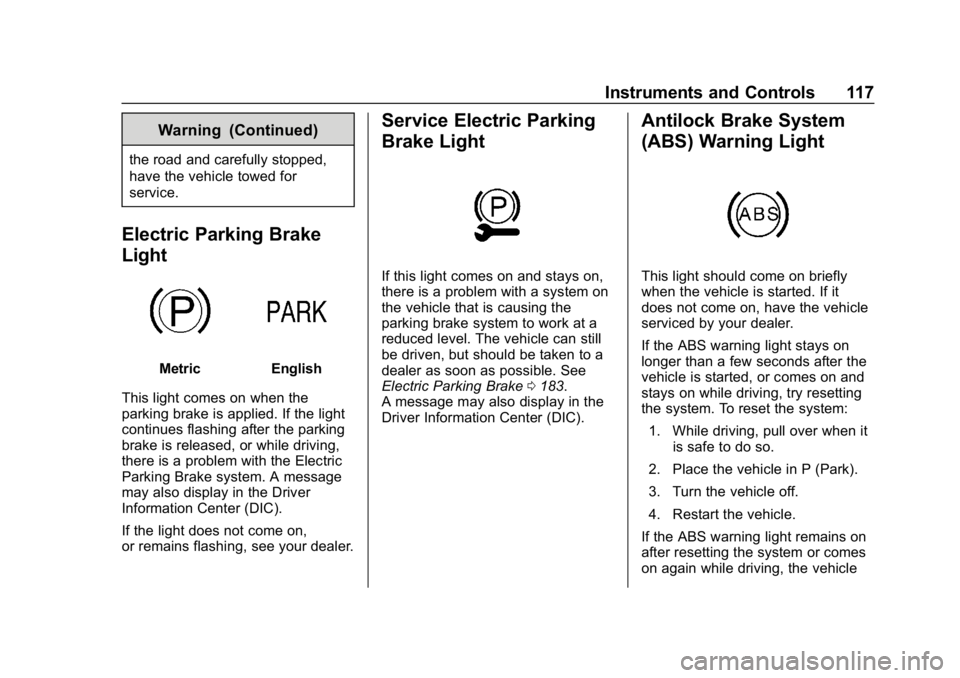
Electric Parking Brake
Light
MetricEnglish
This light comes on when the
parking brake is applied. If the light
continues flashing after the parking
brake is released, or while driving,
there is a problem with the Electric
Parking Brake system. A message
may also display in the Driver
Information Center (DIC).
If the light does not come on,
or remains flashing, see your dealer.
Service Electric Parking
Brake Light
If this light comes on and stays on,
there is a problem with a system on
the vehicle that is causing the
parking brake system to work at a
reduced level. The vehicle can still
be driven, but should be taken to a
dealer as soon as possible. See
Electric Parking Brake 0183.
A message may also display in the
Driver Information Center (DIC).
Antilock Brake System
(ABS) Warning Light
This light should come on briefly
when the vehicle is started. If it
does not come on, have the vehicle
serviced by your dealer.
If the ABS warning light stays on
longer than a few seconds after the
vehicle is started, or comes on and
stays on while driving, try resetting
the system. To reset the system:
1. While driving, pull over when it is safe to do so.
2. Place the vehicle in P (Park).
3. Turn the vehicle off.
4. Restart the vehicle.
If the ABS warning light remains on
after resetting the system or comes
on again while driving, the vehicle
Page 139 of 373
Chevrolet VOLT Owner Manual (GMNA-Localizing-U.S./Canada/Mexico-
12163007) - 2019 - CRC - 11/5/18
138 Instruments and Controls
Engine Assisted Heating
This feature selects the outside
temperature level at which the
engine may run to assist cabin
heating in Electric Mode. A change
in selection will not take effect until
after the vehicle is first
powered down.
Touch On for temperatures below
approximately 0 °C (32 °F), or touch
Deferred for temperatures below
approximately−25 °C (−13 °F).
In Deferred mode, when Max
Defrost is selected the engine may
run at temperatures below
approximately -10 °C (15 °F) until
the vehicle is powered down. See
Automatic Climate Control System
0 150.
Engine Assisted Heating
Plugged In
During remote start, this feature
turns on or off the ability for the
engine to run to help heat the
vehicle when it is plugged in.
A change in setting will not take
effect until after the vehicle is first
powered down. Touch Off or On.
Collision/Detection Systems
Touch and the following may
display:
.
Forward Collision System
. Rear Camera Park Assist
Symbols
. Rear Cross Traffic Alert
. Adaptive Cruise Go Notifier
. Lane Change Alert
Forward Collision System
This feature will turn on or off the
Forward Collision Alert (FCA) and
Forward Automatic Braking (FAB).
The Off setting disables all FCA and
FAB functions. With the Alert and
Brake setting, both FCA and FAB
are available. The Alert setting
disables FAB. See Forward
Automatic Braking (FAB) 0208.
Touch Off, Alert, or Alert and Brake. Rear Camera Park Assist Symbols
This setting enables the Rear
Camera Park Assist Symbols. See
Assistance Systems for Parking or
Backing
0202.
Touch Off or On.
Rear Cross Traffic Alert
This allows the Rear Cross Traffic
Alert feature to be turned on or off.
See “Rear Cross Traffic Alert” in
Assistance Systems for Parking or
Backing 0202.
Touch Off or On.
Adaptive Cruise Go Notifier
This feature will give a reminder that
Adaptive Cruise Control provides
when it has brought the vehicle to a
complete stop behind another
stopping vehicle, and then that
vehicle drives on.
Touch Off or On.
Lane Change Alert
This allows the Lane Change Alert
feature to be turned on or off. See
Lane Change Alert (LCA) 0210.
Page 158 of 373
Chevrolet VOLT Owner Manual (GMNA-Localizing-U.S./Canada/Mexico-
12163007) - 2019 - CRC - 11/5/18
Driving and Operating 157
Driving and
Operating
Driving Information
Distracted Driving . . . . . . . . . . . . 158
Defensive Driving . . . . . . . . . . . . . 159
Drunk Driving . . . . . . . . . . . . . . . . . 159
Control of a Vehicle . . . . . . . . . . . 159
Braking . . . . . . . . . . . . . . . . . . . . . . . 159
Steering . . . . . . . . . . . . . . . . . . . . . . 160
Off-Road Recovery . . . . . . . . . . . 160
Loss of Control . . . . . . . . . . . . . . . 161
Driving on Wet Roads . . . . . . . . 161
Hill and Mountain Roads . . . . . 162
Winter Driving . . . . . . . . . . . . . . . . 163
If the Vehicle Is Stuck . . . . . . . . 164
Vehicle Load Limits . . . . . . . . . . . 164
Starting and Operating
New Vehicle Break-In . . . . . . . . . 168
Power Button . . . . . . . . . . . . . . . . . 168
Starting and Stopping theVehicle . . . . . . . . . . . . . . . . . . . . . . 170
Retained Accessory Power (RAP) . . . . . . . . . . . . . . . . 171
Shifting Into Park . . . . . . . . . . . . . 171
Shifting out of Park . . . . . . . . . . . 172 Parking over Things
That Burn . . . . . . . . . . . . . . . . . . . 173
Extended Parking . . . . . . . . . . . . 173
Electric Vehicle Operating
Modes
System Operation . . . . . . . . . . . . 173
Electric Mode . . . . . . . . . . . . . . . . . 174
Extended Range Mode . . . . . . . 174
Driver Selected Operating Modes . . . . . . . . . . . . . . . . . . . . . . 174
Out of Fuel/Engine Unavailable . . . . . . . . . . . . . . . . . 177
Maintenance Modes . . . . . . . . . . 177
Engine Exhaust
Engine Exhaust . . . . . . . . . . . . . . 180
Running the Vehicle While Parked . . . . . . . . . . . . . . . . . . . . . . 180
Electric Drive Unit
Electric Drive Unit . . . . . . . . . . . . 181
Brakes
Antilock BrakeSystem (ABS) . . . . . . . . . . . . . . . 182
Electric Parking Brake . . . . . . . . 183
Hill Start Assist (HSA) . . . . . . . . 184
Regenerative Braking . . . . . . . . 185
Ride Control Systems
Traction Control/Electronic Stability Control . . . . . . . . . . . . . 186
Driver Mode Control . . . . . . . . . . 188
Cruise Control
Cruise Control . . . . . . . . . . . . . . . . 188
Adaptive Cruise Control . . . . . . 191
Driver Assistance Systems
Driver Assistance Systems . . . 201
Assistance Systems for Parking or Backing . . . . . . . . . . 202
Assistance Systems for Driving . . . . . . . . . . . . . . . . . . . . . . 206
Forward Collision Alert (FCA) System . . . . . . . . . . . . . . . . . . . . . . 206
Forward Automatic Braking (FAB) . . . . . . . . . . . . . . . 208
Side Blind Zone Alert (SBZA) . . . . . . . . . . . . . . . . 210
Lane Change Alert (LCA) . . . . . 210
Lane Departure Warning (LDW) . . . . . . . . . . . . . 212
Lane Keep Assist (LKA) . . . . . . 212
Charging
Plug-In Charging . . . . . . . . . . . . . 214
Delayed Charging Override . . . 216
Charging Status Feedback . . . 216
Charge Cord . . . . . . . . . . . . . . . . . 221
Page 170 of 373
Chevrolet VOLT Owner Manual (GMNA-Localizing-U.S./Canada/Mexico-
12163007) - 2019 - CRC - 11/5/18
Driving and Operating 169
The light is on steady when in ON/
RUN power mode. When the vehicle
is turned off, the POWER
Olight
will turn off.
The Remote Keyless Entry (RKE)
transmitter must be in the vehicle for
the system to operate. If the vehicle
will not start, place the RKE
transmitter in the transmitter pocket.
See Remote Keyless Entry (RKE)
System Operation 031.
ON/RUN : This position is for
starting and driving. With the vehicle
off, and the brake pedal applied,
pressing POWER
Oonce will place
the vehicle in ON/RUN. When the
READY light is on in the instrument
cluster, the vehicle is ready to be
driven. This could take up to
15 seconds at extremely cold
temperatures. See Vehicle Ready
Light 0122. The engine will only
start if needed. If the vehicle did not
start, the instrument cluster will
display a screen with inactive fuel
and battery gauges. See Starting
and Stopping the Vehicle 0170. STOPPING THE VEHICLE/OFF :
To turn the vehicle off, press
POWER
Owith the vehicle in
P (Park). Retained Accessory Power
(RAP) will remain active until the
driver door is opened. See Retained
Accessory Power (RAP) 0171.
When turning off the vehicle, if the
vehicle is not in P (Park), the vehicle
will go to ACC/ACCESSORY and
display the message SHIFT TO
PARK in the Driver Information
Center (DIC).
If the vehicle must be shut off in an
emergency:
1. Brake using a firm and steady pressure. Do not pump the
brakes.
2. Shift the vehicle to N (Neutral). This can be done while the
vehicle is moving. After shifting
to N (Neutral), firmly apply the
brakes and steer the vehicle to
a safe location.
3. Come to a complete stop, shift to P (Park), and turn the vehicle
off by pressing POWER
O. 4. Set the parking brake. See
Electric Parking Brake 0183.
{Warning
Turning off the vehicle while
moving may disable the airbags.
While driving, only shut the
propulsion system off in an
emergency.
If the vehicle cannot be pulled over,
and must be shut off while driving,
press and hold POWER
Ofor
longer than two seconds, or press
twice in five seconds.
Service Mode
Caution
Placing the vehicle in Service
Mode will use the 12-volt battery.
Do not use Service Mode for an
extended period, or the vehicle
may not start.
Page 172 of 373
Chevrolet VOLT Owner Manual (GMNA-Localizing-U.S./Canada/Mexico-
12163007) - 2019 - CRC - 11/5/18
Driving and Operating 171
display a screen with inactive fuel
and battery gauges. SeeStarting
and Stopping the Vehicle 0170.
Restarting Procedure
If the vehicle must be restarted
while it is still moving, move the shift
lever to N (Neutral) and press
POWER
Otwice without pressing
the brake pedal. The propulsion
system will not restart in any other
position.
Forced Engine On
Some vehicle conditions that force
the engine to run:
. There are cold ambient
temperatures.
. The hood is open or not
completely latched while the
vehicle is not in N (Neutral).
. The high voltage battery has a
low charge.
. The engine needs to run for
maintenance.
See Maintenance Modes 0177. A chime will sound if the driver door
is opened while the vehicle is on.
Always press POWER
Oto turn the
vehicle off before exiting.
Stopping Procedure
For information on how to turn the
vehicle off, see Power Button0168.
Retained Accessory
Power (RAP)
Some vehicle accessories may be
used after the ignition is turned off.
The power windows and sunroof,
if equipped, will continue to work for
up to 10 minutes or until any door is
opened.
The infotainment system will
continue to work for 10 minutes,
until the driver door is opened,
or until the ignition is turned on or
placed in ACC/ACCESSORY.
Shifting Into Park
1. Hold the brake pedal down and
set the parking brake. See
Electric Parking Brake 0183. 2. Press shift lever button.
3. Move the shift lever into
P (Park) by pushing the lever
all the way toward the front of
the vehicle.
4. Turn the vehicle off.
Leaving the Vehicle with the
Propulsion System On
{Warning
It can be dangerous to leave the
vehicle with the propulsion
system running. It could overheat
and catch fire.
It is dangerous to get out of the
vehicle if the shift lever is not fully
in P (Park) with the parking brake
firmly set. The vehicle can roll.
Do not leave the vehicle when the
propulsion system is running.
If you have left the propulsion
system running, the vehicle can
move suddenly. You or others
could be injured. To be sure the (Continued)