ad blue CHRYSLER 200 2015 2.G User Guide
[x] Cancel search | Manufacturer: CHRYSLER, Model Year: 2015, Model line: 200, Model: CHRYSLER 200 2015 2.GPages: 698, PDF Size: 5.12 MB
Page 419 of 698
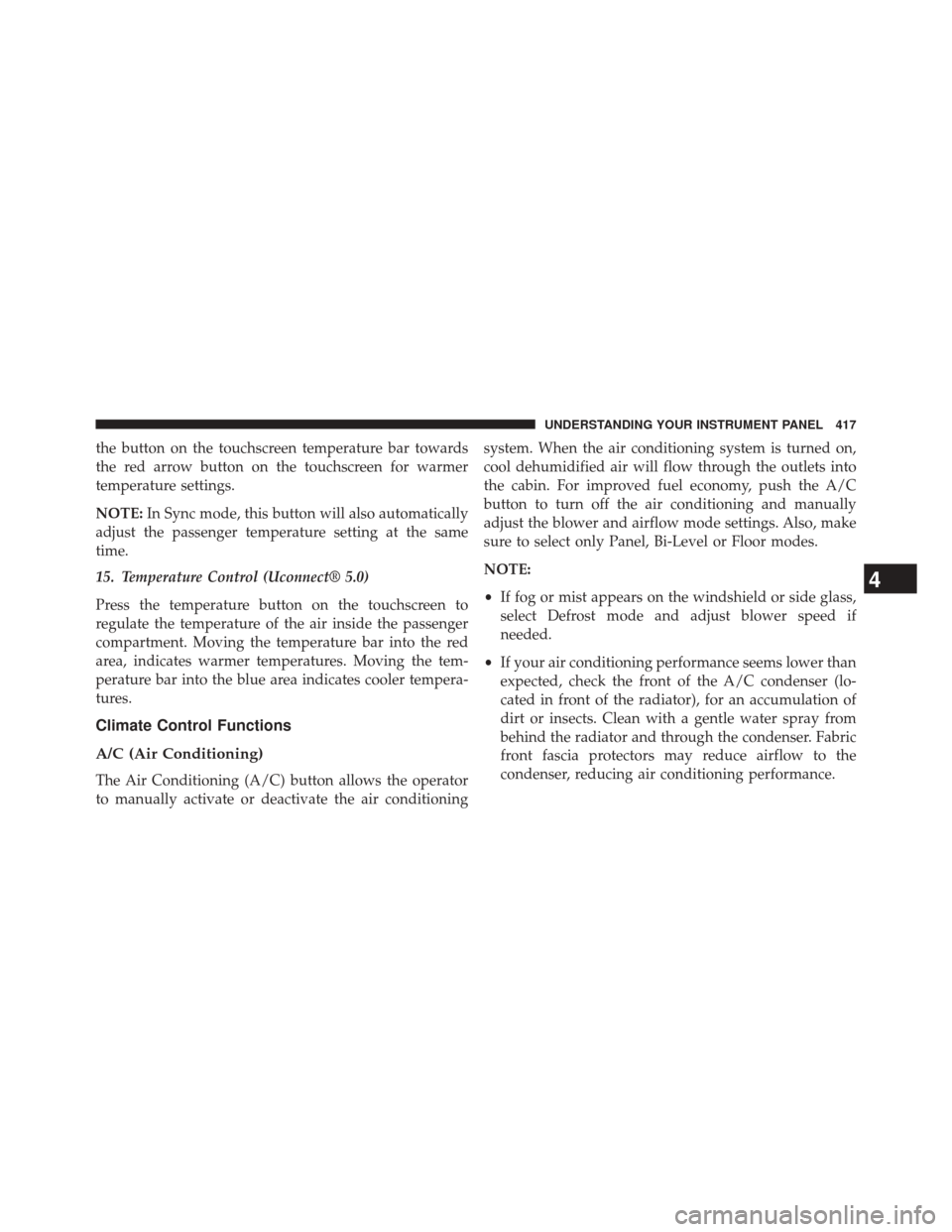
the button on the touchscreen temperature bar towards
the red arrow button on the touchscreen for warmer
temperature settings.
NOTE:In Sync mode, this button will also automatically
adjust the passenger temperature setting at the same
time.
15. Temperature Control (Uconnect® 5.0)
Press the temperature button on the touchscreen to
regulate the temperature of the air inside the passenger
compartment. Moving the temperature bar into the red
area, indicates warmer temperatures. Moving the tem-
perature bar into the blue area indicates cooler tempera-
tures.
Climate Control Functions
A/C (Air Conditioning)
The Air Conditioning (A/C) button allows the operator
to manually activate or deactivate the air conditioning system. When the air conditioning system is turned on,
cool dehumidified air will flow through the outlets into
the cabin. For improved fuel economy, push the A/C
button to turn off the air conditioning and manually
adjust the blower and airflow mode settings. Also, make
sure to select only Panel, Bi-Level or Floor modes.
NOTE:
•
If fog or mist appears on the windshield or side glass,
select Defrost mode and adjust blower speed if
needed.
• If your air conditioning performance seems lower than
expected, check the front of the A/C condenser (lo-
cated in front of the radiator), for an accumulation of
dirt or insects. Clean with a gentle water spray from
behind the radiator and through the condenser. Fabric
front fascia protectors may reduce airflow to the
condenser, reducing air conditioning performance.
4
UNDERSTANDING YOUR INSTRUMENT PANEL 417
Page 431 of 698
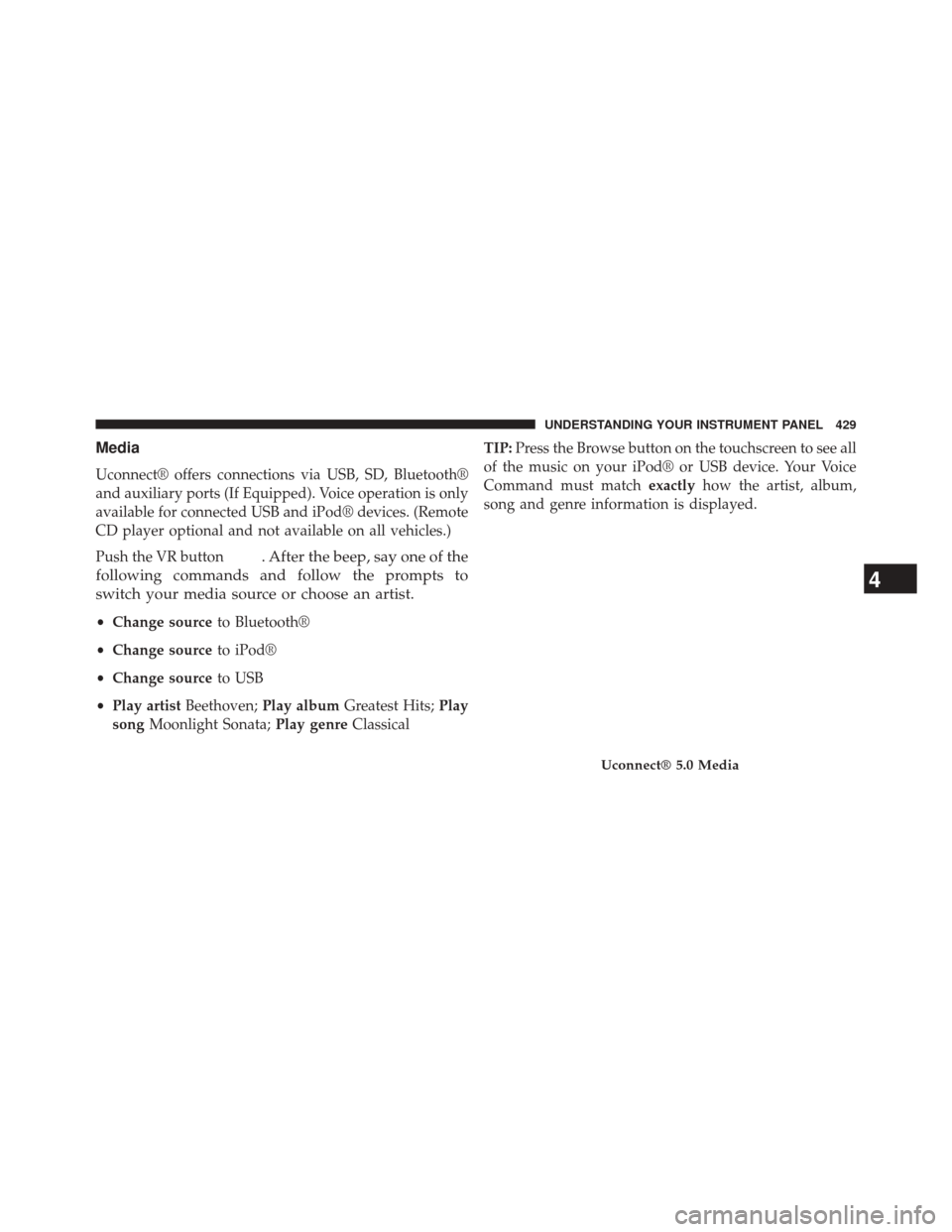
Media
Uconnect® offers connections via USB, SD, Bluetooth®
and auxiliary ports (If Equipped). Voice operation is only
available for connected USB and iPod® devices. (Remote
CD player optional and not available on all vehicles.)
Push the VR button
. After the beep, say one of the
following commands and follow the prompts to
switch your media source or choose an artist.
• Change source to Bluetooth®
• Change source to iPod®
• Change source to USB
• Play artist Beethoven; Play album Greatest Hits; Play
song Moonlight Sonata; Play genreClassical TIP:
Press the Browse button on the touchscreen to see all
of the music on your iPod® or USB device. Your Voice
Command must match exactlyhow the artist, album,
song and genre information is displayed.
Uconnect® 5.0 Media
4
UNDERSTANDING YOUR INSTRUMENT PANEL 429
Page 630 of 698
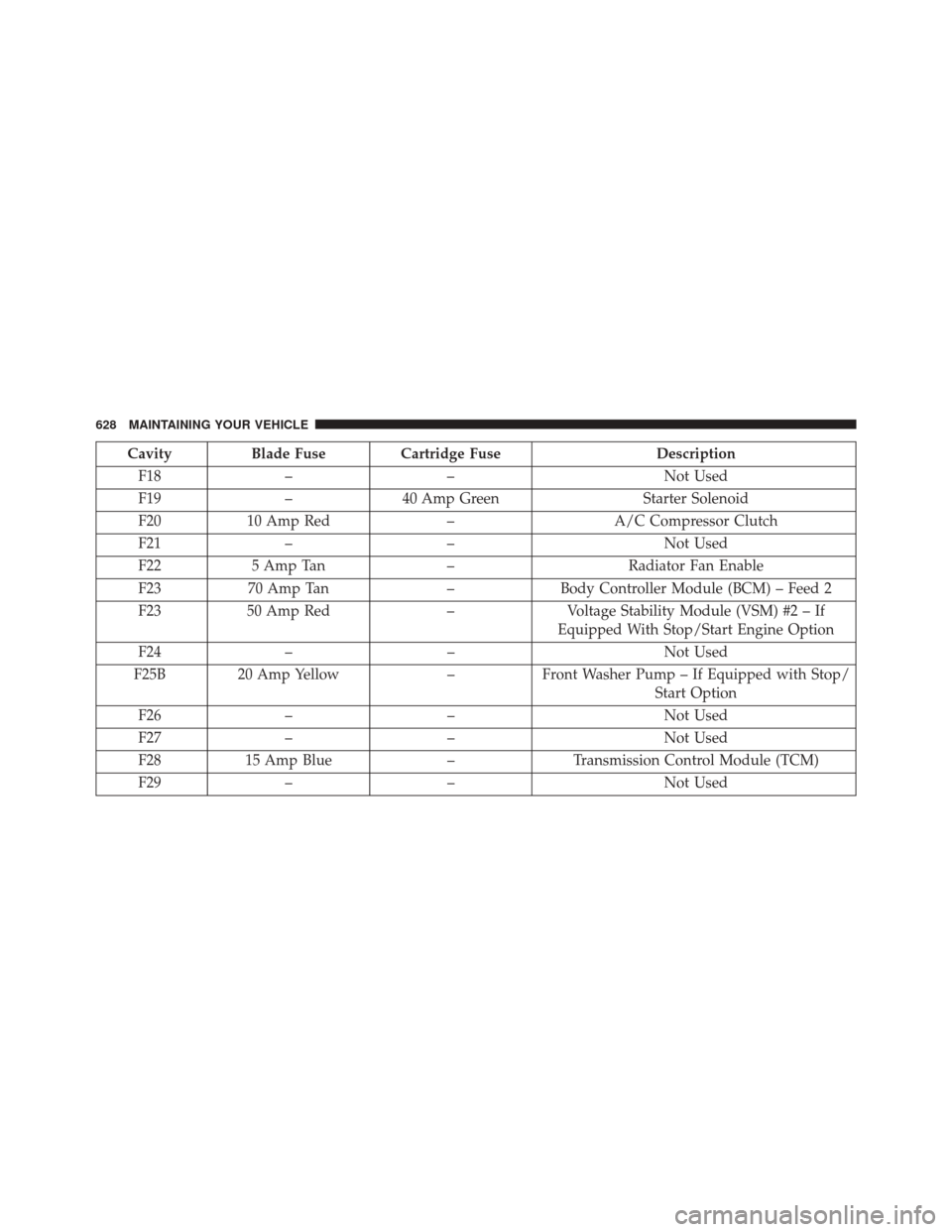
CavityBlade Fuse Cartridge Fuse Description
F18 – – Not Used
F19 –40 Amp Green Starter Solenoid
F20 10 Amp Red –A/C Compressor Clutch
F21 – – Not Used
F22 5 Amp Tan –Radiator Fan Enable
F23 70 Amp Tan –Body Controller Module (BCM) – Feed 2
F23 50 Amp Red –Voltage Stability Module (VSM) #2 – If
Equipped With Stop/Start Engine Option
F24 – – Not Used
F25B 20 Amp Yellow –Front Washer Pump – If Equipped with Stop/
Start Option
F26 – – Not Used
F27 – – Not Used
F28 15 Amp Blue –Transmission Control Module (TCM)
F29 – – Not Used
628 MAINTAINING YOUR VEHICLE
Page 632 of 698
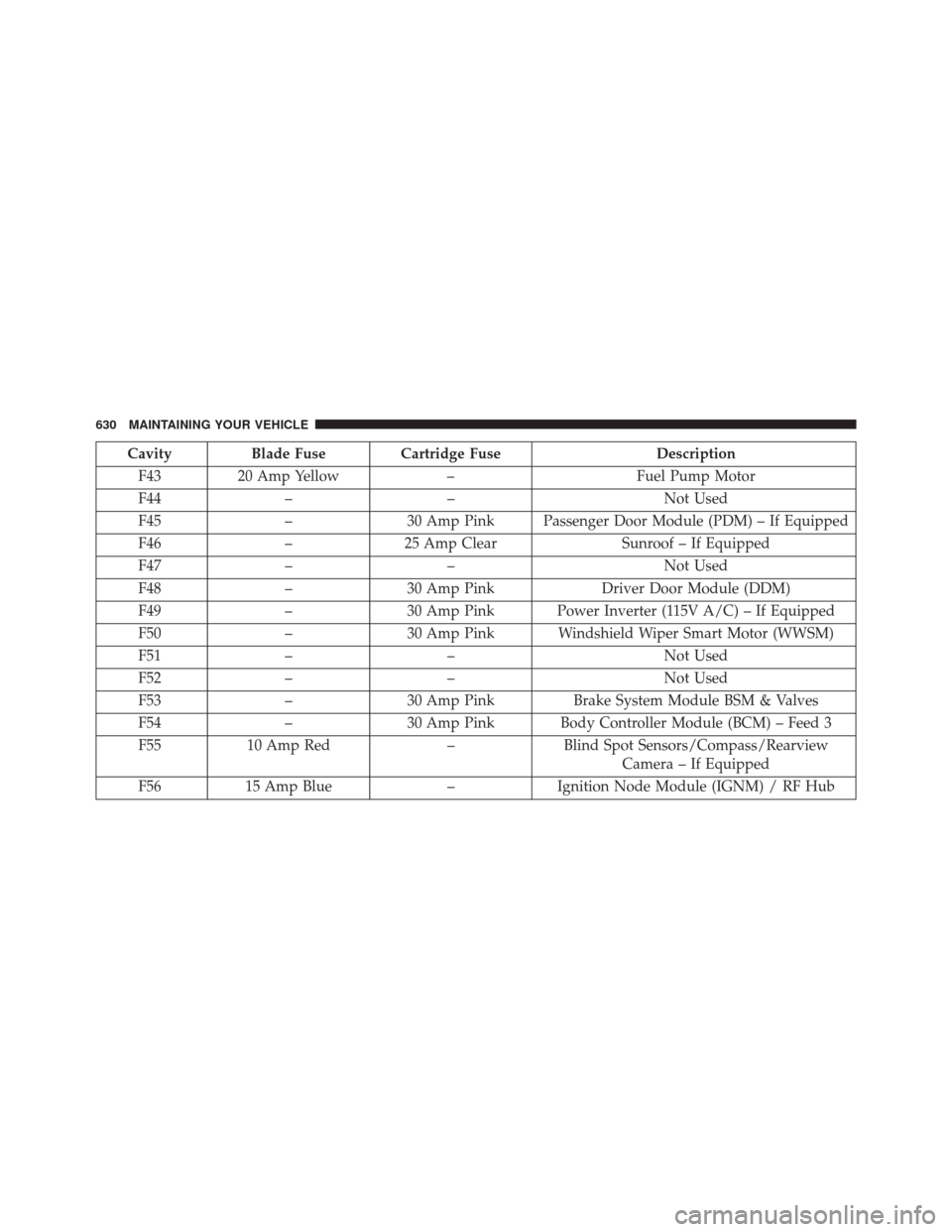
CavityBlade Fuse Cartridge Fuse Description
F43 20 Amp Yellow –Fuel Pump Motor
F44 – – Not Used
F45 –30 Amp Pink Passenger Door Module (PDM) – If Equipped
F46 –25 Amp Clear Sunroof – If Equipped
F47 – – Not Used
F48 –30 Amp Pink Driver Door Module (DDM)
F49 –30 Amp Pink Power Inverter (115V A/C) – If Equipped
F50 –30 Amp Pink Windshield Wiper Smart Motor (WWSM)
F51 – – Not Used
F52 – – Not Used
F53 –30 Amp Pink Brake System Module BSM & Valves
F54 –30 Amp Pink Body Controller Module (BCM) – Feed 3
F55 10 Amp Red –Blind Spot Sensors/Compass/Rearview
Camera – If Equipped
F56 15 Amp Blue –Ignition Node Module (IGNM) / RF Hub
630 MAINTAINING YOUR VEHICLE
Page 633 of 698
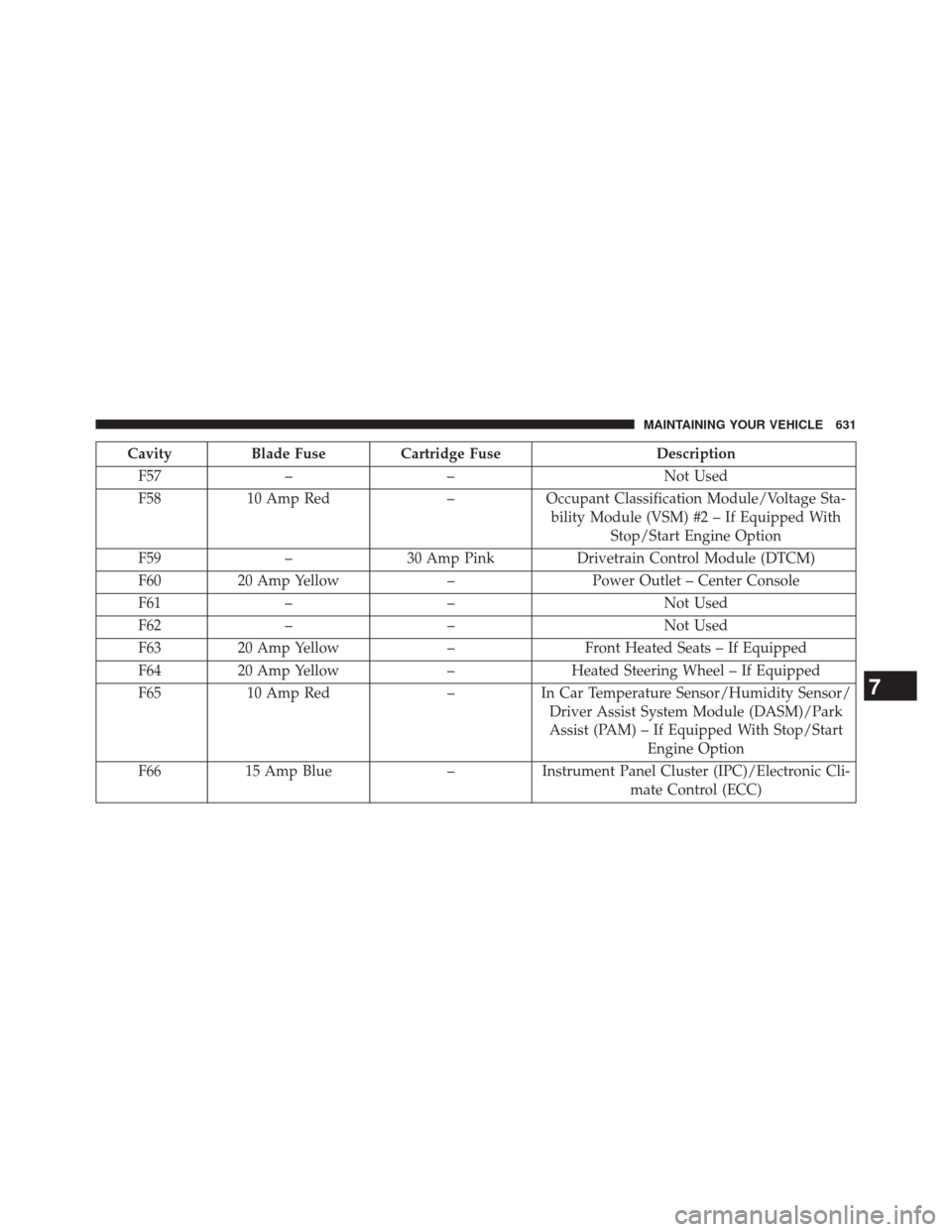
CavityBlade Fuse Cartridge Fuse Description
F57 – – Not Used
F58 10 Amp Red –Occupant Classification Module/Voltage Sta-
bility Module (VSM) #2 – If Equipped With Stop/Start Engine Option
F59 –30 Amp Pink Drivetrain Control Module (DTCM)
F60 20 Amp Yellow –Power Outlet – Center Console
F61 – – Not Used
F62 – – Not Used
F63 20 Amp Yellow –Front Heated Seats – If Equipped
F64 20 Amp Yellow –Heated Steering Wheel – If Equipped
F65 10 Amp Red –In Car Temperature Sensor/Humidity Sensor/
Driver Assist System Module (DASM)/Park
Assist (PAM) – If Equipped With Stop/Start Engine Option
F66 15 Amp Blue –Instrument Panel Cluster (IPC)/Electronic Cli-
mate Control (ECC)
7
MAINTAINING YOUR VEHICLE 631
Page 635 of 698
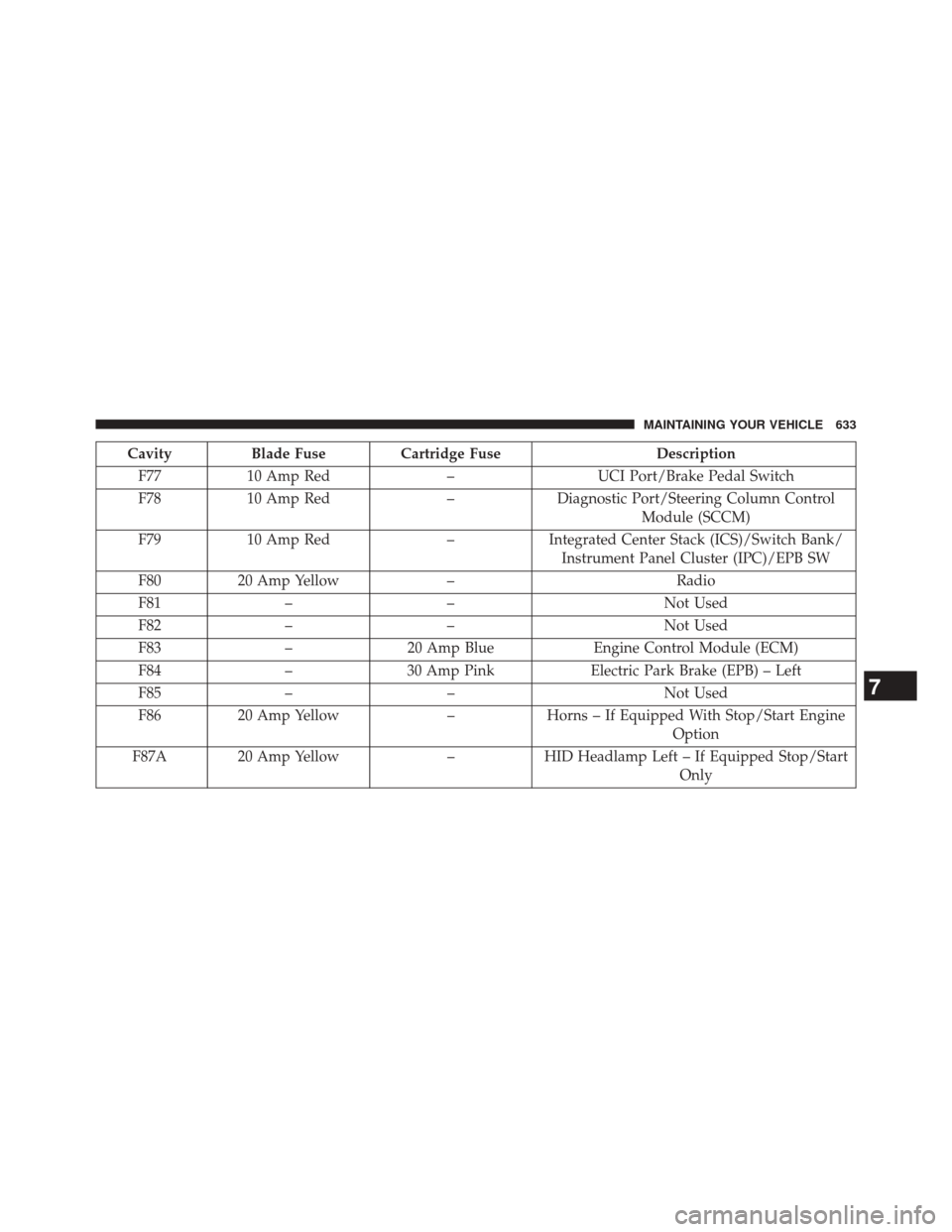
CavityBlade Fuse Cartridge Fuse Description
F77 10 Amp Red –UCI Port/Brake Pedal Switch
F78 10 Amp Red –Diagnostic Port/Steering Column Control
Module (SCCM)
F79 10 Amp Red –Integrated Center Stack (ICS)/Switch Bank/
Instrument Panel Cluster (IPC)/EPB SW
F80 20 Amp Yellow – Radio
F81 – – Not Used
F82 – – Not Used
F83 –20 Amp Blue Engine Control Module (ECM)
F84 –30 Amp Pink Electric Park Brake (EPB) – Left
F85 – – Not Used
F86 20 Amp Yellow –Horns – If Equipped With Stop/Start Engine
Option
F87A 20 Amp Yellow –HID Headlamp Left – If Equipped Stop/Start
Only
7
MAINTAINING YOUR VEHICLE 633
Page 637 of 698
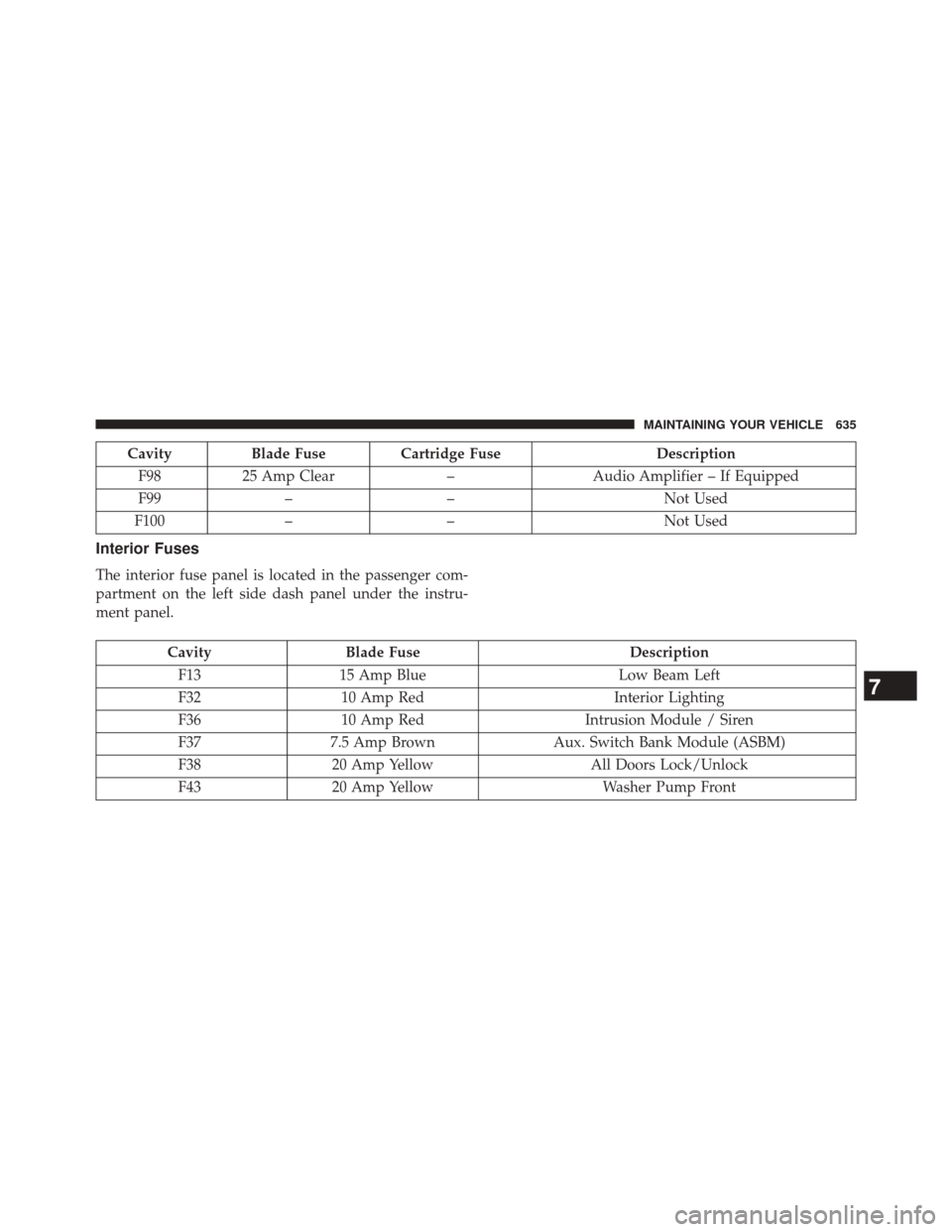
CavityBlade Fuse Cartridge Fuse Description
F98 25 Amp Clear –Audio Amplifier – If Equipped
F99 – – Not Used
F100 – – Not Used
Interior Fuses
The interior fuse panel is located in the passenger com-
partment on the left side dash panel under the instru-
ment panel.
CavityBlade Fuse Description
F13 15 Amp Blue Low Beam Left
F32 10 Amp Red Interior Lighting
F36 10 Amp Red Intrusion Module / Siren
F37 7.5 Amp Brown Aux. Switch Bank Module (ASBM)
F38 20 Amp Yellow All Doors Lock/Unlock
F43 20 Amp Yellow Washer Pump Front
7
MAINTAINING YOUR VEHICLE 635
Page 641 of 698
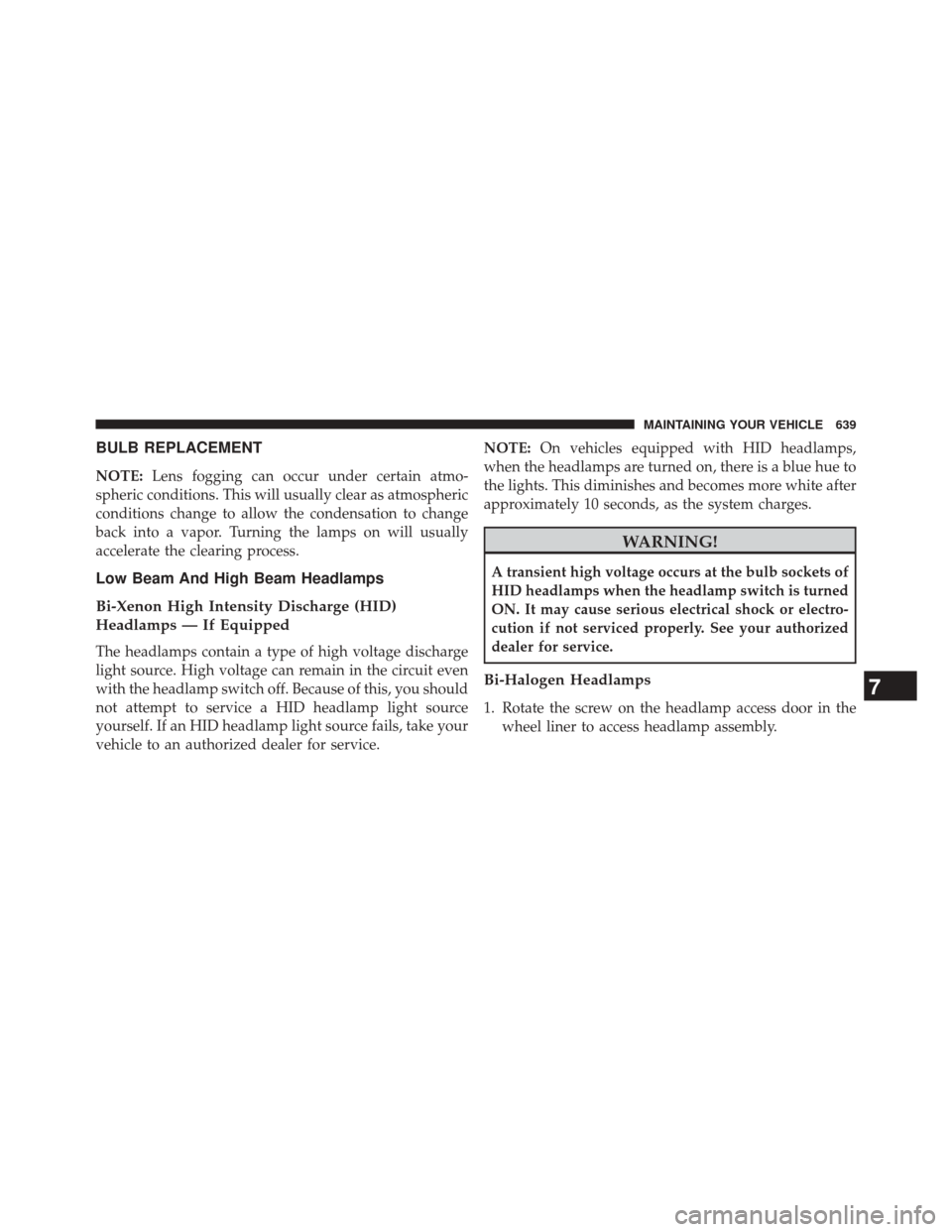
BULB REPLACEMENT
NOTE:Lens fogging can occur under certain atmo-
spheric conditions. This will usually clear as atmospheric
conditions change to allow the condensation to change
back into a vapor. Turning the lamps on will usually
accelerate the clearing process.
Low Beam And High Beam Headlamps
Bi-Xenon High Intensity Discharge (HID)
Headlamps — If Equipped
The headlamps contain a type of high voltage discharge
light source. High voltage can remain in the circuit even
with the headlamp switch off. Because of this, you should
not attempt to service a HID headlamp light source
yourself. If an HID headlamp light source fails, take your
vehicle to an authorized dealer for service. NOTE:
On vehicles equipped with HID headlamps,
when the headlamps are turned on, there is a blue hue to
the lights. This diminishes and becomes more white after
approximately 10 seconds, as the system charges.
WARNING!
A transient high voltage occurs at the bulb sockets of
HID headlamps when the headlamp switch is turned
ON. It may cause serious electrical shock or electro-
cution if not serviced properly. See your authorized
dealer for service.
Bi-Halogen Headlamps
1. Rotate the screw on the headlamp access door in the wheel liner to access headlamp assembly.
7
MAINTAINING YOUR VEHICLE 639